


A game needs hundreds of assets, and every one of them used to take hours of modelling. A chair, a crate, a sword, a tree, a door handle, and each one had to be built, textured, and checked before it could appear in a level. For a small team, that work filled the calendar for months. The best ai 3d generators for game developers change that maths, by turning a written prompt or a single image into a usable model in minutes.
We tested each tool on real game work, not on a feature list. That meant generating the same set of assets every tool was asked for, which was a wooden crate, a sci-fi door, a low-poly tree, a potion bottle, and a simple character prop, then importing each result into a game engine to check the shape, the texture, and the file size. The ranking weighs how usable the output is, how fast it arrives, and how easily it fits a normal pipeline.
Meshy leads the ranking on the combined score, with Tripo close behind for teams that need volume and API access. Rodin wins for teams that want artist-grade geometry, while Sloyd suits developers who need clean props they can tune with sliders. Meshy leads for engine-ready models, Tripo for volume, the rest for narrower strengths.
Meshy sits first on combined score, but the best pick by job table matters just as much for a developer who needs one kind of asset. A tool that ranks sixth overall can still be the right answer for a solo developer who only needs props, just as the overall winner can be wrong for a studio that needs production-ready characters. Match the tool to the pipeline, not to the rank.
In this article
- The 12 Tools at a Glance
- Why the Best AI 3D Generators for Game Developers Change the Schedule
- How We Put Each 3D Generator Through Its Paces
- The 12 Tools in Detail
- What a Game Team Actually Pays for Generated Assets
- Generation Mistakes That Waste the Budget
- Best Pick by Job
- Frequently Asked Questions
- Picking the 3D Generator Your Game Team Keeps
The 12 Tools at a Glance
The table below lines up the best ai 3d generators for game developers on the facts that decide a purchase, which are the price shape, the natural fit, and the strength that earned each rank. Meshy leads on the complete pipeline, while Tripo wins for teams that need many models fast.
| Tool | Starting price | Best for | Standout strength |
|---|---|---|---|
| Meshy | Free plan; paid plans on the vendor site | Teams that want the full pipeline | Text to 3D with texturing and rigging |
| Tripo | Free plan; paid plans on the vendor site | Teams that need volume and API access | Fast generation with strong API |
| Rodin | Free plan; paid plans on the vendor site | Teams that want detailed geometry | High-detail models with clean topology |
| Sloyd | Free plan; paid plans on the vendor site | Developers who need tunable props | Parametric props with slider editing |
| Kaedim | Pricing on the vendor site | Studios that want checked assets | Human-reviewed production assets |
| Alpha3D | Pricing on the vendor site | Teams that need clean topology | Quad meshes with retopology built in |
| CSM Cube | Pricing on the vendor site | Teams that want world building | Scene and world generation tools |
| 3DFY.ai | Pricing on the vendor site | Teams that want quick text to 3D | Fast automated asset creation |
| Masterpiece X | Pricing on the vendor site | Teams that edit as they generate | Generation plus editing in one place |
| Spline AI | Free plan; paid plans on the vendor site | Teams that design in the browser | Browser-based 3D with AI help |
| 3D AI Studio | Pricing on the vendor site | Teams that want many engines in one | Multiple generation engines together |
| Ludo | Pricing on the vendor site | Teams that need rigged characters | Animated characters with game rigs |
Keep Meshy and Tripo and read their reviews to see which asset pipeline fits your game team. A tool that scores High on speed only helps if the mesh is clean enough to use, and a tool that scores High on detail only helps if the file size fits the game.
Why the Best AI 3D Generators for Game Developers Change the Schedule
Asset volume is the quiet bottleneck in game development. A level that needs two hundred props cannot wait for two hundred hand-built models, and a small team cannot hire its way out of that gap. A generator that produces a usable crate or tree in a minute lets the team spend its modelling hours on the hero assets that players actually notice, instead of the background props nobody studies.
Prototyping is the second gain, and it is the one that changes how a game gets designed. When a new idea can be tested with a generated model the same afternoon, the team tries more ideas and keeps the good ones. A level that took a week to block out with grey boxes can now be dressed with real shapes in a day, which means the design gets tested while it is still cheap to change.
The third gain is consistency of style. A generator that takes a reference image and keeps the same look across dozens of assets helps a small team hold a visual style without a large art department. The output still needs a human eye, but the starting point is far closer to the finished look than a blank scene.
The final gain is cost. Hiring an artist for every prop is beyond most indie budgets, and buying asset packs means living with whatever the pack contains. A generator lets a team make the exact prop it needs, in the style it wants, for the price of a subscription, which is a different kind of budget entirely.
How We Put Each 3D Generator Through Its Paces
We ran the best ai 3d generators for game developers through the same five measures, using the same five prompts for every tool, which were a wooden crate, a sci-fi door, a low-poly tree, a potion bottle, and a simple character prop. Each result was imported into a game engine to check it properly.
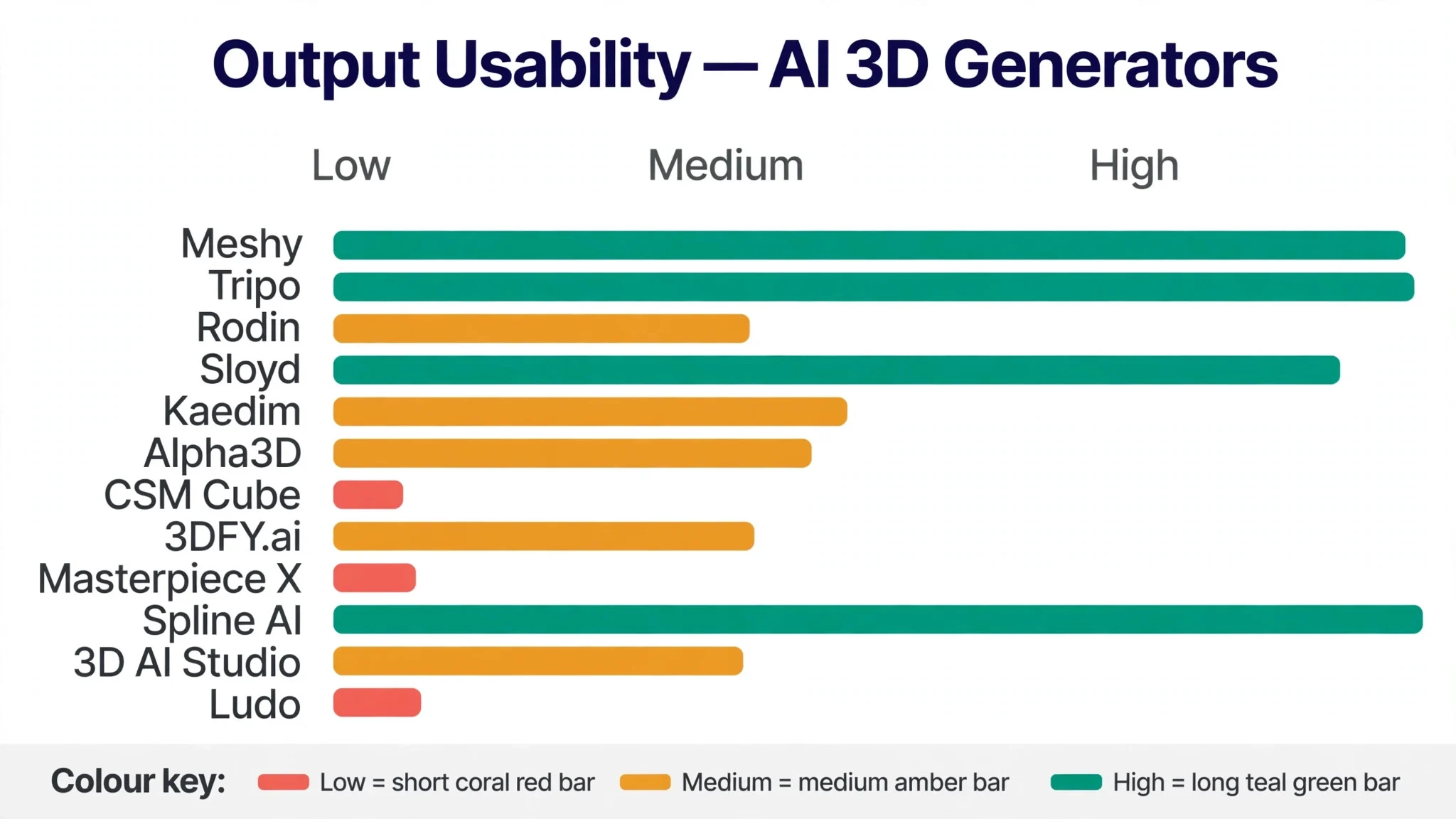
- Output usability, judged by whether the model could drop into a game engine with only light cleanup, rather than hours of repair.
- Generation speed, measured by how long each model took from prompt to downloadable file, across all five test prompts.
- Texture quality, scored on whether the textures looked right in the engine without manual repainting.
- Setup speed, timed from account creation to the first downloaded model, including any credit or plan setup.
- Daily usability, judged by how easily a developer could generate, tweak, and export a model during normal work, without opening a manual.
Each measure carried equal weight except output usability, which counted double, because a generator that produces models nobody can use is not doing its job. Scores run out of 100, and the order below follows the combined total, led by Meshy on the complete pipeline.
The 12 Tools in Detail
Each review below judges the best ai 3d generators for game developers on the same ground. We note what each tool does best, where it falls short, and the team it suits best, with output usability carrying the most weight.
1. Meshy
Meshy tops the best ai 3d generators for game developers on the combined score, and it earns the lead with the most complete pipeline in this ranking. Text or image to 3D, texturing, retopology, auto-rigging, and animation all sit in one workspace, so a developer can go from a prompt to a moving character without opening a second tool. The output imports cleanly into the main engines, which is where most generators fail.
The strengths run beyond the feature list. The textured output looks good in the engine without repainting, the rigging covers humanoid and quadruped shapes, and the free plan gives a real monthly allowance to test with. The workflow is genuinely easy, which matters when the whole team needs to generate assets, not just one technical artist.
The limits are the credit system and the free tier. Free accounts can download only a small number of untextured models each month, and textured models need a paid plan, so a team that generates daily will pay. The free output also carries a licence that needs crediting, which rules it out for commercial shipping.
In the trial, generate the same crate and character prop in Meshy and in one rival, then import both into your engine. Check which one needs less cleanup, and whether the texture survives the import. If Meshy wins on both, the pipeline is real.
Our verdict. The most complete 3D pipeline here, and the safest first pick for most game teams.
2. Tripo
Tripo is the volume pick, and it earns second place by generating models fast and cheaply at scale. The free tier gives a generous monthly credit allowance, the API lets a team generate hundreds of models in a pipeline, and the newer models produce native quad meshes that need less cleanup. For a team that needs many candidate assets quickly, Tripo is the workhorse.
The strengths are speed, price, and the API. Generations arrive in seconds, the credits stretch further than most rivals, and the developer tools cover rigging, texture editing, and retopology through the API. The free plan is genuinely usable for learning and small projects.
The limits are the licence and the polish. Free-tier models are public and not for commercial use, so a team must upgrade before shipping a game. The web interface is plainer than Meshy, and the output sometimes needs more cleanup on complex shapes, though the quad mesh work helps.
In the trial, generate twenty props through the API and time the whole run, then import five into the engine. Check whether the batch felt fast and whether the meshes held up. If the volume is real and the cleanup is light, the workhorse fits.
Our verdict. The best volume generator here, ideal for teams that need many models fast.
3. Rodin
Rodin is the detail pick, and it suits teams that want artist-grade geometry from a prompt or a photo. Built by Hyper3D, it turns text, sketches, or up to four reference photos into a fully textured model with geometry, UVs, and materials in a single pass. For a team that needs hero assets rather than background props, that detail is the point.
The strengths are the geometry and the material quality. The quad topology is clean, the textures hold up at close range, and the export formats cover the main engines. The free plan lets a team generate and inspect a result before spending credits, which makes testing honest.
The limits are cost per model and scope. Rodin charges per generation rather than a flat subscription, so heavy use adds up, and it is a generator rather than a full pipeline, so rigging and animation sit elsewhere. Teams that need hundreds of cheap props will find Tripo or Meshy better value.
In the trial, generate one hero asset from four reference photos and inspect it closely in the engine. Check the topology, the texture at close range, and the file size. If it holds up beside a hand-built model, the detail is worth the price.
Our verdict. The most detailed geometry here, ideal for hero assets and close-up work.
4. Sloyd
Sloyd is the props pick, and it earns its place with parametric generation that game developers can tune. Instead of a fixed mesh, the tool produces props, weapons, and buildings from templates that the developer adjusts with sliders, which keeps the output clean, low-poly, and ready for a game. For level dressing, that control beats raw generation.
The strengths are the clean topology and the editing. Slider-based tweaks change the shape without rebuilding the model, the rigging and animation tools work on paid plans, and the free tier gives one generation a day to test with. The output is game-ready in a way that diffusion-based tools often are not.
The limits are scope and licence. Sloyd is best for props and buildings rather than characters or organic shapes, and the free tier is for personal use only, so commercial work needs a paid plan. Teams that want free-form text to 3D for anything at all will find it narrower than Meshy.
Our verdict. The best tunable props here, ideal for level dressing and environment work.
5. Kaedim
Kaedim is the studio pick, and it suits teams that want production-ready assets with a human checking every mesh. The service takes sketches, reference packs, and art direction, and returns 3D models that have been through artist review before delivery. For a studio that cannot afford a bad mesh in the pipeline, that review is the product.
The strengths are quality control and the art-direction fit. The models arrive clean, in the studio’s own style, and the markup workflow lets the team send feedback and get revisions. The API and the file formats cover the main engines, so the output slots into a real pipeline.
The limits are price and pace. Kaedim is a service with studio pricing, not a self-serve generator, so it costs far more per asset than Meshy or Tripo, and the turnaround is measured in days rather than minutes. Small teams and solo developers will find it out of reach, while studios with a real art budget will find it reliable.
Our verdict. The most production-ready output here, ideal for studios with an art budget.
6. Alpha3D
Alpha3D is the topology pick, and it earns its place with clean quad meshes and a developer-first design. The tool turns text and images into 3D assets with smart retopology, automatic UV unwrapping, and format conversion built in, and the API and MCP server support let a team wire it into a pipeline properly.
The strengths are the mesh quality and the integration. The quad structure holds up in the engine, the polygon controls let a team set the budget per asset, and the credit model includes one-off top-ups without a forced subscription. The pipeline companion helps automate the steps from prompt to finished asset.
The limits are the learning curve and the focus. Alpha3D is built for developers rather than casual users, so the interface rewards technical comfort. It is also strongest on objects and products rather than characters, so a team that needs animated figures will look elsewhere.
Our verdict. The cleanest topology here, ideal for teams that wire generation into a pipeline.
7. CSM Cube
CSM Cube is the world-building pick, and it suits teams that want to generate scenes and worlds, not just single objects. Built by Common Sense Machines, it covers generation, editing, and export for larger 3D work, with tools aimed at artists, developers, and studios rather than casual users.
The strengths are the scope and the editing depth. The tool handles bigger pieces of a game world, the generation is controllable, and the export formats cover the main engines.
The limits are the learning curve and the price shape. Cube is a serious tool with a serious interface, so a solo developer will need time to learn it, and the pricing suits studios better than hobbyists. Teams that only need a few props will find simpler tools faster.
Our verdict. The broadest world-building tool here, ideal for teams generating environments.
8. 3DFY.ai
3DFY.ai is the quick pick, and it earns its place by turning text into a usable 3D model with very little fuss. The automated pipeline handles the generation, and the output arrives in standard formats that drop into a game engine. For a developer who needs a model now and does not want to learn a new system, that speed is the appeal.
The strengths are the simplicity and the automation. The text-to-3D flow is short, the quality is solid for props and simple objects, and the pricing stays modest. The tool suits a team that generates a steady stream of background assets without wanting to manage a complex pipeline.
The limits are control and depth. The automated approach gives the developer less say over the fine detail than Sloyd or Rodin, and the output sometimes needs cleanup on complex shapes. Teams that want hero assets or tight art direction will prefer a tool with more control.
Our verdict. The quickest text to 3D here, ideal for background assets at speed.
9. Masterpiece X
Masterpiece X is the editing pick, and it suits teams that want to generate and refine a model in the same place. The tool covers 3D creation and editing together, so a developer can generate a base mesh, adjust it, and export it without moving between apps. For a small team, that single workspace saves the context switching that eats an afternoon.
The strengths are the combined workflow and the control. The editing tools let a team fix the parts of a generated model that miss the mark, and the export formats cover the main engines.
The limits are the maturity and the price. Masterpiece X is a newer entrant than Meshy or Tripo, so the community and the tutorials are thinner, and the paid plans are the only way to work seriously. Teams that want the deepest pipeline will find Meshy more complete.
Our verdict. The best generate-and-edit combo here, ideal for small teams that refine as they go.
10. Spline AI
Spline AI is the browser pick, and it earns its place by bringing 3D design and AI generation into the browser. A team can design, generate, and preview 3D scenes without installing heavy software, and the collaboration features let several people work on the same scene at once. For web games and interactive work, that browser-first design fits naturally.
The strengths are the accessibility and the collaboration. The free plan covers the basics, the AI features help with texturing and scene building, and the real-time collaboration is genuinely useful for a distributed team. The export options cover the formats a web game needs.
The limits are game-engine depth. Spline is a design tool first, so its output suits web and interactive work better than a full 3D game pipeline, and the AI generation is lighter than the dedicated tools. Teams building a console or PC game will need a second tool for the heavy assets.
Our verdict. The easiest browser-based 3D here, ideal for web games and interactive scenes.
11. 3D AI Studio
3D AI Studio is the multi-engine pick, and it suits teams that want many generation engines behind one subscription. Instead of betting on a single model, the studio runs more than twenty engines, so a developer can pick the best engine for each asset type and compare the results side by side.
The strengths are the choice and the value. One subscription covers many engines, the workflow stays in a single place, and the export formats cover the main engines. For a team that generates varied assets, the ability to switch engines per asset is a real advantage.
The limits are the depth and the polish. A multi-engine hub cannot match the dedicated tools on pipeline depth, and the interface is a launcher rather than a crafted workspace. Teams that want the deepest single pipeline will prefer Meshy, while teams that want variety will stay here.
Our verdict. The widest engine choice here, ideal for teams that generate varied assets.
12. Ludo
Ludo is the characters pick, and it rounds out the ranking with rigged, animated characters built for games. The tool generates characters with proper game rigs, bone naming for the main engines, and animation presets, so a developer can go from a prompt to a moving character without hiring a rigger. For a small team, that rigging alone is worth the price.
The strengths are the rigging and the value. The characters arrive with the bones and the naming a game engine expects, the animation presets cover the common moves, and the free credits let a team test properly.
The limits are the scope. Ludo is built for characters, so a team that needs props and environments will need a second tool, and the character style leans toward stylised rather than realistic. Teams that want realistic human characters will look elsewhere.
Our verdict. The best rigged characters here, ideal for small teams that need moving figures fast.
What a Game Team Actually Pays for Generated Assets
The best ai 3d generators for game developers differ most on how the credits work, and the cheapest price per model is not always the cheapest month. A tool that sells credits cheaply can cost more if the team regenerates the same asset five times, while a tool with a monthly plan can be the bargain for a team that generates every day. Before choosing, work out how many models the team generates in a real month, then compare that total across two or three finalists.
Free tiers deserve a hard look. Meshy, Tripo, Rodin, and Sloyd all offer a free start, but each one limits something different, which is downloads here, commercial use there, and texture quality elsewhere. A free tier that covers the real prototyping work is a gift. A free tier that blocks commercial shipping is just a demo, so test it against the assets the team actually plans to ship.
Watch the licence as much as the price. Free-tier output often carries a licence that needs crediting or forbids commercial use, which means the team must upgrade before the game ships. Check the licence on the plan the team will actually use, not the free one, and budget for the upgrade in the project plan rather than discovering it at launch.

Generation Mistakes That Waste the Budget
The first mistake is generating without a reference. A text prompt alone produces a plausible model, but a prompt plus a reference image produces a model that matches the game’s style. Spend five minutes finding a reference for every hero asset, and the output will need far less cleanup. The reference is the cheapest quality control in the whole pipeline.
The second mistake is skipping the cleanup step. Generated models almost always need retopology, a UV check, and a file-size pass before they belong in a game, and a team that skips that step ships a game that stutters. Build the cleanup into the pipeline from day one, and time it, so the team knows the real cost per asset instead of the generation cost alone.
The third mistake is regenerating instead of editing. When a model is almost right, a few minutes of editing beats five fresh generations, and it keeps the style consistent. Tools like Masterpiece X and Sloyd make editing easy, and a team that edits rather than re-rolls saves credits and keeps the art direction tight.
Best Pick by Job
No single winner fits every game team, so the tools below are matched to the job instead of the rank. Find the row that matches your team, then start the trial with that generator.
| Job | Best pick | Why it wins |
|---|---|---|
| Wants the full pipeline | Meshy | Text to 3D with texturing and rigging |
| Needs many models fast | Tripo | Fast generation with strong API |
| Needs hero asset detail | Rodin | High-detail models with clean topology |
| Dresses levels with props | Sloyd | Parametric props with slider editing |
| Needs studio-grade assets | Kaedim | Human-reviewed production assets |
| Wires generation into a pipeline | Alpha3D | Quad meshes with retopology built in |
| Builds whole environments | CSM Cube | Scene and world generation tools |
| Needs background assets fast | 3DFY.ai | Fast automated asset creation |
| Edits as it generates | Masterpiece X | Generation plus editing in one place |
| Designs in the browser | Spline AI | Browser-based 3D with AI help |
| Wants many engines in one | 3D AI Studio | Multiple generation engines together |
| Needs rigged characters | Ludo | Animated characters with game rigs |
If your situation does not match a row exactly, take the closest one and read that review first, starting with Meshy when it fits. The gap between neighbouring tools is smaller than the gap between a team that checks every model in the engine and one that trusts the preview, so the engine check matters more than a few points on a scorecard.
Frequently Asked Questions
Developers ask the same questions before choosing from the best ai 3d generators for game developers, so the plain answers are here, based on how these tools actually work in a real pipeline.
Can generated models go straight into a game?
Usually not without a cleanup pass. Most generated models need retopology, a UV check, and a file-size pass before they belong in a game, and the amount of work depends on the tool and the asset. Props and background objects often need only light cleanup, while hero assets and characters need a proper human pass. Budget for that cleanup in the project plan.
What file formats do these tools export?
The common formats are GLB, FBX, OBJ, and USD, and most tools in this ranking cover at least three of them. GLB is the easiest for quick engine imports, while FBX suits teams that need rigging and animation data. Check the export list for your engine before choosing, because a tool that exports only one format can slow the pipeline.
How much does generation cost per month for a small team?
It depends on volume, and the range is wide. A solo developer prototyping a few assets a week can often work on a free tier or a low plan, while a team generating hundreds of models a month needs a paid plan or a credit pack. Work out the monthly model count first, then compare the plans on that number rather than the headline price.
Do free tiers allow commercial use?
Often not, and the rules differ by tool. Tripo’s free models are public and not for commercial use, Sloyd’s free tier is for personal use only, and Meshy’s free downloads need crediting under their licence. Check the licence on the plan the team will actually ship from, and upgrade before the game launches rather than after.
Will generated assets match our art style?
They can, with a reference image and a little editing. A prompt plus a reference image produces far closer matches than a prompt alone, and tools that support style references help the team hold a consistent look. Expect to edit the output, especially on hero assets, and treat the generator as a fast starting point rather than a finished artist.
Picking the 3D Generator Your Game Team Keeps
The best ai 3d generators for game developers prove their worth in the first week, and the proof is simple to measure. Generate the same five assets in two tools, import both sets into the engine, and time the cleanup each one needs. If one set drops in with light fixes and the other needs hours of repair, the choice is made.
Meshy wins our ranking on the combined score, but the right tool for your team is the one whose output your engine accepts without a fight. Run the trial on real assets from your own game, judge it on the engine import rather than the demo, and pick the generator that makes the asset list shrink fastest. A pipeline that turns prompts into playable props will pay for the subscription many times over.