

A photographer sells with pictures, and a client decides in the first ten seconds whether the portfolio feels professional. A slow gallery, a cluttered homepage, and a contact form that nobody answers all cost bookings, and a site that looks dated makes even strong work look weak. The best website builders for photographers put the images first, keep the pages fast, and make booking simple, so a wedding photographer can win the enquiry before the couple has read a word. Squarespace leads this ranking on the combined score, with Format close behind for photographers who want a portfolio-first design.
We judged each builder on real photography work rather than a template count. That meant a wedding gallery of 300 images, a portrait booking page, and a print store with twenty products. We tracked how fast the gallery loaded, how clean the site looked on a phone, and how much time the weekly site routine actually took.
Squarespace earns the top spot on design polish, Format on portfolio focus, and every builder after them on a strength of its own. Some are full platforms built for photographers who sell prints and book clients. Others are lighter tools that suit a photographer who only needs a clean portfolio. The right pick depends on your shoot type, your sales mix, and how much of the site work you want the builder to carry.
Squarespace tops the combined score, yet a photographer who mostly needs client proofing should let the best pick by job table near the end carry equal weight. A builder that ranks seventh overall can still be the right answer for a portrait studio, while the overall winner can be too much for a photographer who only needs a simple gallery.
In this article
- The 12 Tools at a Glance
- Why the Best Website Builders for Photographers Pay for Themselves
- How We Put Each Photography Builder Through Its Paces
- The 12 Tools in Detail
- Galleries, Proofing, and the Features That Sell a Shoot
- Five Portfolio Mistakes That Cost Photographers Bookings
- A Five Week Plan to Launch a New Photography Site
- What to Check in the Plan Before You Commit
- Best Pick by Job
- Frequently Asked Questions
- Why Squarespace Leads for Most Photographers
The 12 Tools at a Glance
The table below puts one row per builder, with the price shape, the natural fit, and the strength that put Squarespace first. The best website builders for photographers are not always the most powerful, and the table shows why. Squarespace leads on design polish, while Pixieset wins for photographers who want galleries and stores in one place.
| Tool | Starting price | Best for | Standout strength |
|---|---|---|---|
| Squarespace | Pricing on the vendor site | Photographers who want polished design | Beautiful templates with fast galleries |
| Format | Pricing on the vendor site | Portfolio-first photographers | Clean portfolios with client proofing |
| Pixieset | Free plan; paid plans on the vendor site | Wedding and portrait photographers | Galleries, stores, and booking together |
| SmugMug | Pricing on the vendor site | Photographers who sell prints | Print sales with unlimited storage |
| Wix | Free plan; paid plans on the vendor site | Photographers who want full control | Flexible editor with many apps |
| Zenfolio | Pricing on the vendor site | Photographers who sell online | Stores with marketing tools built in |
| ShootProof | Pricing on the vendor site | Photographers who proof with clients | Proofing galleries with easy sales |
| Adobe Portfolio | Pricing on the vendor site | Photographers already on Adobe | Free with Creative Cloud plans |
| PhotoShelter | Pricing on the vendor site | Photographers who archive and sell | Archive tools with e-commerce |
| Showit | Pricing on the vendor site | Photographers who want total design freedom | Drag-and-drop design with WordPress blog |
| Cargo | Pricing on the vendor site | Photographers with an art-led style | Striking templates for visual work |
| WordPress | Free plan; paid plans on the vendor site | Photographers who want full ownership | Open platform with endless themes |
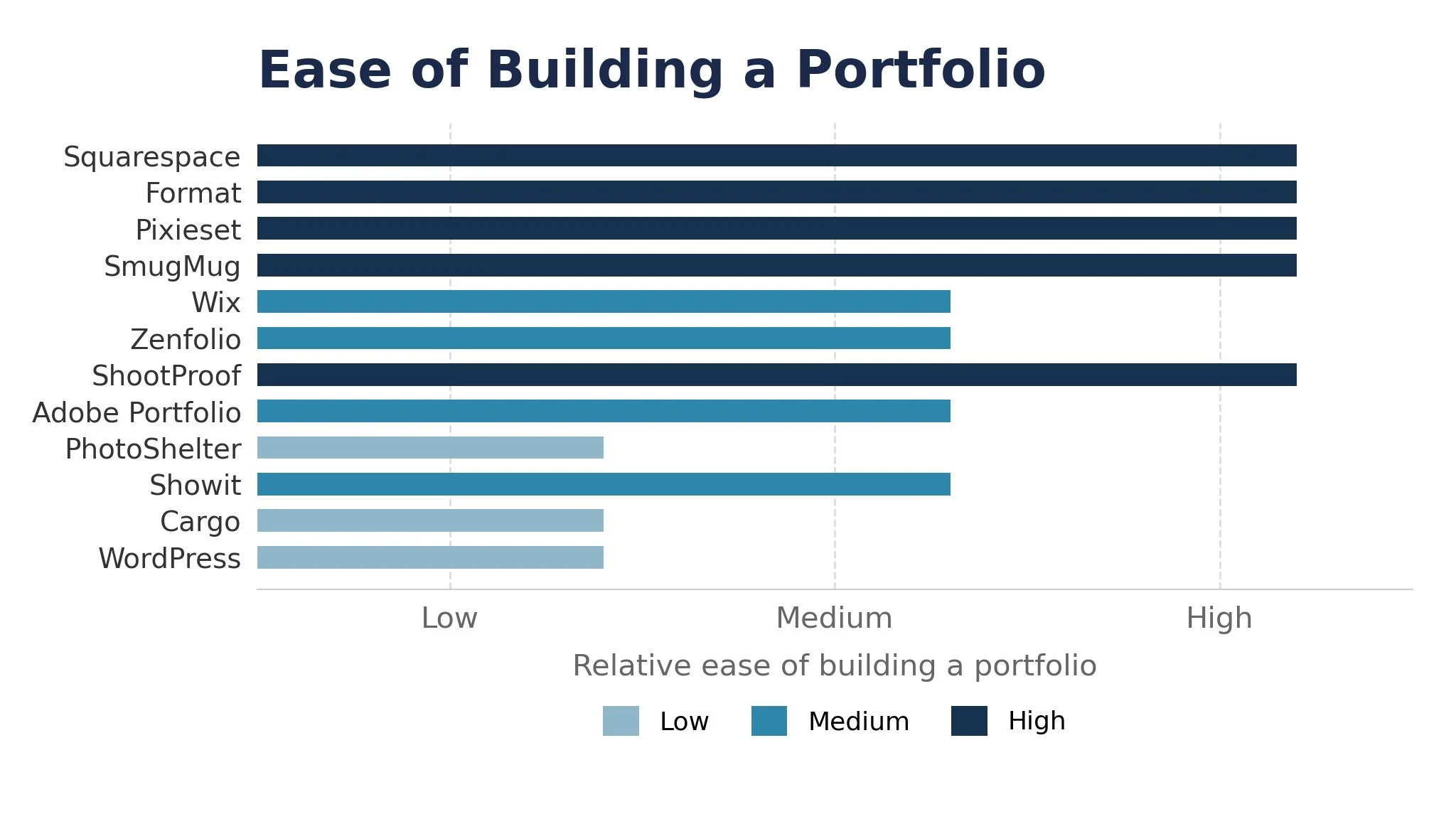
Narrow the table to Squarespace and Format, then read those two reviews to see which portfolio routine fits your studio. A builder that scores High on design only helps if the galleries load fast, and a builder that scores High on sales only helps if clients actually buy. Fit to your photography routine matters more than a long template list, and the best website builders for photographers prove that fit in the first gallery.
Why the Best Website Builders for Photographers Pay for Themselves
A portfolio site pays for itself in the same place, which is the booking that arrives without a phone call. A couple that finds a wedding gallery, loves the style, and books through the site is a client won while the photographer was shooting, and across a year of enquiries that flow is worth far more than the subscription costs. A site that turns a visit into a booking hands that income back, and the saving repeats every month. The best website builders for photographers earn their keep here first, before any other feature matters.
The second reason is fewer lost sales. Most photography losses are not dramatic. A print store that loads slowly, a gallery link that breaks, and a contact form that never replies all cost money quietly. A builder that keeps the store fast and the forms working catches these gaps before the client walks away.
Speed of response is the third reason. When a client asks for a proofing link, a photographer with a clean gallery answers in seconds. A photographer working from a hard drive and email attachments has to upload, link, and explain, and the client is already doubting the service.
The fourth reason is a calmer brand. A site that shows the work beautifully, with one clear style across every page, tells a client the photographer is professional before a word is exchanged. A builder that keeps the design steady gives a studio real consistency for the next shoot.
The final reason is calmer weeks. People do better work when the site updates itself, the galleries deliver themselves, and the bookings arrive without a daily scramble. A clear site routine with a next step beats a pile of sticky notes, and the builders in this ranking all help a small studio keep the workload honest.
How We Put Each Photography Builder Through Its Paces
We tested each photography builder against the same five measures, using a wedding gallery, a portrait booking page, and a print store. Each builder ran the same workload for two weeks, so Squarespace and the rest compare like with like.
- Gallery speed, judged by how quickly 300 images loaded on a phone connection.
- Design quality, measured by how professional the site looked without custom work.
- Booking flow, scored on whether a client could enquire and book without confusion.
- Print sales, timed from a gallery visit to a finished print order.
- Daily usability, judged by how long the weekly site routine took and how often the team needed help.
Each measure carried equal weight except gallery speed, which counted double, because a photography site that loads slowly is not doing its job. Scores run out of 100, and the order below follows the combined total, led by Squarespace on design polish. Where two builders tied, we broke the tie on design quality, since a careful builder protects the photographer from a site that cheapens the work.
We also checked the mobile view, because photography work moves fast. The best builders in this ranking make the gallery beautiful on a phone, while the weakest need a desktop to look good.
The 12 Tools in Detail
Each review below follows the same pattern, and every builder is judged on the same ground. We note what each builder does best, where it falls short, and the photographer it suits best, with gallery speed carrying the most weight.
1. Squarespace
Squarespace is the design leader in this ranking, and it leads because its templates make photography look expensive. Galleries load fast, the layouts are clean, and the booking and store tools sit beside the portfolio without extra plugins. For a photographer who wants a polished site with little effort, it is the natural standard.
The trade off is flexibility. Squarespace is built for beautiful defaults, so a photographer who wants total control over every pixel may find it limiting. A studio that invests in the platform gets a site that looks professional from day one, but one that needs a custom layout should look elsewhere.
In the trial, build one wedding gallery and one booking page, then check both on a phone. Time how long the gallery takes to load, and ask whether the design flattered the work. A fast gallery and a clear site mean the builder can carry your studio.
Our verdict. The most polished photography site here, and the best all rounder for most photographers.
2. Format
Format is the portfolio-first pick, and it earns second place with clean portfolios built for photographers. The templates are made for images, client proofing sits beside the gallery, and the site stays fast without extra work. The design feels calm and professional throughout.
The trade off is breadth. Format is built for portfolios first, so a photographer who needs a large store or a blog may find it lighter than the full platforms. For a photographer whose site exists to show work and win bookings, that focus is exactly right.
In the trial, build one portfolio and one proofing gallery, then check the client view. Ask whether the images looked their best, and whether the proofing flow was simple. Images looked their best and proofing stayed simple.
Our verdict. The cleanest portfolio-first builder here, ideal for photographers who show work.
3. Pixieset
Pixieset is the wedding pick, and it suits wedding and portrait photographers who want galleries, stores, and booking together. Clients view, choose, and buy from one link, the store handles prints and digital files, and the booking tools keep the diary tidy. The workflow saves hours after every shoot.
The trade off is design range. Pixieset is built for the client workflow first, so a photographer who wants a highly designed homepage may find the templates plain. For a wedding photographer whose income depends on the after-shoot workflow, the combined platform saves a second subscription.
In the trial, deliver one gallery with a store and watch the first orders. See if the clients found the buying flow simple, and if the payouts arrived cleanly. Clients bought prints easily and payouts arrived cleanly.
Our verdict. The best gallery plus store here, ideal for wedding photographers.
4. SmugMug
SmugMug is the print sales pick, and it earns its place with print sales and unlimited storage. A photographer can upload full-resolution galleries without counting gigabytes, sell prints through partner labs, and keep the archive safe in one place. The pricing is simple.
The trade off is design polish. SmugMug is built for storage and sales first, so a photographer who wants a striking homepage may find the templates plain. For a photographer whose archive and print income matter most, that focus is exactly right.
In the trial, upload one large gallery and order a test print. Watch whether the upload stayed fast, and whether the print quality matched the screen. SmugMug uploaded the large gallery fast with matching prints.
Our verdict. The best print sales and storage here, ideal for photographers who sell prints.
5. Wix
Wix is the control pick, and it suits photographers who want a flexible editor with many apps. The drag-and-drop builder lets a studio place anything anywhere, and the app market adds booking, stores, and galleries without code. The free plan covers a real trial.
The trade off is design discipline. Wix gives so much freedom that a careless site can look messy, and the photographer must bring the taste. For a studio that knows what it wants and values control, that freedom is the reason to choose it.
In the trial, build one homepage and one gallery, then check both on a phone. Ask whether the layout stayed clean, and whether the booking flow worked. Wix kept the homepage clean and bookings flowing.
Our verdict. The most flexible photography builder here, ideal for photographers who want control.
6. Zenfolio
Zenfolio is the selling pick, and it earns its place with stores and marketing tools built in. Galleries, print sales, digital downloads, and email marketing share one platform, so a photographer can sell and promote without a second tool. The client management is handy.
The trade off is template style. Zenfolio is built for selling first, so a photographer who wants an art-led homepage may find the designs plain. For a photographer whose site must earn money, that focus is exactly right.
In the trial, build one store with prints and digital files, then check the checkout. Ask whether the buying flow was simple, and whether the marketing email looked professional. Checkout stayed simple and marketing emails looked professional.
Our verdict. The best selling tools here, ideal for photographers who sell online.
7. ShootProof
ShootProof is the proofing pick, and it suits photographers who proof with clients every week. Galleries are built for choosing favourites, contracts and invoices sit beside the images, and the print labs integrate cleanly. The workflow is the fastest in this guide for delivery.
The trade off is the public site. ShootProof is built for proofing first, so a photographer who needs a full public portfolio may find it lighter than the site builders. For a portrait studio that delivers galleries daily, that focus is exactly right.
In the trial, deliver one gallery and collect the client favourites. Check whether the choosing flow was simple, and whether the invoice arrived cleanly. ShootProof made choosing favourites simple and invoiced cleanly.
Our verdict. The fastest proofing workflow here, ideal for portrait studios.
8. Adobe Portfolio
Adobe Portfolio is the Adobe pick, and it earns its place by coming free with Creative Cloud plans. A photographer already paying for Lightroom or Photoshop gets a clean portfolio site at no extra cost, and the Lightroom integration publishes galleries in a click. The templates are simple and fast.
The trade off is depth. Adobe Portfolio is a portfolio site first, so a photographer who needs stores or booking must pair it with another tool. For an Adobe photographer who only needs a clean portfolio, that free inclusion is hard to beat.
In the trial, publish one Lightroom gallery and check the site on a phone. Ask whether the images looked their best, and whether the publishing stayed simple. Adobe Portfolio published the Lightroom gallery beautifully.
Our verdict. The best free portfolio for Adobe users here, ideal for Creative Cloud photographers.
9. PhotoShelter
PhotoShelter is the archive pick, and it suits photographers who archive and sell from one place. The archive tools organise thousands of images, the e-commerce handles prints and licences, and the delivery tools keep clients happy. The search is strong.
The trade off is the public site. PhotoShelter is built for the archive first, so a photographer who wants a striking marketing homepage may find the templates plain. For a photographer with a large archive to monetise, that focus is exactly right.
In the trial, upload one archive set and sell one licence. See if the search found the images, and if the licence sale completed cleanly. Search found the images and licences sold cleanly.
Our verdict. The best archive plus sales here, ideal for photographers with large libraries.
10. Showit
Showit is the design freedom pick, and it earns its place with a drag-and-drop designer and a WordPress blog. A photographer can design every pixel of the site, then publish blog posts on WordPress without leaving the platform. The result can look truly distinctive.
The trade off is effort. Showit gives total freedom, so a photographer must design the whole site rather than starting from a polished template. For a studio with a strong visual identity, that freedom is the reason to choose it.
In the trial, design one homepage and one gallery page from scratch. Watch whether the result matched your vision, and whether the blog published cleanly. Showit matched the vision and the blog went live.
Our verdict. The most design freedom here, ideal for photographers with a strong style.
11. Cargo
Cargo is the art-led pick, and it suits photographers with a visual, editorial style. The templates are striking and unusual, the layouts feel like a magazine, and the site stands out from every other portfolio a client sees. The price stays modest.
The trade off is the workflow. Cargo is built for the visual site first, so a photographer who needs proofing or print sales must pair it with another tool. For an art photographer whose site is the work, that focus is exactly right.
In the trial, build one editorial portfolio and check it on a phone. Ask whether the layouts flattered the work, and whether the navigation stayed clear. Layouts flattered the work and navigation stayed clear on phones.
Our verdict. The most striking templates here, ideal for art-led photographers.
12. WordPress
WordPress is the ownership pick, and it rounds out the ranking for photographers who want full control. The open platform runs any theme, any gallery plugin, and any store, so a studio can build exactly the site it wants and own the data outright. The ecosystem is enormous.
The trade off is maintenance. WordPress needs updates, backups, and a host, so a photographer who wants a hands-off site may find it heavy. For a studio that values ownership and customisation, that control is a strength, because the site is truly yours.
In the trial, build one portfolio with a gallery theme and check the speed. Ask whether the theme flattered the work, and whether the updates stayed manageable. The gallery theme flattered the work and updates stayed manageable.
Our verdict. The most control and ownership here, ideal for photographers who want it all.
Galleries, Proofing, and the Features That Sell a Shoot
A photography site earns money through three features, and the first is the gallery. A gallery that loads fast, shows the work at full quality, and looks beautiful on a phone wins the enquiry, while a slow gallery loses it before the client has seen a single image. The best website builders for photographers make this speed visible in the trial, because the gallery is the first thing a client will judge.
The second feature is proofing. A client who can view, choose favourites, and buy from one link is a client who spends more, and the studio saves hours of email. Check the proofing flow from a client phone during the trial, because that is where most clients will meet the gallery.
The third feature is the store. A print store that handles orders, payments, and lab fulfilment without the photographer touching it turns the archive into income. Ask what the store takes per sale, and check whether the lab quality matches the screen, because a print that disappoints costs a client.
Five Portfolio Mistakes That Cost Photographers Bookings
The first mistake is a slow homepage. A hero image that takes five seconds to load loses the visitor before the portfolio appears, and the client never sees the work. Compress the images, test the speed on a phone, and fix the load time before buying any builder.
The second mistake is too many images. A portfolio with 200 pictures bores the client, while one with 30 strong images wins the booking. Curate ruthlessly, and let the best work speak.
The third mistake is a hidden contact form. A client who cannot find the enquiry button in five seconds leaves, and the photographer never knows the visit happened. Put the contact button on every page, and answer every enquiry the same day.
The fourth mistake is no prices. A client who cannot find even a starting price assumes the photographer is out of budget and moves on. Show a range, and let the serious enquiries come through.
The fifth mistake is never updating the site. A portfolio that shows work from three years ago tells a client the photographer has stopped shooting. Add new work every month, and retire the old images before they date the studio.
A Five Week Plan to Launch a New Photography Site
Week one is the curation, and it should be honest. Pick the thirty strongest images, remove the rest, and decide which shoots the site should sell. A tight portfolio beats a large one every time, because clients remember the best image, not the most images.
Week two is the build. Choose the builder that fits the workflow, set up the galleries, and write the booking page. Check the site on a phone and a desktop, and fix anything that looks wrong while the change is still small. A clean first week builds the habit that carries the whole launch.
Week three is the store. Add the print products, set the prices, and order one test print to check the quality. A store that works is a store that earns, while a store that is never tested is a store that fails at the first real order.
Week four is the proofing. Deliver one real gallery to a client, watch the choosing flow, and fix the confusing steps before the next delivery. A proofing habit that runs every week compounds, and the clients spend more with each gallery.
Week five is the launch. Announce the site, update the social profiles, and ask three past clients for a review. A launch that is announced is a launch that brings bookings, while a launch that nobody hears about is a site nobody visits.
What to Check in the Plan Before You Commit
A photography builder plan looks simple on the surface, but three checks decide whether it is fair. The first is the storage limit. A plan that caps storage at a few gigabytes cannot hold a wedding season, and the upgrade price can double the bill, so ask how much full-resolution storage the plan actually includes. A vendor that publishes the limit plainly is telling you it wants the studio to grow.
The second check is the sales fee. A plan that takes a percentage on every print sale plus a monthly fee can take a real slice of income, so ask for the total cost on a typical month of sales, not the headline rate. A vendor that will not do the sum is telling you something.
The third check is the contract length. A two-year lock-in with no exit clause traps a studio in a builder that no longer fits, and the switching cost grows every month. A one-year term with a clear renewal date is safer, and a month-to-month option is safest of all for a first year.
Best Pick by Job
No single photography builder fits every studio, so each common situation below is matched to the builder that scored highest for that job. A wedding studio looks different from an art photographer, and the table below makes that split clear.
| Job | Best pick | Why it wins |
|---|---|---|
| Wants a polished portfolio site | Squarespace | Beautiful templates with fast galleries |
| Portfolio-first photographer | Format | Clean portfolios with client proofing |
| Wedding and portrait work | Pixieset | Galleries, stores, and booking together |
| Sells prints from an archive | SmugMug | Print sales with unlimited storage |
| Wants full design control | Wix | Flexible editor with many apps |
| Sells online with marketing | Zenfolio | Stores with marketing tools built in |
| Proofs with clients weekly | ShootProof | Proofing galleries with easy sales |
| Already pays for Adobe | Adobe Portfolio | Free with Creative Cloud plans |
| Archives and sells licences | PhotoShelter | Archive tools with e-commerce |
| Wants total design freedom | Showit | Drag-and-drop design with WordPress blog |
| Art-led editorial style | Cargo | Striking templates for visual work |
| Wants full ownership | WordPress | Open platform with endless themes |
If your situation does not match a row exactly, take the closest one and read that review first, starting with Squarespace when it fits.
Frequently Asked Questions
Photographers ask the same questions before every website builder change, so we answered the most common ones here. The best website builders for photographers all handle the basics, and the answers below focus on the choices that actually change the outcome.
How much should a photographer pay for a website builder?
Most builders in this ranking charge per month, so a photographer pays one plan plus any sales fee on prints. Free plans cover small portfolios well, but the stores and booking tools that earn real money usually sit on paid tiers. Check the vendor site for current pricing and confirm the total cost on a typical month of sales before you pay, because sales fees can change the bill.
Can one builder handle the portfolio, proofing, and store together?
It can handle all three, and most photographers prefer one system for the whole job. The portfolio needs galleries, proofing needs client choosing, and the store needs print sales, and the leaders cover all three well. Some studios still pair a portfolio builder with a separate proofing tool, which works fine when the gallery links stay in sync.
How long does it take to launch a new photography site?
A focused photographer launches a clean site in three to five weeks if the images are curated. The delay usually comes from too many images and an unfinished booking page, not from the builder. Curate thirty images first, build the galleries, and test the booking flow before the launch, because a rushed site shows the rush.
Do these builders work for a photographer who only shoots part-time?
They work, but the value comes from the routine, not the size. A part-time photographer still needs a fast gallery, a clear booking page, and a simple store. Start with the simplest builder that covers galleries and enquiries, then move up when the bookings grow.
What happens to our galleries if we switch builders later?
Every builder in this ranking exports images and gallery data to standard formats, so a switch is possible but never painless. Site designs and store setups do not transfer, and the studio must rebuild them in the new builder. A switch is never painless, which is why a photographer should trial Squarespace properly now instead of staying with a builder that no longer fits the way the studio works.
Why Squarespace Leads for Most Photographers
A photographer can settle this in a trial by timing days to a live gallery, counting the enquiries that arrive, and measuring gallery speed in the first month. The best website builders for photographers prove themselves on the days to a live gallery, the share of visitors who enquire, and the gallery speed found in the first month, and a five week trial with your real images will show all three. Squarespace wins our ranking on the combined score, but the right builder for your studio is the one your clients enjoy using every week without being asked.
Run the trial on one real gallery with your real images and your real booking page, and judge the builder on the first result rather than the demo. If the gallery launches in a day and the enquiries arrive within a week, the system is working. If the setup stalls and the mobile view disappoints, the tool is fighting you rather than helping you. Pick the builder that makes the work look its best, protect the monthly update habit, and let the bookings pay for the subscription many times over.