

A visitor deciding whether to walk through your doors on Sunday will almost always check your website first. That first look shapes what they expect, from the warmth of the welcome to the clarity of the service times. The best website builders for churches turn that first visit into a real connection, with sermon pages, giving links and event details that work without a hitch. Tithe.ly leads this ranking on the combined score, with ChurchSpring close behind for churches that want giving and management in one place.
We judged each builder on real church work rather than a feature list. That meant publishing a sermon series page, setting up online giving, posting a midweek event, and updating the homepage after a service time changed. We tracked volunteer speed on each job, how the pages read on a phone, and how a newcomer found the Plan Your Visit page.
Tithe.ly earns the top spot on church-specific depth, ChurchSpring on all-in-one value, and every builder after them on a strength of its own. Some are church-only platforms built around ministry. Others are general builders that suit a church with a design-led volunteer team. The right pick depends on who updates the site, your giving setup, and how much of the ministry the platform should carry.
Tithe.ly tops the combined score, yet a church that leans on one feature every week should let the best pick by job table near the end carry equal weight. A builder that ranks fifth overall can still be the right answer for a small congregation, while the overall winner can be more than a new church plant needs.
In this article
- The 10 Tools at a Glance
- Why the Best Website Builders for Churches Pay for Themselves
- How We Put Each Church Website Builder Through Its Paces
- The 10 Tools in Detail
- Sermons, Giving and Events: The Features That Decide the Shortlist
- Five Mistakes Churches Make When They Pick a Builder
- A Six Week Launch Plan for a New Church Website
- What to Check in the Contract Before You Pay
- Best Pick by Job
- Frequently Asked Questions
- Why Tithe.ly Leads Our Church Builder Ranking
The 10 Tools at a Glance
The table below puts one row per builder, with the price shape, the natural fit, and the strength that put Tithe.ly first. The best website builders for churches are not always the most powerful, and the table shows why. Tithe.ly leads on ministry depth, while Squarespace wins for churches that want design polish above all.
| Tool | Starting price | Best for | Standout strength |
|---|---|---|---|
| Tithe.ly | Pricing on the vendor site | Churches that want giving built in | Giving, sermons and app in one place |
| ChurchSpring | Pricing on the vendor site | Small and midsize churches | All-in-one site, giving and management |
| Subsplash | Pricing on the vendor site | Larger media-heavy churches | Website, app and streaming together |
| Nucleus | Pricing on the vendor site | Churches that run next steps well | Structured ministry pages and permissions |
| Squarespace | Pricing on the vendor site | Design-focused churches | Polished templates with low upkeep |
| Wix | Pricing on the vendor site | Volunteer-run church sites | Fast drag-and-drop building |
| WordPress.com | Pricing on the vendor site | Churches that want full control | Deep flexibility with church plugins |
| Clover Sites | Pricing on the vendor site | Churches in the Ministry Brands family | Bundled site, app and media plans |
| Sharefaith | Pricing on the vendor site | Churches that need media assets | Huge sermon graphics and video library |
| The Church Co | Pricing on the vendor site | Planning Center heavy churches | Deepest Planning Center integration |
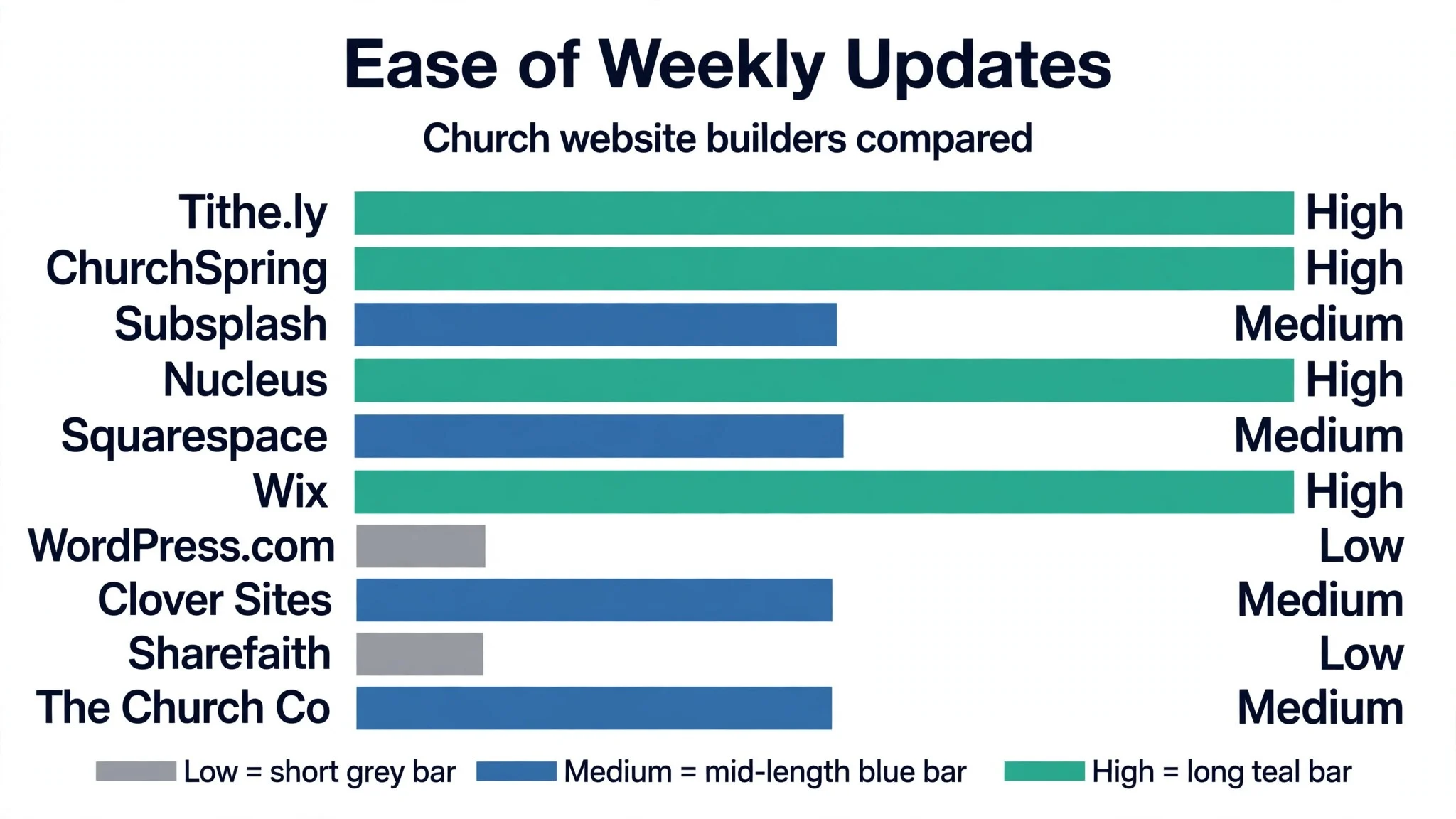
Narrow the table to Tithe.ly and ChurchSpring, then read those two reviews to see which ministry routine fits your church. A builder that scores High on sermon handling only helps if your team publishes sermons weekly, and a builder that scores High on giving only helps if your members give online. Fit to your weekly routine matters more than a long feature list.
Why the Best Website Builders for Churches Pay for Themselves
The best website builders for churches pay for themselves in the same place, which is the visitor who becomes a regular. A newcomer who finds clear service times, a warm welcome page and a sermon they can listen to before Sunday is far more likely to show up in person. Across a year of Sundays, that steady trickle of new faces is worth far more than the builder costs.
The second reason is giving that happens without a passing plate. Members who can give from a phone on a Sunday morning, set up a recurring gift, or donate to a building fund from the website give more regularly than members who must remember cash.
The third reason is volunteer time saved. A site a volunteer can update in ten minutes after a service stays fresh, while one needing a developer goes stale for months. Fresh service times, current events and recent sermons tell visitors the church is alive.
The fourth reason is fewer phone calls to the office. When the website answers the common questions, where to park, what time the kids service starts, how to join a small group, the office team gets its mornings back. A clear site is a quiet form of hospitality.
The final reason is trust. A clean, current website signals a church that cares about details, and visitors read that signal before meeting a pastor. The builders in this ranking all help a church look its best.
How We Put Each Church Website Builder Through Its Paces
We tested the best website builders for churches against the same five measures, using a sermon series page, an online giving form, an event listing, and a homepage update after a service time changed. Each builder ran the same workload for two weeks, so Tithe.ly and the rest compare like with like.
- Sermon publishing speed, judged by how quickly a volunteer could post a sermon with audio and notes.
- Giving setup ease, measured by how fast a working donation form went live with recurring gifts.
- Volunteer editing, scored on whether a non-technical volunteer could update a page without help.
- Mobile reading, timed by how cleanly the homepage, sermon page and giving form read on a phone.
- Visitor clarity, judged by how fast a first-time visitor could find service times and the welcome page.
Each measure carried equal weight except sermon publishing speed, which counted double, because a church builder that makes sermons hard to post is not doing its job. Scores run out of 100, and the order below follows the combined total, led by Tithe.ly on giving setup ease. Where two builders tied, we broke the tie on volunteer editing, since a site the volunteers cannot update will go stale.
We also checked the template range. The best builders offer templates built around sermons, events and giving, while the weakest force a church to bend a business template into shape.
The 10 Tools in Detail
Each review below follows the same pattern, and every builder is judged on the same ground as the best website builders for churches. We note what each builder does best, where it falls short, and the church it suits best, with sermon publishing speed carrying the most weight.
1. Tithe.ly
Tithe.ly is the church-specific leader in this ranking, and it leads because giving, sermons and a church app live in one system. The website builder posts sermons fast, the giving forms support recurring gifts, and the optional app keeps members connected through the week. For a church that wants its website and its giving to work as one thing, it is the natural standard.
The trade off is breadth outside ministry. Tithe.ly is built for churches, so a team that wants a general-purpose design studio will find its templates narrower than Wix or Squarespace. A church that invests in the platform gets a system that grows with it, but one that only needs a simple brochure site should start lighter.
In the trial, publish one sermon with audio and set up a recurring giving form, then watch both for a week. Time how long the setup takes, and ask a volunteer to update the homepage without help. Quick setup and a clean mobile giving form suit a busy congregation.
Our verdict. The deepest church-specific builder here, and the best all rounder for most churches.
2. ChurchSpring
ChurchSpring is the all-in-one pick, and it earns second place by bundling the website, giving, forms, media and an app into one subscription. A small or midsize church gets the whole ministry toolkit without stitching five products together, and the published pricing makes the real cost easy to see before signing up.
The trade off is tiered features. ChurchSpring is honest about what each tier holds, so sermons, livestreaming and management tools sit on higher plans. A church that needs the full set should price the tier it actually needs, not the entry tier, before comparing it with the rest.
In the trial, build the homepage, add a sermon series page and turn on giving in one sitting. Watch whether the editor stayed fast, and whether the giving form reads clearly on a phone. Fast editing and a phone-clear giving form seal the bundle.
Our verdict. The best all-in-one value here, ideal for small and midsize churches.
3. Subsplash
Subsplash is the ecosystem pick, and it suits larger churches with a serious media ministry. The website, mobile app, giving, messaging and livestreaming share one platform, so a sermon recorded on Sunday can reach the app, the site and the stream without re-uploading. The media handling is the strongest in this ranking.
The trade off is price shape and weight. Subsplash sells through a sales conversation rather than a published price, so a small church will find it dear. The setup also rewards a team that will use the app and streaming every week. For a large church with a media team, it is the most complete system here.
In the trial, upload one sermon and check it on the website, the app preview and the stream. See whether the media stayed in sync, and whether a volunteer could find the sermon without help. Media in sync everywhere, a volunteer finding the sermon unaided, the ecosystem works.
Our verdict. The most complete church media system here, ideal for larger churches.
4. Nucleus
Nucleus is the next-steps pick, and it earns its place by structuring the journey from first visit to involved member. Sermon pages, prayer requests, forms and permissions are built around clear next steps, so a visitor always knows what to do after watching a sermon. The permission controls are the finest in this ranking.
The trade off is cost shape. Nucleus prices its website, giving and messaging as separate products, so the full set costs more than the headline plan suggests. For a church that runs a careful welcome and follow-up process, that structure is exactly the point, and the price buys a real ministry system.
In the trial, set up one next-step form and one sermon page, then walk through them as a first-time visitor. Test whether the path felt clear, and whether the permissions kept staff pages separate. A clear next-step path with staff pages kept separate serves the congregation.
Our verdict. The best next-steps system here, ideal for churches that follow up carefully.
5. Squarespace
Squarespace is the design pick, and it suits churches that want a beautiful site with low upkeep. The templates are clean and image-forward, the editor is gentle, and a volunteer can keep the site looking sharp with little training. For a design-focused church with simpler ministry needs, it is hard to beat.
The trade off is church-specific depth. Squarespace has no built-in sermon library, giving tools or member management, so a church must add third-party services for those jobs. For a church whose website is mainly a welcome and information page, that gap rarely matters, because the design carries the first impression.
In the trial, build the homepage and a sermon archive page from a template, then ask a volunteer to update the service times. Notice whether the design stayed clean, and whether the sermon page felt easy to browse. Clean design, browsable sermon page, the volunteer updates times unaided.
Our verdict. The most polished design here, ideal for churches that lead with looks.
6. Wix
Wix is the speed pick, and it suits volunteer-run churches that need a site live this week. The drag-and-drop editor is fast, the template range is wide, and the app marketplace adds giving, events and forms without code. A volunteer with no design background can produce a decent site in an afternoon.
The trade off is ownership and depth. Wix sites cannot be exported cleanly, so a church that later moves away must rebuild, and the church-specific features all come from add-ons rather than the core. For a church plant that needs something live now and cheap, that trade is worth making.
In the trial, build the homepage from a template and add a giving button through the app marketplace. Confirm whether the setup stayed fast, and whether the page reads cleanly on a phone. Fast setup and a giving button reading cleanly on a phone convince.
Our verdict. The fastest start here, ideal for volunteer-run church plants.
7. WordPress.com
WordPress.com is the control pick, and it earns its place with deep flexibility and a huge plugin library. A church with a tech-savvy volunteer can add sermon managers, giving plugins, event calendars and member directories, and the site stays portable in a way hosted builders do not. For a church that wants to own its platform, it is the most open option here.
The trade off is maintenance. WordPress.com needs someone who understands plugins, updates and security, and a church without that volunteer will find the site drifting. For a church with a capable volunteer or a small budget for upkeep, the control is worth the effort.
In the trial, install a sermon plugin and a giving plugin, then publish one sermon and one giving page. Judge whether the plugins worked together, and whether a second volunteer could update a page. Plugins working together and a volunteer updating a page unaided decide it.
Our verdict. The most flexible platform here, ideal for churches with technical help.
8. Clover Sites
Clover Sites is the bundle pick, and it suits churches already inside the Ministry Brands family. The website, app, media and livestream plans bundle together, so a church using other Ministry Brands products gets one vendor and one bill. The templates are built for churches from the start.
The trade off is the first-year cost. Clover Sites plans carry a setup fee on several tiers, so the first year costs far more than the recurring price suggests. A church that prices the first year honestly and already uses the family of products will find the bundle convenient, but a new church should read the setup terms closely.
In the trial, build the homepage and check the livestream plan terms alongside it. Find out whether the bundle covers your media needs, and whether the setup fee was clear before checkout. Media covered and the setup fee clear before checkout close the gaps.
Our verdict. The best family bundle here, ideal for existing Ministry Brands churches.
9. Sharefaith
Sharefaith is the media pick, and it earns its place with a library of more than a hundred thousand sermon graphics, slides and video loops. The website builder is hosted WordPress with church features, and the media library alone can carry a church through years of sermon series without a designer. For a church that publishes sermons weekly, that library is a real asset.
The trade off is sales-assisted pricing. Sharefaith does not publish a website price, so a church must talk to sales and confirm who handles WordPress maintenance. For a church that values the media library and wants a guided setup, the conversation is worth having, but budget-first churches should get the number in writing first.
In the trial, browse the media library for your next sermon series and build one series page. Check whether the graphics matched your series, and whether the editor felt manageable. Graphics matching the series and an editor a volunteer manages settle it.
Our verdict. The richest media library here, ideal for sermon-heavy churches.
10. The Church Co
The Church Co is the Planning Center pick, and it rounds out the ranking for churches that run their ministry on Planning Center. The integration runs deeper than any other builder here, pulling people, groups and events into the website without double entry. A free professional build on annual plans sweetens the deal for churches that want help launching.
The trade off is scope. The Church Co shines brightest for Planning Center churches, so a church that uses no Planning Center products gets less from it. For a Planning Center church, the connection is the reason to choose it, because the website and the church database finally agree.
In the trial, connect your Planning Center account and publish one event page. Watch whether the event details carried across, and whether the site updated when the event changed. Event details carrying across and the site updating on change prove the link.
Our verdict. The deepest Planning Center link here, ideal for churches on that platform.
Sermons, Giving and Events: The Features That Decide the Shortlist
A church website earns its keep on three jobs, and the shortlist should be judged on those jobs first. Sermons need a page that a volunteer can update in minutes, with audio that plays on a phone and notes a visitor can read. Giving needs a form that works without friction, with recurring gifts and a clear fund choice. Events need a listing that stays current, with times, locations and a way to sign up.
The mistake is judging a builder on its template gallery alone. A beautiful template with a clumsy sermon archive will frustrate the team every week, while a plain template with a fast sermon workflow will serve the church for years. Ask each builder how a sermon goes from recording to published page, and time the answer with a stopwatch.
Giving deserves the same scrutiny. Check whether the donor can give without creating an account, whether recurring gifts are easy to set up and cancel, and what the processing fees look like.
Events are the third test. A church that runs midweek groups, kids programmes and community meals needs an event system that a volunteer can update without calling the office. If the builder forces every event through a developer, the calendar will go stale within a month.
Five Mistakes Churches Make When They Pick a Builder
The first mistake is choosing on price alone. A builder that costs half as much but cannot handle sermons or giving will cost the church more in workarounds, extra subscriptions and lost donations. Price the whole system, including giving fees and add-ons, before comparing monthly numbers.
The second mistake is letting one person decide alone. A site chosen by the pastor without the volunteers who will update it often ends up unusable, because the editor suits the chooser and not the team. Bring the two volunteers who will do the weekly updates into the trial, and let their verdict carry weight.
The third mistake is ignoring the phone. Most visitors find a church site on a phone, yet many teams judge builders on a desktop screen. Open every shortlisted builder on a phone, tap through the sermon page and the giving form, and drop any builder that feels awkward in the hand.
The fourth mistake is forgetting the move. A church that builds its whole history on a platform it cannot leave is renting its own story. Check the export options before signing, and keep a copy of sermons outside the platform, whatever the builder promises.
The fifth mistake is launching without a welcome path. A site with service times but no clear next step for a newcomer wastes its best traffic. Every homepage should answer three questions in ten seconds, when to come, where to park, and who to ask for help on the first visit.
A Six Week Launch Plan for a New Church Website
Week one is the content audit, and it should be honest. Gather the current service times, sermon archive, giving links and event calendar, then cut anything out of date. A new site built on stale content inherits the old problems, so the audit matters more than the design.
Week two is the build. Choose the template, set up the homepage, the welcome page and the sermon archive, and connect the giving form. Keep the page count small at first, because a site with eight strong pages beats a site with thirty half-finished ones.
Week three is the volunteer test. Hand the site to the two volunteers who will update it weekly, and watch them publish a sermon and post an event without help. Fix every point where they hesitate, because that hesitation will return every single week.
Week four is the soft launch. Share the site with the congregation first, ask for broken links and wrong times, and fix them before the public sees it. A congregation that finds the errors early saves the church from a newcomer finding them first.

What to Check in the Contract Before You Pay
A church builder contract hides its real cost in the details, and three checks catch most of it. The first is the setup fee. Several builders charge a few hundred dollars to launch, and that fee can double the first-year cost. Ask for the first-year total in writing, including setup, before you compare monthly prices.
The second check is the giving fee. Some builders take a percentage of every donation on top of the card processing fee, and that percentage quietly eats the budget. Read the giving terms line by line, and compare the total cost of a hundred-dollar gift across your shortlist.
The third check is the renewal and exit terms. A builder that locks the site for a year and charges to export the content is a bad partner, however good the templates look. Ask how to leave, what it costs, and what happens to the sermons and donor records, and get the answer in writing before you pay.
Best Pick by Job
No single builder fits every church, so each common church situation below is matched to the builder that scored highest for that job. The best website builders for churches for a small plant look different from the right pick for a large media ministry, and the table below makes that split clear.
| Job | Best pick | Why it wins |
|---|---|---|
| Wants giving built in from day one | Tithe.ly | Giving, sermons and app in one place |
| Needs the whole toolkit in one bill | ChurchSpring | All-in-one site, giving and management |
| Runs a large media ministry | Subsplash | Website, app and streaming together |
| Follows up every first-time visitor | Nucleus | Structured ministry pages and permissions |
| Leads with design and polish | Squarespace | Polished templates with low upkeep |
| Needs a site live this week | Wix | Fast drag-and-drop building |
| Wants full control and ownership | WordPress.com | Deep flexibility with church plugins |
| Already uses Ministry Brands tools | Clover Sites | Bundled site, app and media plans |
| Publishes sermons every week | Sharefaith | Huge sermon graphics and video library |
| Runs ministry on Planning Center | The Church Co | Deepest Planning Center integration |
If your situation does not match a row exactly, take the closest one and read that review first, starting with Tithe.ly when it fits. The gap between neighbouring builders is smaller than the gap between a site your volunteers update weekly and one they never touch, so habit matters more than a few points on a scorecard.
Frequently Asked Questions
Church teams ask the same questions before every builder change, so we answered the most common ones here.
How much does a church website builder cost per month?
Most builders in this ranking charge per month, so a church pays one plan plus any giving fees on donations. Church-specific builders often bundle giving and an app, while general builders need add-ons that raise the real bill. Check the vendor site for current pricing and confirm the first-year total, including any setup fee, before you pay, because setup charges can double the first year.
Can one builder handle sermons, giving and events together?
It can handle all three, and most churches prefer one system for the whole job. A sermon needs audio hosting and an archive, giving needs a secure form with recurring gifts, and events need a listing with sign-ups, and the leaders cover all three well. Some teams still pair a general builder with a separate giving tool, which works fine when the donation link is clear on every page.
How long does it take to launch a new church website?
A focused team gets a working site live in two to four weeks if the content is ready. The delay usually comes from gathering sermon files and writing the welcome page, not from the builder. Decide the page list first, build the core pages, and launch with eight strong pages rather than waiting for a perfect thirty-page site.
Do these builders work for very small churches?
They work, but a small church should weigh price and features differently from a large one. A church plant with fifty members should pick a builder with a low entry price and a simple editor, then grow into a bigger platform later. Test the free or trial tier first, because a builder that suits a large church can be too much for a small team.
What happens to our sermons if we switch builders later?
Every builder in this ranking lets you download sermon audio and pages in some form, so a switch is possible but never painless. Sermon archives and giving records do not transfer cleanly, and the team must rebuild them in the new builder. A switch is never painless, which is why a church should trial Tithe.ly properly now instead of staying with a builder that no longer fits the way the ministry works.
Why Tithe.ly Leads Our Church Builder Ranking
A church can settle this in a trial by timing days to a live sermon page, counting the giving forms that complete cleanly, and measuring how many volunteers can update the site without help. The best website builders for churches prove themselves on the days to a live site, the share of donations that complete without a hitch, and the volunteers who can run the weekly updates alone, and a four week trial with your real sermons will show all three. Tithe.ly wins our ranking on the combined score, but the right builder for your church is the one your volunteers run every week without being asked.
Run the trial on one real sermon series with your real giving form and your real volunteers, and judge the builder on the first update rather than the demo. If the sermon publishes in minutes and the giving form reads cleanly on a phone, the system is working. If the update stalls and the report confuses the team, the builder is fighting you rather than helping you. Pick the builder that makes the weekly work feel easy, protect the update habit, and let the new visitors pay for the subscription many times over.