

A coffee shop owner starts the day before the first customer walks in, checking the milk order, the rota, and the till from yesterday, and the admin keeps growing long after the last cup is poured. Prices shift, regulars ask for the seasonal menu, and a slow Tuesday still needs a full staff rota. The best AI tools for coffee shop owners take the repetitive half of that work off the counter, from writing the social post to forecasting how much milk to order, so the owner can spend the morning on the floor instead of in the back office.
Owner.com leads this ranking on the combined score, with Popmenu close behind for shops that want marketing and ordering in one place.
We judged each tool on real coffee shop work rather than a demo. That meant a Monday rota for six staff, a new seasonal menu with eight drinks, and a week of review replies after a busy weekend. We tracked how fast a campaign went live, how accurate the forecasts looked, and how much time the daily admin actually took.
Owner.com earns the top spot on marketing automation, Popmenu on menu visibility, and every tool after them on a strength of its own. Some are full platforms built for independents that want the website, ordering, and marketing handled together. Others are single-job tools that suit a shop fixing one problem at a time. The right pick depends on your staff size, your order mix, and how much of the admin you want handed over.
Owner.com tops the combined score, yet a shop that mostly needs help with staff rotas should let the best pick by job table near the end carry equal weight. A tool that ranks fourth overall can still be the right answer for a two-person counter, while the overall winner can be too much for a shop that only needs a better menu page.
In this article
- The 8 Tools at a Glance
- Why the Best AI Tools for Coffee Shop Owners Pay for Themselves
- How We Put Each Coffee Shop Tool Through Its Paces
- The 8 Tools in Detail
- Menu, Labour, and the Daily Jobs AI Actually Handles
- Six Coffee Shop AI Mistakes That Waste the Subscription
- A Four Week Rollout Plan for a One-Location Coffee Shop
- What to Check on the Bill Before You Commit
- Best Pick by Job
- Frequently Asked Questions
- Why Owner.com Leads for Most Coffee Shops
The 8 Tools at a Glance
The table below puts one row per tool, with the price shape, the natural fit, and the strength that put Owner.com first. The best AI tools for coffee shop owners are not always the most powerful, and the table shows why. Owner.com leads on automated marketing, while ChatGPT wins for shops that want a flexible assistant for writing and planning.
| Tool | Starting price | Best for | Standout strength |
|---|---|---|---|
| Owner.com | Pricing on the vendor site | Independents that want marketing handled | AI website, ordering, and campaigns together |
| Popmenu | Pricing on the vendor site | Shops that want to be found on Google | Menu pages with AI marketing built in |
| ChatGPT | Free plan; paid plans on the vendor site | Writing, menus, and quick planning | Flexible assistant for any text job |
| 7shifts | Free plan; paid plans on the vendor site | Shops with six or more staff | AI rotas with sales-based forecasts |
| MarginEdge | Pricing on the vendor site | Shops watching food cost closely | Invoice scans with cost forecasting |
| SevenRooms | Pricing on the vendor site | Shops with bookings and regulars | Guest records with voice booking help |
| Slang.ai | Pricing on the vendor site | Shops that miss calls at busy times | AI phone answering with bookings |
| Winnow | Pricing on the vendor site | Shops cutting waste in the kitchen | Computer vision that tracks food waste |
Narrow the table to Owner.com and Popmenu, then read those two reviews to see which marketing routine fits your shop. A tool that scores High on automation only helps if the owner checks the output, and a tool that scores High on forecasting only helps if the sales data feeding it is clean. Fit to your daily routine matters more than a long feature list, and the best AI tools for coffee shop owners prove that fit in the first week of real use.
Why the Best AI Tools for Coffee Shop Owners Pay for Themselves
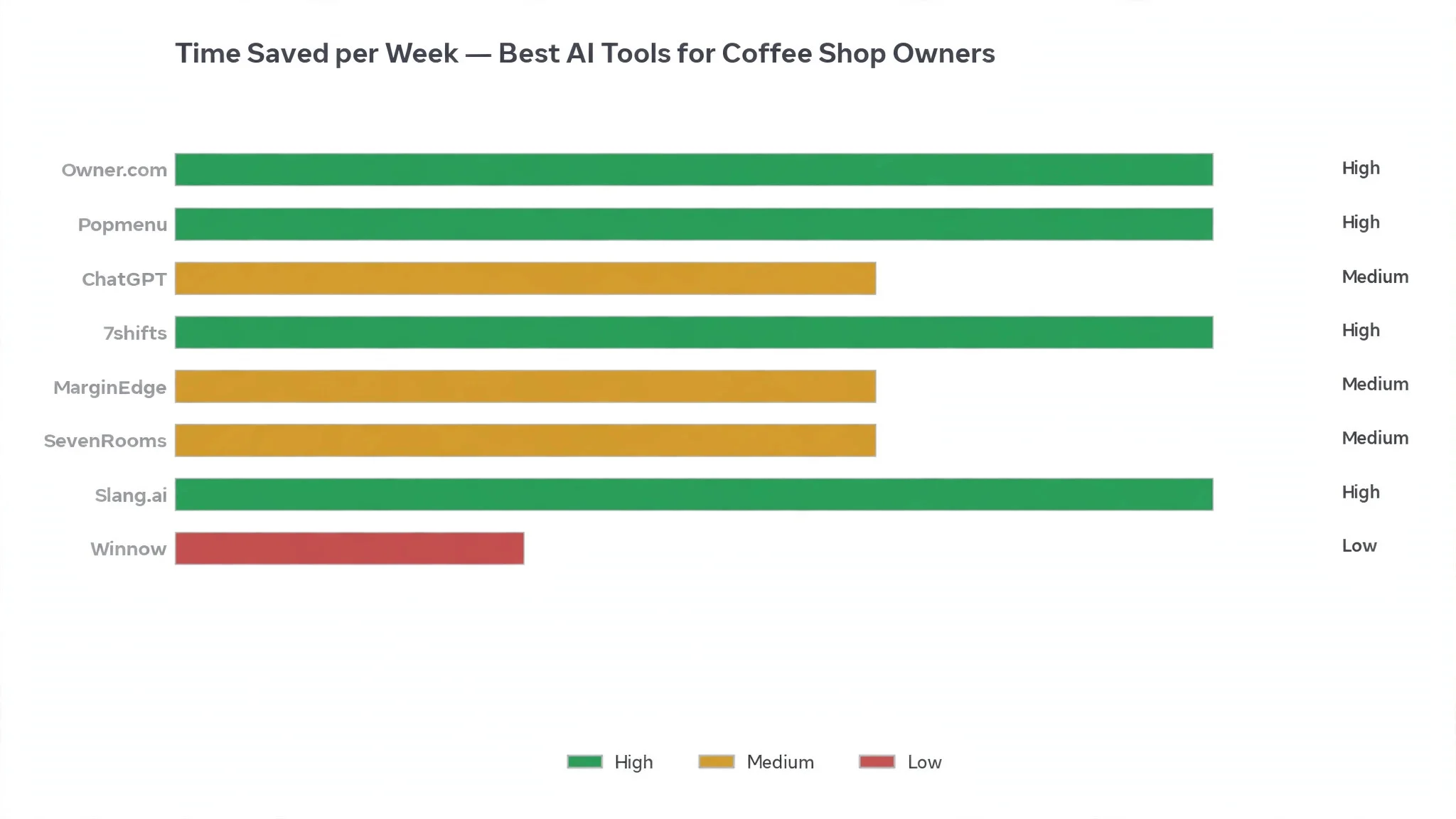
The best AI tools for coffee shop owners pay for themselves in the same place, which is the hour nobody bills for. An owner who spends two hours a day on rotas, replies, and social posts is spending fourteen hours a week on work a tool can draft in minutes, and across a year that gap is worth far more than the subscription costs. A tool that drafts the post and schedules the rota hands those hours back, and the saving repeats every week.
The second reason is fewer missed orders. Most coffee shop losses are not dramatic. A phone rings during the morning rush, nobody answers, and the catering order goes to the shop down the road. A tool that answers the call and takes the booking catches these gaps before the income disappears.
Speed of response is the third reason. When a regular asks about allergens or a new menu item, a shop with a clean menu page answers in seconds. A shop working from a printed menu and memory has to check with the kitchen, and the customer is already doubting the order.
The fourth reason is steadier margins. A tool that tracks food cost and forecasts the milk order gives an owner real numbers for the next supplier negotiation. Guessing that waste is under control is very different from seeing a report that proves it, and that proof is what keeps the margin healthy.
The final reason is calmer mornings. People do better work when the rota is set, the menu is written, and the reviews are answered before the doors open. A clear plan for the day beats a pile of sticky notes, and the tools in this ranking all help a small team keep the morning honest.
How We Put Each Coffee Shop Tool Through Its Paces
We tested each coffee shop tool against the same five measures, using a Monday rota, a seasonal menu launch, and a week of review replies. Each tool ran the same workload for two weeks, so Owner.com and the rest compare like with like.
- Campaign setup speed, judged by how quickly a team could launch a clean promotion without a designer.
- Forecast accuracy, measured by how close the sales and stock predictions came to the real week.
- Phone handling, scored on whether missed calls were answered and bookings were captured.
- Menu clarity, timed from a new drink idea to a finished menu page customers could read.
- Daily usability, judged by how long the morning admin took and how often the team needed help.
Each measure carried equal weight except forecast accuracy, which counted double, because a coffee tool that predicts badly is not doing its job. Scores run out of 100, and the order below follows the combined total, led by Owner.com on marketing automation. Where two tools tied, we broke the tie on daily usability, since a careful tool protects the owner from admin that eats the morning.
We also checked the review reply workflow, because coffee work moves fast. The best tools in this ranking let an owner answer a review in a minute, while the weakest need a separate login for anything beyond a draft.
The 8 Tools in Detail
Each review below follows the same pattern, and every tool is judged on the same ground. We note what each tool does best, where it falls short, and the shop it suits best, with forecast accuracy carrying the most weight.
1. Owner.com
Owner.com is the marketing automation leader in this ranking, and it leads because it runs the whole front of house online. The AI website, direct ordering, email, and text campaigns share one platform, so a shop can take orders without paying delivery app fees and bring lapsed regulars back with automated win-back messages. For an independent that hates marketing admin, it is the natural standard.
The trade off is price shape and fit. Owner.com is built for shops with real revenue and real ordering volume, so a tiny kiosk with low turnover may find it dear. A shop that invests in the platform gets a system that replaces the website, the ordering app, and the email tool at once, but one that only needs a menu page should start lighter.
In the trial, launch one win-back email to regulars who have not visited in a month and watch the redemptions for a week. Time how long the setup takes, and ask whether the ordering page worked cleanly on a phone. The win-back email went out quickly and orders came straight in.
Our verdict. The strongest all-in-one marketing here, and the best all rounder for independents.
2. Popmenu
Popmenu is the menu visibility pick, and it earns second place by making the shop findable on Google. Interactive menus, online ordering, AI review replies, and AI phone answering sit beside the marketing tools, so a team can turn a search into a visit and a visit into a regular. The menu pages load fast and look polished.
The trade off is value for a simple shop. Popmenu is built for shops with real menu complexity and real marketing needs, so a single-counter kiosk with a static menu may find it more than the job requires. For a shop whose menu changes with the seasons, the combined platform saves a second subscription.
In the trial, publish one seasonal menu and send one AI-drafted email, then check the results for both. Ask whether the menu ranked in local search, and whether the email brought anyone back. The menu ranked locally and emails brought regulars back.
Our verdict. The best menu plus marketing here, ideal for shops that change menus often.
3. ChatGPT
ChatGPT is the flexible assistant pick, and it earns third place by handling any text job a shop has. Menu descriptions, social posts, rota notes, supplier emails, and review replies all come from one chat window, and the paid plan adds image generation for menu boards and posters. For a shop that needs a general helper, it is the cheapest start.
The trade off is that nothing is automatic. ChatGPT drafts the work but never sends it, schedules it, or tracks the result, so the owner still runs the routine by hand. For a shop that wants a writing helper rather than a system, that trade is worth making.
In the trial, draft one week of social posts and one menu rewrite, then check the output. Ask whether the tone matched your shop, and whether the posts saved real time. A week of AI-drafted posts saved real time for the team.
Our verdict. The most flexible writing helper here, ideal for shops starting with AI.
4. 7shifts
7shifts is the rota pick, and it earns its place with AI scheduling built for hospitality. Sales forecasts shape the rota, staff swap shifts from their phones, and labour costs stay visible against the day’s takings. The free plan covers a small team, so a shop can test it without paying.
The trade off is scope. 7shifts schedules brilliantly but does not market the shop or take orders, so an owner with wider needs must pair it with another tool. For a shop whose biggest headache is the rota, that focus is exactly right.
In the trial, build one week of rotas from the sales forecast and let staff swap two shifts. See if the labour cost stayed in budget, and if the team understood the app. Labour costs stayed in budget and staff understood the app.
Our verdict. The smartest staff scheduling here, ideal for shops with six or more staff.
5. MarginEdge
MarginEdge is the food cost pick, and it suits shops that watch every pound of beans and milk. Invoices scan themselves, recipes carry a live cost, and a sales forecast shows what to order before the weekend. The built-in assistant answers cost questions in plain language.
The trade off is price shape. MarginEdge is built for shops with real purchasing volume, so a tiny kiosk ordering once a week may find it dear. For a shop whose margin depends on waste control, it is the most careful tool in this ranking.
In the trial, scan one week of invoices and check the recipe costs against the till. Ask whether the forecast matched the weekend, and whether the waste report explained itself. MarginEdge matched the weekend forecast and explained the waste.
Our verdict. The sharpest food cost control here, ideal for shops watching margins.
6. SevenRooms
SevenRooms is the regulars pick, and it earns its place by keeping guest records that remember people. Bookings, visit history, preferences, and notes share one profile, so a shop can greet a regular by name and remember the usual order. The voice AI helps with bookings at busy times.
The trade off is fit for walk-in shops. SevenRooms is built for venues that take bookings, so a counter-only shop with no tables may get less from it. For a cafe with seating and regulars, the connection is the reason to choose it.
In the trial, set up one booking flow and record notes on ten regulars, then check the profiles. Ask whether the booking worked from a phone, and whether the notes helped the team. SevenRooms booked regulars from phones and kept notes handy.
Our verdict. The best guest memory here, ideal for cafes with regulars and bookings.
7. Slang.ai
Slang.ai is the phone pick, and it suits shops that lose orders to unanswered calls. The AI voice agent answers, takes bookings, answers common questions, and sends call summaries to the team, so the morning rush never costs a catering order. The recordings keep a clear record.
The trade off is price shape. Slang.ai is built for shops that rely on the phone, so a shop that takes almost no calls may find it dear. For a shop whose phone rings all morning, it is the most reliable cover here.
In the trial, let the agent answer calls for one busy week and read the summaries each evening. Watch whether the bookings landed correctly, and whether any caller needed a human. Call summaries landed every evening with bookings in place.
Our verdict. The most reliable phone cover here, ideal for busy shops that miss calls.
8. Winnow
Winnow is the waste pick, and it rounds out the ranking for shops that want to see what the kitchen throws away. A camera above the bin records each item, the system values the waste, and the weekly report shows exactly where the money goes. The data changes ordering habits fast.
The trade off is hardware and fit. Winnow needs a kitchen install and suits shops with real prep volume, so a tiny kiosk may get less from it. For a shop with a kitchen that preps daily, that visibility is a strength, because the waste report pays for the system.
In the trial, run the system for two weeks and read the first waste report with the kitchen team. See if the top waste items surprised you, and if the ordering changed. The first waste report changed ordering right away.
Our verdict. The clearest waste visibility here, ideal for shops with a real kitchen.
Menu, Labour, and the Daily Jobs AI Actually Handles
AI helps a coffee shop most with three daily jobs, and the first is the menu. A seasonal drink needs a name, a description, a price, and a photo, and an assistant can draft all four in minutes while the owner checks the taste. The best AI tools for coffee shop owners handle this drafting well, but the owner still needs to check the price against the recipe cost, because an assistant that has never bought milk will happily price a drink below cost.
The second job is the rota. A forecast that reads last year’s sales, the weather, and the local events calendar builds a better rota than a guess, and the savings show up in the labour line within a month. The catch is the data feeding it. A rota tool fed by a clean till history predicts well, while one fed by rough estimates repeats the same mistakes every week.
The third job is the review reply. A shop that answers every review, good and bad, ranks better and keeps regulars longer, and an assistant can draft those replies in the shop’s tone. The rule is simple. AI drafts, the owner sends, and no reply goes out without a human reading it first, because a wrong tone in a public reply costs more than the time saved.
Six Coffee Shop AI Mistakes That Waste the Subscription
The first mistake is buying a platform before naming the job. A shop that pays for a full marketing suite when the real problem is the rota wastes the subscription for a year. Name the one job that hurts most, then buy the tool that does that job best.
The second mistake is trusting a forecast without checking it. A sales prediction that looks right on a quiet week can fail badly on a bank holiday weekend, and an owner who orders from it without a glance ends up short on milk. Check the forecast against the real week for a month before trusting it.
The third mistake is letting AI write the menu unchecked. A drink description that promises a flavour the kitchen cannot deliver brings complaints, not sales. Taste the drink, read the description, and only then publish it.
The fourth mistake is ignoring the phone. A shop that automates social posts but leaves the phone ringing loses the catering orders that pay the rent. Fix the phone first, then the posts.
The fifth mistake is training nobody. A tool that only the owner understands breaks the week the owner is away, and the team goes back to paper rotas and guesswork. Train two people on every tool, and write the routine down.
The sixth mistake is measuring nothing. A subscription that nobody reviews for six months is a subscription nobody needs, and the shop keeps paying for a tool that stopped helping in week two. Set a monthly check, and cancel anything that has not saved time or money.
A Four Week Rollout Plan for a One-Location Coffee Shop
Week one is the audit, and it should be honest. List every admin job the owner does in a week, time each one, and pick the single job that eats the most hours. A tool chosen from timed data beats a tool chosen from a demo every time.
Week two is the first tool. Set up the winner for that one job, run it alongside the old routine, and compare the time spent. Check the output daily, but do not switch the whole shop over until the new routine has survived a busy weekend. A clean first week builds the habit that carries the whole rollout.
Week three is the second job. Add the next tool for the next biggest time sink, and let the two tools run together for a full week. A rollout that adds one tool a week is a habit, while a rollout that adds five tools in a day is a mess the team abandons.
Week four is the routine. Set a weekly admin slot, a shared notes document, and a monthly review of every subscription. An AI habit that runs every week compounds, and the owner sees the value in the hours saved.

What to Check on the Bill Before You Commit
A coffee shop subscription looks simple on the surface, but three checks decide whether it is fair. The first is the fee shape. A platform that charges a monthly fee plus a percentage on every order plus a processing fee can take a real slice of takings, so ask for the total cost on a typical month of sales, not the headline rate. A vendor that will not do the sum is telling you something.
The second check is the contract length. A two-year lock-in with no exit clause traps a shop in a tool that no longer fits, and the switching cost grows every month. A twelve-month term with a clear renewal date is the safer middle ground, while a rolling monthly plan is the safest way to start.
The third check is data ownership. The contract should state plainly that the shop owns its customer list, that exports are free and complete, and that the vendor deletes the data when the contract ends. Read that clause before signing, because a platform that keeps your regulars list after you leave holds a card you do not want to give away.
Best Pick by Job
No single coffee tool fits every shop, so each common situation below is matched to the tool that scored highest for that job. A busy high street cafe looks different from a quiet neighbourhood kiosk, and the table below makes that split clear.
| Job | Best pick | Why it wins |
|---|---|---|
| Wants marketing handled end to end | Owner.com | AI website, ordering, and campaigns together |
| Wants to rank on local search | Popmenu | Menu pages with AI marketing built in |
| Needs a flexible writing helper | ChatGPT | Flexible assistant for any text job |
| Runs rotas for six or more staff | 7shifts | AI rotas with sales-based forecasts |
| Watches food cost closely | MarginEdge | Invoice scans with cost forecasting |
| Remembers regulars and bookings | SevenRooms | Guest records with voice booking help |
| Misses calls in the morning rush | Slang.ai | AI phone answering with bookings |
| Cuts waste in the kitchen | Winnow | Computer vision that tracks food waste |
If your situation does not match a row exactly, take the closest one and read that review first, starting with Owner.com when it fits. The gap between neighbouring tools is smaller than the gap between a regular who comes back and one who drifts away, so habit matters more than a few points on a scorecard.
Frequently Asked Questions
Coffee shop owners ask the same questions before every AI tool change, so we answered the most common ones here. The best AI tools for coffee shop owners all handle the basics, and the answers below focus on the choices that actually change the outcome.
How much should a one-location coffee shop pay for AI tools?
Most tools in this ranking charge per month, so a small shop pays one plan plus any per-order fee on direct sales. Free plans cover small trials well, but the automation and forecasting that save real time usually sit on paid tiers. Check the vendor site for current pricing and confirm the total cost on a typical month of sales before you pay, because percentage fees can change the bill.
Can one tool handle the website, ordering, and marketing together?
It can handle all three, and most independents prefer one system for the whole job. The website needs a menu and ordering, marketing needs email and text, and the leaders cover both well. Some owners still pair a general assistant with a separate ordering tool, which works fine when the menu data stays in sync.
How long does it take to get an AI tool running in a coffee shop?
A focused owner gets a single tool running in a week if the menu and rota data are ready. The delay usually comes from messy sales history and an untrained team, not from the tool. Clean the menu first, train two staff members, and run the tool beside the old routine for a week before switching over.
Do these tools work for a shop with only two staff?
They work, but the payoff comes from the weekly habit, not the headcount. A two-person shop still needs a menu page, review replies, and a simple rota. Start with the most flexible tool that covers writing and planning, then add a specialist when one job clearly eats too much time.
What happens to our customer list if we switch tools later?
Every tool in this ranking exports customer records and order history to common formats, so a switch is possible but never painless. Campaign setups and automation rules do not transfer, and the team must rebuild them in the new tool. A switch is never painless, which is why a shop should trial Owner.com properly now instead of staying with a tool that no longer fits the way the team works.
Why Owner.com Leads for Most Coffee Shops
A coffee shop can settle this in a trial by timing days to a live ordering page, counting the regulars who come back, and measuring direct orders in the first month. The best AI tools for coffee shop owners prove themselves on the days to a live ordering page, the share of lapsed regulars who return, and the direct orders found in the first month, and a four week trial with your real customers will show all three. Owner.com wins our ranking on the combined score, but the right tool for your shop is the one your team uses every morning without being asked.
Run the trial on one real menu with your real regulars and your real rota, and judge the tool on the first result rather than the demo. If the ordering page launches in a day and the win-back email brings people back, the system is working. If the setup stalls and the forecast misses the weekend, the tool is fighting you rather than helping you. Pick the tool that makes the morning feel easy, protect the weekly routine, and let the hours saved pay for the subscription many times over.