

Canva is the pick for most artists, because its album cover templates are the strongest starting point here, with genre layouts that already place the title and the artist name where listeners expect them. Adobe Firefly is the pick for an artist who wants original artwork rather than a template, because it generates the image itself from a prompt. The best album cover makers are the tools that respect the range a square has to cover, building a cover that reads at 64 pixels and still holds up at 3000. The tools in this guide cover that job from every angle, from a free template that finishes the cover in ten minutes to a professional layout app that builds a full vinyl sleeve.
Twelve tools made the list, and they split into three kinds. Template tools give a finished square fast, with genre layouts that already know where the title goes. Photo editors build the cover around a photograph, with the background remover and the colour tools doing the heavy work. AI generators create the artwork itself, which suits an artist with a sound but no photo shoot.
In this article
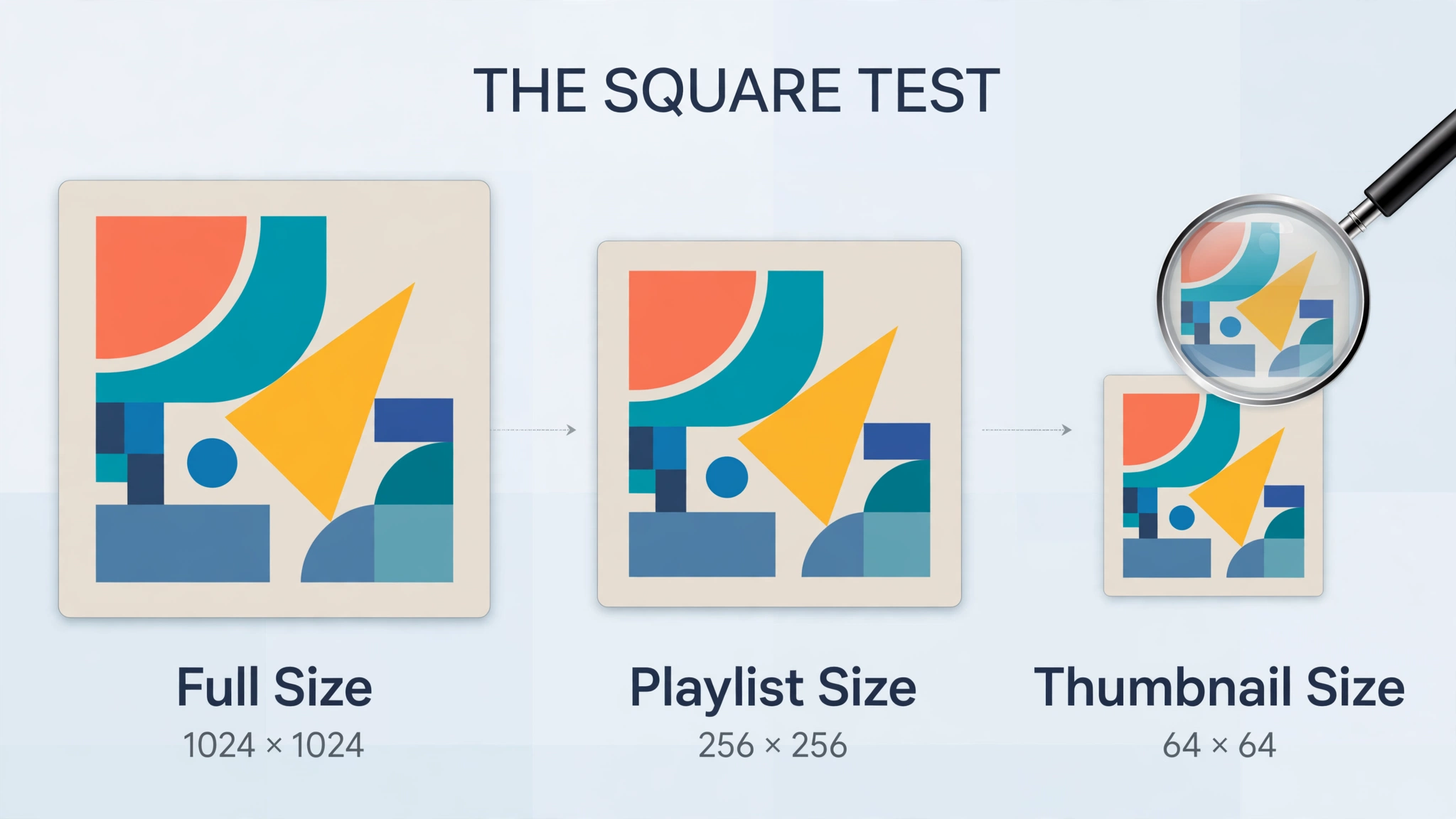
What a Square Has to Do
A square is the hardest shape in design, because nothing about it tells the eye where to start. A good album cover solves that with one focal point, one colour decision and one line of text. The focal point is usually a face, a photograph or a single graphic mark, placed large enough to survive the thumbnail. The colour decision is a palette of two or three colours that matches the mood of the music. The text is the artist name and the release title, set in a typeface that belongs to the genre. Stores reject covers that carry web addresses, social media handles, prices or streaming logos, and the artist name and title on the cover must match the release details exactly.
The genre codes matter more here than in any other cover. A hip hop cover with a portrait and a bold sans serif reads instantly as hip hop, while the same portrait with a thin serif reads as folk. A metal cover with dense blackletter type and dark art reads as metal before a single note plays. The listener uses those codes to decide whether to tap, and a cover that ignores them has to fight the listener’s expectations instead of using them. The best album cover makers are the ones whose templates already respect those codes, rather than handing the artist a blank square and hoping for the best. A template with a genre layout saves an hour of trial and error, and a tool without one costs it.
How the Best Album Cover Makers Were Compared
Each of the best album cover makers was judged on five things that decide whether an album cover is usable when it is finished. Template quality is first, because a cover that starts from a strong genre layout finishes stronger than one that starts from a blank canvas. Photo handling is second, because most album covers are built around a photograph, and the background remover, the colour grading and the crop tools decide how good that photograph looks. Text control is third, because the artist name and the title have to sit exactly where the genre expects them, at a size that survives the thumbnail. Export is fourth, because the cover has to leave as a square JPG or PNG at 3000 by 3000 pixels in RGB colour, and a tool that exports at the wrong size or in the wrong colour mode fails the upload. Price is fifth, measured as the cost of one finished cover and as the cost of a year of releases.
The best album cover makers in this guide all export a square file without a watermark on a paid plan, and every tool here has a free plan or a free trial except Placeit. The comparison below names the limit of each tool plainly, because a tool bought for the wrong job wastes the release it was bought for.
The 12 Tools in Detail
1. Canva
Canva is the tool most artists already have, and its album cover templates are the strongest starting point in this guide. The template library is organised by genre, with layouts for hip hop, pop, rock, electronic and folk that already place the title and the artist name where listeners expect them. The user picks a layout, swaps the photograph, changes the text and exports a square JPG or PNG. The whole job takes under an hour, and the result looks like a cover rather than a poster squeezed into a square.
Pro lists at $120 to $144 a year on annual billing, depending on the region, and the free plan covers a large template set with watermark-free exports, which is enough for a single. Pro adds premium templates, the background remover, a million-plus premium stock photos and the brand kit, which holds the exact colours and fonts of the artist so the cover, the social banners and the merch all match.
The limit is originality. The templates are shared with millions of users, so a cover built from one will look familiar to anyone who has seen the same layout, and the photo tools are simpler than a dedicated editor. For a first single, made by an artist who already pays for Canva, this is the cheapest route here, because the subscription is already paid.
2. Adobe Express
Adobe Express is the Adobe entry in this list, and it suits an artist who wants a polished template with Adobe fonts and stock behind it. The cover starts from a template, the photograph drops in, the text is set in an Adobe font, and the result exports as a square JPG or PNG. The editor is clean, the templates are strong, and the Adobe stock library gives the cover a finish that shows at full size on a TV screen.
Premium costs $9.99 a month, and the free plan covers a solid template set with no watermark on most exports. Premium adds the full template library, premium stock photos, the brand kit and background removal, and a couple of months of Premium covers the cover and the social posts for about $20. Adobe Firefly pairs naturally with Express here, since Firefly generates cover artwork on a free tier, with paid plans from $9.99 a month, and Express handles the typography and the layout on top of it. A cover with generated art and Adobe type looks designed rather than assembled.
The limit is depth. The photo editing is lighter than a dedicated editor, and the templates are shared with every other Express user. For a single or an EP, made quickly for a release week, Express is fast and the result looks professional.
3. Placeit
Placeit is the template tool with the largest mockup library behind it, and its album cover sits inside that library. The user picks a cover template, uploads the artwork or the photograph, changes the text and downloads a square JPG or PNG. The same subscription covers mockups of the cover on a vinyl sleeve, a phone screen, a poster and a shirt, which is useful for a release week.
The subscription costs $14.95 a month or $89.69 a year, which works out to about $7.47 a month on annual billing, and that one price covers unlimited downloads across the whole library with commercial use rights. Single-asset purchases are also available for an artist who needs one cover and nothing else. There is no free trial, so the first month is the test, and a single month is enough to generate every asset a release needs.
The limit is the template. The layout is fixed, the text positions are fixed, and the result looks like the template it came from. There is no photo editor worth the name, so a cover that needs colour grading or a background removal has to be prepared elsewhere first. For a release that needs the cover plus the mockups plus the social images, Placeit is the best value in this guide.
4. Fotor
Fotor is the photo editor in this list, and it suits a cover built around a photograph. The editor opens with the photo, the background remover takes the subject out in one click, the colour tools grade the image, and the text goes on top in a typeface chosen from a large library. A cover that starts from a strong portrait finishes stronger here than in a template tool, because the photo is the whole cover.
Pro costs $8.99 a month on monthly billing or $39.99 a year, which works out to about $3.33 a month, and Pro Plus costs $19.99 a month or $89.99 a year. The free plan covers basic editing with watermarked exports and limited resolution, so the paid plan is the real product for a cover that will sit on a public release. Pro unlocks HD watermark-free exports, the background remover, batch editing and more than 100,000 templates, and the AI credits that come with the plan cover image generation for backgrounds.
The limit is templates. The cover layouts are fewer and plainer than Canva or Express, so an artist who wants a genre layout will build the composition by hand. For a photo-led cover, made by an artist with a good photograph and a clear idea, Fotor is the best tool here.
5. Snappa
Snappa is the fastest tool here for an artist who knows what they want and wants it finished in minutes. The editor opens on a preset canvas size, offers a template, a stock photo library and text, and gets out of the way. An artist picks the square size, chooses a template, swaps the photograph and the title, and exports. The preset sizes mean the file fits first time.
Pro costs $15 a month on monthly billing or $10 a month billed yearly at $120 a year, with unlimited downloads, the background remover, custom fonts and social media integrations. The free plan covers a small number of downloads a month with every template and stock photo included, which is enough to finish a single cover.
The limit is depth. Snappa has no photo grading worth the name and no AI generation, so a cover that needs a photograph transformed or artwork created from nothing has to be made elsewhere first. The template set is smaller than Canva. For a single cover needed today, Snappa is the quickest route here.
6. VistaCreate
VistaCreate is the preset tool with the friendliest price in this list, and it suits an independent artist who needs a cover for social posts and nothing more. The cover goes on a square canvas, templates apply, the text is set, and the result exports as a JPG or PNG. The template library is large, the editor is simple, and a first cover takes minutes.
Pro costs $13 a month on monthly billing or $10 a month billed annually at $120 a year, and the Starter plan is free with over 100,000 templates, a million assets, the background remover and 10 GB of storage. Pro adds over 200,000 templates, 170 million premium assets, unlimited brand kits and unlimited storage, and one Pro plan covers up to ten team members, which means a small label can share one subscription. A 14-day Pro trial needs no credit card, so an artist can build the whole release kit inside the trial and pay nothing.
The limit is the same as the other preset tools. There is no photo grading, no AI generation and no custom layout, so the cover is a template with the artist’s photograph and text in it. For a single on a tight budget, VistaCreate is the cheapest paid route here after Fotor.
7. PicMonkey
PicMonkey is the photo editor with the strongest text tools in this list, and it suits a cover where the typography carries the design. The editor opens with the photograph, the touch-up and colour tools shape it, and the text goes on in a large font library with effects, curves and spacing controls that the template tools do not offer.
Basic costs $7.99 a month or $72 a year, and Pro costs $12.99 a month or $120 a year. Basic covers full photo editing, effects, templates and 1 GB of storage, but no background remover, Smart Resize or brand kit. Pro adds unlimited storage, Smart Resize, the background remover, one brand kit, animation, the premium stock library and PDF export, and a 7-day trial is available. For an album cover, Pro is the plan that matters, because Smart Resize turns the square cover into every promo size and the brand kit keeps a series of singles consistent.
The limit is templates. The cover layouts are fewer than Canva, so an artist who wants a genre layout will compose by hand. For a typography-led cover over a strong photograph, PicMonkey is the best tool here.
8. Visme
Visme is the tool here for a nonfiction or spoken-word release, where the cover has to carry information as well as mood. The editor is built around data and document design, so a cover with a subtitle, a quote or a list of contributors is laid out cleanly, with alignment and spacing tools that the template tools do not offer.
Starter costs $12.25 a month per person on annual billing, which is $147 a year, or $29 a month on monthly billing. The free Basic plan covers standard templates with 500 MB of storage but no downloads, which makes it a preview rather than a working plan for an artist. Starter unlocks JPG, PNG and PDF downloads, the full template and asset library, a brand kit and 200 AI credits a month. The monthly billing price is more than double the annual rate, so a single month of Starter for one cover is an expensive way to buy a cover.
The limit is genre. The templates are built for business and education, not for music, so a hip hop or metal cover will look wrong in Visme. For a spoken-word or audiobook cover, Visme is the cleanest tool here.
9. Design.com
Design.com fits an artist who has no release brand yet and wants the cover, the logo and the website header to come from one set of colours in a single sitting. An artist can shape a simple mark first, then let the cover, the social banners and the website follow it, without hiring a designer or learning a design app. When the cover and the artist website agree, a listener who clicks through from a streaming app sees one artist rather than a collection of mismatched files.
Starting costs nothing, and the paid options add a custom domain and premium features, so the artist should confirm the checkout figure before paying, since the plans shift. The trade-off is depth. The cover templates are clean and the editor is quick, but the range is narrower than Canva or VistaCreate, and there is no photo grading and no AI generation. Take Design.com as a quick, coherent beginning for a new artist building a brand from scratch, not as the tool a working artist uses for every release.
10. PosterMyWall
PosterMyWall is the template tool with the strongest social and email kit behind it, and it suits a release that needs the cover plus the announcement. The cover starts from a template, the text is set, and the same account covers the social posts, the email announcement and the event page for the launch show.
Premium costs $13 a month or $109 a year, and Premium Plus costs $30 a month or $319 a year. Premium includes unlimited high-quality downloads, 3,000 email sends a month, three social accounts, ten event pages a month and a hundred AI credits, which covers an artist with several releases a year comfortably. The free plan covers limited downloads and one social account, which is enough to test the templates before paying.
The limit is photo depth. The editor is a template tool, not a photo editor, so a cover that needs colour grading or a background removal has to be prepared elsewhere. For a release with a launch show and an email list, PosterMyWall is the most complete kit here.
11. Adobe Firefly
Adobe Firefly is the AI generator in this list, and it is the tool for an artist with a sound but no photograph. The user writes a prompt, Firefly generates the artwork, and the result goes into Express or Canva for the typography and the layout. A cover with a surreal landscape, a painted portrait or an impossible object is made in minutes, and the result belongs to the artist alone because no template was involved. Firefly is trained on licensed Adobe Stock and public domain content, which matters for a commercial release.
The free tier covers a limited number of monthly generations, Standard costs $9.99 a month, and Pro costs $19.99 a month, with more generations and more features at each step. The free tier is enough to test a concept, and Standard covers a single with several artwork options to choose from. The typography has to be added in another tool, since Firefly generates images rather than finished covers, and the text it renders inside an image is unreliable, so the artist name and title should always be added in Express or Canva rather than in the prompt.
The limit is control. A generated image cannot be edited the way a photograph can, and the same prompt will not produce the same image twice, so a series of singles will not match unless the artist works at it. For a cover that needs original artwork and no photo shoot, Firefly is the best tool here.
12. Kapwing
Kapwing is a browser video editor, and its album cover comes from the same timeline that makes the lyric video. The cover is built on a square canvas, the text and the photograph are placed, and the same project can produce the cover, the social clips and the lyric video without rebuilding the design.
Pro costs $16 per member a month on annual billing, or $24 a month on monthly billing. The free plan covers the editor with watermarked exports and limited resolution, so the paid plan is the real product for a cover that will sit on a public release. Pro unlocks HD watermark-free exports, the background remover, batch editing and a large template library.
The limit is templates. The cover layouts are fewer than Canva, and the photo tools are lighter than Fotor. For a release where the cover and the lyric video are made together, Kapwing is the most practical tool here.
The 12 Tools at a Glance
| Tool | Price | Free plan | Best for |
|---|---|---|---|
| Canva | $120 to $144 a year | Yes | Genre templates |
| Adobe Express | $9.99 a month | Yes | Adobe polish |
| Placeit | $14.95 a month | No trial | Cover plus mockups |
| Fotor | $8.99 a month | Yes, limited | Photo-led covers |
| Snappa | $15 a month | Yes | Fastest single cover |
| VistaCreate | $13 a month | Yes | Cheapest preset cover |
| PicMonkey | $12.99 a month | Yes | Typography-led covers |
| Visme | $12.25 a month | Yes | Spoken-word covers |
| Design.com | Free to start | Yes | New artist brand |
| PosterMyWall | $13 a month | Yes | Cover plus launch kit |
| Adobe Firefly | Free tier | Yes | Generated artwork |
| Kapwing | $16 a month | Yes | Cover plus lyric video |
The Size Rules for Every Streaming Service
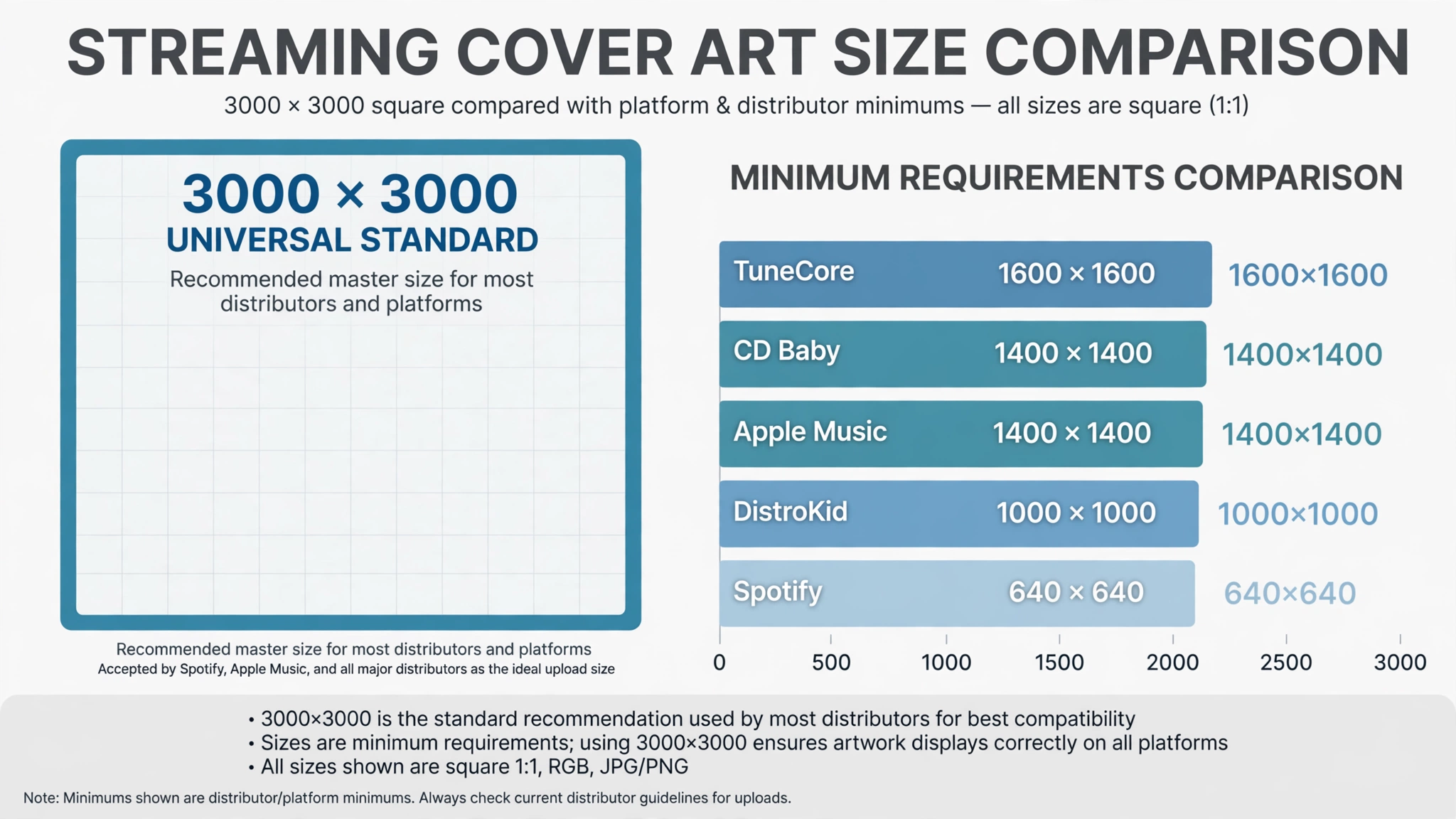
The size rule is simple, and the exceptions are what catch artists out. Build the cover at 3000 by 3000 pixels, square, as a JPG or PNG in RGB colour, and it passes Spotify, which accepts square covers from 640 to 10,000 pixels a side, and most distributors. DistroKid asks for at least 1000 and ideally 3000, TuneCore asks for at least 1600 and at most 3000, and CD Baby asks for at least 1400. Apple is the exception. Its provider guide recommends 3000 by 3000, but its Artists page lists 4000 by 4000 as the minimum, so a release going to Apple needs a second export at 4000. Never upscale a small image to reach these numbers. Start from artwork at 3000 pixels or larger, and keep it in RGB, since CMYK files are rejected.
The content rules are stricter than the size rules, and they are the same across the stores. The artist name and the release title on the cover must match the release details exactly, with no extra words, no web addresses, no social media handles, no email addresses, no phone numbers and no QR codes. No prices, no “out now” stickers, no adverts for merch, and no store or streaming logos. A cover that breaks these rules is rejected at upload, and a rejection costs the release date. The best album cover makers export at the right size with the right colour mode, and the artist’s job is to keep the text clean.
What One Album Cover Costs
A single cover can cost nothing, fifteen dollars, or a year of subscriptions, and the right number depends on how many releases the year will hold. The best album cover makers look different when the price is measured per cover rather than per month. The table below lists the cheapest paid route for one cover from each tool, and the annual cost for an artist releasing every month.
| Tool | One cover | A year of releases |
|---|---|---|
| Canva | $0 on the free plan | $120 to $144 a year for Pro |
| Adobe Express | $9.99 for one month of Premium | $120 a year for Premium |
| Placeit | $14.95 for one month | $89.69 a year |
| Fotor | $8.99 for one month of Pro | $39.99 a year for Pro |
| Snappa | $15 for one month of Pro | $120 a year for Pro |
| VistaCreate | $13 for one month of Pro | $120 a year for Pro |
| PicMonkey | $12.99 for one month of Pro | $120 a year for Pro |
| Visme | $29 for one month of Starter | $147 a year for Starter |
| Design.com | $0 to start | Confirm at checkout |
| PosterMyWall | $13 for one month of Premium | $109 a year for Premium |
| Adobe Firefly | $9.99 for one month of Standard | $120 a year for Standard |
| Kapwing | $24 for one month of Pro | $192 a year for Pro |
The cheapest single cover is a free export from Canva, Adobe Express or VistaCreate. The cheapest paid single cover is a month of Fotor Pro at $8.99 or a month of Adobe Express Premium at $9.99. The most expensive single cover is a month of Visme Starter at $29 on monthly billing, An artist releasing every month should compare the annual column, where Fotor Pro at $39.99 a year is the cheapest paid plan here and Kapwing Pro at $192 a year is the most expensive. The best album cover makers are not the cheapest ones. They are the ones whose price is small against the streams the cover has to earn, and for most artists that means a template tool on a monthly plan for one single, or an annual plan for a year of releases.
Best Pick by Job
| Job | Pick | Why |
|---|---|---|
| Genre templates | Canva | Strongest layout library, brand kit |
| Adobe polish | Adobe Express | Fonts, stock and Firefly art |
| Cover plus mockups | Placeit | $89.69 a year, unlimited downloads |
| Photo-led cover | Fotor | Background remover, $39.99 a year |
| Fastest single cover | Snappa | Preset square, minutes to export |
| Cheapest preset cover | VistaCreate | $13 a month, free trial |
| Typography-led cover | PicMonkey | Best text controls, Smart Resize |
| Spoken-word cover | Visme | Clean layout for information |
| New artist brand | Design.com | Cover, logo and website in one place |
| Cover plus launch kit | PosterMyWall | Social, email and event pages |
| Generated artwork | Adobe Firefly | Licensed training data, original art |
| Cover plus lyric video | Kapwing | One project for cover and video |
Frequently Asked Questions
What size should an album cover be?
Build it at 3000 by 3000 pixels, square, as a JPG or PNG in RGB colour. That size passes Spotify, which accepts square covers from 640 to 10,000 pixels a side, and most distributors, which ask for 3000. Apple is the exception, since its Artists page lists 4000 by 4000 as the minimum, so a release going to Apple needs a second export at 4000.
Can I use Canva for an album cover?
Yes, and it is the most popular route for independent artists. Pick a genre template, swap the photograph, set the artist name and the title, and export a square JPG or PNG at 3000 by 3000. The free plan exports without a watermark, which is enough for a single.
How much does an album cover cost?
A cover costs nothing on the free plan of Canva, Adobe Express or VistaCreate. A paid subscription costs $40 to $150 a year depending on the tool, and one month of a monthly plan costs $9 to $24 for a single cover. A custom cover from a professional designer costs $300 to $1,200.
Why was my album cover rejected?
The usual reasons are text that does not match the release details, a web address or social media handle on the cover, a price or an “out now” sticker, a streaming logo, or a file at the wrong size or in CMYK colour. Check the artist name and the title letter by letter, remove anything promotional, and export a square JPG or PNG at 3000 by 3000 in RGB.
What makes an album cover get tapped?
One focal point, one colour decision and one line of text. The cover has to read at thumbnail size, so the photograph or the mark has to be large, the title has to be legible at 64 pixels, and the genre codes have to be right, because the listener uses them to decide whether to tap.