

Most people reuse the same password in several places, and that single habit is responsible for more account takeovers than any clever attack. One leaked database hands criminals the keys to email, banking and work systems at once, and the damage spreads before anyone notices. The top 10 password managers remove the habit entirely by creating and remembering a different strong password for every account, and 1Password leads this ranking on the combined score, while Bitwarden wins for buyers who want the same protection at the lowest honest price.
A password manager does three practical things. It creates passwords no human would remember, it fills them in without typing, and it warns you when a password appears in a known breach. The tools in this ranking differ mainly in how easy they make those three jobs, and in how well they handle the sharing, family and business cases that follow.
We ranked the ten tools below on security design, ease of daily use, sharing, family and business features, and price shape, with the security model weighted heaviest. The ranking favours tools that stay out of the way, because a manager that annoys its owner will be abandoned, and an abandoned manager protects nothing.
Passkeys are changing the job, and the tools in this ranking are ready for that change. A passkey lets a user sign in with a fingerprint or a face scan instead of a typed password, and it cannot be phished the way a password can. The manager stores the passkey beside the password, so the move happens one site at a time without a painful migration.
In this article
The 10 Tools at a Glance
The top 10 password managers in the table below are ranked on combined value, and each row gives the price shape, the natural fit and the strength that earned its place. Use the table to cut the list to two or three candidates, then let the detail reviews of 1Password and Bitwarden decide between them. Check the 1Password pricing page and confirm before you pay, since plans and limits change without notice.
| Tool | Starting price | Best for | Standout strength |
|---|---|---|---|
| 1Password | Pricing on the vendor site | Families and small teams | Sharing and travel mode in one clean app |
| Bitwarden | Free plan; paid plans on the vendor site | Buyers on the tightest budget | Full features at the lowest honest price |
| Dashlane | Free plan; paid plans on the vendor site | Buyers who want the easiest first week | Setup that guides you from the first minute |
| LastPass | Free plan; paid plans on the vendor site | Long time users | Familiar vaults with broad device support |
| Keeper | Pricing on the vendor site | Regulated businesses | Admin controls built for compliance |
| NordPass | Free plan; paid plans on the vendor site | Occasional travellers | Simple vaults with a clean mobile app |
| RoboForm | Free plan; paid plans on the vendor site | Heavy form filling | Form filling that handles the awkward sites |
| Enpass | Free plan; paid plans on the vendor site | Buyers who want offline vaults | Local vaults with no forced cloud |
| Proton Pass | Free plan; paid plans on the vendor site | Privacy first buyers | Encrypted vaults from a privacy focused team |
| Zoho Vault | Free plan; paid plans on the vendor site | Zoho shops | Team vaults inside the Zoho stack |
A table can only show so much, so treat the price column as a starting point for 1Password and Bitwarden rather than a promise. The real difference between neighbouring tools is usually fit for a buyer weighing 1Password, and fit is what the detail reviews below are built to show. Read the two or three rows that match your situation, then jump to those reviews first, starting with 1Password if it fits.
How We Tested the Top 10 Password Managers
We scored the top 10 password managers on five measures that matter to the person who has to live with the tool every day. Security design counted double, because a password manager holds the keys to everything, and a weak design there cannot be fixed by a pretty interface or a low price.
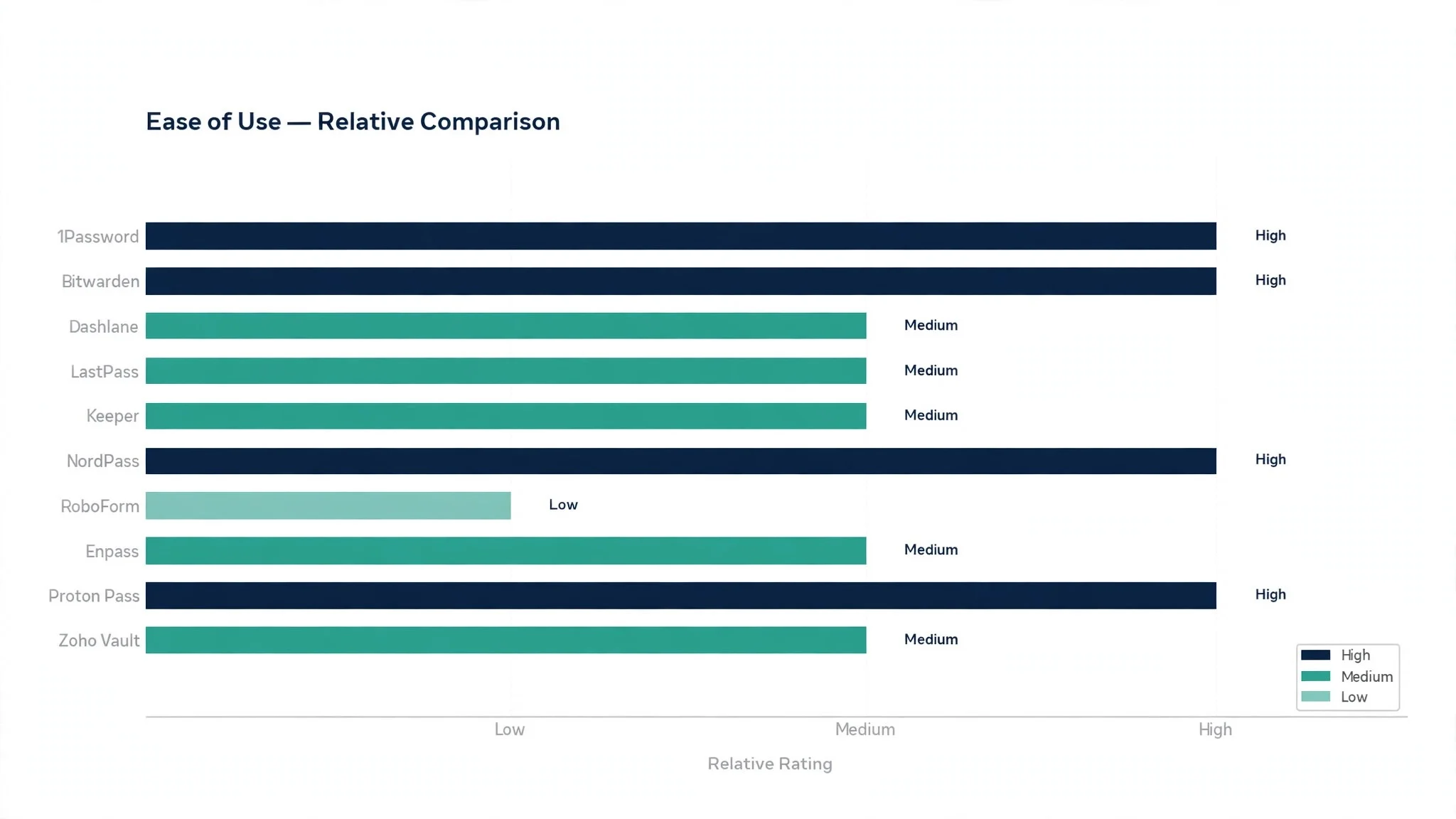
Daily use came next, and we tested it by creating accounts, logging in, changing passwords and filling forms on a phone and a laptop for two weeks. The best tools filled logins without a second thought, while the worst asked for confirmation at every step or failed on the sites people actually use.
Sharing was judged by the real cases, which are a couple sharing streaming logins, a family sharing wifi and school accounts, and a small team sharing a company login. The tools that scored well make sharing a single click with clear revocation, while the weak ones force workarounds that leave old passwords lying around.
We also checked breach alerts and passkey support, since both decide how useful the tool stays over the next two years. A manager that warns you about a leaked password is worth more than one that silently stores it, and passkey support means the tool grows with the login standards rather than fighting them.
Scores run out of 100, and the order below follows the combined total, led by 1Password on the core job. Where two tools tied, we broke the tie on daily use, since the manager you actually open every day is the one that protects you.
We also checked the help on offer, since a password manager is the one tool where a locked out user needs a human quickly. The tools that scored well answer support requests fast and publish clear recovery guides, while the weak ones leave a locked out user guessing. A manager that cannot help in a crisis is a manager that will be abandoned after the first lockout.
Best Pick by Job
No single winner fits every buyer, so we matched each common situation to the tool that scored highest for that job, with 1Password leading on the core job. The top 10 password managers split by job more than by brand, and the table below makes that split clear.
| Job | Best pick | Why it wins |
|---|---|---|
| Families and small teams | 1Password | Sharing and travel mode in one clean app |
| Tightest budget | Bitwarden | Full features at the lowest honest price |
| Easiest first week | Dashlane | Setup that guides you from the first minute |
| Long time users | LastPass | Familiar vaults with broad device support |
| Regulated business | Keeper | Admin controls built for compliance |
| Occasional traveller | NordPass | Simple vaults with a clean mobile app |
| Heavy form filling | RoboForm | Form filling that handles the awkward sites |
| Offline vaults | Enpass | Local vaults with no forced cloud |
| Privacy first | Proton Pass | Encrypted vaults from a privacy focused team |
| Zoho shops | Zoho Vault | Team vaults inside the Zoho stack |
If your situation does not match a row exactly, take the closest one and read that review first, starting with 1Password when it fits. The gap between neighbouring tools is smaller than the gap between a tool a buyer opens daily and one it avoids, so fit to the daily work matters more than a few points on a scorecard, and 1Password shows why.
The 10 Tools in Detail
Each review below follows the same pattern, and the top 10 password managers are judged on the core job first, then on what each tool does best and where it falls short. Where the vendor site listed a price we could verify, it appears in the review for 1Password and Bitwarden, and where the price sits behind a sales call, the review says so.
1. 1Password
1Password is the all rounder, and it leads this ranking because it does every job in the list well rather than one job brilliantly. The vaults are clean, sharing is a single click, travel mode hides sensitive vaults at borders, and the Watchtower alerts flag weak and leaked passwords without nagging. For a family or a small team, that balance is the whole product.
The trade off is price, since 1Password has no free plan and the family plan is the value play. A buyer who wants the best daily experience will find it worth the cost, while a tight budget should look at Bitwarden. Our verdict. The strongest all rounder here, and the best first password manager for most buyers.
2. Bitwarden
Bitwarden is the value specialist, and it earns second place by offering serious security at a price almost anyone can accept. The code is open source, the free plan covers the basics honestly, and the paid plan costs less than a coffee a month. For a buyer who wants strong protection without a large bill, Bitwarden is the most honest deal in this ranking.
The trade off is polish, since the interface is plainer than 1Password and the setup asks a little more of the user. A buyer who values function over finish will never notice, while one who wants the smoothest experience should look at the top of this list. Our verdict. The best value here, ideal for careful buyers.
3. Dashlane
Dashlane is the onboarding specialist, and it earns its place with the smoothest first week in this ranking. The setup walks you through importing passwords, fixing weak ones and turning on breach alerts, and the interface explains itself without a manual. For a first time user who has never trusted a password manager, Dashlane is the gentlest introduction.
The trade off is price on the higher plans, since the full feature set costs more than Bitwarden. A first time buyer will find the guidance worth it, while a confident user may prefer the cheaper options. Our verdict. The easiest start here, ideal for first time users.
4. LastPass
LastPass is the familiar name, and it earns its place with vaults that work across every device and browser without fuss. The autofill is dependable, the sharing is straightforward, and long time users will find the layout exactly where they left it. For a buyer who has used LastPass for years, the continuity alone is a reason to stay.
The trade off is trust, since LastPass suffered a serious breach in the past and some buyers moved away. The product itself remains capable, but a buyer who values a clean security record should look at the top of this list. Our verdict. A capable vault for loyal users, with a history worth weighing.
5. Keeper
Keeper is the business compliance specialist, and it earns its place with admin controls that a regulated company can actually audit. Role based access, detailed event logs and breach monitoring come standard, and the admin console shows the security state of the whole team at a glance. For a business that must prove its password hygiene, Keeper is the clearest choice.
The trade off is that Keeper feels corporate for a family or an individual, and the interface is built for admins rather than casual users. A business buyer will value the control, while a household should look higher up this list. Our verdict. The best admin control here for regulated teams.
6. NordPass
NordPass is the simplicity specialist, and it earns its place with a clean vault that does the basics well on every device. The mobile app is fast, the autofill works without fuss, and the free plan covers a single user honestly. For a traveller who needs logins on a phone and a laptop without thinking about it, NordPass is a quiet and dependable choice.
The trade off is depth, since NordPass lacks the family and business features of the leaders. An individual user will never miss them, while a team should look at 1Password or Keeper. Our verdict. The simplest vault here for individuals on the move.
7. RoboForm
RoboForm is the form filling specialist, and it earns its place by handling the awkward sites that defeat other managers. Long checkout forms, multi page logins and unusual fields all fill correctly, which saves real time for anyone who registers for things all day. For a buyer whose main pain is forms rather than passwords, RoboForm is the most capable tool in this ranking.
The trade off is that the interface feels older than the leaders, and the password features are solid rather than outstanding. A form heavy user will forgive that, while a buyer who wants the prettiest vault should look elsewhere. Our verdict. The best form filler here.
8. Enpass
Enpass is the offline specialist, and it earns its place by letting vaults live on your own devices with no forced cloud. You choose where the vault syncs, whether that is your own storage or none at all, and the tool works fully without a connection. For a buyer who distrusts cloud vaults on principle, Enpass is the only honest answer in this ranking.
The trade off is convenience, since the buyer owns the sync setup and the sharing features are lighter than the cloud tools. A privacy minded individual will value the control, while a team that shares constantly should look at the cloud options. Our verdict. The best offline vault here.
9. Proton Pass
Proton Pass is the privacy specialist, and it earns its place with encrypted vaults from the team behind Proton Mail. The free plan is generous, the hide my email aliases protect your real address at signup, and the encryption story is clear enough to explain to anyone. For a buyer who already trusts Proton with email, Pass is the natural extension.
The trade off is youth, since Proton Pass is newer than the leaders and some business features are still catching up. An individual buyer will find it complete, while a large team should check the admin features in the trial. Our verdict. The best privacy story here for individuals.
10. Zoho Vault
Zoho Vault is the Zoho stack specialist, and it earns its place with team vaults that fit naturally beside Zoho CRM, Mail and Projects. Shared passwords follow team roles, access reports show who used what, and the price is modest for what it covers. For a business already running on Zoho, Vault is the obvious and cheapest fit.
The trade off is that Zoho Vault makes little sense outside the Zoho world, and the individual features are thinner than the leaders. A Zoho business will find it ideal, while anyone else should look higher up this list. Our verdict. The best vault here for Zoho businesses.
Rolling Out a Password Manager to Your Whole Team
Start with yourself, because a rollout led by someone who does not use the tool will fail. Move your own logins first, live with the tool for a week, and note every place it helps and every place it annoys you. That week of honest use is the training material for everyone else, and it is worth more than any vendor guide.
Roll out to the team in small groups, and give each group one clear task, which is to move their ten most used work logins in the first week. Shared logins move second, once people trust the vault, and old shared spreadsheets get deleted only after the new vault is proven. A rollout that moves everything on day one creates panic, while a staged rollout creates confidence.
Set the rules before the rollout rather than after it, since a vault with no rules becomes a junk drawer within a month. Decide who owns shared folders, how leavers lose access, and how often the team reviews weak and reused passwords. The tools that report on weak passwords make that review a five minute job, and the review is what keeps the vault honest.
Plan for the lost master password, because it will happen to someone. Write the recovery process down, test it with one volunteer, and make sure the team knows that a lost master password without a recovery key means a locked vault. A team that understands that rule in advance handles it calmly, while one that discovers it in a crisis does not.
Handle leavers on the day they go, because a shared login that stays live after someone leaves is a risk nobody notices until it matters. The tools with admin controls make removal a single click, and the vault should show which shared items the leaver could see. A monthly check of who still has access keeps the list honest, and the habit takes five minutes.

Passkeys, Breach Alerts and the Next Two Years
Passkeys will replace many passwords over the next two years, and the tools in this ranking are ready for that change. A passkey lets a user sign in with a fingerprint or face scan instead of a typed password, and it cannot be phished the way a password can. The manager stores the passkey beside the password, so the transition happens one site at a time without a painful migration.
Breach alerts are the feature that earns its keep quietly, because a password that appears in a known breach needs changing the same day. The tools that watch breach databases and warn the owner turn a silent risk into a five minute fix, while a manager without alerts leaves the owner blind. Turn the alerts on in the first week, and act on the first warning, since the habit matters more than the feature.
The family plan is the most underrated feature in this ranking, because security habits spread through households faster than through companies. A parent who shares the vault with a teenager teaches password hygiene by example, and the teenager carries that habit into work. The tools with family plans make that extension easy, and the gain is real even though it never appears on a business invoice.
Plan the succession, because a vault that only one person can open becomes a problem when that person is away. Most tools in this ranking offer emergency access, which lets a trusted person open the vault after a waiting period. Set it up now, while the need feels distant, since the family that discovers the gap in a crisis will wish it had acted sooner.
The emergency access feature is the one most buyers ignore until they need it, and by then it is too late. Most tools in this ranking let a trusted person open the vault after a waiting period, which protects the family if the owner cannot. Set it up now, while the need feels distant, since a vault that only one person can open becomes a problem at the worst possible moment.
Do not forget the family angle, because team members go home and reuse work habits at home. A manager with a family plan lets people protect their personal accounts with the same tool, and that habit carries back into work. The tools in this ranking with family plans make that extension easy, and the security gain is real even though it never appears on a business invoice.
Measure the rollout on three numbers, which are reused passwords found, weak passwords fixed and shared logins moved into the vault. If reused passwords fall to near zero in a month, the tool is working. If the numbers do not move, the problem is usually training rather than the tool, so run a short session on the worst habits before switching tools.
The top 10 password managers also differ in how they handle the accounts of someone who leaves a team. The better ones let an admin move the shared logins to a new owner in one step, so nothing is lost and nothing stays in the wrong hands. A vault that cannot transfer ownership cleanly will leave orphaned logins that nobody can use and nobody can delete.
Secure notes deserve the same care as passwords, because the vault holds more than logins. Wifi codes, licence keys, recovery codes and safe combinations all belong in the vault rather than in a drawer, and the tools that make notes easy to find will be used for them. Search the vault by what you need rather than by where you think you filed it, and the notes stay useful.
Travel mode is worth turning on before a trip, since it hides the vaults a border officer should never see. 1Password offers the clearest version of this, and the habit is simply to enable it before departure and disable it on return. A vault that travels light is a vault that stays safe, and the setting costs nothing to use.
The vault health report is the monthly habit that keeps the system honest. Most tools in this ranking show weak, reused and old passwords in one view, and fixing the worst ten each month turns a messy vault into a strong one within a quarter. A vault that nobody reviews will drift back to bad habits, while one that gets a monthly check stays strong.
Secure sharing with an expiry date is the feature that prevents old access from lingering. A password shared for a project should stop working when the project ends, and the tools that set expiry dates automatically make that easy. Check the shared folder every quarter, and remove the people and the passwords that no longer belong there.
Frequently Asked Questions
Buyers ask the same questions before choosing from the top 10 password managers, so the plain answers below cover the ones that come up most often. They are written for the buyer who has to live with the decision on 1Password, not for the vendor brochure.
What happens if I forget my master password?
That depends on the tool, and it is the most important question to ask before you commit. Some tools offer account recovery through a trusted device or a recovery key, while others cannot reset the vault at all, which is the price of strong encryption. Store the recovery key somewhere safe and separate from the vault, and test the recovery flow once while you still remember the password.
Are passkeys really replacing passwords?
They are replacing them gradually, and the tools in this ranking all support passkeys now. A passkey lets you sign in with a fingerprint or face scan instead of a typed password, and it cannot be phished the way a password can. Keep the password manager anyway, because most sites still need passwords today, and the manager stores the passkeys alongside them.
Should a family use one vault or separate vaults?
Separate vaults with sharing is the right answer, and the best tools in this ranking make it easy. Each person keeps a private vault, and shared logins live in a shared folder that any member can leave. One big shared vault means everyone sees everything, which is convenient until a teenager shares the streaming login with a friend.
How hard is it to move from another password manager?
Most tools in this ranking import from their rivals in minutes, and the process is simply to export from the old vault and import into the new one. Check the import twice for shared folders and secure notes, since those are the items most likely to need a manual fix. Run the new tool alongside the old one for a week before deleting anything.
Can I use a password manager offline?
Most of the tools in this ranking keep a local copy of the vault on your devices, so you can log in without a connection. Enpass is the strongest choice for offline use, since its vaults can live entirely on your own devices. The cloud based tools sync when the connection returns, so a short outage never locks you out.
Our Verdict on Password Managers
The decision comes down to three numbers, and they are all measurable in a trial. The top 10 password managers prove themselves on reused passwords removed, time saved at login and the number of breach warnings acted on, and a two week trial with your real accounts will show all three. 1Password wins our ranking on the combined score, but the right tool for your household or team is the one everyone actually uses every day.
Run the trial with your real logins and your real devices, and judge the tool on the daily login rather than the demo. If logging in feels effortless and the vault fills itself without prompting, the system is working. If you find yourself typing passwords by hand again within a week, the tool is fighting you rather than helping you. Pick the tool that makes strong passwords the easy option, protect the master password, and let the calmer inbox pay for the subscription many times over.
Start with the family plan if one is on offer, because the people at home shape the habits at work. A household that shares a vault learns good practice together, and the children carry it into their own working lives. The cost of a family plan is small beside the protection it gives, and the habit it builds is the real product.