

A manager’s day is a stream of requests, deadlines and promises, and the ones that slip are the ones that cost trust. A good to-do app catches every commitment the moment it is made, then shows the manager what matters today without a hunt. The best to-do list apps for managers turn that daily flood into a short, honest list. Todoist leads this ranking on the combined score, with TickTick close behind for managers who want calendar and habits in the same app.
We judged each app on real manager work rather than a feature list. That meant capturing a task from an email, delegating it to a team member, planning a day around meetings, and running a Friday review of what got done. We tracked how fast a task went in and how the handover read.
Todoist earns the top spot on capture speed, TickTick on built-in value, and every app after them on a strength of its own. Some are full work platforms built for teams. Others are focused personal lists that suit a manager who plans alone. The right pick depends on how much of your day is delegation, how your calendar looks, and whether your team lives in the same tool.
Todoist tops the combined score, yet a manager who plans one way every day should let the best pick by job table near the end carry equal weight. An app that ranks seventh overall can still be the right answer for a manager who plans on paper first.
In this article
- The 15 Tools at a Glance
- Why the Best To-do List Apps for Managers Pay for Themselves
- How We Put Each To-do App Through Its Paces
- The 15 Tools in Detail
- Personal Lists vs Team Boards: The Split That Decides the Shortlist
- Five Habits That Make a To-Do App Actually Stick
- A Two Week Manager Trial That Tells the Truth
- What to Check Before You Roll One App Out to a Team
- Best Pick by Job
- Frequently Asked Questions
- Why Todoist Leads Our Manager To-do Ranking
The 15 Tools at a Glance
The table below puts one row per app, with the price shape, the natural fit, and the strength that put Todoist first. The best to-do list apps for managers are not always the most powerful, and the table shows why. Todoist leads on fast capture, while Microsoft To Do wins for managers who want a capable list for free.
| Tool | Starting price | Best for | Standout strength |
|---|---|---|---|
| Todoist | Free plan; paid plans on the vendor site | Managers who capture fast | Natural language entry on every platform |
| TickTick | Free plan; paid plans on the vendor site | Managers who want calendar built in | Calendar, timer and habits in one app |
| Things 3 | Pricing on the vendor site | Apple-only managers | Beautiful design with one-time pricing |
| Asana | Free plan; paid plans on the vendor site | Managers who run team projects | Tasks tied to projects and goals |
| Trello | Free plan; paid plans on the vendor site | Visual managers who like boards | Kanban boards that anyone can read |
| ClickUp | Free plan; paid plans on the vendor site | Managers who want everything in one place | Tasks, docs and dashboards together |
| Monday.com | Pricing on the vendor site | Managers who track work in tables | Colourful boards with strong reporting |
| Notion | Free plan; paid plans on the vendor site | Managers who build their own system | Docs, databases and tasks combined |
| Microsoft To Do | Free plan | Managers inside Microsoft 365 | Free lists synced with Outlook and Teams |
| Sunsama | Pricing on the vendor site | Managers who plan each day deliberately | Guided daily planning ritual |
| Any.do | Free plan; paid plans on the vendor site | Managers who want list plus calendar | Simple lists with a daily planner |
| OmniFocus | Pricing on the vendor site | Apple managers who follow GTD | Deep GTD structure for power users |
| Akiflow | Pricing on the vendor site | Managers whose tasks live elsewhere | Pulls tasks from many tools into one day |
| Google Tasks | Free plan | Managers inside Google Workspace | Simple lists inside Gmail and Calendar |
| Superlist | Free plan; paid plans on the vendor site | Managers who want a modern list | Fast lists with clean team sharing |
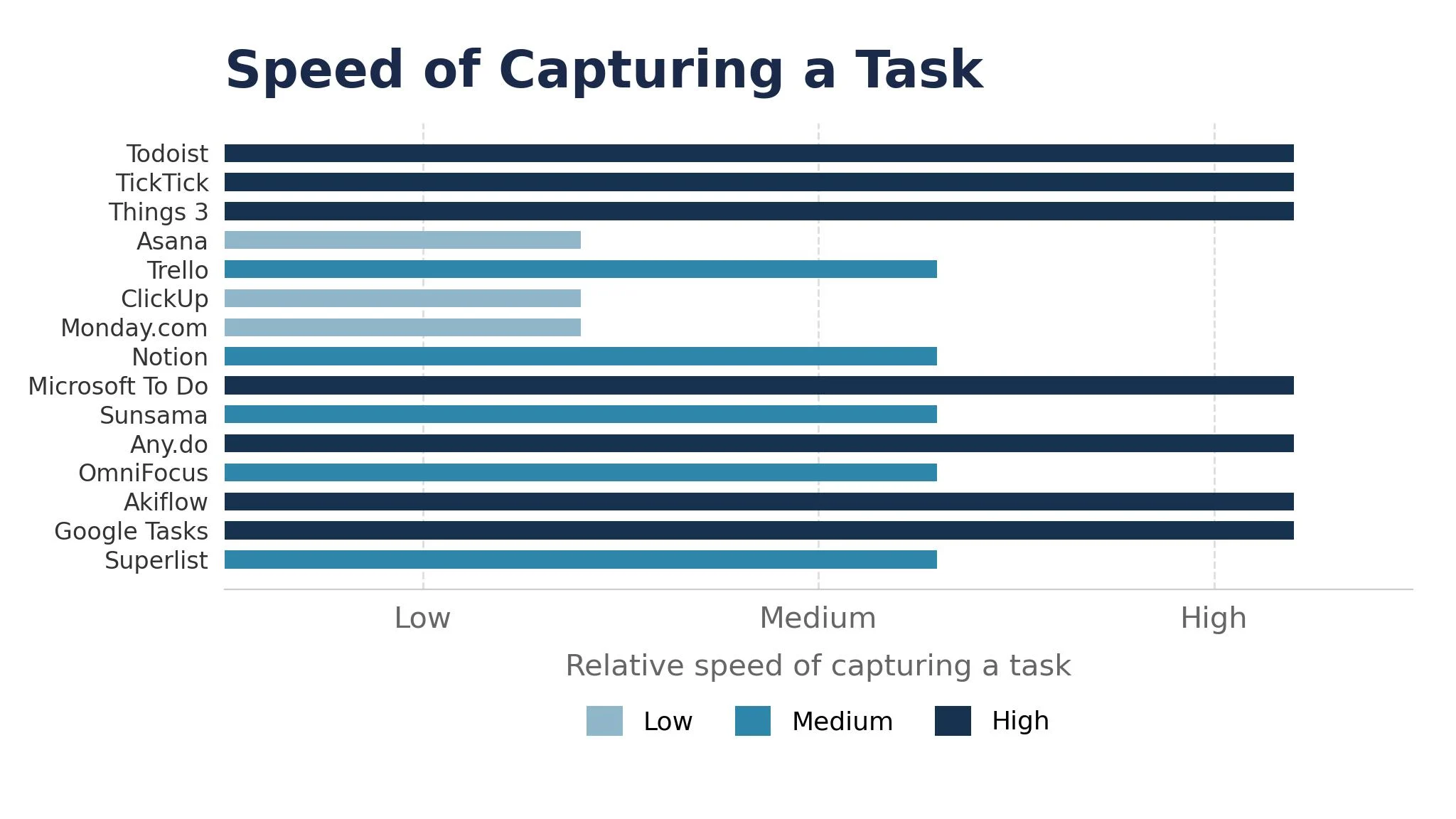
Narrow the table to Todoist and TickTick, then read those two reviews to see which planning routine fits your week. An app that scores High on capture speed only helps if you capture tasks all day, and an app that scores High on team features only helps if your team uses it.
Why the Best To-do List Apps for Managers Pay for Themselves
The best to-do list apps for managers pay for themselves in the same place, which is the commitment that does not slip. A manager who promises a report by Thursday and delivers it on Thursday keeps trust, and trust is the currency a manager spends every day. Across a year of promises, the ones kept on time are worth far more than the app costs.
The second reason is a calmer morning. A manager who opens a short, planned list instead of a flooded inbox starts the day deciding rather than reacting. The app does the remembering, so the manager can do the thinking.
The third reason is delegation that actually lands. A task handed over in an app carries a due date, a clear owner and a paper trail, so nothing vanishes into a chat message. The team knows what is expected, and the Friday review takes minutes instead of an hour.
The fourth reason is fewer meetings. When the list shows who owns what and when it is due, the status meeting shrinks to the exceptions. A manager who trusts the list stops calling meetings to find out what is happening, and the team gets its afternoons back.
How We Put Each To-do App Through Its Paces
We tested the best to-do list apps for managers against the same five measures, using a task captured from an email, a delegation to a team member, a day planned around meetings, and a Friday review of the week. Each app ran the same workload for two weeks, so Todoist and the rest compare like with like.
- Capture speed, judged by how quickly a task went in from an email without breaking the flow.
- Team delegation ease, measured by how fast a task reached a team member with a clear due date.
- Calendar fit, scored on whether the day plan sat beside the meetings without double entry.
- Reminder reliability, timed by whether the right nudge arrived at the right moment.
- Weekly review clarity, judged by how fast a manager could see what got done and what slipped.
Each measure carried equal weight except capture speed, which counted double, because a to-do app that makes capture slow is not doing its job. Scores run out of 100, and the order below follows the combined total, led by Todoist on capture speed. Where two apps tied, we broke the tie on reminder reliability, since a reminder that never arrives is worse than none.
We also checked the mobile apps, because managers capture tasks on the move. The best apps here open fast and sync instantly, while the weakest make the manager wait for the list to load.
The 15 Tools in Detail
Each review below follows the same pattern, and every app is judged on the same ground as the best to-do list apps for managers. We note what each app does best and where it falls short, with capture speed carrying the most weight.
1. Todoist
Todoist is the capture leader in this ranking, and it leads because typing a task feels instant. Natural language entry turns “email Sara every Monday at 9am” into a recurring task in one line, and the app runs on every platform.
The trade off is depth at the edges. Todoist has no native start dates, and the reminders sit on the paid plan, so a manager who plans by start date will feel the gap. A manager that invests in the Pro plan gets the fastest capture here, but one who needs start dates should look at Things 3 or TickTick.
In the trial, capture ten tasks from email and meetings in one day, then plan tomorrow from the list. Time the capture, and check whether the list read clearly the next morning.
Our verdict. The fastest capture here, and the best all rounder for most managers.
2. TickTick
TickTick is the value pick, and it earns second place by bundling the most into one subscription. A built-in calendar, a Pomodoro timer and a habit tracker sit beside the task list, so a manager can plan the day and time the work without a second app.
The trade off is polish. TickTick is slightly less refined than Todoist or Things 3, and the interface shows its many features at once. For a manager who wants value over shine, that trade is worth making, because the calendar alone replaces a separate subscription.
In the trial, plan one full day with the calendar view and run two timed work blocks. Check whether the day plan stayed clear, and whether the timer helped.
Our verdict. The best value here, ideal for managers who want calendar plus tasks.
3. Things 3
Things 3 is the design pick, and it suits Apple-only managers who want the calmest list in this ranking. The Areas, Projects and Tasks structure is clean, the Today view encourages a short honest list, and the one-time purchase beats a subscription over two years.
The trade off is platform lock. Things 3 runs on iPhone, iPad and Mac only, with no Android, no Windows and no web app, and there is no collaboration at all. For a solo manager on Apple, that focus is a strength, because the app never tries to be a team tool.
In the trial, set up your areas and plan one week of Today lists. Check whether the design stayed calm, and whether the one-time price felt fair.
Our verdict. The best-designed list here, ideal for Apple-only managers.
4. Asana
Asana is the team pick, and it earns its place by tying tasks to projects and goals. A manager can assign work, set due dates, track progress on a timeline, and see the whole team workload at a glance.
The trade off is weight for personal use. Asana is built for teams, so a manager who mostly plans alone will find it heavier than a simple list. For a manager running projects with five or more people, the structure pays, because the handover trail is complete.
In the trial, create one project, assign five tasks and check the workload view. Ask whether the assignments were clear, and whether the team could see their own lists.
Our verdict. The strongest team task tool here, ideal for managers who delegate daily.
5. Trello
Trello is the visual pick, and it suits managers who think in boards rather than lists. Cards move across columns, checklists live inside each card, and anyone can read the board at a glance.
The trade off is depth. Trello is lighter on dates, dependencies and reporting than Asana or ClickUp, so a complex project will need power-ups to keep up. For a manager whose work is mostly stages and handoffs, that lightness is exactly right.
In the trial, build one board for the week and move five cards through it. Check whether the board stayed readable, and whether the due dates were clear.
Our verdict. The most readable board here, ideal for visual managers.
6. ClickUp
ClickUp is the all-in-one pick, and it earns its place by packing tasks, docs, goals, dashboards and whiteboards into one platform. A manager who wants the whole workspace in one subscription gets deep customisation, and the free plan covers a useful start.
The trade off is complexity. ClickUp covers so much ground that a new team takes time to learn where each feature lives, and the setup rewards a manager who will configure it properly. For a team that commits to one platform, the depth pays, because the docs and the tasks finally live together.
In the trial, set up one project with tasks, a doc and a dashboard. Check whether the setup stayed manageable, and whether the dashboard explained the week.
Our verdict. The most complete workspace here, ideal for teams that want one tool.
7. Monday.com
Monday.com is the reporting pick, and it suits managers who track work in colourful tables. The boards are visual, the status columns make progress obvious, and the reporting shows workload and deadlines at a glance.
The trade off is price shape. Monday.com sells per seat at a level that climbs fast with a team, and the entry plan is lighter than the marketing suggests. For a manager with a budget and a team to track, the visibility is worth it, but a solo manager should look at the simpler lists first.
In the trial, build one board for the team week and check the workload view. Ask whether the statuses were obvious, and whether the report read clearly.
Our verdict. The clearest team tracking here, ideal for managers who report weekly.
8. Notion
Notion is the system pick, and it earns its place by letting a manager build the exact system they want. Docs, databases and tasks combine, so a meeting note can hold the tasks it created, and a project page can show its own list.
The trade off is setup time. Notion is a blank canvas first, so a manager who wants a working list today must build it or borrow a template. For a manager who enjoys building systems, that effort pays, because the result fits the way they actually think.
In the trial, build one weekly planner page with tasks and notes. Check whether the build took too long, and whether the page stayed useful all week.
Our verdict. The most flexible system here, ideal for managers who build their own.
9. Microsoft To Do
Microsoft To Do is the free pick, and it earns its place as the best completely free option in this ranking. There is no paid tier, no limits and no upsells, and the Outlook and Teams integration turns flagged emails into tasks automatically.
The trade off is depth. Microsoft To Do is a clean list rather than a project tool, so a manager who needs dependencies or rich reporting will outgrow it. For a manager whose day is lists and email, that simplicity is a strength, because the tool never gets in the way.
In the trial, flag five emails and plan tomorrow from the My Day view. Check whether the flagged tasks arrived cleanly, and whether the list stayed simple.
Our verdict. The best free list here, ideal for managers inside Microsoft 365.
10. Sunsama
Sunsama is the ritual pick, and it suits managers who want a deliberate daily plan. The guided ritual pulls tasks from other tools into one daily view, then walks the manager through choosing what matters, timeboxing it and shutting down at the end of the day.
The trade off is price. Sunsama has no free tier, and the monthly cost is the highest in this ranking for a single user. For a manager who will use the ritual every day, the price buys a habit, but a manager who only needs a list should look at the cheaper apps first.
In the trial, run the guided planning ritual for three mornings. Check whether the day felt calmer, and whether the shutdown review helped.
Our verdict. The best daily ritual here, ideal for managers who plan deliberately.
11. Any.do
Any.do is the simple pick, and it earns its place by pairing a genuinely free list with a calendar and a daily planner. The Premium price is low, the interface is friendly, and the Moment feature walks a manager through the day each morning.
The trade off is depth. Any.do is lighter on team features and reporting than Asana or ClickUp, so a manager running a large team will outgrow it. For a manager planning mostly alone, that lightness is exactly right, because the app stays fast.
In the trial, plan one week with the Moment feature and check the calendar view. Ask whether the morning plan stayed short, and whether the calendar matched the list.
Our verdict. The easiest list plus calendar here, ideal for managers who plan alone.
12. OmniFocus
OmniFocus is the GTD pick, and it suits Apple managers who follow Getting Things Done seriously. The perspectives, contexts and review features go deeper than any other app here, so a manager with hundreds of tasks can still find the next action.
The trade off is learning curve and platform. OmniFocus is Apple-only and rewards a manager who will learn its structure, so a casual user will find it heavy. For a manager who lives by GTD, that depth is the whole point, because the system finally matches the method.
In the trial, set up one perspective for the week and run the review feature. Check whether the next actions were obvious, and whether the review felt useful.
Our verdict. The deepest GTD tool here, ideal for Apple power users.
13. Akiflow
Akiflow is the connector pick, and it earns its place by pulling tasks from Asana, Jira, Todoist, Gmail and Slack into one daily view. A manager whose tasks live across five tools stops hunting each morning and plans from one place.
The trade off is price and scope. Akiflow costs more than a simple list, and it is a planner rather than a task store, so the tasks still live elsewhere. For a manager whose fragmentation is the real problem, that price buys back the morning, but a manager with one source of tasks should look at the simpler apps first.
In the trial, connect your three busiest tools and plan one day from the unified view. Check whether the pull worked cleanly, and whether the day plan felt complete.
Our verdict. The best multi-tool planner here, ideal for managers with scattered tasks.
14. Google Tasks
Google Tasks is the Workspace pick, and it earns its place as the simplest list inside Gmail and Calendar. A task created from an email appears in the calendar sidebar, and the whole thing costs nothing for a Google Workspace user.
The trade off is depth. Google Tasks is a basic list with no team features, no rich reminders and no reporting, so a manager who delegates will outgrow it fast. For a manager who plans alone inside Google, that simplicity is a strength, because the list is always one click away.
In the trial, turn five emails into tasks and plan tomorrow from the calendar sidebar. Check whether the tasks arrived cleanly, and whether the list stayed visible.
Our verdict. The simplest Workspace list here, ideal for managers inside Google.
15. Superlist
Superlist is the modern pick, and it rounds out the ranking for managers who want a fast, clean list with team sharing. The interface is modern, the lists sync quickly, and the team features cover the basics without the weight of a full project platform.
The trade off is maturity. Superlist is younger than Todoist or Asana, so its integrations and depth are still growing. For a manager who values speed and a clean interface over a huge feature set, that youth is fine, because the core list works beautifully.
In the trial, share one list with a colleague and plan a week together. Check whether the sharing stayed simple, and whether the list synced fast.
Our verdict. The most modern list here, ideal for managers who want speed and sharing.
Personal Lists vs Team Boards: The Split That Decides the Shortlist
A to-do app earns its keep on one split, and the shortlist should be judged on that split first. The best to-do list apps for managers divide into personal lists and team boards, and the two serve different days.
The mistake is buying a team board for a personal job, or a personal list for a team job. A manager who plans alone will drown in a team platform, while a manager who delegates through a personal list will lose tasks in chat messages. Ask yourself honestly how much of your day is delegation, and let that answer pick the category.
The hybrid trap deserves the same scrutiny. Several apps in this ranking try to serve both jobs, and the result is often a list that is too heavy for personal use and too light for team use. Test the app on your real week, not on the demo.
The calendar question is the final test. A personal list that sits beside the calendar keeps the day honest, while a team board that ignores the calendar lets meetings eat the plan.
Five Habits That Make a To-Do App Actually Stick
The first habit is capture the moment it appears. A task written down in two seconds is a task remembered, while a task held in the head is a task lost. Keep the app on the phone home screen, and capture before the meeting ends.
The second habit is plan tomorrow tonight. A manager who spends five minutes each evening choosing the top three tasks for tomorrow starts the day deciding rather than reacting.
The third habit is one list, not five. A manager with tasks in email, chat, notebooks and three apps has no list at all, just fragments. Pick one app as the single home for tasks, and route everything else into it.
The fourth habit is review on Friday. A manager who never reviews the list carries stale tasks for months, and the list stops being trusted. Spend fifteen minutes each Friday closing what got done and re-dating what slipped.
The fifth habit is delegate with a date. A task handed over without a due date is a wish, not a delegation. Every handover in the app should carry an owner and a date.
A Two Week Manager Trial That Tells the Truth
Week one is the capture test, and it should be honest. Use the app for every task that appears, from emails, meetings and corridor conversations, and count how many you captured versus how many you held in your head.
Week two is the delegation and review test. Hand over five real tasks, run one Friday review, and plan the following Monday from the list. Watch whether the team saw their tasks clearly, and whether the review took minutes or an hour.
The decision rule is simple. If the app captured fast, the team saw their work, and the Friday review felt honest, keep it. If any of those three failed, try the next app on the shortlist.

What to Check Before You Roll One App Out to a Team
A team rollout hides its real cost in the details, and two checks catch most of it. The first is the per-seat price. Several apps look cheap for one user and expensive for ten, so price the whole team before comparing.
The second check is the exit path. An app that locks the tasks inside its own format makes a future switch painful, so check the export before you commit.
Best Pick by Job
No single app fits every manager, so each common manager situation below is matched to the app that scored highest for that job. The best to-do list apps for managers for a solo planner look different from the right pick for a team lead.
| Job | Best pick | Why it wins |
|---|---|---|
| Captures tasks all day | Todoist | Natural language entry on every platform |
| Wants calendar built in | TickTick | Calendar, timer and habits in one app |
| Plans on Apple devices only | Things 3 | Beautiful design with one-time pricing |
| Runs team projects daily | Asana | Tasks tied to projects and goals |
| Thinks in boards and stages | Trello | Kanban boards that anyone can read |
| Wants the whole workspace | ClickUp | Tasks, docs and dashboards together |
| Tracks a team in tables | Monday.com | Colourful boards with strong reporting |
| Builds a custom system | Notion | Docs, databases and tasks combined |
| Works inside Microsoft 365 | Microsoft To Do | Free lists synced with Outlook and Teams |
| Plans each day deliberately | Sunsama | Guided daily planning ritual |
| Wants list plus calendar, simple | Any.do | Simple lists with a daily planner |
| Follows GTD on Apple | OmniFocus | Deep GTD structure for power users |
| Tasks live in many tools | Akiflow | Pulls tasks from many tools into one day |
| Lives inside Google Workspace | Google Tasks | Simple lists inside Gmail and Calendar |
| Wants a modern shared list | Superlist | Fast lists with clean team sharing |
If your situation does not match a row exactly, take the closest one and read that review first, starting with Todoist when it fits. The gap between neighbouring apps is smaller than the gap between a list your team trusts and one they ignore, so habit matters more than a few points on a scorecard.
Frequently Asked Questions
Managers ask the same questions before every to-do app change, so we answered the most common ones here.
How much does a to-do app cost for a manager?
Most apps in this ranking charge per month, so a manager pays one plan plus any extra cost for team seats. Free plans cover solo use well, but reminders, collaboration and reporting usually sit on paid tiers.
Can one app handle personal tasks and team delegation together?
It can handle both, and most managers prefer one system for the whole job. A personal task needs fast capture and a clear Today view, while a delegated task needs an owner, a due date and a paper trail, and the leaders cover both well.
How long does it take to settle into a new to-do app?
A focused manager settles into a new app in two weeks if the old tasks are moved across first. The delay usually comes from rebuilding projects and retraining the team, not from the app.
Do these apps work for managers who plan on paper first?
They work, but the app must fit the paper habit rather than fight it. A manager who plans on paper should pick an app with a clean Today view that mirrors the paper list, then transfer the three top tasks each morning.
What happens to our tasks if we switch apps later?
Every app in this ranking exports tasks to common formats, so a switch is possible but never painless. Project structures and custom views do not transfer, and the team must rebuild them in the new app.
Why Todoist Leads Our Manager To-do Ranking
A manager can settle this in a trial by timing seconds to capture a task, counting the tasks that slip in a week, and measuring how long the Friday review takes. The best to-do list apps for managers prove themselves on the seconds to capture, the share of tasks that get done on time, and the minutes the weekly review takes, and a two week trial with your real work will show all three. Todoist wins our ranking on the combined score, but the right app for your week is the one you open every morning without being asked.
Run the trial on one real week with your real meetings and your real team, and judge the app on the Friday review rather than the demo. If the capture feels instant and the review takes minutes, the system is working.