


Cold email fails quietly. The emails go out, the replies never come, and the sender blames the copy when the real problem is the domain reputation, the warmup, or the list. The best ai tools for cold email outreach are the ones that protect the domain first and send second, with warmup, verification and reply handling built in rather than bolted on.
Eleven tools made the list, and they split into three kinds. Senders run sequences and manage mailboxes. Finders locate and verify the addresses. All-in-one tools hold the database and the sending in one account. The prices below were checked against vendor pages and November 2026 roundups, and where sources disagreed the draft says so rather than picking the friendlier number.
In this article
How the Best AI Tools for Cold Email Outreach Were Compared
Each of the best ai tools for cold email outreach was judged on five things that decide whether a campaign reaches an inbox. Deliverability is first, because an email in spam helps nobody. Warmup is second, because a new domain needs a reputation before it can send at volume. List handling is third, because finding and verifying addresses is half the job. Price is fourth, measured as the cost of one campaign and as the cost of a year of outreach. Ease is fifth, because a tool that needs a deliverability consultant will sit unused.
The tools in this guide all send real campaigns, and every tool here has a free plan or a free trial except the ones that say otherwise. The comparison below names the limit of each tool plainly, because a tool bought for the wrong half of the workflow wastes more than its subscription. It wastes the domain it was bought to protect.
The prices in this guide were checked in November 2026, and they move often in this category. Lemlist raised its entry price during the year, Instantly restructured its plans, and the per-seat and per-contact limits shift with each change. Check the vendor page at checkout, because a roundup from six months ago will understate the cost.
Warmup Decides Whether Anyone Reads the Email
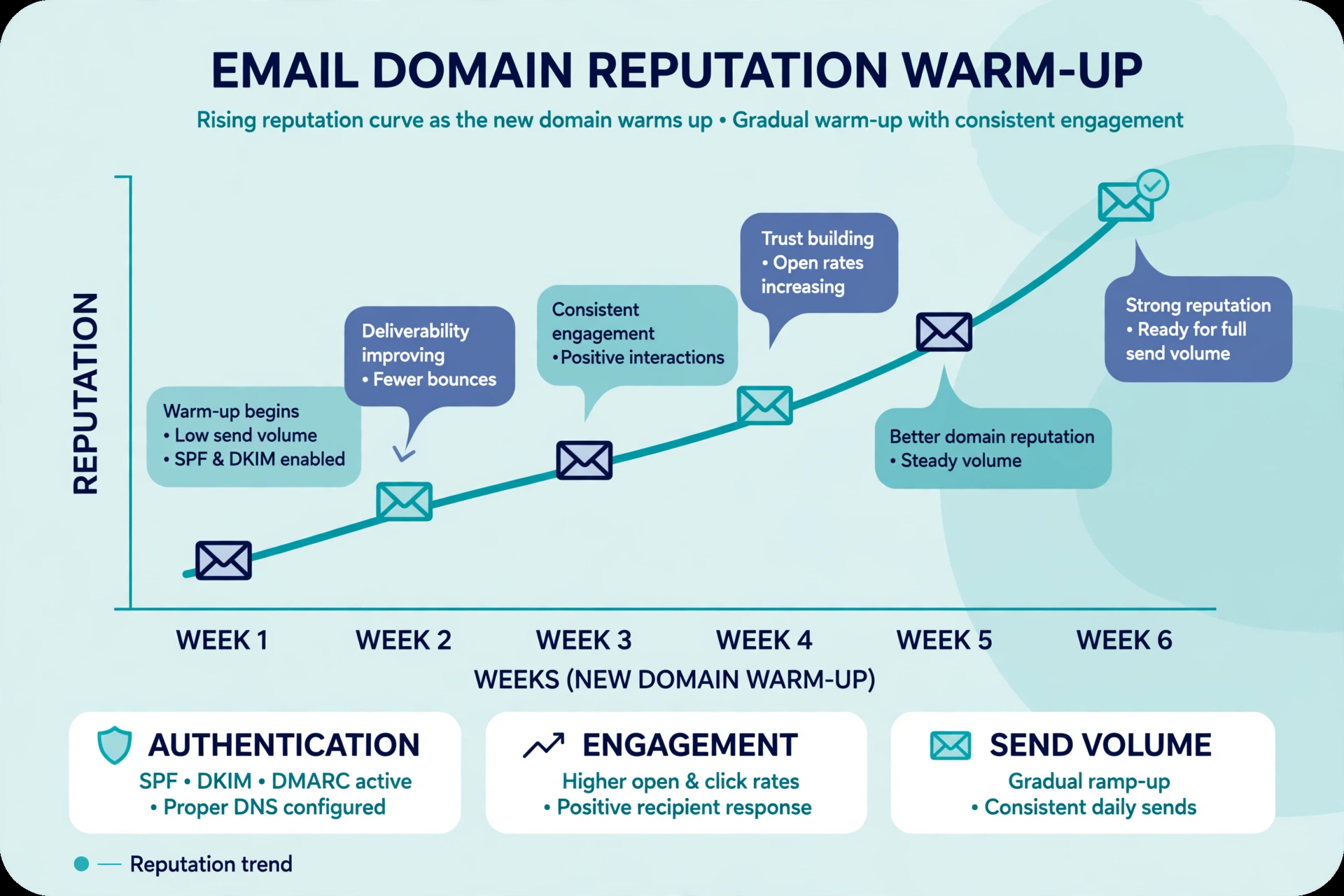
A cold email that lands in spam is not a failed email, it is an invisible one, and the sender never learns it happened. Warmup is what keeps a new domain out of spam, by sending a small volume of mail that gets opened and replied to, building the reputation gradually. Every serious sender in this list includes warmup, and the size of the warmup network is the difference between the cheap tools and the good ones.
The best ai tools for cold email outreach treat deliverability as the product. Unlimited mailboxes matter, because a campaign spread across many domains survives a problem on one of them. Verification matters, because a list full of bad addresses is what gets a domain flagged. Reply handling matters, because a prospect who replies should never receive another automated follow-up.
List quality is the quiet half of deliverability. A list of a thousand verified prospects who fit the offer will outperform a list of ten thousand scraped addresses every time, because the replies are real and the spam complaints are few. Verify before sending, and the domain will thank you.
The 11 Tools in Detail
1. Instantly
Best for Unlimited mailboxes and warmup. Price Growth $37.60 a month on annual billing. Free plan Free trial, no free plan.
Instantly is built for volume. Every plan includes unlimited sending mailboxes and unlimited warmup, which is the combination that matters when a campaign runs across a dozen domains. The Growth plan covers 5,000 emails and 1,000 uploaded contacts a month, and the built-in lead database and AI writing tools sit in the same dashboard as the sending, so prospecting and outreach do not need a second subscription.
Growth costs $47 a month on monthly billing, or $37.60 a month billed annually. Hypergrowth is $107 a month, or $85.58 annually, and covers 125,000 emails and 25,000 contacts. Lead credits are a separate plan line, so check what the database costs before budgeting. The modular pricing stacks up, because the bundles for sourcing, sending and warmup are priced separately on the higher tiers.
Pick it when you send at volume and want unlimited mailboxes without a per-seat charge, because that is where Instantly beats the per-seat tools. Skip it when you send a few hundred emails a month, because the entry price buys capacity you will not use.
Watch out. The contact limit on Growth is 1,000 uploads a month, so a big list needs Hypergrowth or a separate database.
2. Smartlead
Best for Agencies and white-label sending. Price Base $39 a month. Free plan 14-day free trial, no free plan.
Smartlead is the agency default for cold email, and the reason is the warmup network. Every plan includes unlimited mailboxes and unlimited warmup, backed by one of the largest warmup pools in the category. The white-label option lets an agency run client campaigns under its own brand, which is why so many agencies standardise on it rather than on a tool built for a single sender.
Base is $39 a month on monthly billing, or $32 a month billed annually, and covers 6,000 sends and 2,000 contacts a month. Pro is $94 a month, or $78 annually, with 90,000 sends and 30,000 contacts. The add-ons stack, because verified prospect emails are a $59 add-on on Base, and the higher tiers are where the per-seat economics start to make sense.
Pick it when you run many mailboxes for many clients, because the unlimited warmup and white-label are built for exactly that. Skip it when you are a solo sender with one domain, because the agency features add cost without adding value.
Watch out. Support gaps are the most common complaint, so test the response time during the trial before committing a client campaign to it.
3. Lemlist
Best for Personalised multichannel outreach. Price Email $55 a seat a month on annual billing. Free plan 14-day free trial, no free plan.
Lemlist is the creative tool in this list. It personalises images and videos at scale, builds custom landing pages for each prospect, and runs email alongside LinkedIn, WhatsApp, SMS and calls from the same sequence. That multichannel reach is the point, because a prospect who ignores the email may answer the LinkedIn message, and lemlist keeps both in one thread.
Email is $69 a month on monthly billing, or $55 a seat a month billed annually, with unlimited users and email senders. Multichannel is $109 a month, or $87 a seat annually, and adds LinkedIn, SMS and calls with five senders per user. The entry price rose from $39 to $55 a seat on annual billing during 2026, so older roundups understate the cost.
Pick it when personalisation is the strategy, because no other tool here builds personalised images and landing pages this easily. Skip it when the campaign is plain text volume, because the creative features go unused and the per-seat price stings.
Watch out. Lemwarm is included on all plans, but the data add-on for finding prospects starts at $20 a month for 2,000 credits, so budget for it separately.
4. Woodpecker
Best for Deliverability-first sending. Price Email $39 a month. Free plan 14-day free trial, no free plan.
Woodpecker is the careful tool in this list. It puts deliverability first, with manual review queues that hold every reply and bounce for a human look before the sequence continues. That slows a campaign down, and that is the point, because a sender who reviews replies catches the interested prospects fast and stops emailing the people who asked to be left alone.
Email is $39 a month at the 5,000-send selection, or $26 a month billed annually, with unlimited email accounts, unlimited contact storage and unlimited team members. Three warmups are included, with more at $5 a month per account. The multichannel plan is $68 a month. Annual billing is advertised as saving a third, so the yearly price is the honest one to compare.
Pick it when deliverability matters more than speed, because the manual review step is what keeps a domain healthy. Skip it when you need fully automatic sending at scale, because the review queue becomes a bottleneck.
Watch out. Campaigns stop emailing new prospects at the send limit, so watch the counter on a large list.
5. Mailshake
Best for Simple sequences for small teams. Price Starter $29 a month. Free plan Free trial, no free plan.
Mailshake keeps cold email simple. It builds sequences, sends them, and tracks opens, clicks and replies without the agency features that complicate the bigger tools. The interface is the selling point, because a small team can set up a campaign in an afternoon and understand every number on the dashboard without a training call.
Starter is $29 a month, which makes it the cheapest entry point among the dedicated senders in this list. Higher tiers add LinkedIn automation, AI writing and more seats. The price is honest for what it does, and the limit is that it does less than the tools above it, with no built-in lead database and no white-label option.
Pick it when you want a straightforward sender for a small team, because the setup is fast and the price is low. Skip it when you need a lead database or agency features, because Mailshake expects you to bring your own list.
Watch out. The low price covers the basics only, so check what the higher tiers cost before the team grows into them.
6. Reply.io
Best for Sequences plus AI writing. Price Starter $59 a month. Free plan 14-day free trial, no free plan.
Reply.io pairs sequences with an AI sales assistant that drafts, scores and suggests replies, which suits a team that wants the writing help inside the sender rather than in a separate app. It handles email, LinkedIn and calls in one sequence, and the reporting shows which step in the sequence actually gets replies, so the team can fix the weak step instead of rewriting the whole campaign.
Starter is $59 a month, with higher tiers for teams that need more mailboxes and more AI credits. The price sits between Mailshake and lemlist, and the AI features are the justification, because a team that uses the writing assistant every day gets more from the subscription than a team that only sends.
Pick it when the team wants AI help with the writing and the follow-up, because the assistant is built into the workflow. Skip it when the team already writes its own sequences, because the AI features go unused and a simpler sender costs less.
Watch out. AI-drafted follow-ups still need a human read, because a generic follow-up burns the goodwill the first email earned.
7. Apollo
Best for Database plus sending in one place. Price Basic $49 a seat a month on annual billing. Free plan Free plan.
Apollo is the only tool here that is a database first and a sender second. It holds a large B2B contact database, lets you build a list with filters, and then sends the sequence from the same account. That removes the export and import step that breaks most outreach workflows, because the list and the sending live in one place.
The free plan covers basic prospecting and sending with limits, which is enough to test whether the data fits your market. Basic is $49 a seat a month on annual billing, or $65 monthly, with unlimited contacts and mailboxes. Professional is $79 a seat a month. Data accuracy is the most common complaint, so verify a sample of contacts before trusting a whole list.
Pick it when you need the list and the sending together, because the database is the feature you are paying for. Skip it when you already own a good list, because a pure sender costs less and the database goes unused.
Watch out. Verify a sample of any Apollo list before a big send, because stale contacts hurt deliverability.
8. Snov.io
Best for Finding emails and sending. Price Starter $39 a month. Free plan Free trial, no free plan.
Snov.io covers the two halves of outreach that most senders split apart, finding the email address and sending the campaign. Its finder and verifier check addresses before they go into a sequence, which protects the sender reputation, because a list full of bad addresses is what gets a domain flagged.
Starter is $39 a month, with higher tiers for more credits and more mailboxes. The credit model is the thing to understand, because finding and verifying each address costs credits, and a large list burns through them fast. The free trial lets you test the finder accuracy on your own market before paying.
Pick it when you need to find and verify addresses as well as send, because the combined workflow is cheaper than two subscriptions. Skip it when the list already exists and is verified, because a pure sender does the job for less.
Watch out. Credits are the meter, so a big unverified list can eat a month of credits in one afternoon.
9. Hunter
Best for Email finding and verification. Price Starter $49 a month. Free plan Free plan with 25 searches a month.
Hunter is the canonical email-finding tool, and it stays narrow on purpose. It finds the address behind a domain, verifies it, and gets out of the way. The Campaigns feature adds basic sending, but the finding is the product, and teams that already own a sender buy Hunter for the data alone.
Starter is $49 a month, with a free plan that covers 25 searches a month, which is enough to test the accuracy on your own prospects. Higher tiers add more searches and more seats. The price is per account rather than per seat on the lower tiers, which suits a small team sharing one login for research.
Pick it when finding verified addresses is the job, because Hunter is the most established finder in this list. Skip it when you need a full sender, because the Campaigns feature is basic next to the dedicated tools above.
Watch out. Finding is only half the job, so budget for a sender as well if the team does not already own one.
10. GMass
Best for Cold email inside Gmail. Price Standard $29.95 a month. Free plan Free plan with limits.
GMass lives inside Gmail, and that is its whole pitch. It turns a Gmail account into a mail-merge sender with sequences, tracking and follow-ups, without asking the user to learn a new platform. A freelancer or founder who lives in Gmail can run a campaign from the inbox they already open every morning.
Standard is $29.95 a month, with a free plan that covers a small number of sends a day. The price is low, and the limit is Gmail itself, because the sending caps and the deliverability rules of a personal Gmail account apply, and a large campaign will hit them fast.
Pick it when the sender is one person working from Gmail, because nothing is faster to set up. Skip it when the campaign needs many mailboxes or a team, because GMass is built for one inbox, not for an agency.
Watch out. Gmail sending limits apply, so a big list needs a dedicated sender rather than a Gmail add-on.
11. Saleshandy
Best for Unlimited mailboxes at a low price. Price Starter $41 a month. Free plan Free trial, no free plan.
Saleshandy competes on the same ground as Instantly and Smartlead, unlimited mailboxes with no per-inbox fees, at a lower entry price. Starter covers 6,000 emails and 2,000 active prospects a month, with warmup and a built-in lead finder, so a small team gets the full stack without the agency price tag.
Starter is $41 a month on monthly billing, or $34 annually. Pro is $99 a month, or $76 annually, with 100,000 emails and 30,000 prospects. Scale is $189 a month, or $149 annually, with 200,000 emails. The price steps are clean, and the trade-off is a smaller warmup network than Smartlead and fewer creative features than lemlist.
Pick it when you want unlimited mailboxes on a budget, because Starter undercuts the bigger tools at the same volume. Skip it when you need the largest warmup network or the creative tools, because the bigger tools earn their price there.
Watch out. The prospect limit is the meter on Starter, so a growing list will push you to Pro sooner than the email limit does.
Mistakes That Waste the Subscription
The best ai tools for cold email outreach cannot save a campaign built on a bought list. A list that was never opted in will bounce, complain and report spam, and the domain reputation will fall no matter how good the warmup network is. Build the list from real prospects, verify every address, and the tool can do its job.
The second mistake is sending from the main domain. A deliverability problem on the outreach domain is recoverable, and the same problem on the main domain hurts every email the business sends, including invoices and customer support. Buy two or three cheap domains for outreach and keep the main domain clean.
The third mistake is volume without warmup. A new domain that sends a thousand emails on day one will land in spam, because the reputation does not exist yet. Warm up gradually, twenty to thirty emails a day at first, growing over several weeks, and the domain earns the right to send at volume.
The fourth mistake is ignoring replies. A prospect who replies should never receive another automated follow-up, and a prospect who asks to be removed should be removed at once. The tools here all handle replies, but only when the team reads them, so the reply inbox needs a human, not just a filter.
The 11 Tools at a Glance
The table below lines up the eleven tools by entry price and free access, so the shortlist takes a minute to build.
| Tool | Price | Free plan | Best for |
|---|---|---|---|
| Instantly | Growth $37.60 a month on annual billing | Free trial, no free plan | Unlimited mailboxes and warmup |
| Smartlead | Base $39 a month | 14-day free trial, no free plan | Agencies and white-label sending |
| Lemlist | Email $55 a seat a month on annual billing | 14-day free trial, no free plan | Personalised multichannel outreach |
| Woodpecker | Email $39 a month | 14-day free trial, no free plan | Deliverability-first sending |
| Mailshake | Starter $29 a month | Free trial, no free plan | Simple sequences for small teams |
| Reply.io | Starter $59 a month | 14-day free trial, no free plan | Sequences plus AI writing |
| Apollo | Basic $49 a seat a month on annual billing | Free plan | Database plus sending in one place |
| Snov.io | Starter $39 a month | Free trial, no free plan | Finding emails and sending |
| Hunter | Starter $49 a month | Free plan with 25 searches a month | Email finding and verification |
| GMass | Standard $29.95 a month | Free plan with limits | Cold email inside Gmail |
| Saleshandy | Starter $41 a month | Free trial, no free plan | Unlimited mailboxes at a low price |
Read the price column against the contact and mailbox limits, because the cheapest plan with a tight cap costs more than a dearer plan with room to grow.
Best Pick by Job
The right pick depends on the volume and the team, so match the job to the tool rather than buying the biggest name.
| Job | Pick | Why |
|---|---|---|
| High-volume sending | Instantly | Unlimited mailboxes, $37.60 a month |
| Agency sending | Smartlead | Largest warmup network, white-label |
| Personalised campaigns | Lemlist | Images, video and multichannel |
| Deliverability first | Woodpecker | Manual review of every reply |
| Simple small-team sender | Mailshake | $29 a month, fast setup |
| AI-assisted sequences | Reply.io | Writing help inside the sender |
| Database plus sending | Apollo | List and sending in one place |
| Finding and verifying | Snov.io | Finder plus sender combined |
| Finding addresses only | Hunter | Most established finder |
| Gmail-based sending | GMass | $29.95 a month, inside Gmail |
| Unlimited mailboxes on a budget | Saleshandy | $41 a month Starter |
When two tools tie, pick the one whose warmup network is largest, because the warmup is what keeps the domain out of spam while the campaign grows.
Volume Changes the Right Tool
A founder sending 200 emails a month and an agency sending 200,000 need different tools, and the price tables hide that. At low volume, the cheapest sender wins, because the mailboxes and the warmup are barely used. At high volume, the per-seat and per-contact limits decide the bill, and a tool that looked cheap at 200 emails becomes expensive at 20,000.
The practical rule is simple. Under 1,000 emails a month, buy the simplest sender that includes warmup. Between 1,000 and 20,000, buy on mailbox limits and contact caps, because those are the meters that bite first. Above 20,000, buy on the warmup network and the white-label features, because deliverability at that scale is a managed job, not a setting.
The per-contact limits deserve a second look, because they bite before the email limits do. Instantly Growth allows 1,000 uploaded contacts a month, and a list of 5,000 prospects needs Hypergrowth or a separate database. Count the list before the subscription, because the contact cap decides the tier.
The best ai tools for cold email outreach protect the domain first and send second, and the pick that fits your volume is the right one. Instantly leads for high-volume senders, Smartlead for agencies, and Woodpecker for teams that put deliverability first.
A Simple First Campaign
The best ai tools for cold email outreach repay a careful first campaign, and the care starts before the send. Week one is the domain, buy it, warm it, and let the reputation build while the list is verified. Week two is the copy, write one short sequence of three emails, each with a single clear ask, and test it on ten prospects first.
Week three is the send, starting at twenty emails a day and growing only when the replies stay clean. Week four is the review, because the open and reply rates on the first hundred emails tell you more than any benchmark. A campaign that learns from its first hundred will outperform a campaign that blasts a thousand and hopes.
Keep the sequence short, because a prospect who ignores three emails will ignore seven. The follow-up should add a reason to reply, a new detail, a case study, a shorter ask, rather than repeating the first email in different words.
Measure replies, not opens, because an open is a glance and a reply is a conversation. The tool that reports replies clearly is the tool that helps the team improve, and the team that chases opens will optimise for subject lines instead of conversations.
Frequently Asked Questions
How many cold emails can I send a day without hurting my domain?
A new domain should start at 20 to 30 emails a day and grow gradually over several weeks, with warmup running alongside. An established domain with a good reputation can send far more, but the limit is reputation rather than a number, and a sudden jump in volume is what triggers spam filters.
Do I need a separate warmup tool?
No, and buying one separately is usually a waste. Every sender in this list includes warmup, and the warmup network is part of what the subscription pays for. A separate warmup tool only makes sense when the sender has none, which is not the case for any tool here.
What is the difference between a sender and a finder?
A sender runs sequences and manages mailboxes. A finder locates and verifies email addresses. Apollo and Snov.io do both, Hunter and the finders do one half, and Instantly, Smartlead and the other senders do the other half. Most teams need one of each.
Why do cold email prices change so often?
Because the category is competitive and the pricing models are still settling. Lemlist raised its entry price from $39 to $55 a seat on annual billing during 2026, and Instantly restructured its plans the same year. Check the vendor page at checkout, because a roundup from six months ago will understate the cost.
Can I use my main domain for cold email?
No, and that is the most expensive mistake in this category. Cold email should run on separate domains bought for outreach, so a deliverability problem hurts the outreach domain rather than the domain customers use. Buy two or three cheap domains, warm them up, and keep the main domain clean.
How do I know if my emails land in spam?
Send a test campaign to seed accounts on Gmail, Outlook and Yahoo, and check where the emails land. The sender tools here include placement testing, and a sudden drop in opens usually means a deliverability problem rather than a copy problem. Check the domain reputation first, then the copy, because a good email in spam is invisible.