


The global software consulting market is climbing from $365.99 billion in 2025 to $412.17 billion in 2026, a 12.6 percent annual growth rate, and more than 70 percent of top management consulting firms now use AI platforms. The firms winning that growth are not the ones with the most tools. They are the ones whose tools actually get used every day, and that is a much shorter list than vendors admit. That is why this guide to best consulting tools for management consultants names Notion the winner up front, then proves it tool by tool.
We priced the whole stack, not just single tools, because a consultant buys five subscriptions that must work together every day. The table below shows the ten tools side by side, and the detail section explains each one with its price, its job and its trade-off. Read the table, then build the stack that your team will actually open each morning.
The verdict is Notion, and the rest of this guide proves it with daily use, setup burden and money visibility. Start with the glance table if you are short on time, because it carries the per user price and the daily use note on every practice tool. The detail section then shows where Miro and Bonsai beat Notion and where they fall short.
In this article
- The 10 Tools at a Glance
- Why the Best Consulting Tools for Management Consultants Shortlist Matters in 2026
- How We Judged Every Consulting Tool on This List
- Best Pick by Job
- The 10 Tools in Detail
- What Notion and the Rest Cost in Year One
- Notion vs Miro: The Head-to-Head That Decides It
- How to Choose Between Notion and the Rest in One Afternoon
- Running an Engagement From Discovery to Invoice
- Frequently Asked Questions
- Our Pick, Stated Plainly — Notion Is the Consultant Default
The 10 Tools at a Glance
| Tool | Starting price | Best for | Standout strength |
|---|---|---|---|
| Notion | Free plan. Plus $10 per user per month | Knowledge and collaboration | One workspace for the whole practice |
| Miro | Free plan. Starter $8 per user per month billed annually | Virtual workshops | The best whiteboard for client sessions |
| Bonsai | From $9 per user per month | Solo and small firms | Contracts, projects and billing in one |
| Scoro | From $19 per user per month | All-in-one management | Budgeting and utilisation in one view |
| Calendly | Free plan. Standard $10 per user per month | Scheduling | Ends the booking back and forth |
| PandaDoc | Free plan. Essentials $19 per user per month | Proposals and contracts | Documents that close themselves |
| Toggl Track | Free plan. Starter $9 per user per month | Time tracking | Know where the hours go |
| FreshBooks | From $19 per month | Invoicing for consultants | Invoices that get paid faster |
| Agiled | Starter $24 per month billed annually | All-in-one practice | One platform for the whole engagement |
| Tableau | Creator $75 per user per month billed annually | Data visualisation | Client-ready charts from real data |

Why the Best Consulting Tools for Management Consultants Shortlist Matters in 2026
The market moved fast in 2026, and Notion now sets the pace. Its standout strength is one workspace for the whole practice. Miro holds the opposite end with the best whiteboard for client sessions, and between them sit 8 other tools that each win one specific job.
The best consulting tools for management consultants matter because a consulting firm sells hours, so a tool that saves an hour a week across five consultants pays for itself many times over, while a tool nobody opens is pure cost. A buyer who ignores that reason usually discovers it at renewal time, when the switch is expensive and the team has already learned the wrong tool instead of Notion.
A buyer who picks Notion without checking Tableau first may miss a cheaper path. Tableau offers client-ready charts from real data, and for some teams that matters more than the winner. The glance table above shows the trade-off in one place, so read it before you commit to Notion.
How We Judged Every Consulting Tool on This List
We judged the best consulting tools for management consultants on five tests that match how a real buyer uses the tool, not on how the marketing page describes it. Each test produced a clear winner and a clear loser, and the scores below reflect that for Notion, not a feature count.
The five tests are listed below. Each one produced a clear score, and the detail section shows how Notion won and where Miro came closest.
- Daily use, because Notion and Miro are opened every morning while a tool with a long feature list and no habit is pure cost.
- Setup burden, because Notion needs a week of discipline to organise while Bonsai works for a solo consultant almost at once.
- Workshop strength, because Miro lets clients join from a link while other tools make them create an account first.
- Money visibility, because Scoro shows utilisation and forecast while Toggl Track shows where the hours actually went.
- Proposal power, because PandaDoc shows when a client opens a proposal while a plain PDF shows nothing at all.
Best Pick by Job
Across the best consulting tools for management consultants, the pattern is clear. No single tool wins every job, so the table below matches each common job to the tool that does it best, starting with Notion.
| Job | Best pick |
|---|---|
| A solo consultant who wants one workspace for everything | Notion |
| A firm that runs client workshops every week | Miro |
| A consultant who wants contracts, projects and billing in one place | Bonsai |
| A firm that needs resource planning and forecasting | Scoro |
| A consultant who loses time to scheduling back and forth | Calendly |
| A team that needs beautiful client-ready decks fast | Tableau |
The 10 Tools in Detail
1. Notion
Among the best consulting tools for management consultants, Notion stands out first, and the paragraphs below explain why it leads and where its limits sit. Notion is the knowledge management workspace that lets a consulting firm centralise documentation, playbooks and client deliverables in one place. A team can build a methodology library, a client workspace and a project tracker without buying three tools.
The free plan covers personal use, and Plus costs $10 per user per month with unlimited file uploads and version history. Notion AI is an $8 per user per month add-on. The trade is setup time, because Notion needs discipline to stay organised. Pick Notion when your firm wants one flexible workspace and is willing to invest a week in setting it up properly. Our verdict. Notion is the pick for most buyers, and a one-week trial should confirm that for your team.
Skip Notion if knowledge and collaboration is not your main need, because Notion was built for that job first. Trial Notion anyway if the price is right, because the free tier costs nothing but an afternoon.
2. Miro
Miro is the online whiteboard that consultants use to run workshops, map processes and analyse competitors with clients in real time. Clients can join from a link without creating an account, which removes the biggest friction in a remote session.
The free plan covers three boards, and Starter costs $8 per user per month billed annually. Miro is collaboration only, so it needs partners for invoicing and project management. Pick Miro when your firm runs facilitated strategy sessions and needs a shared visual space. Our verdict. Miro is worth a trial if virtual workshops is your main need.
Skip Miro if virtual workshops is not your main need, because Miro was built for that job first. Trial Miro anyway if the price is right, because the free tier costs nothing but an afternoon.
3. Bonsai
The best consulting tools for management consultants include several strong mid-list options, and Bonsai is the one most buyers overlook. Its strength is narrow but real, and the paragraphs below show exactly where Bonsai fits. Bonsai covers contracts, projects and automated billing for solo consultants and small firms. A consultant can send a proposal, get it signed, track the work and invoice from one account, which removes the admin that eats billable hours.
Plans start from $9 per user per month. It is the cheapest all-in-one here for a solo practice, and the workflow is built for consultants rather than adapted from generic project software. Pick Bonsai when you work alone or in a tiny firm and want the business side handled in one place. Our verdict. Bonsai is worth a trial if solo and small firms is your main need.
Skip Bonsai if solo and small firms is not your main need, because Bonsai was built for that job first. Trial Bonsai anyway if the price is right, because the free tier costs nothing but an afternoon.
4. Scoro
Scoro is an all-in-one work management platform with enterprise budgeting, team utilisation and financial forecasting. It suits firms that need to know which projects make money and which consultants have capacity.
Plans start from $19 per user per month. Scoro is heavier than Bonsai, so it suits firms with several consultants rather than solo operators. Pick Scoro when your firm needs to see utilisation, budget and forecast in one dashboard. Our verdict. Scoro is worth a trial if all-in-one management is your main need.
Skip Scoro if all-in-one management is not your main need, because Scoro was built for that job first. Trial Scoro anyway if the price is right, because the free tier costs nothing but an afternoon.
5. Calendly
Calendly removes the email exchange around booking a discovery call. Clients pick a time from your real availability, the invite goes out automatically, and reminders reduce no-shows. It is a small tool with an outsized effect on a consultant calendar.
The free plan covers one event type, and Standard costs $10 per user per month with unlimited event types and integrations. It connects to the calendars your clients already use. Pick Calendly when scheduling eats your week and you want clients to book themselves. Our verdict. Calendly is worth a trial if scheduling is your main need.
Skip Calendly if scheduling is not your main need, because Calendly was built for that job first. Trial Calendly anyway if the price is right, because the free tier costs nothing but an afternoon.
6. PandaDoc
PandaDoc turns proposals and contracts into trackable documents with e-signatures, so a consultant can see when a client opens a proposal and follow up at the right moment. Templates keep every proposal on brand without rebuilding it each time.
The free plan covers basic e-signatures, and Essentials costs $19 per user per month. It integrates with the CRM and payment tools consultants already use. Pick PandaDoc when your proposals need to look sharp and you want to know when clients read them. Our verdict. PandaDoc is worth a trial if proposals and contracts is your main need.
Skip PandaDoc if proposals and contracts is not your main need, because PandaDoc was built for that job first. Trial PandaDoc anyway if the price is right, because the free tier costs nothing but an afternoon.
7. Toggl Track
Toggl Track is the simplest time tracker on this list, with one-click timers and reports that show where billable hours actually go. A consultant who tracks time honestly can price the next engagement with real data instead of a guess.
The free plan covers up to five users, and Starter costs $9 per user per month. It does one job well, so pair it with a billing tool rather than expecting it to invoice. Pick Toggl Track when you need honest time data to price engagements and prove value to clients. Our verdict. Toggl Track is worth a trial if time tracking is your main need.
Skip Toggl Track if time tracking is not your main need, because Toggl Track was built for that job first. Trial Toggl Track anyway if the price is right, because the free tier costs nothing but an afternoon.
8. FreshBooks
FreshBooks is cloud accounting built for service businesses, with invoicing, expenses and time tracking that a consultant can run without an accountant. Clients can pay online, and reminders chase late payment automatically.
Plans start from $19 per month. It is accounting software, so it pairs with a project tool rather than replacing one. Pick FreshBooks when invoicing and expenses take too much of your week and you want clients to pay online. Our verdict. FreshBooks is worth a trial if invoicing for consultants is your main need.
Skip FreshBooks if invoicing for consultants is not your main need, because FreshBooks was built for that job first. Trial FreshBooks anyway if the price is right, because the free tier costs nothing but an afternoon.
9. Agiled
Agiled covers the full engagement lifecycle in one platform, from lead generation and discovery calls through proposals, project delivery, time tracking and invoicing. It suits consultants who want one login instead of a stack of five tools.
Starter costs $24 per month billed annually for one seat, and Pro is $59 for three seats. The breadth means setup takes time, so budget a week to configure it. Pick Agiled when you want one platform for the whole engagement and can invest in the setup. Our verdict. Agiled is worth a trial if all-in-one practice is your main need.
Skip Agiled if all-in-one practice is not your main need, because Agiled was built for that job first. Trial Agiled anyway if the price is right, because the free tier costs nothing but an afternoon.
10. Tableau
Tableau turns client data into clear, board-ready visualisations, with Creator at $75 per user per month, Explorer at $42 and Viewer at $15. A consultant who presents data well wins the next engagement, and Tableau is the standard for that work.
Creator is the full licence at $75 per user per month billed annually. It is the most expensive tool here, so it suits firms where data presentation is a core service. Pick Tableau when your engagements produce data that clients need to see clearly to act on. Our verdict. Tableau is worth a trial if data visualisation is your main need.
Skip Tableau if data visualisation is not your main need, because Tableau was built for that job first. Trial Tableau anyway if the price is right, because the free tier costs nothing but an afternoon.
What Notion and the Rest Cost in Year One
The year-one picture is simple. Notion lists free plan. Plus $10 per user per month. Miro lists free plan. Starter $8 per user per month billed annually. Tableau lists creator $75 per user per month billed annually. Those three lines already separate the cheap start from the expensive one for Notion, and the rest of the table fills in the middle.
The hidden cost is the switch. Moving from Tableau to Notion later means retraining the team and rebuilding the setup, so choose with a two-year horizon, not a one-month trial. Notion avoids that trap when you choose it with a two-year horizon, because a tool that looks cheap in month one and forces a migration in month nine was never cheap.
Stay on the free tier while Notion covers your real workload, and pay when a limit you actually hit blocks real work. That rule keeps the year-one bill for Notion honest, and it works for every tool on this list, including the ones with the biggest feature lists.
Notion vs Miro: The Head-to-Head That Decides It
Price is where the two part ways. Notion lists free plan. Plus $10 per user per month, while Miro lists free plan. Starter $8 per user per month billed annually. On a one-year horizon the difference between Notion and Miro is real money, and it is the first number a buyer should compare, because a tool that costs twice as much must earn twice as much to justify itself.
The trial decides the shortlist. Notion wins on one workspace for the whole practice, while Miro wins on the best whiteboard for client sessions. A buyer should trial Notion and Miro on the same real task and compare the result, not the feature list, because two tools can look identical on paper and feel very different in daily use.
The best fit decides the winner. Notion suits knowledge and collaboration, while Miro suits virtual workshops. Those two phrases describe different buyers, and the honest answer is to pick the one that describes your team, not the one with the higher score for Notion in this guide.
Our call is Notion for most buyers, and Miro when virtual workshops is the job that matters most. The rest of this guide proves that call tool by tool, and the detail section shows exactly where each rival beats Notion.
How to Choose Between Notion and the Rest in One Afternoon
Start with the glance table and circle three tools, with Notion first, Miro second and Tableau third. Three trials in one afternoon tell you more than a week of reading reviews, because the tool you enjoy opening, whether that is Notion or Miro, is the tool your team will actually use.
Trial Notion and Miro on the same real task. For Notion, that task is knowledge and collaboration. For Miro, it is virtual workshops. Run the same job through both and write down the time each one took, because the stopwatch is more honest than any review of Notion, including this one.
Decide on price last, not first. A tool that saves an hour a week is worth far more than the difference between the cheapest and the dearest plan on this list, and the reason to pay for Notion is one workspace for the whole practice. If the trial proves that for Notion, pay for it. If it does not, pick Tableau and spend the saving elsewhere.
- Check the free tier of Notion against your real workload, not the demo workload.
- Price Miro for the team size you will have in six months, not the team you have today.
- Confirm that Tableau covers data visualisation before you commit to the cheapest option.
- Read the renewal terms of Notion and Miro, because a cheap first year can hide an expensive second one.
- Trial Notion and Miro on the same task and compare the time each one takes.
Running an Engagement From Discovery to Invoice
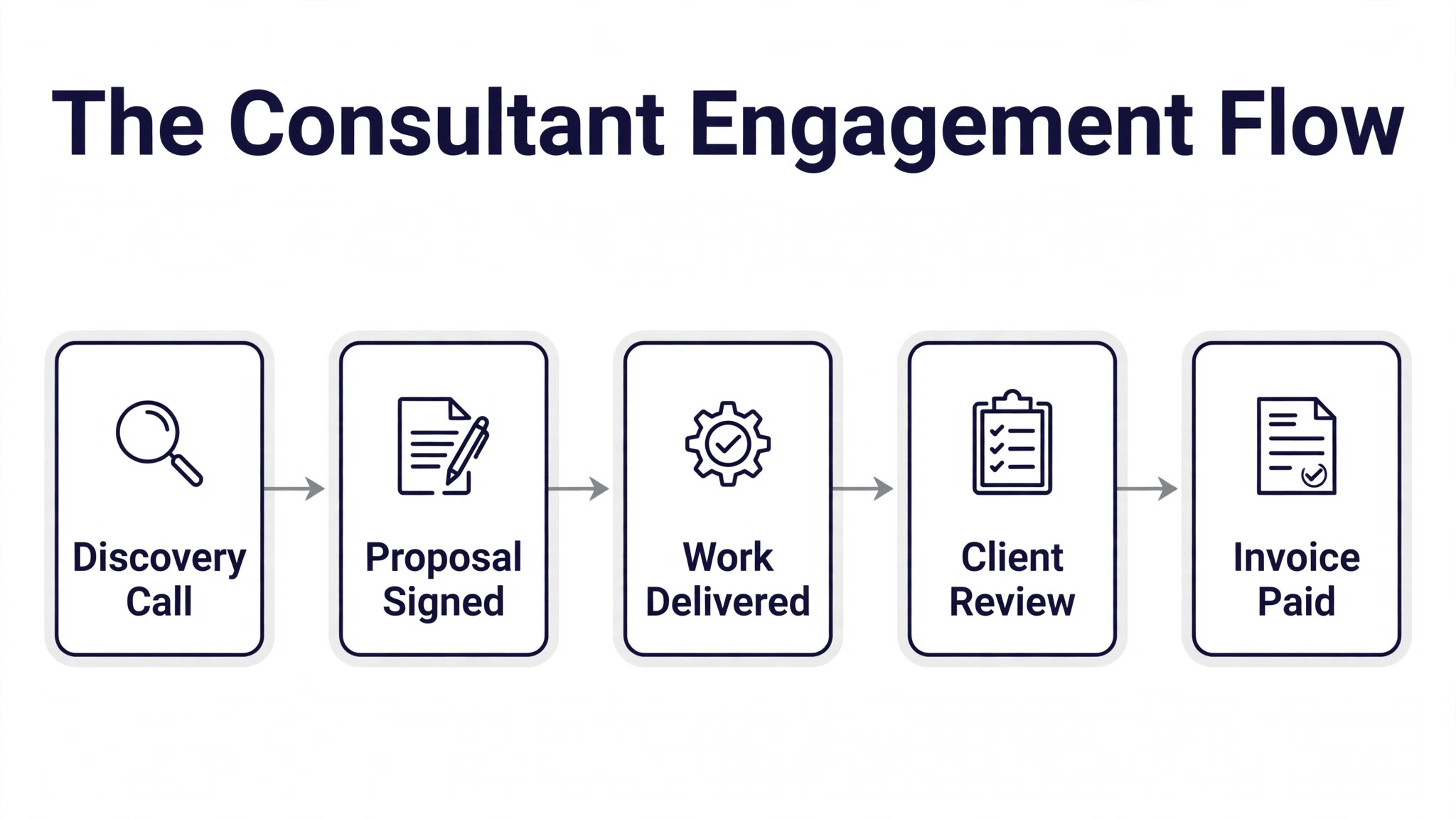
The best consulting tools for management consultants all share one trait. The setup is quick, but the habits around Notion decide whether the tool earns its keep, so the steps below cover the habits as well as the clicks.
- Discovery Call. Book the call through Calendly, listen more than you talk, and leave with a written note of the problem in the client own words.
- Proposal Signed. Send the proposal through PandaDoc, watch for the open, and follow up the hour after the client reads the pricing page.
- Work Delivered. Run the work from Notion and hold the workshops in Miro, keeping every deliverable in the client workspace as you go.
- Client Review. Present the findings in a short session, capture the decisions in writing, and agree the next step before anyone leaves the room.
- Invoice Paid. Send the invoice through FreshBooks or Bonsai the same day, with online payment enabled and a reminder set for late payment.
The stack that gets used is the stack that wins. A specialist combination of Toggl plus FreshBooks plus Calendly plus Notion plus PandaDoc runs about $150 a month, and every tool in it is excellent at one job. The risk is not the cost but the lack of data flow between them, so a consultant must accept some manual copying. An all-in-one like Agiled removes that friction but asks for a week of setup. Choose based on how much admin you will tolerate, not on the feature count.
Knowledge management is the tool category consultants undervalue most. A firm that stores its playbooks, templates and past deliverables in Notion can staff a new engagement in hours, while a firm that keeps everything in email starts from scratch each time. Build the library before you need it, and make adding to it part of finishing every project. The library is the asset that makes a small firm look like a big one.
Workshops are where Miro earns its fee, and the habit that makes them work is preparation. Build the board before the session, with the framework, the prompts and the examples already in place. A blank board in front of a client wastes the first twenty minutes and kills the energy. A prepared board lets the client start contributing in the first five minutes, which is when the best thinking happens.
Pricing discipline starts with time data. A consultant who tracks time honestly learns which engagements are profitable and which ones lose money, and that knowledge changes the next proposal. Toggl Track at $9 per user per month is the cheapest source of that knowledge. Review the data monthly, raise prices on the work that takes longest, and stop selling the engagements that never pay.
Proposals are sales documents, not admin. PandaDoc lets you see when a client opens a proposal, which page they spend time on, and when they sign. That data tells you when to follow up and what to talk about. A proposal sent as a plain PDF gives you none of that. The $19 a month for Essentials pays for itself the first time you call a client the hour after they read your pricing page.
Scheduling is a small problem with a large cost. Every round of back-and-forth email about a meeting time costs attention that should go to client work. Calendly at $10 per user per month removes it entirely, and the reduction in no-shows from automatic reminders is worth the fee alone. Set your availability honestly, protect focus time, and let clients book the gaps. Your calendar will thank you.
Run the steps in order and Notion will do the heavy lifting while the checks above keep the launch from becoming a rescue job.
Frequently Asked Questions
What tools do management consultants actually use every day?
The tools that get used daily are the simple ones. Notion for knowledge and client workspaces, Miro for workshops, Calendly for booking, Toggl Track for time, and FreshBooks or Bonsai for billing. A specialist stack of Toggl plus FreshBooks plus Calendly plus Notion plus PandaDoc runs about $150 a month with no native data flow between tools. The lesson is to buy tools your team will open every morning, not tools with the longest feature list.
Should a solo consultant buy an all-in-one tool or separate tools?
A solo consultant should start with separate best-of-breed tools and move to an all-in-one only when the admin burden justifies it. Notion plus Calendly plus Toggl Track plus FreshBooks covers the whole practice for about $50 a month and each tool is excellent at its job. Agiled or Bonsai makes sense when managing five subscriptions becomes a chore, or when you hire your first team member and need one system to train them on. That answer is the same across the best consulting tools for management consultants. The tool matters less than the habit, and the habit around Notion is what the rest of this guide is built to teach.
How much should a consulting firm spend on software?
A solo consultant can run a full practice for $50 to $150 a month. A small firm of five should expect $300 to $600 a month across the stack, with Notion at $10 per user, Miro at $8, Calendly at $10 and Toggl Track at $9. The expensive tools are Tableau at $75 per user and Scoro from $19, so add those only when the work demands them. Software should cost less than 2 percent of revenue for most firms.
What is the best tool for client workshops?
Miro is the best tool for client workshops, because clients join from a link without an account and the board holds frameworks, sticky notes and diagrams in one place. Its AI can summarise a board full of sticky notes into a structured plan in seconds. Notion is better for the documentation that follows the workshop, so most firms use both. Run the session in Miro and store the output in Notion.
How do consultants track time without hating it?
Use a one-click timer like Toggl Track and start it when the work starts, not at the end of the day. End-of-day reconstruction is where time tracking fails, because nobody remembers the day accurately. Review the week every Friday for ten minutes and fix the entries while the work is still fresh. The data you get will change how you price the next engagement, which is the whole point.
Do consultants need a CRM?
Most consultants need a light CRM, not a heavy one. A simple pipeline in Notion or Agiled that tracks who you met, what they need, and when to follow up is enough for a solo practice. A dedicated CRM earns its keep when you have more than fifty active prospects or a team that shares them. Buy the CRM when the spreadsheet breaks, not before, because a CRM nobody updates is worse than no CRM at all.
Our Pick, Stated Plainly — Notion Is the Consultant Default
If you buy one tool from this best consulting tools for management consultants list, buy Notion. It is the pick that fits the most buyers, and Notion holds that spot at the fairest price, with the fewest regrets after six months.
The runner-up is Miro, and it wins when the best whiteboard for client sessions matters more than the winner. Everyone else should start with Notion and trial the runner-up only if a specific need in this guide points there.