

AI agents now handle between 60 and 90 percent of routine support inquiries on the platforms that publish resolution data, and that range is the reason chatbot builders have moved from a nice extra to a core purchase. A visitor who gets an answer at midnight is a visitor who does not email at 9 in the morning, and the best ai chatbot builders make that midnight answer accurate rather than merely fast.
The market splits into two families. Dedicated builders such as Chatbase and Botpress train an agent on your documents and deploy it anywhere, while support suites such as Intercom and Zendesk put an AI agent in front of an existing ticket queue. A small business with no help desk usually needs the first family. A team that already lives in tickets usually needs the second.
This guide compares ten builders on the numbers that decide a purchase. We look at entry price, the cost at 1,000 monthly chats, training sources, human handover, channel coverage and the limits that only appear after launch. All prices below are the published starting figures, and they change, so confirm the current number on the vendor site before you pay.
In this article
- The 10 Tools at a Glance
- Best Pick by Job
- What the Best AI Chatbot Builders Actually Automate
- The 10 Tools in Detail
- What 1,000 Monthly Chats Cost on Each Builder
- Bot Errors That Send Customers Straight to a Human
- From First Bot to First Resolved Ticket
- How to Test a Bot Before Your Customers Do
- Frequently Asked Questions
- Match the Bot to the Channel, Then to the Budget
The 10 Tools at a Glance
| Tool | Best for | Starting price | Free plan |
|---|---|---|---|
| Chatbase | A fast agent trained on your own content | About 40 dollars a month | Yes, limited credits |
| Botpress | Developers building custom agents | Free, Plus from about 150 dollars a month | Yes, 100 conversations |
| Intercom | Support teams that want AI plus a help desk | About 29 dollars per seat a month | No, 14-day trial |
| Tidio | Small stores pairing live chat with AI | About 24 dollars a month | Yes, 50 conversations |
| ManyChat | Instagram and WhatsApp automation | Free, Pro from about 15 dollars a month | Yes |
| Landbot | No-code bots that qualify leads | Free, Starter from about 36 dollars a month | Yes |
| Zendesk | Ticket queues with an AI layer on top | About 19 dollars per agent a month | No, trial available |
| Freshchat | Small teams that want chat plus AI | Free, paid from about 19 dollars a month | Yes |
| Dialogflow | Google-powered bots for custom apps | Pay as you go | Yes, trial credits |
| ChatBot.com | No-code bots with live chat included | About 19 dollars per user a month | No, 14-day trial |
Best Pick by Job
| Your job | Pick this tool | Why it fits |
|---|---|---|
| You need a bot live this afternoon | Chatbase | Train it on a website and deploy in minutes |
| Your developers want full control | Botpress | Open builder with unlimited agents on paid plans |
| You run a support team with a ticket queue | Intercom | Fin answers first and hands over cleanly |
| You run a small online store | Tidio | Lyro answers product questions beside live chat |
| Your customers message on Instagram | ManyChat | Social automation is the whole product |
| You qualify leads before a sales call | Landbot | Visual flows guide visitors to a booked call |
| You already use Zendesk tickets | Zendesk | The AI agent sits on the queue you own |
| You want chat plus AI for a small team | Freshchat | Free tier covers the basics well |
| You build a bot inside your own app | Dialogflow | Google infrastructure and flexible APIs |
| You want no-code plus live chat | ChatBot.com | One builder covers bot and human chat |
What the Best AI Chatbot Builders Actually Automate
The first job a chatbot does well is answering the questions your team has already answered a hundred times. Opening hours, shipping times, return rules and pricing details are all facts that live in your documents, and the best ai chatbot builders turn those documents into answers without a developer writing rules. The test is accuracy on the tenth question, not the first, because a bot that guesses confidently is worse than a bot that admits it does not know.
The second job is triage. A good builder reads the first message, classifies the intent and routes the conversation to the right place, whether that is a knowledge article, a checkout link or a human agent. The best ai chatbot builders do this routing in seconds and keep the full transcript attached, so the human who takes over never asks the customer to repeat themselves.
The third job is lead capture. A bot that asks three qualifying questions, checks the answers against your criteria and books a call for the right visitors earns its keep in sales rather than support. The builders that do this well let a marketer design the flow visually, test it against real conversations and change the questions without touching code.
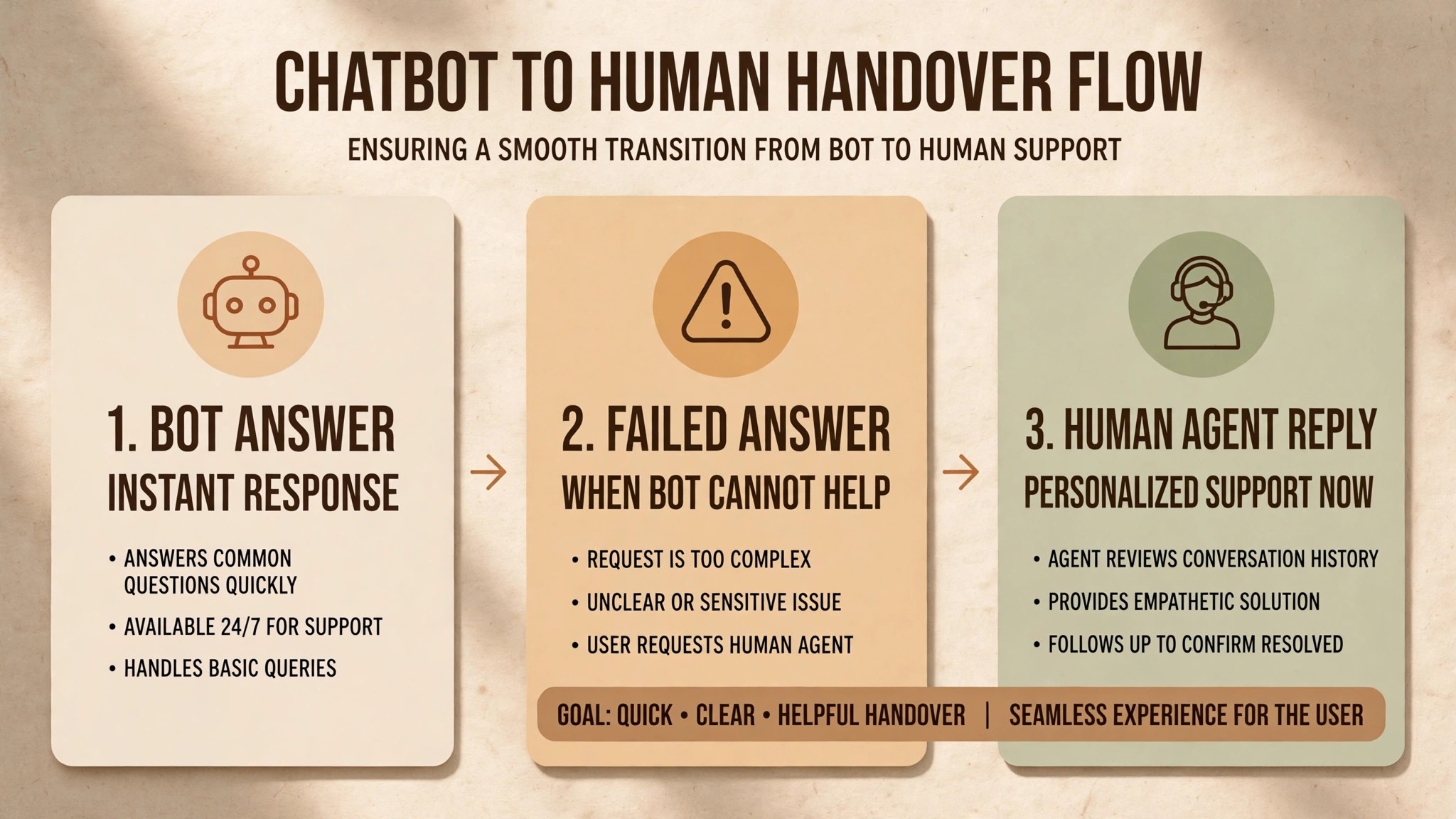
The fourth job is the one most buyers forget, which is knowing when to stop. A bot that keeps a frustrated customer in a loop for five minutes creates more damage than a bot that hands over after two failed answers. Set the handover rule on day one, measure how often it triggers and tune it weekly. A builder that makes handover hard is a builder that will cost you customers.
The 10 Tools in Detail
The ten builders below keep the comparison table’s order, so the builder whose free tier or channel support stood out is easy to find again. Each one states the starting price, the free plan position, the strongest automation feature and the weakness that should make a specific kind of buyer walk away. Read the entry that matches your channel first, then check the two entries next to it before you decide.
1. Chatbase
Chatbase is the fastest route from a pile of documents to a working agent. The free plan offers a small number of message credits for testing, and the Hobby plan costs about 40 dollars a month for 700 message credits. Higher tiers raise the credit allowance and add seats, with Standard at about 150 dollars a month.
The setup is the draw. Upload files, paste a website address or connect a help centre, and the agent answers from that content within minutes. Multiple language models are available, and the agent can be embedded on a website, in Slack or on WhatsApp. A small business that needs a support bot this week rather than this quarter will find nothing faster.
The limits are credit-based. A busy site can burn through 700 credits in days, and the per-message cost rises steeply on higher tiers. Integrations beyond the basics need the higher plans, and the analytics are lighter than a full support suite. Choose Chatbase when speed matters most and the conversation volume is modest.
2. Botpress
Botpress is the developer-first builder for teams that want to design their own agent rather than rent a template. The free plan includes 100 conversations a month, and the Plus plan costs about 150 dollars a month billed annually with 250 conversations and 25 dollars of AI usage included. The Team plan at about 750 dollars a month covers 1,500 conversations.
The builder is visual and deep. Flows, knowledge bases, tables and integrations are all designed in a studio that technical teams enjoy, and unlimited agents are available on paid plans. WhatsApp, webchat and white-label options cover most deployment needs, and the platform suits teams building several agents for different products or regions.
The jump from free to Plus is steep, and non-technical teams will find the learning curve real. A marketer who wants a simple lead bot will move faster on Landbot or ChatBot.com. A team with a developer and a complex workflow will find Botpress the most flexible builder on this list.
3. Intercom
Intercom is the support suite that put an AI agent in front of a mature help desk. The Essential plan costs about 29 dollars per seat a month, and the Fin AI Agent charges about 0.99 dollars per resolved outcome on top. A 14-day trial is available, and there is no permanent free plan.
Fin is the strongest AI agent in this comparison for teams that already run support. It resolves a high share of routine tickets, works across chat and email, and hands over to a human with the full context attached. Intercom reports an average resolution rate near 76 percent across customers, with the best teams reaching higher. The inbox, help centre and outbound messaging all live in the same system.
The cost model needs care. Seats plus per-outcome charges add up quickly at volume, and the headline seat price does not include the AI cost. A team with 1,000 monthly chats should model the Fin charges separately before signing. Choose Intercom when the help desk is the centre of the business, not when a simple website bot is enough.
4. Tidio
Tidio pairs live chat with the Lyro AI Agent, and it is the easiest start for a small online store. The free plan covers 50 conversations a month, and the Starter plan costs about 24 dollars a month billed annually with 100 billable conversations. The Lyro AI Agent starts at about 32 dollars a month for 50 AI conversations.
The combination is the strength. A visitor chats with Lyro about shipping or sizing, and a human takes over the moment the question turns complex. Flows automate common paths, and the Shopify and WordPress integrations install in minutes. The interface is friendly enough for a store owner with no technical help.
The allowances are tight. Fifty free conversations vanish on a busy weekend, and the Lyro allowance on Starter is a one-off bundle rather than a monthly refresh. A store with real volume will need the Growth plan from about 49 dollars a month. Choose Tidio for a small store, and reassess when monthly chats pass 500.
5. ManyChat
ManyChat owns the social messaging channel in a way no general builder matches. The free plan covers basic Instagram and Facebook automation, and the Pro plan starts at about 15 dollars a month based on contact count. WhatsApp automation is available on higher tiers, and the pricing scales with the size of the audience.
The strength is the flow builder for social. Comment triggers, story replies, keyword automation and broadcast messages turn a social following into a conversation channel, and the templates cover giveaways, launches and customer support. A creator or a store that sells through Instagram will find ManyChat does in an afternoon what a general bot builder does in a week.
The weakness is the website. ManyChat is a social tool first, and its website chat is an add-on rather than a strength. A business whose customers write on the website rather than on Instagram should pick Tidio or Intercom instead. Choose ManyChat when the audience already lives in DMs, and keep the website bot separate.
6. Landbot
Landbot is the no-code builder for teams that qualify leads rather than answer support tickets. The free plan covers a basic bot, and the Starter plan costs about 36 dollars a month billed annually. Higher tiers add WhatsApp, integrations and more monthly chats, and the visual builder is the friendliest on this list for a marketer.
The flows are the product. A visitor answers a few questions, the bot scores the answers and the right visitors get a booked call while the rest get a helpful article. The interface uses a drag-and-drop canvas that a sales team can edit without a developer, and the analytics show where visitors drop out of each flow. That drop-off data is gold for a team tuning a lead funnel.
The cost rises with chats, and the AI features are lighter than a document-trained agent. Landbot suits structured conversations with clear paths, not open-ended questions about a product catalogue. A team that wants a bot to answer anything from a knowledge base should pick Chatbase, while a team that wants a bot to qualify and book should pick Landbot.
7. Zendesk
Zendesk puts an AI agent on top of a ticket queue that many support teams already run. The Support Team plan costs about 19 dollars per agent a month paid yearly, and the AI agent charges per automated resolution on top. A trial is available, and there is no permanent free plan.
The strength is the ecosystem. Tickets, chat, email, voice and a help centre share one record, and the AI agent answers from the same knowledge base the humans use. Automated resolutions handle the routine work, and the reporting shows resolution rates, handle times and customer satisfaction in one dashboard. A team that already pays for Zendesk gets the AI layer without migrating anything.
The price is seat-based plus AI charges, which makes the total harder to predict than a flat monthly plan. Small teams without an existing Zendesk account will find the setup heavier than Tidio or Chatbase. Choose Zendesk when the ticket queue is already there and the AI agent is an upgrade, not a fresh start.
8. Freshchat
Freshchat is the small-team chat platform with a genuine free tier. The free plan covers basic live chat, and paid plans start at about 19 dollars a month per agent with AI features added on higher tiers. The platform suits a team of two or three that wants chat, a knowledge base and a bot without enterprise pricing.
The Freddy AI assistant answers common questions, drafts replies for agents and summarises conversations for handover. The interface is clean, the mobile app works well for a team that answers from a phone, and the integrations cover the common CRMs and help desks. A small business can start free and upgrade only when the volume justifies it.
The AI depth is lighter than Intercom or Zendesk, and the automation builder is simpler than Botpress. A team that needs advanced routing or heavy analytics will outgrow Freshchat. A team that needs a solid chat tool with a helpful AI layer at a low price will find it hard to beat.
9. Dialogflow
Dialogflow is Google’s platform for building bots inside custom applications. There is no flat monthly price. The service charges per request on a pay-as-you-go basis, with trial credits for testing. That model suits a product team that embeds a bot in an app and pays for actual usage rather than a seat count.
The strength is the infrastructure. Natural language understanding, multi-language support and integration with Google Cloud services give a development team a solid foundation, and the CX edition handles complex multi-turn conversations for larger products. A bot built on Dialogflow can live inside an app, a voice assistant or a contact centre without changing platforms.
The weakness is that Dialogflow is a toolkit, not a finished product. There is no drag-and-drop builder for marketers, no built-in inbox and no ready-made analytics dashboard. A business without developers should not start here. A product team with engineers will find it the most flexible foundation on this list.
10. ChatBot.com
ChatBot.com is the no-code builder that bundles live chat and ticketing in one subscription. The Starter plan costs about 19 dollars per user a month billed yearly, and it includes a small allowance of AI resolutions each month. A 14-day trial is available, and there is no permanent free plan.
The builder covers the whole journey. A visitor talks to the bot, the bot answers from the knowledge base, and a human takes over in the same window when the question turns complex. Ticketing is included, so a conversation that needs follow-up becomes a ticket without a second tool. The templates cover support, sales and lead generation, and the setup takes an afternoon.
The AI allowance is small on the entry plan, with about ten resolutions a month included, so a busy site will need a higher tier quickly. The analytics are adequate rather than deep, and the platform lacks the social automation of ManyChat. Choose ChatBot.com when a small team wants one tool for bot, chat and tickets at a predictable price.
What 1,000 Monthly Chats Cost on Each Builder
| Tool | Monthly cost at 1,000 chats | What drives the cost |
|---|---|---|
| Chatbase | About 150 dollars | Standard plan, 4,000 message credits |
| Botpress | About 150 dollars | Plus plan, 250 conversations plus AI usage |
| Intercom | About 29 dollars per seat plus 0.99 dollars per outcome | Seats plus per-resolution charges |
| Tidio | About 49 dollars | Growth plan, Lyro allowance extra |
| ManyChat | About 15 to 25 dollars | Pro plan, contact count drives the tier |
| Landbot | About 36 to 70 dollars | Starter to Pro, chat volume drives the tier |
| Zendesk | About 19 dollars per agent plus AI charges | Seats plus per-resolution charges |
| Freshchat | About 19 dollars per agent | Growth tier with AI features |
| Dialogflow | Pay as you go | Request volume, usually the cheapest at this scale |
| ChatBot.com | About 19 dollars per user | Starter plan, AI allowance extra |
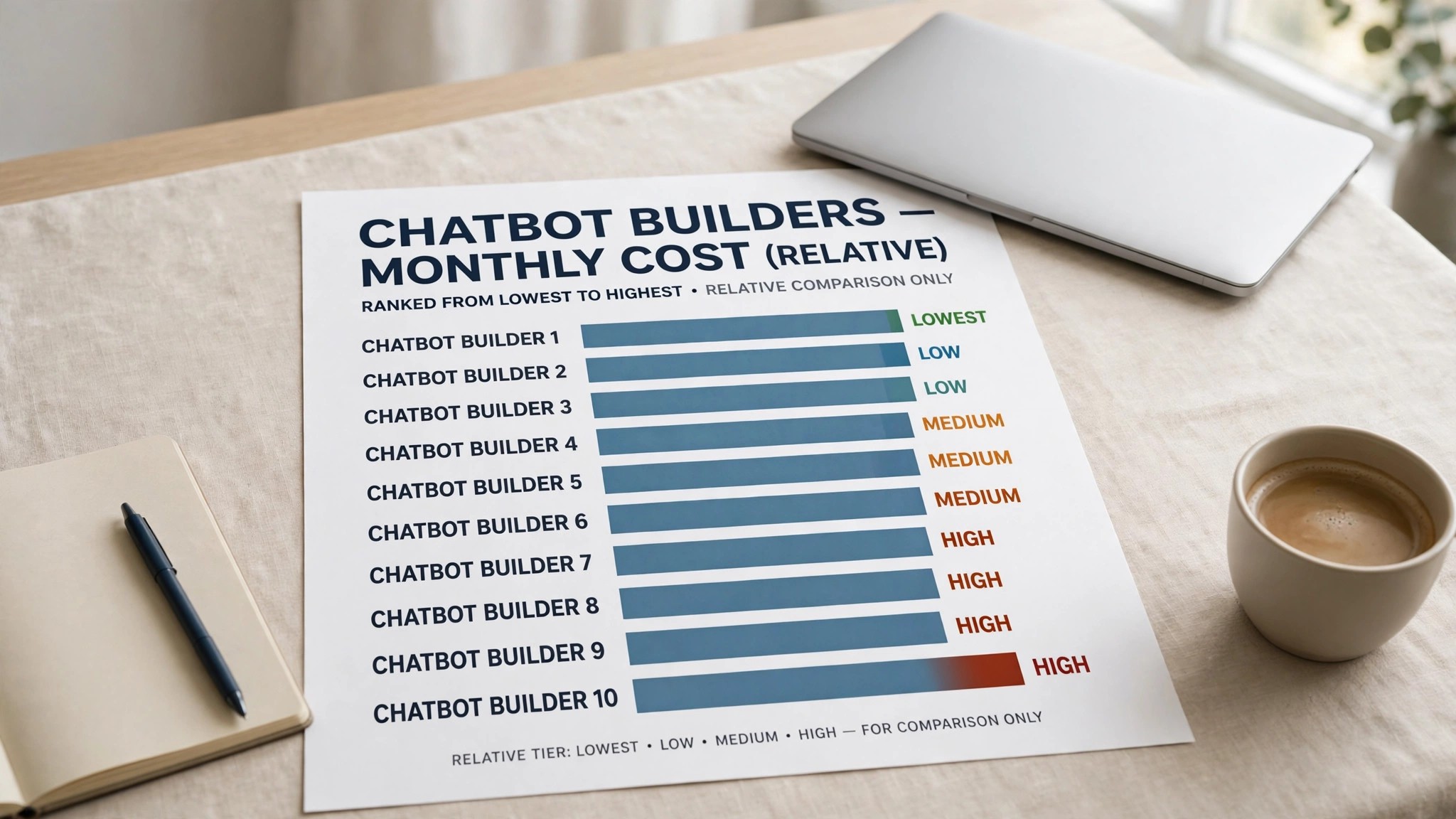
The table uses published starting prices, so confirm each figure on the vendor site before you budget. The pattern is what matters. Credit-based builders charge for messages, seat-based suites charge for agents plus resolutions, and social tools charge for contacts. A business with 1,000 chats a month should model all three cost types, because the cheapest entry price can become the most expensive at volume.
The per-outcome model deserves a worked example. A team with five agents on Intercom Essential pays about 145 dollars a month in seats, and 500 Fin resolutions add about 495 dollars. That total of 640 dollars is fair when Fin replaces a hire, and painful when it merely answers questions the website already answers. Count the resolutions that replace human work, not the resolutions that happen.
Bot Errors That Send Customers Straight to a Human
The first error is a bot that guesses instead of saying it does not know. A confident wrong answer about a refund policy or a delivery date creates a complaint that a human must fix, and the customer remembers the wrong answer longer than the fix. The best ai chatbot builders let a team set a confidence threshold, and anything below it goes straight to a human.
The second error is a loop with no exit. A customer who types the same question three times and gets the same reply will leave angry, and many will leave for a competitor. Build the handover rule into the first version of every flow, and test it by deliberately confusing the bot before launch.
The third error is training on stale documents. A bot that quotes last year’s prices or a retired policy is worse than no bot at all, because the customer trusts the answer. Review the training sources every month, remove retired pages and add the new ones. A ten-minute monthly review prevents most of the embarrassing answers.
The fourth error is hiding the human option. A visitor who cannot find a way to reach a person will assume the business does not want to talk, and that assumption costs sales. Put the human handover button in plain sight on every screen, and measure how often it is used. A rising handover rate is a signal to fix the bot, not to hide the button.
From First Bot to First Resolved Ticket
A chatbot should resolve its first real ticket within a week of setup. The sequence below keeps the launch small enough to finish and real enough to learn from, and the best ai chatbot builders all support a gradual rollout that starts on one page before the whole site.
- List the ten questions your team answers most often and gather the source pages for each.
- Train the bot on those ten answers only, and leave the rest for later.
- Set the handover rule so two failed answers send the visitor to a human.
- Deploy the bot on one page, the pricing or support page, before the whole site.
- Watch the first 50 conversations and fix the three most common wrong answers.
- Add the next ten questions once the first ten answer correctly.
- Connect the bot to the inbox so handover carries the full transcript.
- Review resolution rates weekly and retire any answer that keeps failing.
How to Test a Bot Before Your Customers Do
A bot should fail in private before it ever meets a customer, and the best ai chatbot builders make testing easy enough that a small team can do it in an afternoon. Start with the ten questions your team answers most, and ask the bot each one in three different wordings. A bot that answers all thirty correctly is ready for a soft launch, while a bot that fails five of them needs better training data, not a bigger budget.
The second test is the hostile one. Ask the bot a question it cannot answer, then ask it again with a typo, then ask it in a frustrated tone. The right response is a polite handover to a human, not a confident guess. Record how the bot behaves in each case, because customers will test the edges within the first week and the bot needs to fail gracefully every time.
The third test is the long conversation. A bot that answers the first question well can still lose track by the fifth message, forgetting the product the customer named or the order number they gave. Run a ten-message conversation and check whether the bot remembers the details from the start. A builder that keeps context across a long chat will feel intelligent to customers, while one that forgets will feel broken.
The fourth test is the handover itself. Trigger the handover rule, watch the transcript reach the human agent and check that the customer never has to repeat themselves. A clean handover is the difference between a bot that saves time and a bot that doubles the work, so test it before launch and again after every major change.
Frequently Asked Questions
Can Chatbase answer questions from a PDF price list?
Yes, Chatbase accepts uploaded files including PDFs, and the agent answers from their contents. Keep the training set small and current, because a stale price list produces confident wrong answers. Review the uploaded files every month and remove anything retired.
How does Intercom Fin charge for a resolved conversation?
Fin charges about 0.99 dollars per resolved outcome, on top of the per-seat help desk price. A resolution counts when Fin answers the customer without a human taking over. Model the monthly Fin cost from your actual chat volume before signing, because the charge grows with every resolved ticket.
Is Tidio Lyro enough for a store with 500 chats a month?
Yes on the Growth plan, which starts at about 49 dollars a month and raises the conversation allowance. The Starter plan covers only 100 billable conversations, so a store at 500 chats would hit the limit within days. Check the Lyro allowance separately, because AI conversations are counted apart from human ones.
Does ManyChat work for a business whose customers write on the website?
Only partly. ManyChat is built for Instagram, Facebook and WhatsApp, and its website chat is a secondary feature. A business whose customers write on the website should pick Tidio or Intercom for that channel and keep ManyChat for the social audience.
What should a team check before training a bot on its help centre?
Check three things. Whether the articles are current, whether the bot can cite the source of each answer and whether the handover rule is set. A bot trained on outdated articles will quote retired policies, and a bot without a handover rule will trap frustrated customers in a loop.
Which builder gives the best value for a team with developers?
Botpress gives the most control for a technical team, with a visual studio, unlimited agents on paid plans and flexible deployment. Dialogflow is the runner-up for teams embedding a bot inside their own app, while Chatbase wins when the team wants speed rather than control.
Match the Bot to the Channel, Then to the Budget
If you need a bot live this afternoon, pick Chatbase and train it on your website. If your developers want full control, pick Botpress and build the agent your way. If you run a support team with a ticket queue, pick Intercom and let Fin clear the routine work first.
If you run a small online store, pick Tidio and keep live chat beside the AI. If your customers message on Instagram, pick ManyChat and meet them in the DMs. If you qualify leads before a sales call, pick Landbot and let the flow book the call.
If you already use Zendesk tickets, pick Zendesk and add the AI layer where the queue lives. If you want chat plus AI for a small team, pick Freshchat and start on the free tier. If you build a bot inside your own app, pick Dialogflow and pay for requests. And if you want no-code plus live chat plus tickets in one price, pick ChatBot.com. The best ai chatbot builders are the ones that fit the channel your customers already use, so match the channel first and the price second.