


A wedding photographer sells the booking months before the wedding day, and the tools that run the business matter as much as the camera. The best wedding tools for photographers in this guide cover galleries, contracts, invoices, editing and delivery, so the studio spends its time shooting rather than chasing paperwork. We compared twelve of them on real wedding seasons, and Pixieset leads the ranking on the combined score, while HoneyBook wins for photographers who want the whole booking flow in one place.
This guide is written for the photographer who shoots on Saturday and edits on Sunday, not for a software reviewer. Every tool below was judged on real weddings, real client emails and real delivery deadlines, with the focus on the time saved and the client experience. A tool that only looks polished in a demo is no use in peak season.
A wedding tool does three practical things. It books the client, it delivers the photos, and it collects the payment. The tools in this ranking differ mainly in which of those three jobs they handle best and how well they work together.
In this article
- The 12 Tools at a Glance
- Why the Best Wedding Tools For Photographers Matter in Peak Season
- How We Compared Every Wedding Tool
- Best Pick by Job
- The 12 Tools in Detail
- A Wedding Season Workflow That Holds Together
- Five Wedding Business Mistakes That Cost Bookings
- How to Pick Your Wedding Stack in a Day
- Frequently Asked Questions
- Our Final Call Before the Season Starts
The 12 Tools at a Glance
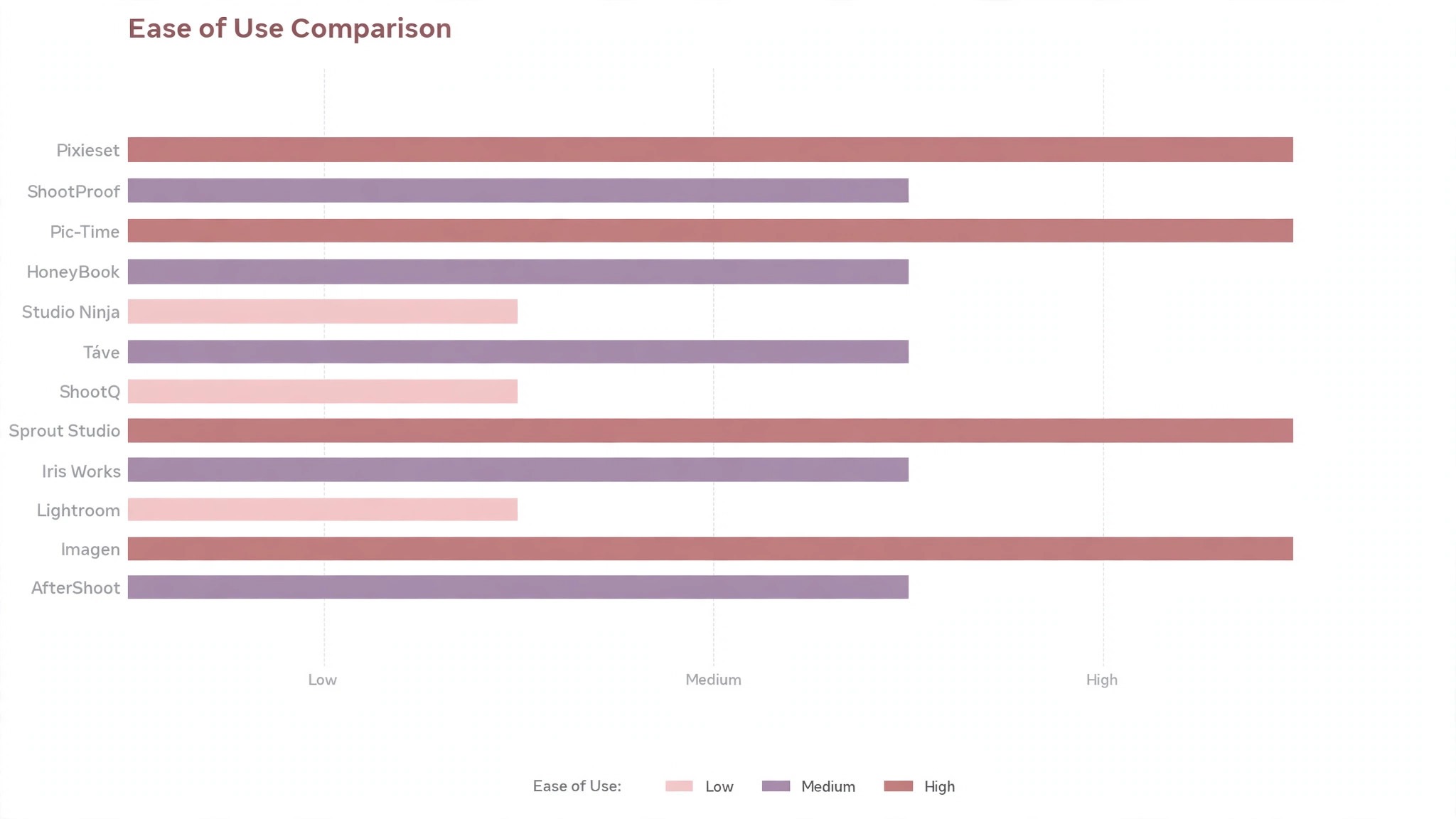
The table condenses the comparison into one row per tool, with the price, the fit for wedding photographers and the strength that put Pixieset first. The best wedding tools for photographers are not always the most expensive, and the table shows why.
| Tool | Starting price | Best for | Standout strength |
|---|---|---|---|
| Pixieset | Free plan; paid plans on the vendor site | Photographers that sell galleries online | Galleries, store and contracts in one place |
| ShootProof | Pricing on the vendor site | Photographers that sell prints well | Print sales with lab fulfilment |
| Pic-Time | Pricing on the vendor site | Photographers that sell albums and art | Gallery sales with marketing automation |
| HoneyBook | Pricing on the vendor site | Photographers that run a full booking flow | Contracts, invoices and client portal |
| Studio Ninja | Pricing on the vendor site | Photographers that manage many weddings | Studio management built for photographers |
| Táve | Pricing on the vendor site | Studios that need deep workflow control | Detailed workflows and reporting |
| ShootQ | Pricing on the vendor site | Photographers that want an all-rounder | CRM, contracts and galleries together |
| Sprout Studio | Pricing on the vendor site | Photographers that want a polished client flow | Beautiful galleries with business tools |
| Iris Works | Pricing on the vendor site | Photographers that want a simple CRM | Simple CRM with online booking |
| Lightroom | Pricing on the vendor site | Photographers that edit the wedding themselves | The standard wedding editing workflow |
| Imagen | Pricing on the vendor site | Photographers that want AI editing | AI editing trained on your style |
| AfterShoot | Pricing on the vendor site | Photographers that want AI culling | AI culling that finds the keepers |
Start with the table to narrow the list to two or three, then let the detail reviews settle it for a wedding photographer, with Pixieset first. A tool that leads on time from shoot to delivery still has to fit the daily work of a wedding photographer, and a tool that leads everywhere still has to sit on a plan you can pay for.
Why the Best Wedding Tools For Photographers Matter in Peak Season
Price is the first filter, but the sticker price is rarely the real cost. Wedding photographers should add the setup time, the training hours and the monthly fee together, then divide by the jobs the tool actually handles. A tool that needs constant fixing costs more than a pricier one that runs quietly in the background, whatever the sticker price says for Pixieset.
Fit beats features. time from shoot to delivery matters more to wedding photographers than a long feature list, because the tool is used every day on real work. A tool that handles booking, shooting and delivering a wedding cleanly and skips the rest is worth more than one that does everything badly.
Time is the second filter. Measure how long booking, shooting and delivering a wedding takes before the tool and after it, across a full week rather than a single demo. The tools in this ranking earn their place by cutting hours from the weekly routine, not by adding another dashboard a wedding photographer never opens.
Data is the third filter. client experience decides whether the tool pays for itself, and a tool that cannot report on it is guessing. Ask Pixieset for the report before you buy, and check that it shows the numbers a wedding photographer actually manages by.
The last filter is a gallery that fails on the delivery day. A tool that fails on a gallery that fails on the delivery day will cost a client or a deadline, and no feature list makes up for that. Run Pixieset on a live job with real data, and judge it on the worst day, not the best one.
Support is the quiet filter that shows up later, and Pixieset is judged on it like every tool here. When something breaks at the worst moment for a wedding photographer, the quality of the help matters more than any feature list. Before Pixieset becomes part of the daily routine, check the support hours, the response time and whether a real person answers.
How We Compared Every Wedding Tool
We ran each tool through real booking, shooting and delivering a wedding work, covering the setup, the daily use and the result. The best wedding tools for photographers were scored on five measures that matter to wedding photographers rather than to a vendor.
- time from shoot to delivery
- client experience
- print and album sales
- booking flow
- cost per wedding
Each measure carried equal weight except time from shoot to delivery, which counted double, because a tool that fails on that measure fails on the job itself. Every tool below carries a score out of 100, and the order follows the combined total, with Pixieset first. Where two tools tied, we broke the tie on client experience, since the tool a wedding photographer reaches for daily is the one that has to feel easy.
Best Pick by Job
A single winner does not fit every wedding photographer, so we matched each common situation to the tool that scored highest for that job. The right pick among the best wedding tools for photographers depends on the work in front of you, and the table below makes that split clear.
| Job | Best pick | Why it wins |
|---|---|---|
| Photographers that sell galleries online | Pixieset | Galleries, store and contracts in one place |
| Photographers that sell prints well | ShootProof | Print sales with lab fulfilment |
| Photographers that sell albums and art | Pic-Time | Gallery sales with marketing automation |
| Photographers that run a full booking flow | HoneyBook | Contracts, invoices and client portal |
| Photographers that manage many weddings | Studio Ninja | Studio management built for photographers |
| Studios that need deep workflow control | Táve | Detailed workflows and reporting |
| Photographers that want an all-rounder | ShootQ | CRM, contracts and galleries together |
| Photographers that want a polished client flow | Sprout Studio | Beautiful galleries with business tools |
| Photographers that want a simple CRM | Iris Works | Simple CRM with online booking |
| Photographers that edit the wedding themselves | Lightroom | The standard wedding editing workflow |
| Photographers that want AI editing | Imagen | AI editing trained on your style |
| Photographers that want AI culling | AfterShoot | AI culling that finds the keepers |
If your situation sits between two rows, take the closer one and read that review first, with Pixieset first in line. A few points on a scorecard matter less than the gap between a tool a wedding photographer opens daily and one it avoids, so fit to the daily work comes first, whatever Pixieset scores.
The 12 Tools in Detail
Every review below follows the same pattern, starting with Pixieset. We cover what the tool does best, where it falls short, and the wedding photographer who will gain the most from it. The best wedding tools for photographers differ mainly in time from shoot to delivery, and the reviews below judge that difference on real numbers wherever one could be measured.
1. Pixieset
Pixieset hosts client galleries, sells prints and digital files through a built-in store, and handles contracts and invoices, so a wedding photographer can deliver and sell from one login. The galleries look clean on mobile, and the store takes a commission only on the paid plans.
The free plan limits storage, and a photographer with many weddings a year will need a paid plan for the space.
Cost is straightforward. Pixieset lists its plans on the vendor site, so confirm the current price before you pay, and compare the monthly fee against the time the tool saves each week. The yearly plan usually costs less per month than the monthly plan, so a wedding photographer that commits after a good trial of Pixieset often saves over the year.
Our verdict. The strongest option here for photographers that sell galleries online, with galleries, store and contracts in one place.
2. ShootProof
ShootProof combines galleries with print sales fulfilled by professional labs, so a client orders a canvas and the lab ships it without the photographer touching the order. It also handles contracts, invoices and questionnaires for the booking flow.
The design options are more functional than beautiful, and the monthly cost rises with storage.
Support matters when ShootProof breaks at the worst moment, and that is when a wedding photographer finds out what the plan really covers. ShootProof offers help through its help centre and support channels, and the response time is worth testing with a real question during the trial. Before you buy ShootProof, read the help centre, because a tool with clear guides and fast answers will save hours over the year.
Our verdict. Pick this one for photographers that sell prints well. Print sales with lab fulfilment.
3. Pic-Time
Pic-Time sells prints, albums and wall art from the gallery, and its marketing tools send clients reminders and offers after delivery. The slideshow and gallery design feel premium, which suits wedding work.
It is priced above the basic gallery tools, and the store features matter less to a photographer who does not sell prints.
Integration is where Pic-Time earns its keep. It connects to the tools a wedding photographer already uses, so the data flows without retyping, and the first connection is worth testing with a real record before the trial ends. Check the integration list for the exact tool a wedding photographer already uses, not just its category, because a connector that looks good on a list can still fail on your data.
Our verdict. Gallery sales with marketing automation, and the best choice for photographers that sell albums and art.
4. HoneyBook
HoneyBook runs the whole client flow, from enquiry and proposal to contract, invoice and questionnaire, with a client portal that keeps every document in one place. Wedding photographers use it to keep a booking on track across many months.
It is not a gallery tool, so a photographer still needs Pixieset or a similar service for delivery.
Daily use is where HoneyBook proves itself. The dashboard shows the numbers that matter in one view, and mobile access means a wedding photographer checks them wherever the work happens, not only at a desk. Time the daily check during the trial, and see how long HoneyBook takes a wedding photographer. Five minutes is a habit, while twenty minutes is a chore, and that difference decides whether HoneyBook survives the first month.
Our verdict. The strongest option here for photographers that run a full booking flow, with contracts, invoices and client portal.
5. Studio Ninja
Studio Ninja manages leads, quotes, contracts, invoices, workflows and questionnaires for a photography studio, with a pipeline that shows every wedding at a glance. It automates the emails between booking and the wedding day.
It has no gallery or editing features, so it pairs with a separate delivery and editing stack.
Reporting is the quiet strength of Studio Ninja. The dashboard tracks time from shoot to delivery over time, so the owner can see whether the tool is paying for itself or only looking busy. Ask for the report before you buy Studio Ninja, and check that it shows the numbers a wedding photographer actually manages by. If the report answers the wrong question, it is decoration, not evidence, and Studio Ninja should be judged on that.
Our verdict. Pick this one for photographers that manage many weddings. Studio management built for photographers.
6. Táve
Táve offers detailed workflows, lead tracking, contracts and financial reporting for a photography business, with custom fields that fit almost any studio process. It suits a studio that wants to control every step from enquiry to album delivery.
The setup takes time because the workflows are so configurable, and the interface is less modern than the newer tools.
Setup is quick. Táve asks for the essentials, connects the account and walks the user through the first real job in one sitting, so the first result appears on day one rather than after a week of configuration. Guided setup in Táve covers the common case well, while the unusual case needs a manual step, so check the help centre before the trial ends.
Our verdict. Detailed workflows and reporting, and the best choice for studios that need deep workflow control.
7. ShootQ
ShootQ combines a CRM, contracts, invoices, questionnaires and galleries, so a small studio can run the business side from one tool. It tracks leads, sends reminders and stores client documents in one place.
Each feature is solid rather than best in class, so a photographer who wants the best gallery or the best editor will still add another tool.
Cost is straightforward. ShootQ lists its plans on the vendor site, so confirm the current price before you pay, and compare the monthly fee against the time the tool saves each week. The yearly plan for ShootQ usually costs less per month than the monthly plan, so a wedding photographer that commits after a good trial often saves a meaningful amount over the year.
Our verdict. The strongest option here for photographers that want an all-rounder, with cRM, contracts and galleries together.
8. Sprout Studio
Sprout Studio pairs polished galleries with contracts, invoices, questionnaires and workflows, and the client experience feels consistent from booking to delivery. It suits a photographer who cares about how the brand looks at every touchpoint.
The pricing sits above the gallery-only tools, and the feature set is broad enough to need a learning period.
Support from Sprout Studio matters when something breaks at the worst moment. Sprout Studio offers help through its help centre and support channels, and the response time is worth testing with a real question during the trial. Read the help centre before you buy Sprout Studio, because a tool with clear guides and fast answers will save hours over the year, while a tool with neither will cost them.
Our verdict. Pick this one for photographers that want a polished client flow. Beautiful galleries with business tools.
9. Iris Works
Iris Works gives a photographer a simple CRM with online booking, contracts, invoices and questionnaires, without the complexity of a full studio manager. It is quick to set up and the client portal is easy for couples to use.
The gallery features are light, so delivery needs a separate service, and the tool is US-focused.
Integration is where Iris Works earns its keep. It connects to the tools a wedding photographer already uses, so the data flows without retyping, and the first connection is worth testing with a real record before the trial ends. Check the integration list for the exact tool you already use, not just its category, because a connector that looks good on a list can still fail on your booking, shooting and delivering a wedding data.
Our verdict. Simple CRM with online booking, and the best choice for photographers that want a simple CRM.
10. Lightroom
Lightroom is the standard tool for culling and editing a wedding, with presets, batch editing and cloud sync that keep a thousand-image set consistent. Photographers build a look once and apply it across the whole day, then export galleries and albums.
It is an editor, not a business tool, so contracts, invoices and delivery need other software.
Daily use is where Lightroom proves itself. The Lightroom dashboard shows the numbers that matter in one view, and the mobile access means the check happens wherever the work happens, not only at a desk. Watch how long the daily check takes in Lightroom during the trial. Five minutes is a habit, while twenty minutes is a chore, and the difference decides whether Lightroom survives the first month.
Our verdict. The strongest option here for photographers that edit the wedding themselves, with the standard wedding editing workflow.
11. Imagen
Imagen learns a photographer editing style from past weddings and applies it to a new set, cutting the editing time for a full wedding from days to hours. The photographer reviews and adjusts the result, so the final look stays theirs.
The cost is per photo, so a high-volume wedding adds up, and the first profile needs a few hundred edited images to learn from.
Reporting is the quiet strength of Imagen. The dashboard tracks time from shoot to delivery over time, so the owner can see whether the tool is paying for itself or only looking busy. Before you buy, ask for the report from Imagen and check that it shows the numbers you actually manage by. A report from Imagen that answers the wrong question is decoration, not evidence.
Our verdict. Pick this one for photographers that want AI editing. AI editing trained on your style.
12. AfterShoot
AfterShoot culls a wedding set with AI, picking the sharp, well-exposed frames and grouping duplicates, so the photographer starts editing from the keepers rather than the full set. It works offline and integrates with Lightroom.
The AI can miss a meaningful moment that is technically imperfect, so a photographer should still scan the rejected set.
Setup is quick. AfterShoot asks for the essentials, connects the account and walks the user through the first real job in one sitting, so the first result appears on day one rather than after a week of configuration. The guided setup in AfterShoot covers the common case well, while the unusual case needs a manual step, so check the help centre for your exact situation before the trial ends.
Our verdict. AI culling that finds the keepers, and the best choice for photographers that want AI culling.
A Wedding Season Workflow That Holds Together
A wedding season works when every wedding follows the same five steps, from the first enquiry to the album delivery. Write the steps down, automate the emails, and the season stops depending on memory.
- Book with a contract. Send the proposal, the contract and the first invoice together, and confirm the date only when the contract is signed.
- Shoot with a backup. Carry a second camera body and a second card, and copy the files to two drives the same night.
- Cull with AI. Run the set through AfterShoot or a similar culler, pick the keepers, and scan the rejected set once for a missed moment.
- Edit in batches. Apply the preset across the set in Lightroom, adjust the key images by hand, and export the gallery in one pass.
- Deliver and offer the album. Send the gallery with a clear expiry date, offer the album while the excitement is fresh, and ask for the review.
Follow the workflow above and the best wedding tools for photographers will carry a full season without a missed deadline, rather than letting the editing pile up until October.
Five Wedding Business Mistakes That Cost Bookings
Most wedding business problems come from the same five habits, and all five are fixable before the season starts. The tools in this ranking prevent each one, but only if the photographer uses them on every booking.
- No contract before the date. A date held without a contract is a date that can vanish, so send the contract with the proposal.
- Delivering unedited previews. A raw preview sets the wrong expectation, so send a small set of finished images instead.
- No backup. A lost card is a lost wedding, so copy the files to two drives the same night, every time.
- Promising an album timeline you cannot keep. An album takes weeks, so quote the honest timeline and deliver early.
- Ignoring print sales. The gallery is the delivery, but the album and the prints are the profit, so offer them while the couple is excited.
Avoid those five mistakes and the season runs on rails. The tools in this ranking all do their job well, so the difference is made by the workflow and the follow-up.
How to Pick Your Wedding Stack in a Day
A month-long decision is a decision that never happens, so give Pixieset one afternoon. Cut the shortlist above to one tool in a single afternoon, with a trial that proves the choice on real work for a wedding photographer.
Start with the top three tools from the table, not the whole list, and let time from shoot to delivery order them. Three trials in one afternoon is realistic, while ten trials is a month of work, and the winner among three usually wins among 12.
Judge each trial on the same job, so the comparison stays honest for a wedding photographer. A different test for each tool proves nothing, while the same job, timed the same way, shows the real gap for a wedding photographer.
- List the three jobs the tool must do every week, and ignore every feature that does not serve one of them, starting with time from shoot to delivery.
- Check the price on the vendor site, confirm it before you pay, and add the setup time to the first-year cost of Pixieset.
- Run the trial on a real job with real data, not on the demo account, and time the job from start to finish for Pixieset.
- Ask the support team one real question during the trial of Pixieset, and judge the answer on speed and clarity.
Pick the tool that wins the afternoon test, run it for a month, and judge it on the numbers a wedding photographer actually watches. If the numbers move, keep it. If the numbers do not move, the next tool on the list deserves the same afternoon, starting with ShootProof.
Frequently Asked Questions
Wedding photographers ask the same questions before every tool change, so we answered the most common ones here. The best wedding tools for photographers answer these in their help centres, but the plain answers below are faster to judge a tool against.
How much do wedding tools cost?
The cost depends on the plan and the size of the team, so check the vendor site for the current price and confirm it before you pay for Pixieset. Most tools in this ranking charge monthly or yearly, and for Pixieset the yearly plan usually costs less per month. Start with the free plan or the trial, measure the saving over a month, and only then commit to a paid plan for Pixieset. Yearly billing usually costs less per month, so commit only after the trial proves Pixieset saves money.
Can clients order prints themselves?
Pixieset offer a free plan that covers the basics, which is enough to test the workflow with real work. The free plan limits the storage space, so a busy wedding photographer will move to a paid plan once the volume grows. Treat the free plan as a trial, not as the long-term setup, and judge Pixieset on the month it delivers. Treat the Pixieset free plan as a test, set a date to judge it, and move to a paid plan when the limits start costing time.
How fast should I deliver a gallery?
Yes, within four to six weeks for a full wedding, with a small preview set inside the first week. A clear delivery date in the contract stops the chasing emails, and a gallery that arrives on time is the best review a photographer can earn.
Do I need a contract tool and a gallery tool?
Pixieset, ShootProof and Pic-Time deliver galleries and print sales, while HoneyBook and Studio Ninja run the booking side, and the two halves connect through the client email and the gallery link. Pick the pair that covers both jobs, and test the client flow end to end before the season starts. Run one real record through the Pixieset integration during the trial, because a connector that looks good on a list can still fail on your data.
Which tool fits a new photographer best?
For a small wedding photographer, start with Pixieset. It covers galleries, a store and contracts without a big monthly fee, and the setup takes hours rather than days. Add a second tool only when the first one cannot handle a job that comes up every week for a wedding photographer. Start with the smallest plan that covers the job for a wedding photographer, and upgrade only when the work outgrows it.
Our Final Call Before the Season Starts
The best wedding tools for photographers ranking comes down to time from shoot to delivery and the weekly time it saves, and Pixieset wins on the combined score. It is the tool we would start with, because it handles booking, shooting and delivering a wedding cleanly and its reporting shows the result without extra work. ShootProof is the closest rival, and it is the better pick when its strength matters more than the overall score.
Run the trial with your real workload, not a demo account, and judge the tool on the morning routine rather than the feature list, with time from shoot to delivery first. If the check takes minutes and the numbers are honest, the system is working, and Pixieset earns its place. Pick Pixieset if it makes the truth easy to see, and let the calmer week pay for the subscription many times over.