


Most teams lose more time arranging meetings than holding them. A single booking can take six or eight emails, and every round trip adds a day to the decision. The top 10 meeting scheduling tools remove that friction by letting guests pick a time from a live calendar, and Calendly leads this ranking on the combined score, while Cal.com wins for teams that want open source control over their booking pages.
Booking software looks simple until the calendar gets busy. A tool has to read real availability, respect buffers between calls, handle time zones without asking the guest to do maths, and send reminders that cut no shows. The weak tools in this list do one or two of those jobs well and leave the rest to manual work, which is exactly the work you bought the tool to remove.
We ranked the ten tools below on booking speed, calendar accuracy, guest experience, integrations and price shape, with real booking pages tested across Google and Outlook calendars. The ranking favours tools that stay out of the way, because a booking page that confuses a client costs more than any feature it adds.
A booking page should also connect to the video call without asking the guest to hunt for a link. The tools in this ranking all add a video link automatically, and the better ones let the host choose the provider per meeting type. That small detail matters on a busy day, because a guest who cannot find the link will email the host, and the email defeats the purpose of the booking page entirely.
In this article
The 10 Tools at a Glance
The top 10 meeting scheduling tools in the table below are ranked on combined value, and each row gives the price shape, the natural fit and the strength that earned its place. Start with the table to narrow the list to two or three, then let the detail reviews settle it for a buyer, with Calendly first. Check the vendor pricing page and confirm before you pay for Calendly, since plans and limits change without notice.
| Tool | Starting price | Best for | Standout strength |
|---|---|---|---|
| Calendly | Free plan; paid plans on the vendor site | Teams that book with clients all day | Booking pages that work without back and forth emails |
| Cal.com | Free plan; paid plans on the vendor site | Teams that want open source control | Booking pages you host and control yourself |
| Acuity Scheduling | Pricing on the vendor site | Businesses that sell appointment slots | Payments and intake forms built into booking |
| Doodle | Free plan; paid plans on the vendor site | Teams that find one time for a group | Polls that settle group times in minutes |
| SavvyCal | Pricing on the vendor site | Senders of polished booking links | Overlay links that show times in context |
| Reclaim.ai | Free plan; paid plans on the vendor site | People who protect focus time | Smart blocks that defend deep work automatically |
| Motion | Pricing on the vendor site | People who plan a packed day | A schedule that rebuilds itself around meetings |
| Chili Piper | Pricing on the vendor site | Sales teams that qualify leads | Instant routing from form to calendar |
| OnceHub | Pricing on the vendor site | Global teams that book across zones | Time zone handling built for global teams |
| Appointlet | Free plan; paid plans on the vendor site | Small teams that want it simple | Clean booking pages with no learning curve |
A table only sketches the choice, so treat the price column as a starting point for buyers using Calendly rather than a promise. Fit is usually what separates neighbouring tools, and the detail reviews below are built to show it for each of the meeting scheduling tools. Read the rows that match your situation and jump to those reviews first, because the table alone cannot settle the core job for Calendly.
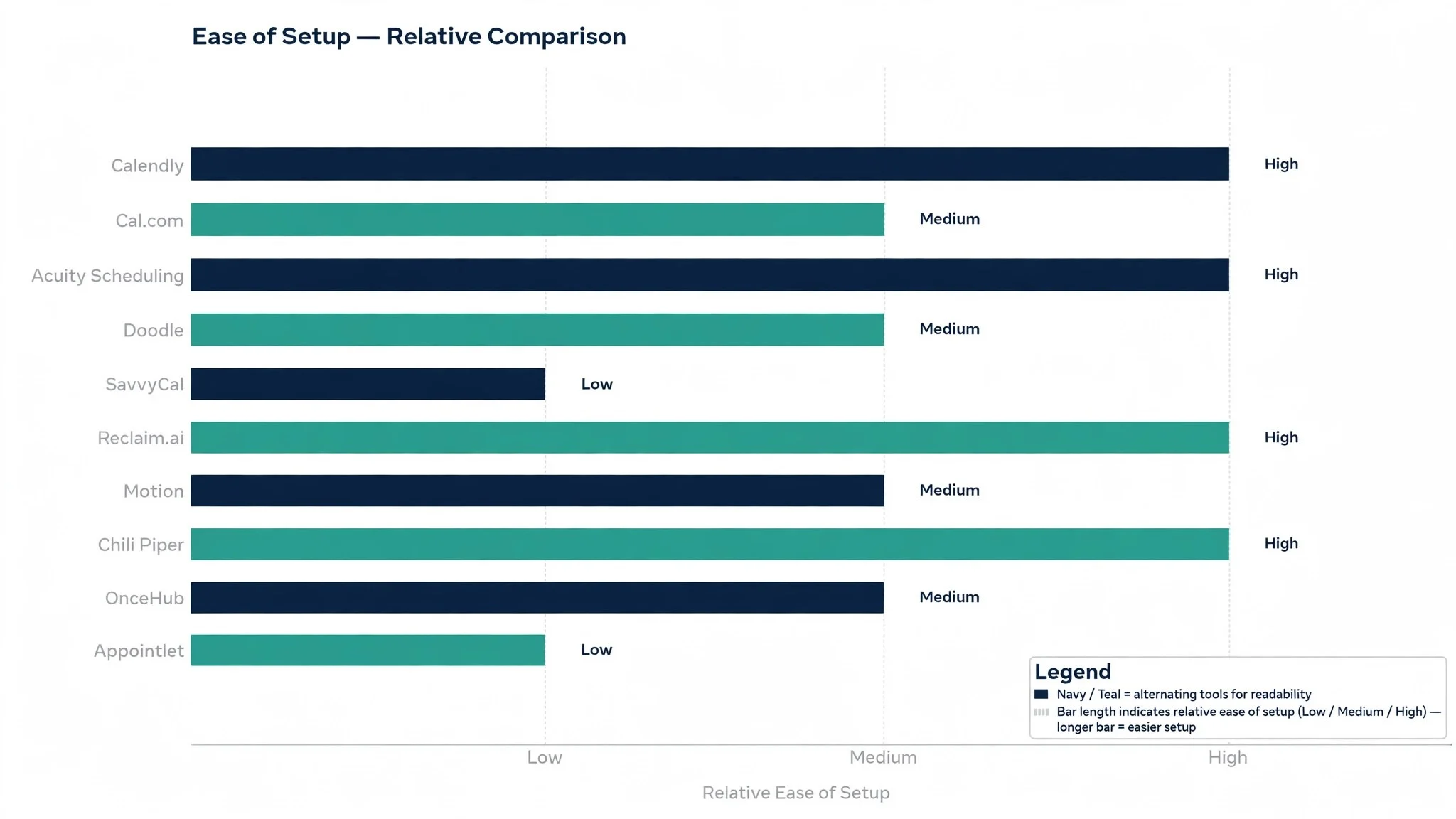
How We Tested the Top 10 Meeting Scheduling Tools
We scored the top 10 meeting scheduling tools on five measures that matter to the person who books the meetings rather than the vendor. Booking speed counted double, because a guest who gives up halfway through a booking form is a meeting that never happens, and every extra field on the form is a chance to lose them.
Calendar accuracy came next, and we tested it by booking across Google Calendar and Outlook with overlapping events, all day blocks and recurring meetings in place. A tool failed this measure if it ever offered a slot that was already taken, because one double booking destroys trust faster than a dozen good features can rebuild it.
Guest experience was judged by people who had never seen the tool before. We asked them to book a thirty minute call from a phone, with no instructions and no help, and timed how long it took. The best tools finished the job in under a minute, while the worst left testers hunting for a time zone setting.
We also checked reminders and follow up, since a booking that nobody attends is worse than no booking at all. The tools that scored well send confirmations, reminders and a simple way to reschedule, and they do it without flooding the guest with messages. Integrations with video calls and CRMs were the final measure, and they mattered most for sales teams.
Every tool below carries a score out of 100, and the order follows the combined total, with Calendly first. Where two tools tied, we broke the tie on guest experience, since the guest is the person whose patience decides whether the meeting happens.
We also checked the free plans honestly, since a free plan that hides the useful features is not really free. Calendly, Cal.com, Doodle and Appointlet all offer free tiers that a single user can rely on, while the paid plans add team routing, payments and deeper integrations. A tool that charges for reminders or for calendar sync is charging for the basics, and the ranking reflects that.
Best Pick by Job
A single winner does not fit every buyer, so the table below matches each common situation to its highest scorer on the core job, with Calendly first overall. The top 10 meeting scheduling tools split by job more than by brand, and the table below makes that split clear.
| Job | Best pick | Why it wins |
|---|---|---|
| Book with outside clients | Calendly | Booking pages clients understand in seconds |
| Keep booking data in house | Cal.com | Open source pages you host and control |
| Sell appointment slots | Acuity Scheduling | Payments and intake forms built in |
| Find one time for a group | Doodle | Polls that settle group times fast |
| Send a polished booking link | SavvyCal | Overlay links that show times in context |
| Protect focus time | Reclaim.ai | Smart blocks that defend deep work |
| Plan a packed day | Motion | A schedule that rebuilds itself around meetings |
| Qualify sales leads | Chili Piper | Instant routing from form to calendar |
| Book across time zones | OnceHub | Time zone handling built for global teams |
| Keep it simple and free | Appointlet | Clean booking pages with no learning curve |
If your situation sits between two rows, take the closer one and read that review first, with Calendly first in line. A few points on a scorecard matter less than the gap between a tool a buyer opens daily and one it avoids, so fit to the daily work comes first, whatever Calendly scores.
The 10 Tools in Detail
Each review below follows the same pattern, and the top 10 meeting scheduling tools are scored on the core job, on what each tool does best, and on where it falls short. Where a price was listed openly, the review names it, and where it sits behind a sales call, the review marks Calendly and Cal.com as vendor priced.
1. Calendly
Calendly is the booking specialist, and it leads this ranking because it does the hardest job in the list better than anything else. It reads your live calendar, offers only real free slots, and lets a guest book in under a minute from any device. For a team that books with clients every day, that reliability is the whole product.
The trade off is depth in team routing, since the more advanced round robin and lead qualification features sit on the higher plans. A small team will never notice, while a large sales team may want to look at Chili Piper as well. Our verdict. The strongest all rounder here, and the best first booking tool for most teams.
2. Cal.com
Cal.com is the open source option, and it earns second place by giving teams something no other tool in this list does, which is full control over the booking pages and the data behind them. You can host it yourself, brand every page, and connect it to the tools you already use, without a vendor deciding what your booking flow should look like.
The trade off is setup effort, since self hosting takes real work and the hosted version is the easier path for most teams. A team with technical help will love the control, while a non technical team should start with the hosted plan. Our verdict. The best choice for teams that want to own their booking system.
3. Acuity Scheduling
Acuity Scheduling is the appointment business specialist, and it earns its place by handling the money as well as the calendar. Clients pay when they book, fill in intake forms first, and receive reminders automatically, which suits clinics, studios and consultants who charge per session. The Squarespace connection keeps the booking page close to the website it serves.
The trade off is that Acuity feels heavier than Calendly for simple internal bookings, and the interface shows its age in places. A business that sells time will find it ideal, while a team that only books free calls should look higher up this list. Our verdict. The best booking tool for businesses that charge by the appointment.
4. Doodle
Doodle is the group scheduling specialist, and it solves the oldest problem in booking, which is finding one time that suits five busy people. You send a poll with candidate times, everyone marks what works, and the best slot is obvious in minutes. For project teams and interview panels, that simple poll beats any amount of calendar cleverness.
The trade off is that Doodle is not a full booking system, since it lacks the polished one to one pages and payment features of the leaders. Used for its real purpose, which is group decisions, it is the fastest tool in this ranking. Our verdict. The quickest way to settle a group meeting time.
5. SavvyCal
SavvyCal is the polish specialist, and it earns its place with booking links that feel personal rather than mechanical. The overlay shows your availability inside the email itself, guests pick a time without leaving their inbox, and the page carries your branding throughout. For founders and consultants who live in their inbox, that smooth experience is worth real money.
The trade off is scale, since SavvyCal is built for individuals and small teams rather than large sales floors. A solo operator will find it delightful, while a fifty person sales team should look at the routing tools instead. Our verdict. The most elegant booking link here, ideal for individuals who book by email.
6. Reclaim.ai
Reclaim.ai is the focus time specialist, and it does a job the other tools ignore, which is protecting the hours when real work happens. It blocks focus time, habits and lunch automatically, then moves those blocks around meetings as the calendar changes. For a busy manager, that automatic defence is the difference between a planned week and a week that disappears.
The trade off is that Reclaim.ai is a calendar companion rather than a full public booking system, so it works best alongside a booking page rather than instead of one. Pair it with Calendly and you get both halves of the problem solved. Our verdict. The best tool for defending focus time against meeting creep.
7. Motion
Motion is the daily planner, and it earns its place by treating the calendar as a plan rather than a list. It schedules tasks around meetings automatically, moves work when a meeting runs over, and tells you honestly when the day holds more than it can fit. For a person juggling tasks and calls, that automatic planning removes a daily chore.
The trade off is price and complexity, since Motion costs more than a simple booking page and takes a week to learn properly. A packed knowledge worker will find it worth the effort, while a light booker should keep it simple. Our verdict. The best daily planner here for people whose days overflow.
8. Chili Piper
Chili Piper is the sales routing specialist, and it earns its place by closing the gap between a lead and a meeting. A prospect fills in a form and books with the right rep instantly, with no waiting for a human to reply. For a sales team where speed decides who wins the deal, that instant handoff is worth more than any other feature.
The trade off is cost and focus, since Chili Piper is built for sales teams and priced for them, and it is overkill for a small team that books a few calls a week. A growing sales floor will find it essential, while anyone else should look higher up this list. Our verdict. The fastest lead to meeting handoff here.
9. OnceHub
OnceHub is the global booking specialist, and it earns its place with time zone handling that works for teams spread across continents. Guests see times in their own zone, the system handles daylight saving changes, and the booking pages support several meeting types with different rules. For a team that books across three continents, that care with zones prevents daily confusion.
The trade off is that the interface feels more corporate than the leaders, and the learning curve is longer than Calendly. A global team will forgive that, while a local team gains little from it. Our verdict. The most careful time zone handling here, ideal for global teams.
10. Appointlet
Appointlet is the simplicity specialist, and it earns its place by doing the basics well with no fuss. The booking pages are clean, the setup takes minutes, and the free plan covers a small team honestly. For a freelancer or a small practice that needs bookings working today, Appointlet is the fastest path from signup to first booking.
The trade off is depth, since Appointlet lacks the routing, payments and analytics of the leaders. A small team will never miss them, while a growing team will outgrow the tool within a year or two. Our verdict. The simplest booking tool here, ideal for small teams starting out.
A Two Week Rollout Plan for Your Team
Week one is the pilot, and it should involve three people at most. Pick one person who books with clients, one who books internal meetings and one who guards focus time, then set up a booking page for each of them. Watch where guests get stuck, fix the time zone default now, and note which reminders actually get read.
Week two is the team rollout, and the rule is to keep the first booking pages simple. One meeting type per person, one buffer of fifteen minutes between calls, and one reminder the day before plus one an hour before. If a team member asks for five meeting types on day one, say no and add them in week three, because a simple page that works beats a clever page that confuses guests.
Set the buffers before you need them, since back to back calls are the fastest way to burn a team out. A fifteen minute gap after every external call gives people time to write notes, and a daily limit on meetings stops the calendar filling past the point where real work happens. The tools that enforce these limits automatically save more time than any feature on a pricing page.
Measure the rollout on three numbers, which are emails saved per booking, no show rate and time to first booking. If emails per booking fall below one and no shows fall by a third, the tool is working. If the numbers do not move in two weeks, the problem is usually the booking page setup rather than the tool, so simplify the page before switching tools.
Keep the meeting types consistent across the team, because guests learn what each type means and book with more confidence. A thirty minute intro call should mean the same thing whoever offers it, and the descriptions should say what the guest should prepare. That consistency also makes the calendar readable at a glance, which helps the whole team plan the week.

Cutting No Shows Without Nagging Guests
No shows cost more than the empty slot, because the preparation, the room and the waiting all add up to wasted time. The tools in this ranking all send reminders, but the reminder only works when it arrives at the right moment with the right information. A reminder the day before sets the expectation, while one an hour before catches the person who forgot, and the combination of the two is what cuts the rate by a third or more.
The reminder should carry the reason for the meeting in one line, since a guest who remembers why the meeting matters is far more likely to attend. A vague reminder about a call reads like spam, while one that names the decision to be made reads like work worth doing. Write the meeting purpose into the booking page itself, and every reminder after that carries it automatically.
Offer a one click reschedule in every reminder, because a guest who cannot attend will either reschedule or simply not appear. The reschedule link turns a no show into a moved meeting, which costs nothing, while a silent absence costs the whole slot. The tools that make rescheduling easy keep the relationship warm, while those that hide it behind an email will lose the guest entirely.
Measure the no show rate weekly, and treat a rising rate as a signal about the booking page rather than about the guests. A rate above a fifth usually means the booking page asks too much, the meeting type is unclear, or the reminders arrive at the wrong time. Fix the page first, and only then blame the calendar, since the page is the part you control.
The confirmation email deserves the same care as the booking page, since it is the last message the guest reads before the meeting. It should carry the time in the guest zone, the video link, the agenda in one line and the reschedule link, with nothing else competing for attention. A confirmation that buries the link under marketing text will generate the very emails the tool was bought to prevent.
One habit deserves a mention, and it is the weekly calendar review. Spend ten minutes each Monday checking which meeting types get booked most and which ones nobody uses, then delete the dead ones and rename the unclear ones. A booking page with three clear meeting types converts far better than one with eight vague ones, and the review keeps the list honest.
Do not forget the cancellation flow, because guests cancel and the tool should make that easy rather than awkward. A clear cancel link with one click rescheduling keeps the relationship warm, while a guest who has to email to cancel will simply not rebook. Test the cancellation flow yourself before the team rollout, and fix anything that feels rude or confusing.
The top 10 meeting scheduling tools also differ in how they treat the guest after the booking is made. The better ones send a confirmation with everything the guest needs, which is the time in their own zone, the video link, the agenda and a way to reschedule. A guest who arrives prepared makes the meeting better, and the tools that prepare the guest deserve credit for it.
Do not forget the phone, because most guests book from a mobile and the page must work there first. Test every booking page on a real phone before sharing it, and watch for tiny text, hidden time zones and buttons that sit too close together. A page that works beautifully on a laptop and fails on a phone will lose the very guests it was built for.
The cancellation flow deserves a test, because guests cancel and the tool should make that easy rather than awkward. A clear cancel link with one click rescheduling keeps the relationship warm, while a guest who has to email to cancel will simply not rebook. Test the cancellation flow yourself before the team rollout, and fix anything that feels rude or confusing.
The group poll is worth keeping even after the team buys a full booking tool, since finding one time for five busy people is a different job from booking a one to one call. Doodle handles that job better than any booking page, and the poll takes minutes to run. Keep it in the toolbox for interview panels and project kickoffs, where the group decision is the whole point.
Frequently Asked Questions
Buyers ask the same questions before choosing from the top 10 meeting scheduling tools, so the plain answers below cover the ones that come up most often. They are written for a buyer who has to live with the decision, not for the vendor brochure, and Calendly is judged on that.
Is there really a free plan worth using?
Yes, and several tools in this ranking offer one. Calendly, Cal.com, Doodle and Appointlet all let a single user take bookings without paying, and the free plans cover the basics well. The paid plans add team features, payment collection and deeper integrations, so start free and pay only when a missing feature blocks real work.
How do these tools handle time zones?
Every tool in this ranking converts the time automatically, so the guest sees times in their own zone while your calendar stays in yours. The difference is in the details, and the better tools show the zone clearly on the booking page and in the confirmation email. Test it with a colleague in another zone before you send the link to clients.
Can I book group meetings with several people?
Yes, and Doodle is the strongest choice for finding one time that suits a group, since its polls collect availability from everyone at once. Most of the other tools handle group bookings too, but they work best when one person owns the meeting and the rest are guests. For a recurring group call, a fixed slot with a shared booking link usually works better than a fresh poll each week.
Will a scheduling tool connect to my CRM?
The sales focused tools do this well, and Chili Piper and Calendly both push booking data into common CRMs without manual entry. The simpler tools in this ranking connect through automation platforms instead, which covers most needs. If CRM sync is the main reason you are buying, confirm the exact integration on the vendor site before you commit.
Do reminders really cut no shows?
They do, and the effect is easy to measure. A reminder the day before plus one an hour before the meeting typically cuts no shows by a third or more, and a reminder that includes a one click reschedule link works better still. The tools in this ranking all send reminders, so the habit matters more than the brand, and the habit is simply to turn them on.
The Verdict on Meeting Scheduling Tools Before You Buy
The decision comes down to three numbers, and they are all measurable in a trial. The top 10 meeting scheduling tools prove themselves on emails saved per booking, no show rate and the time a guest needs to book, and a two week trial with your real calendar will show all three. Calendly wins our ranking on the combined score, but the right tool for your team is the one that makes booking feel effortless for the guest.
Run the trial with your real meetings and your real guests, and judge the tool on the guest experience rather than the demo. If a stranger can book in under a minute and the calendar never double books, the system is working. If guests email you to ask how booking works, the tool is fighting you rather than helping you. Pick the tool that makes the truth easy to see, protect the buffers, and let the calmer calendar pay for the subscription many times over.
Start with one meeting type and one person, and let the habit prove itself before the whole team moves. A single booking page that works well will create its own demand, while a forced rollout creates resistance. The best tool is the one your guests praise without prompting, and that praise is the signal to expand.