


A podcast is the most personal marketing a small business can make. A listener hears the owner’s voice, learns how the business thinks, and starts to trust it before ever walking through the door. But a show with echoing audio, long pauses, and no home on the big platforms does the opposite, and a business that records badly sounds careless. The best podcast tools for small businesses exist to make a small team sound like a professional studio.
We tested each tool on real small business work, not on a feature list. That meant recording the same twenty-minute episode in every tool, which was an owner interview with a remote guest, a noisy room, and a script that needed cutting down. The ranking weighs how good the recording sounds, how fast the edit goes, and how easily the finished show reaches listeners.
Riverside leads the ranking on the combined score, with Descript close behind for teams that edit by cutting words on a page. Buzzsprout wins for teams that want hosting done simply, while Spotify for Creators suits businesses that want a free start on the biggest platform. Riverside earns its place on remote recording quality, Descript on text editing, and the rest on narrower strengths.
Riverside leads the combined score, while a business that records one kind of episode should treat the best pick by job table near the end as the real shortlist. A tool that ranks fifth overall can still be the right answer for a business that only records solo episodes, just as the overall winner can be wrong for a team that records guests across three time zones. Match the tool to the show, not to the rank.
In this article
- The 10 Tools at a Glance
- Why the Best Podcast Tools for Small Businesses Earn Listeners
- How We Put Each Podcast Tool Through Its Paces
- The 10 Tools in Detail
- What a Small Business Actually Pays for a Podcast
- Podcast Mistakes That Lose Listeners
- Best Pick by Job
- Frequently Asked Questions
- Choosing the Podcast Tool Your Business Ships With Weekly
The 10 Tools at a Glance
The table below lines up the best podcast tools for small businesses on the facts that decide a purchase, which are the price shape, the natural fit, and the strength that earned each rank. Riverside leads on recording quality, while Descript wins for teams that want editing to feel like word processing.
| Tool | Starting price | Best for | Standout strength |
|---|---|---|---|
| Riverside | Free plan; paid plans on the vendor site | Teams that record remote guests | Studio-quality local recording |
| Descript | Free plan; paid plans on the vendor site | Teams that edit by cutting text | Text-based editing with AI help |
| Buzzsprout | Free plan; paid plans on the vendor site | Teams that want simple hosting | Easy publishing with clear stats |
| Spotify for Creators | Free plan; paid plans on the vendor site | Businesses starting free | Free hosting on a huge platform |
| Podcastle | Free plan; paid plans on the vendor site | Teams that record and edit in one place | Recording, editing, and AI tools together |
| Zencastr | Free plan; paid plans on the vendor site | Teams that record remote interviews | Clean remote recording with video |
| Adobe Podcast | Pricing on the vendor site | Teams that need clean audio fast | AI cleanup for noisy recordings |
| Captivate | Pricing on the vendor site | Teams that want hosting plus growth | Hosting with marketing tools built in |
| Transistor | Pricing on the vendor site | Teams that run more than one show | Multi-show hosting with analytics |
| Audacity | Free plan; paid plans on the vendor site | Teams that edit on a zero budget | Free editor with deep control |
Riverside and Descript lead the table, so compare their reviews on recording and editing to see which habit fits the way your business records. A tool that scores High on recording only helps if the edit is fast enough to ship weekly, and a tool that scores High on hosting only helps if the show actually sounds good.
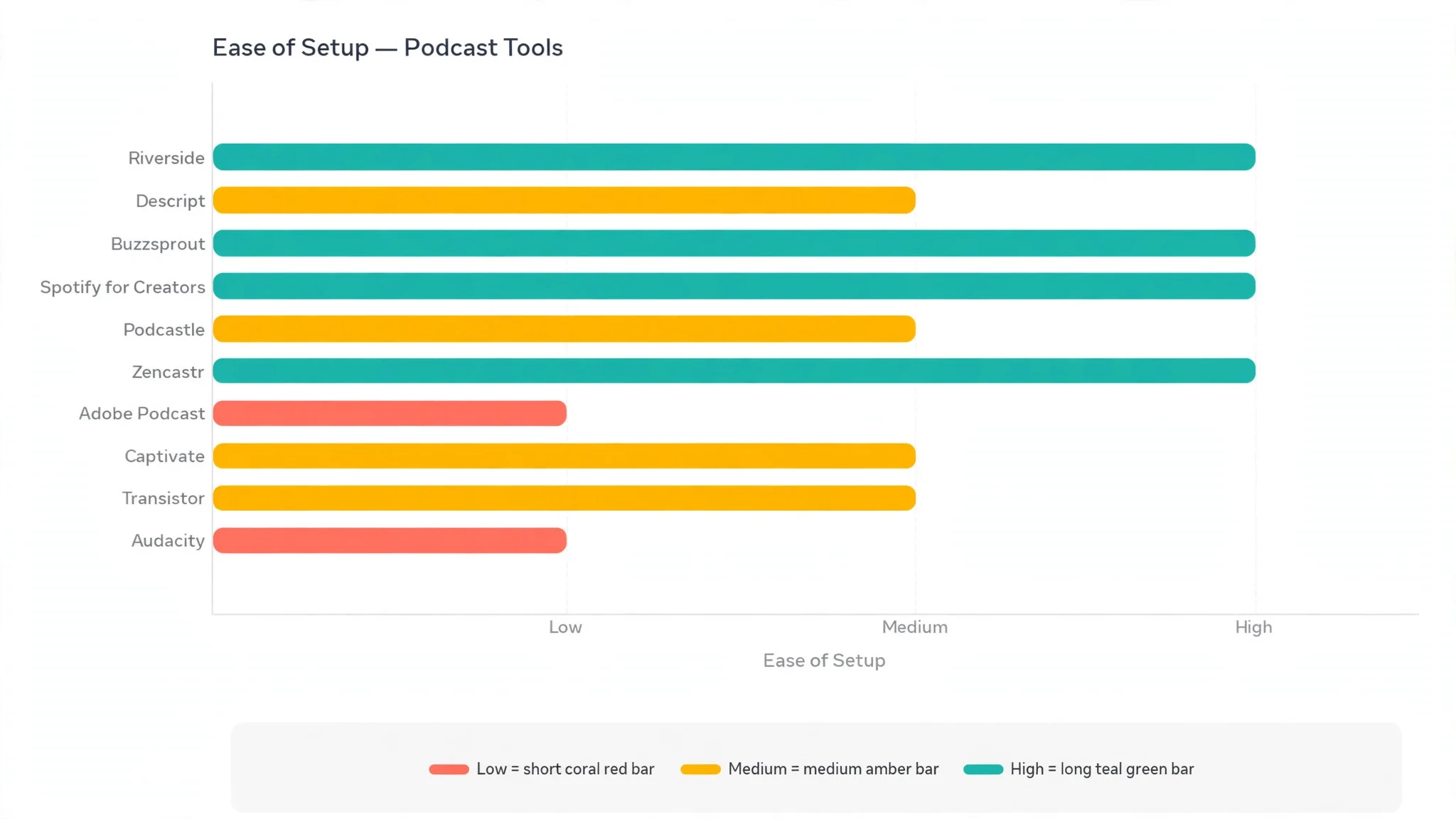
Why the Best Podcast Tools for Small Businesses Earn Listeners
Audio quality is the first test, and listeners decide in seconds. A show that echoes, crackles, or fades in and out gets switched off before the guest finishes their first answer, while a clean recording keeps a listener through the whole episode. The tools in this ranking record each voice locally, which means a bad connection cannot ruin the guest’s audio.
Consistency is the second reason a tool matters. A small business podcast only builds an audience if episodes arrive on schedule, and a slow edit is the usual reason they do not. A tool that cuts the edit from a day to an hour makes a weekly show realistic for a team that also runs a business, and a weekly show is what turns casual listeners into regulars.
Distribution is the third gain. A show that only lives on the business website reaches the people who already know the business, while a show on the main podcast platforms reaches people searching for the topic. Good hosting tools publish to every platform at once, with a single upload, so the owner does not have to learn each platform separately.
The final gain is evidence. Hosting stats show which episodes people finish, where listeners drop off, and which topics bring new subscribers. That evidence tells the owner what to record next, which is worth more than any guess. A show that improves every month is a show that grows.
How We Put Each Podcast Tool Through Its Paces
We ran the best podcast tools for small businesses through the same five measures, using the same twenty-minute episode for every tool, which was an owner interview with a remote guest, a noisy room, and a script that needed cutting down. Each tool handled the same recording and edit, so the scores compare like with like.
- Recording quality, judged by how clean the finished audio sounded, with separate tracks for each voice and no damage from a weak connection.
- Editing speed, measured by how long the same cut took, from raw recording to a finished episode ready to publish.
- Publishing ease, scored on how simply the finished show reached the main platforms, with show notes and episode art handled in the same flow.
- Setup speed, timed from account creation to the first recorded minute, including any guest invitation and microphone check.
- Daily usability, judged by how easily a non-technical owner could record, edit, and publish without asking for help or opening a manual.
Each measure carried equal weight except recording quality, which counted double, because a podcast tool that cannot capture clean audio is not doing its job. Scores run out of 100, and the order below follows the combined total, led by Riverside on recording quality.
The 10 Tools in Detail
Each review below judges the best podcast tools for small businesses on the same ground. We note what each tool does best, where it falls short, and the team it suits best, with recording quality carrying the most weight.
1. Riverside
Riverside tops the best podcast tools for small businesses on the combined score, and it earns the lead with recording quality that protects the show from bad internet. Each guest is recorded locally on their own device, so the finished audio stays clean even when the live call stutters, and separate tracks for every voice make the edit far easier. For a business that records guests remotely, that safety net is the whole point.
The strengths run beyond the recording. Video is captured in high quality too, which gives the business clips for social media, and the AI tools can clean up filler words and draft show notes. The studio interface is clear, guests join from a browser with no install, and the transcription arrives quickly after the recording ends.
The limits are price and scope. Riverside costs more than the free-led hosts, and it is a recording studio first, so hosting and distribution sit elsewhere. A team that records solo episodes in one room will get less value, while a team that records guests every week will feel the difference in every episode.
In the trial, record a remote guest with a weak connection and listen to the finished tracks. Check whether the guest’s voice stayed clean, whether the separate tracks made the edit easier, and whether the video clips are usable. If all three pass, the recording quality is real.
Our verdict. The best remote recording here, and the safest first pick for interview shows.
2. Descript
Descript is the editing pick, and it earns second place by turning editing into word processing. The recording becomes a transcript, and cutting a word from the transcript cuts the audio, which means an owner can edit an episode by reading it rather than by scrubbing through waveforms. For a small team without an audio engineer, that idea changes everything.
The strengths are the edit and the AI help. Studio Sound cleans up echo and background noise, the filler-word removal tidies the ums and uhs in one click, and Overdub can fix a misspoken word by typing the correction. Video editing works the same way, so the business gets clips and a full episode from one session.
The limits are the learning curve and the recording side. Descript records well but does not match Riverside for remote guest reliability, and the text-based edit takes a session to trust. The free plan is generous for testing, but serious weekly use needs a paid tier.
In the trial, edit the same ten-minute segment in Descript and in a normal audio editor, and time both. Check whether the transcript edit felt faster and whether the cleaned audio sounds natural. If the edit took half the time, the text approach fits.
Our verdict. The fastest editing here, ideal for teams without an audio engineer.
3. Buzzsprout
Buzzsprout is the hosting pick, and it suits teams that want publishing to be simple. Upload the finished episode, add the show notes, and Buzzsprout sends it to the main platforms, with clear stats showing how each episode performs. For a business that records elsewhere and just needs a reliable home for the show, that simplicity is the appeal.
The strengths are the ease and the stats. The dashboard is plain and readable, the free plan lets a team test the whole flow, and the episode pages look professional without any design work. The Magic Mastering option cleans up the audio on upload, which helps a team that records in a noisy room.
The limits are recording and editing. Buzzsprout does not record or edit, so the team needs another tool for those steps, and the free plan limits the hours a team can host. Teams that want an all-in-one studio will look at Riverside or Podcastle instead.
In the trial, publish one real episode and check how it appears on the main platforms. Read the stats after a week and see whether they answer the questions the owner actually asks. If publishing felt easy and the stats are clear, the hosting fits.
Our verdict. The simplest hosting here, ideal for teams that record elsewhere.
4. Spotify for Creators
Spotify for Creators is the free start pick, and it suits businesses that want to launch a show without spending anything. Hosting is free, the tools cover recording, editing, and publishing in one place, and the show reaches Spotify’s huge audience plus the other platforms. For a business testing whether podcasting works, that free start removes the risk.
The strengths are the price and the reach. The recording tools handle remote guests, the editing is simple enough for a beginner, and the analytics show how the show performs on Spotify. The Q and A and poll features let listeners interact with the show, which suits a business building a community.
The limits are control and depth. The tools are simpler than Riverside or Descript, so a team that wants deep editing or studio-grade recording will feel the ceiling. The platform is Spotify first, which suits most shows but gives the business less independence than a dedicated host.
Our verdict. The best free launch here, ideal for businesses testing podcasting.
5. Podcastle
Podcastle is the all-in-one pick, and it earns its place by covering recording, editing, and AI cleanup in a single browser studio. A team can record a remote guest, edit the transcript, clean the audio, and publish the show without leaving the tab. For a small business, that single workspace keeps the whole show manageable.
The strengths are the breadth and the AI tools. The audio cleanup handles echo and noise well, the text-based editing works like Descript, and the video recording gives the business clips for social media. The free plan covers the basics, which is enough to test the full flow properly.
The limits are the depth of each part. Podcastle does many things well but does not lead any single one, so a team that wants the very best remote recording will still prefer Riverside, and a team that wants the deepest hosting will prefer Buzzsprout. The paid tiers are where the serious weekly use sits.
Our verdict. The best single workspace here, ideal for teams that want one tab for the whole show.
6. Zencastr
Zencastr is the remote interview pick, and it suits teams that record guests across time zones. Like Riverside, it records each voice locally, so the finished audio stays clean whatever the connection does, and the video is captured in high quality for clips. For an interview show, that reliability is the difference between a usable episode and a lost hour.
The strengths are the recording and the simplicity. Guests join from a browser, the separate tracks make the edit easy, and the built-in editing tools handle the basic cuts. The pricing stays below Riverside, which suits a small business watching the budget, and the free plan covers the first steps.
The limits are the editing depth and the brand reach. Zencastr edits well for basic work but does not match Descript for text-based editing, and the hosting and distribution tools are lighter than Buzzsprout. Teams that want one tool for everything will find gaps.
Our verdict. The best-value remote recording here, ideal for interview shows on a budget.
7. Adobe Podcast
Adobe Podcast is the cleanup pick, and it earns its place with AI that rescues noisy recordings. The Enhance Speech tool turns a phone recording from a loud room into audio that sounds like a studio, which is a lifeline for a business that records wherever it can. For a team without a quiet room, that cleanup is worth more than any other feature.
The strengths are the cleanup and the Adobe connection. The enhancement is genuinely strong on voice, the editing tools handle the basics, and the transcription is accurate. Teams already using Adobe tools will find the workflow familiar, and the web studio keeps the setup light.
The limits are scope and price. Adobe Podcast is a cleanup and editing tool, not a full recording studio or host, so the team needs other tools for guests and distribution. The best features sit on paid tiers, and the pricing suits teams already in the Adobe world better than newcomers.
Our verdict. The strongest audio cleanup here, ideal for teams that record in noisy rooms.
8. Captivate
Captivate is the growth pick, and it suits teams that want hosting plus the tools to grow the audience. Beyond publishing to every platform, it offers episode pages, calls to action, and analytics that show what listeners do after they hear the show. For a business that treats the podcast as marketing, those growth tools matter.
The strengths are the hosting and the marketing. The dashboard is clear, the unlimited shows and episodes on paid plans suit a business with more than one idea, and the monetisation tools help a show earn once the audience grows. The support is known for answering quickly.
The limits are price and recording. Captivate is a host, not a studio, so the team records and edits elsewhere, and there is no free plan, so a business pays from day one. Teams that only need simple hosting will find Buzzsprout cheaper.
Our verdict. The best hosting for growth here, ideal for businesses that treat the show as marketing.
9. Transistor
Transistor is the multi-show pick, and it earns its place by hosting several shows under one account without fuss. A business with a main show, a customer-stories show, and an internal show can run all three from one dashboard, with separate analytics for each. For a business with more than one idea, that structure saves money and confusion.
The strengths are the multi-show support and the analytics. The episode pages look professional, the private podcasting option suits internal shows, and the integrations cover the tools a marketing team already uses. The pricing stays fair for what it covers, and the interface is clean.
The limits are recording and editing. Transistor is a host, so the team needs a separate studio, and the free options are limited. A business with one show will get less value than a business with three, and the growth tools are lighter than Captivate.
Our verdict. The best multi-show hosting here, ideal for businesses running more than one show.
10. Audacity
Audacity is the free editor pick, and it rounds out the ranking with a no-cost audio editor that has served podcasters for years. It records, cuts, cleans, and exports audio with deep control, and it costs nothing, which makes it the honest choice for a business on a zero budget. For a team that records in one room and edits carefully, it does the job.
The strengths are the price and the control. The editing tools cover noise removal, levelling, and multi-track work, the plugin support adds what the base lacks, and the community has answered every question a beginner could ask. A careful editor can produce a professional-sounding show with Audacity alone.
The limits are the learning curve and the missing pieces. Audacity does not record remote guests, does not host, and does not help with publishing, so the team needs other tools for those steps. The interface looks dated, and a beginner will need a few sessions before the edit feels fast.
Our verdict. The best free editor here, ideal for teams editing on a zero budget.
What a Small Business Actually Pays for a Podcast
The best podcast tools for small businesses differ most on what the monthly fee actually covers, and the cheapest plan is not always the cheapest show. A recording studio, an editor, and a host are three separate jobs, and a team that buys all three separately can spend more than a team that picks an all-in-one. Before choosing, list the steps the show actually needs, then compare the total across two or three finalists.
Free plans deserve a hard look. Riverside, Descript, Buzzsprout, Spotify for Creators, Podcastle, Zencastr, and Audacity all offer a free start, but each one limits something different, which is recording hours here, hosting hours there, and editing features elsewhere. A free plan that covers a real monthly episode is a gift. A free plan that runs out halfway through the month is just a trial.
Watch the per-show costs too. Some hosts charge by the hour of audio, some by the show, and some by the month regardless of volume, which changes the maths for a business that publishes weekly versus monthly. Work out the real publishing rhythm first, then check what a year of that rhythm costs on each finalist.

Podcast Mistakes That Lose Listeners
The first mistake is publishing bad audio and hoping the content saves it. Listeners forgive a dull minute, but they do not forgive echo, clipping, or a guest who fades in and out. Record each voice on its own track, check the levels before the guest speaks, and run the cleanup pass every time. Clean audio is the minimum, not the goal.
The second mistake is editing by feel instead of by plan. An episode that wanders for forty minutes loses listeners at the first dull stretch, while an episode cut to the strong twenty minutes keeps them. Outline the episode before recording, cut the weak sections without mercy, and keep the published length honest. A tight twenty minutes beats a loose forty every time.
The third mistake is publishing and then going quiet. A show that appears on one platform and never gets mentioned anywhere else grows slowly, while a show with a short clip on social media, a note in the email newsletter, and a link on the website finds listeners every week. Spend an hour promoting each episode, and the audience compounds.
Best Pick by Job
No single winner fits every small business, so the tools below are matched to the job instead of the rank. Find the row that matches how your business records, then start the trial with that podcast tool.
| Job | Best pick | Why it wins |
|---|---|---|
| Records remote guests weekly | Riverside | Studio-quality local recording |
| Edits without an engineer | Descript | Text-based editing with AI help |
| Wants simple hosting | Buzzsprout | Easy publishing with clear stats |
| Starting free | Spotify for Creators | Free hosting on a huge platform |
| Wants one tab for the show | Podcastle | Recording, editing, and AI together |
| Records interviews on a budget | Zencastr | Clean remote recording with video |
| Records in noisy rooms | Adobe Podcast | AI cleanup for noisy recordings |
| Treats the show as marketing | Captivate | Hosting with marketing tools built in |
| Runs more than one show | Transistor | Multi-show hosting with analytics |
| Edits on a zero budget | Audacity | Free editor with deep control |
If your situation does not match a row exactly, take the closest one and read that review first, starting with Riverside when it fits. The gap between neighbouring tools is smaller than the gap between a show that ships weekly and one that ships when someone finds time, so the shipping habit matters more than a few points on a scorecard.
Frequently Asked Questions
Owners ask the same questions before choosing from the best podcast tools for small businesses, so the plain answers are here, based on how these tools actually work for a small team.
How much does it cost to start a business podcast?
A business can start free, using Spotify for Creators for hosting and Audacity for editing, with a decent USB microphone as the only purchase. Most teams move to a paid plan within a few months, once the show is weekly and the edit needs to be faster. Budget for a recording tool and a host, and check the vendor site for current pricing before committing.
Do we need video as well as audio?
Not to start, but it helps. A video version gives the business clips for social media, which is where most new listeners discover a show. Riverside, Zencastr, Descript, and Podcastle all capture video alongside the audio, so the team gets both from one recording session. Start with audio only if the budget is tight, and add video once the show is weekly.
How long should a business podcast episode be?
Twenty to thirty minutes suits most small business shows, because it fits a commute or a lunch break, and it is short enough to edit in an afternoon. A solo tips episode can run fifteen minutes, while an interview can stretch to forty if the guest is strong. The right length is the one the team can sustain weekly without the edit eating a whole day.
Can one person run the whole show?
Yes, and many small business shows are run by one person. The owner records, edits, and publishes, using a tool like Descript or Podcastle to keep the edit fast. The realistic time is three to four hours per episode, including recording, editing, and promotion, so a weekly show needs a protected half-day in the calendar.
How do listeners find a small business podcast?
Through the platforms, through search, and through the business itself. Good hosting publishes the show to every platform at once, the episode titles should carry the topic plainly, and the business should mention each episode in its email newsletter and on social media. Most early listeners come from the business’s existing customers, and the platforms bring the rest over time.
Choosing the Podcast Tool Your Business Ships With Weekly
The best podcast tools for small businesses prove their worth in the first episode, and the proof is simple to measure. Record the same episode in two tools, listen to both as a stranger would, and time the edit each one needs. If one sounds clean and edits in an hour while the other sounds thin and takes a day, the choice is made.
Riverside wins our ranking on the combined score, but the right tool for your business is the one that gets the episode out every week without a struggle. Run the trial on a real episode with a real guest, judge it on the finished audio rather than the demo, and pick the studio that makes a weekly show feel easy. A clean show, shipped on schedule, will pay for the subscription many times over.