


Freelancing sells time, and time that is not tracked is time that is not billed. A freelancer who guesses at hours will undercharge the slow client, overpromise the next one, and end the month unsure where the hours went. Worse, the workday itself leaks, because email, messages, and admin quietly eat the hours that should have gone to paying work. The best time management tools for freelancers exist to make every hour visible, billable, and honest.
We tested each tool on real freelance work, not on a feature list. That meant running the same week through every tool, which was three client projects, a dozen small admin jobs, two late-night revisions, and a Friday invoice run. The ranking weighs how easily the tool captures time, how honestly it reports it, and how little it interrupts the work itself.
Toggl Track leads the ranking on the combined score, with Clockify close behind for freelancers who want a free tracker that never runs out. Harvest wins for freelancers who bill by the hour and need invoices to match the time, while Timely suits those who want the hours captured without starting and stopping a timer. Toggl Track earns its place on time capture, Clockify on free tracking, and the rest on strengths of their own.
Toggl Track sits first on combined score, but a freelancer whose week runs on one habit should let the best pick by job table near the end decide instead. A tool that ranks fifth overall can still be the right answer for a freelancer who only needs focus, just as the overall winner can be wrong for someone who bills in six-minute units. Match the tool to the working day, not to the rank.
In this article
- The 8 Tools at a Glance
- Why the Best Time Management Tools for Freelancers Pay for Themselves
- How We Put Each Time Tool Through Its Paces
- The 8 Tools in Detail
- What a Freelancer Actually Pays for Time Tracking
- Time Mistakes That Cost Freelancers Money
- Best Pick by Job
- Frequently Asked Questions
- Choosing the Time Tool Your Freelance Week Runs On
The 8 Tools at a Glance
The table below lines up the best time management tools for freelancers on the facts that decide a purchase, which are the price shape, the natural fit, and the strength that earned each rank. Toggl Track leads on ease and reporting, while Clockify wins for freelancers who want a free tracker with no real limits.
| Tool | Starting price | Best for | Standout strength |
|---|---|---|---|
| Toggl Track | Free plan; paid plans on the vendor site | Freelancers who want tracking made easy | One-click timers with clear reports |
| Clockify | Free plan; paid plans on the vendor site | Freelancers who want tracking free | Generous free plan with no time cap |
| Harvest | Free plan; paid plans on the vendor site | Freelancers who bill by the hour | Time, expenses, and invoices together |
| Timely | Pricing on the vendor site | Freelancers who hate starting timers | Automatic capture of the working day |
| RescueTime | Pricing on the vendor site | Freelancers who want honest focus data | Automatic tracking of where time goes |
| Motion | Pricing on the vendor site | Freelancers whose days keep changing | Automatic daily planning and rescheduling |
| Sunsama | Pricing on the vendor site | Freelancers who plan the day by hand | Calm daily planning with timeboxing |
| Forest | Pricing on the vendor site | Freelancers who need focus help | A focus timer that grows a virtual tree |
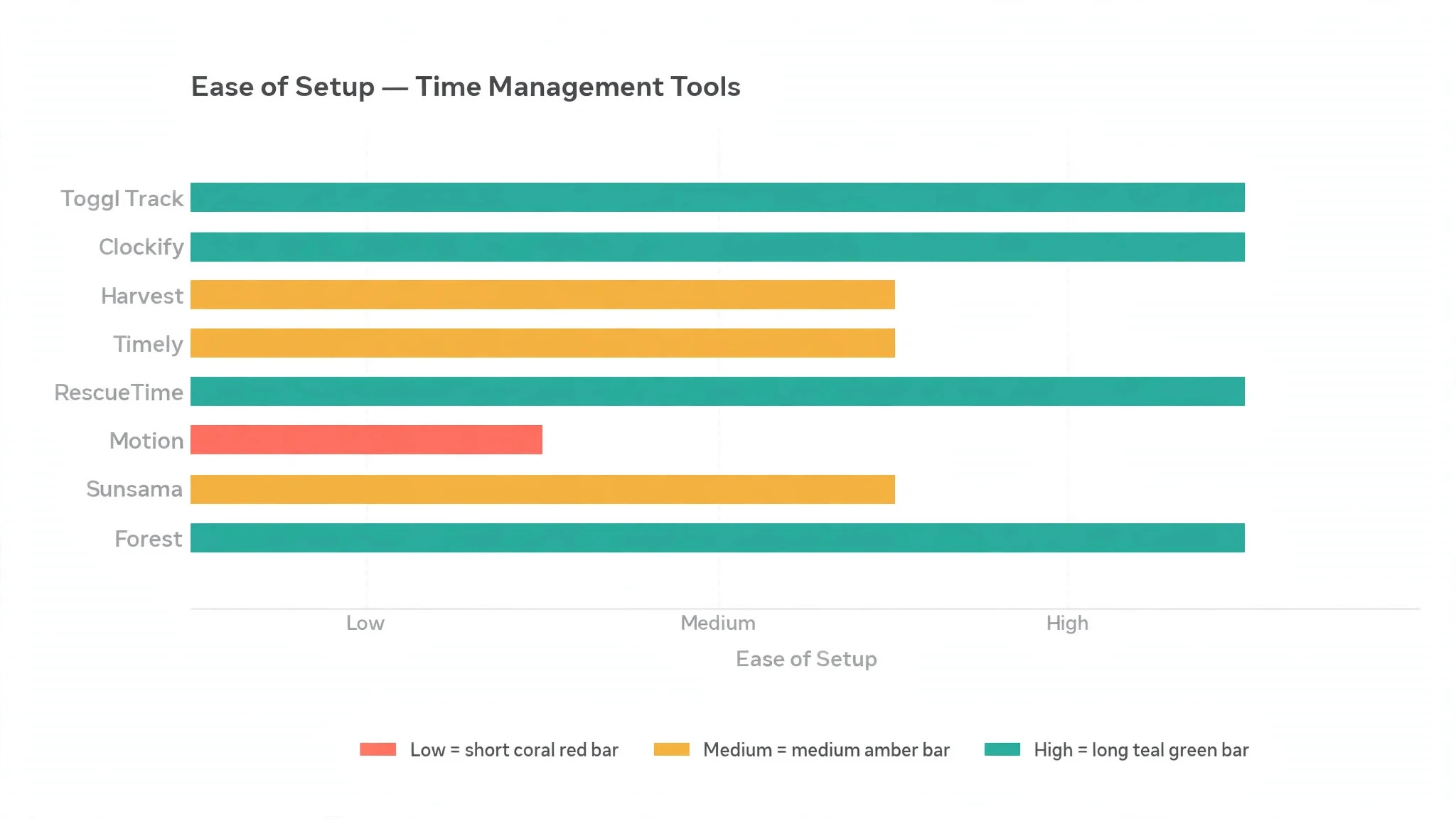
Toggl Track and Clockify sit at the top of the table, so compare their reviews on time capture to see which habit fits your freelance week. A tool that scores High on automation only helps if the freelancer trusts its numbers, and a tool that scores High on planning only helps if the day actually gets planned.
Why the Best Time Management Tools for Freelancers Pay for Themselves
Unbilled hours are the most expensive leak in freelancing. A freelancer who works nine hours and bills seven has given away two hours of income, and over a month that gap is a full week of pay. A tracker that captures the real hours, including the quick calls and the small fixes, turns that leak into income the freelancer has already earned.
The second gain is honest pricing. A freelancer who knows a logo takes eleven hours and a landing page takes twenty-three can quote the next job with confidence, instead of guessing and then working the extra hours for free. The report that shows the real cost of each job is the report that makes the next quote accurate, and accurate quotes are what make a freelance business sustainable.
Scope creep is the third reason a tool matters. When a client asks for one more revision, the tracker shows exactly how much extra time that revision costs, which gives the freelancer the evidence to charge for it or to say no. Without that evidence, the extra work just happens, and the freelancer absorbs it silently until the resentment shows in the work.
The final gain is a calmer working day. A freelancer who can see the day laid out, with the deep work protected and the admin batched together, stops switching tasks every ten minutes and starts finishing things. The tools in this ranking all help a freelancer protect the hours that matter, and a protected morning is worth more than any feature list.
The fifth gain is a better end to the week. A freelancer who can look at Friday and see exactly what was done, what was billed, and what is still waiting starts the weekend without the nagging feeling that something was forgotten. That clear ending is what makes Monday easier, because the week starts from a clean list instead of a pile of half-remembered tasks.
How We Put Each Time Tool Through Its Paces
We ran the best time management tools for freelancers through the same five measures, using a simulated freelance week with three client projects, a dozen small admin jobs, two late-night revisions, and a Friday invoice run. Each tool handled the same week, so the scores compare like with like.
- Time capture, judged by how easily the tool recorded the real hours, including the quick calls and the small fixes that usually go untracked.
- Reporting honesty, measured by whether the weekly report showed where the hours really went, with billable and non-billable time clearly separated.
- Planning help, scored on whether the tool helped the freelancer plan the day and protect deep work, rather than just recording what happened.
- Setup speed, timed from account creation to a working system with clients, projects, and the first tracked hour.
- Daily usability, judged by how little the tool interrupted the work, and how often the freelancer needed to ask for help or look up a guide.
Each measure carried equal weight except time capture, which counted double, because a time tool that cannot capture the real hours is not doing its job. Scores run out of 100, and the order below follows the combined total, led by Toggl Track on ease and reporting.
The 8 Tools in Detail
Each review below judges the best time management tools for freelancers on the same ground. We note what each tool does best, where it falls short, and the freelancer it suits best, with time capture carrying the most weight.
1. Toggl Track
Toggl Track tops the best time management tools for freelancers on the combined score, and it earns the lead with a tracker that is genuinely easy to use every day. One click starts the timer, one click stops it, and the entry can be tagged to a client and a project without opening a form. The reports then show the week clearly, with billable and non-billable hours separated, so Friday invoicing takes minutes instead of an hour.
The strengths run beyond the timer. The free plan covers the basics for a solo freelancer, the browser extension and mobile app keep the timer within reach wherever the work happens, and the integrations cover the main project and invoicing tools. The Pomodoro timer and the idle detection help a freelancer stay honest about breaks, which keeps the numbers trustworthy.
The limits are the depth of the planning side. Toggl Track records time beautifully but does not plan the day for the user, so a freelancer who wants automatic scheduling will look at Motion or Sunsama. The free plan also holds back some reporting depth, and the project features are lighter than a full project management tool.
In the trial, track one full week with the timer running on every job, including the quick calls and the small fixes. Check the Friday report against your memory of the week, and see whether the billable hours match what you actually worked. If the report surprises you, the tracker is already earning its keep.
Our verdict. The easiest tracker here, and the safest first pick for most freelancers.
2. Clockify
Clockify is the free pick, and it earns second place with a free plan that has no real time cap. A freelancer can track unlimited hours, projects, and clients without paying, which is a genuine offer rather than a trial in disguise. For a freelancer starting out, or one who tracks a lot of hours on a tight budget, that free plan is hard to beat.
The strengths are the generosity and the simplicity. The timer, the manual entries, and the timesheet all work well, the reports cover the basics clearly, and the integrations include the main calendars and project tools. The paid tiers add admin controls, invoicing, and deeper reports, but the free tier already covers the daily work.
The limits are polish and depth. The interface feels plainer than Toggl Track, the reports are solid rather than beautiful, and the planning features are lighter than Motion or Sunsama. A freelancer who wants automatic capture or smart scheduling will find Clockify more of a recorder than a planner.
In the trial, track the same week in Clockify and in your current system, then compare the reports. Check whether the free plan covers everything you used, and whether the timer felt easy to reach. If the week tracked cleanly for free, the value is real.
Our verdict. The best free tracker here, ideal for freelancers who track a lot for nothing.
3. Harvest
Harvest is the billing pick, and it suits freelancers who charge by the hour and need the invoice to match the time. Time, expenses, and invoicing all live in one place, so the hours tracked on Monday become the invoice sent on Friday without retyping anything. For a freelancer who bills weekly, that single flow saves hours every month.
The strengths are the joined-up billing and the clean reports. The timer is easy, the expenses attach to the right project, and the invoice shows the work clearly enough that clients pay without questions. The free plan covers a small number of projects, which is enough to test the whole flow properly, and the integrations cover the main accounting tools.
The limits are the project cap and the planning side. The free plan covers only a couple of projects, so a freelancer with many clients needs a paid tier, and Harvest records time rather than planning the day. A freelancer who wants automatic scheduling or focus help will need a second tool.
In the trial, track one client project for a week, add the expenses, and send the invoice from Harvest. Check whether the client questioned anything, and whether the invoice took minutes or an hour. If the invoice went out cleanly, the billing flow fits.
Our verdict. The best time-to-invoice flow here, ideal for freelancers who bill by the hour.
4. Timely
Timely is the automatic pick, and it earns its place by capturing the working day without a timer. The tool watches which apps and documents the freelancer uses, builds a private timeline of the day, and lets the user assign each block to a client with one click. For a freelancer who forgets to start the timer, that automatic capture recovers hours that would otherwise vanish.
The strengths are the capture and the honesty. The timeline shows the real day, including the meetings and the admin that a manual timer misses, and the Memory feature drafts the timesheet from the timeline. The reports show billable and non-billable time clearly, and the integrations cover the main calendars and project tools.
The limits are price and trust. Timely costs more than the free-led trackers, and the automatic capture needs the freelancer to trust a tool that watches the working day, even though the data stays private. A freelancer who prefers a manual timer will find the automation more than they need, and the setup takes a little longer.
Our verdict. The best automatic capture here, ideal for freelancers who forget the timer.
5. RescueTime
RescueTime is the honesty pick, and it suits freelancers who want to know where the hours really go. The tool runs quietly in the background, records which apps and sites the freelancer uses, and reports the day in plain terms, showing the focused hours, the distracted hours, and the time lost to messaging and social feeds. For a freelancer who suspects the day leaks, that report is the truth.
The strengths are the automatic tracking and the focus tools. The daily report is easy to read, the focus sessions block distracting sites for a set period, and the goals feature tracks whether the freelancer hit the target for deep work. The data stays private, and the setup takes minutes.
The limits are billing and planning. RescueTime shows where time went but does not turn those hours into invoices, so a freelancer who bills by the hour needs a second tool. It also records rather than plans, so a freelancer who wants a scheduled day will look at Motion or Sunsama instead.
Our verdict. The most honest focus data here, ideal for freelancers who want the truth about their day.
6. Motion
Motion is the planning pick, and it earns its place by building the day and rebuilding it when plans slip. Tasks, deadlines, and meetings go in, and Motion schedules the work around them, then reshuffles automatically when a meeting overruns or a task takes longer than planned. For a freelancer whose days never go as planned, that automatic reshuffle is a relief.
The strengths are the scheduling and the calendar. The day plan is realistic rather than optimistic, the AI rescheduling keeps the priorities in order, and the calendar integration means the plan and the meetings live together. The task management covers the basics well, and the interface is clean.
The limits are price and scope. Motion costs more than a simple tracker, and it plans rather than tracks, so a freelancer who needs detailed billing reports will need a second tool. The automatic scheduling also needs the freelancer to trust the plan, which takes a week of use before it feels natural.
Our verdict. The smartest daily planner here, ideal for freelancers whose days keep changing.
7. Sunsama
Sunsama is the calm planning pick, and it suits freelancers who like to plan the day by hand. Each morning, the freelancer pulls tasks from email, calendars, and project tools into a single daily plan, timeboxes each one, and works through the list in order. For a freelancer who thinks best with a written plan, that ritual is the whole point.
The strengths are the ritual and the calm. The daily planning flow is genuinely pleasant, the timeboxing keeps the day realistic, and the integrations pull tasks from the tools the freelancer already uses. The weekly review helps the freelancer see what got done and what slipped, which makes the next week better.
The limits are price and automation. Sunsama costs more than a simple tracker, and it plans rather than tracks, so a freelancer who bills by the hour needs a second tool for the numbers. The manual planning also takes ten minutes each morning, which suits some freelancers and frustrates others.
Our verdict. The calmest daily planner here, ideal for freelancers who plan by hand.
8. Forest
Forest is the focus pick, and it rounds out the ranking with a timer that turns focus into a game. The freelancer plants a virtual tree, works for a set period, and the tree grows if the phone stays untouched, while touching the phone kills it. For a freelancer who loses hours to the phone, that small game is surprisingly effective.
The strengths are the simplicity and the motivation. The focus timer is easy to start, the growing forest shows the week’s focused hours at a glance, and the real-tree planting partnership gives the habit a purpose beyond the screen. The price is modest, and the app works on the devices the freelancer already carries.
The limits are scope. Forest helps with focus but does not track clients, bill hours, or plan the day, so a freelancer needs a second tool for the business side. It is a focus aid, not a time management system, and a freelancer who needs invoices and reports will outgrow it quickly.
Our verdict. The best focus aid here, ideal for freelancers who lose hours to the phone.
What a Freelancer Actually Pays for Time Tracking
The best time management tools for freelancers differ most on what the free plan really covers, and the cheapest paid plan is not always the cheapest year. Toggl Track and Clockify both offer free tiers, but each one holds back something different, which is reporting depth here, project limits there, and admin controls elsewhere. A free plan that covers the real working week is a gift. A free plan that runs out halfway through the month is just a trial.
Watch the per-seat maths too. Most of these tools charge per user each month, which suits a solo freelancer, but a freelancer who hires a subcontractor or a virtual assistant pays for every extra seat. Check what two or three seats cost before committing, because the price that looks cheap for one person can double quickly when the team grows.
The planning tools price differently again. Motion and Sunsama charge more than a simple tracker, because they plan the day rather than just recording it, and that planning is worth paying for only if the freelancer actually plans. A freelancer who never plans will get more value from a free tracker and a paper list than from a premium planner they open twice a week.
The cost of not tracking at all is the number most freelancers never calculate. Two unbilled hours a day, at a modest hourly rate, adds up to a full week of pay every month, and that gap is invisible without a tracker. Against that loss, even the most expensive tool in this ranking pays for itself in a single day of recovered hours.

Time Mistakes That Cost Freelancers Money
The first mistake is tracking from memory at the end of the week. A freelancer who tries to reconstruct Friday’s hours on Friday evening will forget the quick calls, the small fixes, and the ten minutes here and there, and the invoice will come up short. Start the timer when the work starts, even for a five-minute job, and the invoice will match the real week.
The second mistake is tracking everything and billing nothing. A tracker that records the admin, the marketing, and the learning is useful, but only the client work gets billed, and a freelancer who never separates the two cannot see whether the business actually pays. Tag every entry as billable or not, review the split weekly, and the numbers will show whether the rates need to rise.
The third mistake is letting the tool become a second job. A tracker that needs ten clicks per entry, a planner that needs an hour of setup, or a report that needs a manual to read will be abandoned within a fortnight. Pick the simplest tool that covers the real need, use it for a full month, and only add features when the simple version starts to pinch.
The fourth mistake is planning the day and then ignoring the plan. A schedule that gets written in the morning and abandoned by ten o’clock is worse than no schedule, because it teaches the freelancer to ignore their own plans. Keep the plan short, with three priorities and the rest as overflow, and protect the first deep-work block before opening email.
Best Pick by Job
No single winner fits every freelancer, so the tools below are matched to the job instead of the rank. Read the row that sounds like your working day, then start the trial with that tool.
| Job | Best pick | Why it wins |
|---|---|---|
| Wants tracking made easy | Toggl Track | One-click timers with clear reports |
| Wants tracking free | Clockify | Generous free plan with no time cap |
| Bills by the hour | Harvest | Time, expenses, and invoices together |
| Forgets to start timers | Timely | Automatic capture of the working day |
| Wants honest focus data | RescueTime | Automatic tracking of where time goes |
| Days keep changing | Motion | Automatic daily planning and rescheduling |
| Plans the day by hand | Sunsama | Calm daily planning with timeboxing |
| Loses hours to the phone | Forest | A focus timer that grows a virtual tree |
If your situation does not match a row exactly, take the closest one and read that review first, starting with Toggl Track when it fits. The gap between neighbouring tools is smaller than the gap between a freelancer who tracks every hour and one who guesses, so the habit matters more than a few points on a scorecard.
Frequently Asked Questions
Freelancers ask the same questions before choosing from the best time management tools for freelancers, so the plain answers are here, based on how these tools actually work in a real working week.
Should a freelancer track every minute, or just client work?
Track everything, and tag it billable or not. The client hours become the invoice, while the admin, marketing, and learning hours show where the rest of the week goes. A freelancer who only tracks client work never sees the admin eating a day a week, and never learns which parts of the business need to change.
Is automatic time tracking safe for privacy?
The reputable tools keep the data private to the freelancer, and the timeline stays on the freelancer’s own account. Timely and RescueTime both record which apps and sites were used, but the detail is for the freelancer alone, not for a client or a boss. Check the privacy policy before choosing, and turn off any tracking the freelancer is not comfortable with.
How much time does tracking add to the day?
Almost none, once the habit forms. A one-click timer takes a second to start and a second to stop, and the Friday invoice run takes minutes instead of an hour because the hours are already recorded. The tools that cost time are the ones that need ten clicks per entry, which is why ease of capture matters more than any other feature.
Can one tool handle both tracking and planning?
Partly, but no single tool in this ranking does both at full depth. Toggl Track and Clockify track brilliantly but plan lightly, while Motion and Sunsama plan well but track lightly. Most freelancers pair a tracker with a planner, or pick the one that matches their bigger pain, which is usually the tracking for billers and the planning for the overwhelmed.
What should a freelancer measure first?
Start with the billable share, which is the hours billed divided by the hours worked, and the unbilled hours each week. Those two numbers show whether the business pays. Add the hours per client next, because the client who takes twenty hours for the price of ten is the client who needs a new rate or a polite goodbye.
Choosing the Time Tool Your Freelance Week Runs On
The best time management tools for freelancers prove their worth in the first week, and the proof is simple to measure. Track one full week, then compare the billable hours against what you would have guessed, and count the hours that went to admin, messages, and distractions. If the report surprises you, the tool is already earning its keep.
Toggl Track wins our ranking on the combined score, but the right tool for your working day is the one you actually open every morning without thinking about it. Run the trial on a real week with real clients, judge it on the Friday report rather than the demo, and pick the tracker that makes every hour visible. An honest week and a full invoice will pay for the subscription many times over.