


A school runs on records, and a single student generates dozens of them before lunch. Attendance, grades, behaviour notes, medical forms, bus routes, and fee payments all live somewhere, and when they live in five different places the office spends the day chasing paper instead of helping families. The best school management software puts those records in one system, so a registrar can answer a parent in seconds and a principal can see the whole school at a glance. PowerSchool SIS leads this ranking on the combined score, with Infinite Campus close behind for districts that need one database across many schools.
We judged each platform on real school work rather than a feature list. That meant a Monday attendance round, a term report for 400 students, and a new family enrolled the week before term started. We tracked how fast a record was found and how much time the daily office routine actually took.
PowerSchool SIS earns the top spot on district depth, Infinite Campus on unified data, and every platform after them on a strength. Some are full systems built for large districts, while others are lighter tools that suit a single school running its first digital office.
PowerSchool SIS tops the combined score, yet a small private school should let the best pick by job table near the end carry equal weight. A platform that ranks sixth overall can still be the right answer for a 200-student school.
In this article
- The 15 Tools at a Glance
- Why the Best School Management Software Pays for Itself
- How We Put Each School Platform Through Its Paces
- The 15 Tools in Detail
- Admissions, Attendance, and the Modules That Matter Most
- Five School System Mistakes That Waste a Whole Term
- An Eight Week Rollout Plan for a New School Year
- Data Migration, Training, and the Questions to Ask Before You Sign
- Best Pick by Job
- Frequently Asked Questions
- Why PowerSchool SIS Leads for Most Districts
The 15 Tools at a Glance
The table below puts one row per platform, with the price shape, the natural fit, and the strength that put PowerSchool SIS first. The best school management software is not always the biggest, and the table shows why. PowerSchool SIS leads on district scale, while Gradelink wins for small private schools that want a simple start.
| Tool | Starting price | Best for | Standout strength |
|---|---|---|---|
| PowerSchool SIS | Pricing on the vendor site | Large K-12 districts | Deep SIS with state reporting |
| Infinite Campus | Pricing on the vendor site | Districts that need one database | Unified data across every school |
| Alma | Pricing on the vendor site | Schools that want a modern SIS | Clean dashboards with family portals |
| Gradelink | Pricing on the vendor site | Small private and faith schools | Simple all-in-one with good support |
| Blackbaud | Pricing on the vendor site | Independent schools that fundraise | SIS plus enrolment and fundraising |
| FACTS SIS | Pricing on the vendor site | Private PreK-12 schools | Admissions, tuition, and billing together |
| Veracross | Pricing on the vendor site | Independent schools with complex needs | Strong academics with parent portals |
| Skyward | Pricing on the vendor site | Districts that need ERP depth | SIS plus finance and HR in one place |
| Classter | Pricing on the vendor site | International and multi-program schools | Modular SIS with billing and portals |
| Schoology | Pricing on the vendor site | Schools that lead with learning | LMS with classroom tools built in |
| Fedena | Pricing on the vendor site | Schools on a tight budget | Broad ERP modules at a low price |
| Teachmint | Pricing on the vendor site | Schools adding classroom tech | Connected classroom with attendance |
| MyClassCampus | Pricing on the vendor site | Schools that want mobile-first tools | Mobile apps for staff and parents |
| Brightwheel | Pricing on the vendor site | Early childhood and preschools | Simple billing with parent messaging |
| eSkooly | Free plan; paid plans on the vendor site | Schools that want a free start | Free basic plan with paid upgrades |
Narrow the table to PowerSchool SIS and Infinite Campus, then read those two reviews to see which school routine fits your district. Fit to your school routine matters more than a long feature list.
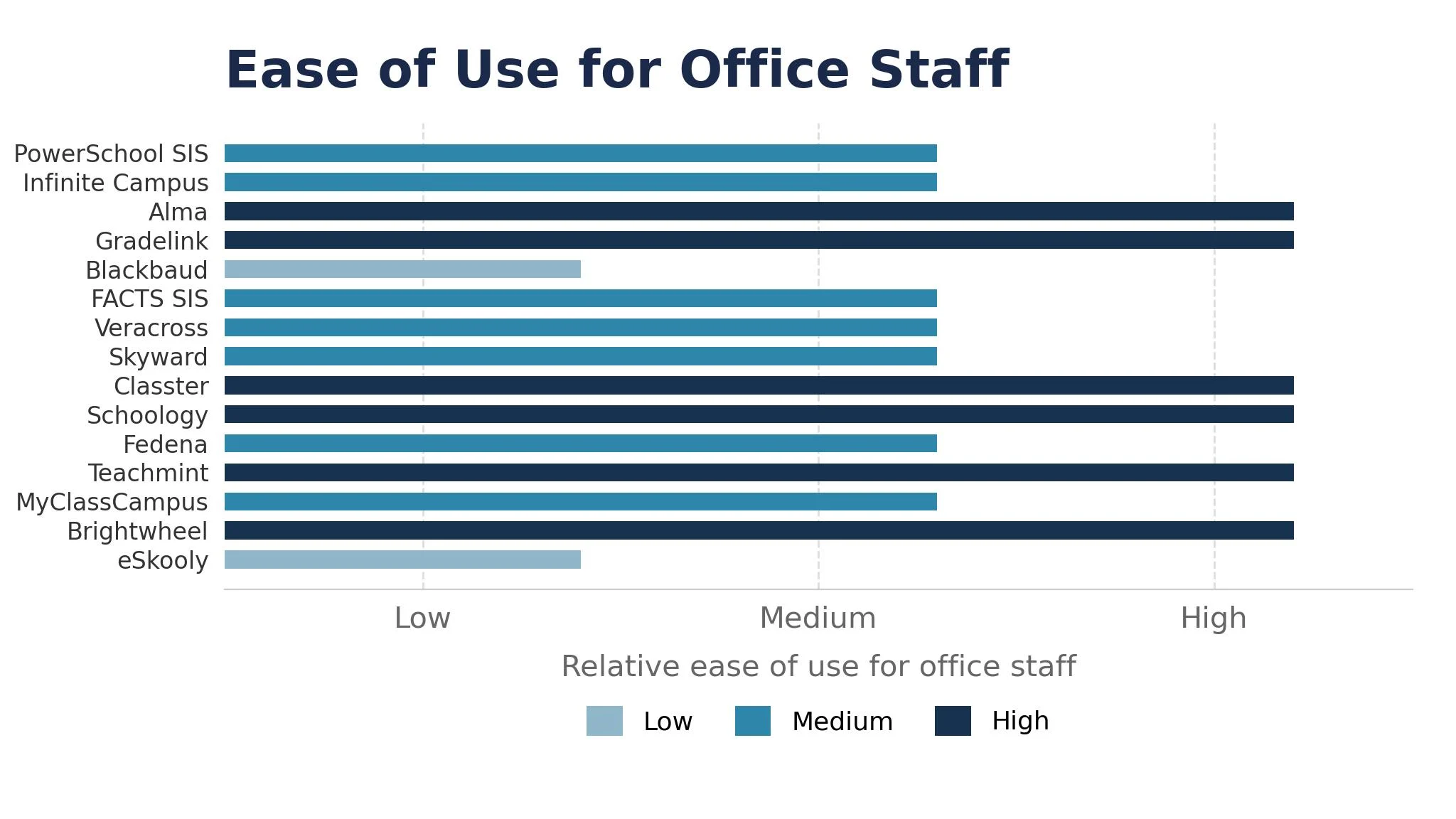
Why the Best School Management Software Pays for Itself
A school system pays for itself in the same place, which is the office hour nobody bills for. A registrar who spends two hours a day retyping attendance and chasing forms is spending ten hours a week on work a system handles in minutes, and across a term that gap is worth far more than the licence costs. A platform that records attendance once and shares it everywhere hands those hours back, and the saving repeats every week. The best school management software earns its keep here first, before any other feature matters.
The second reason is fewer errors. Most school losses are not dramatic. A grade is typed wrong, a medical note sits in the wrong file, and a parent is called about the wrong child. A single record that every teacher and office worker shares catches these gaps before they reach a family.
The fourth reason is evidence for the board and for inspectors. A system that records attendance, grades, and behaviour gives a school real numbers for the next inspection, and that proof is what keeps the school in good standing.
How We Put Each School Platform Through Its Paces
We tested each school platform against the same five measures, using a Monday attendance round, a term report, and a new family enrolment. Each platform ran the same workload for two weeks, so PowerSchool SIS and the rest compare like with like.
- Record lookup speed, judged by how quickly the office could find a student record and the next step.
- Report clarity, measured by how fast a principal could read a term report with real numbers.
- Attendance handling, scored on whether the daily round stayed accurate and quick.
- Parent communication, timed from a parent question to a finished answer with real data.
- Daily usability, judged by how long the morning office routine took and how often the team needed help.
Each measure carried equal weight except record lookup speed, which counted double, because a school system that hides the student record is not doing its job. Scores run out of 100, and the order below follows the combined total, led by PowerSchool SIS on district depth. Where two platforms tied, we broke the tie on report clarity, since a careful system protects the school from numbers nobody trusts.
The 15 Tools in Detail
Each review below follows the same pattern, and every platform is judged on the same ground, with record lookup speed carrying the most weight.
1. PowerSchool SIS
PowerSchool SIS is the district depth leader in this ranking, and it leads because it handles the full scope of student data. Enrolment, attendance, grading, scheduling, and state reporting share one system, so a district of twenty schools works from the same records. For a large district, it is the natural standard.
The trade off is learning curve and weight. PowerSchool SIS is built for districts with real scale, so a small school may find it dear and complex. A district that invests in training gets a system that grows with it, but a single school should start lighter.
In the trial, run one attendance round and one term report, then check the results. Time how long the lookup takes, and ask whether the report read clearly. PowerSchool SIS ran the attendance round and term report swiftly.
Our verdict. The deepest district system here, and the best all rounder for large districts.
2. Infinite Campus
Infinite Campus is the unified data pick, and it earns second place with one database across every module. SIS, food service, payments, and online registration share the same records, so a change in one place shows everywhere at once. The reporting stays consistent across schools.
The trade off is cost and complexity. Infinite Campus is built for districts with real scale, so a small school may find it dear. For a district that needs one source of truth, that trade is worth making.
In the trial, enrol one new student and check every module the same day. Ask whether the record appeared everywhere, and whether the registration form was simple. New student records appeared in every module.
Our verdict. The most unified district data here, ideal for multi-school districts.
3. Alma
Alma is the modern SIS pick, and it earns third place with clean dashboards and family portals. Teachers log attendance and grades quickly, parents see progress without calling the office, and the built-in analytics flag students who need help early. The interface stays friendly throughout.
The trade off is depth at very large scale. Alma suits mid-size schools best, so a huge district may need more. For a school that wants a modern system without enterprise weight, that trade is worth making.
In the trial, run one week of attendance and grades, then check the parent portal. Ask whether teachers finished quickly, and whether parents found the data. Teachers finished fast and parents found the data.
Our verdict. The most modern school SIS here, ideal for mid-size schools.
4. Gradelink
Gradelink is the small school pick, and it suits private and faith-based schools that want a simple start. Attendance, grades, billing, and parent communication share one web system, and the support team answers quickly. The price stays within reach of a small budget.
The trade off is scale. Gradelink is built for small schools, so a large district will outgrow it. For a school of a few hundred students, that simplicity is exactly right.
In the trial, set up one class and run a week of attendance and grades. See if the office finished fast, and if the parent emails looked professional. Gradelink finished attendance and grades fast for the office.
Our verdict. The simplest small school system here, ideal for private schools.
5. Blackbaud
Blackbaud is the independent school pick, and it earns its place by joining academics with fundraising. The SIS, enrolment, and advancement tools share one record, so a development office can see a family history beside the gift history. The platform handles volume well.
The trade off is price shape. Blackbaud is built for independent schools with real budgets, so a small school may find it dear. For a school that fundraises as well as teaches, the connection is the reason to choose it.
In the trial, enrol one family and log one gift, then check the shared record. Ask whether the data carried across, and whether the reports read clearly. Family and gift records carried across into shared reports.
Our verdict. The best academics plus fundraising here, ideal for independent schools.
6. FACTS SIS
FACTS SIS is the private school bundle pick, and it suits PreK-12 schools that want admissions, tuition, and billing together. Families apply, enrol, and pay in one place, so the office never retypes the same details. The tuition management is strong.
The trade off is breadth outside the bundle. FACTS SIS is built for private school operations, so a public district may get less from it. For a private school that bills families directly, that focus is exactly right.
In the trial, run one admission and one tuition payment, then check the family record. Ask whether the payment matched the billing, and whether the office saved time. FACTS SIS matched tuition payments to billing without errors.
Our verdict. The best admissions plus billing here, ideal for private schools.
7. Veracross
Veracross is the complex independent pick, and it suits schools with demanding academics. Scheduling, grading, advisory, and parent portals run deep, and the system handles unusual timetables well. The portals keep families informed without office calls.
The trade off is setup time. Veracross covers so much ground that the first configuration takes a careful term. A school that invests that time gets a system that replaces several tools, but one that only needs attendance should start lighter.
In the trial, build one timetable and one grading cycle, then check the parent portal. Ask whether the schedule handled the edge cases, and whether the portal read clearly. Veracross tamed timetable edge cases and left the portal clear.
Our verdict. The deepest independent school academics here, ideal for complex schools.
8. Skyward
Skyward is the ERP depth pick, and it earns its place by joining the SIS with finance and HR. Student records, payroll, budgeting, and purchasing share one system, so a district office works from the same numbers. The state reporting is strong.
The trade off is weight. Skyward is built for districts with real scale, so a single school may find it dear. For a district that wants operations and academics in one place, that trade is worth making.
In the trial, run one payroll cycle beside one attendance week and check the numbers. Ask whether the finance data matched, and whether the office saved time. Payroll numbers matched attendance and the office saved time.
Our verdict. The best SIS plus finance here, ideal for districts that want one system.
9. Classter
Classter is the international pick, and it suits schools with many programmes and many countries. The modular SIS covers academics, billing, CRM, and portals, and the system adapts to different curricula without a rebuild. The Azure hosting keeps it stable.
The trade off is configuration. Classter is flexible enough to need careful setup, so a school should budget time for it. For a multi-program institution, that flexibility is the reason to choose it.
In the trial, set up two programmes with different billing rules and check the portals. Ask whether the rules held, and whether the families found the data. Classter held each billing rule and portal clear.
Our verdict. The most flexible modular system here, ideal for international schools.
10. Schoology
Schoology is the learning pick, and it earns its place by leading with the classroom. Assignments, discussions, and grading sit beside the SIS data, so teachers run the class from one screen. The course tools are strong.
The trade off is admin depth. Schoology is a learning platform first, so a school that needs deep enrolment and billing must pair it with another system. For a school whose priority is teaching, that focus is exactly right.
In the trial, run one course with assignments and grades for two weeks. Watch whether the students found the work, and whether the grades flowed cleanly. Students found their work and grades flowed cleanly.
Our verdict. The strongest classroom tools here, ideal for schools that lead with learning.
11. Fedena
Fedena is the budget pick, and it suits schools that need broad ERP modules at a low price. Academics, administration, communication, and finance share one platform, and the cloud hosting keeps the setup simple. The price stays modest.
The trade off is polish. Fedena is lighter on modern design than the leaders, so a school that values a slick interface may notice. For a school that puts breadth and price first, it is the most generous choice here.
In the trial, run one term of attendance, grades, and fees, then check the reports. Ask whether the modules covered the office, and whether the price stayed fair. Fedena covered attendance, grades and fees at a fair price.
Our verdict. The best budget ERP here, ideal for schools watching every pound.
12. Teachmint
Teachmint is the classroom tech pick, and it suits schools adding connected classroom tools. Attendance, live classes, and assessments run from one connected device with software, so a teacher can take the register and teach from the same screen. The mobile apps are handy.
The trade off is admin scope. Teachmint is built around the classroom, so a school that needs deep billing and enrolment must pair it with another system. For a school modernising its classrooms, that focus is exactly right.
In the trial, run one week of classes with attendance and one assessment. See if the register stayed accurate, and if the students joined easily. Teachmint kept the register accurate and students joined easily.
Our verdict. The best connected classroom here, ideal for schools adding classroom tech.
13. MyClassCampus
MyClassCampus is the mobile-first pick, and it earns its place with apps for staff and parents. Attendance, fees, homework, and messages all work from a phone, so a school with busy parents keeps everyone informed without paper. The setup stays quick.
The trade off is depth at scale. MyClassCampus suits small to mid-size schools best, so a large district may need more. For a school whose parents live on their phones, that mobile focus is the reason to choose it.
In the trial, send one fee reminder and one homework notice by phone, then check the parent response. Ask whether the messages arrived clearly, and whether the office saved time. MyClassCampus delivered fee reminders and homework notices clearly.
Our verdict. The most mobile-friendly school system here, ideal for phone-first parents.
14. Brightwheel
Brightwheel is the early childhood pick, and it suits preschools and nurseries that need simple billing with parent messaging. Check-ins, photos, billing, and messages share one app, so a nursery keeps parents updated through the day. The price stays modest.
The trade off is scope. Brightwheel is built for early years, so a primary school with complex grading will outgrow it. For a nursery that needs parent trust and simple billing, that focus is exactly right.
In the trial, run one week of check-ins, photos, and billing, then check the parent app. Ask whether the messages reassured parents, and whether the billing matched. Check-in photos reassured parents and billing matched exactly.
Our verdict. The best early years system here, ideal for preschools and nurseries.
15. eSkooly
eSkooly is the free start pick, and it rounds out the ranking for schools that want to begin without paying. The basic plan covers students, attendance, grades, and fees for free, with paid upgrades for more. The setup stays simple.
The trade off is depth. eSkooly is lighter on advanced reporting and integrations than the leaders, so a growing school will outgrow it. For a school starting its first digital office, that free start is a strength, because the team learns the routine before paying.
In the trial, set up one class and run a week of attendance and grades. Watch whether the office finished fast, and whether the reports read clearly. eSkooly wrapped the week quickly and reports read clearly.
Our verdict. The best free starting point here, ideal for schools beginning digitisation.
Admissions, Attendance, and the Modules That Matter Most
A school system is a bundle of modules, and the first question is which ones the school actually uses daily. Attendance and grading run every day, admissions runs a few months a year, and finance runs every month, so a system that does attendance brilliantly and admissions adequately beats one that does everything adequately. The best school management software makes this trade visible in the trial, because the daily modules are the ones the office will judge it on.
The second question is the parent portal. A portal that shows grades, attendance, fees, and messages in one place cuts office calls dramatically, while a portal that shows only grades leaves parents calling anyway. Check the portal from a parent phone during the trial, because that is where most families will meet the system.
Five School System Mistakes That Waste a Whole Term
The first mistake is buying for the district you hope to become. A school of 200 students that buys a system built for 20,000 pays for scale it will never use, and the office drowns in complexity. Buy for the school you have, and move up when the enrolment grows.
The second mistake is skipping the data clean-up. A migration that imports duplicate students, wrong grades, and old addresses poisons every report that follows. Clean the data first, import a test batch, and check the records before the full import.
The third mistake is training only the office. A system that teachers never learn becomes an office tool, and attendance stays on paper while the office retypes it. Train the teachers first, because they create the records the office reads.
The fourth mistake is ignoring the parent experience. A portal that parents cannot find or cannot read generates more calls than it saves, and the office ends up doing double work. Test the portal with three real parents before the launch.
The fifth mistake is judging a system by the demo. A demo shows the best screens with clean data, while real school data is messy and the office is busy. Run the trial on real records with real families, because the demo never shows the hard parts.
An Eight Week Rollout Plan for a New School Year
Weeks one and two are the data clean-up, and they should be honest. Export every student list, remove duplicates, and decide which fields actually matter, then import a small test batch before the full list. A clean import beats a fast import every time, because bad data poisons every report that follows.
Weeks three and four are the first module. Turn on attendance, train the teachers, and run the daily round for two weeks. Check the records daily, fix anything that looks wrong while the list is still small, and let the office learn the routine before adding more. A clean first module builds the habit that carries the whole system.
Weeks five and six are grading and reports. Turn on the gradebook, run one progress report, and check it with two teachers. A reporting habit that runs every term compounds, and the principal sees the value in the numbers.
Weeks seven and eight are the parent portal. Open it to a small group of families, watch the questions that arrive, and fix the confusing screens before the full launch. A portal that parents understand cuts office calls within a month.

Data Migration, Training, and the Questions to Ask Before You Sign
A school contract looks simple on the surface, but three checks decide whether it is fair. The first is migration help. A vendor that imports your data, checks it, and fixes the errors is worth far more than one that hands over a template and wishes you luck. Ask who does the migration, how long it takes, and what happens when the import finds duplicates.
The second check is training. A contract that includes training for teachers and office staff saves a term of confusion, while one that charges per session turns every question into a bill. A vendor that trains the whole school in the first month is telling you it wants the system to work, and the contract should also state plainly that the school owns its student data and that exports are free and complete.
Best Pick by Job
No single pick among the best school management software fits every school, so each common situation below is matched to the platform that scored highest for that job.
| Job | Best pick | Why it wins |
|---|---|---|
| Runs a large K-12 district | PowerSchool SIS | Deep SIS with state reporting |
| Needs one database everywhere | Infinite Campus | Unified data across every school |
| Wants a modern SIS | Alma | Clean dashboards with family portals |
| Runs a small private school | Gradelink | Simple all-in-one with good support |
| Independent school that fundraises | Blackbaud | SIS plus enrolment and fundraising |
| Private school that bills families | FACTS SIS | Admissions, tuition, and billing together |
| Complex independent academics | Veracross | Strong academics with parent portals |
| District that wants ERP depth | Skyward | SIS plus finance and HR in one place |
| International multi-program school | Classter | Modular SIS with billing and portals |
| Leads with classroom learning | Schoology | LMS with classroom tools built in |
| School on a tight budget | Fedena | Broad ERP modules at a low price |
| Adds connected classroom tech | Teachmint | Connected classroom with attendance |
| Parents who live on phones | MyClassCampus | Mobile apps for staff and parents |
| Preschool or nursery | Brightwheel | Simple billing with parent messaging |
| Wants a free starting point | eSkooly | Free basic plan with paid upgrades |
If your situation does not match a row exactly, take the closest one and read that review first, starting with PowerSchool SIS when it fits.
Frequently Asked Questions
School leaders ask the same questions before every system change, so we answered the most common ones here. The best school management software all handles the basics, and the answers below focus on the choices that actually change the outcome.
How much should a school pay for management software?
Most platforms in this ranking charge per student or per year, so a school pays one licence plus any setup fee. Free plans cover small trials well, but the reporting and parent portals that save real time usually sit on paid tiers. Check the vendor site for current pricing and confirm the total cost for your enrolment before you pay.
Can one platform handle attendance, grades, fees, and messages together?
It can handle all four, and most schools prefer one system for the whole job. Attendance needs a daily round, grades need a gradebook, fees need billing, and messages need a parent portal, and the leaders cover all four well. Some schools still pair a learning platform with a separate billing tool, which works fine when the student data stays in sync.
How long does it take to move student records to a new platform?
A focused school moves a clean student list in four to ten weeks if the data is tidy. The delay usually comes from duplicate records and messy exports, not from the platform. Clean the data first, import a test batch, and check the records before the full import.
Do these platforms work for a school with only 200 students?
They work, but the value comes from the routine, not the size. A school with 200 students still needs clean attendance, prompt parent answers, and a clear record for each child. Start with the simplest platform that covers attendance and grades, then move up when enrolment grows.
What happens to our student data if we switch platforms later?
Every platform in this ranking exports student records and grades to common formats, so a switch is possible but never painless. Report templates and automation rules do not transfer, and the team must rebuild them in the new platform. A switch is never painless, which is why a school should trial PowerSchool SIS properly now instead of staying with a system that no longer fits.
Why PowerSchool SIS Leads for Most Districts
A district can settle this in a trial by timing days to a clean attendance round, counting the parent questions answered in seconds, and measuring report accuracy in the first term. The best school management software proves itself on the days to a clean attendance round, the share of parent questions answered without a search, and the report accuracy found in the first term, and an eight week trial with your real students will show all three. PowerSchool SIS wins our ranking on the combined score, but the right platform for your district is the one your office opens every morning without being asked.
Run the trial on one real school with your real students and your real office routine, and judge the platform on the first result rather than the demo. If the attendance round finishes in minutes and the term report reads clearly, the system is working. Pick the platform that makes the school day feel easy, and let the hours saved pay for the licence many times over.