

Ten tools, prices from free to 60 dollars a month, and one question that decides which of the best ai image generators for restaurants deserves your money. A dish photo is the first thing a hungry guest sees on a delivery app, on a menu board, and on a social feed, and it sits beside the price and the star rating as one of only three things that decide the next tap.
The price is fixed by your costs. The rating is earned over months. The photo can change this afternoon. Midjourney wins for most restaurants, because its food images look like they were shot in a real kitchen with warm light, and a small team can learn it in a weekend.
In this article
- The 10 Tools at a Glance
- What a Restaurant Photo Has to Do That Other Photos Do Not
- The 10 Tools in Detail
- What a Month of Restaurant Images Really Costs
- Best Pick by Job
- How to Choose the Best AI Image Generators for Restaurants
- Frequently Asked Questions
- The Verdict: Midjourney Takes It for Most Restaurants
The 10 Tools at a Glance
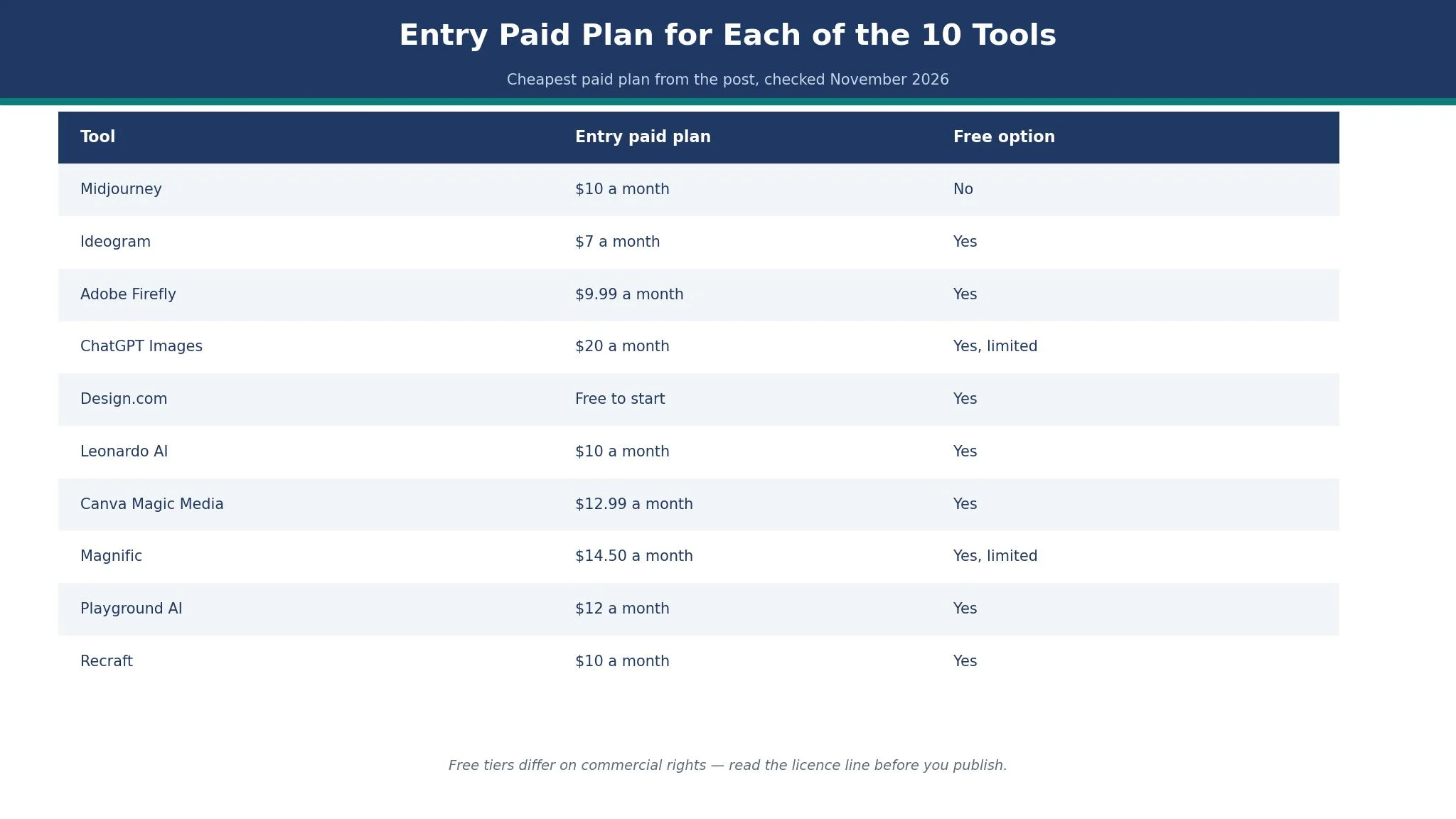
This table compares the best ai image generators for restaurants on the four things that decide a restaurant purchase. Prices here are the cheapest paid plan each vendor lists, cross-checked against vendor pages and recent roundups in November 2026. When listings disagree on a figure, this guide prints the spread instead of settling on a single number and calling it settled.
| Tool | Entry paid plan | Free option | Best for |
|---|---|---|---|
| Midjourney | $10 a month | No | Most restaurants |
| Ideogram | $7 a month | Yes | Menus and posters with words |
| Adobe Firefly | $9.99 a month | Yes | Safest commercial use |
| ChatGPT Images | $20 a month | Yes, limited | Fast drafts and edits |
| Design.com | Free to start | Yes | Logo and images from one place |
| Leonardo AI | $10 a month | Yes | Consistent dish styles |
| Canva Magic Media | $12.99 a month | Yes | Social posts and menus together |
| Magnific | $14.50 a month | Yes, limited | Stock photos plus AI images |
| Playground AI | $12 a month | Yes | Quick social graphics |
| Recraft | $10 a month | Yes | Brand-matched illustrations |
What a Restaurant Photo Has to Do That Other Photos Do Not
A restaurant photo has a job no other business photo has. It must make a stranger hungry. A law firm photo must look trustworthy, a gym photo must look energetic, and a restaurant photo must make someone imagine taste, smell, and heat. Steam rising from a bowl, butter melting on a grilled sandwich, and the shine on a glazed rib all do work that a clever caption cannot do. The best ai image generators for restaurants in this guide were judged on that job first, and on everything else second.
The second job is honesty. A photo that shows a burger twice the size of the one on the plate buys one order and loses a customer. Guests photograph their food now, and a gap between the menu image and the real plate shows up in reviews within days. The best ai image generators for restaurants are the ones that help you show the real dish well, not the ones that invent a dish you never serve. Use generated images for mood shots, backgrounds, seasonal campaigns, and social posts, and use real photos for the dishes themselves wherever a guest can compare the two.
The 10 Tools in Detail
This section tests the best ai image generators for restaurants against the same three restaurant jobs. A plate shot that looks edible, a poster that reads clearly, and a social post that stops a scroll. Unless a line says otherwise, each figure in this guide is the cheapest paid plan, checked in November 2026.
1. Midjourney
Midjourney leads this list because its food images look like photographs taken by someone who knows kitchens. A bowl of ramen comes out with steam that looks like steam, a wood-fired pizza has char that looks like char, and a dining room scene has the warm, slightly uneven light of a real restaurant at 7 p.m. Other tools can make pretty pictures. Midjourney makes pictures that make people hungry, and that is the whole job.
The price starts at 10 dollars a month for the Basic plan, rising to 30 dollars for Standard, 60 dollars for Pro, and 120 dollars for Mega, with higher tiers buying more fast generation time and, from Pro up, private generations. There is no free tier, which is the main drawback for a restaurant testing the idea for the first time. A team that is unsure should look at the free tools below first, then move to Midjourney once the habit of generating images is established and the cost has a clear return.
The working method matters more than the plan. Midjourney runs through Discord or its web editor, and the learning curve is real for the first hour. The payoff is control over style. A restaurant can set one style reference from its best real dish photo and then generate a whole season of campaign images that share the same light, the same table, and the same mood, so the social feed looks like one restaurant rather than ten different ones. That consistency is what separates a professional feed from a random one.
The weakness is text. Midjourney still mangles words inside images more often than the text-first tools below, so a poster that must carry a price or a date needs a second tool or a text overlay added in a design app. Use Midjourney for the photo, then add words in Canva or Adobe Express. The two-step workflow takes five extra minutes and saves a ruined poster.
2. Ideogram
Ideogram is the pick when the image must contain words. A poster that says Friday Fish Night, a menu board that lists three lunch specials, and a social graphic with a price all need letters that spell correctly, and Ideogram renders readable text inside images better than any other tool in this list. For a restaurant that promotes with posters rather than pure photography, that skill matters more than photorealism.
Pricing starts at 7 dollars a month for Basic on some trackers, with Plus listed at 20 dollars a month, or 15 dollars billed annually, and a free tier that covers limited generations. Listings put the entry figure at 7 to 8 dollars, so take that as the low end and confirm the price at checkout. The free tier is genuinely usable for a weekly poster, and the paid plans mainly buy more generations and private images.
The working method is simple. Type the poster text as part of the prompt, name the dish, name the mood, and Ideogram returns an image with the words baked in. A café that runs a different lunch special every day can generate the next day poster in the time it takes to write the special on a chalkboard. The text stays sharp at print size, which is where most generators fail, and the colours stay bright enough for a window poster.
The weakness is food realism. Ideogram dish shots look good, but they do not reach the warmth and detail of Midjourney, and a close-up of a plated dish can look slightly flat. The two tools divide the work cleanly. Ideogram makes the poster, Midjourney makes the hero food shot, and the two together cover a restaurant better than either one alone.
3. Adobe Firefly
Adobe Firefly is the safest commercial choice in this list, and safety matters for a restaurant that puts its images on a website, a printed menu, and a delivery listing. Firefly is trained on licensed Adobe Stock content and public domain material, and Adobe offers commercial indemnification on paid plans, which means the legal risk of a training-data dispute sits with Adobe rather than with the restaurant. No other tool in this list gives that assurance as plainly.
The standalone Standard plan starts at 9.99 dollars a month, with Pro at 19.99 dollars a month, and higher tiers adding more generative credits. Firefly is also included in Creative Cloud plans, so a restaurant that already pays for Photoshop or Illustrator may already have it. The free tier gives a limited number of generative credits, enough to test whether the style fits the brand.
The working method suits teams that already edit photos. Firefly lives inside Photoshop and Adobe Express, so a manager can generate a background, drop in a real dish photo, and finish a social post without opening a new app. The generative fill tool can extend a table shot to a wider banner, remove a stray glass from the background, and change a grey sky in a patio photo to a warm evening. Those small edits are the daily work of restaurant marketing, and Firefly does them inside the tools most designers already know.
4. ChatGPT Images
ChatGPT Images, built on the DALL-E family of models, is the easiest image generator to start with, because it lives inside a chat window most owners already use. There is no new interface to learn, no Discord server to join, and no style settings to study. A manager types a sentence, gets four images, and asks for changes in plain words, and the tool remembers the conversation, so a second request can say make the plate bigger and the background darker without repeating the whole brief.
Pricing is free with limits inside ChatGPT, and 20 dollars a month for ChatGPT Plus, which buys much higher limits and faster generations. That 20 dollars also buys the chatbot itself, which a restaurant can use to write menu descriptions, draft a reply to a review, and plan a social calendar, so the image tool arrives as part of a wider package rather than a single-purpose subscription.
The working method is conversational editing, and it is genuinely useful for a busy owner. Upload a real photo of a dish and ask for a version with a darker table and a glass of red wine beside it, and the edit keeps the dish recognisable. That is a different skill from generating a new image from nothing, and it is the skill a restaurant uses most, because the starting point is usually a real plate rather than a blank page.
5. Design.com
Design.com earns its place here for a restaurant opening its doors with nothing designed yet, because the logo, the menu art, and the social images can all come out of one account in a single afternoon. A new bistro that needs a sign, a menu, and a first set of social posts can build them around one palette and one mark, instead of hiring a designer for the logo and learning a second app for the pictures. The shared palette is the real gain for a kitchen whose brand is still taking shape.
What it cannot do is match a specialist on the image itself. Its pictures are usable and coherent, but they lack the craveable warmth of Midjourney food shots and the letter-perfect text of Ideogram posters. A restaurant chasing one striking campaign hero should hire the specialist for that shot. A restaurant that needs a whole set of matching brand images, a logo, and a menu from a single login will get more from the bundle than from any one tool inside it.
The starting tier is free, and the paid options add a custom domain and premium features, so check the checkout page before paying, because the plans move. For a new owner, the time saved by keeping logo and images in one place outweighs the gap in image quality, and time is the scarcest thing a new restaurant has.
6. Leonardo AI
Leonardo AI is the pick for a restaurant that needs many images in one consistent style. The draw here is control over the finished look. A team can train a style on its own photos, set a consistent look for every dish shot, and generate a whole menu of images that share the same light, the same plate, and the same background. That consistency is hard to buy any other way, and it is what makes a feed look like a brand rather than a scrapbook.
Pricing starts at 10 dollars a month billed annually for the Apprentice plan, or 12 dollars month to month, with a free tier that gives 150 tokens a day. The token system takes a day to understand, because different actions cost different amounts, but the free daily allowance is enough to test whether the style control is worth paying for. Higher tiers buy more tokens and faster generations.
The working method suits a team that plans ahead. Spend an afternoon building the style, testing it on five dishes, and saving the settings, and the next fifty images come out matching. A hotel restaurant group with three outlets can use one style across all three, so a guest who sees a post from any of them recognises the brand. That is a real advantage for a group, and a minor one for a single café.
7. Canva Magic Media
A restaurant already designing in Canva should pick Magic Media, because the generator lives in the same canvas as the menu, the poster, and the social post. From that one canvas, a manager can generate a dish background, drop in the price, add the logo, and export a print-ready PDF, all without opening a second app. That single-canvas workflow is worth more than a small gap in image quality for most small teams.
The free tier covers the basics, and Canva Pro is quoted at 12.99 dollars a month in some listings and 144 dollars a year in others, a gap of a few dollars, so confirm the figure at checkout. Pro adds brand kits, background removal, and premium templates, and a restaurant leans on those three every single week. The image allowance is a shared monthly pool, so a team that generates heavily should watch the count near the end of the month.
The working method is template-first. Pick a menu template, generate a background image for it, swap the dish names, and the menu is done. A restaurant that changes its lunch specials weekly can keep one template and refresh only the words and the image, which keeps the brand steady while the content moves. The social scheduling and print ordering inside Canva add to the value, because the poster can go from screen to printer without a file transfer.
8. Magnific
Magnific, formerly Freepik, is the pick for a restaurant that wants stock photos and AI images from one subscription. The library holds millions of photos, vectors, and templates, and the AI tools sit beside them, so a manager who cannot generate the right shot can usually find a close stock photo instead. That fallback matters on a busy week when a generated image keeps coming out wrong.
Pricing is reported at 14.50 dollars a month billed annually, or 20 dollars month to month, with a free plan that gives up to 20 AI images a day using the in-house model. The free plan is for personal use only and requires attribution, so a restaurant must pay before using free-tier images in its marketing. The premium tiers add more credits and remove the attribution requirement, and the exact figure varies by currency, so check the checkout page.
The working method suits a team that mixes sources. Generate a hero image for the seasonal campaign, pull a stock photo for the background of a catering flyer, and use a template for the weekly special. The upscaler is a quiet bonus, because it can rescue a low-resolution phone photo of a dish and make it usable on a printed menu. A restaurant with years of phone photos will find that feature alone worth testing.
9. Playground AI
Playground AI is the pick for quick social graphics, because it combines image generation with ready templates for posts, stories, and posters. A restaurant that posts daily needs volume, and Playground AI is built for volume, with a free plan that gives up to 5 images every 3 hours on its own model, plus a small monthly credit allowance for other models.
Pricing is reported at 12 dollars a month billed annually for Pro, or 15 dollars month to month, with 144 dollars a year as the annual total. The free plan is genuinely usable for a small restaurant that posts a few times a week, and the paid plan mainly buys more generations and faster service. The commercial licence on generated images is a real advantage over tools whose free images cannot be used in business.
The working method is template-first and fast. Pick a social template, type a prompt for the image, swap the text, and the post is ready. A café that runs a daily special can build the habit of generating the image while the special is being cooked, which keeps the feed fresh without a weekly design session. The board and canvas features help a team keep campaigns organised, which matters once the post count grows.
10. Recraft
Recraft is the pick for brand-matched illustration, because it generates vector images with consistent styles and gives real vector output that scales to any size. A restaurant that uses illustrated menus, a illustrated map of its farm suppliers, or a set of icons for dietary information will find Recraft more useful than a photorealistic generator, because illustrations stay readable at any size and print cleanly.
Pricing starts at 10 dollars a month billed annually for Basic, or 12 dollars month to month, with a free plan that gives up to 30 credits a day. The free plan has a catch that matters. Images made on the free plan are owned by Recraft, appear in its public community gallery, and are not licensed for commercial use, so a restaurant must pay before using Recraft images in its marketing. The paid plans give full commercial rights and private generations.
The working method suits a brand that plans its look. Build a style library once, save the colours and the line style, and every illustration that follows matches. A restaurant group with a illustrated children’s menu, a illustrated allergen guide, and a illustrated loyalty card can keep all three in one visual language, which is hard to do with photography alone. The mockup tools help a team see how an illustration looks on a menu or a sign before printing.
What a Month of Restaurant Images Really Costs
Count the real monthly cost before you choose from the best ai image generators for restaurants, because the headline plan is never the whole bill. A restaurant that posts four times a week needs about sixteen images a month, plus two posters and one menu refresh, and that volume decides the plan more than any feature list. A free tier that allows five images a day covers that volume easily, while a credit-based plan that charges per image can run dry in the third week.
Best Pick by Job
Match your restaurant job to its row below, then jump straight to that tool if you are short on time.
| Job | Pick | Why it wins here |
|---|---|---|
| Most restaurants | Midjourney | Warmest, most craveable food shots |
| Posters with words | Ideogram | Readable text inside images |
| Safest commercial use | Adobe Firefly | Licensed training data and indemnity |
| Fast drafts and edits | ChatGPT Images | Chat-based edits on real photos |
| Logo plus images together | Design.com | One brand kit for logo and images |
| Consistent style across dishes | Leonardo AI | Style control that holds across a menu |
| Social posts and menus together | Canva Magic Media | Generator inside the design canvas |
| Stock plus AI in one place | Magnific | Huge library with a usable fallback |
| Daily social graphics | Playground AI | Fast templates with a usable free tier |
| Illustrated menus and icons | Recraft | Real vector output in a fixed style |
How to Choose the Best AI Image Generators for Restaurants
Start with the job, not the feature list. Write down the three images you need most often, in order. For most restaurants the list is short, and it usually reads like this. A hero shot of the best-selling dish, a poster for the weekend special, and a social post that keeps the feed alive between the two. If a generator fumbles any of those three restaurant images, cross it off, however long its feature page runs. Test each one with those three jobs before you look at anything else, because a beautiful generator that cannot spell your special correctly is a poster tool that fails at posters.
Check who owns the image before you publish it. Free tiers differ sharply on this point. Recraft owns free-plan images and shows them publicly, Magnific limits free images to personal use with attribution, and Playground AI gives a commercial licence on its free plan. A restaurant that uses a free image commercially without reading the terms risks a takedown or a bill, and the risk is avoidable. Read the licence line on the pricing page, not the marketing headline, and pay for the plan that gives you the rights you need.
Check the text test before you commit. Generate a poster with your restaurant name, a price, and a date, and read the words at full size. If a letter is wrong, the tool fails the poster job, and no amount of food realism fixes it. Ideogram passes this test most often, ChatGPT Images passes it well, and Midjourney needs a design app to finish the words. That single test separates the tools faster than any review, because it tests the exact job a restaurant does every week.
Frequently Asked Questions
How much should a restaurant pay for an AI image generator?
For one of the best ai image generators for restaurants, a restaurant should budget 10 to 20 dollars a month, plus a design app when the generator ships without one. A small café that posts a few times a week can stay on free tiers, while a restaurant that runs weekly campaigns should budget 20 to 40 dollars a month for a generator and a design canvas together. If the total passes 50 dollars a month, check whether the extra features match images you actually make, because many owners pay for generations they never use.
Can I use AI images on a printed menu?
Yes, if the licence allows commercial use and the resolution is high enough. Check the licence first, because some free tiers forbid commercial use or keep ownership with the tool. Then check the export size, because a social post at screen resolution will look soft on a printed menu. Generate at the highest size the plan allows, or upscale the image before printing, and print one test copy before ordering a full run.
Will guests notice that my food photos are AI generated?
Guests notice a gap between the image and the plate, not the tool that made the image. A generated image of a dish you actually serve, styled honestly, reads as a good photo. A generated image of a dish you never serve reads as a trick, and the review that follows costs more than the image saved. Use generated images for mood, campaigns, and social posts, and use real photos for the dishes a guest can compare on the table.
Which tool spells words correctly inside images?
Ideogram is the most reliable in this list for readable text, followed by ChatGPT Images. Both handle a restaurant name, a price, and a date in one image. Midjourney and Leonardo AI can render short words well, but they still make mistakes often enough that a poster should be checked letter by letter. When the words must be perfect, generate the image without text and add the words in a design app.
Do I still need a photographer if I use an AI image generator?
Yes, for the hero shots that define the restaurant. A photographer captures the real room, the real plates, and the real light that no generator can invent honestly, and those images carry the brand for years. Use the generator for the weekly work, the posters, the social posts, and the seasonal campaigns, and use the photographer for the menu cover, the website hero, and the dishes that guests photograph most.
What is the fastest way to start with AI images for a restaurant?
Pick one tool, generate five images of your best-selling dish with different prompts, and post the best one. That single test teaches more than a week of reading reviews, because it shows how the tool handles your food, your light, and your style. Then build one template for posters and one for social posts, and reuse them every week. A restaurant that posts one good image a week beats a restaurant that plans a perfect campaign and never publishes it.
The Verdict: Midjourney Takes It for Most Restaurants
Midjourney wins this list of the best ai image generators for restaurants because its food images make people hungry, and hunger is the only metric that matters for a restaurant image. Ideogram is the better pick when the image must carry words, Adobe Firefly is the better pick when commercial safety is the priority, and ChatGPT Images is the better pick for fast edits on real photos. Start with the three images you need most often, test each tool on those three jobs, and choose the one whose results you would happily show a guest. A good image posted this week beats a perfect image planned for next month, every time.