

A guest walks past the lobby board at 6 p.m., sees a flyer for a jazz night that happened last Friday, and keeps walking. The flyer was beautiful, the date was wrong, and the hotel lost a booking it had already paid to promote. That is the problem the best flyer makers for hotels have to solve, and it is not a design problem. It is a speed problem, a print problem, and an update problem, all wearing a design costume. Canva wins for most hotels, because it makes a new flyer fast, prints it well, and keeps the brand steady across every outlet.
In this article
The 12 Tools at a Glance
This table compares the best flyer makers for hotels on the four things that decide a hotel purchase. The table prices are the entry paid tier from each vendor site, double-checked against vendor pages and recent roundups in November 2026. If two sources quote different prices, the guide shows the range between them rather than choosing one and hiding the disagreement.
| Tool | Entry paid plan | Free option | Best for |
|---|---|---|---|
| Canva | $12.99 a month | Yes | Most hotels |
| Adobe Express | $9.99 a month | Yes | Polished print flyers |
| PosterMyWall | $9.95 a month | Yes | Event flyers and posters |
| VistaCreate | $10 a month | Yes | Fast flyers on a budget |
| Design.com | Free to start | Yes | Logo and flyers from one place |
| Visme | $12.25 a month | Yes | Data-rich hotel flyers |
| Piktochart | $10 a month | Yes | Infographic-style flyers |
| Snappa | $10 a month | Yes | Simple flyers fast |
| Venngage | $10 a month | Yes | Accessible, readable flyers |
| Fotor | $3.33 a month | Yes | Photo-led flyers |
| Desygner | $4.95 a month | Yes | Cheapest capable paid plan |
| Microsoft Designer | $9.99 a month | Yes | Free-first hotel flyers |
The Flyer a Hotel Actually Needs
A hotel flyer is not a poster for a gallery wall. It is a piece of paper or a screen that has three seconds to tell a guest what is happening, when it is happening, and where to go. A spa offer, a jazz night, a Sunday brunch, and a conference dinner all share that job, and they share it in different places. The lobby board, the lift, the restaurant table, and the guest phone all show the same message in different sizes, and a flyer tool that cannot resize a design without rebuilding it wastes the one resource a hotel team never has enough of, which is time.
The second job is print quality. A flyer that looks sharp on a laptop and soft on paper tells a guest the hotel does not check its work, and a hotel lives on the impression that it checks everything. Print quality depends on the export as much as on the editor, so a tool must offer a PDF at 300 DPI with bleed before the file goes to a print shop. The best flyer makers for hotels in this guide were judged on that export first, and on the template library second, because a beautiful template with a poor export is a flyer that fails in the lift.
The 12 Tools in Detail
This section tests the best flyer makers for hotels against the same three hotel jobs. A lobby flyer that reads from three metres away, a table flyer that reads at arm length, and a phone flyer that reads on a small screen. Figures in this guide mean the lowest paid plan unless a sentence flags a different basis, all checked in November 2026.
1. Canva
No tool in this list covers more hotel flyer jobs than Canva, which is why it leads: one account handles the lobby poster, the table flyer, and the phone version of the same event. Its flyer library runs to thousands of designs for events, offers, menus, and seasonal campaigns, and a front office manager can learn the editor in an afternoon. A hotel that already uses Canva for menus and social posts gets its flyers from the same account, the same brand kit, and the same templates, which keeps every piece of paper in the building looking like one hotel.
The free tier does the basics, and Pro shows up at 12.99 dollars a month in some listings and 144 dollars a year in others, a spread of a few dollars, so check the checkout page. Pro buys brand kits, background removal, premium templates, and the resize tool that turns a lobby poster into a phone story in one click. The print ordering inside Canva is a bonus for a hotel without a local print shop, because the flyer can go from screen to delivery without a file transfer.
The weakness is that the free tier limits premium templates and brand kit features, so a hotel that wants every flyer on brand should budget for Pro from the start. Choice is the other trap: a new user can lose an hour browsing templates instead of publishing the flyer. Pick one template per event type, save it, and reuse it, and Canva stops being a catalogue and starts being a system.
2. Adobe Express
When a flyer has to look polished and there is no designer on staff, Adobe Express is the tool to reach for first. The templates are tidier than most rivals, the typography is better, and the Adobe Stock assets give a small hotel access to photography it could never shoot itself. A flyer for a gala dinner needs a hero image that looks expensive, and Adobe Express supplies one in the same canvas where the words go.
It starts free with limits, and Premium runs 9.99 dollars a month when billed monthly, or 99.99 dollars for the year. That is one of the cheapest paid entries in this list, and it bundles Firefly generative credits with 4,000 Adobe Fonts, so a hotel can generate a background image and set the headline in a typeface no rival hotel is using. The free tier carries a usable set of templates and 5 GB of storage, which is enough to run a real event week before paying anything.
3. PosterMyWall
PosterMyWall leads on event flyers, because posters and flyers are its home turf rather than one format among many. A hotel that hosts weddings, conferences, and live music needs a different flyer for every event, and PosterMyWall has templates built around dates, venues, and celebration, with animated video versions for social media and digital signage publishing for the lobby screen. That event focus shows in every detail.
The free plan stamps a watermark on downloads, and Premium starts from 9.95 dollars monthly, 99.95 dollars yearly, though some listings quote 13 dollars a month. The free tier works for a draft, but a watermarked flyer has no place in a hotel lobby, so start on Premium and stay there. A 14-day Premium trial lets a hotel run a real event week through the tool before paying a dollar.
The weakness is design range beyond events. PosterMyWall makes a beautiful event flyer, and it makes a quiet spa offer or a corporate rate card less well, because its templates lean loud and celebratory. Use it for the event, and use Canva or Adobe Express for the everyday flyer that must whisper rather than shout.
4. VistaCreate
VistaCreate, formerly Crello, suits a hotel that wants Canva-style flyers for less money and with less fuss. The editor is fast, the template library is large, and the Pro plan covers up to ten seats on one subscription, which makes it the cheapest way for a hotel team to share one paid plan. A hotel with three outlets and five staff who make flyers can put them all on one VistaCreate Pro subscription, while Canva would bill per person.
Pricing is free on the Starter plan, and Pro costs 10 dollars a month billed annually, or 13 dollars month to month on some listings. That price buys premium templates, brand kits, background removal, and the resize tool, which are the features a hotel actually uses. The free plan is generous enough to test a full event before paying, and the upgrade is cheap enough that a hotel should not stay on free once flyers go into the lobby.
5. Design.com
Design.com earns its place for a hotel that is opening its doors with no brand yet, because the logo, the event flyers, the spa offers, and the restaurant posters can all be drawn from one palette in a single afternoon. A new boutique property can settle its mark first, then build the lobby flyers, the spa offers, and the restaurant posters around it, without hiring a designer or learning a design app. When the logo and the flyers agree, a guest feels the coherence even if they never name it.
Depth is the shortfall. The tool makes a clean, coherent flyer, yet it cannot match Canva on template range or PosterMyWall on event-specific design, and it lacks the resize and print workflow a busy hotel team leans on every week. A property that makes one flyer a month will find it plenty. A property that makes five flyers a week will outgrow it, and should begin with a specialist instead.
It is free to start, with paid options for a custom domain and premium features, so check the exact checkout price before buying, because the plans change. The gain sits in the bundle, logo and flyers together, rather than in any one feature alone. A small hotel that needs a logo, a stack of flyers, and printed material from one account saves days of back-and-forth, and a new property has little of that time to spare.
6. Visme
Visme leads where a flyer has to carry data, because charts, tables, and interactive elements are built into it rather than bolted on. A conference flyer that shows a schedule, a spa flyer that compares packages, or a wedding flyer that lists inclusions will look cleaner in Visme than in a simple design app, because the data tools are built in rather than bolted on.
It is free to start with limits, and Starter costs 12.25 dollars monthly when billed annually, while Pro is 24.75 dollars monthly on the same terms. The free Basic plan stamps a watermark on exports and holds back high-resolution downloads, so budget for Starter before printing anything a guest will hold. The dearer tiers bring HTML5 exports, analytics, and forms, which matter on a lobby screen far more than on a printed flyer.
7. Piktochart
Piktochart is the pick for infographic-style flyers, because it owns that niche more completely than any general tool. A hotel that publishes a flyer explaining its sustainability programme, a map of its grounds, or a timeline of a conference day will find Piktochart templates cleaner and faster than a general design app. The chart tools pull data from a sheet, so a flyer that shows occupancy, rates, or package comparisons stays accurate without retyping.
The free plan has limits, and Pro is 10 dollars per member a month on annual billing, or 15 dollars month to month, with Business at 17 dollars per member a month on annual billing. The free plan covers basic needs with two PNG downloads, which is enough to test a real flyer before paying. The Business plan adds PDF and presentation exports and a brand kit, which a hotel group should price if flyers go to print.
The weakness is event flyers. Piktochart makes a beautiful explainer and a plain party flyer, because its templates lean structured and calm. A hotel that needs a loud, celebratory event flyer will get a better result from PosterMyWall, and a hotel that needs an everyday offer will get a faster result from Canva.
8. Snappa
Snappa is the pick for simple flyers made fast, because it strips away everything a hotel team does not need and leaves the job. The editor is plain, the templates are clean, and a front office manager can make a flyer in fifteen minutes without a tutorial. That speed is the whole product, and for a hotel that makes flyers under time pressure it is worth more than a larger template library.
Pricing is free with a limit of three downloads a month, and Pro costs 10 dollars a month billed annually, or 15 dollars month to month, with a Team plan at 20 dollars a month for five users. The free limit is tight enough that a hotel making more than three flyers a month must pay, and the Pro price is fair for what it buys. Its Buffer integration suits a hotel that pushes events on social media as well as in print.
9. Venngage
Venngage is the pick for accessible, readable flyers, because it builds accessibility into its templates rather than leaving it to the designer. Contrast checkers, readable layout templates, and clear hierarchy help a hotel make flyers that older guests and guests with low vision can actually read, and that is a real audience in a hotel lobby. A flyer nobody can read is a flyer that fails, no matter how beautiful it is.
It is free to start with limits, and Premium is 10 dollars a month on annual billing, or 19 dollars month to month. The free tier does not allow downloading files, so a hotel must pay before it can print anything, which is a sharper limit than most rivals. Budget for Premium from the start, and treat the free tier as a design trial rather than a working plan.
10. Fotor
Fotor is the pick for photo-led flyers, because it is a photo editor first and a design tool second. A hotel with strong photography, a beautiful pool, a striking dining room, or a view worth selling, can start from the photo and build the flyer around it, with real editing tools for light, colour, and cropping built in. Most flyer tools treat the photo as a box to fill, while Fotor treats it as the point.
Pricing is reported from 3.33 dollars a month billed annually on some roundups, with Pro plans listed from 8.99 to 19.99 dollars a month on others, so the exact figure varies by plan and region. Read the low figure as the annual-billed entry point, and check the checkout page before paying. The free basic tier covers a usable set of flyers, with a watermark on AI features.
11. Desygner
Desygner is the pick for the cheapest capable paid plan in this list, because its Pro+ tier is reported at 4.95 dollars a month billed annually, with Business at 19 dollars per user a month. That entry price buys real PDF editing, brand tools, and collaboration, which is more than most tools offer at twice the price. A small hotel that watches every dollar should shortlist Desygner first on price alone.
Pricing is free with limits, and the paid tiers run from the Pro+ figure above to Business at 19 dollars per user a month, with some listings quoting Pro at 9.95 to 19.95 dollars a month. The range is wide enough that a hotel should read the plan page carefully and confirm which tier covers PDF export and brand kits before paying. The free tier does for a draft, and the upgrade costs little enough to try for a month without regret.
Polish is where it gives ground. Desygner templates are capable rather than beautiful, and the editor asks more patience than Canva or Snappa. A hotel that wants flyers to look expensive will need more design effort here than elsewhere. A hotel that wants capable flyers at the lowest paid price will find the trade fair.
12. Microsoft Designer
Microsoft Designer suits a hotel that wants a free-first flyer tool inside the Microsoft world. It is free to start, with premium features through Microsoft 365, reported from 9.99 dollars per user a month, and it uses AI to turn a sentence into a design, which suits a manager who knows what the flyer should say but not how it should look. A hotel that already pays for Microsoft 365 may already have the premium features.
Pricing is free, with the premium tier tied to a Microsoft 365 subscription, so a hotel should check what its existing subscription already covers before paying for anything new. The AI generation is genuinely useful for a first draft, and the templates cover the common hotel jobs, from event flyers to seasonal offers.
The Print Checklist Every Hotel Flyer Must Pass
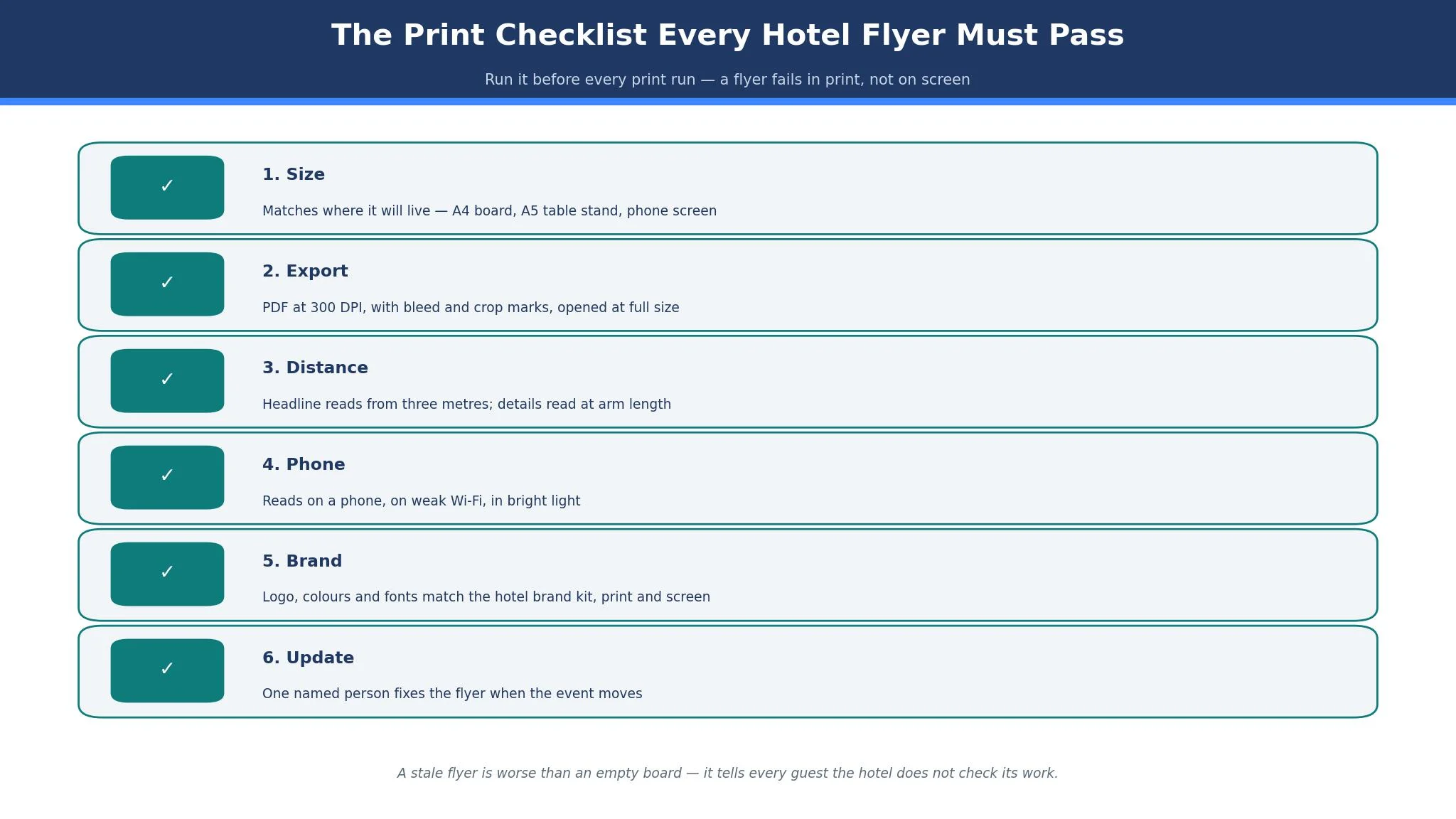
A flyer fails in print, not on screen, so the checklist below is the overview-proof part of this guide. It is the part no short answer can replace, because each item needs a real check on a real file. Run it before every print run, and keep it beside the printer.
Check the size first. Confirm the flyer size matches the place it will live, whether that is an A4 lobby board, an A5 table stand, or a phone screen. A flyer designed for a board and shrunk for a table will have text too small to read, and a flyer designed for a table and blown up for a board will look soft and blurred.
Check the export second. Export a PDF at 300 DPI with bleed and crop marks, and open it at full size before sending it to print. Read every word, check every price, and check every date twice. A wrong date on a printed flyer is a promise the hotel must honour or an apology it must make, and either one costs more than a test print.
Check the distance third. Print one copy, pin it where guests will see it, and step back three metres. If the headline cannot be read from there, the flyer fails the lobby job. Then hold it at arm length and check the details, because the same flyer must work at both distances. Most hotel flyers fail the three-metre test on the first try, and the fix costs nothing except larger type and fewer words.
Check the phone fourth. Open the digital version on a phone, on weak Wi-Fi, and in bright light. If the text is too small or the image loads slowly, the flyer fails the phone job. A guest who cannot read the offer on their phone will not walk to the lobby to read it on paper.
Check the brand fifth. Confirm the logo, the colours, and the fonts match the hotel brand kit, and confirm the same flyer looks like the same hotel in print and on screen. A guest who sees the brunch flyer, the spa poster, and the social post in one day should see one hotel rather than three different designs.
Check the update sixth. Decide who updates the flyer when the event moves, and spell out how the update reaches the print copy, the lobby screen, and the phone version. Skip that rule and the hotel ends up with a jazz night flyer still showing last Friday date, and a guest who walks past it and keeps walking. The best flyer makers for hotels justify their price by making this checklist quick, and a hotel that skips it pays for the gap in empty seats.
Best Pick by Job
Each row below pairs one hotel flyer job with the tool that handles it best, so start from the job you have this week.
| Job | Pick | Why it wins here |
|---|---|---|
| Most hotels | Canva | Largest library, easiest editor, print ordering |
| Polished print flyers | Adobe Express | Best typography and stock assets |
| Event flyers | PosterMyWall | Event templates with video and signage |
| Fast flyers on a budget | VistaCreate | Ten seats on one cheap Pro plan |
| Logo plus flyers together | Design.com | One brand kit for logo and flyers |
| Data-rich flyers | Visme | Charts and interactive boards built in |
| Infographic flyers | Piktochart | Cleanest data and timeline layouts |
| Simple flyers fast | Snappa | Plainest editor, fastest finish |
| Accessible flyers | Venngage | Contrast and readability built in |
| Photo-led flyers | Fotor | Real photo editing inside the flyer |
| Cheapest paid plan | Desygner | Capable Pro+ from $4.95 a month |
| Free-first flyers | Microsoft Designer | Free start inside Microsoft 365 |
How to Choose the Best Flyer Makers for Hotels
Start with the place, not the template. Write down where the flyer will live, in order. A lobby board needs a headline that reads from three metres, a table stand needs details that read at arm length, and a phone needs a design that reads on a small screen in bright light. A maker that cannot handle one of those three sizes without a rebuild does not belong on a hotel shortlist, whatever its feature page claims. Test each shortlisted tool among the best flyer makers for hotels by making the same flyer in all three sizes, and pick the one that finishes fastest without a rebuild.
Check the export before you commit. Export a PDF at 300 DPI with bleed, open it at full size, and print one copy. If the text is soft, the colours shift, or the bleed is missing, the tool fails the print job. A flyer tool that cannot export properly is a design toy, not a hotel tool, and the test takes ten minutes.
Check the update habit before you commit. Ask who will change the flyer when the event changes, and time how long the change takes. If the answer is a designer and a day, the tool will leave stale flyers on the board. If the answer is the front office manager and ten minutes, the tool will keep the board fresh. A hotel board with a stale flyer is worse than an empty board, because it tells every guest the hotel does not check its own work.
Frequently Asked Questions
How much should a hotel pay for a flyer tool?
For one of the best flyer makers for hotels, most hotels should budget 10 to 13 dollars a month on annual billing, or 120 to 156 dollars a year. A small hotel that makes a few flyers a month can stay on free tiers, while a hotel that runs weekly events should budget for a paid plan that covers brand kits and print-ready exports. If the total passes 25 dollars a month for flyers alone, check whether the extra features match flyers you actually make.
What size should a hotel flyer be?
A lobby flyer is usually A4 or A3, a table flyer is usually A5 or a half page, and a phone flyer is usually a portrait story size. Design the flyer at the size it will be printed, not at screen size, and use the resize tool to make the other versions rather than rebuilding from scratch. Always print one copy at full size before ordering a full run, because a flyer that looks right on screen can fail on paper.
Can I make a hotel flyer without a designer?
Yes. These tools are made for hotel staff rather than designers, and a careful manager can publish a good flyer within an hour. Hire a designer when the flyer has to stand apart, when the hotel wins on looks, or when nobody on the property has hours to spare. Hire a designer for the gala dinner and the wedding fair, and use a template tool for the weekly brunch and the jazz night.
How do I print a flyer so it looks professional?
Export a PDF at 300 DPI with bleed and crop marks, use a heavier paper stock than office paper, and print one test copy before ordering the full run. Check the colours under the lobby light, not only under office light, because warm lobby lighting shifts colours. If the hotel has no local print shop, Canva and Adobe Express both offer print delivery, and a local shop will usually match their price for a small run.
Should hotel flyers match the hotel brand?
Yes, every flyer should carry the same logo, colours, and fonts as the hotel, because a guest who sees the brunch flyer, the spa poster, and the social post in one day should see one hotel. Set the brand kit once in the tool, and lock the templates so a junior staff member cannot accidentally use the wrong font. A hotel with matching flyers looks organised, and a hotel with mismatched flyers looks like nobody is in charge.
How often should a hotel update its lobby flyers?
A hotel should update its lobby flyers whenever an event changes, and review the whole board every Monday morning. A stale flyer is worse than an empty board, because it tells every guest the hotel does not check its own work. Give one person the job of checking the board each morning, and give them a tool that lets them fix a flyer in ten minutes without calling a designer.
The Verdict: Canva Takes It for Most Hotels
Canva wins this list of the best flyer makers for hotels because it makes a new flyer fast, prints it well, and keeps the brand steady across every outlet, and those three things are the whole job for a hotel. Adobe Express wins when the flyer must look polished, PosterMyWall wins for events, and VistaCreate wins when ten staff share one cheap plan. Begin with where the flyer will live, check the export at full size, and pick the tool whose update habit fits the team. A flyer that is right, readable, and current beats a flyer that is beautiful and stale, every time.