

A visitor sits in a pew, opens the bulletin, and sees two codes. One links to the giving page, and it works. The other links to last Easter service, and it does not, because the free trial that made it ended in May. The first code cost nothing. The second cost a visitor. That gap is the whole story of the best qr code generators for churches, and it is not about design.
It is about whether the code still works next year, after the trial ends, after the volunteer who made it leaves, and after the link it points to changes. QRCode Monkey wins for most churches, because its static codes are free, never expire, and print cleanly at any size.
In this article
Static or Dynamic: The One Decision That Decides Everything
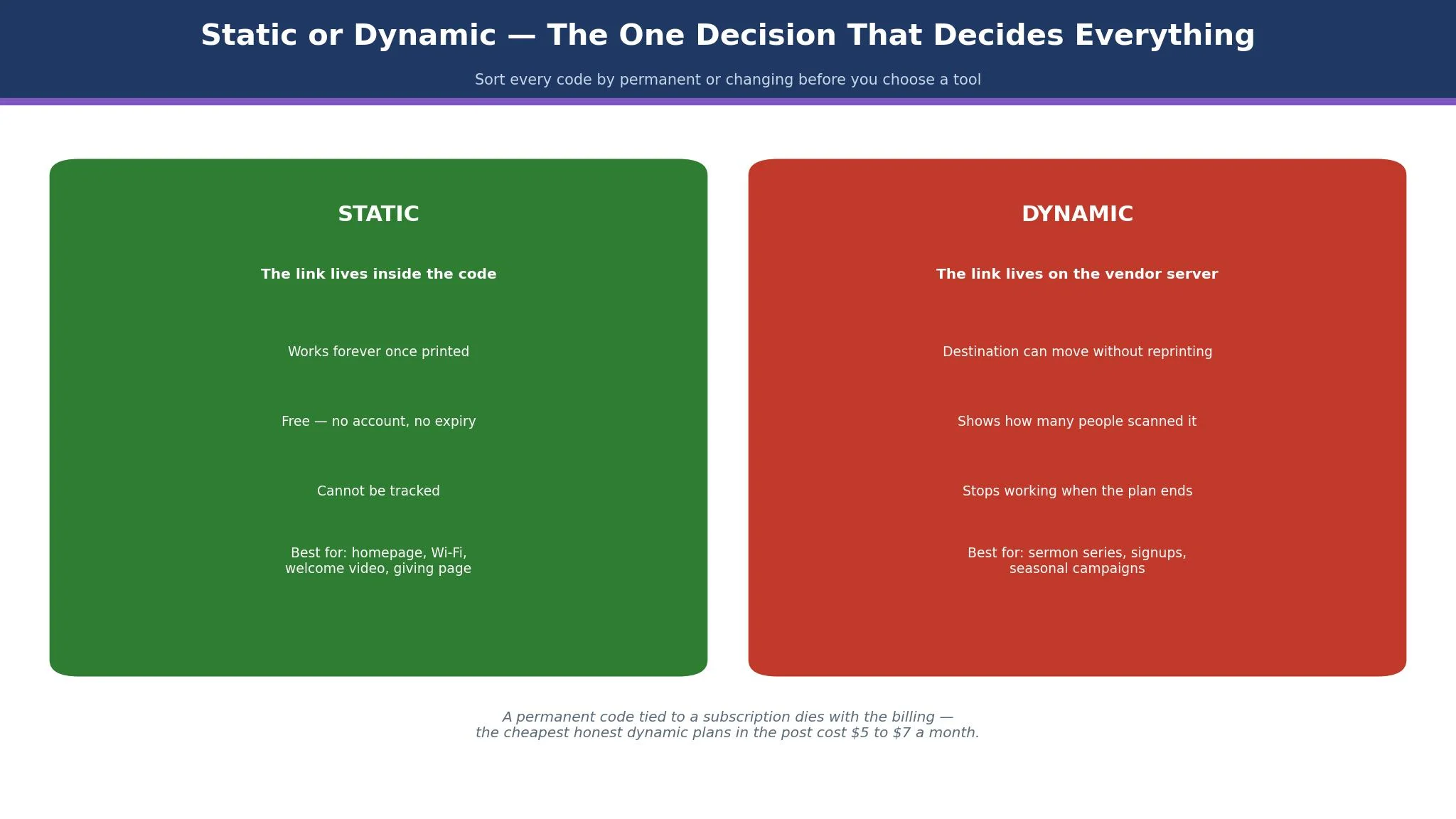
A static code holds the link inside the code itself, and it works forever once printed. A dynamic code holds a short redirect, and it can be edited and tracked, but it stops working when the subscription ends. That difference decides every other choice in this guide, and a church that gets it wrong will reprint its bulletins, its pew cards, and its welcome signs.
A static code suits anything that never changes. The church homepage, the Wi-Fi password, the welcome video, and the permanent giving page all work as static codes, because the destination will be the same in five years. A static code costs nothing, needs no account, and cannot be switched off by a missed payment, which is exactly what a church needs for the things it prints once and uses for years.
A dynamic code suits anything that changes. A sermon series page, a signup form for a youth camp, an event registration, and a seasonal giving campaign all need a code whose destination can move without reprinting. A dynamic code also shows how many people scanned it, which tells a church whether the bulletin code is working or being ignored. The price is a subscription, and the risk is that the code dies when the subscription ends, so a church choosing among the best qr code generators for churches must budget for the plan as long as the code is in print.
The 15 Tools at a Glance
This table compares the best qr code generators for churches on the four things that decide a church purchase. Prices below are the lowest paid tier each vendor advertises, checked on vendor pages and in recent roundups during November 2026. When a price differs between listings, both figures appear here as a range, because picking one would pretend the disagreement does not exist.
| Tool | Entry paid plan | Free option | Best for |
|---|---|---|---|
| QRCode Monkey | Free | Yes | Most churches |
| QR TIGER | $7 a month | Yes | Cheapest dynamic codes |
| QRCodeChimp | $6.99 a month | Yes | Most generous free dynamic plan |
| Uniqode | $9 a month | Trial | Larger churches and teams |
| QR Code Generator | $9.99 a month | Trial | Campaign tracking |
| Flowcode | $25 a month | Yes, limited | Events and campaigns |
| Canva QR | $12.99 a month | Yes | Codes inside church designs |
| Adobe Express QR | $9.99 a month | Yes | Codes inside branded designs |
| Bitly | $10 a month | Yes, limited | Short links plus codes |
| ME-QR | $10.50 a month | Yes | Many codes at once |
| Scanova | $5 a month | Trial | Clear pricing and print tiers |
| QRStuff | $100 a year | Yes | Many code types |
| GoQR.me | Free | Yes | One-off free codes |
| QRKit | $5 a month | Yes | Low-cost dynamic codes |
| The QR Code Generator | $5 a month | Yes | Cheapest flexible plan |
The 15 Tools in Detail
This section tests the best qr code generators for churches against the same three church jobs. A pew card code that scans from the back row, a bulletin code that still works next year, and a giving code that a first-time visitor can use without help. Take every figure below as the entry paid plan unless the text says otherwise; each was verified in November 2026.
1. QRCode Monkey
QRCode Monkey leads this list because it does the job most churches need for nothing at all, and no other free tool here matches that. It makes unlimited static codes with no signup, no account, and no expiry, and it lets a church add its logo, pick its colours, and download the code as a PNG, SVG, PDF, or EPS file. The vector download matters, because a printer needs an SVG or EPS file to print a code large on a welcome banner without it going blurry.
The price is free, and that is the whole price. There is no paid plan for the generator itself, and the site is supported by advertising and by a sister service for dynamic codes. A church that needs only static codes will never pay anything, and a church that needs dynamic codes will need a second tool, because QRCode Monkey itself does not track scans or edit a code after printing.
The working method suits a volunteer team. Open the site, paste the link, add the logo, download the file, and put it in the bulletin. The whole job takes five minutes, and the code can be tested with any phone before it goes to print. A church that prints its welcome card once and uses it for two years will find no better tool, because the code it prints today will still work when the volunteer who made it has moved on.
2. QR TIGER
QR TIGER is the pick for the cheapest real dynamic-code plan, because its Regular plan costs 7 dollars a month billed annually, or 9.99 dollars month to month, and it includes 12 dynamic codes with unlimited scans and advanced analytics. That figure beats most rivals, and the free tier hands a church three dynamic codes with 500 scans each, enough to run a sermon series as a trial before paying.
The working method suits a church that runs seasonal campaigns. Create a dynamic code for the Easter giving page, change its destination to the summer camp signup when Easter ends, and the printed bulletin never needs reprinting. The bulk generation on the Advanced plan at 16 dollars a month helps a larger church that needs a different code for every small group, and the frames and logo tools keep the code looking like part of the design rather than a black square pasted on it.
3. QRCodeChimp
QRCodeChimp is the pick for the most generous free dynamic plan, because its free tier gives 10 dynamic codes and 1,000 scans a month across all of them, which is more than any other tool in this list. A small church can run its giving code, its sermon code, its event signup, and its youth group code on the free plan, and only pay when the scan count grows past the limit.
Pricing starts at 6.99 dollars a month billed annually for the Starter plan, which covers 50 dynamic codes, with monthly billing listed at 9.99 dollars a month on some trackers. The paid plans add bulk generation from spreadsheets, more scans, and a stated SOC 2 Type II compliance claim, which matters for a church that handles giving data and wants its vendors to meet a recognised security standard.
4. Uniqode
Uniqode, formerly Beaconstac, is the pick for larger churches and teams, because it serves organisations where compliance and scale are not optional. Every paid plan lists GDPR and SOC 2 Type 2 compliance, and the platform scales through Core, Plus, and Business tiers with features like conditional routing, GPS tracking, custom domains, and single sign-on. A church network with several campuses will find those tools useful, while a single small church will find them unnecessary.
Pricing starts at 9 dollars a month billed annually for the Essential plan, which covers 15 dynamic codes and 50,000 scans a year, with a 14-day free trial and no free plan. Higher tiers rise to 49 dollars a month for Core and 99 dollars for Plus, and the platform sells annual plans only, so a church must budget the full year up front. The custom domain is an add-on with a price that varies by listing, so a church that wants codes on its own domain should confirm that cost before choosing.
5. QR Code Generator
QR Code Generator, at qr-code-generator.com and owned by Bitly, is the pick for campaign tracking, because it serves marketing teams that need to know which code worked and where. The dashboard shows scans by time, device, and location, and the campaign tools help a church compare a bulletin code against a social media code and see which one brings visitors. A church that runs a real outreach campaign will find those numbers useful.
Pricing is listed from 9.99 dollars a month billed annually for the Starter plan on published roundups, with a 14-day free trial and no free plan. The exact figure varies by region, because the pricing page defaults to a euro display for some visitors, so a church should confirm the dollar figure before budgeting. The higher plans add more codes, more scans, and deeper analytics, and the enterprise tiers are priced on request.
6. Flowcode
Flowcode is the pick for events and campaigns, because it ties scans to audience building, customer relationship tools, and retargeting, which suits a church that runs conferences, concerts, and outreach events. The free plan gives two dynamic codes with Flowcode branding, and the paid plans add landing pages, more codes, and integrations with Salesforce, HubSpot, and Mailchimp, which help a larger church follow up with visitors after an event.
Pricing starts at 25 dollars a month billed annually for the first paid tier, or 60 dollars month to month on the Pro Plus plan, which covers 50 codes and landing pages. That price is higher than most tools in this list, and it buys campaign features a small church will not use. The free plan is limited to two codes, which is enough to test an event, and the enterprise tier is priced on request.
7. Canva QR
A church already designing in Canva should use its built-in code generator, because it lives in the same canvas as the bulletin, the flyer, and the social post. A volunteer can lay out the welcome card, place the code, and export a print-ready PDF from the same canvas, with the church logo and colours carried over from the brand kit.
Inside Canva the generator is free, while Pro is listed at 12.99 dollars a month in some places and 144 dollars a year in others, with listings disagreeing by a few dollars. Basic code generation costs nothing, while Pro unlocks brand kits, background removal, and premium templates, and a church spreads those across bulletins, flyers, and social posts, so the code is only one job the payment covers.
8. Adobe Express QR
Adobe Express QR is the pick for a church whose designs must look polished, because the code generator sits inside Adobe Express with its tidy templates, better typography, and Adobe Stock assets. A church that prints a welcome booklet, a sermon series guide, and a giving card will find the codes sit naturally inside designs that already look professional, rather than looking pasted on.
The free tier is the starting point, and Premium is priced at 9.99 dollars monthly, with the yearly figure at 99.99 dollars. Free covers a usable set of templates and code generation, while Premium brings brand controls, template locking, and Firefly credits, which keep every volunteer on the same look. The direct print delivery option helps a church without a local print shop.
9. Bitly
Bitly is the pick for a church that wants short links plus codes in one place, because its core product is the short link, and the code is built on top of it. A church that shares links on social media, in emails, and in print can use one Bitly link everywhere, track its clicks, and print the same link as a code, which keeps the analytics in one dashboard rather than spread across three tools.
Pricing is free with limits, including five short links a month and two codes, and Core costs 10 dollars a month billed annually, with Growth at 29 dollars a month. The free tier is tight enough that a church sharing links weekly will outgrow it, and the paid plans mainly buy more links, more codes, and longer analytics history. The codes are dynamic, tied to the Bitly link, so they stop working if the link is deleted or the plan lapses.
10. ME-QR
ME-QR is the pick for a church that needs many codes at once, because its free plan allows bulk creation and up to 10,000 codes, all with an advertisement shown to the scanner. That volume suits a church that prints a different code for every small group, every classroom, and every event, and needs them all made in one afternoon rather than one at a time.
Pricing is reported at 10.50 dollars a month billed annually for the Lite plan, or 16.99 dollars month to month, with Lite making only one code ad-free. Analytics are included on all plans, with one year of history on the free plan and three years on Lite, which helps a church compare seasons. The free codes carry an advertisement, which a church should consider carefully before putting one on a giving card, because an advert on the way to a donation is a poor welcome.
11. Scanova
Scanova is the pick for clear pricing and print tiers, because it publishes five tiers from 5 dollars to 75 dollars a month, each with its code count printed plainly, and every tier includes unlimited scans. A church can read the table, pick the tier that covers its code count, and know exactly what it will pay, which is rarer than it should be in this category. The Basic plan at 5 dollars a month billed annually covers three codes, and the trial lasts 14 days.
Pricing starts at 5 dollars a month billed annually, with monthly billing from 15 dollars a month on the Lite plan, and a one-time plan at 150 dollars for a single code with lifetime validity. The AI-designed code art on the lowest tier and the AI landing page builder on higher tiers help a church make codes that look like part of the design rather than a black square, and the print tiers are named plainly enough for a volunteer to understand them.
12. QRStuff
QRStuff is the pick for many code types, because it supports more data types than most rivals, from Wi-Fi passwords and contact cards to calendar events and plain text, and its static codes never expire with no scan cap. A church that wants a code for the Wi-Fi, a code for the pastor contact card, and a code for the Christmas service calendar can make all three in one place, which keeps the volunteer workflow simple.
The free plan has limits, and Lite is 100 dollars a year, roughly 8.33 dollars a month. The free plan gives 10 dynamic codes valid for 30 days, so a church must not print a free dynamic code, because it will stop working a month later. The paid plan covers 50 dynamic codes, and the static codes work forever with no scan cap, which is the feature a church should actually use.
13. GoQR.me
GoQR.me is the pick for a one-off free code, because it makes static codes with no signup, no account, and no fuss, and it has done so for years. A church that needs one code for a single event, a funeral notice, or a one-time signup form can make it in a minute and print it, and the code will work as long as the link it points to works.
Pricing is free, and that is the whole price. There is no paid plan to upsell, no trial to expire, and no account to manage, which makes it the simplest tool in this list. The design options are thinner than QRCode Monkey, with fewer colour and logo controls, and there is no tracking, because a static code cannot be tracked.
14. QRKit
QRKit is the pick for low-cost dynamic codes, because its paid plans start at 5 dollars a month billed annually, or 8 dollars month to month, for 12 dynamic codes with unlimited scans and print-ready SVG, PDF, and EPS downloads. That price buys the same core job as tools charging twice as much, and the full design suite is free with no watermark, which means a church can design the code properly before paying anything.
Pricing starts at 5 dollars a month billed annually, with a free plan that gives one dynamic code with 100 total scans a month and unlimited static codes. The free dynamic code is enough to test a sermon series, and the paid plan covers a whole church year of campaigns. The basic analytics on the free plan cover 30 days of history, and the advanced analytics on the paid plan cover more, which helps a church see which codes are actually scanned.
15. The QR Code Generator
The QR Code Generator, at the-qrcode-generator.com, is the pick for the cheapest flexible plan, because its Flex plan costs 5 dollars a month billed yearly for five dynamic codes, or 10 dollars a month for 45, with ad-free, watermark-free codes and 60 days of analytics history. The free plan gives two dynamic codes that never expire, shown with an advertisement, and unlimited static codes, which is a fairer free offer than most rivals.
Pricing starts at 5 dollars a month billed annually, with bulk creation and CSV export included on the cheapest plan, which helps a church that needs a code for every small group without paying for a higher tier. City and country analytics, device and operating system breakdowns, and 60 days of history come with the entry plan, while GPS scan location is a 5 dollar a month add-on.
What a Church Actually Pays in a Year
Count the real yearly cost before you choose from the best qr code generators for churches, because the headline plan is never the whole bill. A church that needs only static codes pays nothing, because QRCode Monkey and GoQR.me make them free forever, and that zero is the right answer for a welcome card, a homepage link, and a Wi-Fi password. A church that needs dynamic codes for a sermon series, an event signup, and a giving campaign pays for one plan, and the cheapest honest plans in this list cost 5 to 7 dollars a month, or 60 to 84 dollars a year.
Best Pick by Job
Pick the church job you have this week from the rows below and start with the tool beside it. The best qr code generators for churches are the ones whose codes still work when the volunteer who made them has moved on, and this table is built around that test.
| Job | Pick | Why it wins here |
|---|---|---|
| Most churches | QRCode Monkey | Free static codes that never expire |
| Cheapest dynamic codes | QR TIGER | 12 dynamic codes for $7 a month |
| Most generous free dynamic plan | QRCodeChimp | 10 free dynamic codes, 1,000 scans a month |
| Larger churches and teams | Uniqode | Compliance and scale built in |
| Campaign tracking | QR Code Generator | Scans by time, device and location |
| Events and campaigns | Flowcode | Audience tools and CRM links |
| Codes inside church designs | Canva QR | Code inside the bulletin canvas |
| Codes inside branded designs | Adobe Express QR | Tidy templates and brand controls |
| Short links plus codes | Bitly | One link for social, email and print |
| Many codes at once | ME-QR | Bulk creation on the free plan |
| Clear pricing and print tiers | Scanova | Every tier printed plainly |
| Many code types | QRStuff | Wi-Fi, contact and calendar codes |
| One-off free codes | GoQR.me | No signup, no account, no fuss |
| Low-cost dynamic codes | QRKit | 12 dynamic codes for $5 a month |
| Cheapest flexible plan | The QR Code Generator | Flex from $5 a month, 2 free codes |
How to Choose the Best QR Code Generators for Churches
Start with the permanence question, not the feature list. Write down every code the church will print, and mark each one permanent or changing. A permanent code gets a static tool, and a changing code gets a dynamic plan, and a church that sorts its codes this way before choosing a tool will spend less and reprint less. A permanent church code tied to a subscription is a code that dies with the billing, so strike any of the best qr code generators for churches that does that, whatever its feature page promises.
Check the expiry rule before you commit. Read the plan page and the terms, and find the sentence that says what happens to the code when the trial ends or the plan lapses. If the code stops working, the plan must stay active as long as the code is in print, and the church must budget for that as a permanent cost. If the code keeps working, the tool is safe for permanent print. That single sentence separates the tools a church can trust from the ones it cannot, faster than any review.
Frequently Asked Questions
How much should a church pay for a QR code generator?
Most churches should pay nothing for static codes, and 5 to 7 dollars a month for one dynamic plan that covers its changing codes, or 60 to 84 dollars a year on annual billing. A larger church with several campuses should budget 9 to 25 dollars a month for a team plan with compliance and scale. If the total passes 30 dollars a month for codes alone, check whether the extra features match codes you actually print.
Will a free QR code stop working?
A free static code never stops working, because the link lives inside the code itself. A free dynamic code often stops working when the trial ends or the scan limit is reached, because the link lives on the vendor server and the vendor switches it off. A church should use free static codes for anything permanent, and only print dynamic codes from a paid plan it intends to keep.
Can a church track how many people scan its codes?
Yes, but only with dynamic codes, because a static code cannot report anything. A dynamic plan shows scan counts by time, device, and location, which tells a church whether the bulletin code is working or being ignored. A church that wants numbers should pay for one dynamic plan and use it for the codes it measures, while keeping its permanent codes static and free.
What size should a QR code be on a pew card?
A pew card code should be at least 2 centimetres square, and larger is better, because a guest scans it at arm length in dim light. Print one copy, pin it in a pew, and scan it from the back row before ordering a full run. A code that is too small or too dense will fail in the pew even though it works on a desk, and the fix is a larger code or a shorter link.
Can I put my church logo in a QR code?
Yes, if the tool supports logo overlays and the logo covers no more than about a third of the code. QRCode Monkey, QR TIGER, and QRCodeChimp all support logos, and the code should always be tested after the logo is added, because a logo that covers too much will break the scan. Print one copy and scan it with three phones before ordering a full run.
Should a church use one code or several?
A church should use several codes, one per job, so the giving code, the sermon code, and the event signup each point to their own page. One code for everything forces a visitor to navigate from a homepage, and most will not. Keep the count small, name each code by its job, and write down where each one is printed, so a code can be checked and fixed without hunting through every bulletin.
The Verdict: QRCode Monkey Takes It for Most Churches
QRCode Monkey wins this list of the best qr code generators for churches because its static codes are free, never expire, and print cleanly at any size, and those three things are the whole job for most churches.
QR TIGER is the better pick when the church needs cheap dynamic codes, QRCodeChimp is the better pick when the church wants the most generous free dynamic plan, and QRKit is the better pick when the church wants low-cost dynamic codes with clean exports. Start with the permanence question, check the expiry rule before you print, and test every code from the back row. A code that still works next year beats a code with more features that dies in May, every time.