

MustHaveMenus wins for most hotels, because a hotel menu is not one menu. It is a breakfast menu, a room service card, a bar list, a banquet sheet, and a poolside board, all of which must change together when a price moves or a dish runs out. The best menu makers for hotels are the ones that treat the menu as live data rather than a finished file, so one edit updates the print copy, the website, and the QR code at the same time. That single ability separates the tools built for hotels from the design apps that only make pretty pages.
In this article
The 8 Tools at a Glance
This table compares the best menu makers for hotels on the four things that decide a hotel purchase. Every price in the table is the lowest paid plan the vendor publishes, verified against vendor pages and recent roundups in November 2026. Where two listings quote different prices for the same plan, you will see both ends of the spread here, not a single figure dressed up as certain.
| Tool | Entry paid plan | Free option | Best for |
|---|---|---|---|
| MustHaveMenus | $24 a month | Yes | Most hotels |
| iMenuPro | $16 a month | No | Fast, clean printed menus |
| Canva | $12.99 a month | Yes | Design-led menus and posters |
| Design.com | Free to start | Yes | Logo and menus from one place |
| Adobe Express | $9.99 a month | Yes | Brand-safe menus fast |
| PosterMyWall | $9.95 a month | Yes | Event and banquet menus |
| Menutech | €15 a month | Trial | Multilingual hotel menus |
| Visme | $12.25 a month | Yes | Data-rich menus and boards |
The 8 Tools in Detail
This section tests the best menu makers for hotels against the same three hotel jobs. A printed menu that reads well in low light, a QR menu that updates without reprinting, and a banquet sheet that can be rebuilt in an afternoon. Every number that follows is the entry paid tier, unless the sentence says otherwise, and every one was checked in November 2026.
1. MustHaveMenus
MustHaveMenus leads this list because it was built for food businesses from the start, not adapted from a general design app, and that shows in every template. Its library holds thousands of restaurant-specific templates with matching sets for dine-in menus, takeout cards, and table tents, so a hotel can give its restaurant, its bar, and its room service the same look without hiring a designer. That matching set is the detail guests notice, even if they cannot name it.
Pricing is reported from 24 dollars a month in one roundup and 49 dollars a month per location in others, with a free plan that covers a smaller template set. The gap between sources is real, and a hotel should confirm the checkout price for its number of locations before budgeting, because the per-location billing means a five-outlet hotel pays five times the single price. The higher plans add digital signage and more storage, and the Display add-on for menu boards is sold separately, which is the most common complaint in public reviews.
The working method is what makes it a hotel tool rather than a design tool. The menu lives as data, so a price change updates the print file, the website menu, and the QR code at the same time. A chef who changes the soup of the day in the morning does not need to reprint anything or call the front desk, because the code on the table already shows the new soup. The platform also syncs with Toast and Square point-of-sale systems, so prices typed once in the till do not need retyping in the menu.
2. iMenuPro
iMenuPro suits a hotel that wants a beautiful printed menu in a hurry, and it has been doing exactly that job longer than any other tool in this guide. It began in 1994 as MenusDeluxe, the first menu design software, and it is still built for menus only, which shows in every detail. The templates understand courses, wine lists, and daily specials, and the editor is laid out around the way a menu reads rather than the way a poster reads.
Pricing is simple. One flat price covers everything: 16 dollars a month, or 135 dollars a year, which comes to roughly 11.25 dollars a month. There is no free plan, but there is a 30-day trial, and the flat price means a hotel with five outlets pays the same as a hotel with one. That flat rate is a genuine advantage over per-location tools for a hotel group.
The working method suits a chef who changes the menu often. The food database saves dishes, so a seasonal special can be built from saved items, and marking a dish as sold out removes it from the printed file, the web menu, and the QR code at once. A banquet manager who needs a different menu for every wedding can duplicate last month menu, change the starters, and print a new sheet in fifteen minutes, which is the speed a hotel actually needs on a Friday afternoon.
3. Canva
For a hotel that wants menus that look designed rather than typed, Canva is the pick, because no other tool here offers as many menu templates in an editor a front-desk manager can learn without training. A front office manager with no design training can pick a menu template, swap the dish names, add the hotel logo, and export a print-ready PDF in under an hour. That ease is why Canva sits on so many hotel computers already.
The free plan covers the basics, and Pro is listed near 12.99 dollars a month on some pages and 15 dollars on others, with a yearly total between roughly 120 and 144 dollars on annual billing. Listings differ by a few dollars, so check the checkout page for the figure that applies to you. Pro also unlocks brand kits, background removal, and premium templates, and a hotel puts those to work on menus, posters, and social posts alike, so menus are just one of the jobs the payment covers.
The working method is template-first, and the brand kit is the feature that matters most for a hotel. Set the hotel colours, the fonts, and the logo once, and every menu, every poster, and every social post pulls from the same kit. A guest who sees the breakfast menu, the spa poster, and the Instagram post in one day sees one hotel rather than three different designs, and that consistency is worth more than any single template.
4. Design.com
Design.com belongs on this list for a hotel opening with no brand yet, because the logo, the dining-room menu, the bar list, and the room-service card can all be built from one set of colours in a single sitting. A new boutique property can shape its mark first, then let the restaurant menu, the bar list, and the room-service card follow it, without hiring a designer or learning a design app. When the logo and the menus agree, a guest notices the coherence even if they never name it.
Depth is the trade-off. The tool produces a clean printed menu, a bar list, and a simple room-service card, yet it never holds the menu as live data the way MustHaveMenus or iMenuPro do, and its template range is narrower than Canva. A kitchen that reprices dishes daily will outgrow it, and a property running five outlets will want per-outlet management. Take it as a quick, coherent beginning for a small property finding its look, not as the system a large hotel runs on for years.
Starting costs nothing, and the paid options add a custom domain and premium features, so confirm the checkout figure before paying, since the plans shift. The gain is the bundle, logo and menus together, rather than any one feature on its own. A small hotel that needs a logo, a set of menus, and printed material from one login saves hours, and hours are what a new property runs shortest on.
5. Adobe Express
A hotel already paying for Adobe tools, or one whose menus must look polished with nobody on staff trained in design, will find Adobe Express the natural pick. The templates are tidy, the typography is better than most rivals, and the brand controls keep a junior staff member from accidentally using the wrong font on the dinner menu. A hotel group with brand guidelines will appreciate the template locking, which keeps every outlet on the same look.
The free tier does plenty, and Premium is listed at 9.99 dollars each month, which comes to 99.99 dollars over a year. That is among the cheapest paid entries here, and it bundles Adobe Stock assets with Firefly generative credits, so a hotel can conjure a background for a seasonal menu instead of buying stock photos on the side. Even without paying, a hotel gets a surprising amount of menu work done, with a usable template set and 5 GB of storage in the free tier.
The working method suits a team that values typography. Menu text is small, and a font that reads well at 10 points in a dim dining room is not a luxury. Small type is where Adobe Express pulls ahead, and one click on its resize tool turns the printed menu into a social post and a story graphic, so the marketing team never rebuilds a design just because a special went online. The direct print delivery option also helps a hotel that wants menus printed and shipped without a local print shop.
The weakness is menu-specific function. Like Canva, Adobe Express makes a file, not a live menu, so a price change means editing and re-exporting. A hotel that updates its menu weekly should pair it with a live menu tool, or accept the re-export habit. For a hotel whose menu changes with the seasons rather than the week, that habit is a minor cost.
6. PosterMyWall
For event and banquet menus, PosterMyWall is the pick, because it began life as a poster and flyer tool and still does that one job better than the general design apps. A hotel that hosts weddings, conferences, and gala dinners needs a different menu for every event, and PosterMyWall makes a new one fast, with templates built around dates, venues, and celebration rather than around a fixed restaurant list.
Downloads are free with a watermark, and Premium begins at 9.95 dollars each month, 99.95 dollars over a year, while Premium Plus at higher tiers adds more stock and features. A watermarked draft is fine for planning, but no hotel should set a watermarked menu on a wedding table, so pay for Premium from day one. Use the 14-day Premium trial to run a real banquet week through it before any money changes hands.
The working method suits a banquet team under time pressure. Pick an event template, swap the dishes and the date, add the hotel logo, and the menu is ready for the client to approve. The email and social publishing tools help a hotel promote the event as well as print for it, and the digital signage publishing turns a banquet menu into a lobby screen without a second tool. Animated video templates are a bonus for a hotel that pushes its events on social channels.
The weakness is depth for the main restaurant. PosterMyWall makes a beautiful one-off menu, and it makes a weekly-changing restaurant menu less well, because there is no dish database and no live data. Use it for the banquet and the event, and use a menu system for the restaurant that changes every day.
7. Menutech
Menutech is the pick for a hotel that serves guests in several languages, because multilingual menus are its core strength rather than an add-on. A hotel in a tourist city needs its menu in three or four languages, and translating a menu by retyping it in a design app invites errors that a guest will notice. Menutech holds the menu as data and publishes it in each language from the same source, so a price change updates every language at once.
Pricing runs from 15 euros a month to 60 euros a month across five tiers, with the exact figure depending on the number of menus and features a property needs. That range is wide, so a small hotel should price the lowest tier that covers its languages, and a resort should price the tier that covers its outlets. The per-account billing, rather than per-location, helps a hotel group keep the cost predictable.
The working method suits a hotel with international guests. Build the menu once, add the translations, and publish a QR code that lets each guest pick a language on their own phone. The allergen and dietary information travels with the translation, which matters for a hotel that must serve guests with allergies safely. A guest who reads the menu in their own language orders with more confidence, and orders more.
The weakness is design flair. Menutech menus are clean and correct rather than beautiful, and a boutique hotel that wants a menu to look like a design object will need a design app as well. Let each side do what it does best. Menutech holds the content and the languages, and a design tool makes the printed showpiece for the main dining room.
8. Visme
A hotel whose menus carry data, wine regions, tasting notes, nutrition figures, should look at Visme first, because charts, tables, and interactive elements are its home ground rather than plain pages. A hotel that publishes a wine list with regions and vintages, a breakfast menu with nutritional notes, or a digital menu board with prices that change by season will find Visme more capable than a simple design app. The interactive exports also suit a hotel that puts its menu on a lobby screen or a tablet.
The free plan has limits, and Starter is 12.25 dollars a month on annual billing, with Pro at 24.75 dollars a month on the same basis. Basic is free but it watermarks exports and caps downloads below print quality, so a hotel should move to Starter before anything goes to the printer for guests. Higher tiers add HTML5 exports, analytics, and forms, and those pay off on a digital menu board far more than on a printed sheet.
The working method suits a hotel that thinks in boards rather than pages. Build the menu as a visual board, add the data, and publish it as a web link, a PDF, or a screen display. Its chart builder turns a tasting menu into a journey rather than a list, and the brand kit holds the colours and fonts steady across the restaurant, the bar, and the spa. The PowerPoint import is a quiet bonus for a hotel that already has its menus in slides.
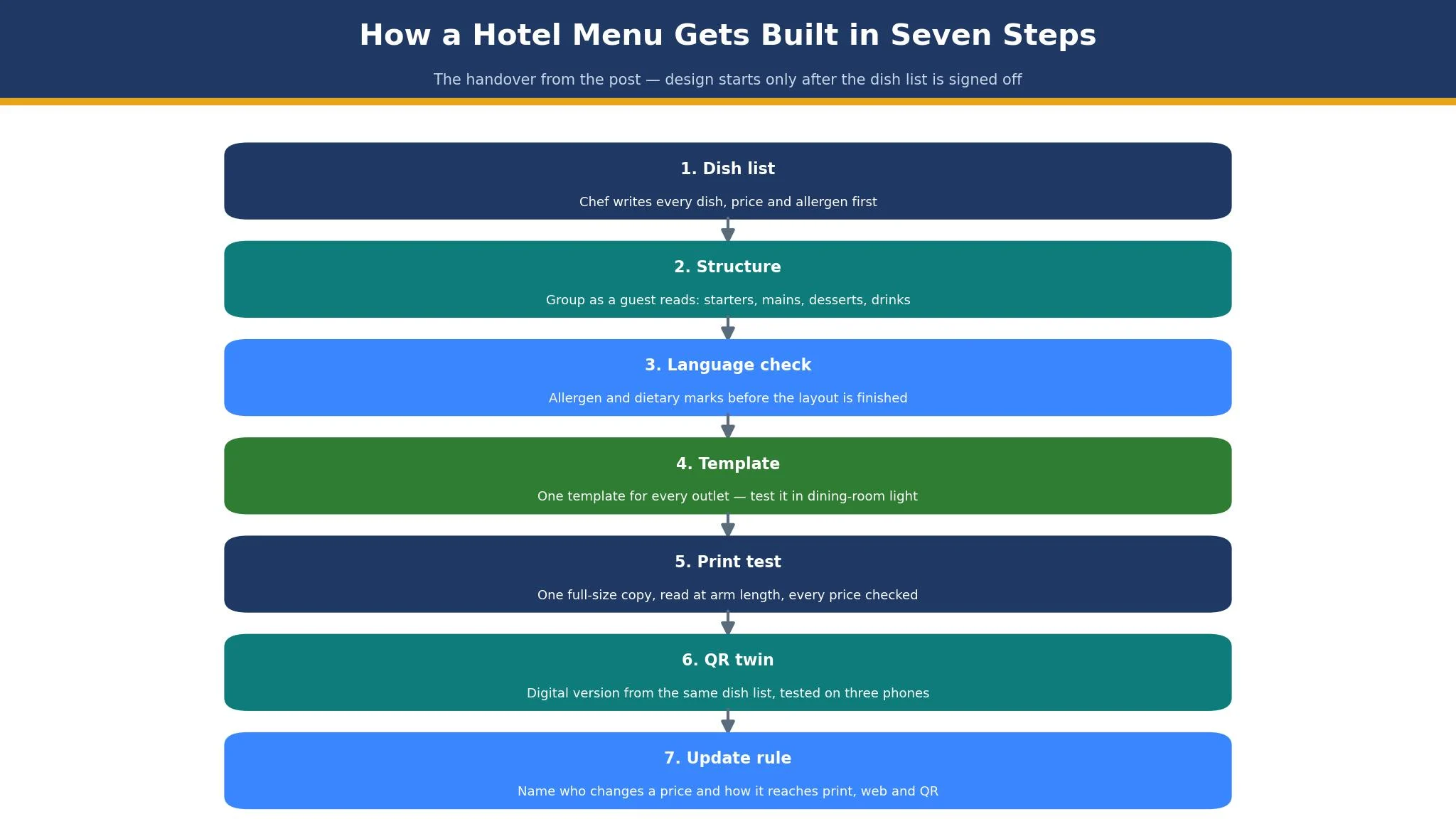
How a Hotel Menu Gets Built in Seven Steps
A hotel menu fails most often in the handover, not in the design. The chef writes the dishes, the manager formats them, the printer prints them, and the front desk answers questions about a menu it has never seen. The seven steps below close that gap, and they work with any of the best menu makers for hotels in this guide.
Step one is the dish list. The chef writes every dish, its price, and its allergens in one document before anyone opens a design tool. No design work starts until that list is signed off, because a menu designed around a draft list will be redesigned twice.
Step two is the structure. Group the dishes the way a guest reads them, not the way a kitchen stores them. Starters, mains, desserts, and drinks, with the high-margin dishes where the eye lands first. A hotel menu that buries its best dish on page three is a menu that sells its average dish instead.
Step three is the language check. A hotel menu needs its allergen and dietary marks before the layout is finished, because adding them later breaks the spacing. Mark gluten-free, vegan, and nut-containing dishes in the dish list, and carry those marks into every language version.
Step four is the template. Pick one template and use it for every outlet, so the breakfast menu, the bar list, and the room service card look like one hotel. The template should be tested in the dining room light, not only on a bright office screen, because a menu that reads well at a desk can fail at a candlelit table.
Step five is the print test. Print one copy at full size, read it at arm length, and check every price and every spelling. A wrong price on a printed menu is a promise the hotel must honour or an apology it must make, and either costs more than one test print.
Step six is the QR twin. Build the digital version from the same dish list, not from a scan of the print file, so the two match. Test the code with three different phones, including an older one, and check that it opens fast on the hotel Wi-Fi.
Step seven is the update rule. Name the person who changes a price, the place they change it, and the route the change takes to the print copy, the website, and the QR code. Without that rule, a hotel ends up charging three different prices for one dish, and a guest who spots the gap stops trusting any of them. The best menu makers for hotels justify their price by making step seven painless, and a hotel that skips the step pays for the gap in complaints.
What a Hotel Menu System Really Costs in Year One
Add the numbers before you choose from the best menu makers for hotels, because the headline plan is never the whole bill. A hotel with one restaurant on MustHaveMenus at 24 dollars a month pays 288 dollars in year one, while the same hotel on iMenuPro at 135 dollars a year pays less than half that, and a hotel on Canva Pro at about 156 dollars a year sits between the two. The gap between the cheapest and the dearest option is real, but it is smaller than the cost of reprinting a menu three times because the tool could not update a price.
A five-outlet hotel tells a different story. MustHaveMenus billed per location turns 24 dollars a month into 120 dollars a month, or 1,440 dollars a year, before the Display add-on. iMenuPro at a flat 135 dollars a year covers all five outlets for the price of one, and Canva Pro at one seat covers the design work for all five. The per-location question is the first question a hotel group should ask any vendor among the best menu makers for hotels, because it decides the year-one total more than the headline plan does.
Time is the second cost. Building a menu takes five to ten hours for a first version, and updating it takes an hour a week when the tool holds the menu as data, and three hours a week when the tool only makes files. A hotel that changes its menu weekly saves about a hundred hours a year with a live-data tool, and that saving is worth far more than the price gap between the tools. Count the hours before you count the dollars, because the hours are where the real bill lives.
Best Pick by Job
Find your hotel job below and take the tool beside it, then read only that tool section if you are short on time.
| Job | Pick | Why it wins here |
|---|---|---|
| Most hotels | MustHaveMenus | Live data across print, web and QR |
| Fast printed menus | iMenuPro | Flat price and a dish database |
| Design-led menus | Canva | Largest template library, easiest editor |
| Logo plus menus together | Design.com | One brand kit for logo and menus |
| Brand-safe menus fast | Adobe Express | Best typography and template locking |
| Banquet and event menus | PosterMyWall | Event templates built for dates and venues |
| Multilingual menus | Menutech | One source, every language updated together |
| Data-rich menus and boards | Visme | Charts and interactive boards built in |
How to Choose the Best Menu Makers for Hotels
Start with the update habit, not the template. Ask how often the menu changes, who changes it, and how fast the change must reach the guest. A hotel that changes its menu daily needs live data, and should shortlist MustHaveMenus and iMenuPro first. A hotel that changes its menu with the seasons needs beautiful design, and should shortlist Canva and Adobe Express first. A hotel that serves guests in four languages needs multilingual publishing, and should shortlist Menutech first. The update habit decides the shortlist, and the template decides within it.
Check the print test before you commit. Print one menu from each shortlisted tool, read it in the dining room at dinner light, and ask a colleague to find a price and an allergen mark without help. If they cannot find either in ten seconds, the template fails the job, no matter how good it looks on a screen. A menu is read by hungry people in low light, and a tool that forgets that has forgotten its only user.
Check the QR test before you commit. Generate the code, print it at the size you will use on the table, and scan it with three phones, including one older model and one on weak Wi-Fi. If the menu opens slowly or the text is too small, the tool fails the QR job. A QR menu that frustrates a guest is worse than no QR menu, because the guest blames the hotel rather than the tool.
Frequently Asked Questions
How often should a hotel update its menu?
A hotel should update its menu whenever a price, a dish, or an allergen changes, and review the whole menu with the seasons. A live-data tool makes a price change in minutes, while a file-based tool needs a re-export and a reprint, so the update habit should match the tool. A hotel that changes prices monthly can use any tool in this guide, while a hotel that changes them weekly should choose a live-data tool first.
Can a hotel use one tool for all its outlets?
Yes, if the tool bills per account rather than per location, or if the per-location price is budgeted for every outlet. iMenuPro and Canva cover all outlets on one price, while MustHaveMenus bills per location, so a five-outlet hotel should price the total before choosing. The template should also be shared across outlets, so every menu looks like the same hotel.
Do hotel guests prefer printed menus or QR menus?
Guests prefer a choice. Older guests and guests in a fine dining room usually prefer a printed menu, while younger guests and guests ordering room service often prefer a QR menu on their own phone. A hotel that offers both, with the same dishes and the same prices in each, serves both groups. A hotel that offers only one will hear about it in reviews.
What allergen information must a hotel menu carry?
A hotel menu should mark the major allergens for every dish, including gluten, nuts, dairy, and shellfish, and it should name a contact for guests with a serious allergy. The marks must match across the printed menu, the QR menu, and every language version, because a guest who trusts the English menu and eats from the translated one is trusting a translation. Check the marks with the chef before every print run.
How much should a hotel pay for a menu tool?
Most hotels should pay between 10 and 25 dollars a month for a single outlet, or 135 to 300 dollars a year on annual billing. A hotel group with five outlets should budget 135 dollars a year on a flat-price tool, or up to 1,440 dollars a year on a per-location tool, and should compare those totals before choosing. If the total passes 100 dollars a month for one outlet, check whether the extra features match menus you actually publish.
Can I design a hotel menu without a designer?
Yes. Hotel staff can run every tool in this guide, and a careful manager can put a good menu out in a day. Pay a designer when the menu has to stand apart, when the hotel wins on looks, or when the property has no hours to spare. Hire a designer for the main dining room menu, and use a template tool for the bar list, the room service card, and the banquet sheets.
The Verdict: MustHaveMenus Takes It for Most Hotels
MustHaveMenus wins this list of the best menu makers for hotels because it treats the menu as live data, and a hotel menu that cannot update itself is a menu that will be wrong within a month.
iMenuPro is the better pick for a hotel that wants a flat price and a fast printed menu, Canva is the better pick for a hotel that wants design range, and Menutech is the better pick for a hotel that serves guests in several languages. Begin with how often the menu changes, check the print copy in dinner light, and pick the tool whose update habit fits the kitchen. A menu that is right everywhere beats a menu that is beautiful in one place and wrong in two others, every time.