

A still logo sits quietly on a website header. The same logo, given three seconds of motion, introduces a video, opens a presentation and signs off a social clip. That is the whole job of the best logo animation tools, and the difference between them is not whether they can move a logo. It is how much control they give over the movement, what file they hand back at the end, and what the result costs when the animation is needed once rather than every week. A template tool finishes the job in fifteen minutes and hands back an MP4. A professional motion app takes a day to learn and hands back anything, including a transparent overlay. A browser editor sits between the two, with presets that are quick and a timeline that allows real editing.
The nine tools in this guide cover that full range, from free plans that watermark the export to a professional subscription that costs more in a month than some of the others cost in a year. The goal is a logo animation that looks like it belongs to the brand, in a format the website or the video editor can actually use, at a price that makes sense for one animation or for a hundred.
In this article
Three Ways to Animate a Logo
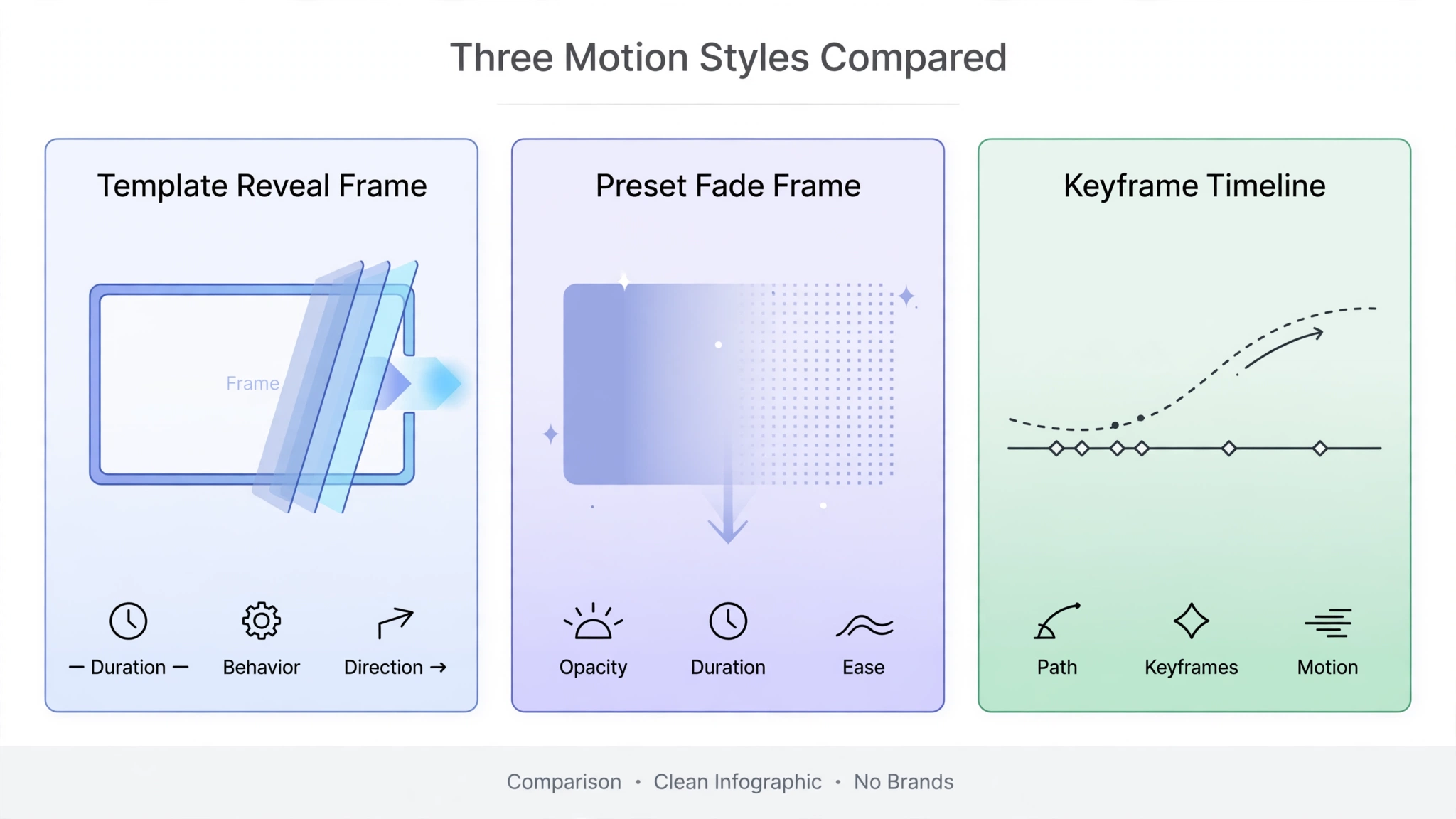
Every logo animation is built one of three ways, and the choice matters more than the choice of tool, because each way sets a ceiling on what the result can look like. The first way is a template reveal. The motion is already designed, the logo drops into a slot, and the user changes colours, text and music. Renderforest and Placeit work this way. The second way is presets on a design canvas. The logo and the text sit on a page, and the user applies a fade, a rise, a slide or a bounce to each element. Canva, Adobe Express and VistaCreate work this way. The third way is a timeline with keyframes. The user sets where each part of the logo is at the start and where it is at the end, and the software fills in the movement between. After Effects works this way, and Animaker and Kapwing sit between presets and keyframes, with a timeline that allows real timing control without the professional learning curve.
The right way depends on where the animation will live. A YouTube intro needs a reveal with sound, and a template does that in minutes. A website header needs a short loop that never distracts, and a preset fade does that cleanly. A video overlay needs a transparent background, and only the keyframe tools can deliver that, so the format question has to be answered before the tool is picked. A logo animated once, for one launch, belongs in a template tool on a monthly plan. A logo animated every week belongs in a tool with a timeline and a brand kit. The best logo animation tools are the ones that match the motion to the placement, and the sections below show which tool fits each placement.
How the Best Logo Animation Tools Were Compared
Each of the best logo animation tools was judged on five things that decide whether a logo animation is usable when it is finished. Speed is first, because a logo animation is usually needed the day before a launch, and a tool that takes a week to learn fails that test. Control is second, because a template that cannot change its timing produces the same animation every other user of that template produces. Export formats are third, because an MP4 is useless as a video overlay and a GIF is useless as a broadcast intro. Price is fourth, measured as the cost of one finished animation and as the cost of a year of animations, because the two numbers point at different tools. Watermark and commercial rights are fifth, because a watermarked logo animation cannot go on a client video.
The best logo animation tools in this guide all export without a watermark on a paid plan, and every tool here has a free plan or a free trial except Placeit, which has no free trial and asks for the first month as the test. The comparison below names the limit of each tool plainly, because a tool bought for the wrong job wastes the launch it was bought for.
The 9 Tools in Detail
1. Renderforest
Renderforest is the template maker in this list, and it is the quickest way from a logo file to a finished animation. The user picks a logo reveal template, uploads the logo, changes the colours and the text, adds music from the library, and downloads an MP4. Each template has its own length and style, and the motion belongs to the template rather than to the logo. That is the trade. The animation looks professional in minutes, but another business using the same template gets the same motion with a different logo in the slot.
Renderforest recommends a 1000 by 1000 pixel transparent PNG, with uploads capped at 30 MB on the free plan and 500 MB for subscribers. A logo with a white background baked in will show that background through the whole animation, so the transparent file matters more here than in any other tool in this guide. Exports are MP4 only, at 360p, HD720 or HD1080 depending on the plan, and the free plan adds a watermark and limits the resolution. A transparent PNG going in does not mean a transparent video coming out, so a logo animation from Renderforest cannot sit on top of other footage as an overlay.
Lite costs $15 a month, or $108 a year on annual billing. Pro costs $39 a month or $228 a year, and Business costs $59 a month or $468 a year. The free plan is enough to test a template, but the watermark makes it unusable for a real launch. For a single logo reveal needed this week, Renderforest is the fastest tool here, and its limit is the one to remember. The template decides the motion.
2. Animaker
Animaker is a browser animation studio, and it is the tool here for a business that wants a timeline without installing professional software. The editor opens in the browser with a timeline, a library of characters, props and templates, and the logo on the canvas. The user can set entrance and exit effects, move elements along the timeline, add a voiceover or a character, and export a video. It is more work than a template and more control than a preset, which is the right middle ground for a weekly video series.
Pricing has three paid tiers, checked on the vendor pricing page in November 2026. Basic costs $10 a month, Starter costs $19 a month, and Pro costs $49 a month. Basic allows 5 premium exports a month at 720p, Starter allows 10 premium exports a month at 1080p, and Pro allows 30 premium exports a month at 2K quality. The watermark is removed at Pro, and commercial rights start at Pro as well, which matters for anyone animating a logo for a client. The free plan allows 3 downloads a month in HD with a watermark. One caution is worth recording. Some roundups from the same month show different Animaker prices, with Basic at $15 a month on annual billing and Pro at $43, so the price at checkout should be confirmed before paying.
The strength of Animaker is the character builder and a template library past a thousand templates, with more than a hundred million stock assets behind them. A logo animation can open with a character, carry a voiceover and close on the logo, which is a full intro rather than a reveal. The weakness is that the tool is built for explainer videos first and logo animation second, so a user who wants only a three second reveal will find faster tools elsewhere.
3. Canva
Canva is the tool most readers already have, and its logo animation is preset based. The logo sits on a canvas, the user selects it, opens the Animate menu and picks a movement such as fade, rise, slide, bounce or pop. Text gets its own animation, and the timing can be adjusted per element. The result is a short video that can be downloaded as an MP4 or a GIF, and the whole job takes minutes.
Pro lists at $120 to $144 a year on annual billing, depending on the region, and the free plan covers a large template set with watermark-free exports, which is enough for a single animation. Pro adds premium templates, the background remover, a million-plus premium stock photos and the brand kit, which holds the exact colours and fonts of the brand so the animated logo matches the website, the slide deck and the email signature.
The limit is control. Canva has no keyframes and no timeline in the professional sense, so the logo cannot follow a custom path or split into parts that move independently. A logo with a symbol and a wordmark animates as one piece or as two elements with separate presets, and the result looks like Canva, which is fine for a small business and wrong for a brand that needs a signature motion. For a first logo animation, made by someone who already pays for Canva, this is the cheapest route here, because the subscription is already paid.
4. Adobe Express
Adobe Express is the Adobe entry in this list, and it sits close to Canva in approach with a different asset library behind it. The logo goes on a canvas, animation effects apply to text and elements, and the result exports as an MP4 or a GIF. The editor is clean, the templates are strong, and the Adobe stock library and fonts give the result a polish that shows on a social feed. For a business already inside the Adobe world, Express is the obvious place to animate a logo, because the brand kit and the fonts carry across from the rest of the work.
Premium costs $9.99 a month, and the free plan covers a solid template set with no watermark on most exports. Premium adds the full template library, premium stock photos, the brand kit and background removal, and a couple of months of Premium covers the logo animation and the social posts for about $20. Adobe Firefly pairs naturally with Express here, since Firefly generates a background for the animation on a free tier, with paid plans from $9.99 a month, and Express handles the typography and the layout on top of it.
The limit is the same as Canva. The animation is preset based, with no keyframes and no custom motion path, so a logo that needs to draw itself on stroke by stroke cannot be built here. The export is an MP4 or a GIF with a background, not a transparent overlay, so the animation works as a standalone clip and not as a layer over other footage. For a social launch, a presentation opener or a website hero clip, Express is fast and the result looks professional.
5. Adobe After Effects
After Effects is the professional tool in this list, and it is the only one here with no ceiling on what the motion can be. The logo is built from layers, each layer gets keyframes for position, scale, rotation and opacity, and the software fills in the movement between them. Expressions add physics and randomness, masks reveal a logo stroke by stroke, and 3D layers turn a flat mark into an object that rotates in space.
The single-app plan costs $22.99 a month on annual billing, or $34.49 a month on a month-to-month plan, with a 7-day trial. One pricing roundup lists $31.49 a month for the single app, which conflicts with the $22.99 figure from the vendor pages, so the price at checkout should be confirmed. Either way, After Effects costs more in a month than most tools here cost in a year, and that is the honest price of having no ceiling.
The export is the other reason to pay it. After Effects exports with an alpha channel, so the animation can be a transparent overlay that sits on top of other footage, which is the one export no template tool here offers. It also exports the standard MP4 and MOV files a video editor expects, and the Lottie format a website or an app plays as a vector animation that stays sharp at any size. The cost is time. A first animation takes days to learn, not minutes, and a business that needs one logo reveal this week should not start here.
6. Kapwing
Kapwing is a browser video editor, and its logo animation comes from a timeline rather than a template. The logo goes on the canvas, the timeline below it carries the clip, and the user trims, splits, adds text and applies effects along that timeline. It is a video editor first, which means the logo animation can sit inside a longer video, with a voiceover, captions and b-roll around it, rather than being a standalone clip. That matters for a creator who publishes video every week and wants the logo intro to be part of the edit.
Pro costs $16 per member a month on annual billing, or $24 a month on monthly billing. The free plan covers the editor with watermarked exports, so the paid plan is the real product for an animation that will sit on a public video. Pro unlocks HD watermark-free exports, the background remover, batch editing and a large template library. The team features suit a small crew sharing one workspace, with shared assets and shared brand settings.
The limit is depth. Kapwing has no keyframes in the After Effects sense, so a logo cannot follow a custom motion path or ease through a complex sequence. The animation presets are solid but generic, and a brand that needs a distinctive motion will outgrow them. The export is an MP4, which suits video and social. For a creator who edits video in the browser and needs the logo intro inside that edit, Kapwing is the most practical tool here.
7. VistaCreate
VistaCreate is the preset tool with the friendliest price in this list, and it suits a small business that needs a logo animation for social posts and nothing more. The logo goes on a canvas, animation presets apply to the logo and the text, and the result exports as an MP4 or a GIF. The template library is large, the editor is simple, and a first animation takes minutes.
Pro costs $13 a month on monthly billing or $10 a month billed annually at $120 a year, and the Starter plan is free with over 100,000 templates, a million assets and 10 GB of storage. Pro adds over 200,000 templates, 170 million premium assets, unlimited brand kits and unlimited storage, and one Pro plan covers up to ten team members. A 14-day Pro trial needs no credit card, so a business can build the whole launch kit inside the trial and pay nothing.
The limit is the same as the other preset tools. There are no keyframes, no custom motion path, and no transparent video export, so the animation is a standalone clip with a background. The template set is shared with every other VistaCreate user, so the motion will look familiar. For a social launch on a tight budget, VistaCreate is the cheapest paid route here after Renderforest Lite, and its trial makes the first animation free.
8. Placeit
Placeit is the template tool with the largest mockup library behind it, and its logo animation sits inside that library. The user picks a logo animation template, uploads the logo, changes the text and the colours, and downloads an MP4. The same subscription covers mockups of the logo on shirts, mugs, billboards and screens, which is useful for a launch week when the animation, the product photos and the social posts all have to match.
The subscription costs $14.95 a month or $89.69 a year, which works out to about $7.47 a month on annual billing, and that one price covers unlimited downloads across the whole library with commercial use rights. Single-asset purchases are also available for a business that needs one animation and nothing else. There is no free trial, so the first month is the test, and a single month is enough to generate every animation a launch needs.
The limit is the template. The motion is fixed, the timing is fixed, and the result looks like the template it came from. There is no transparent video export, so the animation is a standalone MP4 with a background, and there is no timeline for custom timing. The mockup library is the reason to pick Placeit over Renderforest, and the animation quality is the reason to pick Renderforest over Placeit when only the animation matters.
9. FlexClip
FlexClip is a browser video editor with a template library of more than 6,000 templates, and its logo animation comes from that library inside a timeline editor. The user picks a template, drops the logo in, adjusts the text and the timing on the timeline, and exports an MP4. It is more flexible than a pure template tool because the timeline allows trimming and rearranging, and simpler than a professional tool because the motion still starts from a preset.
Plus costs $19.99 a month on monthly billing, or $11.99 a month billed annually at $143.88 a year. The free plan exports at 720p with a watermark, a 12 project cap and a 10 minute maximum per video. Plus removes the watermark, unlocks 1080p exports, adds 30 GB of cloud storage and 3,600 AI credits a year, with 5 stock assets per project. Business costs $29.99 a month, or $19.99 a month billed annually, and adds 4K exports and 100 GB of storage.
The limit is export depth. FlexClip exports MP4, and the animation is a standalone clip with a background rather than a transparent overlay. The templates are shared across a large user base, so the motion will look familiar, and the timeline does not offer keyframes for custom motion paths. For a weekly social video workflow where the logo animation opens every video, FlexClip is fast, cheap on annual billing, and consistent.
The 9 Tools at a Glance
| Tool | Price | Free plan | Best for |
|---|---|---|---|
| Renderforest | $15 a month | Yes | Fastest template reveal |
| Animaker | $10 a month | Yes | Timeline animation in a browser |
| Canva | $120 to $144 a year | Yes | Animating inside a design suite |
| Adobe Express | $9.99 a month | Yes | Adobe polish on a preset |
| Adobe After Effects | $22.99 a month | Trial | No-ceiling professional motion |
| Kapwing | $16 a month | Yes | Logo intro inside a video edit |
| VistaCreate | $13 a month | Yes | Cheapest preset animation |
| Placeit | $14.95 a month | No trial | Animation plus mockups |
| FlexClip | $19.99 a month | Yes | Weekly social video workflow |
Export Formats That Decide the Buy
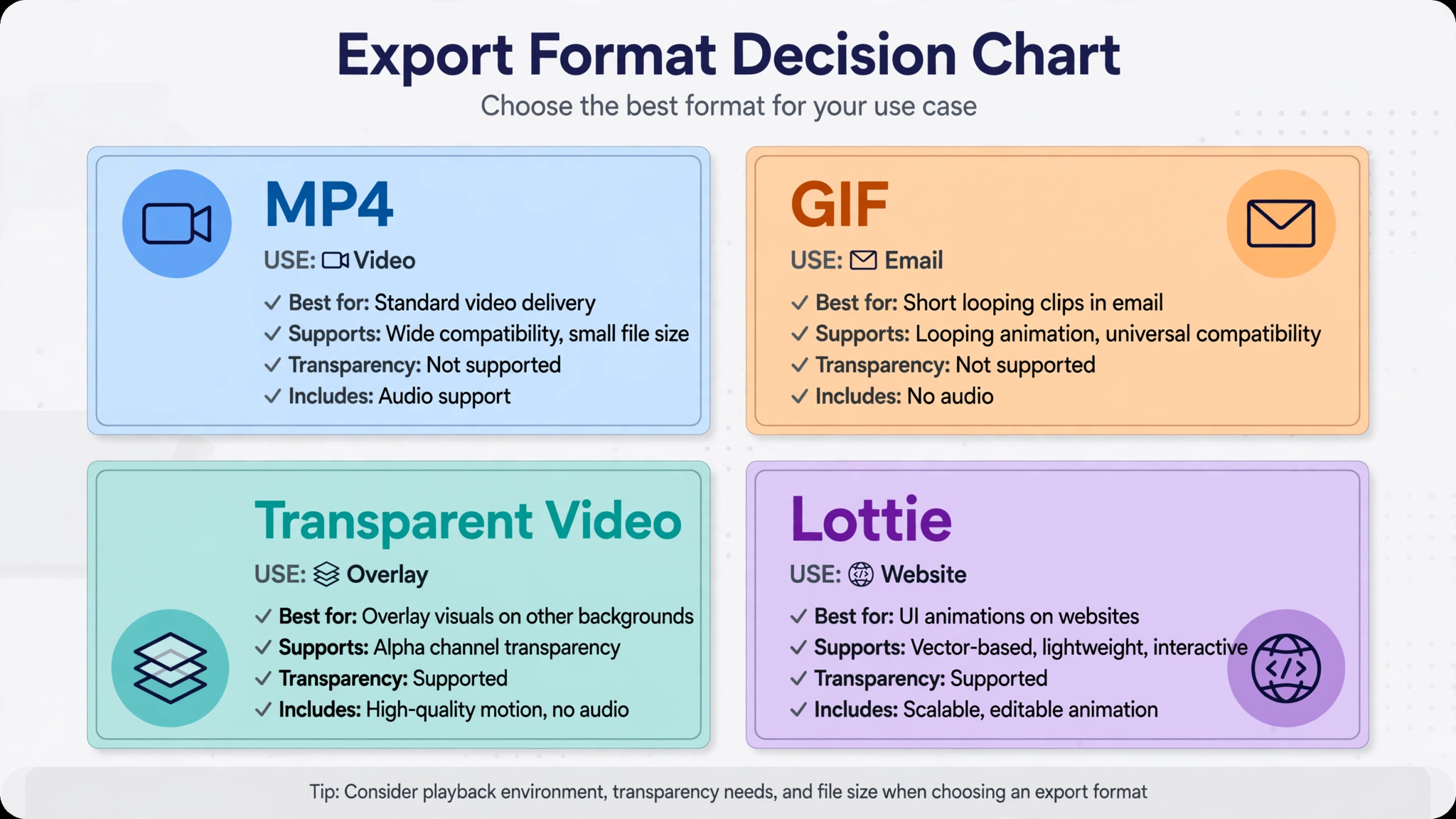
The export format is the decision most buyers get wrong, because they pick the tool first and discover the limit after the animation is finished. An MP4 is the default, and every tool here exports one. It suits a YouTube intro, a social post, a presentation opener and a website hero clip, which covers most logo animations. A GIF suits an email signature and the places that cannot play video, and Canva, Adobe Express, VistaCreate and FlexClip export one, while Renderforest and Placeit do not list a GIF export for logo animations. A transparent video suits a logo that sits on top of other footage, and only After Effects here exports one, with an alpha channel in a MOV file. A Lottie file suits a website or an app, where the animation plays as vector graphics and stays sharp at any size, and After Effects exports that too. The best logo animation tools are the ones whose export matches the placement, and that match is worth checking before the subscription is bought.
The practical rule is simple. If the animation will play on its own, an MP4 is enough and the cheapest template tool wins. If the animation will sit on top of footage, the buy is After Effects, because no other tool here exports a transparent overlay. If the animation will live on a website as a loading screen, the buy is After Effects for Lottie, or a GIF from a preset tool as the cheap fallback. If the animation will go in an email signature, a GIF from Canva or VistaCreate is the answer, and the file has to be kept small.
What One Logo Animation Costs
A single logo animation can cost nothing, fifteen dollars, or a year of subscriptions, and the right number depends on how many animations the year will hold. The best logo animation tools look different when the price is measured per animation rather than per month, so the table below lists both. The table lists the cheapest paid route for one animation from each tool, and the annual cost for a business animating a logo every month.
| Tool | One animation | A year of animations |
|---|---|---|
| Renderforest | $15 for one month of Lite | $108 a year for Lite |
| Animaker | $10 for one month of Basic | $120 a year for Basic at $10 a month |
| Canva | $0 on the free plan | $120 to $144 a year for Pro |
| Adobe Express | $9.99 for one month of Premium | $120 a year for Premium at $9.99 a month |
| Adobe After Effects | $34.49 for one month, month to month | $276 a year at $22.99 a month on annual billing |
| Kapwing | $24 for one month of Pro | $192 a year for Pro at $16 a month |
| VistaCreate | $13 for one month of Pro | $120 a year for Pro at $10 a month |
| Placeit | $14.95 for one month | $89.69 a year |
| FlexClip | $19.99 for one month of Plus | $143.88 a year for Plus at $11.99 a month |
The cheapest single animation is a free export from Canva, Adobe Express or VistaCreate, which costs nothing and takes minutes. The cheapest paid single animation is a month of Adobe Express Premium at $9.99 or a month of Animaker Basic at $10, and both remove the limits that matter for a real launch. The most expensive single animation is a month of After Effects at $34.49, which only makes sense when the animation needs an alpha channel or a custom motion no template can produce. A business animating a logo every week should compare the annual column, where Placeit at $89.69 a year is the cheapest paid plan in this guide and After Effects at about $276 a year is the most expensive. The best logo animation tools are not the cheapest ones. They are the ones whose price is small against the videos the animation has to open, and for most businesses that means a template tool on a monthly plan for one launch, or an annual plan for a weekly series.
Best Pick by Job
| Job | Pick | Why |
|---|---|---|
| Fastest logo reveal this week | Renderforest | Template reveal in minutes, MP4 at 1080p |
| Weekly animated videos | Animaker | Timeline, characters and 2K exports at Pro |
| Animating inside a design suite | Canva | Presets, brand kit and Magic Resize in one place |
| Adobe polish on a preset | Adobe Express | Firefly backgrounds and clean templates |
| Signature motion, no ceiling | Adobe After Effects | Keyframes, alpha channel and Lottie export |
| Logo intro inside a video edit | Kapwing | Timeline editor with the video around it |
| Cheapest preset animation | VistaCreate | $13 a month, free trial, team sharing |
| Animation plus mockups | Placeit | $89.69 a year with unlimited downloads |
| Weekly social video workflow | FlexClip | Timeline templates at $11.99 a month annual |
Frequently Asked Questions
How long should a logo animation be?
Three to six seconds is the working range for most placements. A YouTube intro can run five seconds, a social post works at three, and a website loading animation should stay under four so visitors are not kept waiting. A timeline tool lets the length be set exactly. An animation longer than ten seconds stops being an introduction and starts being a video of its own.
What file format should I export for a website?
An MP4 suits a hero clip or a video header, and a GIF suits a small looping mark in a place that cannot play video. A Lottie file is the best choice for a loading screen or an animated header, because it plays as vector graphics, stays sharp at any size and stays small. Only After Effects in this guide exports Lottie.
Can I animate a logo for free?
Yes, and the free plans of Canva, Adobe Express, VistaCreate, Renderforest, Animaker, Kapwing and FlexClip all export a logo animation without payment. The catch is the watermark on most of them, and the resolution limit on the free tier. Canva and Adobe Express export without a watermark on their free plans, which makes them the best free route for a one-off animation.
Do I need a transparent background?
Only when the animation will sit on top of other footage, such as a logo bug over a video or an intro over b-roll. A standalone intro, a social post or a presentation opener does not need one, and an MP4 with a background is the right file for those. When transparency is needed, only After Effects in this guide exports it, with an alpha channel in a MOV file.
What size should my logo file be before animating?
A 1000 by 1000 pixel transparent PNG is the spec Renderforest recommends, and it is a good starting point for every tool here, because a square transparent file scales cleanly into any template. A logo with a white background baked in will show that background through the animation, so the file should be exported with transparency before it is uploaded. A low resolution logo will look soft at 1080p.