

A banner is the smallest canvas in advertising, and the hardest to get right. A leaderboard banner is 728 by 90 pixels, which is less height than a line of text, and it still has to carry a headline, a product and a button. A shop banner is wide and short, a social banner is wide and thinner, and a display ad comes in a dozen sizes that all have to match. The best banner makers are the tools that handle that sprawl without making the designer rebuild the same banner ten times, with a resize tool that keeps the text legible and the brand kit that keeps every size consistent. The tools in this guide cover that job from every angle, from a free template that finishes a banner in ten minutes to an ad automation platform that turns one design into a full campaign.
Ten tools made the list, and they split into three kinds. Design tools give a canvas and a template library, and the banner is built by hand. Photo editors build the banner around a product photograph, with the background remover doing the heavy work. Ad platforms automate the sprawl, resizing one design into every standard ad size and publishing it to the ad networks. The prices below were checked against vendor pages and November 2026 pricing roundups, and where sources disagreed the draft says so rather than picking the friendlier number.
In this article
Banner Sizes That Break Most Designs
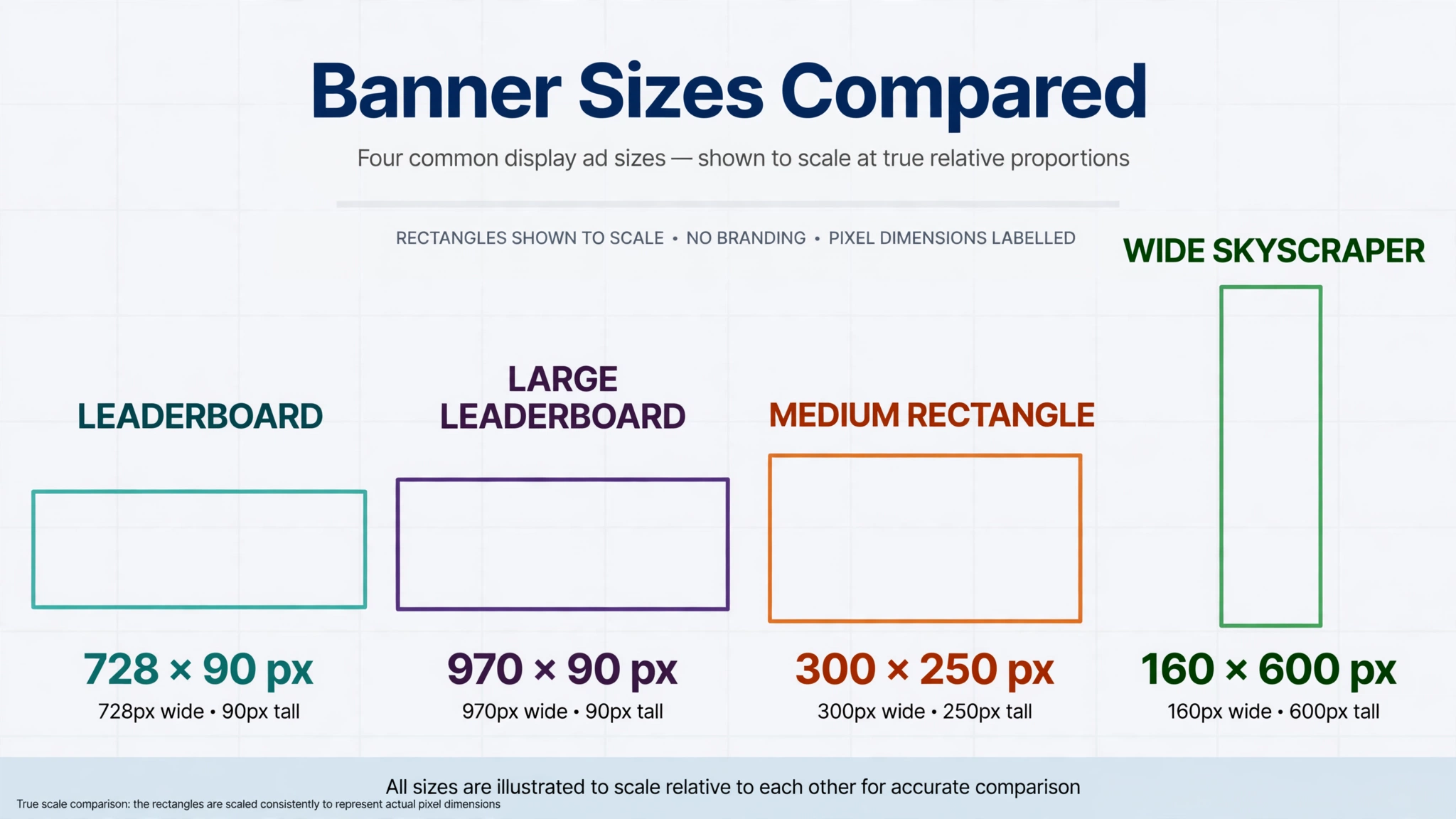
The size list is the first thing a banner maker has to get right, because a banner built at the wrong size is rejected by the ad network or cropped by the platform. Display ads run on standard sizes, and the four that matter most are the leaderboard at 728 by 90 pixels, the medium rectangle at 300 by 250, the wide skyscraper at 160 by 600 and the large leaderboard at 970 by 250. A campaign that runs on Google Display or Meta needs all four, plus the square at 250 by 250 and the half page at 300 by 600, and each size needs its own layout, because a headline that fits the leaderboard will not fit the skyscraper.
Social and shop banners add their own sizes. A LinkedIn profile banner is 1584 by 396 pixels, and a company page banner is 1512 by 256. An Etsy big banner is 3360 by 840 and the mini banner is 1200 by 300. A website hero banner is usually 1920 by 600 or wider, and a YouTube channel banner is 2560 by 1440 with the safe area in the middle. The resize tool is what separates the good banner makers from the rest, because it turns one design into all of these sizes without rebuilding it, and it keeps the headline inside the safe zone on every one. The best banner makers are the ones whose resize tool keeps the headline inside the safe zone on every size. A tool that makes the designer guess the size is the wrong tool for this job.
How the Best Banner Makers Were Compared
Each of the best banner makers was judged on five things that decide whether a banner is usable when it is finished. Resize is first, because a banner maker that cannot turn one design into every size forces the designer to rebuild the same banner ten times, which is the whole job the tool is supposed to do. Template quality is second, because a banner that starts from a strong layout finishes stronger than one that starts from a blank canvas, and the ad templates have to respect the size they were built for. Text control is third, because a headline has to sit exactly where the size allows it, at a size that survives a 728 by 90 strip, and the button has to be legible at a glance. Export is fourth, because the banner has to leave as a JPG, PNG, GIF or HTML5 file at the exact size the network asks for, and a tool that exports at the wrong size fails the upload. Price is fifth, measured as the cost of one finished banner and as the cost of a year of campaigns, because a single banner needs a different tool from a weekly ad set. The best banner makers are the ones that score well on resize first, because that is the job that decides the campaign.
The best banner makers in this guide all export without a watermark on a paid plan, and every tool here has a free plan or a free trial except Placeit, which has no free trial and asks for the first month as the test. The comparison below names the limit of each tool plainly, because a tool bought for the wrong job wastes more than its subscription. It wastes the campaign it was bought for.
The 10 Tools in Detail
1. Canva
Canva is the tool most marketers already have, and its banner templates are the strongest starting point in this guide. The template library is organised by size and by use, with layouts for display ads, social banners, shop banners and website heroes that already place the headline and the button where the size allows them. The user picks a layout, swaps the photograph, changes the text and exports a JPG or PNG. The whole job takes under an hour, and the result looks like a banner rather than a poster squeezed into a strip.
Pro lists at $120 to $144 a year on annual billing, depending on the region, and the free plan covers a large template set with watermark-free exports, which is enough for a single banner. Pro adds premium templates, the background remover, a million-plus premium stock photos and the brand kit, which matters because the brand kit holds the exact colours and fonts of the brand so the banner, the social posts and the website all match. Magic Resize turns one banner into every size without rebuilding it, which is the feature that matters most here, because a campaign needs the leaderboard, the rectangle and the skyscraper from one design.
The limit is formats. Canva exports JPG, PNG, GIF and MP4, but it does not export HTML5, so a campaign that needs animated HTML5 ads has to be built elsewhere. The templates are shared with millions of users, so a banner built from one will look familiar. For a social or shop banner, made by a marketer who already pays for Canva, this is the cheapest route here, because the subscription is already paid.
2. Adobe Express
Adobe Express is the Adobe entry in this list, and it suits a marketer who wants a polished banner with Adobe fonts and stock behind it. The banner starts from a template, the photograph drops in, the text is set in an Adobe font, and the result exports as a JPG, PNG or GIF. The editor is clean, the templates are strong, and the Adobe stock library gives the banner a finish that shows on a large screen. For a marketer already inside the Adobe world, Express is the obvious place to build a banner, because the brand kit and the fonts carry across from the rest of the work.
Premium costs $9.99 a month, and the free plan covers a solid template set with no watermark on most exports. Premium adds the full template library, premium stock photos, the brand kit and background removal, and the one-click Resize turns a banner into every size without rebuilding it. A couple of months of Premium covers the banner set, the social posts and a set of website graphics for about $20. Adobe Firefly pairs naturally with Express here, since Firefly generates banner backgrounds on a free tier, with paid plans from $9.99 a month, and Express handles the typography and the layout on top of it.
The limit is the same as Canva. There is no HTML5 export, so an animated display campaign has to be built elsewhere, and the templates are shared with every other Express user. For a social or shop banner, made quickly for a campaign week, Express is fast and the result looks professional.
3. Snappa
Snappa is the fastest tool here for a marketer who knows what they want and wants it finished in minutes. The editor opens on a preset canvas size, offers a template, a stock photo library and text, and gets out of the way. A marketer picks the banner size, chooses a template, swaps the headline and the photograph, and exports. The whole job takes less time than writing the ad copy, and the preset sizes mean the file fits first time.
Pro costs $15 a month on monthly billing or $10 a month billed yearly at $120 a year, with unlimited downloads, the background remover, custom fonts and social media integrations. The free plan covers a small number of downloads a month with every template and stock photo included, which is enough to finish a single banner. Team costs $30 a month for five users, which suits a small team sharing the design work across several campaigns.
The limit is resize. Snappa has no Magic Resize, so each banner size has to be built separately, which is the whole job a campaign tool is supposed to do. The template set is smaller than Canva. For a single banner needed today, Snappa is the quickest route here. For a full ad set in every size, the resize tools do more.
4. VistaCreate
VistaCreate is the preset tool with the friendliest price in this list, and it suits a small business that needs a banner for social posts and nothing more. The banner goes on a canvas, templates apply, the text is set, and the result exports as a JPG, PNG or GIF. The template library is large, the editor is simple, and a first banner takes minutes. The tool does one job well, which is turning an idea into a banner without a learning curve.
Pro costs $13 a month on monthly billing or $10 a month billed annually at $120 a year, and the Starter plan is free with over 100,000 templates, a million assets, the background remover and 10 GB of storage. Pro adds over 200,000 templates, 170 million premium assets, unlimited brand kits and unlimited storage, and one Pro plan covers up to ten team members, which means a small team can share one subscription and keep their banners consistent. A 14-day Pro trial needs no credit card, so a business can build the whole campaign kit inside the trial and pay nothing.
The limit is the same as the other preset tools. There is no HTML5 export and no true resize, so each size is a separate build, and the templates are shared with every other VistaCreate user. For a social banner on a tight budget, VistaCreate is the cheapest paid route here after Fotor, and its trial makes the first banner free.
5. Fotor
Fotor is the photo editor in this list, and it suits a banner built around a product photograph. The editor opens with the photo, the background remover takes the product out in one click, the colour tools grade the image, and the headline goes on top in a typeface chosen from a large library. A banner that starts from a strong product shot finishes stronger here than in a template tool, because the photograph is the whole banner and Fotor treats it that way.
Pro costs $8.99 a month on monthly billing or $39.99 a year, which works out to about $3.33 a month, and Pro Plus costs $19.99 a month or $89.99 a year. The free plan covers basic editing with watermarked exports and limited resolution, so the paid plan is the real product for a banner that will sit on a public campaign. Pro unlocks HD watermark-free exports, the background remover, batch editing and more than 100,000 templates, and the AI credits that come with the plan cover image generation for backgrounds. At $39.99 a year, Pro is the cheapest paid plan in this guide.
The limit is resize. Fotor has no Magic Resize and no HTML5 export, so a full ad set has to be built size by size. The templates are fewer and plainer than Canva. For a photo-led banner, made by a marketer with a good product shot, Fotor is the best tool here. For a full campaign in every size, the ad platforms do more.
6. PicMonkey
PicMonkey is the photo editor with the strongest text tools in this list, and it suits a banner where the headline carries the design. The editor opens with the photograph, the touch-up and colour tools shape it, and the headline goes on in a large font library with effects, curves and spacing controls that the template tools do not offer. A banner with a big headline over a product photograph is built faster here than anywhere else.
Basic costs $7.99 a month or $72 a year, and Pro costs $12.99 a month or $120 a year. Basic covers full photo editing, effects, templates and 1 GB of storage, but no background remover, Smart Resize or brand kit. Pro adds unlimited storage, Smart Resize, the background remover, one brand kit, animation, the premium stock library and PDF export, and a 7-day trial is available. For a banner, Pro is the plan that matters, because Smart Resize turns one banner into every promo size and the brand kit keeps a campaign consistent.
The limit is formats. There is no HTML5 export, so an animated display campaign has to be built elsewhere, and the template set is smaller than Canva. For a headline-led banner over a strong photograph, PicMonkey is the best tool here. For a full ad set, the ad platforms do more.
7. Visme
Visme is the tool here for a banner that has to carry information as well as a headline, such as a webinar banner, an event banner or a data-led ad. The editor is built around document design, so a banner with a date, a speaker list or a statistic is laid out cleanly, with alignment and spacing tools that the template tools do not offer. A banner that is really a small poster fits Visme better than a product ad does.
Starter costs $12.25 a month per person on annual billing, which is $147 a year, or $29 a month on monthly billing. The free Basic plan covers standard templates with 500 MB of storage but no downloads, which makes it a preview rather than a working plan for a marketer. Starter unlocks JPG, PNG and PDF downloads, the full template and asset library, a brand kit and 200 AI credits a month. The monthly billing price is more than double the annual rate, so a single month of Starter for one banner is an expensive way to buy a banner.
The limit is ad formats. There is no HTML5 export and no ad network publishing, so a display campaign has to be exported and uploaded by hand. The templates are built for business and education, not for ads. For an event or webinar banner, Visme is the cleanest tool here. For a display ad set, the ad platforms do more.
8. Design.com
Design.com fits a business that has no brand yet and wants the banner, the logo and the website header to come from one set of colours in a single sitting. A business can shape a simple mark first, then let the banner, the social profiles and the website follow it, without hiring a designer or learning a design app. When the banner and the website agree, a visitor who clicks through from an ad sees one brand rather than a collection of mismatched files, and that coherence helps a new business look established.
Starting costs nothing, and the paid options add a custom domain and premium features, so the business should confirm the checkout figure before paying, since the plans shift. The trade-off is depth. The banner templates are clean and the editor is quick, but the range is narrower than Canva or VistaCreate, and there is no resize tool and no HTML5 export. Take Design.com as a quick, coherent beginning for a new business building a brand from scratch, not as the tool a working marketer uses for every campaign. For a first banner where the business wants one visual identity across the banner, the website and the social profiles, it does that job in an afternoon.
9. Creatopy
Creatopy is the ad platform in this list, and it is the only tool here built for campaigns rather than single banners. One design is turned into every standard ad size at once, the text is edited across all sizes together, and the finished set exports as JPG, PNG, GIF, HTML5 or MP4. A product feed can drive the banners, so a hundred products each get their own banner with the right price and image, and the set can be published directly to Meta, Google Ads and more than twenty other ad networks. That is a different job from making one banner, and it is the job a performance marketer actually has.
Creatopy rebranded to The Brief in October 2025, and creatopy.com now redirects to thebrief.ai, with existing projects and logins carrying over. Pro costs $29 a month billed yearly, which is $348 a year, and covers one seat, the Ad Studio, more than 5,000 templates, AI for normal use, five brand kits and 250 GB of storage. Ultra costs $79 a month billed yearly, and Team costs $49 per seat a month. Paid plans have a 7-day free trial with no card required. One pricing roundup still lists Pro at $39 a month, which was the price before a change on 2 November 2026, so the $29 figure is the current one and the price at checkout should still be confirmed.
The limit is price and scope. At $29 a month, Pro costs more than most tools here cost in a year, and a business that needs one banner a month will not use the automation enough to justify it. The editor is built for ads, so a shop banner or a social banner is a side job rather than the main one. For a campaign that needs a full ad set in every size, published to the networks, Creatopy is the best tool here by a wide margin. For a single banner, the cheaper tools do the same job for less.
10. Placeit
Placeit is the template tool with the largest mockup library behind it, and its banner sits inside that library. The user picks a banner template, uploads the photograph or the artwork, changes the text and downloads a JPG or PNG. The same subscription covers mockups of the banner on a laptop screen, a phone, a billboard and a storefront, which is useful for a campaign week when the banner, the product photos and the social posts all have to match. A banner from Placeit rarely stands alone. It is part of a set of campaign assets made in one place.
The subscription costs $14.95 a month or $89.69 a year, which works out to about $7.47 a month on annual billing, and that one price covers unlimited downloads across the whole library with commercial use rights. Single-asset purchases are also available for a business that needs one banner and nothing else. There is no free trial, so the first month is the test, and a single month is enough to generate every asset a campaign needs. That makes Placeit one of the cheapest single-banner buys in this guide, at under $15 for a month that covers the whole campaign kit.
The limit is the template. The layout is fixed, the text positions are fixed, and the result looks like the template it came from. There is no resize tool and no HTML5 export, so a full ad set has to be built size by size. For a campaign that needs the banner plus the mockups plus the social images, Placeit is the best value in this guide.
The 10 Tools at a Glance
| Tool | Price | Free plan | Best for |
|---|---|---|---|
| Canva | $120 to $144 a year | Yes | Resize across sizes |
| Adobe Express | $9.99 a month | Yes | Adobe polish |
| Snappa | $15 a month | Yes | Fastest single banner |
| VistaCreate | $13 a month | Yes | Cheapest preset banner |
| Fotor | $8.99 a month | Yes, limited | Photo-led banners |
| PicMonkey | $12.99 a month | Yes | Headline-led banners |
| Visme | $12.25 a month | Yes | Event and data banners |
| Design.com | Free to start | Yes | New business brand |
| Creatopy | $29 a month | Trial | Full ad sets, HTML5 |
| Placeit | $14.95 a month | No trial | Banner plus mockups |
Static, Animated or HTML5
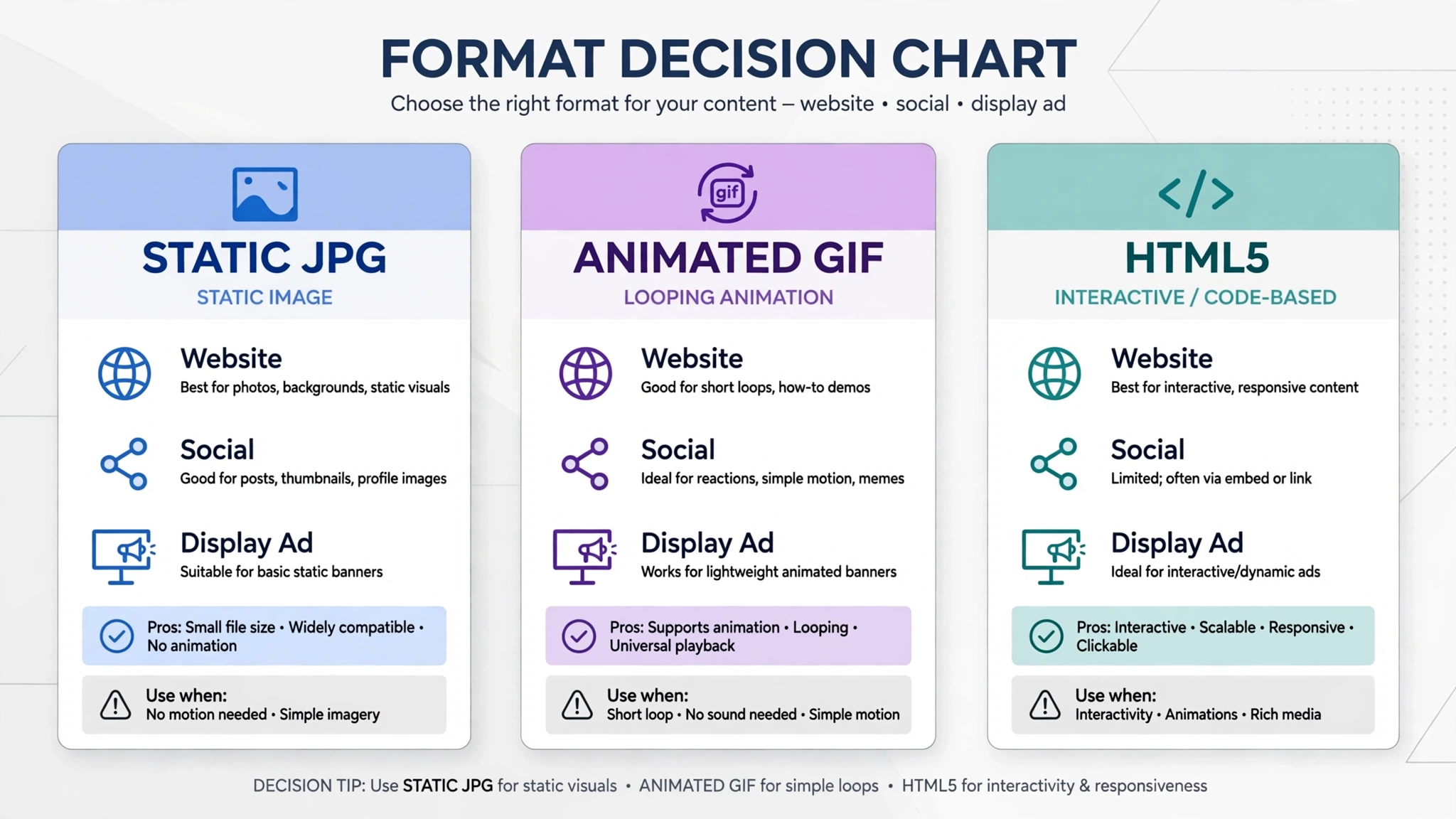
The format is the decision most buyers get wrong, because they pick the tool first and discover the format limit after the banner is finished. A static JPG or PNG suits a shop banner, a social banner and a website hero, which covers most banners, and every tool here exports one. An animated GIF suits a banner that has to move on a platform that cannot play video, and Canva, Adobe Express, VistaCreate and Creatopy export one, while Snappa, Fotor, PicMonkey and Placeit do not list a GIF export for banners. An MP4 suits a video banner or a social story, and Canva, Adobe Express and Creatopy export one. An HTML5 banner suits a display campaign on Google Display or Meta, because it animates, tracks clicks and stays small, and only Creatopy in this list exports one.
The practical rule is simple. If the banner will sit on a website or a shop, a JPG or PNG is enough and the cheapest template tool wins. If the banner will run as a display ad, the buy is Creatopy, because no other tool here exports HTML5 or publishes to the ad networks. If the banner will move on social, a GIF from Canva or VistaCreate is the answer, and the file has to be kept small, because a heavy GIF loads slowly and looks unprofessional. The best banner makers are the ones whose export matches the placement, and the placement should be decided before the subscription is bought.
Best Pick by Job
| Job | Pick | Why |
|---|---|---|
| Resize across sizes | Canva | Magic Resize, brand kit |
| Adobe polish | Adobe Express | Fonts, stock and Firefly art |
| Fastest single banner | Snappa | Preset sizes, minutes to export |
| Cheapest preset banner | VistaCreate | $13 a month, free trial |
| Photo-led banner | Fotor | Background remover, $39.99 a year |
| Headline-led banner | PicMonkey | Best text controls, Smart Resize |
| Event and data banner | Visme | Clean layout for information |
| New business brand | Design.com | Banner, logo and website in one place |
| Full ad set, HTML5 | Creatopy | Every size at once, ad publishing |
| Banner plus mockups | Placeit | $89.69 a year, unlimited downloads |
Frequently Asked Questions
What size should a banner be?
It depends on the placement. A leaderboard display ad is 728 by 90 pixels, a medium rectangle is 300 by 250, a wide skyscraper is 160 by 600 and a large leaderboard is 970 by 250. A LinkedIn profile banner is 1584 by 396, an Etsy big banner is 3360 by 840, and a website hero is usually 1920 by 600 or wider. Build the design once and resize it for each placement, rather than building each size from scratch.
Can I use Canva for a banner?
Yes, and it is the most popular route for small businesses. Pick a template at the right size, swap the photograph, set the headline and the button, and export a JPG or PNG. The free plan exports without a watermark, which is enough for a single banner. Pro adds Magic Resize, which turns one banner into every size, and the brand kit, which keeps a campaign consistent.
How much does a banner cost?
The best banner makers all offer a free plan, and a banner costs nothing on the free plan of Canva, Adobe Express or VistaCreate. A paid subscription costs $40 to $150 a year depending on the tool, and one month of a monthly plan costs $9 to $16 for a single banner. A custom banner from a professional designer costs $50 to $300 or more. A full ad set from Creatopy costs $29 a month billed yearly, which only makes sense for a business running campaigns every week.
What is an HTML5 banner?
An HTML5 banner is an animated ad built as a small web page, with text, images and animation that play inside the ad slot on Google Display, Meta and other networks. It animates, tracks clicks and stays small, which is why display campaigns use it instead of a GIF. Only Creatopy in this guide exports HTML5, so a display campaign that needs it should budget for the ad platform rather than a design tool.
Why does my banner look blurry?
The usual reasons are a source photograph smaller than the export size, a JPG saved at low quality, or a banner built at one size and stretched to another. Build from a photograph at least as large as the export, export a PNG for text-led banners and a high-quality JPG for photo-led ones, and resize with the tool’s resize feature rather than stretching the file. A banner exported at the exact size the placement asks for stays sharp.