


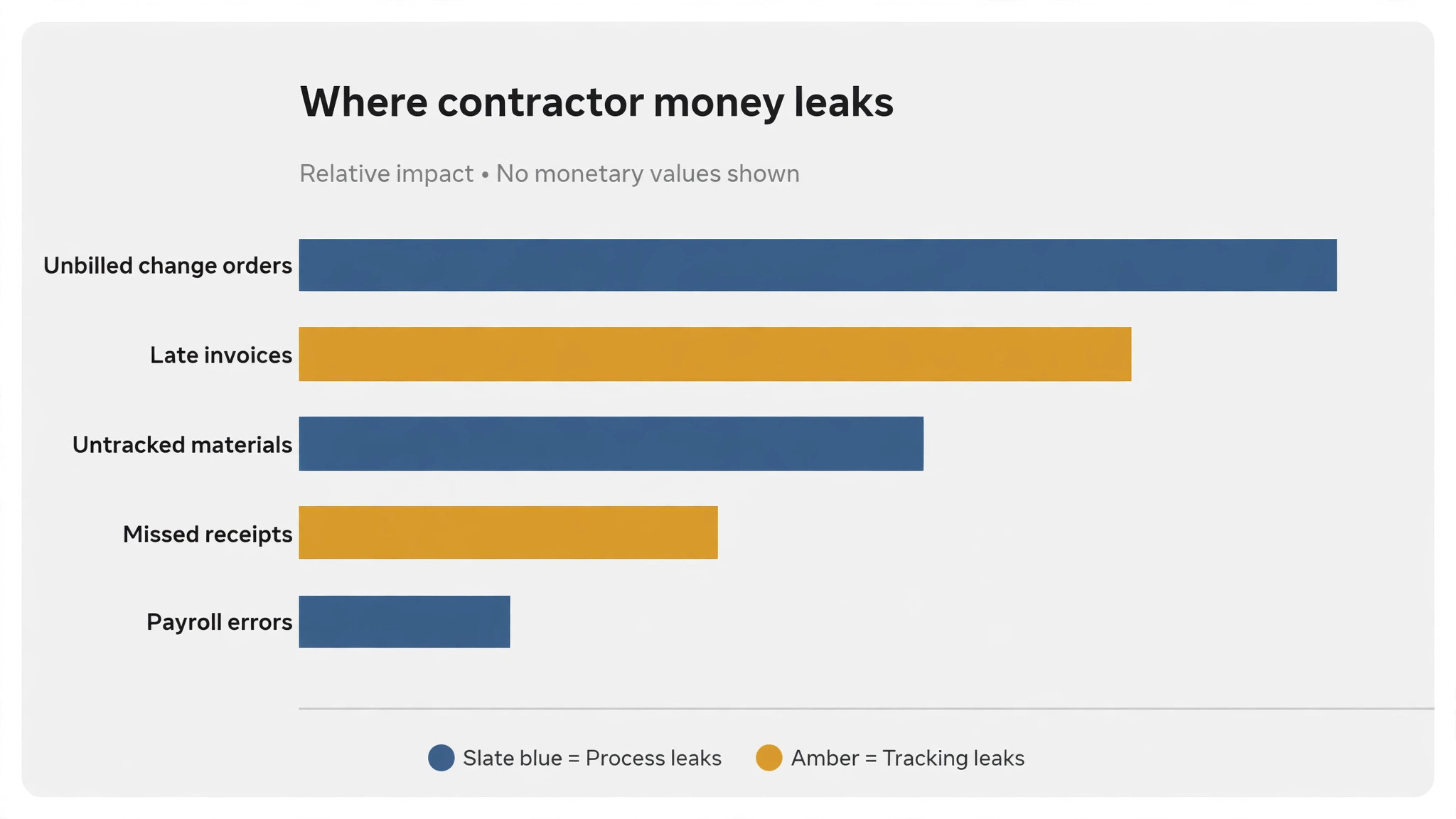
A contractor can work six days a week, finish every job, and still run out of money. The reason is almost always the same, which is that the books show revenue while the jobs lose money. A change order never billed, materials bought twice, a crew paid for hours nobody tracked, and an invoice sent three weeks late. The best accounting software for contractors exists to catch those leaks, because a contractor who does not know the margin on each job is guessing with the whole business.
The problem is not a lack of work. It is a lack of job-level truth. A general ledger can look healthy while one bad job eats the profit of three good ones, and the contractor only finds out at tax time. Accounting software that tracks profit per project turns that guess into a number, and the number decides which jobs to take next.
This guide compares the best accounting software for contractors on price, fit and day-to-day use, and it ends with a clear pick for each job.
In this article
- Why a Contractor Can Be Busy and Still Go Broke
- How We Judged the Best Accounting Software for Contractors
- The 10 Tools at a Glance
- Best Pick by Job
- The 10 Tools in Detail
- Set Up Contractor Books in Four Weeks
- What Contractor Accounting Really Costs Each Month
- Five Mistakes That Leak a Contractor’s Money
- Frequently Asked Questions
- Our Pick, Stated Plainly (QuickBooks Online)
Why a Contractor Can Be Busy and Still Go Broke
Before comparing prices, run through this checklist for best accounting software for contractors, which covers the six things that decide whether the tool earns its keep.
- Project profitability per job, because a contractor needs the margin on each job, not just the monthly total.
- Change order billing, so extra work is invoiced rather than absorbed.
- Invoice speed, because an invoice sent late is money lent to the client for free.
- Integration with the field service tool, because double entry of jobs wastes hours and creates errors.
- Receipt capture from the job site, because a receipt lost in a truck is a deduction lost.
- Payroll or 1099 handling, because a contractor with a crew needs it in the same system.
How We Judged the Best Accounting Software for Contractors
We judged each tool on the contractor’s question, which is whether each job made money. A tool scored well when it tracked profit per project, when it billed change orders cleanly, and when it synced with the field service tools contractors actually use. A tool lost points when it was a fine general ledger but could not say whether a job won or lost money, because that is the number that decides the next bid.
Judged as a shortlist led by QuickBooks Online, the scores below reflect the tools as they stand in 2026, with starting prices taken from the vendor sites and from roundups published this year.
- Job costing depth, because the margin per job is the number that matters.
- Change order handling, so extra work is billed rather than given away.
- Field service integration, because jobs should flow into the books without retyping.
- Invoicing speed, so the client pays quickly and the contractor stays liquid.
- Price against firm size, so a solo contractor is not paying for an enterprise system.
The 10 Tools at a Glance
Here is how the best accounting software for contractors compare on price, fit and standout strength, so the shortlist is visible in one place.
| Tool | Starting price | Best for | Standout strength |
|---|---|---|---|
| QuickBooks Online | From $38 a month | contractors who want the default books every accountant knows | QuickBooks Online is the default accounting platform for contractors, because every major field service tool syncs with it. Simple Start costs 38 dollars a month, Essentials 85 dollars, Plus 140 dollars with project profitability, and Advanced 340 dollars. |
| Xero | From $27 a month | contractors with bigger office teams who want unlimited users | Xero offers clean double-entry accounting with unlimited users on every plan, from Early at 27 dollars a month to Growing at 59 dollars and Established at 97 dollars. It suits a contractor with several office staff who all need access. |
| FreshBooks | From $23 a month | solo contractors who mainly need clean invoicing | FreshBooks is built around invoicing and time tracking, with Lite at 23 dollars a month for five billable clients, Plus at 43 dollars for 50 clients, and Premium at 70 dollars for unlimited clients. It suits a solo contractor who bills by the hour or by the project. |
| Wave | Free for bookkeeping | new contractors who need real books at zero cost | Wave offers invoicing, expense tracking, receipt scanning and financial reporting for free, with payroll as an add-on at 40 dollars plus 6 dollars per employee a month. Its Pro plan costs 19 dollars a month for added features. |
| Zoho Books | From $20 a month | contractors already using Zoho products | Zoho Books covers invoicing, expenses, banking and reporting from 20 dollars a month, and it connects to Zoho CRM and the wider Zoho suite. It suits a contractor who already runs the business on Zoho. |
| Sage | Pricing on the vendor site | contractors who want a long-established accounting brand | Sage is a long-running accounting platform with invoicing, expenses, banking and reporting, and its pricing is shown on the vendor site. It suits contractors who want a traditional accounting product with strong support. |
| HoneyBook | From $19 a month | contractors who sell projects and need contracts plus payments | HoneyBook combines proposals, contracts, invoicing and payments in one workflow from 19 dollars a month, and it suits contractors who win work with a proposal before the job starts. It is built for service businesses that sell a project, not just hours. |
| Jobber | Pricing on the vendor site | contractors who want quoting, scheduling and invoicing in one place | Jobber covers quoting, scheduling, invoicing and payments for home service contractors, and it syncs with QuickBooks Online for the books. Its pricing is shown on the vendor site. |
| Buildertrend | From $339 a month | builders who manage whole projects, not just books | Buildertrend is project management software for builders, with scheduling, budgeting, client communication and financial tracking from about 339 dollars a month. It suits a builder running several projects at once rather than a solo contractor. |
| Knowify | From $99 a month | contractors who need job costing built into the books | Knowify combines accounting with job costing, budgeting and contract management from 99 dollars a month, and it is built for contractors who need to know the true cost of each job. It syncs with QuickBooks Online. |
Best Pick by Job
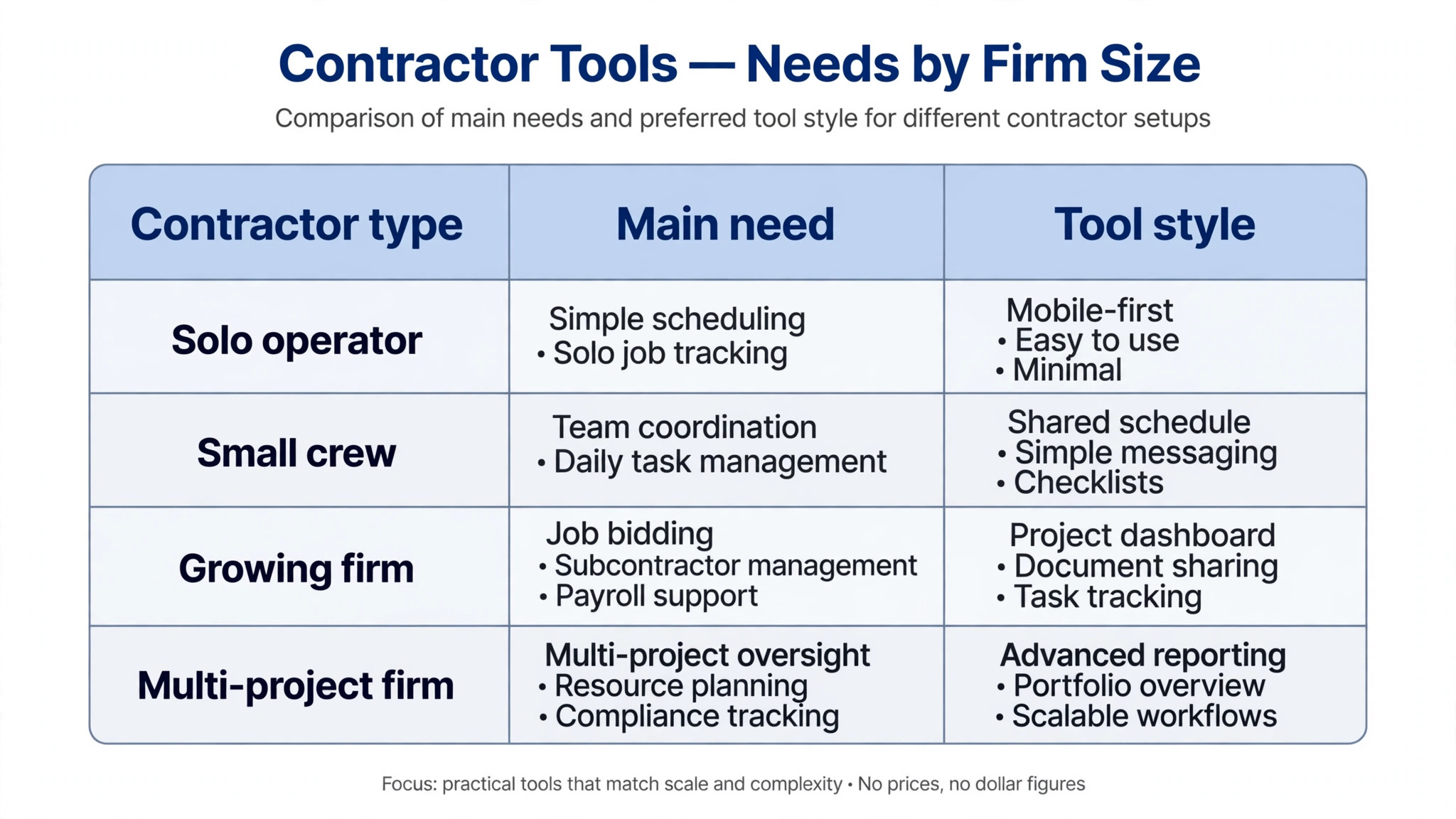
Our pick among the best accounting software for contractors is QuickBooks Online, and the table below matches the right tool to the job at hand, because the best tool depends on what the reader is actually doing.
Use the table above as a shortlist for best accounting software for contractors, not a final answer, and run the top two trials in the same week before paying for a year.
| Job | Best pick | Why |
|---|---|---|
| Solo contractor, invoicing only | FreshBooks | Clean invoicing from $23 a month |
| New contractor, zero budget | Wave | Real bookkeeping for free |
| Contractor with a large office team | Xero | Unlimited users from $27 a month |
| Contractor who needs job costing | Knowify | Job costing built in from $99 a month |
| Best overall for most contractors | QuickBooks Online | Project profitability with the deepest integrations |
The 10 Tools in Detail
The best accounting software for contractors below are listed with the price, the fit and the reason to skip each one, so the decision is visible tool by tool.
1. QuickBooks Online
QuickBooks Online is built for contractors who want the default books every accountant knows. It starts from $38 a month.
QuickBooks Online is the default accounting platform for contractors, because every major field service tool syncs with it. Simple Start costs 38 dollars a month, Essentials 85 dollars, Plus 140 dollars with project profitability, and Advanced 340 dollars.
Its project profitability tracking shows whether a job made money after materials and labour, which is the number a contractor needs most.
Skip it when the budget is tight, because the price has risen every year and Plus is the plan most contractors actually need.
In the trial, check QuickBooks Online against the checklist above, and confirm the $38 a month plan covers the job before paying.
2. Xero
Xero is built for contractors with bigger office teams who want unlimited users. It starts from $27 a month.
Xero offers clean double-entry accounting with unlimited users on every plan, from Early at 27 dollars a month to Growing at 59 dollars and Established at 97 dollars. It suits a contractor with several office staff who all need access.
Its interface is cleaner than QuickBooks, and its multi-currency handling suits contractors who buy materials across borders.
Skip it when the field service tool must sync deeply, because Xero has fewer contractor integrations than QuickBooks.
In the trial, check Xero against the checklist above, and confirm the $27 a month plan covers the job before paying.
3. FreshBooks
FreshBooks is built for solo contractors who mainly need clean invoicing. It starts from $23 a month.
FreshBooks is built around invoicing and time tracking, with Lite at 23 dollars a month for five billable clients, Plus at 43 dollars for 50 clients, and Premium at 70 dollars for unlimited clients. It suits a solo contractor who bills by the hour or by the project.
Its invoices look professional and get paid faster than a spreadsheet, which is the daily win for a one-person firm.
Skip it when the firm has a team, because FreshBooks is light on multi-user access and job costing.
In the trial, check FreshBooks against the checklist above, and confirm the $23 a month plan covers the job before paying.
4. Wave
Wave is built for new contractors who need real books at zero cost. It is free for bookkeeping.
Wave offers invoicing, expense tracking, receipt scanning and financial reporting for free, with payroll as an add-on at 40 dollars plus 6 dollars per employee a month. Its Pro plan costs 19 dollars a month for added features.
Its free tier is genuinely usable, which makes it the best starting point for a contractor who is just getting established.
Skip it when the firm needs project profitability or deep job costing, because Wave is a bookkeeping tool rather than a contractor system.
In the trial, check Wave against the checklist above, and confirm the free plan plan covers the job before paying.
5. Zoho Books
Zoho Books is built for contractors already using Zoho products. It starts from $20 a month.
Zoho Books covers invoicing, expenses, banking and reporting from 20 dollars a month, and it connects to Zoho CRM and the wider Zoho suite. It suits a contractor who already runs the business on Zoho.
Its automation handles recurring invoices and payment reminders without staff attention.
Skip it when the accountant insists on QuickBooks, because Zoho Books is less familiar to US accountants.
In the trial, check Zoho Books against the checklist above, and confirm the $20 a month plan covers the job before paying.
6. Sage
Sage is built for contractors who want a long-established accounting brand. Pricing is on the vendor site.
Sage is a long-running accounting platform with invoicing, expenses, banking and reporting, and its pricing is shown on the vendor site. It suits contractors who want a traditional accounting product with strong support.
Its reporting is solid for a contractor who needs proper financial statements for a bank or a lender.
Skip it when a published starting price is needed, because Sage prices vary by plan and region.
In the trial, check Sage against the checklist above, and confirm the quoted plan covers the job before paying.
7. HoneyBook
HoneyBook is built for contractors who sell projects and need contracts plus payments. It starts from $19 a month.
HoneyBook combines proposals, contracts, invoicing and payments in one workflow from 19 dollars a month, and it suits contractors who win work with a proposal before the job starts. It is built for service businesses that sell a project, not just hours.
Its proposal-to-payment flow means a client can accept, sign and pay without the contractor chasing paperwork.
Skip it when the firm needs full double-entry books, because HoneyBook is a client workflow tool rather than a complete accounting system.
In the trial, check HoneyBook against the checklist above, and confirm the $19 a month plan covers the job before paying.
8. Jobber
Jobber is built for contractors who want quoting, scheduling and invoicing in one place. Pricing is on the vendor site.
Jobber covers quoting, scheduling, invoicing and payments for home service contractors, and it syncs with QuickBooks Online for the books. Its pricing is shown on the vendor site.
Its field app lets a crew see the day’s jobs, quote on site and collect payment before leaving.
Skip it when a published price is needed before budgeting, because Jobber prices by quote.
In the trial, check Jobber against the checklist above, and confirm the quoted plan covers the job before paying.
9. Buildertrend
Buildertrend is built for builders who manage whole projects, not just books. It starts from $339 a month.
Buildertrend is project management software for builders, with scheduling, budgeting, client communication and financial tracking from about 339 dollars a month. It suits a builder running several projects at once rather than a solo contractor.
Its client portal keeps homeowners informed, which cuts the phone calls that eat a builder’s day.
Skip it when the firm is small, because 339 dollars a month is a project management price, not a bookkeeping price.
In the trial, check Buildertrend against the checklist above, and confirm the $339 a month plan covers the job before paying.
10. Knowify
Knowify is built for contractors who need job costing built into the books. It starts from $99 a month.
Knowify combines accounting with job costing, budgeting and contract management from 99 dollars a month, and it is built for contractors who need to know the true cost of each job. It syncs with QuickBooks Online.
Its job costing shows the margin on each project while the work is still running, so a contractor can fix a losing job before it ends.
Skip it when the firm only needs simple invoicing, because Knowify is built for job costing depth.
In the trial, check Knowify against the checklist above, and confirm the $99 a month plan covers the job before paying.
Set Up Contractor Books in Four Weeks
The five steps below are the checklist we would follow for best accounting software for contractors, in the order that wastes the least time.
List every open job with its real costs. Write down every open job, what has been billed, what has been spent on materials and labour, and what is still owed. That list is the starting truth, and a tool loaded with wrong opening numbers will lie for a year.
Connect the bank and the field tool first. Link the bank feed and the field service tool before entering a single invoice, because the sync is what saves the hours. A tool that is not connected is just a prettier spreadsheet.
Bill every change order the same week. Make it a rule that no change order waits past Friday, because an unbilled change order is a gift to the client. The tool should make billing a change order a two-minute job, not a monthly chore.
Reconcile weekly, not monthly. Spend thirty minutes every Friday matching the bank feed to the jobs, and the month-end close becomes a formality. A contractor who reconciles monthly finds problems a month late, when they cost more to fix.
Review job margins before the next bid. Before pricing the next job, look at the margin on the last three similar jobs, and bid from that number rather than from habit. A contractor who bids from real margins wins the jobs that pay and loses the ones that do not.
What Contractor Accounting Really Costs Each Month
The monthly bill for best accounting software for contractors runs from the cheapest entry point to the top tier, and the right budget depends on volume rather than brand.
The monthly bill for contractor accounting runs from free on Wave to 38 dollars a month for QuickBooks Simple Start, 140 dollars for QuickBooks Plus, and about 339 dollars for Buildertrend. Most small contractors land on QuickBooks Plus at 140 dollars or Xero Growing at 59 dollars, because those are the plans with project profitability. A solo contractor who only needs invoicing can start on FreshBooks Lite at 23 dollars or Wave for free, and upgrade when the first crew member arrives.
The cost that surprises contractors is the accountant’s bill. A clean set of books costs less to have reviewed than a messy one, and a contractor who hands an accountant a year of unreconciled transactions pays for the cleanup. The software pays for itself when the books are clean enough that the accountant’s hours drop, and that usually happens in the first quarter after a proper setup.
A contractor should price the next job from the last three, not from habit. A bid built on last year’s rates ignores the material price rises and the crew costs that changed since, and the job that looked profitable on paper loses money in reality. The accounting tool holds the real numbers, and a bid that starts from them is the only honest bid. Check the margin on similar jobs before every quote.
The weekly reconciliation is the cheapest insurance a contractor buys. Thirty minutes on a Friday catches a missed invoice, a double-charged material and a failed payment while they are still small, and the same problems found at month-end cost a weekend. Make it a habit, not a chore, and the year-end tax work becomes a formality rather than a crisis.
A contractor who tracks materials per job learns which supplier is expensive and which crew wastes the most. The tool shows the pattern, such as one job type always running over on materials, and the fix is a different supplier or a tighter order list. That pattern is invisible in a general ledger, and it is worth more than any discount the supplier offers.
A contractor should keep one card for the business and never mix in personal spending, because mixed money is the fastest way to lose a deduction and to confuse the job costing. The business card feeds the accounting tool automatically, while a personal card needs manual entry, and manual entry is where receipts get lost. One card, one account, and the books stay clean without extra work.
Retainage is the contractor’s cash flow trap, because a client who holds back ten percent until the end of the job leaves the contractor funding the work for months. The accounting tool should track retainage per job, so the contractor knows exactly how much is held and when it is due. A contractor who does not track retainage discovers the shortfall when the payroll is due, and that is the worst time to find it.
A contractor who bids from the last job’s real margin wins the jobs that pay and loses the ones that do not, while one who bids from habit wins the jobs that lose money. The accounting tool holds the real numbers, so the bid should start there, not from last year’s rate card. Check the margin on the last three similar jobs before every quote, and the business gets healthier with every bid.
Five Mistakes That Leak a Contractor’s Money
Billing change orders late or never. An unbilled change order is the most common leak in contracting, and it is entirely avoidable. Bill it the week the work happens, while the client still remembers agreeing to it.
Mixing personal and business money. A contractor who pays for materials from a personal card creates a tax mess and hides the true job cost. Use the business account for every job expense, and let the tool capture the receipt.
Choosing the cheapest plan without job costing. A plan without project profitability cannot answer the only question that matters, which is whether the job made money. Pay for the plan that answers it.
Letting invoices sit for weeks. An invoice sent three weeks after the job is money lent to the client, and some clients never pay a late invoice happily. Send the invoice the day the work is done.
Skipping the weekly reconciliation. A month of unreconciled bank feeds is a weekend of detective work, and the errors found late are the expensive ones. Thirty minutes a week prevents it.
Frequently Asked Questions
These are the questions readers ask most about best accounting software for contractors, answered with the prices and limits above.
How much does accounting software cost a contractor each month?
A solo contractor can start free on Wave or at 23 dollars a month on FreshBooks Lite, while QuickBooks Online starts at 38 dollars for Simple Start and 140 dollars for Plus, which is the plan most contractors need for project profitability. Xero starts at 27 dollars a month, and Buildertrend starts at about 339 dollars for full project management. The right budget depends on whether the firm needs job costing or just invoicing.
Which accounting software is best for contractors?
QuickBooks Online is the best pick for most contractors, because every major field service tool syncs with it and its Plus plan at 140 dollars a month tracks project profitability. Xero is the pick when the office team is large, because it offers unlimited users from 27 dollars a month. A solo contractor who mainly needs invoicing should start with FreshBooks at 23 dollars or Wave for free.
Does QuickBooks track profit per job?
Yes, on the Plus plan at 140 dollars a month, which includes project profitability tracking, inventory and class tracking. Simple Start at 38 dollars does not include project profitability, so a contractor who needs job margins must buy Plus. That is the plan most contractors actually need, and the price jump from Simple Start is the cost of knowing whether each job made money.
Is Xero or QuickBooks better for a contractor?
QuickBooks is better when the contractor uses a field service tool, because its integrations are deeper and every accountant knows it. Xero is better when the office team is large, because unlimited users are included and the interface is cleaner, and it starts cheaper at 27 dollars a month. A contractor should check that their field service tool syncs with Xero before switching, because a weak sync wastes more time than the saving is worth.
Can a contractor use free accounting software?
Yes, Wave offers real bookkeeping, invoicing and expense tracking for free, which is enough for a new contractor getting established. The limits appear when the firm needs project profitability, payroll or deep job costing, at which point QuickBooks Plus or Knowify becomes necessary. Start free, and pay when the free tool cannot answer whether a job made money.
What is job costing, and does a small contractor need it?
Job costing tracks every cost against a single job, so the contractor knows the margin while the work is still running rather than at tax time. A small contractor needs it as soon as there is more than one job at a time, because a general ledger cannot say which job is losing money. QuickBooks Plus, Xero Established and Knowify all offer it, and the plan that includes it is usually the right one.
Our Pick, Stated Plainly (QuickBooks Online)
Our pick for most contractors is QuickBooks Online Plus, because it is the default every accountant and field service tool understands, and its project profitability tracking answers the question that decides the next bid. It costs 140 dollars a month, which is real money, yet one change order billed on time covers it. The exception is a solo contractor who mainly needs invoicing, where FreshBooks at 23 dollars a month or Wave for free is the honest choice.
Start with the trial, load the open jobs with their real costs, and run one month of billing through the tool before paying for a year. If the job margins are clear and the change orders get billed, the tool has earned its place. If the books still cannot say whether a job made money, keep looking, because that answer is the whole point.