A small business collects email addresses for a year, and the list reaches two thousand names, yet the sales from email barely move. The owner sends a newsletter when there is time, which is rarely, and the subscribers forget the business exists. The best email automation tools for small businesses exist for that exact gap, because a list that is not emailed on a schedule is just a spreadsheet of people who once cared.
The problem is not the list. It is the missing system. A welcome email that goes out the moment someone joins, a cart reminder that fires on its own, and a win-back email that reaches a customer who has gone quiet are three emails that earn money while the owner serves customers. A tool that sends them automatically is worth more than a tool with a prettier template, because the automatic emails are the ones that actually go out.
This guide compares the best email automation tools for small businesses on price, fit and day-to-day use, and it ends with a clear pick for each job.
Why the List Grows and the Sales Do Not
Before comparing prices, run through this checklist for best email automation tools for small businesses, which covers the six things that decide whether the tool earns its keep.
- Automation on the plan you actually buy, because some tools reserve it for a higher tier.
- Pricing that follows your list honestly, because a tool that charges for unsubscribed contacts punishes growth.
- A welcome series that runs on its own, because the first email after signup is the most valuable one.
- Abandoned cart flows for shops, because one recovered cart a month can pay for the tool.
- Segmentation by behaviour, so buyers and browsers do not get the same email.
- Deliverability that keeps emails out of spam, because an email nobody sees earns nothing.
How We Judged the Best Email Automation Tools for Small Businesses
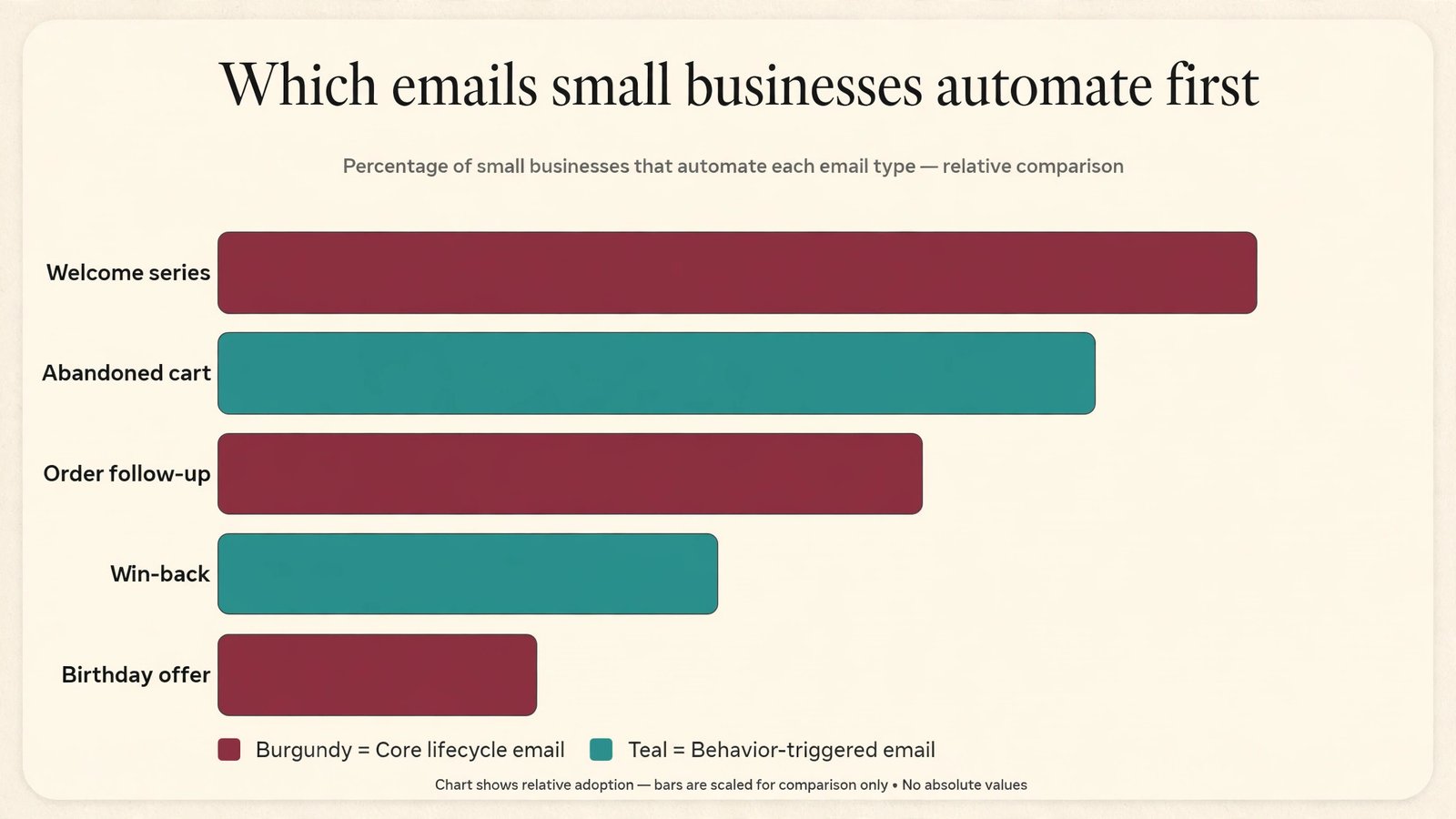
We judged each tool on the emails that earn money, which are the welcome series, the abandoned cart and the win-back. A tool scored well when those flows were included on the plan a small business actually buys, when its price stayed fair as the list grew, and when its deliverability kept emails in the inbox. A tool lost points when its cheapest plan included no automation at all, because a small business that buys that plan gets a newsletter tool, not an automation tool.
Judged as a shortlist led by MailerLite, the scores below reflect the tools as they stand in 2026, with starting prices taken from the vendor sites and from roundups published this year.
- Automation on the entry plan, because the flows are the product, not an upgrade.
- Pricing against list growth, so the bill stays fair as subscribers arrive.
- Welcome and cart flows, because those two emails earn the most money.
- Segmentation by behaviour, so the right email reaches the right person.
- Deliverability, because an email in spam is the same as no email at all.
The 12 Tools at a Glance
Here is how the best email automation tools for small businesses compare on price, fit and standout strength, so the shortlist is visible in one place.
| Tool | Starting price | Best for | Standout strength |
|---|---|---|---|
| MailerLite | From $10 a month | small businesses that want low-cost email with automation included | MailerLite covers campaigns, automation, landing pages and a simple website from 10 dollars a month, with a free plan for up to 250 subscribers. Its editor is clean, its automation includes welcome series and branching, and its price stays low as the list grows. |
| Brevo | From $9 a month | businesses with a large list that email rarely | Brevo charges by emails sent rather than contacts stored, so a business with a big list that emails a few times a month pays very little. Starter costs 9 dollars a month for 5,000 emails, and automation starts on Standard at 18 dollars a month. |
| Mailchimp | From $13 a month | small businesses that want the biggest integration library | Mailchimp is the familiar default, with Essentials from 13 dollars a month for 500 contacts and Standard from 20 dollars, which adds branching automation. Its free plan covers 250 contacts, and its integration library is the largest in this list. |
| ActiveCampaign | From $15 a month | businesses that run deep multi-step automation | ActiveCampaign has the deepest automation builder here, with Starter at 15 dollars a month for 1,000 contacts on annual billing and Plus at 49 dollars, which removes the five-action cap on automations. It suits a business that runs complex customer journeys. |
| Constant Contact | From $12 a month | small businesses that want simple campaigns and events | Constant Contact covers email campaigns, events and basic automation from 12 dollars a month, and it is built for small businesses that want a simple tool rather than a marketing platform. Its support is known for being helpful to non-technical owners. |
| GetResponse | From $19 a month | small businesses that want email plus webinars and funnels | GetResponse combines email automation with landing pages, funnels and webinars from 19 dollars a month, and it suits a business that sells a course or a service through a funnel. Its automation includes scoring and tagging. |
| Omnisend | From $16 a month | online shops that want email plus SMS in one tool | Omnisend is built for ecommerce, with email and SMS automation, abandoned cart flows and product recommendations from 16 dollars a month. It connects to Shopify and WooCommerce, and its prebuilt flows save a shop hours of setup. |
| Drip | From $39 a month | shops that want behaviour-based email at scale | Drip is an ecommerce CRM with deep behaviour tracking, from 39 dollars a month. It tracks what each customer browsed and bought, and it triggers emails from that behaviour rather than from a fixed schedule. |
| Klaviyo | From $20 a month | shops that want the deepest ecommerce email | Klaviyo is the standard ecommerce email platform, with deep Shopify integration, predictive analytics and advanced flows from 20 dollars a month. Its free plan covers 250 contacts, and its segmentation is the best in this list. |
| Kit | From $39 a month | creators selling digital products through email | Kit, formerly ConvertKit, is built for creators who sell courses, ebooks and memberships, with automation, landing pages and commerce from 39 dollars a month. Its free plan covers the basics, and its visual automation builder is easy to learn. |
| Moosend | From $9 a month | budget businesses that want automation without a high price | Moosend offers campaigns, automation, landing pages and reporting from 9 dollars a month, with a free trial and a simple interface. It suits a small business that wants the core features at the lowest price. |
| Sender | From $9 a month | small lists that want branching automation cheaply | Sender offers branching automation on every plan from 9 dollars a month at 500 subscribers, with 12 times sends per subscriber. It suits a small business that wants real automation without paying for a premium plan. |
Best Pick by Job
Our pick among the best email automation tools for small businesses is MailerLite, and the table below matches the right tool to the job at hand, because the best tool depends on what the reader is actually doing.
Use the table above as a shortlist for best email automation tools for small businesses, not a final answer, and run the top two trials in the same week before paying for a year.
| Job | Best pick | Why |
|---|---|---|
| Small list, lowest price | MailerLite | Automation included from $10 a month |
| Large list, emailed rarely | Brevo | Charged by sends, from $9 a month |
| Online shop, email plus SMS | Omnisend | Abandoned cart flows from $16 a month |
| Business that runs deep automation | ActiveCampaign | Deepest automation from $15 a month |
| Best overall for most small businesses | MailerLite | Automation on a $10 plan |
The 12 Tools in Detail
The best email automation tools for small businesses below are listed with the price, the fit and the reason to skip each one, so the decision is visible tool by tool.
1. MailerLite
MailerLite is built for small businesses that want low-cost email with automation included. It starts from $10 a month.
MailerLite covers campaigns, automation, landing pages and a simple website from 10 dollars a month, with a free plan for up to 250 subscribers. Its editor is clean, its automation includes welcome series and branching, and its price stays low as the list grows.
Its value is the automation on the cheap plan, because most tools charge extra for the flows a small business actually needs.
Skip it when the list passes 10,000 subscribers, because the price climbs faster than Brevo at that size.
In the trial, check MailerLite against the checklist above, and confirm the $10 a month plan covers the job before paying.
2. Brevo
Brevo is built for businesses with a large list that email rarely. It starts from $9 a month.
Brevo charges by emails sent rather than contacts stored, so a business with a big list that emails a few times a month pays very little. Starter costs 9 dollars a month for 5,000 emails, and automation starts on Standard at 18 dollars a month.
Its pricing model is the reason to pick it, because a large list that rarely gets emailed is nearly free.
Skip it when the business needs automation on the cheapest plan, because Starter includes no automation at all.
In the trial, check Brevo against the checklist above, and confirm the $9 a month plan covers the job before paying.
3. Mailchimp
Mailchimp is built for small businesses that want the biggest integration library. It starts from $13 a month.
Mailchimp is the familiar default, with Essentials from 13 dollars a month for 500 contacts and Standard from 20 dollars, which adds branching automation. Its free plan covers 250 contacts, and its integration library is the largest in this list.
Its templates and ecommerce links suit a shop that sells through email, because the store and the list stay connected.
Skip it when the list grows past a few thousand, because Mailchimp charges for every contact including unsubscribed ones.
In the trial, check Mailchimp against the checklist above, and confirm the $13 a month plan covers the job before paying.
4. ActiveCampaign
ActiveCampaign is built for businesses that run deep multi-step automation. It starts from $15 a month.
ActiveCampaign has the deepest automation builder here, with Starter at 15 dollars a month for 1,000 contacts on annual billing and Plus at 49 dollars, which removes the five-action cap on automations. It suits a business that runs complex customer journeys.
Its conditional logic and predictive sending are the features that justify the price for a business that lives on email.
Skip it when the business only needs simple welcome emails, because the depth is wasted and the learning curve is real.
In the trial, check ActiveCampaign against the checklist above, and confirm the $15 a month plan covers the job before paying.
5. Constant Contact
Constant Contact is built for small businesses that want simple campaigns and events. It starts from $12 a month.
Constant Contact covers email campaigns, events and basic automation from 12 dollars a month, and it is built for small businesses that want a simple tool rather than a marketing platform. Its support is known for being helpful to non-technical owners.
Its event tools suit a business that runs workshops or classes and emails about them.
Skip it when the business needs deep automation, because Constant Contact is a campaign tool first.
In the trial, check Constant Contact against the checklist above, and confirm the $12 a month plan covers the job before paying.
6. GetResponse
GetResponse is built for small businesses that want email plus webinars and funnels. It starts from $19 a month.
GetResponse combines email automation with landing pages, funnels and webinars from 19 dollars a month, and it suits a business that sells a course or a service through a funnel. Its automation includes scoring and tagging.
Its webinar feature is the reason to pick it, because few email tools include one.
Skip it when the budget is under 15 dollars, because GetResponse starts higher than the cheapest tools here.
In the trial, check GetResponse against the checklist above, and confirm the $19 a month plan covers the job before paying.
7. Omnisend
Omnisend is built for online shops that want email plus SMS in one tool. It starts from $16 a month.
Omnisend is built for ecommerce, with email and SMS automation, abandoned cart flows and product recommendations from 16 dollars a month. It connects to Shopify and WooCommerce, and its prebuilt flows save a shop hours of setup.
Its abandoned cart flow is the feature that pays for the tool, because one recovered cart a month covers the bill.
Skip it when the business does not sell online, because Omnisend is built for shops.
In the trial, check Omnisend against the checklist above, and confirm the $16 a month plan covers the job before paying.
8. Drip
Drip is built for shops that want behaviour-based email at scale. It starts from $39 a month.
Drip is an ecommerce CRM with deep behaviour tracking, from 39 dollars a month. It tracks what each customer browsed and bought, and it triggers emails from that behaviour rather than from a fixed schedule.
Its behaviour triggers suit a shop with a large catalogue, because the right email depends on what the customer looked at.
Skip it when the list is small, because 39 dollars a month is a lot before the revenue justifies it.
In the trial, check Drip against the checklist above, and confirm the $39 a month plan covers the job before paying.
9. Klaviyo
Klaviyo is built for shops that want the deepest ecommerce email. It starts from $20 a month.
Klaviyo is the standard ecommerce email platform, with deep Shopify integration, predictive analytics and advanced flows from 20 dollars a month. Its free plan covers 250 contacts, and its segmentation is the best in this list.
Its predictive features, such as expected next order date, help a shop time its emails to when a customer is ready to buy again.
Skip it when the business is not a shop, because Klaviyo is built for ecommerce and priced for it.
In the trial, check Klaviyo against the checklist above, and confirm the $20 a month plan covers the job before paying.
10. Kit
Kit is built for creators selling digital products through email. It starts from $39 a month.
Kit, formerly ConvertKit, is built for creators who sell courses, ebooks and memberships, with automation, landing pages and commerce from 39 dollars a month. Its free plan covers the basics, and its visual automation builder is easy to learn.
Its commerce features let a creator sell a digital product from an email without a separate store.
Skip it when the business is a local shop, because Kit is built for creators rather than retailers.
In the trial, check Kit against the checklist above, and confirm the $39 a month plan covers the job before paying.
11. Moosend
Moosend is built for budget businesses that want automation without a high price. It starts from $9 a month.
Moosend offers campaigns, automation, landing pages and reporting from 9 dollars a month, with a free trial and a simple interface. It suits a small business that wants the core features at the lowest price.
Its low entry price makes it a genuine alternative to MailerLite for a business counting every dollar.
Skip it when the business needs advanced segmentation, because Moosend is simpler than ActiveCampaign or Klaviyo.
In the trial, check Moosend against the checklist above, and confirm the $9 a month plan covers the job before paying.
12. Sender
Sender is built for small lists that want branching automation cheaply. It starts from $9 a month.
Sender offers branching automation on every plan from 9 dollars a month at 500 subscribers, with 12 times sends per subscriber. It suits a small business that wants real automation without paying for a premium plan.
Its automation on the cheapest plan is the standout, because most tools reserve branching for higher tiers.
Skip it when the list grows large, because the price climbs with subscribers like the rest.
In the trial, check Sender against the checklist above, and confirm the $9 a month plan covers the job before paying.
Build the Three Emails That Earn Money First
The five steps below are the checklist we would follow for best email automation tools for small businesses, in the order that wastes the least time.
Write the welcome series before anything else. Create a three-email welcome series that goes out over the first week after signup, with a thank you, a bestseller and a reason to come back. The welcome email has the highest open rate of any email the business will ever send, so it deserves the best writing.
Add the abandoned cart flow next. Set up a cart reminder that fires one hour after a cart is left, then a second one a day later with a reason to return. A shop that recovers even a few carts a month pays for the tool, and the flow runs without anyone remembering it.
Create a win-back email for quiet customers. Find the customers who have not bought in ninety days, and send them a simple email asking what they need. A win-back email costs nothing to send and revives customers the business had already written off.
Segment buyers from browsers. Split the list into people who have bought and people who have only browsed, and send each group a different email. Buyers get a thank you and a next step, while browsers get a reason to try, and the same email to both groups wastes both.
Check the numbers every month. Spend thirty minutes each month looking at open rates, click rates and sales per email, and drop the email that earns nothing. A list that is measured improves, while a list that is ignored slowly goes stale.
What Email Automation Really Costs as the List Grows
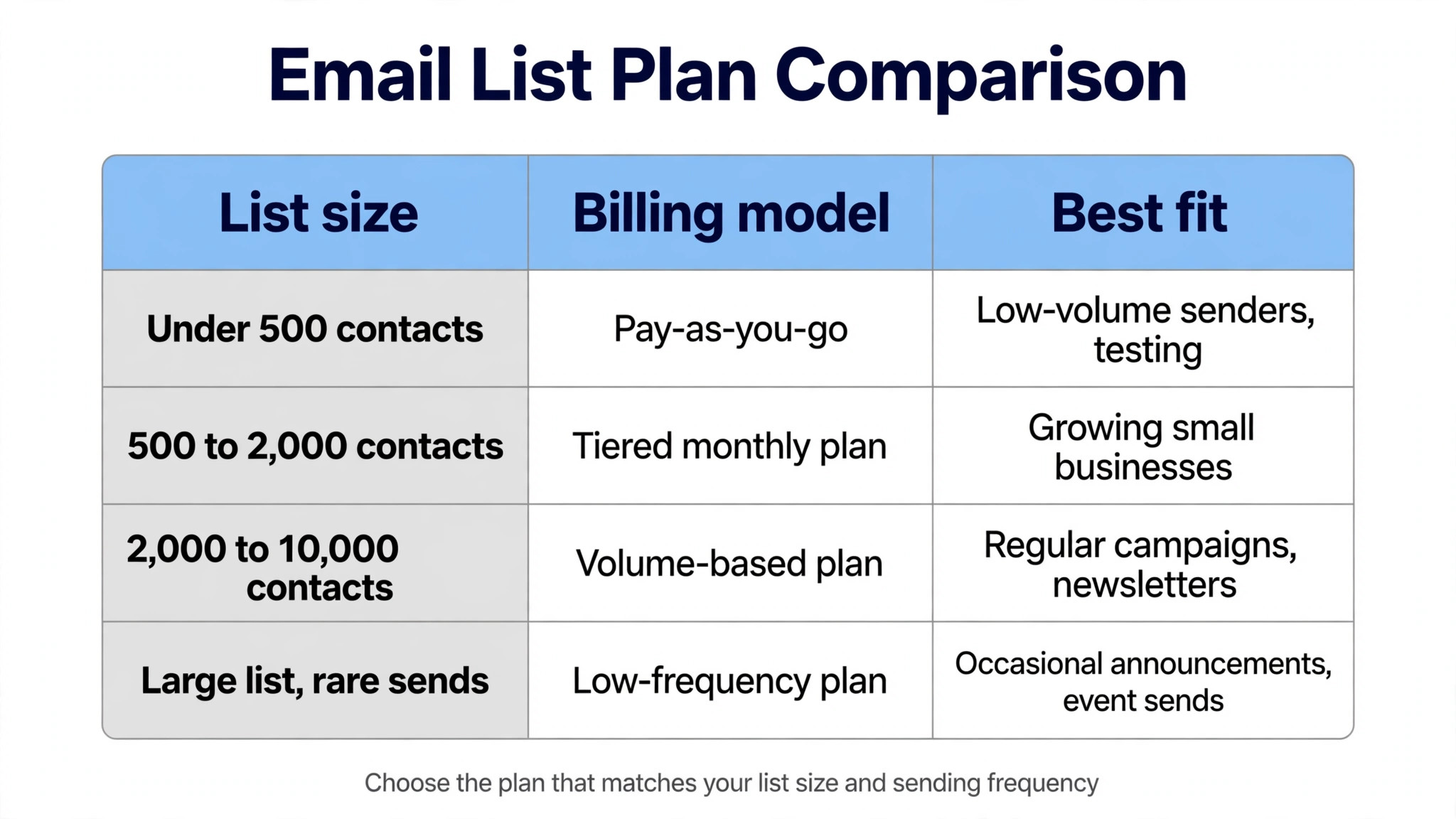
The monthly bill for best email automation tools for small businesses runs from the cheapest entry point to the top tier, and the right budget depends on volume rather than brand.
The monthly bill for email automation runs from about 9 dollars a month for Brevo, Moosend or Sender to 39 dollars for Drip or Kit, and the price usually follows the contact count. A list of 500 contacts costs 9 to 13 dollars a month on most tools here, while a list of 5,000 costs 49 to 89 dollars, and a list of 10,000 costs 89 to 179 dollars. Brevo is the exception, because it charges by emails sent rather than contacts, so a large list that emails rarely stays cheap.
The cost that owners forget is the unsubscribed contact. Mailchimp charges for every contact in the audience, including unsubscribed and non-subscribed ones, so a list that looks like 5,000 names can bill like 7,000. Clean the list every quarter, remove the contacts who never open, and the bill drops while the open rate rises, which is the rare case where less costs less and earns more.
A small business should treat its list as an asset, not a chore. The list is the only marketing channel the business owns outright, because a social network can change its rules overnight while the email list stays. A business that builds its list every day, even by ten names a week, owns a growing asset, while one that ignores it rents attention from platforms that do not care. The tool is just the keeper of that asset.
The welcome email deserves the best writing in the business. It is the first email a new subscriber reads, it has the highest open rate, and it sets the tone for every email after. A welcome email that is honest, specific and useful earns a customer, while one that is generic earns an unsubscribe. Write it as if the reader is standing in the shop, because that is who they are.
Deliverability is the quiet number that decides whether email works. A tool can have perfect automation and still fail if its emails land in spam, so check the sender reputation, set up the authentication records, and clean the list regularly. A business that sends to engaged subscribers and removes the dead ones will see its emails land in the inbox, while one that blasts a stale list will slowly disappear from it.
Five Mistakes That Waste a Small Business’s Email List
Buying a plan with no automation. Brevo Starter at 9 dollars a month includes no automation, so a business that buys it for automation has bought the wrong plan. Check that the flows are included before paying.
Emailing the whole list the same message. A buyer and a browser need different emails, and the same message to both wastes the buyer and confuses the browser. Segment before sending.
Never cleaning the list. A list full of dead addresses hurts deliverability, because inbox providers notice when nobody opens. Remove the contacts who have not opened in six months.
Sending only when there is news. A business that emails only when it has news trains subscribers to ignore it, because the emails arrive at random. A schedule, even a monthly one, earns more than a random burst.
Judging an email by opens alone. An email with a high open rate and no sales is a pleasant failure, while an email with a low open rate and ten sales is a quiet success. Judge by sales per email, not by opens.
Frequently Asked Questions
These are the questions readers ask most about best email automation tools for small businesses, answered with the prices and limits above.
How much does email automation cost a small business?
A small business with 500 contacts pays about 9 dollars a month on Brevo, Moosend or Sender, about 10 dollars on MailerLite, and about 13 dollars on Mailchimp. ActiveCampaign starts at 15 dollars a month for 1,000 contacts, while Drip and Kit start at 39 dollars. The price climbs with the list, so a list of 5,000 costs roughly 49 to 89 dollars a month on most tools here.
Which email automation tool is best for a small business?
MailerLite is the best pick for most small businesses, because it includes automation, landing pages and a clean editor from 10 dollars a month, with a free plan for up to 250 subscribers. Brevo is the pick when the list is large but emailed rarely, because it charges by sends rather than contacts. A shop should look at Omnisend or Klaviyo instead, because they are built for ecommerce.
Is Mailchimp or MailerLite better for a small business?
MailerLite is better for a small business that wants low cost and automation included, because it starts at 10 dollars a month with automation on the plan, while Mailchimp reserves branching automation for its Standard plan at 20 dollars. Mailchimp is better when the business needs the largest integration library or sells through a store that links deeply to Mailchimp. A business that only needs simple campaigns can pick either, but the one counting dollars should pick MailerLite.
Does Brevo really charge by emails sent?
Yes, Brevo charges by the number of emails sent each month rather than the number of contacts stored, which is unusual. Starter at 9 dollars a month covers 5,000 emails, and the free plan allows 300 emails a day with unlimited contacts. The catch is that Starter includes no automation, so a business that needs welcome series and triggers must buy Standard at 18 dollars a month.
What is the cheapest email automation tool with real automation?
MailerLite and Sender are the cheapest with real automation included, because MailerLite starts at 10 dollars a month with automation and Sender starts at 9 dollars with branching automation on every plan. Moosend starts at 9 dollars with automation too. Brevo is cheaper at 9 dollars, but its Starter plan includes no automation, so the real cheapest automation plan is Standard at 18 dollars.
How many emails should a small business send each month?
One welcome series, one regular campaign a week, and the automatic flows are a good starting point, which works out to roughly six to ten emails a month per subscriber. A business that emails daily will see unsubscribes rise, while one that emails monthly will be forgotten. The right frequency is the one the list tolerates, and the unsubscribe rate is the signal to watch.
Our Pick, Stated Plainly (MailerLite)
Our pick for most small businesses is MailerLite, because it includes automation on a 10 dollar plan, its editor is clean, and its price stays fair as the list grows. A business with 500 subscribers pays about 10 dollars a month for a tool that sends the welcome series, the cart reminder and the win-back without anyone remembering. The exception is a large list that emails rarely, where Brevo wins on its send-based pricing, and a shop, where Omnisend or Klaviyo is the honest choice.
Start with the free plan, build the welcome series first, and watch the sales per email for a month before paying. If the welcome emails earn money and the cart flow recovers sales, the tool has earned its place. If the list is quiet and the emails earn nothing, the problem is the offer, not the tool, and no software will fix that.