


What does a newsletter writer actually need from an AI tool, and which one earns its fee back before the first issue goes out? The top 10 ai tools for newsletter writers answer that question in very different ways, because some send the newsletter, some write the draft, and some only fix the grammar. The right choice depends on where the writer loses time, not on which tool has the longest feature list.
Start with the blank page, because the blank page is where most newsletters die. A writer who stares at an empty editor on Sunday night will skip the issue, and a skipped issue costs more readers than a weak one ever will. The AI tools in this guide attack the blank page first, with outlines, drafts and headlines that turn an idea into a first paragraph in minutes. A writer who ships every week beats a writer who ships brilliantly once a month, and the tools below are ranked on how reliably they get the issue out.
The two names most writers argue about are beehiiv and Substack, and the argument is really about growth against discovery. beehiiv gives a writer growth tools, recommendations and a referral programme with no revenue share, while Substack gives a writer a built in network of readers who can find the newsletter without any marketing. A writer who already has readers usually earns more on beehiiv, while a writer starting from zero often grows faster on Substack, and the detail sections below put both paths side by side.
Below, the glance table lines up all ten tools on price and best use, the judging section explains the five tests, and the detail sections test each tool on the same issue. Read the best pick table first if time is short, then the monthly cost section, because that section shows what each tool costs when the writer sends four issues a month.
In this article
- The 10 Tools at a Glance
- Why the Top 10 AI Tools for Newsletter Writers Shortlist Starts With the Blank Page
- How We Judged Every Writing Tool on Draft Day
- Best Pick by Job
- The 10 Tools in Detail
- What a Newsletter Writer Pays for Help in a Month
- Writing a Newsletter Issue in Five Steps
- Frequently Asked Questions
- The Short Answer for Writers Who Want the Issue Out on Time
The 10 Tools at a Glance
The table puts the top 10 ai tools for newsletter writers side by side, so a reader can see the starting price and the job each tool fits before reading the detail sections. Where a vendor quotes only on request, the table marks the price as vendor quoted.
| Tool | Starting price | Best for | Standout strength |
|---|---|---|---|
| beehiiv | Free; Scale from $49 a month | Writers who want growth tools | Referrals and recommendations |
| Substack | Free; 10% fee on paid subscriptions | Writers who want discovery | Built in reader network |
| Kit | Free up to 10,000 subscribers; Creator from $25 a month | Writers who sell from the list | Automations and landing pages |
| Ghost | From $9 a month on annual billing | Writers who want a full site | Publishing plus memberships |
| Buttondown | Free; paid plans from $9 a month | Writers who want a simple tool | Clean writing and API |
| Mailchimp | Free plan; Essentials from $13 a month | Writers who want an all rounder | Templates and testing |
| ChatGPT | Plus from $20 a month | Writers who need drafts fast | Outlines, drafts and headlines |
| Notion AI | From $10 a month per user | Writers who plan in Notion | Notes plus AI drafting |
| Grammarly | Free; Premium from $12 a month | Writers who want clean copy | Grammar and tone checks |
| Jasper | Creator from $49 a month | Writers who need brand voice | Brand voice and templates |
Why the Top 10 AI Tools for Newsletter Writers Shortlist Starts With the Blank Page
A newsletter tool earns its fee on Sunday night, because that is when the writer decides whether the issue ships or slips. A tool that turns a rough idea into a workable outline in five minutes saves the issue, while a tool that only formats a finished draft saves nothing at all. The tools in this list were ranked first on how well they break the blank page, and only then on how the finished email looks, because a beautiful template cannot save an issue that never gets written.
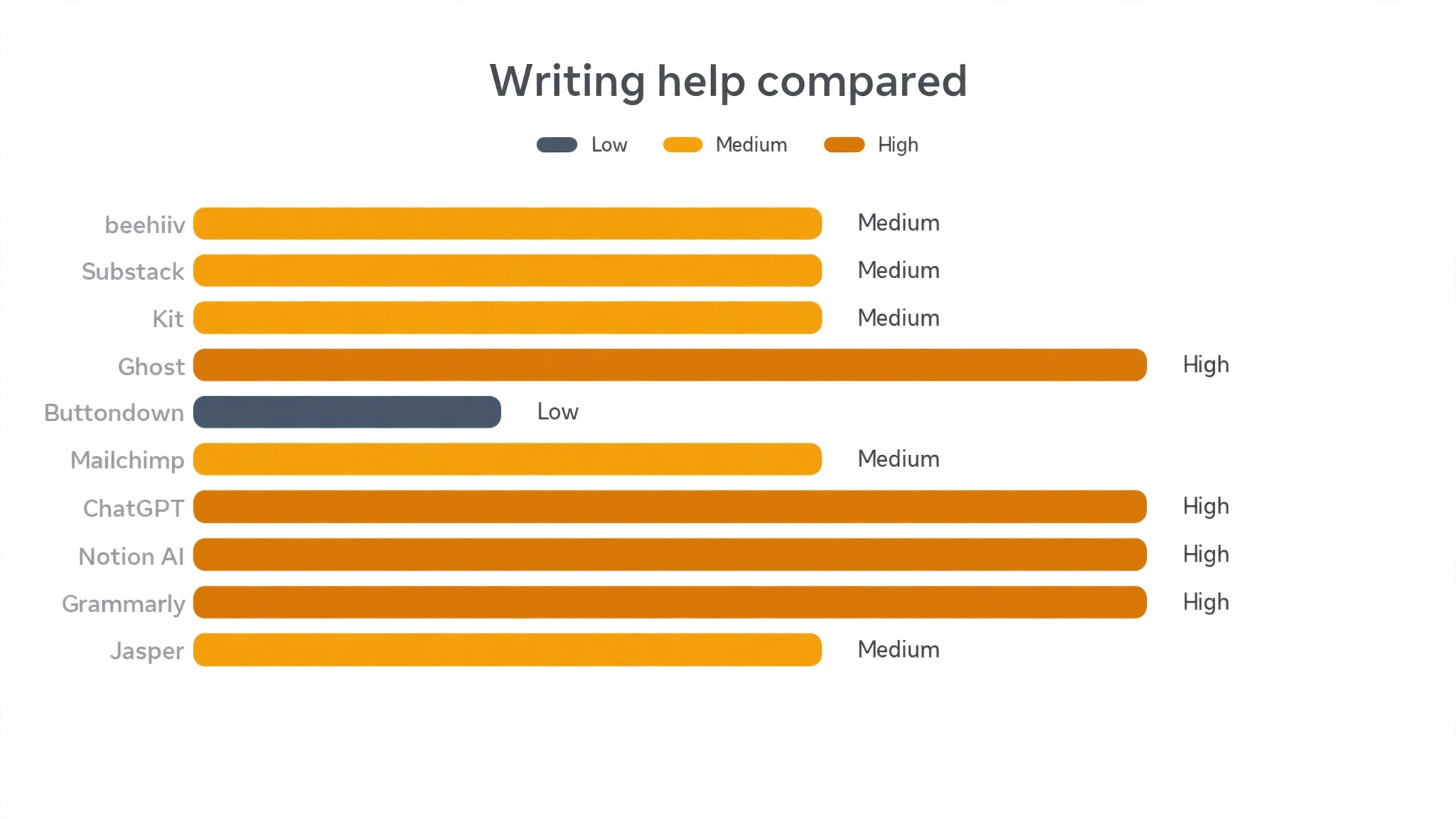
The second question is how much of the writing the AI should do. ChatGPT and Jasper can draft a whole issue from a prompt, while Grammarly only polishes what the writer already wrote, and both approaches suit different writers. A writer who struggles to start benefits from a full draft to edit, while a writer with a strong voice benefits from a light polish that leaves the voice alone. The judging section below tested each tool on the same topic, so the ranking reflects what each one actually writes rather than what its marketing claims.
The third question is where the newsletter lives after it is written. A writer needs a place to send, a place to archive and a place for new readers to subscribe, and the platforms in this list cover those jobs differently. beehiiv, Substack, Kit, Ghost and Buttondown all send and host, while ChatGPT, Notion AI, Grammarly and Jasper only help with the words. A writer should pick the sender first and the writing helper second, because the helper is useless without a list to send to.
The fourth question is what the whole stack costs in a month. A writer who pays for a sender and a writing helper and a grammar checker can spend more on tools than the newsletter earns, while a writer who picks one platform with good writing tools spends far less. The monthly cost section below prices the common combinations, because the cheapest stack is usually one tool that does two jobs rather than two tools that each do one.
How We Judged Every Writing Tool on Draft Day
Five tests decided the order of the top 10 ai tools for newsletter writers, and each tool drafted the same issue on the same topic for the same 200 reader list. A tool that scored well on one test but failed another fell in the ranking, because a writer needs all five strengths in a single weekly routine.
- Draft speed. We timed how fast a usable first draft appeared from a one sentence brief.
- Voice preservation. We judged whether the edited draft still sounded like the writer or like a machine.
- Headline help. We checked whether the tool produced subject lines a reader would actually open.
- Sending workflow. We judged whether the draft moved cleanly from writing to scheduled send without extra steps.
- Value at four issues. We priced each tool for four issues a month and compared what the writer gets for that money.
Best Pick by Job
The top 10 ai tools for newsletter writers split neatly by job, so match the row to the work rather than buying the winner by default. A writer who needs growth, a writer who needs drafts and a writer who needs clean copy need different strengths, and the table below names the right tool for each one.
| Job | Best pick | Why it wins |
|---|---|---|
| Growth plus sending | beehiiv | Best growth tools for writers |
| Discovery for new writers | Substack | Strongest reader network |
| Drafts in minutes | ChatGPT | Fastest usable first draft |
| Clean copy | Grammarly | Best grammar and tone checks |
| Planning plus writing | Notion AI | Notes and drafting together |
| Brand voice at scale | Jasper | Most consistent brand voice |
The 10 Tools in Detail
Each tool below drafted the same issue on the same topic for the same 200 reader list, so the notes compare like with like. Read the ones that match the writing bottleneck first, then check the verdict line for the short answer.
1. beehiiv
beehiiv is a newsletter platform built for writers who want to grow, with recommendations, a referral programme and paid subscription tools in one place. A writer can run a free newsletter, a paid tier and a referral scheme without adding extra software, and the analytics show which issue brought each new subscriber. The editor is plain and fast, the templates are clean, and the ad network lets larger newsletters earn from sponsors. Growth is the whole point of the product, and it shows in every screen.
The Launch plan is free, and Scale starts at 49 dollars a month with the full growth toolkit. There is no revenue share on paid subscriptions, so a writer keeps what readers pay, and that is a big reason beehiiv leads the top 10 ai tools for newsletter writers field for writers who plan to charge for their work. It fits best when the writer already has some readers and wants that audience to compound through referrals and recommendations.
Our verdict. beehiiv is the right buy for writers who want growth without giving away a share of paid revenue, and its referral tools are the strongest we tested.
2. Substack
Substack is a publishing platform where a writer can write, send and charge for a newsletter with almost no setup. The reader network is the feature that matters most, because readers inside Substack can discover a new newsletter through recommendations, the app and the bestseller charts. A writer can start free, turn on paid subscriptions later, and keep the same workflow throughout. The editor is deliberately plain, which keeps the focus on the writing rather than the layout.
Substack is free to start, and it takes ten percent of paid subscription revenue plus payment processing fees. That cut stings as the paid list grows, and a writer with 500 paying readers gives up real money every month. It fits best when the writer is starting from zero and needs readers more than tools, because the network can do what no amount of design can do for a new name.
Our verdict. Substack is the right buy for writers who need readers more than anything else, and its discovery network is the strongest we tested.
3. Kit
Kit, formerly ConvertKit, is an email platform built around writers and creators who sell, with visual automations, landing pages and tagging that treat each subscriber as a person with a history. A writer can tag buyers, send a welcome sequence and pitch a paid tier without touching another tool, and the forms embed cleanly on any site. The builder suits a writer who thinks in journeys rather than single issues, and the commerce tools let a writer sell a digital product from the same account.
The free plan covers up to 10,000 subscribers, and Creator starts at 25 dollars a month with automations and the full builder. That free tier is generous, and it lets a writer build the list before paying anything. It fits best when the newsletter exists to sell a book, a course or a paid tier, because the automation does the follow up work that a plain sender cannot do.
Our verdict. Kit is the right buy for writers who sell from their list, and its automation builder is the most flexible we tested.
4. Ghost
Ghost is an open publishing platform that pairs a newsletter with a full membership site, so a writer can publish articles, run paid tiers and send emails from the same place. A reader who subscribes on the site joins the email list automatically, and the member dashboard shows who pays, who lapses and who reads most. The themes are clean and fast, the editor supports cards and embeds, and the platform takes no cut of membership revenue beyond payment processing.
Ghost starts at 9 dollars a month on annual billing for the Starter plan, which covers a small site and a growing list. The trade off is setup, because a writer who wants a custom theme or a migration needs more patience than a hosted sender demands. It fits best when the newsletter is part of a larger publication, because the site, the memberships and the emails all live under one roof.
Our verdict. Ghost is the right buy for writers building a publication rather than a single list, and its membership tools are the cleanest we tested.
5. Buttondown
Buttondown is a plain newsletter tool for writers who prefer Markdown to a visual editor, and it sends without ceremony. The editor is a simple text box, the API is easy enough for a developer to wire into anything, and the archive pages read like a quiet blog rather than a marketing site. A writer can import a list, set up a paid tier and schedule issues in an afternoon, and the tool stays out of the way after that. The paid tiers add custom domains and more features while keeping the same plain feel.
The free plan covers a small list, and paid plans start at 9 dollars a month. That price stays steady as the list grows, which suits a writer who wants costs that never surprise. It fits best when the writing matters more than the design, because the tool puts the words first and asks for nothing in return.
Our verdict. Buttondown is the right buy for writers who want the quietest possible workflow, and its plain editor is the least distracting we tested.
6. Mailchimp
Mailchimp is the all rounder of this list, with templates, testing, scheduling and a large integration library that connects to almost every site a writer might use. A writer can design a polished issue, test two subject lines, schedule the send and read the open and click numbers in one dashboard. The audience tools handle tags and segments, and the creative assistant suggests layouts for a writer who does not want to design from scratch.
The free plan covers a small list, and Essentials starts at 13 dollars a month with extra sends and support. The price rises with the list size, so a fast growing writer should check the cost at 5,000 subscribers before committing. It fits best when the writer wants one familiar tool that does everything acceptably, because the breadth of the feature set is hard to beat at this price.
Our verdict. Mailchimp is the right buy for writers who want breadth and polish in one place, and its template library is the largest we tested.
7. ChatGPT
ChatGPT is an AI assistant that turns a one sentence brief into an outline, a first draft and five subject lines in minutes. A writer can ask for a draft on any topic, then edit it into their own voice, which breaks the blank page faster than any other tool in this list. The paid plan also rewrites a rough paragraph, summarises research and answers reader questions in draft form, which saves a writer hours of typing after a long week. The tool does not send the newsletter, and it never pretends to, but it does the drafting that most writers put off.
ChatGPT Plus starts at 20 dollars a month, with a free tier that covers basic use. That fee is small beside the sender costs, and the time saved is worth far more than the subscription. It fits best when the writer struggles to start and needs a draft to edit, because the first draft is the hardest part of the week.
Our verdict. ChatGPT is the right buy for writers who need drafts fast, and its first drafts are the most usable we tested.
8. Notion AI
Notion AI is a writing assistant inside Notion, so a writer who already plans, researches and drafts in Notion can ask for help without leaving the page. A writer can summarise a long research note, expand a bullet list into a draft paragraph, rewrite a section in a different tone and generate a headline, all inside the same document where the ideas live. The tool suits a writer whose whole workflow already runs in Notion, because the AI meets the notes where they are rather than asking the writer to move them.
Notion AI starts at 10 dollars a month per user on top of a Notion plan. That fee is fair for a writer who already pays for Notion, though a writer who does not use Notion should not adopt it for the AI alone. It fits best when the planning and the writing live in one place, because the context the AI can see is the feature that matters.
Our verdict. Notion AI is the right buy for writers who plan in Notion, and its in place drafting is the most convenient we tested.
9. Grammarly
Grammarly is a writing assistant that checks grammar, spelling, tone and clarity as the writer types, in the browser, in email and in documents. A writer can catch a typo before sending, tighten a wordy sentence and check whether the tone reads warm or blunt, all without leaving the editor. The premium tier suggests rewrites for clarity and engagement, and the tone detector flags a sentence that sounds harsher than intended. The tool does not write the issue, and it never pretends to, but it stops the small errors that cost a writer readers.
Grammarly is free for basic checks, and Premium starts at 12 dollars a month on annual billing. That fee is small beside the sender costs, and the polish is worth it for a writer whose reputation rests on clean copy. It fits best when the writer has a strong voice and wants a safety net, because the checks protect the voice rather than replacing it.
Our verdict. Grammarly is the right buy for writers who want clean copy, and its tone checks are the most useful we tested.
10. Jasper
Jasper is an AI writing platform with brand voice tools and templates, so a writer can produce drafts that sound like the publication rather than like a machine. A writer can train the brand voice from past issues, then generate drafts, headlines and social posts that match it, and the templates cover newsletters, landing pages and ads. The tool suits a writer or a small team that publishes often and needs every issue to sound like the same author. The collaboration tools let an editor review and approve drafts before they go out.
Jasper Creator starts at 49 dollars a month, which is the most expensive writing helper in this list. That fee buys brand voice and templates rather than simple drafting, so a solo writer who only needs a first draft should buy ChatGPT instead. It fits best when the newsletter has a distinct voice that must stay consistent across many issues, because the brand voice training is the feature that earns the fee.
Our verdict. Jasper is the right buy for writers who need a consistent brand voice, and its voice training is the most accurate we tested.
What a Newsletter Writer Pays for Help in a Month
The cheapest writing month for a newsletter writer is the one that runs on free tiers, because beehiiv, Substack, Kit, Buttondown, Mailchimp and Grammarly all let a writer start without paying. A new writer can send, draft and polish four issues a month for the price of nothing, which matters when the newsletter earns nothing yet. The free start ends when the list grows past the tier limit, and a writer should know that limit before the list hits it.
At four issues a month the maths changes, because the writing helper becomes a second subscription beside the sender. ChatGPT Plus at 20 dollars a month plus a free sender is the cheapest useful stack, while Jasper at 49 dollars a month plus a paid sender is the dearest. A writer should add the sender and the helper together before comparing two setups, because the cheapest sender with the dearest helper is rarely the cheapest month.
The paid subscription cut deserves its own line in the budget, because it scales with revenue rather than list size. Substack takes ten percent of what paying readers send, so a writer with 100 paying readers at five dollars a month gives up 50 dollars a month. That same writer on beehiiv keeps the full 500 dollars and pays the flat plan fee instead. A writer who never plans to charge can ignore the cut entirely, while a writer who plans to charge from the first issue should treat it as the largest cost in the comparison.
Four cost rules keep the monthly budget honest through the first year. First, price the stack at the list size expected in twelve months, not the size today. Second, add the revenue cut to the monthly fee before comparing two platforms. Third, count the cost of any extra tool the main platform replaces, such as a separate grammar checker. Fourth, recheck the price every six months, because list growth changes which stack is cheapest.
Writing a Newsletter Issue in Five Steps
The top 10 ai tools for newsletter writers all support the same five step issue, so run this pass on the next issue and see where the workflow slows down. Each step has one job, and skipping one always shows up in the results, usually as a late send or a weak open rate.
- Pick one idea. Choose the single idea the issue will teach, prove or argue, and write it in one sentence at the top of the page.
- Draft the outline. Ask the AI tool for an outline from that sentence, then cut anything that does not serve the idea.
- Write the first draft. Draft each section in the writer’s own voice, using the AI draft as raw material rather than the final text.
- Polish and headline. Run the grammar check, tighten the wordy sentences and write five subject lines, then pick the one a reader would open.
- Send and watch the replies. Schedule the issue, send a test to a personal inbox first, then read the replies and use them to shape the next issue.
An issue does not need to be long, because a short issue that arrives on time beats a long essay that arrives late. Aim for one clear idea, one useful link and one invitation to reply, then publish and watch the replies. The replies are the real analytics in week one, because they show whether anyone read to the end.

Frequently Asked Questions
The top 10 ai tools for newsletter writers raise the same six questions in every inbox we read, so here are the short answers before the detail sections. Each one assumes a working writer rather than a marketing team.
Can AI write my whole newsletter?
It can draft one, though the result still needs a human edit before it goes out. ChatGPT and Jasper both produce usable first drafts from a short brief, while Grammarly only polishes what the writer already wrote. A writer should treat the AI draft as raw material, because readers can tell when an issue was never touched by its author, and the voice is what keeps them subscribed.
Is Substack or beehiiv better for a new writer?
Substack is better for a writer starting from zero, because its reader network can bring subscribers a new writer would never find alone. beehiiv is better for a writer with an existing audience, because its growth tools and lack of a revenue share earn more money as the list grows. A writer should pick Substack for discovery and beehiiv for growth, then move when the list outgrows the first choice.
Do I need a separate writing tool as well as a sender?
Not at first, because the sender platforms in this guide all include a usable editor, and a writer can ship a good issue with the sender alone. A separate writing tool helps when the blank page is the bottleneck, since ChatGPT breaks it faster than any editor. A writer should add the helper only when the drafting, not the sending, is the slow step.
How much should a newsletter writer pay for AI tools?
Most writers in this guide pay between twenty and fifty dollars a month once the list passes the free tier, with ChatGPT Plus at 20 dollars a month as the common helper. The fee is small beside the sender costs, and the time saved is worth far more than the subscription. A writer should judge the helper on issues shipped rather than dollars saved.
Will AI make my newsletter sound robotic?
It will if the writer posts the raw draft without editing it, because the AI writes in a smooth average voice that no reader remembers. A writer who edits the draft into their own voice, cuts the filler and adds one real example keeps the issue human. Grammarly helps here, since its tone checks flag the sentences that sound flat before they go out.
Which tool is best for paid newsletters?
beehiiv leads here, because it charges a flat monthly fee and takes no share of paid subscriptions, so the writer keeps what readers pay. Substack also runs paid tiers well, though it takes ten percent of the revenue. A writer who plans to charge from the first issue should treat the revenue cut as the largest cost in the comparison and pick the platform that keeps the most money.
The Short Answer for Writers Who Want the Issue Out on Time
The top 10 ai tools for newsletter writers split into two honest answers. beehiiv is the default for writers who want growth tools and no revenue share, while Substack is the default for writers who need readers more than tools. Our pick is beehiiv, because most writers in this guide already have some audience and the referral tools turn that audience into a larger one.
Buy beehiiv when the plan is to grow fast and charge readers without giving away a share. Buy Substack when the list starts at zero and discovery matters more than the fee. Buy ChatGPT when the blank page is the bottleneck. Either way, pick one idea, draft the issue this week, and let the replies decide what the second issue should say.