


What should a content brief cost your team each month? The answer runs from a free trial to several hundred dollars, and the dearest option is rarely the one that produces the best briefs. The best content brief tools for content teams in this guide span that whole range, and Surfer leads the list because its briefs pair search data with a structure writers can follow without a training course. This guide works through the price of every tool before it weighs the features.
A brief is the cheapest place to fix a bad article. An hour spent on a sharp outline saves a day of rewrites, and a vague brief guarantees a draft that misses the search intent. Yet most teams still hand writers a keyword and a word count, then wonder why the draft comes back thin. The tools below exist to close that gap, and they do it in very different ways.
Some build briefs from the pages already ranking, pulling headings, questions and terms into a ready outline. Others lean on editorial workflow, assigning briefs, tracking drafts and gathering feedback in one place. A few do both. The fifteen tools below cover the full spread, and the price breakdown in each section shows what you pay for the difference.
In this article
- The 15 Tools at a Glance
- Why the Best Content Brief Tools for Content Teams Shortlist Matters in 2026
- How We Judged Every Brief Tool on This List
- Best Pick by Job
- The 15 Tools in Detail
- Surfer vs Clearscope: The Head-to-Head That Decides It
- Picking a Brief Tool That Writers Will Actually Use
- Running Your First Content Brief in Five Steps
- Frequently Asked Questions
- Our Pick, Stated Plainly — Surfer Is the Content Team Default
The 15 Tools at a Glance
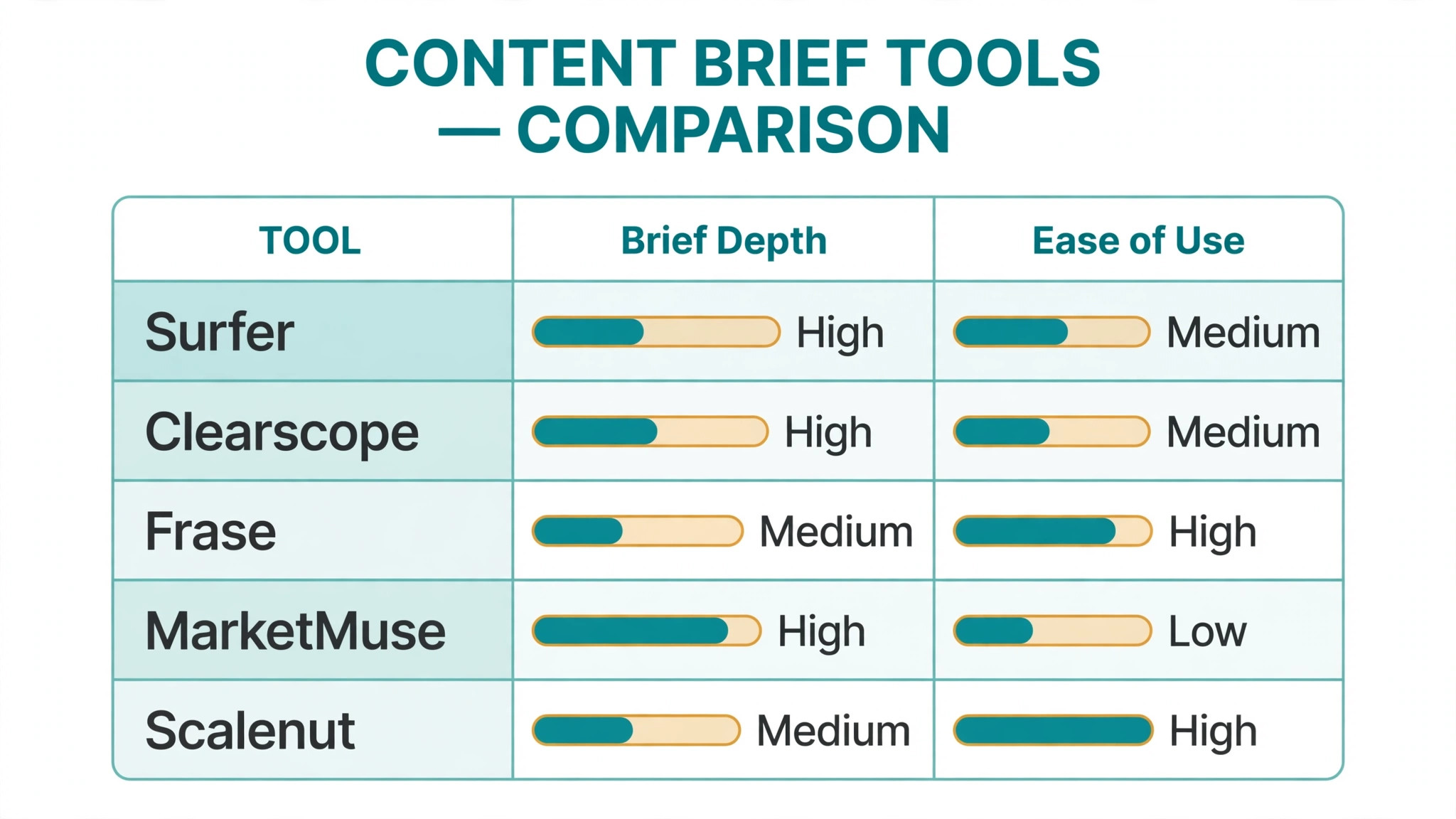
Start with the money. The best content brief tools for content teams fall into three price bands, and the table below shows where each of the fifteen sits before you read a single review.
| Tool | Starting price | Best for | Standout strength |
|---|---|---|---|
| Surfer | From $99 a month | Data-led briefs | Search-based outlines |
| Clearscope | Pricing on the vendor site | Enterprise briefs | Term coverage reports |
| Frase | From $14.99 a month | Small teams | Fast AI outlines |
| MarketMuse | Pricing on the vendor site | Content strategy | Topic authority maps |
| Content Harmony | Pricing on the vendor site | Agency workflows | Brief templates |
| WriterZen | Pricing on the vendor site | Budget teams | Keyword clustering |
| Dashword | Pricing on the vendor site | Growing blogs | Simple brief builder |
| Topic | Pricing on the vendor site | Research depth | Question mining |
| Scalenut | From $20 a month | Fast production | AI writing support |
| Letterdrop | Pricing on the vendor site | B2B content teams | SEO plus distribution |
| AirOps | Pricing on the vendor site | AI workflows | Bulk brief creation |
| Contently | Pricing on the vendor site | Managed content | Writer marketplace |
| Semrush | From $139.95 a month | All-in-one SEO | Writing assistant |
| Narrato | Pricing on the vendor site | Small agencies | AI content workspace |
| Acrolinx | Pricing on the vendor site | Regulated industries | Governance checks |
Why the Best Content Brief Tools for Content Teams Shortlist Matters in 2026
Search results now reward pages that answer the question fully, and a thin article has nowhere to hide. Google reads the whole page, compares it with the pages already ranking, and ranks the one that covers the topic best. A writer working from a one-line brief cannot produce that page, no matter how talented they are. The brief has become the ranking factor nobody talks about.
Teams feel the pressure in output numbers. A content lead who once managed ten articles a month now manages thirty, and the briefs are where quality either holds or collapses. Without a system, each writer invents their own structure, and the site ends up with thirty articles that read like they came from thirty different companies. A good brief tool keeps the structure consistent while the volume grows.
The cost of a weak brief shows up late, which makes it easy to miss. An article ships, ranks on page three, and nobody connects the result to the brief that started it. Months pass before the team realises the content engine is producing pages that never earn traffic. This shortlist exists so a team can judge a brief tool on what it actually changes, not on its demo.
How We Judged Every Brief Tool on This List
We put every tool through five practical tests, and the best content brief tools for content teams had to clear all five before they earned a place on this list.
- Outline quality. We generated a brief for the same keyword in each tool and scored how complete and usable the outline was for a working writer.
- Search data depth. We checked whether the tool reads the pages already ranking, and how fresh and specific the data behind each suggestion is.
- Writer experience. We handed briefs to freelance writers and asked how clear the instructions were and how long the first draft took.
- Workflow fit. We tested assigning, reviewing and revising briefs inside the tool, and scored how well it suits a team rather than a solo user.
- Price against output. We compared the monthly cost with the number of briefs a team can realistically produce, and scored value rather than sticker price.
Best Pick by Job
No single tool wins every content job, so match the work in front of you to the tool that handles it best. The best content brief tools for content teams differ most in how they treat the writer, not in their feature lists.
| Job | Best pick |
|---|---|
| Solo blogger | Frase |
| Agency with 20 writers | Surfer |
| Enterprise content team | MarketMuse |
| Fast newsroom briefs | Scalenut |
| SEO-led content program | Clearscope |
| Small team on a budget | WriterZen |
The 15 Tools in Detail
1. Surfer
Surfer builds briefs from the search results themselves. Give it a keyword and it reads the top ranking pages, pulls their headings, questions and common terms, and turns them into an outline a writer can follow step by step. The content editor scores the draft live against the same data, so a writer can see the score climb as they cover each point. Teams that publish search-led content will feel at home within an hour.
Pricing is where the best content brief tools for content teams separate most clearly. Surfer paid plans start around $99 a month, which buys a set number of content editor queries, and higher tiers add more. Confirm the current figure before you buy, since the plan limits and prices move, so check the pricing page for the latest numbers before you commit. A team producing ten briefs a month will find the entry plan workable.
The live score is the feature writers either love or resent. It keeps drafts on topic, yet a writer chasing a perfect score can stuff in terms the reader does not need. The best teams treat the score as a guide rather than a grade. Our verdict. Buy it when search rankings pay the bills and briefs need data behind them.
2. Clearscope
Clearscope is the enterprise choice for briefs built on term coverage. Its reports show which terms the top pages use, how important each one is, and whether your draft covers them. The interface is calm and spare, with none of the clutter that slows a writer down. Large teams value the shared reports, since an editor and a writer can look at the same grading sheet.
Pricing on the vendor site is the accurate line for Clearscope, as plans are quoted per team and depend on report volume. The cost sits above most tools on this list, which fits the enterprise audience it serves. Confirm the current figure before you buy, and ask for a trial report on your own keyword before you commit.
Clearscope does less than some rivals. It will not write drafts, manage assignments or track a content calendar. What it does, it does with unusual polish, and teams that already own a workflow tool will not miss the extras. Our verdict. Choose it when report quality matters more than an all-in-one workspace.
3. Frase
Frase is the fastest way to turn a keyword into a usable brief. Its AI outline builder reads the ranking pages and drafts a structure in under a minute, and the built-in research panel gathers the questions people actually ask. Small teams like the speed, since a brief that took an hour now takes ten minutes. The writing assistant sits beside the brief, so a writer can draft without leaving the page.
Pricing starts from $14.99 a month for the basic plan, which makes Frase one of the cheapest entries on this list. Confirm the current figure before you buy, since the limits on AI words and briefs change between tiers. A solo blogger can run a whole content program on the entry plan.
The outlines sometimes need a human pass, since the AI can repeat a heading the ranking pages share without asking whether it belongs. An editor who spends five minutes trimming the outline will get far better drafts than one who ships it raw. Our verdict. Start here when speed matters and the budget is tight.
4. MarketMuse
MarketMuse thinks in topics rather than keywords. It maps a whole subject area, shows where your site has authority and where it has gaps, and then builds briefs that fill the gaps in the right order. Content strategists use it to plan a quarter of publishing, not just one article. The briefs it produces are long and detailed, with research notes a writer can lean on.
Pricing on the vendor site is the honest answer, since MarketMuse quotes plans based on the size of the site and the number of briefs. It is a premium tool with a premium price, aimed at teams that treat content as a revenue channel. Confirm the current figure before you buy, and run the free inventory check first to see what it finds.
The learning curve is real. A new user can feel lost in the topic maps for a week, and the tool rewards teams that invest time in the setup. Small teams may find it more than they need. Our verdict. Pick it when content strategy, not single articles, is the job.
5. Content Harmony
Content Harmony is built for agencies that brief at volume. Its templates standardise the structure of every brief, so twenty writers produce work that reads like one team wrote it. The workflow moves a brief from keyword to assignment to draft review without leaving the tool, and the reporting shows which briefs turned into ranking pages. Agency owners like the consistency it forces.
Pricing on the vendor site is the right line, since plans depend on the number of briefs and seats. The cost is mid-range for this list, and agencies usually recover it in the first month of saved briefing time. Confirm the current figure before you buy, and test a template against your own house style first.
The tool assumes a team process already exists. A solo blogger will find the workflow heavy, and the templates need setup before they pay off. Agencies with a process will feel the benefit fast. Our verdict. Use it when twenty writers must sound like one voice.
6. WriterZen
WriterZen packs keyword clustering, topic discovery and brief building into a budget-friendly package. Its keyword explorer groups related searches into clusters, so a team can brief a whole topic at once instead of one article at a time. The brief builder itself is simple, with headings, questions and word counts drawn from the ranking pages. Small teams get a lot of tool for the money.
Pricing on the vendor site is the fair line for WriterZen, since its plans and limits have shifted over time. The cost stays well below the enterprise tools on this list, which is the point. Confirm the current figure before you buy, and compare the monthly and yearly rates.
The interface feels less polished than the leaders, and some features take a click or two more than they should. Nothing here is broken, yet the experience is plain. Teams that value function over finish will not mind. Our verdict. Try it when the budget is small and the keyword list is long.
7. Dashword
Dashword keeps brief building simple on purpose. Give it a keyword and it returns an outline, a word count target and a list of terms to cover, with almost no settings to learn. The clean layout suits teams that want to brief quickly and move on. Content editors can share a brief link with a writer who never needs an account, which removes a common friction point.
Pricing on the vendor site is the accurate answer, since Dashword plans depend on brief volume. The entry cost is modest for a growing blog. Confirm the current figure before you buy, and check how many briefs each tier includes.
Dashword will not manage a content calendar or score a draft against competitors in the depth the leaders offer. It is a briefing tool first and last, and teams that need more will pair it with something else. Our verdict. Pick it when the team wants briefs, not a platform.
8. Topic
Topic, formerly Content Harmony for research, is the research-heavy option. It mines the questions people ask, the headings competitors use and the terms that signal depth, then packs the findings into a brief a writer can trust. The content grader scores drafts against the research, which gives editors a consistent way to judge quality. Teams that care about thoroughness will appreciate the detail.
Pricing on the vendor site is the right line, since Topic quotes plans by usage. The cost is mid-range, and the value shows in the research depth. Confirm the current figure before you buy, and run a brief on a keyword you know well to judge the output.
The briefs can overwhelm a junior writer, since the research notes run long. An editor should trim the brief before handing it over, or the writer will spend more time reading than writing. Our verdict. Use it when the article must be the most thorough page on the topic.
9. Scalenut
Scalenut pairs brief building with AI writing, so a team can go from keyword to draft in one sitting. Its cruise mode generates an outline, then a first draft, with the writer editing rather than starting blank. The briefs themselves are solid, with headings, questions and term suggestions drawn from the ranking pages. Fast-moving content teams like the pace.
Pricing starts from $20 a month for the essential plan, which makes Scalenut one of the cheapest AI-assisted options here. Confirm the current figure before you buy, since AI word limits differ between tiers and the site lists the current numbers. A team producing daily content can run on the entry tier.
AI drafts need a human editor, and Scalenut is honest about that. The first draft is a starting point, not a finished article, and teams that publish it raw will regret it. Used properly, the tool doubles output without halving quality. Our verdict. Choose it when volume is the constraint and editors are ready.
10. Letterdrop
Letterdrop combines SEO briefs with distribution, which suits B2B teams that publish on LinkedIn as much as on their blog. Its brief builder covers keywords and structure, then the same tool schedules the post and tracks engagement. Content marketers who live in both search and social will like having one home for both jobs.
Pricing on the vendor site is the fair answer, since Letterdrop plans depend on seats and publishing volume. The cost is mid-range for a B2B tool. Confirm the current figure before you buy, and check whether the social features are included in the tier you need.
The SEO depth is lighter than the specialist brief tools, so a team chasing hard keywords may want a second tool for research. For B2B teams that value distribution as much as rankings, the trade is worth it. Our verdict. Pick it when LinkedIn matters as much as Google.
11. AirOps
AirOps is the workflow tool for teams that brief in bulk. It chains AI steps together, so one workflow can research a keyword, build a brief, draft the article and pass it to an editor without manual handoffs. Teams publishing hundreds of pages use it to keep quality steady at a scale no manual process can match. The workflow builder is the product, not the brief itself.
Pricing on the vendor site is the right line, since AirOps quotes plans by usage and seats. The cost fits teams operating at scale. Confirm the current figure before you buy, and start with one workflow before you automate the whole pipeline.
AirOps is overkill for a small blog. The setup takes time, and a team producing ten articles a month will never use what it offers. Large operations will wonder how they managed without it. Our verdict. Buy it when the brief count runs into the hundreds.
12. Contently
Contently is a managed platform with a writer marketplace attached. A team can brief, assign and pay freelance writers inside one system, drawing on a vetted pool that covers most industries. The brief tools are solid, with templates and style guides, yet the real value is the network. Content leads who struggle to find reliable writers will feel the difference immediately.
Pricing on the vendor site is the accurate answer, since Contently quotes custom plans. It is a premium service with pricing to match. Confirm the current figure before you buy, and ask what the managed services include.
Teams that already have writers will pay for a marketplace they do not need. The platform makes sense when finding and managing freelancers is itself the bottleneck. Our verdict. Use it when the writer search is the hard part.
13. Semrush
Semrush is the all-in-one SEO platform, and its SEO Writing Assistant turns its keyword data into briefs. A team already paying for Semrush gets brief building as part of the package, which changes the value maths entirely. The assistant checks tone, readability and term coverage inside Google Docs and WordPress, so writers never leave their editor. The data behind it is the deepest on this list.
Pricing starts from $139.95 a month for the Pro plan, which includes the writing assistant and the wider SEO suite. Confirm the current figure before you buy, since Semrush prices move and the annual plan costs less per month. A team that needs rank tracking and site audits as well will find the bundle hard to beat.
Bought for briefs alone, Semrush is expensive. Its brief builder is good rather than best in class, and the specialist tools beat it on outline quality. The value is the bundle. Our verdict. Pick it when the team needs the whole SEO suite anyway.
14. Narrato
Narrato is an AI content workspace for small agencies. It covers briefs, AI drafting, plagiarism checks and publishing in one tidy interface, and its templates suit teams that produce similar content repeatedly. The brief builder is straightforward, with keyword suggestions and outline help that a junior writer can follow. Agencies like the way projects stay organised.
Pricing on the vendor site is the fair line for Narrato, since plans depend on users and AI words. The cost is modest for an agency tool. Confirm the current figure before you buy, and test the AI output on your own niche before committing.
Narrato is newer than the leaders, and its data depth is thinner in competitive niches. A team in a crowded market should cross-check its keyword suggestions elsewhere. For most small agencies, the workspace itself is the draw. Our verdict. Try it when the agency needs one tidy home for content.
15. Acrolinx
Acrolinx is the governance tool for regulated industries. It checks every brief and draft against a company style guide, flags terms a legal team would reject, and scores content for consistency across thousands of pages. Banks, healthcare firms and global enterprises use it to keep content compliant. No other tool on this list does this job.
Pricing on the vendor site is the right answer, since Acrolinx quotes enterprise plans. The cost is high, and so is the risk it manages. Confirm the current figure before you buy, and involve the legal team in the trial.
A small team will find Acrolinx heavy and slow. It is built for organisations where one wrong term can cost real money, not for blogs chasing traffic. Our verdict. Buy it when compliance, not creativity, sets the rules.
Surfer vs Clearscope: The Head-to-Head That Decides It
Surfer and Clearscope both build briefs from ranking data, yet they serve different masters. Surfer gives writers a live score and an editor that updates as they type, which suits teams that publish often and iterate fast. Clearscope gives editors a polished report and a calm grading sheet, which suits teams that review carefully and publish less often. The choice is between a tool for writers and a tool for editors.
Price widens the gap. Surfer publishes its plans openly and starts near $99 a month, while Clearscope quotes per team and costs more. A small agency can start on Surfer tomorrow with a card payment. Clearscope needs a sales conversation and a budget line. That difference alone decides the question for many teams.
The data behind both is strong, and neither will mislead a writer about what the ranking pages cover. Surfer updates its scores quickly and covers more languages, while Clearscope presents its findings more clearly. A team that briefs in several languages will lean Surfer, and a team that briefs for one market will be happy with either.
Picking a Brief Tool That Writers Will Actually Use
The best brief tool is the one your writers open without being told, so judge the shortlist by adoption rather than by the feature table.
- Give writers a trial brief first. A tool that confuses your best writer in week one will not improve in week four.
- Count the clicks to a finished brief. If briefing takes longer than writing the outline by hand, the tool has failed.
- Check the data on your own keywords. A demo on a generic topic proves nothing, so run your hardest keyword through every finalist.
- Ask who owns the templates. A tool that lets editors set the house style once will keep every brief consistent.
- Price the briefs, not the seats. A cheap plan that limits briefs to five a month costs more than a dearer plan that covers fifty.
Running Your First Content Brief in Five Steps
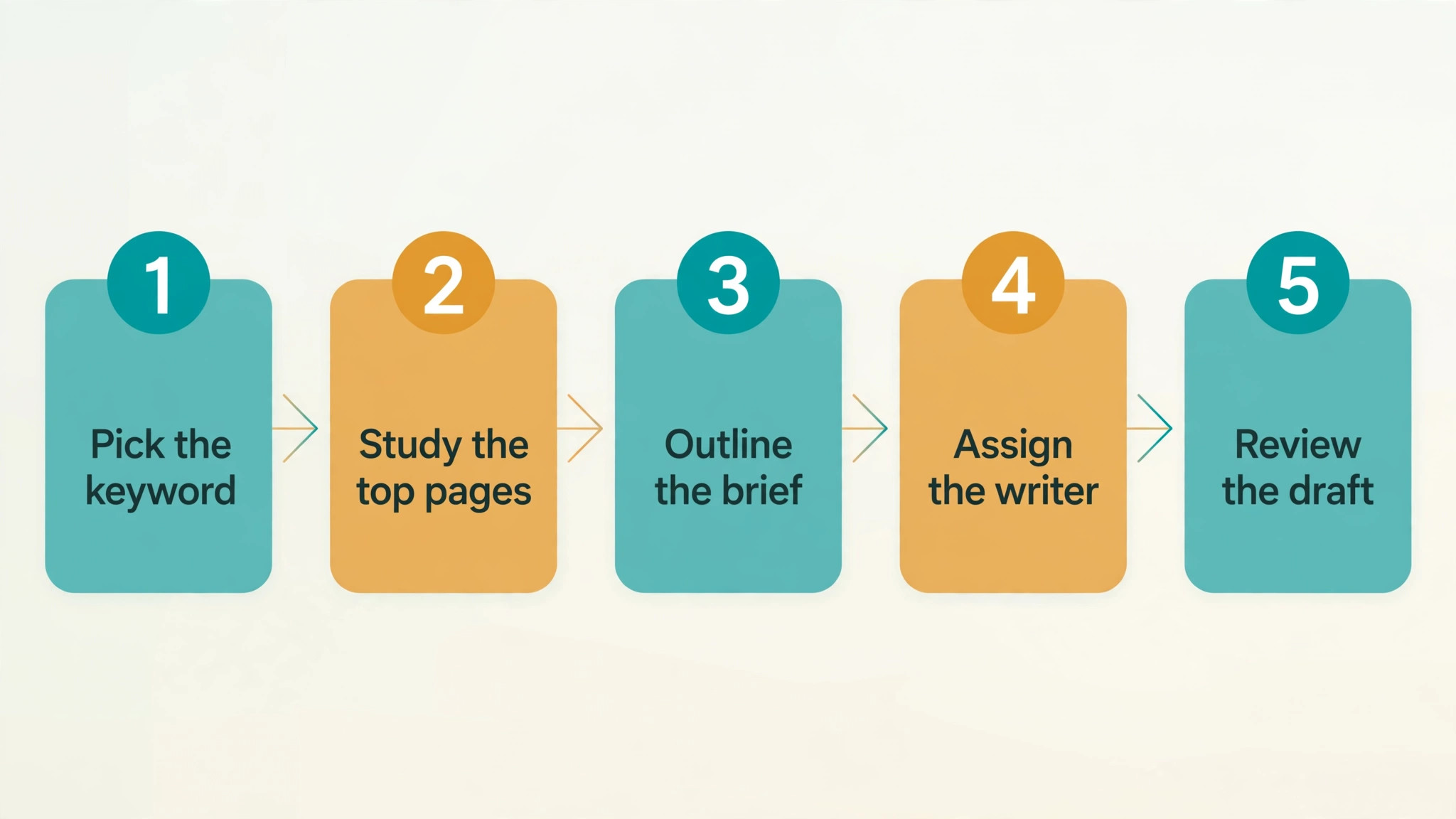
The best content brief tools for content teams only help when the process around them is clear, so here is the five-step run we recommend for a first brief.
- Pick the keyword. Choose one search with clear intent and a page you can realistically outrank.
- Study the top pages. Read the first five results and note what each one covers and what each one misses.
- Outline the brief. Turn the gaps into headings, add the questions readers ask, and set a word count.
- Assign the writer. Hand over the brief with a deadline and one contact for questions, then step back.
- Review the draft. Score it against the brief, not against taste, and send one round of notes.
Frequently Asked Questions
These are the questions content leads ask us most about the best content brief tools for content teams, answered in plain terms.
How long does it take to brief an article properly?
A good brief takes thirty to sixty minutes when the keyword is new, and half that when the topic is familiar. The research is the slow part, since reading the ranking pages and finding the gaps cannot be rushed. A brief tool cuts the formatting and data-gathering time, yet the thinking still belongs to a human. Teams that skip the thinking produce briefs that read well and rank badly.
Can a brief tool replace a human content strategist?
No, and any vendor that claims otherwise is selling a demo. A tool can gather data, suggest headings and score coverage, yet it cannot decide which angle will win readers or which topic deserves the next month of effort. The strategist sets the direction, and the tool makes the direction executable. Treat the tool as a skilled assistant, not as a replacement for judgment.
What makes a brief usable for freelance writers?
Clarity beats length. A freelance writer needs the angle in one sentence, the headings in order, the questions to answer and the terms to cover, plus a word count and a deadline. A brief that buries those facts in ten pages of research notes will be skimmed, not read. The best briefs on this list put the essentials first and keep the research as backup.
How many briefs can a small team produce each month?
A team of two can produce twenty to thirty solid briefs a month once the process settles, and a brief tool can lift that number by a third. The limit is rarely the tool, since most plans cover more briefs than a small team can use. The limit is the research time, and the tool helps most by cutting the repetitive parts of that research.
Should every article get a full data-led brief?
Not every page needs one. A news update or an opinion piece needs a short brief with an angle and a deadline, not a term coverage report. Save the full data-led brief for pages that must rank, since those are the pages where the research pays for itself. A team that briefs everything the same way wastes hours on pages that never needed the effort.
Do AI-written drafts need a brief at all?
They need one more than human drafts do. An AI tool with a vague instruction will produce generic text that reads smoothly and says little, while the same tool with a sharp brief will produce a draft worth editing. The brief is the instruction, and its quality decides the draft quality. Teams that brief AI tools well get drafts that need one edit instead of three.
Our Pick, Stated Plainly — Surfer Is the Content Team Default
If your team buys one brief tool this quarter, buy Surfer. The best content brief tools for content teams all have a place, but Surfer pairs the clearest pricing with the most usable briefs, and that combination is why it leads this guide. Writers understand the live score, editors trust the data, and the cost per brief stays reasonable as output grows.
The rest of the list earns its place for particular work. Clearscope suits enterprise review, MarketMuse suits strategy, and Frase suits a tight budget. Use Surfer for the daily work, then add the specialist that matches the gap in your process. That is the whole strategy, and it works for a team of two as well as a team of fifty.
One last pricing note matters. Track what each brief actually costs, from the subscription share to the hours spent briefing, and keep the numbers in a simple sheet. After a month you will know your true cost per brief on the tool you chose, and the renewal decision will take minutes instead of a meeting. The tools do not change much. Your data about them is what improves.