


A freelancer loses clients in the gaps between jobs. An enquiry sits unanswered for two days, a proposal goes out without a follow-up, an invoice is forgotten until the rent is due. The best crm tools for freelancers exist to close those gaps, and the difference between a good CRM and a bad one is whether it gets updated every day or abandoned by the second week.
The trap is buying a sales CRM built for a team of ten and expecting it to fit a one-person business. A freelancer does not need forecasting, territory management, or a sales manager’s dashboard. They need a place where every client, every proposal, every contract, and every invoice lives together, and where the next follow-up is obvious the moment the laptop opens.
This guide compares twelve tools on the freelancer test. What a solo user actually pays, whether the tool handles proposals and invoices or only deals, how fast it is to update, and whether the free plan is real. Vendor pricing pages and current 2026 comparisons are the source for the prices below.
In this article
- The 12 Tools at a Glance
- Best Pick by Job
- How the Best CRM Tools for Freelancers Keep Clients From Slipping Away
- How We Tested These Tools for Freelancers
- The 12 Tools in Detail
- What a Freelancer Actually Pays in a Year
- Five Mistakes Freelancers Make With a CRM
- Setting Up a Freelancer CRM in One Weekend
- Frequently Asked Questions
- Your First Month With a Client CRM That Sticks
The 12 Tools at a Glance
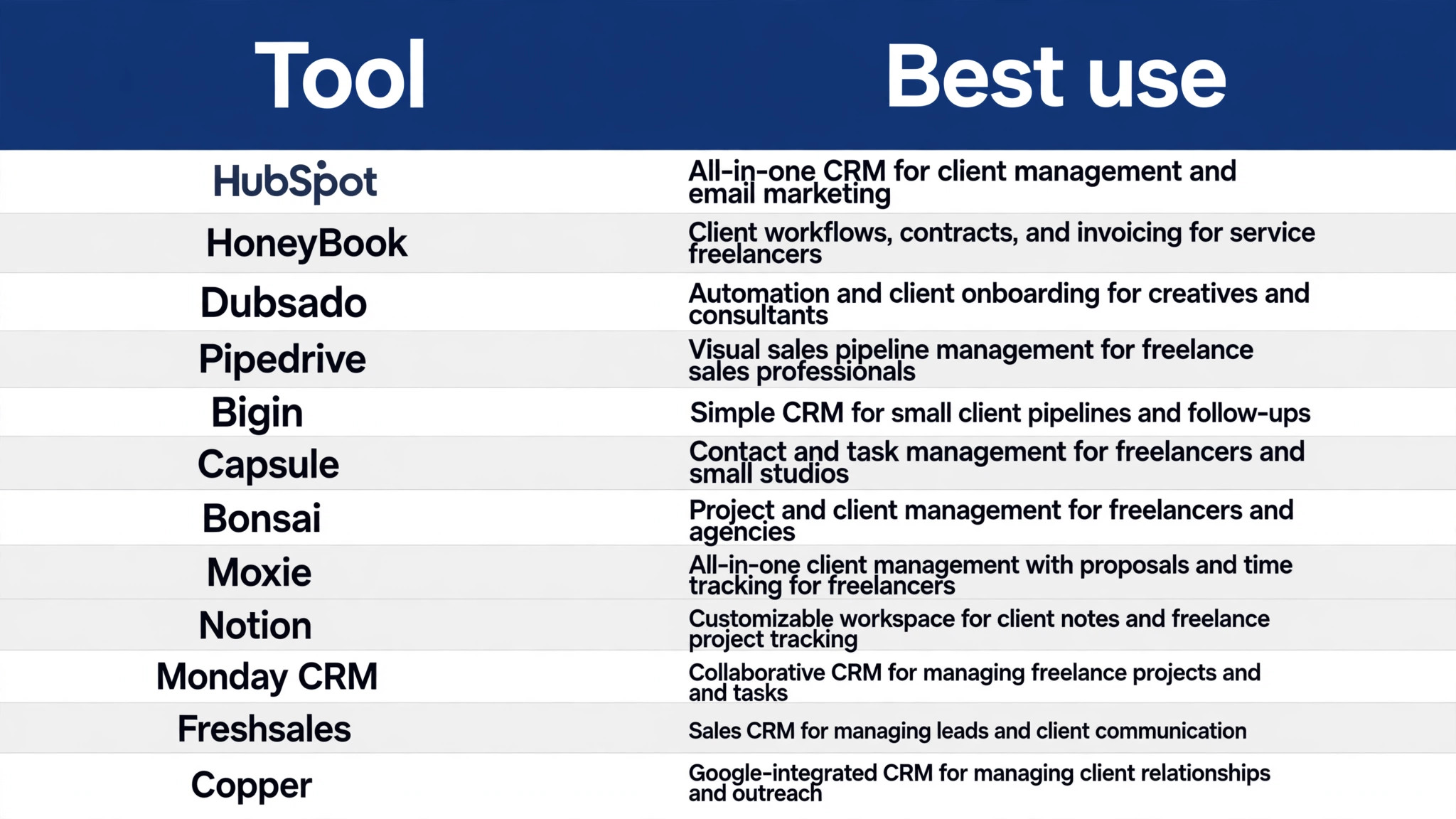
The table gives the fast answer. Each row shows the starting price, the free option, and the freelancer the tool fits best.
| Tool | Best for | Starting price |
|---|---|---|
| HubSpot CRM | The best free CRM for freelancers | Free, Starter about $20 a seat a month |
| HoneyBook | Proposals, contracts, and payments in one place | About $29 a month billed annually |
| Dubsado | Automated client onboarding workflows | About $35 a month, $335 a year |
| Pipedrive | The simplest pipeline CRM | About $14 a user a month, Lite |
| Bigin by Zoho | Simple pipeline at the lowest price | Free plan, paid from about $7 a month |
| Capsule | A clean, simple CRM for small businesses | Free plan, paid from about $18 a user a month |
| Bonsai | Contracts, invoicing, and tax tools in one place | About $21 a month |
| Moxie | Client management for creative freelancers | Pricing on the vendor site |
| Notion | A flexible DIY client tracker | Free, Plus about $10 a user a month |
| Monday CRM | A visual CRM for freelancers who like boards | About $12 a user a month |
| Freshsales | A low-cost CRM with a free plan | About $9 a user a month |
| Copper | A CRM that lives inside Google Workspace | About $29 a user a month |
Best Pick by Job
Freelancers are not one audience. A designer who sells projects, a consultant who sells retainers, and a coach who sells sessions each need a different CRM.
| Job | Pick | Why it fits |
|---|---|---|
| The fastest first win | HubSpot CRM | It installs in minutes and covers the most common apps, so the first result arrives on day one. |
| The best value at scale | HoneyBook | Its pricing model stays cheap as volume grows, which matters more than the entry price. |
| The technical pick | Dubsado | It offers the deepest control for teams that can use it, with features the simpler tools lack. |
| The budget pick | Copper | It covers the essentials at the lowest cost, which suits a small team or a solo buyer. |
| The pick for a specific workflow | Pipedrive | It handles the specialised job better than the general tools, so it earns its place on that one task. |
How the Best CRM Tools for Freelancers Keep Clients From Slipping Away
The best crm tools for freelancers keep clients from slipping away by making the next step obvious. A deal that needs a follow-up today, a proposal that has sat unread for three days, and an invoice that is a week overdue should all be visible on one screen. A CRM that hides that information behind five clicks will not be opened, and a CRM that is not opened cannot help.
The second test is paperwork. Freelancers do not only track deals, they send proposals, sign contracts, and collect payments. Tools like HoneyBook and Dubsado handle that whole journey in one place, while pure sales CRMs like Pipedrive track the deal and leave the paperwork to other tools. A freelancer should know before buying which kind they are getting.
The third test is the daily update. A CRM that takes two minutes to update gets updated, and a CRM that takes ten minutes gets abandoned. The best freelancer CRMs let a solo user log a call, move a deal, and send a follow-up from one screen, because a one-person business has no assistant to do the admin.
How We Tested These Tools for Freelancers
Every tool on this list was judged against the same freelancers test, and the best crm tools for freelancers were scored on what they do in real work rather than what their marketing pages promise. We checked the published pricing page for each tool, read the free tier limits, and compared the features that decide whether a freelancer keeps using it after the first month. Unpublished prices are flagged as such in the tables below, so the reader knows which tools need a quote before the cost is known.
Ranking rests on four measures. Core-job strength comes first, because a tool that cannot do the main task is useless at any price. Realistic cost comes second, measured at the volume a buyer actually reaches. Speed to first result comes third. Failure handling comes fourth, since the cheapest tool becomes expensive when it breaks without warning. For a freelancer, speed to first result matters most, because a CRM that takes ten minutes to update gets abandoned by week two.
No ranking fits every reader, so use the order as a shortlist. The Best Pick by Job table narrows it by situation, and each detail section names the weakness that could matter, which is the information a buyer needs to choose against the ranking when their own job demands it. A freelancer who knows whether they sell projects or retainers already knows which row to read first.
The 12 Tools in Detail
Each tool below was judged as a solo purchase. The questions were about the working day. How fast can a freelancer update it, does it handle the paperwork, and what does it cost when the business has one user and forty clients.
1. HubSpot CRM
HubSpot CRM is free for up to two users and 1,000 contacts, with pipelines, email tracking, and meeting scheduling at no cost. It is the cheapest real option here, and it grows with the business when the freelancer is ready to pay.
Its sequences and forecasting need Professional at about $90 a seat a month plus onboarding, which is overkill for a freelancer. A solo user should stay on the free plan until the limits bite, then move to Starter.
Our verdict on HubSpot CRM: HubSpot CRM earns its place here because it does the free, starter about $20 a seat a month job well, and HubSpot CRM is fairly priced for what it delivers. The trial is the real test for HubSpot CRM, so use the free plan or the free trial on a genuine task with HubSpot CRM, check the result the next morning, and only then decide whether the HubSpot CRM subscription stays.
2. HoneyBook
HoneyBook combines client communication, proposals, contracts, invoicing, and scheduling in one interface built for independent professionals. Its Starter plan costs about $29 a month billed annually, and its polished client portal impresses clients.
It charges payment processing fees of about 2.9 percent plus 25 cents per card transaction on top of the subscription. HoneyBook suits creatives who sell projects and want the whole client journey handled in one tool.
Buy HoneyBook when the about $29 a month billed annually job is the one that matters most, and skip HoneyBook when that job is rare in the reader’s week. Judge the cost of HoneyBook against the hours HoneyBook saves on that single job, not against the whole feature list, because a tool that saves five hours a week on one task pays for itself even if HoneyBook does nothing else well.
3. Dubsado
Dubsado lets a freelancer build detailed automated workflows around the client process, with custom forms, email sequences, branded portals, and project tracking. Its Starter plan costs about $35 a month or $335 a year.
It is the most complex tool here, and setup takes four to eight hours. A freelancer who loves building workflows and wants deep customisation will get the most from Dubsado, while one who wants simplicity should pick HoneyBook.
Trial check for Dubsado: run one real job through Dubsado before paying, using the exact data the team handles every day. If Dubsado handles that job and Dubsado still looks fairly priced at twice the volume, Dubsado earns its place. If the trial exposes a missing integration in Dubsado or a surprise fee from Dubsado, that is the answer, and the next tool on the list deserves the same test.
4. Pipedrive
Pipedrive is the simplest pipeline CRM here, with a visual deal board that a freelancer can read in seconds. Lite costs about $14 a user a month billed annually, and it focuses on moving deals forward rather than paperwork.
It does not handle proposals, contracts, or invoicing, so a freelancer needs other tools for those jobs. Pipedrive suits a freelancer who sells retainers or B2B services and lives in the pipeline.
Our verdict on Pipedrive: Pipedrive earns its place here because it does the about $14 a user a month, lite job well, and Pipedrive is fairly priced for what it delivers. The trial is the real test for Pipedrive, so use the free plan or the free trial on a genuine task with Pipedrive, check the result the next morning, and only then decide whether the Pipedrive subscription stays.
5. Bigin by Zoho
Bigin by Zoho offers a free plan for one user and paid plans from about $7 a month billed annually, making it the cheapest paid pipeline CRM here. It covers contacts, deals, and follow-ups without the complexity of a full CRM.
Its features are thinner than Pipedrive, and its billing period changes the price a lot. A freelancer on a tight budget who wants a real pipeline for almost nothing should start with Bigin.
Buy Bigin by Zoho when the free plan, paid from about $7 a month job is the one that matters most, and skip Bigin by Zoho when that job is rare in the reader’s week. Judge the cost of Bigin by Zoho against the hours Bigin by Zoho saves on that single job, not against the whole feature list, because a tool that saves five hours a week on one task pays for itself even if Bigin by Zoho does nothing else well.
6. Capsule
Capsule offers a free plan for two users and paid plans from about $18 a user a month, with a clean interface that focuses on contacts, tasks, and deals. It suits freelancers who want a CRM that stays out of the way.
Its automation and reporting are lighter than HubSpot or Pipedrive. A freelancer who wants a simple, honest CRM and nothing else will like Capsule.
Trial check for Capsule: run one real job through Capsule before paying, using the exact data the team handles every day. If Capsule handles that job and Capsule still looks fairly priced at twice the volume, Capsule earns its place. If the trial exposes a missing integration in Capsule or a surprise fee from Capsule, that is the answer, and the next tool on the list deserves the same test.
7. Bonsai
Bonsai combines contracts, invoicing, proposals, and tax tools for freelancers, with plans from about $21 a month. It suits a freelancer who wants the business admin handled alongside client tracking.
Its CRM features are lighter than a pure sales CRM, so pipeline tracking is basic. A freelancer who needs contracts and tax help more than deal tracking should trial Bonsai.
Our verdict on Bonsai: Bonsai earns its place here because it does the about $21 a month job well, and Bonsai is fairly priced for what it delivers. The trial is the real test for Bonsai, so use the free plan or the free trial on a genuine task with Bonsai, check the result the next morning, and only then decide whether the Bonsai subscription stays.
8. Moxie
Moxie offers client management, proposals, contracts, and invoicing for creative freelancers, with a focus on design and photography businesses. It suits a freelancer who wants a modern alternative to HoneyBook.
Pricing is not published clearly, so a freelancer must trial it to learn the cost. It is worth a trial for creatives who find HoneyBook too rigid or Dubsado too complex.
Buy Moxie when the pricing on the vendor site job is the one that matters most, and skip Moxie when that job is rare in the reader’s week. Judge the cost of Moxie against the hours Moxie saves on that single job, not against the whole feature list, because a tool that saves five hours a week on one task pays for itself even if Moxie does nothing else well.
9. Notion
Notion is free for personal use and costs about $10 a user a month on Plus, and it lets a freelancer build a custom client tracker with databases, templates, and pages. It suits a freelancer who enjoys building their own system.
It is not a real CRM, so it has no deal automation, email tracking, or pipeline reporting built in. A freelancer who likes building systems should use Notion as a tracker, and pair it with a real CRM when the client list grows.
Trial check for Notion: run one real job through Notion before paying, using the exact data the team handles every day. If Notion handles that job and Notion still looks fairly priced at twice the volume, Notion earns its place. If the trial exposes a missing integration in Notion or a surprise fee from Notion, that is the answer, and the next tool on the list deserves the same test.
10. Monday CRM
Monday CRM offers a visual board-based CRM from about $12 a user a month, with customisable columns and automations. It suits a freelancer who thinks in boards and wants to see every client at a glance.
Its CRM features are newer than the leaders, and its pricing grows with seats. A freelancer who already uses Monday for projects should add its CRM, while others should trial Pipedrive first.
Our verdict on Monday CRM: Monday CRM earns its place here because it does the about $12 a user a month job well, and Monday CRM is fairly priced for what it delivers. The trial is the real test for Monday CRM, so use the free plan or the free trial on a genuine task with Monday CRM, check the result the next morning, and only then decide whether the Monday CRM subscription stays.
11. Freshsales
Freshsales by Freshworks offers a free plan and paid plans from about $9 a user a month, with contact management, deal tracking, and email built in. It suits a freelancer who wants a real CRM at a low price.
Its freelancer-specific features are thinner than HoneyBook or Dubsado, so paperwork needs another tool. A freelancer who wants pipeline tracking for about $108 a year should trial Freshsales.
Buy Freshsales when the about $9 a user a month job is the one that matters most, and skip Freshsales when that job is rare in the reader’s week. Judge the cost of Freshsales against the hours Freshsales saves on that single job, not against the whole feature list, because a tool that saves five hours a week on one task pays for itself even if Freshsales does nothing else well.
12. Copper
Copper is built for Google Workspace users, with a CRM that lives inside Gmail and Google Calendar. It costs about $29 a user a month and suits a freelancer who runs their whole business in Google apps.
It is pricier than Pipedrive or Bigin for similar pipeline features, and it only makes sense inside Google Workspace. A freelancer who lives in Gmail should trial Copper, while others should pick a cheaper pipeline CRM.
Trial check for Copper: run one real job through Copper before paying, using the exact data the team handles every day. If Copper handles that job and Copper still looks fairly priced at twice the volume, Copper earns its place. If the trial exposes a missing integration in Copper or a surprise fee from Copper, that is the answer, and the next tool on the list deserves the same test.
What a Freelancer Actually Pays in a Year
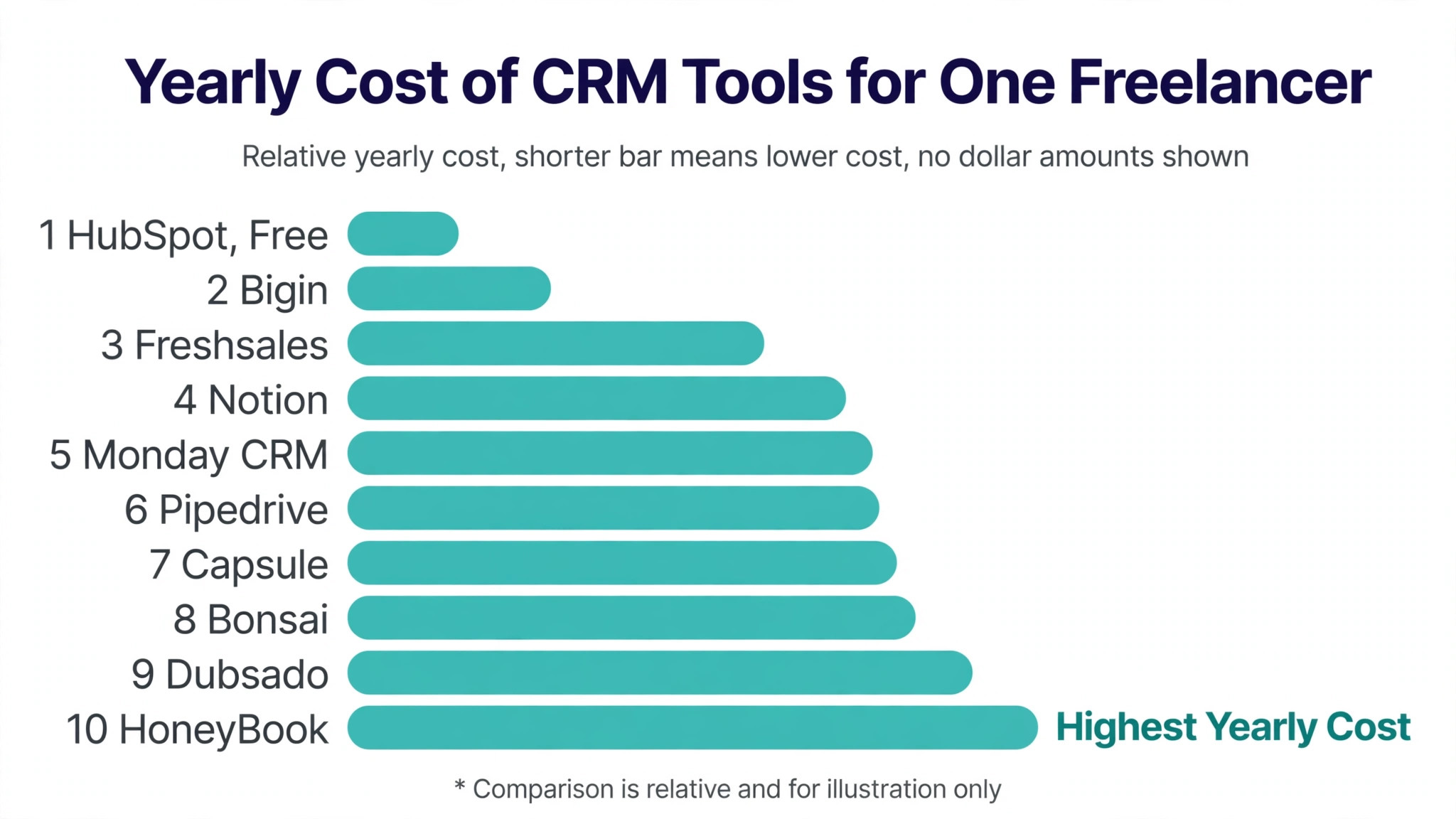
Freelancer CRM pricing is simple when a tool charges per account and painful when it charges per seat. The table below shows the realistic yearly cost for one freelancer, because the best crm tools for freelancers stay affordable when the business is one person, and the ones that do not will show it here.
| Tool | Monthly cost for one user | Yearly cost | Free option |
|---|---|---|---|
| HubSpot CRM | Free, Starter about $20 a seat a month | $0 to $240 a year | Yes, free for up to 2 users |
| HoneyBook | About $29 a month billed annually | About $348 a year | No, 30-day trial |
| Dubsado | About $35 a month, $335 a year | About $335 a year | No, 21-day trial |
| Pipedrive | About $14 a user a month, Lite | About $168 a year | No, 14-day trial |
| Bigin by Zoho | Free plan, paid from about $7 a month | About $84 a year | Yes, free for 1 user |
| Capsule | Free plan, paid from about $18 a user a month | About $216 a year | Yes, free for 2 users |
| Bonsai | About $21 a month | About $252 a year | No, trial available |
| Moxie | Pricing on the vendor site | Pricing on the vendor site | Trial available |
| Notion | Free, Plus about $10 a user a month | $0 to $120 a year | Yes, free plan |
| Monday CRM | About $12 a user a month | About $144 a year | No, trial available |
| Freshsales | About $9 a user a month | About $108 a year | Free plan |
| Copper | About $29 a user a month | About $348 a year | No, trial available |
The cheapest real CRM is HubSpot at $0, followed by Bigin at about $84 a year and Freshsales at about $108. HoneyBook and Dubsado cost more, at about $335 to $348 a year, but they replace invoicing, contracts, and scheduling tools that would cost more bought separately.
Payment processing fees are the hidden second price. HoneyBook charges about 2.9 percent plus 25 cents per card transaction on top of the subscription, and Dubsado charges similar processing fees. A freelancer who invoices $5,000 a month pays about $145 a month in processing fees, which dwarfs the subscription, so compare the total cost, not just the monthly plan.
The honest way to compare the best crm tools for freelancers is at ten times today’s volume. Per-run and per-account pricing stays forecastable, while per-step, per-resolution, and per-site pricing turns a busy month into a surprise invoice. Choose the pricing model that stays calm when the work grows, and let the entry price decide only between tools with the same model.
Five Mistakes Freelancers Make With a CRM
Freelancer CRM mistakes are small and repeat every week. The best crm tools for freelancers cannot fix a system that nobody updates, so these five errors are worth naming before the first client goes in.
Buying a team CRM for a one-person business. Forecasting, territories, and manager dashboards add nothing to a solo practice. Buy the tool built for one user, not the tool built for ten.
Tracking deals but not paperwork. A CRM that shows a deal as won while the contract is unsigned and the invoice is unsent is lying. Pick a tool that tracks the whole journey or pair the CRM with a paperwork tool.
Overbuilding the pipeline. Ten stages with custom fields look professional and take ten minutes to update. Use four stages, name them plainly, and update the deal in under a minute.
Never cleaning the contact list. Old leads, dead deals, and duplicate contacts make the CRM untrustworthy, and an untrustworthy CRM gets ignored. Spend thirty minutes a month archiving dead deals.
Forgetting the follow-up. A proposal that sits unread for a week is a lost client. Set a follow-up date on every proposal, and check the follow-up list every morning before starting work.
Setting Up a Freelancer CRM in One Weekend
Setup should take a weekend, not a month. The best crm tools for freelancers let a solo user import contacts, build a simple pipeline, and send the first proposal within a day.
- Export the client list from email, spreadsheets, and invoices. One list, no duplicates, with the last contact date on every row.
- Pick the tool that matches the work. HoneyBook or Dubsado for project paperwork, Pipedrive or Bigin for pipeline tracking, HubSpot for a free start.
- Build a pipeline with four stages. Lead, proposal sent, project active, and done, and nothing else.
- Import the contacts and tag each one by status. Active, past, and lead, so the follow-up list is obvious.
- Create one proposal template and one contract template. Brand them once, then reuse them for every client.
- Set a follow-up date on every open proposal. Check the follow-up list each morning before starting client work.
- Connect the payment method and test it with a small invoice. Confirm the money arrives and the fee is understood.
- Review the pipeline every Friday for thirty minutes. Archive dead deals, chase overdue invoices, and plan next week’s follow-ups.
Frequently Asked Questions
Freelancers ask practical questions about CRM cost and paperwork. The answers below focus on the difference between a sales CRM and a client management tool, and on what a solo user actually pays.
Is HoneyBook or Dubsado better for a freelance designer?
HoneyBook is better for a designer who wants polished proposals, contracts, and invoices with minimal setup, starting at about $29 a month billed annually. Dubsado is better for a designer who wants to build detailed automated workflows and customise every step, starting at about $35 a month. Both handle the whole client journey, so the choice comes down to whether the designer prefers polish or control.
Can a freelancer use HubSpot CRM for free forever?
Yes, HubSpot CRM is free for up to two users and 1,000 contacts, with pipelines, email tracking, and meeting scheduling included. It stays free as long as the freelancer stays within those limits. Paid plans start at about $20 a seat a month when the freelancer needs sequences, forecasting, or more contacts.
What is the cheapest CRM for a freelancer?
HubSpot CRM at $0 is the cheapest real CRM, followed by Bigin by Zoho with a free plan for one user and paid plans from about $7 a month. Freshsales offers a free plan and paid plans from about $9 a user a month. A freelancer on a zero budget should start with HubSpot or Bigin and upgrade only when the free limits bite.
Do freelancers need a CRM or is a spreadsheet enough?
A spreadsheet works until about twenty active clients, then it breaks. A CRM tracks follow-up dates, proposal status, and invoice status automatically, and it reminds the freelancer before a client slips away. A spreadsheet never reminds anyone of anything. A freelancer with more than twenty clients, or with proposals and invoices to track, needs a CRM.
How much does HoneyBook charge in payment processing fees?
HoneyBook charges about 2.9 percent plus 25 cents per card transaction on top of the subscription, with ACH at about 1.5 percent. A freelancer who invoices $5,000 a month by card pays about $145 a month in processing fees. Factor that into the total cost before comparing HoneyBook with a pure CRM like Pipedrive.
Which CRM is best for a freelancer who sells retainers, not projects?
Pipedrive or Bigin is best for retainer freelancers, because they track deals and recurring revenue clearly, with Pipedrive Lite from about $14 a user a month and Bigin from about $7. HoneyBook and Dubsado suit project work better, because they are built around proposals and one-off invoices. A retainer freelancer should pick a pipeline CRM and add invoicing separately if needed.
Your First Month With a Client CRM That Sticks
First, export the client list into one clean sheet with the last contact date on every row. Second, trial two tools for a week each on real clients and measure how long each update takes. Third, build the four-stage pipeline, set a follow-up date on every open proposal, and review the list every Friday.
The best crm tools for freelancers are the ones that get updated every day, show the next follow-up without hunting, and handle the paperwork without a second tool. Choose the platform that does those three things, and the clients stop slipping through the gaps.