

A customer who waits two days for a reply rarely complains. They leave, and they tell a friend the business did not care. For a small business, that quiet exit is expensive, because replacing a customer costs far more than keeping one. The best customer service tools for small businesses exist to stop that slow leak, by giving a team of two or five the same tidy inbox, the same fast answers, and the same calm tone as a company ten times its size.
We tested each tool on real small business work, not on a feature list. That meant answering the same mixed inbox a shop owner faces every morning, which is an order question, a delivery complaint, and a refund request. The ranking weighs how fast a reply goes out, how little the team has to retype, and how easily a new hire picks the system up.
Freshdesk leads the ranking on the combined score, with Zendesk close behind for teams that expect to grow fast. Help Scout wins for teams that want email to feel personal, while Intercom suits businesses that sell through live chat.
Freshdesk sits first on combined score, but a small team on one channel should let the best pick by job table outweigh the overall order. A tool that ranks fourth overall can still be the right answer for a shop that lives on chat, just as the overall winner can be wrong for a team that only handles email.
In this article
- The 10 Tools at a Glance
- Why the Best Customer Service Tools for Small Businesses Pay Off Fast
- How We Put Each Support Tool Through Its Paces
- The 10 Tools in Detail
- What a Small Team Actually Pays Over a Year
- Mistakes That Cost Small Teams Customers
- Best Pick by Job
- Frequently Asked Questions
- Settling Your Small Team Support Call
The 10 Tools at a Glance
The table below lines up the best customer service tools for small businesses on the facts that decide a purchase, which are the price shape, the natural fit, and the strength that earned each rank. Freshdesk leads on value and reporting, while Zendesk wins for teams that need deep automation and room to grow.
| Tool | Starting price | Best for | Standout strength |
|---|---|---|---|
| Freshdesk | Free plan; paid plans on the vendor site | Small teams that want value fast | Clean ticketing with strong reporting |
| Zendesk | Pricing on the vendor site | Growing teams that need depth | Deep automation and app marketplace |
| Help Scout | Pricing on the vendor site | Teams that prize a personal tone | Shared inbox that reads like email |
| Intercom | Pricing on the vendor site | Businesses that sell through chat | Live chat with smart bots |
| Zoho Desk | Free plan; paid plans on the vendor site | Teams already using Zoho apps | Context from CRM beside each ticket |
| HubSpot Service Hub | Free plan; paid plans on the vendor site | Teams that want service beside sales | Free CRM tied to every conversation |
| LiveChat | Pricing on the vendor site | Shops that need chat done well | Fast chat with rich visitor detail |
| Gorgias | Pricing on the vendor site | Ecommerce stores with busy inboxes | Macros tied to order data |
| Tidio | Free plan; paid plans on the vendor site | Small shops starting with chat | Chatbots that are quick to launch |
| Kayako | Pricing on the vendor site | Teams that want one simple inbox | Unified inbox with live chat built in |
Freshdesk and Zendesk are the two rows to compare first, so read those reviews and see which inbox your team opens every morning.
Why the Best Customer Service Tools for Small Businesses Pay Off Fast
Slow replies cost a small business twice. The first cost is the sale that never happens, because a shopper who asks a question at nine in the evening buys from the rival who answers at nine fifteen. The second cost is the customer who leaves quietly and never says why, which means the business keeps losing people for a reason it cannot see.
A shared inbox fixes the most common failure, which is a message that belongs to nobody. In a small team, email often lives in one person’s account, and when that person is ill or on holiday, the message sits unread. A shared inbox gives every message an owner, a status, and a history anyone on the team can open.
Canned replies and templates fix the second failure, which is slow typing. Most small business questions repeat themselves, which are delivery times, return rules, stock checks, and booking changes. A tool that stores the good answers lets a team reply in seconds with the same warm wording every time, instead of typing a fresh reply from scratch at midnight.
The third gain is memory. A customer who has written three times should not have to explain the whole story a fourth time. Good tools show the full history beside the new message, so the reply can start with what already happened instead of asking the customer to repeat it. That memory is what makes a small business feel careful rather than careless.
How We Put Each Support Tool Through Its Paces
We ran the best customer service tools for small businesses through the same five measures, using a simulated shop inbox with forty mixed conversations, two team members, and one owner checking the numbers. Each tool handled the same workload for two weeks, so the scores compare like with like.
- Reply speed, judged by how quickly a team member could send a correct first reply to a common question, using templates and the shared inbox.
- Inbox clarity, measured by how fast a new hire could tell which messages were waiting, which were answered, and which needed an owner.
- Automation depth, scored on how much routine work the tool handled alone, from sorting messages to suggesting replies and closing resolved tickets.
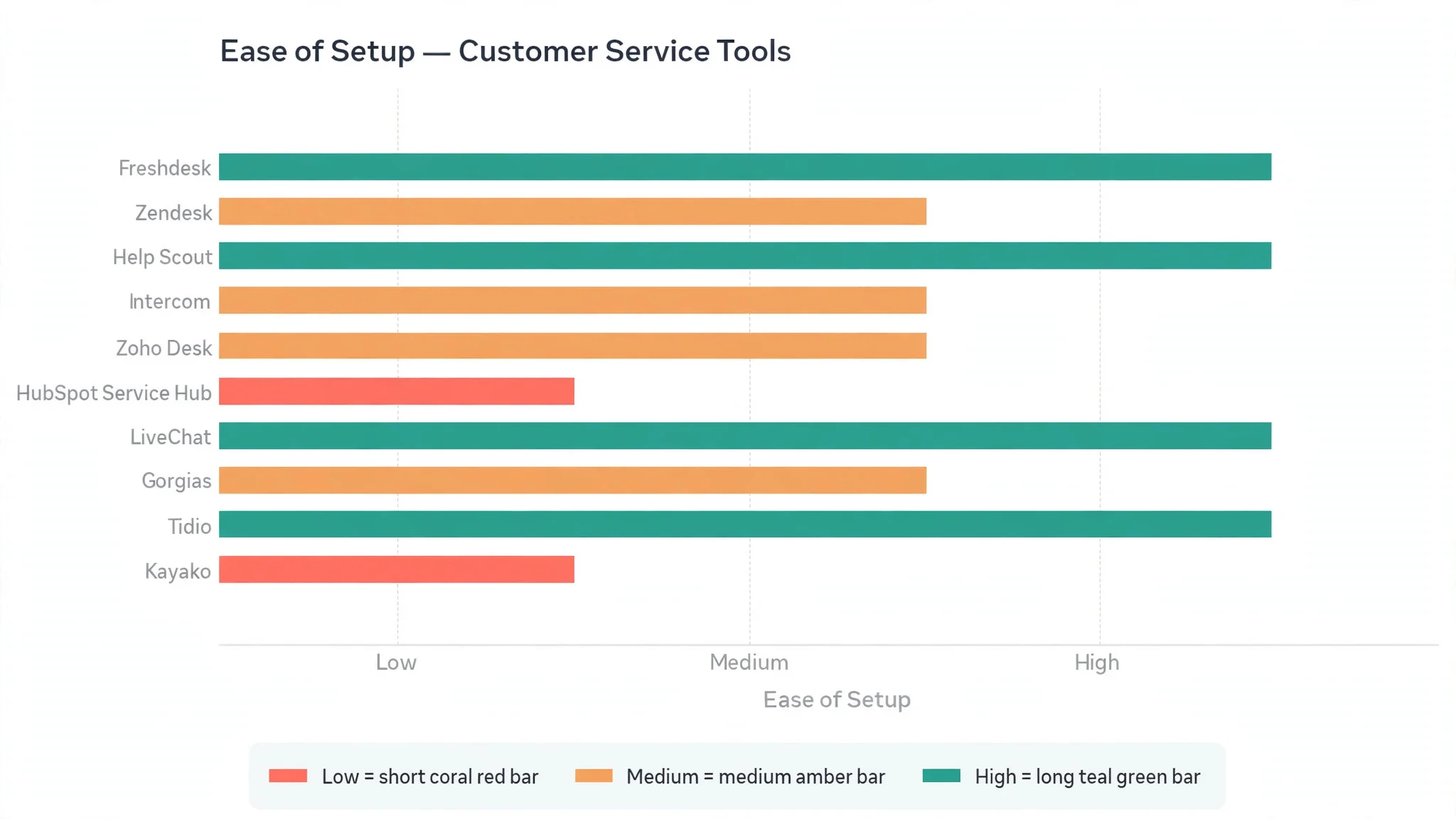
- Setup speed, timed from account creation to a working inbox with the team invited, the first templates written, and the first real message answered.
- Daily usability, judged by how long the morning inbox check took and how often the team needed to ask for help or look up a guide.
Each measure carried equal weight except reply speed, which counted double, because a support tool that cannot get answers out fast is not doing its job. Scores run out of 100, and the order below follows the combined total, led by Freshdesk on value and clarity.
The 10 Tools in Detail
Each review below judges the best customer service tools for small businesses on the same ground. We note what each tool does best, where it falls short, and the buyer it suits best, with reply speed carrying the most weight.
1. Freshdesk
Freshdesk tops the best customer service tools for small businesses on the combined score, and it earns the lead with a rare mix of a generous free plan and a genuinely tidy inbox. Tickets arrive from email, chat, phone, and social channels into one queue, and the team can sort them by urgency, assign owners, and reply from templates without opening five tabs. The interface stays plain and readable, which matters when a new hire starts on Monday.
The strengths run beyond the price. Automations route messages by keyword, so a refund request reaches the person who handles refunds instead of sitting in a general pile. Reporting on the paid tiers shows reply times and busiest hours clearly enough for an owner to act on.
The limits are honest ones. The free plan covers the basics well but holds back the deeper automation and the richer reports, so a growing team will need to pay sooner than with some rivals. The AI features feel lighter than Zendesk or Intercom.
In the trial, load one real week of messages and time the morning clear. Ask a new starter to answer three common questions using templates only, and check whether the reply sounds like your business or like a machine. If the starter finishes in under ten minutes and the replies read warm, the tool fits.
Our verdict. The best all rounder here, and the safest first pick for most small teams.
2. Zendesk
Zendesk is the heavyweight, and it earns second place with depth no other tool in this ranking matches. The ticketing engine handles high volume with ease, the automation rules are genuinely powerful, and the app marketplace adds almost any integration a growing business could want. A team that starts small and plans to reach fifty agents will not outgrow it.
The strengths show in the details. Triggers and automations can sort, tag, escalate, and reply to routine messages before a human ever sees them. The reporting suite tracks first reply time, resolution time, and satisfaction scores in depth, and the knowledge base helps customers answer their own questions.
The limits are price and complexity. Zendesk costs more than most rivals, and the bill climbs as agents and features are added, so a team of three should check the total before committing. Setup also takes longer, because the power comes with settings that need real thought.
In the trial, build one automation that sorts messages by topic and one that sends an instant acknowledgement after hours. Check whether the setup feels clear or whether it needs a guide open beside it. If the team can build both in an afternoon, the depth is usable rather than decorative.
Our verdict. The deepest platform here, ideal for teams that expect real growth.
3. Help Scout
Help Scout is the personal touch specialist, and it earns third place by making shared inboxes feel like ordinary email. Customers never see ticket numbers or case IDs, and replies read like a message from a person, not a system. For a small business that sells on warmth and trust, that tone is worth more than a long feature list.
The strengths are focus and restraint. The shared inbox is simple to learn, collision detection stops double replies, and saved replies handle the repeat questions. Docs, its built-in knowledge base, lets customers find answers alone, which quietly cuts the inbox in half.
The limits are scope. Help Scout does not try to be a full contact centre, so phone support and heavy live chat sit outside its core, and teams that need those channels will add another tool. Reporting is solid but lighter than Zendesk, and the AI help is modest next to the leaders.
In the trial, send a test message as a customer and read the reply as that customer would. Ask whether it sounds like a person who cares or a system that processed a case. Then check the Docs search with a real customer question. If both feel human, the tool fits a business built on relationships.
Our verdict. The warmest inbox here, ideal for teams that sell on personal service.
4. Intercom
Intercom is the chat-first pick, and it suits businesses that win customers in conversation rather than in an inbox queue. Live chat, targeted messages, and AI bots work together to greet visitors, answer common questions, and pass the warm leads to a human at the right moment. For a business with a busy website, that flow turns browsing into sales.
The strengths are speed and targeting. The messenger can show different messages to different visitors, so a returning customer sees something different from a first-time browser. Fin, its AI agent, resolves a real share of routine questions on its own, and the inbox keeps the human handoffs tidy. Product tours and onboarding messages add value for software sellers.
The limits are cost and focus. Intercom prices above most rivals in this ranking, and the bill can surprise a small team that adds seats and features. Email support feels secondary to chat, so a business whose customers mostly write emails will get less value.
In the trial, put the chat on one busy page and watch a full day of conversations. Count how many the bot resolved alone and how many needed a human, then read the handoffs for warmth. If the bot handles the routine half and the humans get the interesting half, the balance is right.
Our verdict. The strongest live chat here, ideal for businesses that sell through conversation.
5. Zoho Desk
Zoho Desk is the context pick, and it earns its place by showing the customer behind the ticket. When a message arrives, the agent sees the customer’s history, orders, and notes from the wider Zoho system beside it, so the reply can start from facts instead of questions. For teams already using Zoho apps, that context arrives with no extra setup.
The strengths are integration and price. The free plan is genuinely usable for a small team, and the paid tiers stay below most rivals while adding automation, multi-channel inboxes, and a solid knowledge base. Zia, its AI helper, can suggest replies and spot the tone of a message.
The limits are polish and pace. The interface feels busier than Freshdesk or Help Scout, and new users take a little longer to find their way around. Some advanced features sit behind higher tiers, and teams outside the Zoho world get less of the context that makes the tool shine.
In the trial, open a ticket from a repeat customer and check what the agent sees without clicking away. Ask whether the history answers the obvious questions before the reply is written. If the agent can answer in one screen, the context is earning its keep.
Our verdict. The best context beside the ticket here, ideal for teams already in the Zoho world.
6. HubSpot Service Hub
HubSpot Service Hub is the joined-up pick, and it suits small businesses that want service, sales, and marketing in one place. Every conversation sits beside the customer’s full record, so a support agent can see what the customer bought, what they were promised, and what the sales team already said. That shared record stops the classic failure where support and sales tell a customer two different things.
The strengths start with the free tier, which includes a shared inbox, live chat, and basic ticketing at no cost, tied to a free CRM that many small teams already use. The paid tiers add automation, customer feedback surveys, and a knowledge base, all inside the same system.
The limits are price at scale and depth in one area. The higher tiers cost more than specialist rivals, and a team that only needs support may pay for marketing features it never opens. The ticketing itself is capable but less deep than Zendesk, so very high volume teams may feel the ceiling sooner.
In the trial, open a customer record and read the full story before answering a test message. Check whether the sales notes and the support history agree, and whether the agent can reply without asking the customer to repeat anything. If the record tells the whole story, the joined-up system is doing its job.
Our verdict. The best service beside sales here, ideal for teams already using HubSpot.
7. LiveChat
LiveChat is the chat specialist, and it earns its place by doing one thing very well. The chat widget loads fast, looks clean on any website, and gives agents rich detail about each visitor, including the page they are on and what they looked at before writing. For a shop where most questions arrive while the customer is browsing, that detail turns a vague chat into a useful conversation.
The strengths are speed and craft. Agents can handle several chats at once with canned responses and typing previews, and the ticketing add-on catches messages that arrive after hours. Reports show chat volume, response times, and satisfaction clearly, and the integrations cover the main ecommerce and CRM platforms.
The limits are scope. LiveChat is chat first, so email and social messages feel like additions rather than equals, and a team with a heavy email load will need a second system or a higher tier. There is no free plan, so a small shop pays from day one, though the entry tier stays modest.
In the trial, run the chat on the busiest product page for a week and read ten real conversations. Check whether the visitor detail helped the agent answer faster, and whether the canned replies sounded natural. If the chats end with a sale or a solved problem more often than before, the tool is earning its fee.
Our verdict. The sharpest pure chat tool here, ideal for shops that sell while customers browse.
8. Gorgias
Gorgias is the ecommerce pick, and it is built for stores whose inbox fills with order questions. When a message arrives, the agent sees the order, the tracking status, and the refund history beside it, and one-click macros can answer, refund, or update an order without leaving the inbox. For a busy store, that saves minutes on every single conversation.
The strengths are the order connection and the macros. The tool ties into the main ecommerce platforms, so the agent never has to ask for an order number or open a second tab. Automation rules sort messages by intent, and the revenue reports show which conversations led to sales. The AI features can draft replies in the store’s own tone.
The limits are fit and price. Gorgias is made for ecommerce, so a service business or a consultancy will find much of it irrelevant. Pricing is based on ticket volume rather than seats, which suits some stores and surprises others, so the monthly count matters more than the headcount.
In the trial, answer ten real order questions and count the clicks each one needs. Check whether the macro handled the refund without a second tab, and whether the revenue report shows the value of the work. If most questions close in one screen, the ecommerce focus is paying off.
Our verdict. The best inbox for online stores here, ideal for ecommerce teams with heavy order traffic.
9. Tidio
Tidio is the easy start, and it suits small shops that want chat and simple bots running today, not next month. The setup takes minutes, the chatbot builder uses plain drag and drop, and the free plan covers the basics well enough for a shop finding its feet. For a business that has never used a support tool, Tidio is the gentlest first step.
The strengths are speed and simplicity. The chat widget looks good out of the box, the bots can answer common questions and collect contact details, and the shared inbox keeps email and chat in one place. Lyro, its AI agent, can handle routine questions in plain language.
The limits are depth. Tidio is not a full helpdesk, so teams with complex ticket flows, heavy email volume, or strict reporting needs will outgrow it. The AI features sit on higher tiers, and the free plan caps the number of conversations, so a busy shop will need to pay as traffic grows.
In the trial, build one bot flow for the most common question your shop receives, then test it as a customer. Check whether the bot answers cleanly and hands over to a human when it should. If the first bot is live within an hour and the handoff feels smooth, the tool fits a small team.
Our verdict. The quickest start here, ideal for small shops new to support tools.
10. Kayako
Kayako is the simple unified pick, and it rounds out the ranking with a single inbox that covers email, chat, and social messages without fuss. The interface stays calm, the ticket flow is easy to follow, and the shared views let a small team see everything waiting without hunting through folders. For a team that wants one quiet place for all customer messages, Kayako delivers it.
The strengths are unity and calm. Every channel lands in the same queue, and the conversation view keeps the full history in one thread, so an agent never loses the thread of a long-running problem. Live chat is built in rather than bolted on, and the self-service help centre lets customers find answers alone. The learning curve is short.
The limits are momentum and polish. Kayako has a smaller community and fewer new features than the leaders, and its automation and AI are lighter than Freshdesk or Zendesk. Teams that want deep reporting or a large app marketplace will feel the gap.
In the trial, route email and chat into the same queue for a week and watch the morning check. Ask whether the team can see everything waiting in one view, and whether the help centre answers the most common question without an agent. If the inbox feels quieter and the team calmer, the tool is doing its job.
Our verdict. The calmest unified inbox here, ideal for small teams that want one quiet queue.
What a Small Team Actually Pays Over a Year
The best customer service tools for small businesses differ most on what happens after the free plan ends, and the sticker price is only the start. A tool that looks cheap per agent can cost more once the team adds seats, turns on automation, or needs the reports that sit on a higher tier. Before choosing, add up the seats, the channels, and the features the team will actually use, then compare that total across two or three finalists.
Free plans deserve a hard look, not a quick yes. Freshdesk, Zoho Desk, HubSpot, and Tidio all offer a free tier, but each one holds back something different, which is automation here, reporting there, and AI elsewhere. A free plan that covers the real workload is a gift. A free plan that forces an upgrade in month two is just a trial with better marketing.
Watch the pricing model as much as the price. Most tools charge per agent each month, while Gorgias charges by ticket volume, which changes the maths for a store with seasonal spikes. A shop that answers five hundred messages in December and fifty in February should check what the spike costs, not what the average costs. Ask the vendor for the annual total on the team’s real numbers before signing anything.

Mistakes That Cost Small Teams Customers
The first mistake is buying for the demo instead of the daily work. A tool can look brilliant in a guided tour and still slow the team down every morning. Trial the tool on real messages, with real customers, for at least two weeks, and judge it on the morning check rather than the sales call.
The second mistake is skipping the templates. Teams that answer every message from scratch burn hours and sound different every time, which customers notice. Write ten saved replies in the first week, covering delivery, returns, stock, refunds, and booking changes, and review them monthly. A good template sounds like the business at its best, not like a form letter.
The third mistake is leaving the inbox to one person. When only one team member knows the tool, every holiday and sick day becomes a backlog, and customers wait. Train at least two people on every channel, and keep the shared views simple enough that a new hire can read them on day one.
Best Pick by Job
No single winner fits every small business, so the tools below are matched to the job instead of the rank.
| Job | Best pick | Why it wins |
|---|---|---|
| Wants the best all rounder | Freshdesk | Value, clarity, and reporting in one place |
| Expects fast growth | Zendesk | Depth and automation that scale with the team |
| Sells on personal service | Help Scout | Replies that read like a person wrote them |
| Wins customers in live chat | Intercom | Chat, bots, and targeting in one flow |
| Already runs on Zoho | Zoho Desk | Customer context beside every ticket |
| Wants service beside sales | HubSpot Service Hub | Shared customer record across teams |
| Runs a busy online shop | Gorgias | Order data and macros in the inbox |
| Needs chat done well | LiveChat | Fast widget with rich visitor detail |
| Starting from zero | Tidio | Chat and bots live within an hour |
| Wants one quiet queue | Kayako | Every channel in a single calm inbox |
If your situation does not match a row exactly, take the closest one and read that review first, starting with Freshdesk when it fits. The gap between neighbouring tools is smaller than the gap between a tool your team updates daily and one they avoid, so adoption matters more than a few points on a scorecard.
Frequently Asked Questions
Buyers ask the same questions before choosing from the best customer service tools for small businesses, so the plain answers are here, based on how these tools actually work for small teams.
How many agents does a small business need on a support tool?
Most small teams start with two or three seats, which are the owner and the one or two people who answer customers most. The shared inbox means part-time help can cover busy hours without a full seat each. Start small, then add seats when the reply times start slipping, not before.
Can one tool handle email, chat, and social messages together?
Yes, and that is the main reason to buy one. Freshdesk, Zendesk, Kayako, and HubSpot all pull email, chat, and social messages into a single queue, so the team checks one place instead of four. Chat-first tools like Intercom and LiveChat cover email too, but email feels secondary there.
Is a free plan enough for a team of three?
Often yes for the first few months, especially with Freshdesk, Zoho Desk, or HubSpot, which all offer usable free tiers. The free plan usually covers the inbox, templates, and basic reports, which is enough while the team learns the habit. Expect to pay once the team wants automation, deeper reports, or AI replies.
How long does it take to switch from plain email to a support tool?
A focused team is answering from the new inbox within a day, and comfortable within two weeks. The setup itself takes an hour or two, which is connecting the email account, writing ten templates, and inviting the team. The slower part is the habit, which is checking the shared queue instead of a personal inbox.
What should a small business measure first?
Start with first reply time, which is how long a customer waits for any answer at all, and the number of messages still waiting at the end of the day. Those two numbers show whether the team is keeping up. Add customer satisfaction once the basics are steady.
Settling Your Small Team Support Call
The best customer service tools for small businesses prove their worth in the first month, and the proof is simple to measure. Time the morning inbox check, count the messages still waiting at the end of the day, and read five replies as a customer would. If the check takes ten minutes, the queue clears daily, and the replies sound warm, the system is working.
Freshdesk wins our ranking on the combined score, but the right tool for your business is the one your team opens every morning without being asked. Run the trial on real messages with your real team, and pick the inbox that makes good service the easy option. A calm inbox and a fast reply will pay for the subscription many times over.