


A tutor teaching twenty students a week spends about six hours on work that is not teaching, including scheduling, invoicing, lesson preparation and chasing payments. The best education tools for tutors cut that admin time in half, and the recovered hours either become more teaching or an evening off. We scored fifteen platforms on lesson delivery, scheduling, payment handling and how well they fit a tutor working alone or with a small team. TutorBird leads the ranking on the combined score, while LearnCube wins for tutors who teach live online lessons every day.
This guide is written for the tutor who teaches from home, online or in students houses, and who is tired of running the business from a notebook and a phone full of messages. Every tool below was tested through the same month of tutoring, with twelve students, three subjects and a mix of online and in person lessons, covering scheduling, the lesson itself, homework and payment. The result is a ranking that weighs the teaching experience as heavily as the admin, plus a pick for each kind of tutor.
Tutoring software is not the same as classroom software. A tutor needs a whiteboard that works one to one, a scheduling system that understands cancellations, and a payment flow that does not require chasing parents every month. The tools in this ranking are all built for tutoring or small group teaching, and they differ mainly in how well they handle the live lesson itself, which is where the learning happens.
In this article
The 15 Tools at a Glance
The table below compresses our scoring into one view, with each tool reduced to its price, its natural fit and the strength that earned its place. The best education tools for tutors are not always the most feature rich, and the table shows why. TutorBird leads on the balance of scheduling, billing and lesson management, while Kahoot wins on engagement for tutors who want every lesson to feel like a game.
| Tool | Starting price | Best for | Standout strength |
|---|---|---|---|
| TutorBird | Pricing on the vendor site | Independent tutors | Scheduling, billing and lessons in one place |
| TutorCruncher | Pricing on the vendor site | Tutoring agencies | The most complete agency system here |
| Teachworks | Pricing on the vendor site | Small tutoring businesses | Clean scheduling and invoicing |
| LearnCube | Pricing on the vendor site | Online tutors | The best live online classroom here |
| Bramble | Pricing on the vendor site | Online maths and science tutors | Interactive whiteboard built for tutoring |
| Lessonspace | Pricing on the vendor site | Online tutors who want flexibility | A whiteboard that fits any subject |
| BitPaper | Free plan; paid plans on the vendor site | Tutors who want a free whiteboard | A capable whiteboard at no cost |
| Moodle | Free plan; paid plans on the vendor site | Tutors who build courses | The most complete course platform here |
| Google Classroom | Free plan; paid plans on the vendor site | Tutors on a budget | Free assignments and class management |
| Kahoot | Free plan; paid plans on the vendor site | Tutors who want engagement | Quizzes that students actually enjoy |
| Quizizz | Free plan; paid plans on the vendor site | Tutors who test often | Quick quizzes with instant feedback |
| Nearpod | Pricing on the vendor site | Interactive lesson tutors | Lessons that keep students involved |
| Edpuzzle | Pricing on the vendor site | Tutors who use video | Video lessons with questions built in |
| Seesaw | Pricing on the vendor site | Tutors of younger students | The friendliest portfolio for young learners |
| ClassDojo | Free plan; paid plans on the vendor site | Tutors who involve parents | Parent communication that actually works |
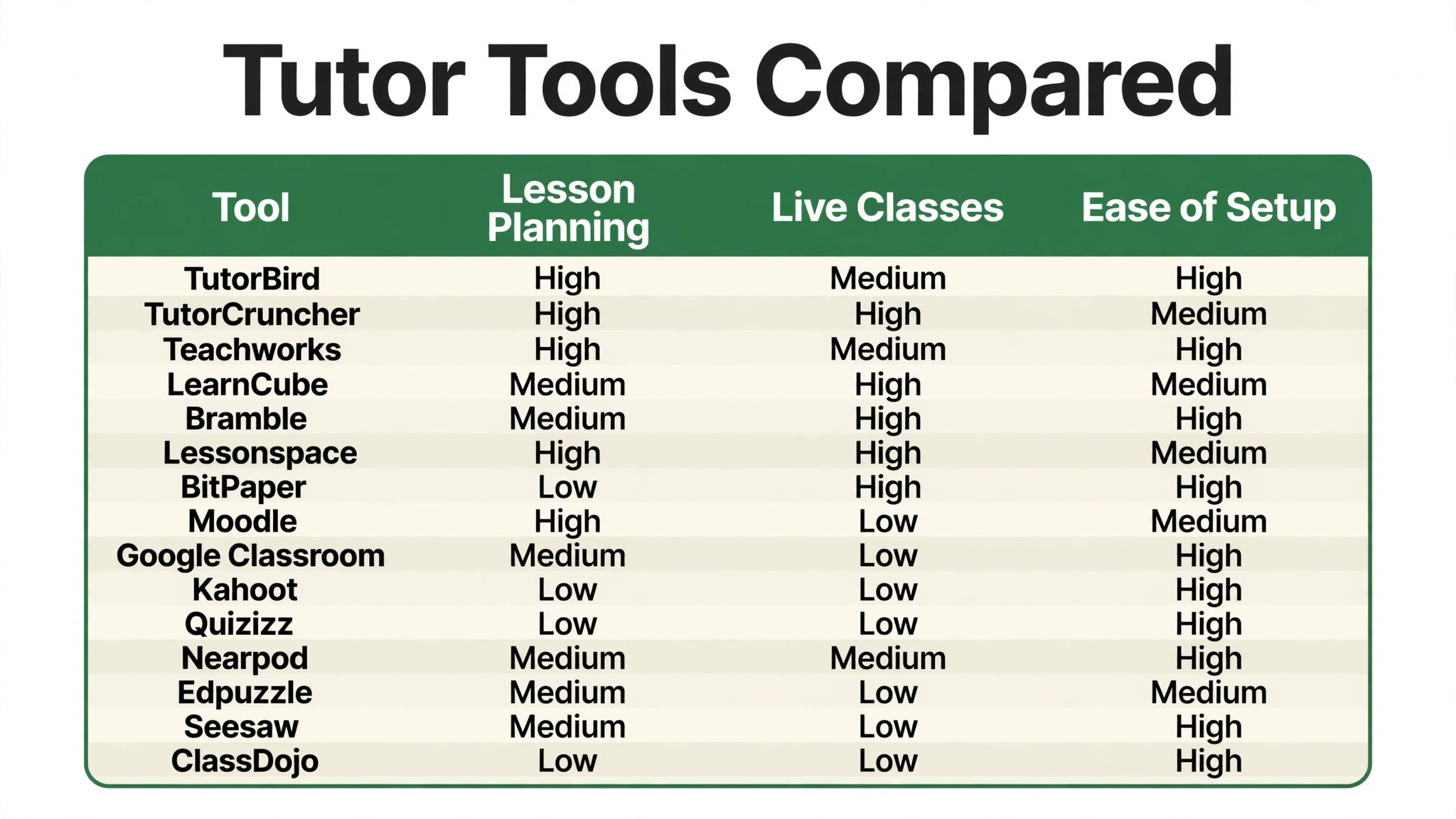
Use the table to cut the list to two or three candidates, then let the detail reviews decide between them. A tool that scores High on lesson planning is only useful if it fits the way you actually teach, and a tool that scores High on live classes is only useful if your students can join easily. The reviews below explain the reasoning behind every rating in the table.
One more filter before the detail. Check whether the tool handles payments and cancellations the way your business needs, because a tutoring platform that cannot chase a late payment creates a monthly chore. A clean payment flow means parents pay on time without a reminder, and that single feature saves more time than any lesson tool.
Why the Best Education Tools for Tutors Save Hours Every Week
The admin burden of tutoring is invisible until it is measured, and the measurement is usually a shock. Six hours a week on scheduling, invoicing, lesson preparation and payment chasing is a full working day that produces no teaching and no income. The tools in this ranking attack that burden directly, by automating the scheduling, the reminders and the invoicing, so the tutor gets the day back.
Scheduling is the first place where the software earns its keep. A tutor with twelve students and a changing timetable spends hours each week on messages about times, cancellations and rescheduling. A system that lets parents book, reschedule and cancel within rules the tutor sets removes almost all of that messaging, and the calendar stays accurate without the tutor touching it. That single change can save two hours a week on its own.
Lesson delivery is the second reason, and it is the one that affects the students directly. A tutor teaching online needs a whiteboard that responds instantly, a way to share documents and a lesson that keeps a student engaged for a full hour. The best tools in this ranking make the online lesson feel like sitting at the same table, with a whiteboard, shared notes and a recording the student can review later. A poor lesson tool makes the hour feel long, and a long hour is a student who does not come back.
Payment is the third reason, and it is the one tutors mention most often. Chasing parents for payment is uncomfortable, and it is work that nobody enjoys. The better tools in this ranking invoice automatically, take payment by card, and send polite reminders without the tutor writing a single message. That automation removes the awkward conversation entirely, and the tutor gets paid on time without asking.
There is also a preparation argument that matters every week. A tutor who can reuse lesson plans, pull up a student past work and see what was covered last time prepares faster and teaches better. The tools that keep a record of each student progress turn preparation from a blank page into a quick review, and that speed is what lets a tutor take on more students without burning out.
The final reason is growth. A tutor who runs the business on a notebook can manage twelve students, but not thirty, because the admin grows faster than the teaching. A system that handles scheduling, billing and records lets the same tutor grow the practice without hiring an administrator.
How We Graded Every Tutoring Platform
We ran each platform through the same month of tutoring, with twelve students, three subjects and a mix of online and in person lessons. The best education tools for tutors were scored on five measures that matter to a working tutor rather than a vendor.
- Lesson delivery, measured by how well the live classroom worked for a one to one online lesson, including the whiteboard, document sharing and the recording quality.
- Scheduling quality, judged by how easily parents could book, reschedule and cancel, and how accurately the calendar stayed in sync.
- Payment handling, covering automatic invoicing, card payments, reminders and how quickly the tutor was actually paid.
- Lesson planning, judged by how easily a tutor could build, reuse and adapt lesson plans, and how well the system tracked what each student had covered.
- Setup speed, timed from account creation to a first real lesson with a student, including the student joining without technical help.
Each measure carried equal weight except lesson delivery, which counted double, because a tutoring tool that cannot deliver a good lesson is not a tutoring tool. Platforms earned a score out of 100, and the ranking below follows the combined total. Where two tools tied, we broke the tie on payment handling, since getting paid on time is the tutor biggest practical worry.
Best Pick by Job
A single winner does not fit every tutor, so we matched each common situation to the tool that scored highest for that job. The best education tools for tutors for an online maths tutor look different from the right pick for a tutoring agency, and the table below makes that split clear.
| Job | Best pick | Why it wins |
|---|---|---|
| Independent tutor | TutorBird | Scheduling, billing and lessons in one place |
| Tutoring agency | TutorCruncher | The most complete agency system here |
| Small tutoring business | Teachworks | Clean scheduling and invoicing |
| Online tutor | LearnCube | The best live online classroom here |
| Maths and science tutor | Bramble | Interactive whiteboard built for tutoring |
| Flexible online lessons | Lessonspace | A whiteboard that fits any subject |
| Free whiteboard | BitPaper | A capable whiteboard at no cost |
| Building courses | Moodle | The most complete course platform here |
| Tutor on a budget | Google Classroom | Free assignments and class management |
| Engagement first | Kahoot | Quizzes that students actually enjoy |
| Frequent testing | Quizizz | Quick quizzes with instant feedback |
| Interactive lessons | Nearpod | Lessons that keep students involved |
| Video based teaching | Edpuzzle | Video lessons with questions built in |
| Younger students | Seesaw | The friendliest portfolio for young learners |
| Parent communication | ClassDojo | Parent messaging that actually works |
If your situation does not match a row exactly, take the closest one and read that review first. The gap between neighbouring tools is smaller than the gap between a system your students enjoy and one they tolerate, so fit to your teaching style matters more than a few points on a scorecard.
The 15 Tools in Detail
Each review below sticks to the same format. We describe what the tool does best, where it falls short, and the tutor who will get the most from it. Prices come from the vendor site when we could verify them, and are marked vendor priced when the vendor keeps the rate behind a sales conversation.
1. TutorBird
TutorBird leads because it covers the whole tutoring business in one place. Scheduling, invoicing, lesson notes and student records all live in a single system, and the tutor can run the business from a phone between lessons. The billing is the strongest here, with automatic invoicing and card payments that mean parents pay on time without a reminder.
The best education tools for tutors need a live classroom that matches their admin, and TutorBird is good rather than best here. The lesson tools are capable but lighter than LearnCube or Bramble, so a tutor who teaches mostly online may want a dedicated classroom alongside it. For most independent tutors, though, TutorBird is the most complete single system in this ranking.
Our verdict. The most complete tutoring business system here, ideal for independent tutors.
2. TutorCruncher
TutorCruncher is the agency system, built for tutoring businesses with many tutors and many students. It handles tutor payroll, student matching, scheduling and invoicing across the whole agency, and the reporting shows which tutors and which subjects make money. For an agency owner, that control is genuinely valuable.
The trade off is complexity. The setup takes longer than the simpler tools, and the interface assumes an administrator rather than a single tutor. A solo tutor will find it more than they need, and the price reflects a platform built for scale. It earns its place here on agency depth, but an independent tutor should start higher up the list.
Our verdict. The most complete agency system here, built for tutoring businesses with many tutors.
3. Teachworks
Teachworks is the clean scheduling and invoicing system for small tutoring businesses. It covers the calendar, the billing and the student records without clutter, and the interface is pleasant to use every day. A small business with a handful of tutors will find it easy to adopt and easy to live with.
The limitation is lesson delivery. Teachworks does not include a live classroom, so an online tutor needs a separate tool for the lesson itself. That separation is fine for in person tutoring, where the lesson needs no software, but an online tutor should pair it with LearnCube or Lessonspace.
Our verdict. A clean scheduling and billing system, ideal for small tutoring businesses.
4. LearnCube
LearnCube is the best live online classroom in this ranking. Its whiteboard is responsive, the lesson materials load instantly, and the recording quality is the clearest we tested. A tutor teaching online every day will feel the difference within the first lesson, because the classroom gets out of the way and lets the teaching happen.
The trade off is that LearnCube is a classroom, not a business system. It does not handle scheduling, invoicing or student records, so a tutor needs a separate tool for the admin side. As a lesson tool it is outstanding, and as a complete system it is incomplete, which is why it sits behind the all rounders in this ranking.
Our verdict. The best live online classroom here, ideal for tutors who teach online every day.
5. Bramble
Bramble is the interactive whiteboard built for maths and science tutoring. It records every stroke, lets the student and tutor work on the same board in real time, and the playback shows exactly how a problem was solved. For a maths tutor, that playback is the feature that matters most, because it shows the thinking rather than just the answer.
The limitation is breadth. Bramble is built for maths and science, and tutors of other subjects will find it narrower than Lessonspace. It is also a classroom rather than a business system, so scheduling and billing need a separate tool. For a maths or science tutor, though, it is hard to beat.
Our verdict. The best whiteboard for maths and science tutoring, with playback that shows the thinking.
6. Lessonspace
Lessonspace is the flexible online classroom, with a whiteboard that fits any subject and a clean interface that students join in one click. It handles documents, video and collaborative work without fuss, and the lesson recordings are easy to share. For an online tutor who teaches several subjects, it is the most versatile classroom in this ranking.
The trade off is the same as LearnCube. Lessonspace is a classroom, not a business system, so scheduling and billing need a separate tool. It is also lighter on the subject specific features that make Bramble so good for maths. As a general online classroom, though, it is excellent.
Our verdict. The most versatile online classroom here, ideal for tutors who teach several subjects.
7. BitPaper
BitPaper is the free whiteboard, and it is genuinely capable rather than a demo. It offers a responsive whiteboard, document sharing and a clean interface at no cost, which makes it the best starting point for a tutor who wants to try online teaching without paying. For a tutor on a tight budget, it is the lowest risk way to start.
The limitation is that BitPaper is only a whiteboard. There is no scheduling, no billing and no student records, so a tutor needs other tools for the business side. It is a classroom component rather than a complete system, and a full time tutor will eventually want more.
Our verdict. The best free whiteboard here, ideal for tutors starting online teaching.
8. Moodle
Moodle is the most complete course platform in this ranking, and it is free to use. It handles courses, assignments, quizzes, grading and student progress with a depth no other tool here matches. A tutor who builds structured courses, rather than one to one lessons, will find it far more capable than a simple classroom tool.
The trade off is complexity and focus. Moodle is built for courses, not for live one to one tutoring, and the setup takes time and technical confidence. A tutor who mainly teaches live lessons should look elsewhere, but one who sells courses will find Moodle hard to beat.
Our verdict. The most complete course platform here, ideal for tutors who build structured courses.
9. Google Classroom
Google Classroom is the free option for tutors on a budget. It handles assignments, class materials and student communication cleanly, and it integrates with the Google tools that students already use. For a tutor who needs a simple way to share work and collect assignments, it is the easiest free system to start with.
The limitation is that Google Classroom is built for schools, not for tutoring businesses. There is no scheduling, no billing and no live whiteboard, so a tutor needs other tools for those parts. It is a useful free component, and a tutor who pairs it with a payment tool has a workable low cost system.
Our verdict. The best free classroom management here, ideal for tutors on a tight budget.
10. Kahoot
Kahoot is the engagement tool, and it turns revision into a game that students actually enjoy. Quizzes run live, students compete for points, and the energy in the room changes the moment a Kahoot starts. For a tutor who struggles to keep students engaged, it is the most effective tool in this ranking.
The trade off is that Kahoot is a quiz tool, not a teaching platform. It does not handle scheduling, billing or lesson delivery, and it works best as a ten minute activity inside a longer lesson. Used that way, it is excellent, and as a complete system it is not enough on its own.
Our verdict. The most engaging quiz tool here, ideal for tutors who want every lesson to feel like a game.
11. Quizizz
Quizizz is the frequent testing tool, with quick quizzes that give instant feedback and show the tutor exactly which topics each student has mastered. It works live or as homework, and the reporting is clear enough to plan the next lesson from. For a tutor who tests often, it is the most practical quiz tool here.
The limitation is the same as Kahoot. Quizizz is a quiz tool rather than a complete tutoring platform, and it needs to sit alongside a system that handles scheduling and billing. As a testing layer on top of a tutoring business, it is excellent.
Our verdict. The best quiz tool for frequent testing, with feedback that plans the next lesson.
12. Nearpod
Nearpod is the interactive lesson platform, turning a standard lesson into a series of polls, quizzes and collaborative activities that keep students involved. The lesson library is strong, and the teacher dashboard shows who is keeping up and who is lost. For a tutor who teaches small groups, it is the most engaging lesson format here.
The trade off is preparation time. Nearpod lessons take longer to build than a simple whiteboard session, and the platform is built for classrooms rather than one to one tutoring. A tutor who teaches groups will love it, while one who teaches one to one may find it heavy.
Our verdict. The most interactive lesson format here, ideal for small group tutoring.
13. Edpuzzle
Edpuzzle is the video lesson tool, letting a tutor take any video, add questions at key moments, and see whether the student actually watched and understood. It is the best way to use video in tutoring, because the questions turn passive watching into active learning. For a tutor who assigns video homework, it is the most effective tool here.
The limitation is scope. Edpuzzle handles video lessons, not live teaching, scheduling or billing, so it needs to sit alongside a complete system. As a homework and flipped learning tool, it is excellent, and as a standalone platform it is not enough.
Our verdict. The best video lesson tool here, ideal for tutors who use video homework.
14. Seesaw
Seesaw is the portfolio tool for younger students, and it is the friendliest platform in this ranking for primary age learners. Students record their work with photos, drawings and voice notes, and parents can see the progress in real time. For a tutor of younger students, that parent visibility is the feature that matters most.
The trade off is age range. Seesaw is built for young learners, and older students will find it childish. It also does not handle scheduling or billing, so a tutor needs a separate business system. As a portfolio and parent communication tool for young students, it is outstanding.
Our verdict. The friendliest portfolio for young learners, ideal for tutors of primary age students.
15. ClassDojo
ClassDojo is the parent communication tool, and it is free for the core features. It lets a tutor message parents, share student progress and celebrate achievements, all in an app parents actually open. For a tutor whose biggest problem is keeping parents informed, it is the most effective tool here.
The limitation is that ClassDojo is a communication tool, not a tutoring platform. It does not handle lessons, scheduling or billing, so it needs to sit alongside a complete system. As a parent communication layer, it is excellent, and as a standalone tool it is not enough.
Our verdict. The best parent communication here, ideal for tutors who want parents involved.
A Four Week Setup From First Lesson to Full Timetable
Setting up a tutoring practice takes four weeks when it is done properly, and the plan below keeps the lessons running while the system takes over. The best education tools for tutors still need a tutor who prepares, and rushing that preparation guarantees a messy first month. The plan keeps the teaching first and the admin second.
Week one is the business setup. Load the student list, set the prices and the cancellation rules, and connect the payment system. This is the week where the business is defined, and the decisions made here, such as the cancellation policy and the payment terms, will save hours of awkward conversation later. Write them down and share them with every parent.
Week two is the first lessons. Teach with the new classroom tool, record the lessons, and ask the students what worked and what did not. The student feedback in week two is the most valuable data the tutor will get, because a tool that confuses the student will not survive the first month. Fix the problems that actually happened rather than the ones you feared.
Week three is the routine. Turn on automatic invoicing, set the weekly schedule, and build the lesson plan templates for each subject. Most tutors find the admin time drops sharply in week three, and that drop is the proof the system is working. Use the recovered time to prepare better lessons rather than taking on more students immediately.
Week four is the review and the full timetable. Compare the admin hours, the payment speed and the student feedback against the month before go live, fix the three lessons that worked least well, and open the timetable to new students. Keep the old notebook as a backup for one more week, but make the system the only place where lessons are scheduled from now on.
The routine is the whole secret. A system that is reviewed every Friday, with the next week lessons planned and the invoices checked, will outperform a fancier platform that nobody opens. Put the Friday review on the calendar, make it a habit, and let the software become the way the practice runs.

Frequently Asked Questions
Tutors ask the same questions before every platform change, so we answered the most common ones here. The best education tools for tutors answer these in their documentation, but the plain answers below are faster to judge a platform against.
How much does tutoring software cost?
Most tools in this ranking start between 30 and 150 dollars a month for an independent tutor, with pricing that rises with student count or tutor count. Free plans exist for the classroom tools, and agency pricing applies above that. Compare the monthly cost against the recovered admin hours, because a system that saves six hours a week pays for itself many times over.
How long does it take to set up a tutoring practice?
A single tutor can be live in one to two weeks, while an agency should allow four to six weeks including data loading and training. The slowest part is almost always loading the student list and setting the prices and cancellation rules, so start that work before the software arrives rather than after.
Do students need to download anything?
The best tools in this ranking let a student join in one click, with no download and no account. Check the joining process specifically before buying, because a tool that needs a setup call before the first lesson will lose students. A student who struggles to join the lesson will not come back for the second one.
Can tutoring software handle payments?
Yes, and the better tools in this ranking do it well. They invoice automatically, take payment by card, and send polite reminders without the tutor writing a single message. Check the payment processing fees before launching, because they vary between platforms, and make sure the system supports the payment methods your parents actually use.
Should I use one tool or several?
One tool for the business, and a second for the classroom if the business tool does not include one. A tutor who runs TutorBird for the business and LearnCube for the lessons gets the best of both, but a tutor who runs five tools will use none of them properly. Pick one business system, commit to it for three months, and judge it on the habit rather than the features.
Will online tutoring work for younger students?
Yes, when the tool fits the age. A younger student needs a simple interface, a friendly design and a parent nearby for the first lesson. Tools such as Seesaw and ClassDojo are built for young learners, while a plain whiteboard may be too abstract. Match the tool to the student age, and keep the lessons short and active.
The Last Lesson Before You Decide
The decision comes down to three numbers, and they are all measurable in a trial. The best education tools for tutors prove themselves on admin hours saved, payment speed and student feedback, and a four week trial with your real students will show all three. TutorBird wins our ranking on the combined score, but the right tool for your practice is the one that moves your worst number the furthest.
Run the trial with your real students and your real timetable, and judge the tool on the lesson rather than the demo. If the students join easily, the lesson flows and the invoice sends itself, the system is working. If the lesson stalls on technology, the tool is fighting you rather than helping you. Pick the platform that makes the teaching easy, protect the Friday review, and let the recovered hours pay for the subscription many times over.