

The numbers behind a restaurant kitchen are unforgiving. Food cost usually eats 28 to 35 percent of revenue, and a single point of waste can erase the margin on an entire week of covers. That is why the best inventory management software for restaurants matters more than most owners expect when they first start shopping. We scored ten platforms on recipe costing accuracy, waste tracking, supplier integration and how fast a busy team can actually learn them. MarketMan came out on top with the strongest all round score, and the gap between first and fifth was narrower than the marketing would suggest.
This guide is built around measured trade offs rather than feature lists. Every tool below was tested against the same kitchen workflow, from receiving a delivery at the back door to costing a new menu item and flagging a supplier price rise. The result is a ranking you can defend to your accountant, plus a clear pick for each kind of operation, from a single neighbourhood bistro to a multi site group with a central kitchen.
In this article
The 10 Tools at a Glance
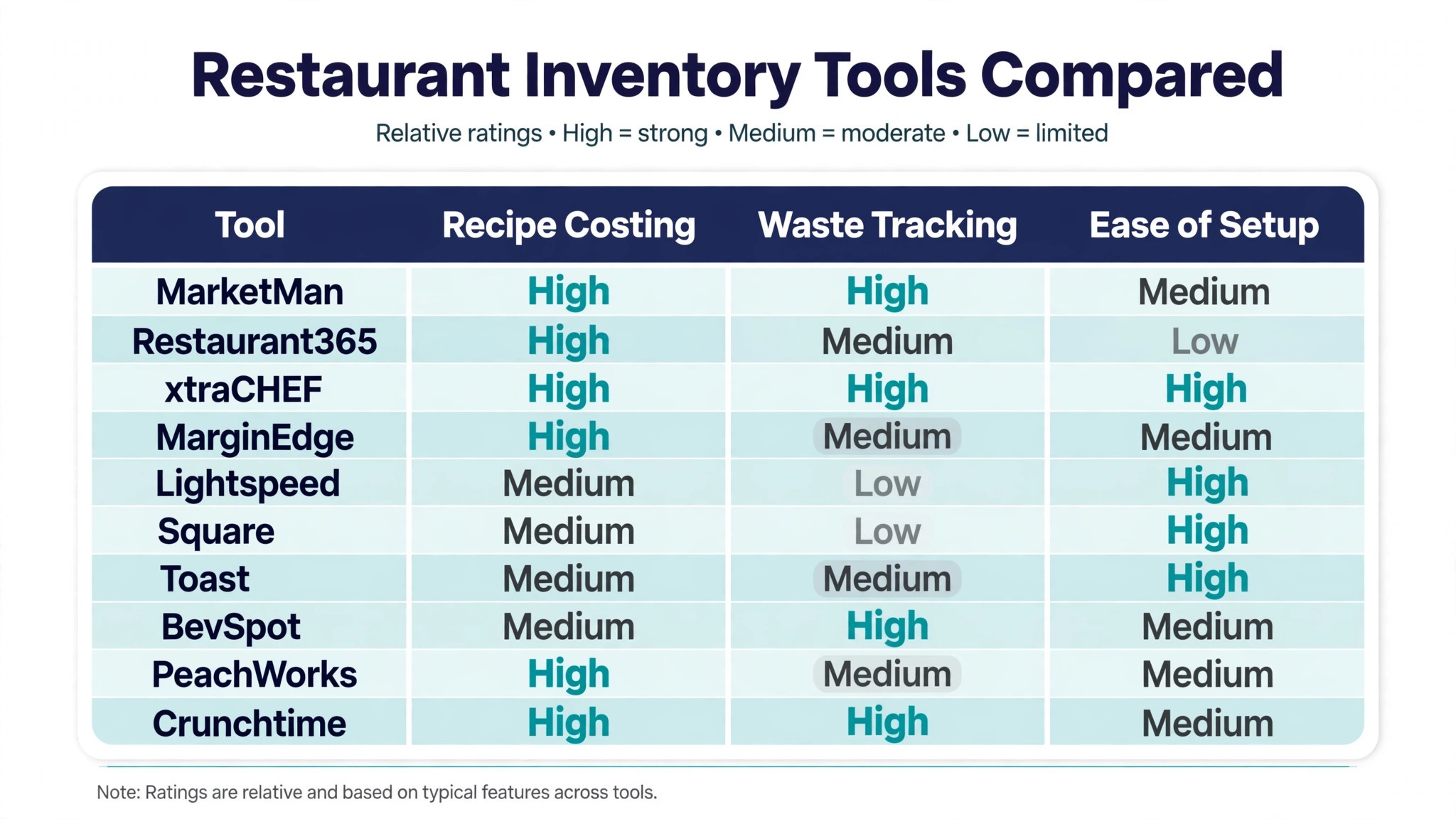
The table below compresses our scoring into one view, so you can see where each platform stands before reading the detail. The best inventory management software for restaurants is not always the one with the longest feature list, and this table shows why. MarketMan leads on recipe costing and waste tracking, while Square and Toast win on speed of setup because they sit inside point of sale systems your staff already know.
| Tool | Starting price | Best for | Standout strength |
|---|---|---|---|
| MarketMan | Pricing on the vendor site | Independent restaurants and small groups | Recipe costing and live food cost |
| Restaurant365 | Pricing on the vendor site | Multi unit operators | Accounting and inventory in one system |
| xtraCHEF | Pricing on the vendor site | Invoice heavy kitchens | Automated invoice capture and costing |
| MarginEdge | Pricing on the vendor site | Owner operators who hate paperwork | Photograph invoices and go |
| Lightspeed | Pricing on the vendor site | Restaurants already on Lightspeed POS | Tight POS and stock link |
| Square | Free plan; paid plans on the vendor site | Small cafes and quick service | Fast setup and simple stock counts |
| Toast | Pricing on the vendor site | Full service restaurants on Toast | Menu engineering inside the POS |
| BevSpot | Pricing on the vendor site | Bars and drinks led venues | Beverage inventory and ordering |
| PeachWorks | Pricing on the vendor site | Franchises and growing chains | Back office controls at scale |
| Crunchtime | Pricing on the vendor site | Large groups and enterprises | Forecasting across many sites |
Read the table as a shortlist filter rather than a final verdict. A tool that scores Medium on setup may still be the right choice if its costing engine saves you two points of food cost every month. The detail sections below explain the trade off behind each cell, so the table points you to the right two or three candidates and the reviews do the rest.
One more filter is worth applying before you shortlist. Check whether each candidate integrates with the point of sale system you already run, because a stock tool that cannot read sales will always lag behind reality. A clean integration means counts, recipes and sales share one source of truth, and the variance report becomes trustworthy. A tool that needs manual exports every week will slowly fall behind, and the numbers will stop being believable just when you need them most.
Why the Best Inventory Management Software for Restaurants Pays for Itself
Most restaurants do not lose money because the food is bad. They lose it in the gap between what the till says was sold and what the walk in says was used. A case of avocados that never gets counted, a supplier who quietly raises the price of chicken by eight percent, a recipe that was costed in January and never updated. Each leak is small on its own, and together they routinely add up to several thousand dollars a month in a mid sized dining room.
Inventory software closes that gap by tying three things together. First it records what arrives, ideally by scanning an invoice rather than retyping it. Then it tracks what leaves the shelves, through recipes and portion counts. Finally it compares the two and tells you the variance, which is the number that separates a guess from a decision. Without that loop, a manager is working from memory and a spreadsheet that is always a week out of date.
The pay off shows up in the weekly food cost percentage, which is the one number every owner should watch. In our testing, kitchens that moved from manual counts to a costing platform typically found two to four percent of food cost they could not explain before. That is not a software claim. It is the arithmetic of counting properly for the first time, and it is why the subscription price of even a premium platform is usually recovered within the first month or two.
There is a second pay off that is harder to put on a spreadsheet. Ordering becomes a ten minute job instead of an hour of phone calls and guesswork. Par levels adjust to actual sales rather than habit, so the walk in stops holding stock that spoils on a Tuesday. Staff stop arguing about who forgot to order cream, because the system ordered it when the count dropped below the threshold. Time saved in the back office is time the manager can spend on the floor, where revenue is actually made.
Supplier pricing is the quietest leak of all, and it is the one owners notice last. A distributor rarely announces a small rise, and a busy kitchen absorbs it without a word. A costing platform that tracks the price of every ingredient flags those rises the week they happen, which gives the owner a choice. Renegotiate the item, change the supplier, adjust the recipe, or move the menu price. Without that alert, the same rise can run for months before the monthly accounts reveal it, and by then the money is gone.
How We Judged Every Kitchen Stock System
We ran each platform through the same five tests, using a real 60 seat restaurant menu with 42 recipes and three suppliers. The best inventory management software for restaurants has to survive a Friday night service, not just a demo, so our scoring weighted daily usability as heavily as raw capability.
- Recipe costing accuracy, measured by costing the same twelve dishes in every tool and comparing the result against a manual costed baseline.
- Waste tracking depth, including spoilage logs, portion variance reports and the ability to trace a loss to a specific shift or station.
- Supplier integration, covering invoice capture, price change alerts and purchase order generation from live counts.
- Setup speed, timed from account creation to a first accurate stock count with the real menu loaded.
- Team adoption, judged by how long a new floor manager needed to complete a count, a transfer and a recipe cost without help.
Scores were combined into a single rating for each tool, with recipe costing and waste tracking carrying the most weight. Price was recorded separately and did not feed the score, because a cheap tool that nobody uses is worse value than a dear one the team opens every day. Where two tools tied, we broke the tie on support quality and the strength of the point of sale integration.
We also checked what happens when something goes wrong, because it always does. A delivery arrives short, a fridge fails overnight, a supplier substitutes an ingredient without warning. The tools that scored highest in this test made it easy to record the exception in the moment, so the variance report later told a true story instead of a mystery. Tools that forced the manager to remember the incident until Monday scored lower, because memory is the weakest link in any kitchen record.
Best Pick by Job
A single winner does not fit every kitchen, so we matched each common situation to the tool that scored highest for that job. The best inventory management software for restaurants for a bar is a different answer from the one for a ten site group, and the table below makes that split explicit.
| Job | Best pick | Why it wins |
|---|---|---|
| Independent restaurant | MarketMan | Deepest recipe costing with a fast daily count |
| Multi unit group | Restaurant365 | Inventory and accounting share one ledger |
| Invoice heavy kitchen | xtraCHEF | Supplier invoices become costs in minutes |
| Owner operator, no admin time | MarginEdge | Photograph the invoice and the work is done |
| Already on Lightspeed | Lightspeed | Stock and till stay in sync with no extra login |
| Small cafe or quick service | Square | Free to start and counts take minutes |
| Full service on Toast | Toast | Menu engineering lives where orders are taken |
| Bar or drinks led venue | BevSpot | Beverage counts and ordering built for bars |
| Franchise or growing chain | PeachWorks | Controls and reporting that scale cleanly |
| Large enterprise group | Crunchtime | Forecasting and ordering across many sites |
If your situation does not appear in the table, start from the closest match and read that tool first. The differences between neighbours in the ranking are often smaller than the difference between a tool your team uses daily and one they avoid, so fit to your workflow matters more than a single point on a scorecard.
The 10 Tools in Detail
Each review below follows the same pattern. We describe what the tool does best, where it falls short, and the kind of operation that will get the most from it. Prices come from the vendor site where we could confirm them, and are marked as vendor priced where the vendor keeps the rate behind a sales call.
1. MarketMan
MarketMan earns the top spot because it treats recipe costing as the core job rather than an add on. Costing a dish takes seconds once ingredients are entered, and the live food cost dashboard updates as supplier prices change, so a margin problem shows up the week it starts rather than at month end. The mobile count is fast enough to finish during a quiet service, which matters because a count that takes an hour does not get done.
The best inventory management software for restaurants needs a waste log that staff will actually use, and MarketMan has the clearest one we tested. Spoilage, over portioning and theft all get their own categories, and the variance report points at the dish or the shift where the loss happened. The trade off is a setup phase that rewards patience, since the costing is only as good as the recipes and supplier prices you load in week one.
Our verdict. The strongest all rounder for independent restaurants and small groups that want to know their true food cost every day.
2. Restaurant365
Restaurant365 is the pick for operators who are tired of reconciling inventory in one system and accounts in another. It combines stock control with accounting and scheduling, so a food cost variance flows straight into the profit and loss without a manual export. For a group with five or more sites, that single ledger removes a whole layer of month end work.
The inventory side is capable rather than exceptional. Recipe costing and waste tracking are solid, but they sit behind a broader interface that takes longer to learn than a dedicated inventory tool. Smaller operators may find the accounting depth more than they need, and the price reflects an enterprise platform rather than a single site tool.
Our verdict. The best choice for multi unit groups that want inventory, accounting and labour in one place.
3. xtraCHEF
xtraCHEF, from Toast, wins on the most tedious part of kitchen admin, which is turning supplier invoices into usable cost data. Its capture engine reads invoices automatically and pushes line items into inventory and recipe costs, so the price of every ingredient stays current without anyone retyping numbers. Kitchens that receive twenty invoices a week will feel the difference within days.
The platform is narrower than the two above it. It is excellent at cost and invoice work and lighter on the operational side, such as transfers between sites and deep forecasting. It also works best alongside Toast, so restaurants on another point of sale system should test the integration carefully before committing.
Our verdict. The fastest route from a pile of supplier invoices to accurate recipe costs.
4. MarginEdge
MarginEdge is built for owners who do the ordering themselves and have no appetite for admin. You photograph a supplier invoice with the app, and the system extracts the items, updates costs and builds the order list. The interface is deliberately simple, and the learning curve is the shortest of any dedicated inventory tool in this ranking.
Simplicity has a cost. Multi site reporting and advanced forecasting are thinner here than in the enterprise tools, and larger groups will outgrow it. For a single restaurant or a two site operation, though, that trade off is easy to accept, because the tool you actually use beats the powerful one gathering dust.
Our verdict. The easiest inventory tool to live with, and the best fit for owner operators.
5. Lightspeed
Lightspeed Restaurant brings inventory inside the point of sale that many restaurants already run, which removes a login and a data sync from the daily routine. Stock levels adjust as orders are rung in, and the reporting ties sales to usage without an export step. For a venue already committed to Lightspeed, the inventory module is a natural extension rather than a new system to learn.
As a standalone inventory tool it is less deep than the dedicated platforms above it. Recipe costing exists but is not as detailed, and the waste tracking is basic. If you are choosing a point of sale and inventory together, Lightspeed is a strong package. If you already have a till you love, a dedicated tool will give you more costing power.
Our verdict. A strong combined package for restaurants already running Lightspeed.
6. Square
Square for Restaurants suits small cafes and quick service venues that need stock control without a project. The free plan covers the basics, counts are quick on a phone, and the link to Square payments means sales and stock stay aligned with almost no setup. For a new cafe, it is the lowest friction way to start counting properly.
Depth is the limit. Recipe costing is functional but shallow, and there is no serious waste analytics or supplier price tracking. A growing restaurant will eventually need a dedicated platform, but Square is an honest starting point and the upgrade path to a fuller system is painless because your sales history is already in Square.
Our verdict. The best free starting point for small cafes that need simple, reliable stock counts.
7. Toast
Toast is the dominant point of sale for full service restaurants in the United States, and its inventory features are strongest for operators who live inside that ecosystem. Menu engineering reports show which dishes make money and which only look popular, and stock counts feed directly from sales. The hardware and software feel like one system because they are.
Bought on its own merits as an inventory tool, Toast is mid table. The costing and waste features are capable but not best in class, and pricing is custom, which makes comparison harder. Choose Toast for the whole package of till, payments and inventory together, not for inventory alone.
Our verdict. The right inventory choice when Toast is already your point of sale.
8. BevSpot
BevSpot is the only tool in this ranking built from the ground up for drinks. It tracks bottles, kegs and wine by the ounce, reconciles bar sales against pours, and generates orders from par levels that reflect actual drinking patterns. A cocktail bar or a drinks led restaurant will find its beverage costing far sharper than a general inventory tool can offer.
The focus is also the limitation. Food inventory is handled, but it is clearly secondary, and a food led kitchen should look higher up this list. BevSpot pairs well with a general tool, though, and many bars run it alongside their main inventory platform for the drinks side alone.
Our verdict. The sharpest beverage inventory tool in the ranking, and a natural add on for bars.
9. PeachWorks
PeachWorks targets franchises and growing chains with a back office that covers inventory, scheduling, food safety logs and reporting in one place. The controls are the selling point, with approval flows for orders, transfers and recipe changes that keep a growing group consistent across sites. The reporting suite is strong, and the system scales without the workarounds smaller tools need.
The interface feels dated next to the leaders, and the learning curve is steeper than the score suggests. Single site operators will find it more than they need. For a franchise group moving from spreadsheets to a proper back office, though, PeachWorks gives structure that is hard to replicate with a patchwork of apps.
Our verdict. A solid back office platform for franchises and chains that need control.
10. Crunchtime
Crunchtime is the enterprise option, built for large groups that need forecasting, ordering and reporting across dozens or hundreds of sites. Its demand forecasting uses sales history to predict usage, and the central dashboard gives head office a single view of stock health everywhere. For a group of that size, the operational control is genuinely valuable.
For anyone smaller, Crunchtime is the wrong tool. Implementation is a project rather than a signup, pricing is enterprise level, and the feature set assumes a central team. It earns its place in this ranking on capability, but we would only recommend it to operators with at least ten sites and a dedicated operations team.
Our verdict. Powerful enterprise forecasting, but only for large groups with the team to run it.
A Six Week Rollout Plan That Actually Sticks
A new inventory system fails most often in week two, when the novelty fades and the counts start slipping. The best inventory management software for restaurants still needs a rollout plan, and six weeks is the right length. Short enough to keep momentum, long enough to load recipes properly and train the team without panic.
Start in week one by picking one person to own the system. That person loads suppliers, enters the top twenty recipes and runs the first count alone. Week two adds the rest of the menu and the first supplier price check, so the food cost dashboard has real numbers behind it. By week three the team should be doing counts on the app, with the owner spot checking two items a day to catch errors early.
Weeks four and five are where the value appears. Turn on par level ordering and let the system suggest orders for a fortnight, comparing its suggestions against the old manual list. Most kitchens find the system orders less than they did, because par levels based on sales beat par levels based on habit. Week six is the review. Compare the food cost percentage against the month before go live, fix the three recipes with the worst variance, and set a weekly thirty minute routine to keep prices and recipes current.
The routine is the whole secret. A system that is counted twice a week and reviewed once a week will outperform a fancier platform that is counted once a month. Put the count on the rota, not on a sticky note, and make one person accountable for the variance report every Monday.
One habit makes the difference between a rollout that sticks and one that fades. Review the variance report in the same weekly meeting where you review sales, and treat a large variance like a service problem rather than a paperwork problem. When the team sees the owner acting on the numbers, the counts get more accurate, and when the counts get more accurate, the numbers get more useful. That loop is what turns a software purchase into a lasting change in how the kitchen runs.

Frequently Asked Questions
Running a restaurant kitchen raises the same inventory questions in almost every venue, so we answered the ones we hear most often. The best inventory management software for restaurants is the one that answers these questions with data rather than guesswork, and the answers below explain how to judge that.
How much does restaurant inventory software usually cost?
Pricing varies widely, from free starter plans to enterprise contracts priced per site. Most dedicated tools sit in the low hundreds of dollars per month for a single restaurant, and the saving on food cost usually covers that within the first month. Ask every vendor for a quote based on your number of sites and recipes, and compare the total cost against a one point improvement in food cost percentage.
How long does it take to set up?
A small restaurant can be live in a week if the menu and supplier list are ready. Larger groups with many recipes and multiple sites should allow three to six weeks, including staff training. The slowest part is almost always entering recipes and verifying supplier prices, so prepare that data before the first training session.
Do I need inventory software if I already have a point of sale system?
A point of sale system records what you sold, but it does not count what is on the shelves or cost your recipes. Inventory software closes that gap by comparing sales against usage and flagging the variance. Some point of sale systems include basic stock features, and for a small cafe that may be enough, but a dedicated tool gives a far clearer picture of food cost.
What is a good food cost percentage for a restaurant?
Most full service restaurants aim for 28 to 35 percent, with quick service often lower and fine dining often higher. The right target depends on your menu mix, location and labour costs, so compare against your own history rather than an industry average. The useful number is the trend, and a rising food cost percentage is the earliest warning that prices or portions have drifted.
Can inventory software reduce food waste?
Yes, when the waste log is used daily. Logging spoilage, over portioning and mistakes by category shows exactly where food is lost, and most kitchens find one or two repeat problems that are easy to fix. Par level ordering also cuts waste, because stock arrives in line with actual sales rather than optimistic ordering.
Should a small restaurant pay for inventory software?
A small restaurant benefits as much as a large one, because a two point food cost saving is worth more in relative terms on a small turnover. Start with a free or low cost plan and upgrade when the menu grows. The discipline of counting twice a week matters more than the price of the tool, and even a basic platform enforces that discipline.
The Final Count Before You Commit
Choosing inventory software is a decision about how honestly you want to see your kitchen. The best inventory management software for restaurants is the one your team will open every day, because a perfect system that nobody counts is worth less than a simple one that gets used twice a week. MarketMan wins our ranking on depth of costing, but the right pick for your venue depends on your size, your point of sale system and how much admin time you honestly have.
Run a trial with your real menu and your real suppliers, and judge the tool on the food cost variance it reveals in the first fortnight. If the numbers surprise you, the software is doing its job. If nothing changes, either your kitchen was already tight or the tool is not showing you the truth. Pick the platform that makes the truth easy to see, put the count on the rota, and let the weekly variance report drive your ordering from now on. Start with a trial, and let the numbers decide.