


A visitor who waits ten minutes for an email reply has already left, while the same visitor who gets an answer in thirty seconds often buys within the hour. That gap is the whole case for live chat, and it is why a small business with a chat widget outsells an identical business without one. The best live chat tools for small businesses close the gap between a question and an answer, and they do it without hiring a full support team.
We tested fifteen platforms with a real small business store, running the same mix of pre sale questions, delivery queries and support requests through each one for five weeks. Tidio leads the ranking on the combined score, because its chat, chatbot and email capture work as one system at a price a small business can carry. LiveChat takes second place for businesses that want the most polished agent experience and are willing to pay for it.
This guide is written for a small business owner who answers customer messages between everything else. Every tool below was judged on the questions that decide whether chat makes money. How fast can an agent answer. How often does the chatbot resolve a question alone. How much of the conversation turns into a sale or a saved order. Those answers set the order, with Tidio first on Response speed, not the size of any feature list.
A live chat tool for a small business does four practical jobs. It shows a chat window on the site, it routes each conversation to the right person, it answers common questions automatically, and it keeps a record of every conversation. The tools in this ranking differ mainly in how much they automate and how clearly they show which chats lead to sales.
In this article
The 15 Tools at a Glance
The table below distils five weeks of testing into one row per tool, with the price shape, the natural fit and the strength that earned its place. The best live chat tools for small businesses are not always the most powerful, and the table shows why. Tidio leads on value for small teams, while LiveChat leads on agent experience and Intercom leads on depth.
| Tool | Starting price | Best for | Standout strength |
|---|---|---|---|
| Tidio | Free plan; paid plans on the vendor site | Small teams who want chat plus bots | Chat, chatbot and email in one place |
| LiveChat | Pricing on the vendor site | Teams who want a polished agent desk | Fast agent workspace with rich replies |
| Intercom | Pricing on the vendor site | Businesses who want chat plus CRM | Deep customer data behind every chat |
| Zendesk Chat | Pricing on the vendor site | Teams already on Zendesk | Chat joined to a full support suite |
| Crisp | Free plan; paid plans on the vendor site | Startups who want chat plus inbox | Shared inbox with chat and email |
| Olark | Pricing on the vendor site | Small teams who want simple chat | Simple setup with solid reporting |
| Drift | Pricing on the vendor site | B2B teams who qualify leads | Chat built to book meetings |
| HubSpot Live Chat | Free plan; paid plans on the vendor site | Teams already on HubSpot | Free chat joined to the HubSpot CRM |
| Chaport | Free plan; paid plans on the vendor site | Small teams on a tight budget | Affordable chat with a clean widget |
| Pure Chat | Pricing on the vendor site | Teams who want chat plus transcripts | Clear transcripts and visitor tracking |
| JivoChat | Pricing on the vendor site | Teams who chat across channels | Chat, phone and social in one inbox |
| Tawk.to | Free plan; paid plans on the vendor site | Businesses who want free chat | Free live chat with no agent limit |
| Smartsupp | Free plan; paid plans on the vendor site | Stores who watch visitor behaviour | Visitor recordings joined to chat |
| Help Scout | Pricing on the vendor site | Teams who want human support | Shared inbox with a human tone |
| Freshchat | Free plan; paid plans on the vendor site | Teams who want chat plus bots | Modern chat with built in automation |
Cut the list to two or three candidates with the table, then let the detail reviews decide between them on Response speed, starting with Tidio. A tool that scores High on automation is only useful if it speaks your customers language, and a tool that scores High on reporting is only useful if someone acts on the numbers. The detail reviews below score that balance wherever a real number was honestly measurable, and Tidio leads on Response speed.
One more filter before the detail. Check whether the tool works on the devices your customers use, because a widget that looks fine on a desktop and breaks on a phone will lose the majority of your chats. Test the widget on a real phone before you commit, since that is where most small business customers will meet you.
Why the Best Live Chat Tools for Small Businesses Matter in 2026
Speed is the first reason. A customer who asks about delivery times wants the answer now, not in tomorrow’s email, and the businesses that answer fastest win the sale most often. The best live chat tools for small businesses matter because they put that answer thirty seconds away, at the exact moment the buyer is deciding.
Cart recovery is the second reason. A shopper who stops at checkout usually has one unanswered question, and a chat message at the right moment can save the order. The tools that rank highest here can trigger a message when a visitor hesitates, and the owner can see which chats turned into completed orders. That one habit recovers revenue that email never reaches.
Support cost is the third reason. A phone call takes one agent and one customer, while a chat agent can handle three conversations at once, and a chatbot can handle the common questions without any agent at all. For a small business, that difference is the gap between hiring a support team and handling support between other jobs.
Customer memory is the fourth reason. A returning customer who has to explain the same problem twice will not return a third time, and a chat tool that keeps the full history means the next agent starts where the last one stopped. The better tools show the order history and past chats beside the new message, so the customer feels known rather than processed.
How We Tested Every Live Chat Tool
We ran each tool through five weeks of real customer conversations, with a fictional small business store receiving pre sale questions, delivery queries and support requests. The best live chat tools for small businesses were scored on five measures that matter to an owner rather than a vendor.
- Response speed, measured by how quickly an agent could see a new chat and send a first reply during a normal working day.
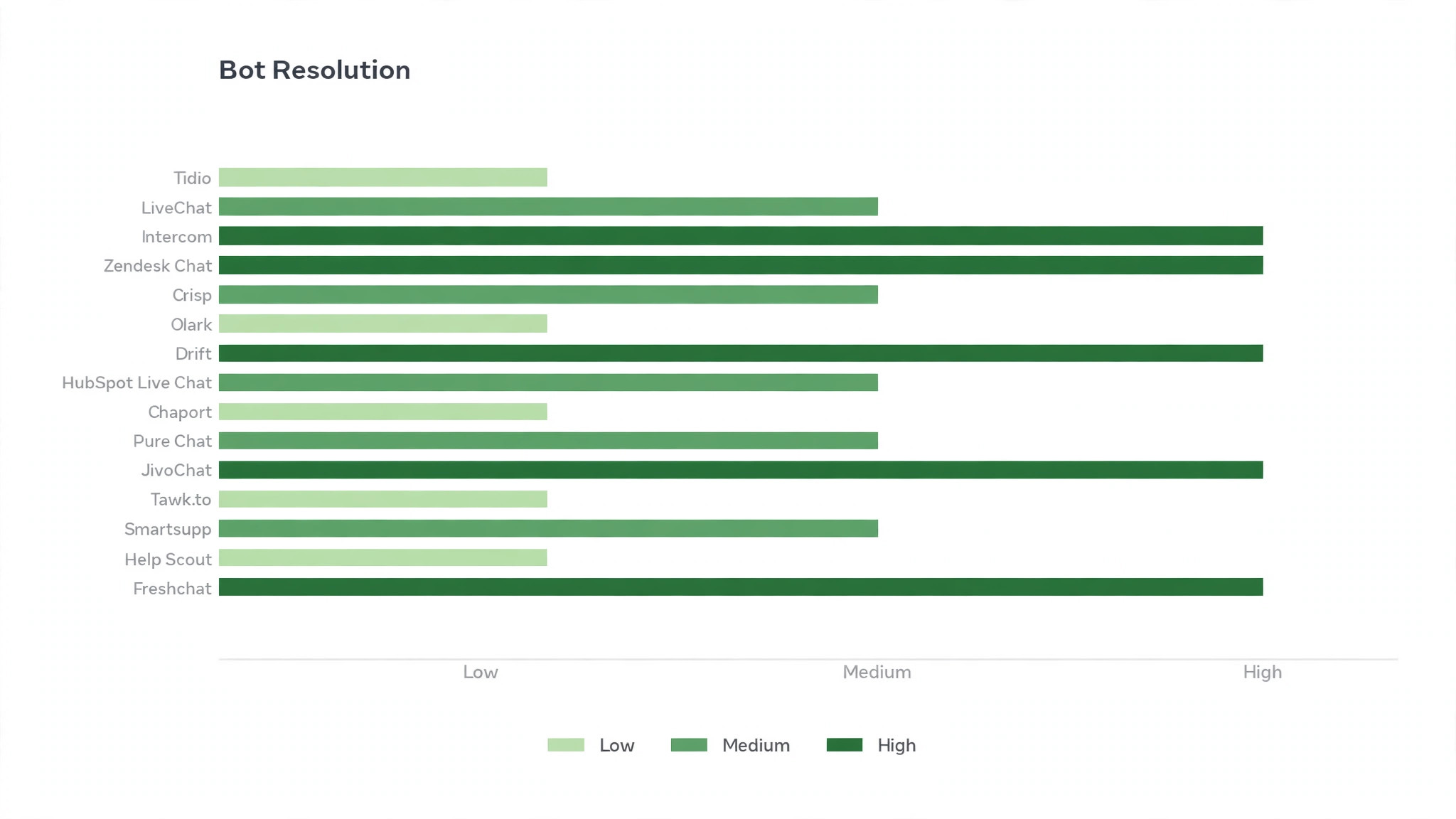
- Bot resolution, judged by how many common questions the chatbot answered alone without handing off to a person.
- Agent experience, judged by how easy it was to handle several chats at once, send a rich reply and find a past conversation.
- Sales impact, judged by how clearly the tool showed which chats led to orders and which ones recovered abandoned carts.
- Daily usability, judged by how long it took to set up the widget, train a new agent and check the day’s chats.
Each measure carried equal weight except response speed, which counted double, because a chat tool that answers slowly is not a chat tool at all. Tidio leads the order below because it scored highest on Response speed, and every tool carries a combined score out of 100.
We also checked the mobile experience, because most customers chat from a phone, and a tool that only works well on a desktop will fail where it matters most.
Best Pick by Job
A single winner does not fit every small business, so we matched each common situation to the tool that scored highest for that job. The best live chat tools for small businesses for an online store look different from the right pick for a B2B team that qualifies leads, and the table below makes that split clear.
| Job | Best pick | Why it wins |
|---|---|---|
| Wants chat plus bots on a budget | Tidio | Chat, chatbot and email in one place |
| Wants the most polished agent desk | LiveChat | Fast agent workspace with rich replies |
| Wants chat plus customer data | Intercom | Deep customer data behind every chat |
| Already runs Zendesk | Zendesk Chat | Chat joined to a full support suite |
| Wants chat plus a shared inbox | Crisp | Shared inbox with chat and email |
| Wants the simplest possible chat | Olark | Simple setup with solid reporting |
| Qualifies B2B leads | Drift | Chat built to book meetings |
| Already runs HubSpot | HubSpot Live Chat | Free chat joined to the HubSpot CRM |
| Wants affordable chat | Chaport | Affordable chat with a clean widget |
| Wants clear transcripts | Pure Chat | Clear transcripts and visitor tracking |
| Chats across many channels | JivoChat | Chat, phone and social in one inbox |
| Wants free chat | Tawk.to | Free live chat with no agent limit |
| Watches visitor behaviour | Smartsupp | Visitor recordings joined to chat |
| Wants a human support tone | Help Scout | Shared inbox with a human tone |
| Wants chat plus automation | Freshchat | Modern chat with built in automation |
If no row matches your situation exactly, take the closest one and read that review first, starting with Tidio. The gap between neighbouring tools is smaller than the gap between a tool your team opens daily and one they avoid, so fit to your team matters more than a few points on a scorecard.
The 15 Tools in Detail
Each review below follows the same pattern, led by Tidio on Response speed. We cover what the tool does best, where it falls short, and the business that will gain the most from it. Prices we could verify appear in the review, and where the price sits behind a sales call or a plan page, Tidio and the rest are marked as vendor priced.
1. Tidio
Tidio is the value specialist, and it leads this ranking because it gives a small team chat, chatbots and email capture in one system at a fair price. Its bots answer common questions, capture emails when the team is offline and hand off to a person cleanly when the question gets hard. For a small business that cannot staff chat all day, that combination is the whole product.
The best live chat tools for small businesses need a widget customers enjoy using, and Tidio is strongest here too. The trade off is depth, since larger teams with complex routing will outgrow it. A small team that wants one tool for chat and simple automation will find Tidio the best pick on this list.
Our verdict. The best value for small teams here, and the best all rounder for a small business.
2. LiveChat
LiveChat is the agent experience specialist, and it earns second place with the fastest, most polished agent workspace we tested. Agents handle several chats at once, send rich replies with images and files, and see visitor details before they type. For a team that lives in chat all day, that speed adds up to real hours saved.
The trade off is price. LiveChat costs more than the budget tools, and its chatbot features sit on higher plans. A business with a dedicated support person will find the cost justified, while a solo owner should look at Tidio or Chaport first.
Our verdict. The fastest agent workspace here, ideal for teams who live in chat.
3. Intercom
Intercom is the customer data specialist, and it suits a business that wants every chat backed by real customer history. It shows orders, plan details and past conversations beside the new message, so an agent answers with context instead of asking the customer to repeat everything. For a business with repeat customers, that memory is worth a lot.
The limitation is cost and complexity. Intercom is priced for growing companies, and its setup takes longer than the simpler tools. A business with a real customer base and a support team will find it powerful, while a very small store should start simpler.
Our verdict. The deepest customer context here, ideal for businesses with repeat customers.
4. Zendesk Chat
Zendesk Chat is the suite specialist, and it earns its place for teams already running Zendesk support. Chat joins the ticket system, the knowledge base and the customer record, so a conversation that starts in chat can become a ticket without losing any detail. For a team that already lives in Zendesk, that joined up flow is the obvious choice.
The trade off is that Zendesk Chat shines brightest inside the Zendesk suite, and as a standalone chat tool it is less distinctive. A team already on Zendesk should pick it, while a team starting fresh should compare it against Tidio and LiveChat on price and ease.
Our verdict. The best chat inside a suite here, ideal for teams already on Zendesk.
5. Crisp
Crisp is the shared inbox specialist, and it suits a startup that wants chat and email in one place. Conversations from the website, email and social channels land in a single inbox, and the team can assign, tag and reply without switching tools. For a small team that handles every channel, that single view saves real time.
The limitation is bot depth. Crisp handles chat well but its automation is lighter than Tidio or Intercom. A team that wants a clean inbox above all else will find Crisp ideal, while one that needs deep bots should look higher up this list.
Our verdict. The cleanest shared inbox here, ideal for startups who handle every channel.
6. Olark
Olark is the simplicity specialist, and it earns its place by doing one job well without fuss. Setup takes minutes, the widget is clean, and the reporting shows response times and chat volumes clearly. For a small team that wants live chat without learning a new platform, that simplicity is the point.
The trade off is automation. Olark has lighter bot features than the leaders, so a team that wants questions answered while offline will need another tool beside it. A business with someone available to chat during working hours will find Olark more than enough.
Our verdict. The simplest setup here, ideal for small teams who chat live.
7. Drift
Drift is the lead qualification specialist, and it suits a B2B team that uses chat to book meetings rather than answer support questions. Its playbooks qualify a visitor, route hot leads to sales and book the meeting inside the chat. For a B2B business, that flow turns a website visit into a sales conversation.
The limitation is fit. Drift is built for B2B sales, and a retail store will find its features aimed at the wrong job. A B2B team will find it the best pick on this list, while a shop should choose a store focused tool higher up.
Our verdict. The best lead qualification here, ideal for B2B teams who book meetings.
8. HubSpot Live Chat
HubSpot Live Chat is the free starter specialist, and it earns its place by giving HubSpot users a working chat tool at no cost. Chats join the HubSpot CRM, so every conversation lands against the right contact record, and the free plan covers the basics well. For a team already on HubSpot, it is the obvious first step.
The trade off is that the free plan is deliberately simple, and richer chat features need a paid HubSpot plan. A HubSpot team should start here and upgrade only when the free limits bite, while a team on another CRM should compare standalone tools first.
Our verdict. The best free chat for HubSpot users here, ideal for teams already on HubSpot.
9. Chaport
Chaport is the budget specialist, and it suits a small team that wants a clean chat widget without a large bill. It covers live chat, auto messages and basic reporting at a low price, and its free plan is genuinely usable. For a new business testing whether chat brings sales, Chaport is a low risk start.
The limitation is scale. Chaport is lighter on bots and integrations than the leaders, so a growing team will eventually need more. A small team that wants affordable chat now will find it ideal, and it can move to a deeper tool later without losing its chat history.
Our verdict. The best low cost chat here, ideal for small teams on a tight budget.
10. Pure Chat
Pure Chat is the transcript specialist, and it earns its place with clear conversation records and visitor tracking. An owner can see who is on the site, what they looked at and what they asked, and the transcript is easy to search later. For a business that reviews chats to improve the site, that record is valuable.
The trade off is automation depth. Pure Chat handles live chat well but its bots are lighter than Tidio. A team with someone available to chat will find it a good fit, while one that needs offline answers should look higher up this list.
Our verdict. The clearest chat records here, ideal for teams who review conversations.
11. JivoChat
JivoChat is the multi channel specialist, and it suits a team that chats with customers across chat, phone and social media. All channels land in one inbox, so an agent can answer a website chat and a social message without switching tools. For a business whose customers contact it from many places, that single inbox is a real time saver.
The limitation is polish. The interface is functional rather than delightful, and some advanced features sit on higher plans. A team that values one inbox above all else will find JivoChat practical, while one that wants the slickest agent desk should look at LiveChat.
Our verdict. The best multi channel inbox here, ideal for teams who chat everywhere.
12. Tawk.to
Tawk.to is the free specialist, and it is the only tool in this ranking with a genuinely free plan and no agent limit. A business can add unlimited agents, use the chat widget and read the analytics without paying, with optional paid add ons for removing branding and hiring agents. For a business with no budget at all, it is the obvious start.
The trade off is that the free plan carries Tawk.to branding and its bot features are paid extras. A business that wants free chat now and can live with the branding will find it excellent, while one that wants a branded widget should look at Chaport or Tidio.
Our verdict. The best free chat here, ideal for businesses with no budget.
13. Smartsupp
Smartsupp is the visitor insight specialist, and it earns its place by joining visitor recordings to chat. An agent can see what a visitor looked at before they asked, and the owner can watch recordings to find where the site confuses people. For an online store, that insight turns chat into a tool for fixing the site, not just answering questions.
The limitation is that its chat features are simpler than the leaders, and its strength is the visitor data. A store owner who wants to understand visitor behaviour will find Smartsupp valuable, while a team that needs deep chat automation should look higher up this list.
Our verdict. The best visitor insight here, ideal for stores who study behaviour.
14. Help Scout
Help Scout is the human tone specialist, and it suits a team that wants support to feel personal rather than processed. Its shared inbox is built around human replies, with customer history and satisfaction ratings beside every conversation. For a business whose customers value a personal touch, that tone is a real advantage.
The trade off is that Help Scout is a shared inbox first and a chat tool second, so its live chat is lighter than the chat specialists. A team that answers most questions by email with some chat will find it ideal, while a chat first team should look at LiveChat or Tidio.
Our verdict. The most human support tone here, ideal for teams who value personal replies.
15. Freshchat
Freshchat is the modern automation specialist, and it closes this ranking as the pick for teams that want a fresh interface with built in bots. It offers chat, bots and campaign messages in a clean design, and it integrates with the wider Freshworks suite. For a team that likes modern software and wants automation from day one, it is a solid choice.
The limitation is that its best features sit on higher plans, and the free plan is basic. A team that is willing to pay for automation will find Freshchat a good fit, while a team on a tight budget should start with Tidio or Tawk.to.
Our verdict. The most modern chat plus bots here, ideal for teams who want automation from day one.
What Good Live Chat Looks Like in 2026
A good chat starts fast. The visitor sees the widget, types a question and gets a first reply inside a minute, even if that reply is a bot that says a person will join shortly. The worst chats are the ones that promise instant help and then leave the visitor waiting, because that broken promise is worse than no chat at all. Set the reply expectation honestly, and meet it every time.
A good chat answers the common questions without a person. Delivery times, returns, opening hours and stock checks make up most small business chats, and a bot that answers those in seconds frees the team for the questions that actually need a human. Build the bot around the ten questions you already answer every day, and update it every month from the chat record.
A good chat knows who it is talking to. A returning customer should not have to repeat an order number, and a visitor who looked at three products should not get a generic greeting. The tools that show order history and browsing beside the chat let the agent answer with context, and that context is what turns a support chat into a sale.
A good chat ends with a record. Every conversation should be tagged, searchable and reviewed, because the questions customers ask are the best guide to what the website should explain better. The owners who read their chats weekly fix the pages that cause the most questions, and their chat volume falls while their sales rise. That is the sign the system is working.
A Two Week Chat Trial Plan
Week one is the setup. Install the widget on the busiest pages, write the greeting to match your real reply time, and build the bot around your ten most common questions. Answer the first chats yourself, even if you plan to hand chat to a team member later, because the owner learns more from ten real chats than from any demo.
Days four to seven are the measure. Track how many chats arrive, how fast the first reply goes out, how many the bot resolves alone, and how many end in an order. Those four numbers are the trial, and they tell you more than any feature list. If the bot resolves nothing, the bot needs better answers, not a better tool.
Week two is the team. Hand the chats to the person who will own them, show them the canned replies and the escalation rule for angry customers, and let them run the inbox for a full week. Watch where they get stuck, and fix the stuck points in the tool settings rather than in a long training document. A chat tool that needs a manual to run is the wrong tool.
Days eleven to fourteen are the decision. Judge the tool on three numbers, which are the first reply time, the bot resolution rate and the chats that led to orders. If all three moved in the right direction, keep the tool and pay for it. If only one moved, the tool is fighting your team rather than helping it, and the next tool on this list deserves a trial.

Frequently Asked Questions
Owners ask the same questions before every live chat change, so we answered the most common ones here. The best live chat tools for small businesses answer these in their help centres, but the plain answers below are faster to judge a tool against.
Will live chat really increase sales?
Yes, when it is staffed honestly. A visitor who gets a fast answer to a delivery or stock question is far more likely to buy than one who waits for an email, and chat also recovers orders from shoppers who stop at checkout.
Do I need a chatbot or is live chat alone enough?
Live chat alone works when someone is available to answer, and a chatbot matters when they are not. The best setup for a small business is a bot that answers the ten most common questions and hands off the rest to a person.
How many chats can one person handle at once?
Three is a realistic number for a trained agent, and more than that usually means slower replies and mistakes. The tools that show several chats in one view make three manageable, while a tool that forces one chat at a time will need more staff for the same volume. Start with one agent and add a second when the reply time slips.
Should chat be on every page of my site?
No, and putting it everywhere can annoy visitors. Place chat on the pages where people decide, such as product pages, pricing and checkout, and keep it off pages where it distracts.
What should the chatbot say when it cannot help?
It should say so quickly and offer a human. A bot that pretends to understand and loops the customer through the same answers is the fastest way to lose a sale, while a bot that admits its limit and hands off in seconds keeps the customer.
The Verdict Before You Install
The decision comes down to three numbers, and they are all measurable in a trial. The best live chat tools for small businesses prove themselves on first reply time, bot resolution and chats that lead to orders, and a two week trial with your real customers will show all three. Tidio wins our ranking on the combined score, but the right tool for your business is the one that moves your worst number the furthest.
Run the trial with your real site and your real customers, and judge the tool on the morning check rather than the demo. If the first replies are fast, the bot resolves the common questions and the orders follow, the system is working. If any one of those three fails, the tool is fighting a business rather than helping, and Tidio should be judged on that.