


A contractor’s cash flow lives or dies on getting paid, and getting paid is where most jobs go wrong. The work is done, the client is happy, and then the invoice sits unpaid for sixty days while the materials supplier wants its money in fourteen. A contractor who waits for cheques and chases late payments by phone is lending the client money for free. The best payment tools for contractors exist to shorten that wait, by making it easy for a client to pay on the spot.
We tested each tool on real contractor work, not on a feature list. That meant running the same month through every tool, which was ten invoices, three deposits, two progress payments, and one late payer. The ranking weighs how fast the money arrives, how little the contractor has to chase, and how easily the books stay accurate.
Square leads the ranking on the combined score, with Stripe close behind for contractors who want payments inside their own website or app. QuickBooks Payments wins for contractors who already run their books on QuickBooks, while PayPal suits those whose clients already trust it. Square earns its place on taking payment anywhere, Stripe on online depth.
Square sits first on combined score, but the best pick by job table should decide for a contractor taking payment one way. A tool that ranks seventh overall can still be the right answer for a contractor who only takes deposits on site, just as the overall winner can be wrong for a contractor who bills in stages. Match the tool to the job, not to the rank.
In this article
- The 15 Tools at a Glance
- Why the Best Payment Tools for Contractors Shorten the Wait
- How We Put Each Payment Tool Through Its Paces
- The 15 Tools in Detail
- What a Contractor Actually Pays in Fees
- Payment Mistakes That Delay the Money
- Best Pick by Job
- Frequently Asked Questions
- The Payment Tool That Gets Contractors Paid
The 15 Tools at a Glance
The table below lines up the best payment tools for contractors on the facts that decide a purchase, which are the price shape, the natural fit, and the strength that earned each rank. Square leads on in-person payments, while Stripe wins for contractors who take payments online.
| Tool | Starting price | Best for | Standout strength |
|---|---|---|---|
| Square | Free plan; paid plans on the vendor site | Contractors who take payment on site | Card reader with fast payouts |
| Stripe | Pricing on the vendor site | Contractors who take payments online | Flexible online payments and invoicing |
| QuickBooks Payments | Pricing on the vendor site | Contractors already on QuickBooks | Payments inside the accounting |
| PayPal | Free plan; paid plans on the vendor site | Contractors whose clients trust PayPal | Familiar checkout with buyer trust |
| Jobber Payments | Pricing on the vendor site | Field service contractors | Payments inside quotes and scheduling |
| Housecall Pro | Pricing on the vendor site | Home service contractors | Payments tied to jobs and dispatch |
| FreshBooks | Free plan; paid plans on the vendor site | Contractors who invoice simply | Clean invoices with payment tracking |
| Wave | Free plan; paid plans on the vendor site | Small contractors on a tight budget | Free invoicing with payment links |
| HoneyBook | Pricing on the vendor site | Contractors who manage client projects | Contracts, invoices, and payments together |
| Joist | Pricing on the vendor site | Contractors who quote on site | Fast estimates that turn into invoices |
| Invoice2go | Pricing on the vendor site | Contractors who invoice from a phone | Mobile invoicing with payment links |
| Melio | Free plan; paid plans on the vendor site | Contractors who pay suppliers too | Pay and get paid in one place |
| BILL | Pricing on the vendor site | Contractors with many supplier bills | Bill pay with approval workflows |
| Wise | Pricing on the vendor site | Contractors who work across borders | Low-cost international payments |
| GoCardless | Pricing on the vendor site | Contractors who collect recurring payments | Bank debit for regular billing |
Compare Square and Stripe first, see which way of taking payment fits your jobs.
Why the Best Payment Tools for Contractors Shorten the Wait
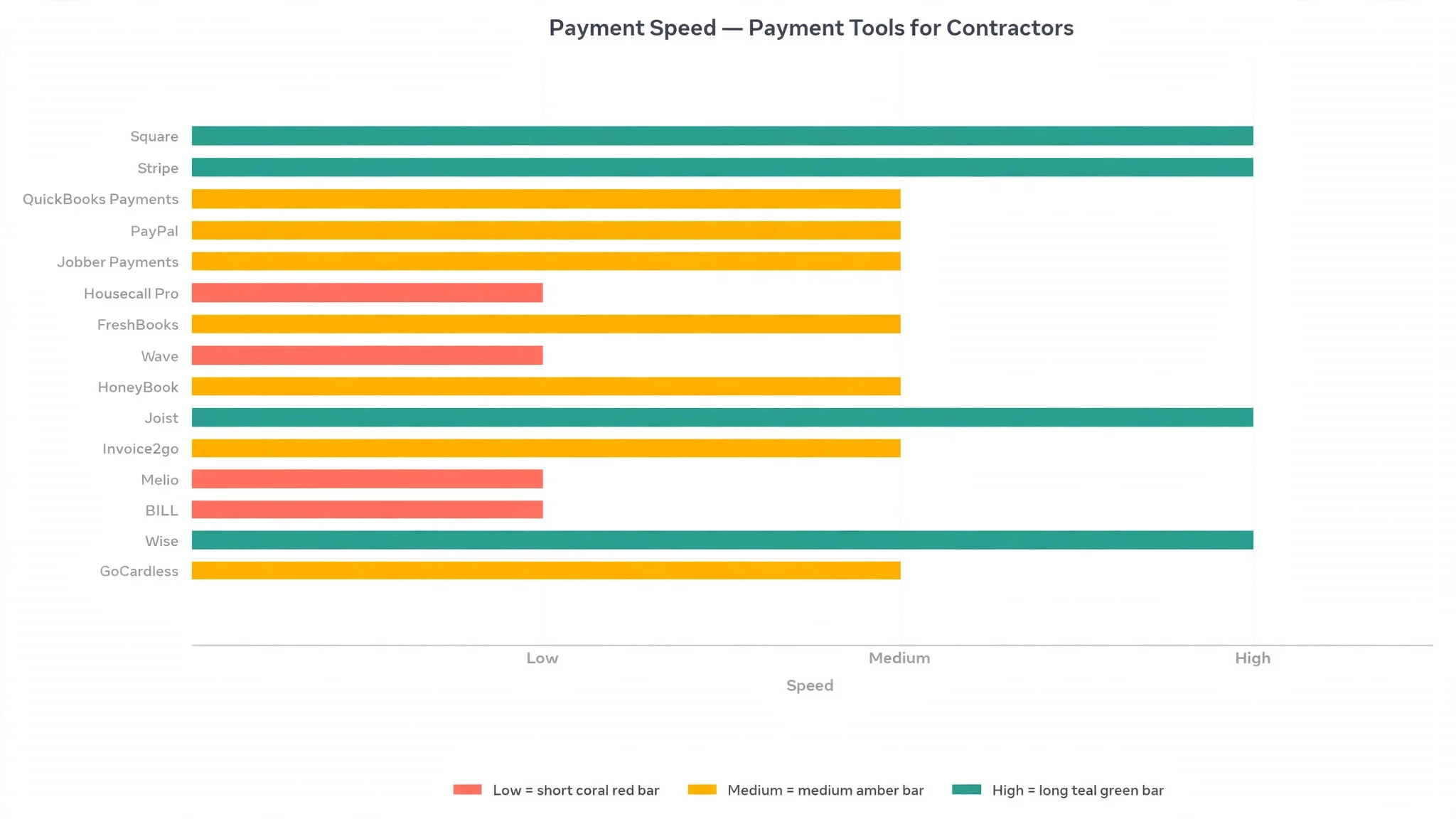
Speed of payment is the first reason a tool matters, and it is the one that changes the bank balance fastest. A client who can pay by card on the spot, or by clicking a link in an invoice, pays days or weeks sooner than a client who has to write a cheque or arrange a bank transfer. The tools in this ranking cut that wait to hours, which means the contractor’s money arrives while the job is still fresh in the client’s mind.
Deposits are the second gain. A contractor who takes a deposit before ordering materials is not funding the client’s job from their own pocket, and a tool that collects the deposit at the quote stage makes that normal rather than awkward.
Progress payments are the third reason. A long job paid in stages, with each stage released when the work is done, keeps the cash flowing through the project instead of arriving in one lump at the end. A tool that schedules those stages and reminds the client automatically removes the awkward conversation about money at every milestone.
The final gain is the books. A payment that lands in the accounts automatically, matched to the right invoice, means the contractor knows at a glance who has paid, who is late, and what is owed.
How We Put Each Payment Tool Through Its Paces
We ran the best payment tools for contractors through the same five measures, using a simulated month with ten invoices, three deposits, two progress payments, one late payer, and a Friday reconciliation against the bank. Each tool handled the same month, so the scores compare like with like.
- Payment speed, judged by how quickly the money reached the bank after the client paid, from card tap to cleared funds.
- Ease of collection, measured by how simply a client could pay, whether by card on site, by link in an invoice, or by bank debit.
- Chasing help, scored on whether the tool reminded late payers automatically, with clear records of what was owed and when.
- Setup speed, timed from account creation to the first payment taken, including any bank verification and invoice setup.
- Daily usability, judged by how easily a contractor could send an invoice and take a payment from a phone on site, without asking for help.
Each measure carried equal weight except payment speed, which counted double, because a payment tool that cannot get money into the bank fast is not doing its job. Scores run out of 100, and the order below follows the combined total, led by Square on in-person payments.
The 15 Tools in Detail
Each review below judges the best payment tools for contractors on the same ground. We note what each tool does best, where it falls short, and the contractor it suits best, with payment speed carrying the most weight.
1. Square
Square tops the best payment tools for contractors on the combined score, and it earns the lead with in-person payments that work anywhere. The card reader takes a payment on site in seconds, the money lands fast, and the invoices carry a payment link for clients who prefer to pay later. For a contractor who finishes a job and wants paying before leaving the driveway, that speed is the whole point.
The strengths run beyond the reader. The free point-of-sale app covers invoicing, the dashboard shows who has paid and who is late, and the integrations cover the main accounting tools. The setup is quick, and the contractor can start taking card payments the same day the reader arrives.
The limits are the fees and the online depth. The per-transaction fee is fair but adds up on large jobs, and Square is strongest in person rather than online, so a contractor who bills mostly by invoice may prefer Stripe.
In the trial, take a card payment on site and send an invoice with a payment link on the same day. Check how fast the money arrived, and whether the dashboard showed both payments clearly. If the money landed fast and the books matched, the tool fits.
Our verdict. The best on-site payments here, and the safest first pick for most contractors.
2. Stripe
Stripe is the online pick, and it earns second place with flexible payments that fit a contractor’s website, invoices, and apps. Clients can pay by card, bank, or wallet through a checkout that looks professional, and the invoicing tools handle deposits, progress payments, and recurring billing. For a contractor who takes most payments online, Stripe is the workhorse.
The strengths are the flexibility and the reliability. The payment links work without a website, the invoicing is clean, and the payouts land on a predictable schedule. The developer tools let a contractor wire payments into a quoting system.
The limits are the setup and the in-person side. Stripe is an online platform first, so taking a card on site needs extra hardware or a third-party reader, and the setup rewards a contractor who is comfortable with online tools.
Our verdict. The best online payments here, ideal for contractors who bill through the web.
3. QuickBooks Payments
QuickBooks Payments is the accounting pick, and it suits contractors who already run their books on QuickBooks. Payments taken through the system land in the accounts automatically, matched to the right invoice, so the contractor never reconciles by hand. For a contractor who already trusts QuickBooks, that connection is worth more than any single feature.
The strengths are the match and the familiarity. Invoices carry a payment link, clients pay by card or bank, and the books update themselves. The reporting shows who is late and what is owed.
The limits are the tie-in and the cost. QuickBooks Payments works best inside QuickBooks, so a contractor who uses other accounting will get less value, and the combined cost of the accounting plus the payment fees adds up.
Our verdict. The best payments inside accounting here, ideal for contractors already on QuickBooks.
4. PayPal
PayPal is the trust pick, and it earns its place because clients already know it. A client who hesitates to type card details into an unknown checkout will pay through PayPal without a second thought, and the invoicing tools let a contractor send a payment link in seconds. For a contractor whose clients are wary of new payment pages, that familiarity closes jobs.
The strengths are the recognition and the speed. The invoicing is simple, the payment links work anywhere, and the buyer protection gives clients confidence. The mobile app lets a contractor send an invoice and check a payment from the site.
The limits are the fees and the disputes. The per-transaction fee is higher than some rivals, and the dispute process can hold funds while a claim is reviewed, which frustrates a contractor who did the work properly.
Our verdict. The most trusted checkout here, ideal for contractors whose clients value familiarity.
5. Jobber Payments
Jobber Payments is the field service pick, and it suits contractors who quote, schedule, and invoice from one system. The payment tools sit inside Jobber’s job management, so a quote becomes a job, the job becomes an invoice, and the invoice carries a payment link, all without retyping anything. For a contractor who runs the whole business from the field, that flow saves hours.
The strengths are the joined-up workflow and the client experience. Clients approve quotes online, pay deposits at booking, and receive reminders automatically, while the contractor sees the schedule and the payments in one dashboard. The mobile app is built for the field.
The limits are the scope and the price. Jobber is a full business system, so a contractor who only needs payments will pay for far more, and the monthly cost suits established businesses better than one-person operations.
Our verdict. The best payments inside job management here, ideal for field service contractors.
6. Housecall Pro
Housecall Pro is the home service pick, and it earns its place with payments tied to jobs and dispatch. The system schedules the job, sends the technician, takes the payment on site, and follows up with the client, all from one app. For a home service contractor with a team on the road, that single flow keeps the day organised.
The strengths are the dispatch and the payment flow. The scheduling is clear, the technician sees the job and the price on a phone, and the payment is taken before the van leaves. The automated follow-ups ask for reviews, which brings in new work.
The limits are the price and the focus. Housecall Pro is built for home services, so a general contractor will find some features irrelevant, and the monthly cost suits teams better than solo operators. The accounting depth is lighter than QuickBooks.
Our verdict. The best payments tied to dispatch here, ideal for home service teams.
7. FreshBooks
FreshBooks is the simple invoicing pick, and it suits contractors who want clean invoices with payment tracking. The invoices look professional, clients pay by card or bank through a link, and the dashboard shows who has paid, who is late, and what is owed. For a contractor who lives by the invoice, that clarity is the point.
The strengths are the invoices and the ease. The setup is quick, the time tracking ties hours to invoices, and the late-payment reminders go out on their own. The free plan covers the basics for a small contractor.
The limits are the in-person side and the scale. FreshBooks is an invoicing tool first, so taking a card on site needs a separate reader, and larger contractors may want deeper job management. The payment fees are fair but the feature set is narrower than Jobber or Housecall Pro.
Our verdict. The cleanest invoicing here, ideal for contractors who bill by invoice.
8. Wave
Wave is the budget pick, and it earns its place with free invoicing and payment links that cost nothing until a client pays. A small contractor can send professional invoices, track who has paid, and take card payments without a monthly subscription, which removes the biggest barrier to getting paid properly.
The strengths are the price and the simplicity. The invoicing is clean, the accounting tools cover the basics, and the payment links work in any invoice. The setup takes minutes.
The limits are depth and support. Wave covers the basics well but lacks the job management, scheduling, and deep reporting of the bigger systems, and the support is lighter than the paid rivals. A growing contractor will outgrow it, though for a small operation it is hard to beat on value.
Our verdict. The best free invoicing here, ideal for small contractors on a tight budget.
9. HoneyBook
HoneyBook is the client project pick, and it suits contractors who manage a job from first enquiry to final payment. Contracts, invoices, and payments all sit in one client flow, so the client signs the contract, pays the deposit, and receives the invoice without leaving the system. For a contractor who sells a project rather than an hour, that flow is the point.
The strengths are the client experience and the templates. The contract and invoice templates look professional, the payment scheduling handles deposits and progress payments, and the client portal keeps every message and document in one place.
The limits are the price and the focus. HoneyBook charges a monthly fee that suits established contractors better than beginners, and it is built for client projects rather than quick jobs, so a contractor who does small repairs will find it heavy. The accounting depth is lighter than QuickBooks.
Our verdict. The best client project flow here, ideal for contractors who sell projects.
10. Joist
Joist is the on-site quoting pick, and it earns its place by turning a quote into an invoice in minutes. The contractor builds the estimate on a phone at the client’s home, the client approves it on the spot, and the same document becomes the invoice with a payment link. For a contractor who quotes on site, that speed wins jobs.
The strengths are the speed and the mobile design. The estimates look professional, the deposit can be collected at approval, and the payment tracking shows what is owed. The app is built for the field.
The limits are depth. Joist covers quoting and invoicing well but lacks the scheduling, dispatch, and accounting depth of the bigger systems, and the reporting is basic. A contractor who needs full job management will need a second tool.
Our verdict. The fastest on-site quoting here, ideal for contractors who estimate at the door.
11. Invoice2go
Invoice2go is the mobile invoicing pick, and it suits contractors who run the business from a phone. Invoices are built in seconds, payment links go out by text or email, and the dashboard shows who has paid. For a contractor who is always on site, that phone-first design is the whole point.
The strengths are the mobile experience and the simplicity. The invoices look clean, the payment options cover card and bank, and the reminders chase late payers automatically. The setup takes minutes.
The limits are depth and scale. Invoice2go is an invoicing tool, not a full business system, so a contractor who needs scheduling, job management, or deep accounting will need more. The reporting is lighter than FreshBooks or QuickBooks.
Our verdict. The best phone-first invoicing here, ideal for contractors who invoice from site.
12. Melio
Melio is the two-way pick, and it earns its place by handling both sides of a contractor’s money. The contractor can get paid by clients and pay suppliers from the same place, which keeps the cash flow visible in one dashboard. For a contractor who juggles supplier bills and client payments, that single view is valuable.
The strengths are the supplier payments and the free start. Bank transfers to suppliers cost nothing, the scheduling tools handle recurring bills, and the client payment links work cleanly.
The limits are depth. Melio is a payments tool rather than a full accounting or job management system, so a contractor who needs deep invoicing or scheduling will need a second tool. The card payment fees are fair but not the cheapest in this ranking.
Our verdict. The best pay-and-get-paid combo here, ideal for contractors who pay suppliers too.
13. BILL
BILL is the bill pay pick, and it suits contractors with many supplier bills to manage. The system captures bills, routes them for approval, and pays them on schedule, while the receivables side tracks what clients owe. For a contractor with a busy supplier book, that approval workflow prevents the missed payment that stalls a job.
The strengths are the approval flow and the audit trail. Every bill shows who approved it and when, the payments go out on time, and the integration with the main accounting tools keeps the books accurate.
The limits are price and focus. BILL is built for bill pay first, so the client payment tools are lighter than Stripe or Square, and the monthly cost suits larger contractors better than solo operators. A small contractor with few supplier bills will find it more than they need.
Our verdict. The strongest supplier bill pay here, ideal for contractors with busy supplier books.
14. Wise
Wise is the international pick, and it earns its place with low-cost payments across borders. A contractor who works for clients abroad, or pays suppliers in another currency, gets a fair exchange rate and low fees, with the money arriving faster than a traditional bank transfer. For cross-border work, that saving is real.
The strengths are the rate and the transparency. The fees are shown upfront, the exchange rate is the real mid-market rate, and the multi-currency account holds balances in several currencies.
The limits are scope. Wise is a money transfer tool, not a full invoicing or job management system, so a contractor who needs deep billing will need a second tool. The card payment options are lighter than Stripe or Square.
Our verdict. The cheapest cross-border payments here, ideal for contractors who work internationally.
15. GoCardless
GoCardless is the recurring pick, and it rounds out the ranking with bank debit for regular billing. A contractor who charges a monthly retainer, a maintenance plan, or a regular service fee can collect it automatically by direct debit, without chasing a card payment every month. For recurring work, that automation is the point.
The strengths are the automation and the low fees. Direct debit costs less than card payments, the failure handling retries a missed payment automatically, and the integrations cover the main invoicing tools.
The limits are the fit and the pace. Direct debit suits recurring billing but not one-off jobs, and the first payment takes longer to clear than a card payment. A contractor who mostly does one-off work will get less value, while a contractor with monthly clients will save hours.
Our verdict. The best recurring billing here, ideal for contractors with monthly clients.
What a Contractor Actually Pays in Fees
The best payment tools for contractors differ most on the fee, and the cheapest headline rate is not always the cheapest month. A tool that charges a low percentage can cost more if the contractor takes many small payments, while a tool with a monthly fee can be the bargain for a contractor who takes large payments. Before choosing, work out the real monthly volume, then compare the total cost across two or three finalists.
Watch the payout time as much as the rate. A tool that pays out in one day and a tool that pays out in five days charge the same fee, but the slower one leaves the contractor waiting for money that is already earned. Check the payout schedule on the plan the contractor will actually use, and ask what faster payouts cost.
The processing fee is only part of the cost. Chargebacks, dispute fees, and the cost of a failed payment all add up, and a tool with strong fraud checks can save more than a tool with a slightly lower rate. Read the fee schedule in full before committing to a tool for the year.

Payment Mistakes That Delay the Money
The first mistake is sending the invoice late. A contractor who finishes on Friday and invoices on Monday has already given the client three extra days, and a client who receives the invoice late pays late. Send the invoice the same day the work finishes, with a payment link included, and the money arrives sooner.
The second mistake is skipping the deposit. A contractor who orders materials before taking a deposit is funding the client’s job from their own pocket, and a client who has paid nothing has no reason to hurry. Take a deposit at approval, set the progress payments in the contract, and make the final payment due on completion rather than on the client’s convenience.
The third mistake is letting late payers drift. An invoice that goes unchased for a month becomes an invoice that never gets paid, because the client assumes the contractor has forgotten. Set the reminder to go out automatically at seven days and again at fourteen, and follow up in person at thirty. A polite, automatic chase beats an awkward phone call every time.
Best Pick by Job
No single winner fits every contractor, so the tools below are matched to the job instead of the rank. Read the row that sounds like your business, then start the trial with that tool.
| Job | Best pick | Why it wins |
|---|---|---|
| Takes payment on site | Square | Card reader with fast payouts |
| Takes payments online | Stripe | Flexible online payments and invoicing |
| Already runs on QuickBooks | QuickBooks Payments | Payments inside the accounting |
| Clients trust the checkout | PayPal | Familiar checkout with buyer trust |
| Runs field service jobs | Jobber Payments | Payments inside quotes and scheduling |
| Runs a home service team | Housecall Pro | Payments tied to jobs and dispatch |
| Invoices simply | FreshBooks | Clean invoices with payment tracking |
| Small budget, needs invoicing | Wave | Free invoicing with payment links |
| Manages client projects | HoneyBook | Contracts, invoices, and payments together |
| Quotes on site | Joist | Fast estimates that turn into invoices |
| Invoices from a phone | Invoice2go | Mobile invoicing with payment links |
| Pays suppliers too | Melio | Pay and get paid in one place |
| Many supplier bills | BILL | Bill pay with approval workflows |
| Works across borders | Wise | Low-cost international payments |
| Collects recurring payments | GoCardless | Bank debit for regular billing |
If your situation does not match a row exactly, take the closest one and read that review first, starting with Square when it fits.
Frequently Asked Questions
Contractors ask the same questions before choosing from the best payment tools for contractors, so the plain answers are here, based on how these tools actually work on a real job.
How fast does the money actually arrive?
It depends on the tool and the payment type. Card payments through Square or Stripe usually land in one to two business days, while bank transfers and direct debits take longer. Check the payout schedule on the plan the contractor will actually use, because the headline speed is not always the speed on the cheapest tier.
Should a contractor take a deposit on every job?
Yes, on any job that needs materials ordered or a date held. A deposit of a third is common, and it protects the contractor from a client who cancels after the materials are bought. The tools in this ranking collect the deposit at quote approval, which makes it a normal part of the process.
What happens if a client disputes a card payment?
The payment provider holds the funds while the dispute is reviewed, and the contractor needs to show the contract, the photos, and the messages that prove the work was done. Keep those records for every job, because a contractor with good records wins most disputes.
Can one tool handle both client payments and supplier bills?
Some can. Melio and BILL both cover paying suppliers as well as getting paid by clients, while the rest focus on the client side. A contractor with many supplier bills should weigh Melio or BILL, while a contractor who only needs client payments will find Square or Stripe simpler.
Do these tools work with accounting software?
Yes, most of them do. Square, Stripe, Jobber, Housecall Pro, FreshBooks, and BILL all integrate with the main accounting tools, so payments land in the books without manual entry. QuickBooks Payments is built for QuickBooks, so a contractor already on QuickBooks gets the deepest connection.
The Payment Tool That Gets Contractors Paid
The best payment tools for contractors prove their worth in the first month, and the proof is simple to measure. Send the invoice the same day the work finishes, count how many days the money takes to arrive, and check whether the books matched the bank on Friday. If the money lands fast and the reconciliation takes minutes, the system is working.
Square wins our ranking on the combined score, but the right tool for your business is the one that gets the money into the bank fastest with the least chasing. Run the trial on real jobs with real clients, and pick the tool that makes getting paid the easy part of the job. Fast payment and clean books will pay for the fees many times over.