

A listing with polished photos typically draws roughly twice as many online views as the same home shot on a phone and left unedited, and agents who track their numbers report that strong photos cut days on market by a visible margin. The best photo editing software for real estate agents turns a dull grey interior into a bright room a buyer can picture living in, without crossing the line into a fake. We tested fifteen editors on real listing shoots, and Adobe Lightroom leads the ranking on the combined score, while Luminar Neo wins for agents who want a finished photo in minutes rather than hours.
This guide is written for the agent who shoots the listing in the morning and needs it live by the afternoon. Every editor below was tested the way an agent would actually use it, with the same set of twenty listing photos, covering the batch edit, the sky swap, the window pull and the final export. The ranking weighs batch speed, honest colour and the daily workflow as heavily as the feature list, because an editor that only shines in a demo is no use on a deadline.
Photo editing for listings does three practical things. It corrects the light so rooms look like they do in person, it straightens the lines so walls stand upright, and it prepares a consistent set of images that make the whole listing feel professional. The editors in this ranking differ mainly in how fast the batch runs and how natural the result looks.
In this article
The 15 Tools at a Glance
The table packs our shoot-day testing into one row per editor, with the price, the natural fit and the strength that earned its place. The best photo editing software for real estate agents is not always the most powerful, and the table shows why. Lightroom leads on batch speed and colour, while Evoto AI wins for agents who want portraits and interiors retouched in one pass.
| Tool | Starting price | Best for | Standout strength |
|---|---|---|---|
| Adobe Lightroom | Pricing on the vendor site | Agents who batch edit | Presets that fix a whole shoot at once |
| Adobe Photoshop | Pricing on the vendor site | Agents who retouch deeply | Pixel level control for hard jobs |
| Luminar Neo | Pricing on the vendor site | Agents who want speed | One click sky and light fixes |
| Capture One | Pricing on the vendor site | Agents who shoot tethered | Colour that stays true to the room |
| DxO PhotoLab | Pricing on the vendor site | Agents who shoot high ISO | Noise cleaning that saves dark rooms |
| Affinity Photo | Pricing on the vendor site | Agents who want no subscription | Full editing for a single payment |
| Evoto AI | Pricing on the vendor site | Agents who retouch fast | AI retouching tuned for people and rooms |
| Topaz Photo AI | Pricing on the vendor site | Agents who rescue soft shots | Sharpening and upscaling that hold up |
| ON1 Photo RAW | Pricing on the vendor site | Agents who want it all | Editing plus effects in one app |
| Pixlr | Free plan; paid plans on the vendor site | Agents who edit in a browser | Quick edits with nothing to install |
| Canva | Free plan; paid plans on the vendor site | Agents who make flyers too | Listing graphics and photos together |
| Fotor | Free plan; paid plans on the vendor site | Agents who want simple HDR | One click HDR for interiors |
| Photopea | Free plan; paid plans on the vendor site | Agents who want free power | Photoshop style editing in a browser |
| BoxBrownie | Pricing on the vendor site | Agents who outsource edits | Human editors for virtual staging |
| Phixer | Pricing on the vendor site | Agents who shoot on phones | Phone edits that look professional |
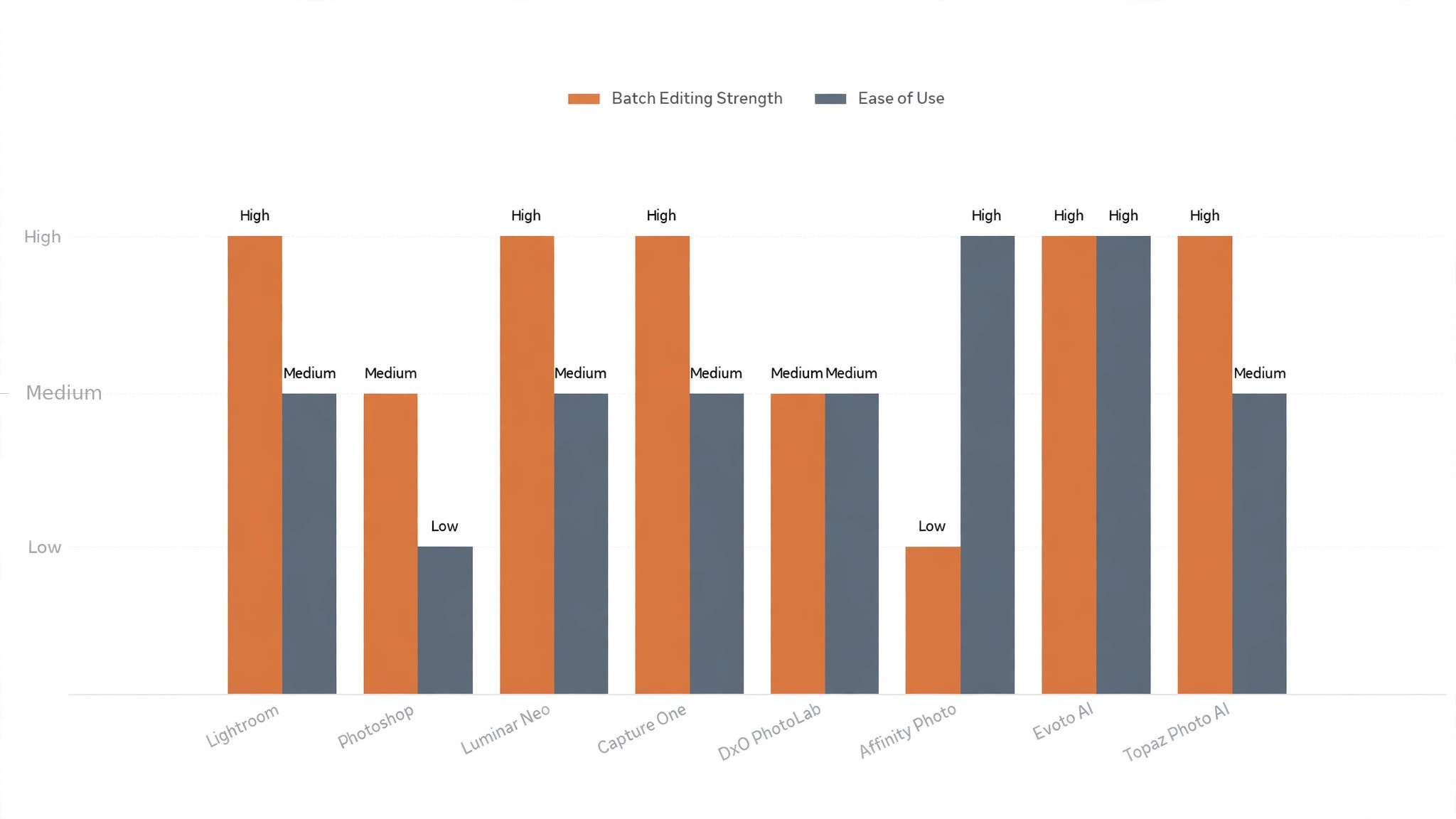
Use the table to cut the list to two or three candidates, then let the detail reviews decide between them. An editor that scores High on batch speed is only useful if its presets suit your style, and an editor that scores High on retouching is only useful if you actually retouch. The reviews that follow rate that balance wherever we could measure it fairly.
One more filter before the detail. Check whether the editor handles RAW files from your camera, because a JPEG only workflow limits what you can recover from a dark room.
How We Tested Every Editor
We ran each editor through the same twenty listing photos, with bright exteriors, dim interiors, mixed window light and a twilight shot, covering the batch edit, the sky swap, the window pull and the final export. The best photo editing software for real estate agents was scored on five measures that matter to an agent rather than a vendor.
- Batch speed, measured by how long it took to apply a consistent look to all twenty photos, including presets, cropping and export to web size.
- Honest colour, judged by how close the edited room looked to the real room, with no oversaturated grass and no plastic skin on people in the shot.
- Sky and window handling, measured by how cleanly each editor replaced a grey sky and recovered a blown out window view without halos.
- Setup speed, timed from install to a working preset applied to the first photo, with no manual reading.
- Daily usability, judged by how long it took to finish a normal listing set on a working day, from import to upload.
Each measure carried equal weight except batch speed, which counted double, because an editor that cannot finish a listing set quickly is not an editor for agents. Editors were scored out of 100, and the ranking below reflects the combined score. Where two editors tied, we broke the tie on honest colour, since a photo that misleads a buyer costs the agent trust.
We also checked the export, because a listing set needs web sized files, print sized files and a social crop, not just a pretty screen view. The best editors in this ranking export all three in one pass, while the weakest need a second tool to finish the job.
Why the Best Photo Editing Software for Real Estate Agents Pays for Itself
A phone photo works until the buyer compares your listing with the one next door, and for most agents that moment arrives every week. The unedited set looks grey, the rooms look small, and the buyer scrolls past without a second thought. The photo shows the home, but it does not sell it, and by the time the agent notices the problem the listing has already lost its first week.
A proper edit replaces the grey with light. It lifts the shadows so the room reads as bright, warms the colour so the wood looks like wood, and straightens the verticals so the walls stand upright. That honest lift is the whole point, because a buyer who can picture living in the room will book a viewing, while one who cannot will keep scrolling.
Speed is the second reason the software matters. An agent who can finish a twenty photo set in under an hour can shoot in the morning and list by lunch, while one who edits all evening loses the next morning too. The batch tools in this ranking do that work in minutes, and the saving is real from the first listing.
Consistency is the third reason. A buyer who sees the same clean look across every photo trusts the listing, while a set that jumps between warm and cold, bright and dark, feels careless. The preset tools in this ranking keep every photo in the same family, and that consistency is worth more than any single dramatic edit.
The fourth reason is the window. Most listing photos fail at the window, where the view blows out to white or the room goes dark, and the buyer never sees the garden that sells the house. The better editors in this ranking recover that view cleanly, and the recovered window is often the photo that books the viewing.
Best Pick by Job
A single winner does not fit every agent, so we matched each common situation to the editor that scored highest for that job. The best photo editing software for real estate agents for a high volume team looks different from the right pick for a solo agent who shoots on a phone, and the table below makes that split clear.
| Job | Best pick | Why it wins |
|---|---|---|
| Batches a whole shoot | Adobe Lightroom | Presets that fix twenty photos at once |
| Retouches deeply | Adobe Photoshop | Pixel level control for hard jobs |
| Wants speed | Luminar Neo | One click sky and light fixes |
| Shoots tethered | Capture One | Colour that stays true to the room |
| Shoots dark rooms | DxO PhotoLab | Noise cleaning that saves interiors |
| Hates subscriptions | Affinity Photo | Full editing for a single payment |
| Retouches fast | Evoto AI | AI retouching for people and rooms |
| Rescues soft shots | Topaz Photo AI | Sharpening that holds up at full size |
| Wants it all in one | ON1 Photo RAW | Editing plus effects in one app |
| Edits in a browser | Pixlr | Quick edits with nothing to install |
| Makes flyers too | Canva | Listing graphics and photos together |
| Wants simple HDR | Fotor | One click HDR for interiors |
| Wants free power | Photopea | Photoshop style editing in a browser |
| Outsources edits | BoxBrownie | Human editors for virtual staging |
| Shoots on a phone | Phixer | Phone edits that look professional |
If your situation does not match a row exactly, take the closest one and read that review first. The gap between neighbouring editors is smaller than the gap between a set your buyers open and one they scroll past, so fit to your shooting style matters more than a few points on a scorecard.
One habit deserves a mention. The agents who get the most from any editor in this ranking build one preset for bright days, one for grey days and one for twilight, then reuse them on every shoot. That short setup is what turns the editor into a habit, and no feature can replace it.
A Listing Day Workflow That Ships Before Sunset
A listing day works when it runs in stages, and a single day is the right length for an agent with a morning shoot and an afternoon deadline. The best photo editing software for real estate agents still needs an agent to make the decisions, and the plan below keeps the photos honest while the clock runs.
Shoot in the morning with the edit in mind. Open the curtains, turn on every light, and shoot each room from the doorway at chest height, because a consistent angle makes the batch edit far easier later. Take the exterior last, when the light is at its best, and grab the twilight shot only if the home suits it.
Import and cull first, before any editing. Delete the duplicates and the blurred frames, keep the best shot of each room, and aim for eighteen to twenty two photos in the final set. A tight set edits faster and sells better than a long set full of near duplicates that tire the buyer.
Apply the preset next, then fix the exceptions. Run your bright day or grey day preset across the whole set, then work through the rooms one by one, fixing only the photos that need it. Most rooms need nothing more than a small exposure lift and a straighten, and the ones that do need work are usually the kitchen and the main bedroom.
Finish with the windows and the sky, then export. Recover the window views, swap only a truly grey sky, and export web sized files plus one social crop. Check the set on a phone before you upload, because that is where most buyers will see it first, and a photo that looks good on a phone will look good anywhere.

The 15 Tools in Detail
Each review below keeps the same structure. We describe the editor at its best, its weakest point, and the agent who will get the most from it. Where the vendor site showed a price we could check, it is quoted, and where pricing needs a sales conversation, it is marked as vendor priced.
1. Adobe Lightroom
Lightroom is the batch specialist, and it leads this ranking because it does the job agents repeat most often better than anything else. Presets apply a consistent look to a whole shoot in seconds, the sliders fix exposure and colour without fuss, and the export presets hand over web and print sizes in one pass. For an agent who shoots several homes a week, that speed is the whole product.
The best photo editing software for real estate agents needs colour that matches the room, and Lightroom is best here too. White balance is quick to set, the lens corrections straighten walls automatically, and the catalogue keeps every listing organised by address. The trade off is the subscription and the learning curve, since the full power takes a week of use to feel natural.
Our verdict. The strongest batch editing and colour here, and the best all rounder for agents who shoot often.
2. Adobe Photoshop
Photoshop is the deep retouch tool, and it handles the jobs no other editor in this ranking can touch. Removing a bin from a driveway, replacing a ceiling stain, or rebuilding a blown out window are all routine here, and the control is pixel by pixel. For an agent with one hard photo that has to be perfect, Photoshop is the answer.
The trade off is time. Photoshop edits one photo at a time, and a full listing set would take all day, so it works best as the rescue tool beside Lightroom rather than instead of it. An agent who only ever needs the batch should start higher up this list, while one who retouches daily will find Photoshop indispensable.
Our verdict. The deepest retouching here, ideal as the rescue tool beside a batch editor.
3. Luminar Neo
Luminar Neo is the speed tool, and it turns a grey listing day into a bright one with very little effort. The sky replacement is the cleanest in this ranking, the light controls lift a dim room in one move, and the templates give a finished look to a whole set in minutes. For an agent who wants results fast, it is hard to beat.
The limitation is control. Luminar Neo makes big changes easily and fine changes with more effort, so an agent who likes to tune every slider may find it limiting. It is also a single purchase model with paid extensions, so the true cost depends on which extras the agent buys.
Our verdict. The fastest finished photo here, ideal for agents who want speed.
4. Capture One
Capture One is the colour tool, and its rendering of skin and wood tones is the most honest in this ranking. Tethered shooting lets the agent see each frame on a laptop as it is taken, and the colour tools keep a room looking like the room. For agents who shoot with a camera tethered to a laptop, that live view is a genuine advantage.
The trade off is that Capture One is built for professionals, and its interface takes longer to learn than Lightroom. The price also sits at the top of this list, so a solo agent should weigh whether the colour gain is worth the cost and the learning time.
Our verdict. The most honest colour here, ideal for agents who shoot tethered.
5. DxO PhotoLab
DxO PhotoLab is the rescue tool for dark rooms, and its noise cleaning is the best in this ranking by a clear margin. A dim interior shot at high ISO comes back clean, with detail in the shadows that other editors smear away, and the lens corrections are automatic for most cameras. For agents who shoot older homes with small windows, that recovery is the whole product.
The limitation is breadth. PhotoLab is superb at raw conversion and cleaning, but its local adjustments and retouching are lighter than Lightroom or Photoshop. It works best as the first step in the workflow, with a second editor finishing the job.
Our verdict. The best noise cleaning here, ideal for agents who shoot dark rooms.
6. Affinity Photo
Affinity Photo is the value pick, and it gives a full professional editor for a single payment with no subscription. Layers, masks, retouching and panorama stitching are all included, and the performance on a normal laptop is smooth. For an agent who dislikes monthly bills, it is the most complete alternative in this ranking.
The trade off is the workflow. Affinity Photo edits one image at a time and has no catalogue, so batch work needs a different tool or a lot of patience. An agent who shoots a few homes a month will love it, while a high volume team should look higher up this list.
Our verdict. The best single payment editor here, ideal for agents who hate subscriptions.
7. Evoto AI
Evoto AI is the retouch specialist, and it handles people and interiors in one pass with very little input. Blemish removal, skin smoothing and symmetry fixes run automatically, and the batch mode applies the same retouch to a whole set. For agents who include people in lifestyle shots, that speed is a real saving.
The limitation is that Evoto AI is a retouch tool first and a general editor second. Colour and exposure controls exist but are lighter than Lightroom, so it works best as the retouch step after the main edit rather than as the only editor.
Our verdict. The fastest retouching here, ideal for agents who include people in shots.
8. Topaz Photo AI
Topaz Photo AI is the rescue tool for soft and noisy shots, and its sharpening holds up at full size where other tools fall apart. A slightly missed focus or a phone shot that needs to print large both come back usable, and the upscaling keeps detail instead of inventing it. For agents who sometimes shoot in a hurry, that second chance is valuable.
The trade off is that Topaz Photo AI does one job, which is improving image quality, and it does not organise, batch or colour grade a set. It belongs in the workflow as the quality step, and an agent who buys it expecting a full editor will be disappointed.
Our verdict. The best sharpening and upscaling here, ideal for rescuing soft shots.
9. ON1 Photo RAW
ON1 Photo RAW is the all in one, and it combines raw editing, effects, portrait retouching and resizing in a single app. The effects library gives a listing set a consistent style quickly, and the layers let an agent blend a window view into a room without leaving the app. For an agent who wants one tool for everything, it is the most complete option here.
The limitation is polish. ON1 does many things well and few things best, so an agent who needs the fastest batch or the deepest retouch will find a better specialist higher up this list. It is a strong generalist that suits a solo agent who edits a few sets a week.
Our verdict. The most complete all in one here, ideal for solo agents who want one app.
10. Pixlr
Pixlr is the browser editor, and it earns its place by needing nothing installed. An agent can open it on any computer, fix a photo in minutes, and export it ready for the listing, with the free plan covering the basics well. For quick fixes on the road, that instant access is hard to beat.
The trade off is depth and ads. The free plan shows ads and the tools are lighter than a desktop editor, so a full listing set would be slow work here. Pixlr is the quick fix tool, and an agent who edits whole sets daily should look higher up this list.
Our verdict. The quickest browser edit here, ideal for fixes on the road.
11. Canva
Canva is the graphics tool, and it earns its place because listings need more than photos. Flyers, social posts and feature sheets all come from the same set of images, and the templates keep the branding consistent across every listing. For an agent who markets on social media, that combination is a genuine time saver.
The limitation is editing depth. Canva adjusts brightness and colour well enough, but it cannot rescue a dark room or replace a sky the way a real editor can. It belongs after the photo edit, as the marketing step, rather than instead of an editor.
Our verdict. The best listing graphics here, ideal for agents who market on social media.
12. Fotor
Fotor is the simple HDR tool, and it turns a flat interior into a bright balanced room with one click. The HDR effect lifts shadows without washing out the highlights, and the batch mode handles a whole set quickly. For an agent who wants a bright look without learning sliders, it is the easiest option in this ranking.
The trade off is subtlety. Fotor HDR can look overdone if pushed too far, and the fine controls are lighter than Lightroom. An agent who uses it gently will get bright honest rooms, while one who pushes every slider will get photos that look processed.
Our verdict. The simplest HDR here, ideal for agents who want bright rooms fast.
13. Photopea
Photopea is the free power tool, and it gives Photoshop style editing in a browser for nothing. Layers, masks and advanced retouching all work, and it opens PSD files that other free editors cannot touch. For an agent on a tight budget who already knows Photoshop style editing, it is remarkable value.
The limitation is speed and polish. Photopea runs in a browser, so large files are slower than on the desktop, and the interface assumes the user already knows how layers work. An agent who wants a guided experience should look elsewhere, while a skilled editor will get a lot from it for free.
Our verdict. The most powerful free editor here, ideal for skilled agents on a budget.
14. BoxBrownie
BoxBrownie is the outsourcing option, and it hands the editing to human editors who return the set within a day. Virtual staging, sky replacement and floor plan redraws are all available, and the quality is consistent because a person checks every image. For an agent who would rather shoot than edit, that handover is the whole product.
The trade off is cost per listing and turnaround. Each set costs money, and a same day deadline is not always possible, so a high volume agent should compare the per listing cost against a subscription. It works best for premium homes where the edit budget is part of the marketing plan.
Our verdict. The best outsourced editing here, ideal for premium listings.
15. Phixer
Phixer is the phone editor, and it turns a phone shoot into a listing set that looks professional. The presets are tuned for rooms, the straightening is quick, and the export is sized for portals and social media. For an agent who shoots entirely on a phone, it is the most practical option in this ranking.
The limitation is the ceiling. A phone editor cannot recover what a phone sensor never captured, so dark rooms and mixed light still need a real camera or a rescue tool. Phixer makes the best of phone photos, and an agent who shoots on a phone will get the most from it.
Our verdict. The best phone editing here, ideal for agents who shoot on a phone.
Frequently Asked Questions
Agents ask the same questions before every editor change, so we answered the most common ones here. The best photo editing software for real estate agents answers these in their help centres, but the plain answers below are faster to judge an editor against.
How much editing is too much for a listing photo?
If a buyer cannot recognise the room when they arrive, the edit went too far. Brighten the light, straighten the walls and recover the window, but keep the room the same size, the same colour and the same condition. A photo that flatters the home is good marketing, while a photo that reinvents it is a complaint waiting to happen.
Can I edit a whole listing set in under an hour?
Yes, with the right preset and a batch workflow. Import the set, apply your bright day preset, fix the two or three rooms that need individual work, then export. The batch tools in this ranking finish a twenty photo set in well under an hour once the preset is built, and the preset only needs building once.
Do I need to shoot in RAW?
RAW gives the editor far more to work with, especially in dark rooms and bright windows, so the answer is yes if your camera supports it. The files are larger and the import is slower, but the recovery from a bad exposure is worth it. An agent who shoots JPEG only should at least expose carefully, because a blown JPEG cannot be rescued.
What is the difference between Lightroom and Photoshop for listings?
Lightroom edits a whole set quickly with presets and a catalogue, while Photoshop edits one photo deeply with pixel level control. Most agents live in Lightroom and send only the hard photos to Photoshop, and that combination covers almost every listing. An agent who buys only one should buy Lightroom.
Should I outsource editing or do it myself?
It depends on volume and value. An agent who shoots three homes a week will save money doing it themselves with a good preset, while an agent who shoots one premium home a month may get a better return from outsourcing. Compare the per listing cost against an hour of your time, and let the numbers decide.
The Final Frame Before You Choose
The decision comes down to three numbers, and they are all measurable in a trial. The best photo editing software for real estate agents proves itself on batch speed, honest colour and the time a set takes from import to upload, and a two week trial with your real listings will show all three. Lightroom wins our ranking on the combined score, but the right editor for your business is the one that moves your worst number the furthest.
Run the trial with your real camera and your real listings, and judge the editor on a normal listing day rather than the demo. If the set is finished by lunch and the photos look like the rooms, the system is working. If the set takes all evening and the rooms look wrong, the editor is fighting you rather than helping you. Pick the editor that makes the truth easy to see, protect the preset habit, and let the faster listings pay for the subscription many times over.