


A website can look fine and still be broken underneath. Pages return errors, links point nowhere, and duplicate titles quietly push rankings down, while the owner sees nothing wrong on the surface. The best site audit tools exist to find those hidden faults, crawling every page the way a search engine does and listing what needs fixing first. Semrush leads this ranking on the combined score, with Ahrefs close behind for teams that want audit data tied to backlink strength.
We judged each tool on work a site owner really does. That meant crawling a mid-size site, fixing the errors it found, and re-crawling to confirm the fix. We tracked how fast the crawl finished, how clearly the errors ranked, and how a non-technical owner coped when the report listed hundreds of issues.
Semrush earns the top spot on audit breadth, Ahrefs on link-aware auditing, and every tool after them on a strength of its own. Some are full SEO platforms built for teams that audit sites every week. Others are lighter tools that suit an owner checking one site a month. The right pick depends on your site size, your technical skill, and how often the audit runs.
Semrush tops the combined score, yet a site owner who only needs one kind of check should let the best pick by job table near the end carry equal weight. A tool that ranks sixth overall can still be the right answer for a small site, while the overall winner can be more than a monthly check needs.
In this article
- The 12 Tools at a Glance
- Why the Best Site Audit Tools Pay for Themselves
- How We Put Each site audit tool Through Its Paces
- The 12 Tools in Detail
- Site Audit vs Backlink Audit: What Each One Finds
- Five Audit Mistakes That Waste Site Owner Budget
- A Four Week Audit Plan for a Mid-Size Site
- What to Check in an Audit Report Before You Trust It
- Best Pick by Job
- Frequently Asked Questions
- Semrush First, Then the Rest of the Shortlist
The 12 Tools at a Glance
The table below puts one row per tool, with the price shape, the natural fit, and the strength that put Semrush first. The best site audit tools are not always the most expensive, and the table shows why. Semrush leads on audit breadth, while Screaming Frog wins for owners who want a fast desktop crawl.
| Tool | Starting price | Best for | Standout strength |
|---|---|---|---|
| Semrush | Free plan; paid plans on the vendor site | Teams that want audits plus full SEO | Broadest audit with keyword and link data |
| Ahrefs | Pricing on the vendor site | Teams that want audits tied to links | Audit data beside backlink strength |
| Screaming Frog | Free plan; paid plans on the vendor site | Owners who want a fast desktop crawl | Fast crawl with deep technical detail |
| Sitebulb | Pricing on the vendor site | Teams that want audits explained well | Clear audits with plain fix guidance |
| Moz Pro | Free plan; paid plans on the vendor site | Teams that want audits plus rank tracking | Audit beside rank and link data |
| SE Ranking | Pricing on the vendor site | Small teams that want audits on a budget | Good audit depth at a lower price |
| Lumar | Pricing on the vendor site | Large sites that need deep crawling | Enterprise crawl at serious scale |
| ContentKing | Pricing on the vendor site | Sites that need constant monitoring | Real-time alerts when errors appear |
| OnCrawl | Pricing on the vendor site | Teams that want audits plus log data | Crawl data beside server log insight |
| JetOctopus | Free plan; paid plans on the vendor site | Large sites that want fast crawls | Fast crawl with log file analysis |
| Woorank | Free plan; paid plans on the vendor site | Small sites that want a simple audit | Simple audit with a clear score |
| Sitechecker | Free plan; paid plans on the vendor site | Owners who want audits plus monitoring | Audit with uptime and rank checks |
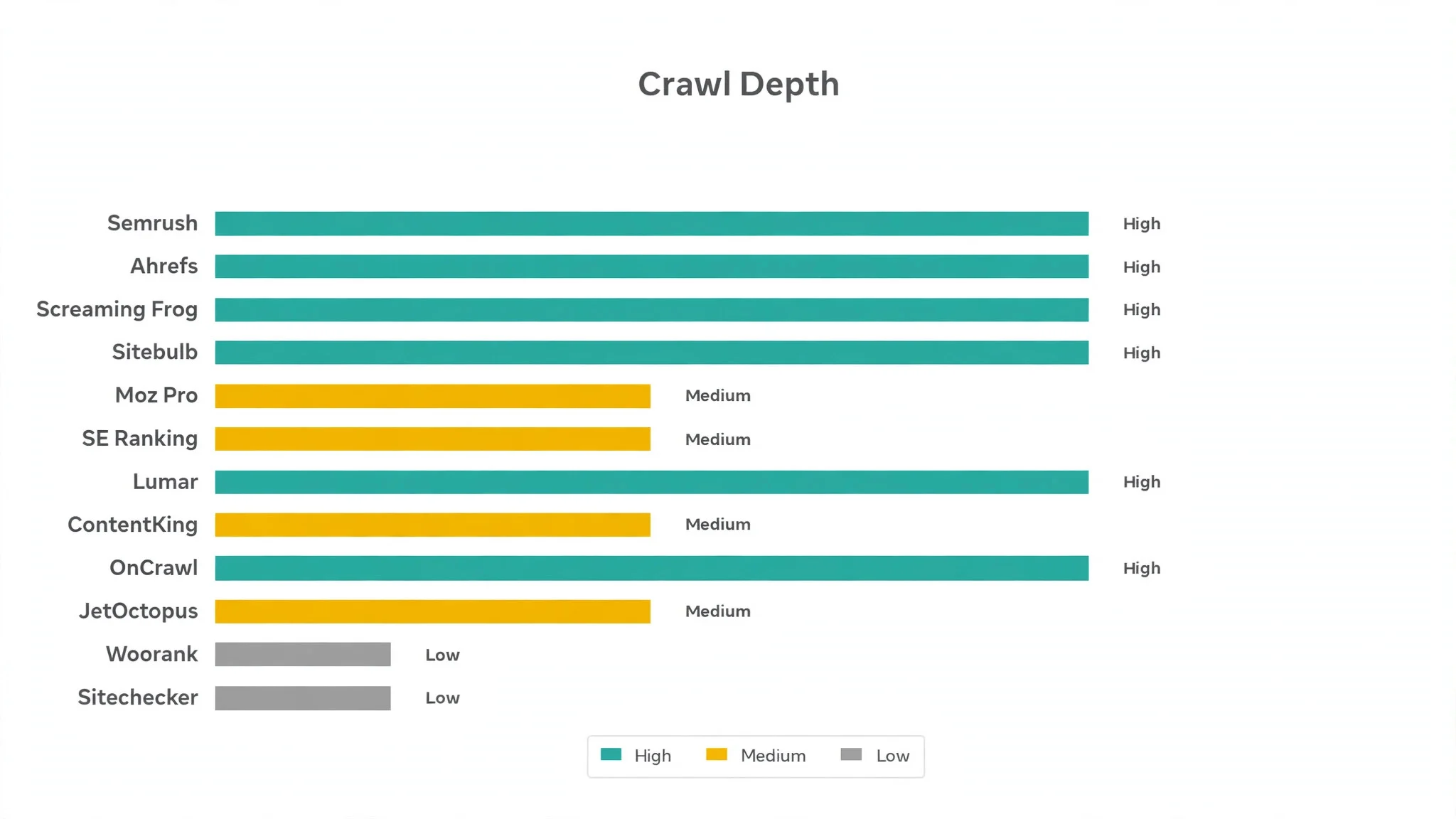
Narrow the table to Semrush and Ahrefs, then read those two reviews to see which audit routine fits your site. A tool that scores High on crawl depth only helps if your site is large enough to need it, and a tool that scores High on reporting only helps if the fixes get done. Fit to your audit routine matters more than a long feature list.
Why the Best Site Audit Tools Pay for Themselves
The first reason is traffic that returns. A page with a broken link or a missing title loses visitors a search engine would otherwise send, and across a year of traffic that gap is worth far more than the tool costs. An audit that finds the error hands that traffic back, and the gain repeats with every crawl.
The second reason is fewer wasted redesigns. Most site losses are not dramatic. A team rebuilds a section based on taste, the new pages rank worse, and nobody knows why. An audit catches these gaps because each change is measured against the old version before the team pays for a full rebuild.
The third reason is speed of response. When a client asks why traffic fell, a team with a fresh audit answers in seconds. A team working from opinion and guesswork has to argue the point, and the client is already doubting the recommendation.
The fourth reason is evidence for the next budget. A tool that records every error, every fix, and every recovery gives a team real numbers for the next pitch. Guessing that audits help is very different from showing a report that proves it, and that proof is what wins the next contract.
How We Put Each site audit tool Through Its Paces
We tested the best site audit tools against the same five measures, using a mid-size site with known errors, a broken link set, and a batch of duplicate titles. Each tool ran the same workload for two weeks, so Semrush and the rest compare like with like.
- Crawl speed, judged by how quickly a team could crawl a mid-size site without a server strain.
- Error clarity, measured by how fast a manager could read which errors mattered most.
- Fix guidance, scored on whether the tool explained how to fix each error in plain words.
- Re-crawl accuracy, timed from fixing an error to the next crawl confirming it was gone.
- Daily usability, judged by how long the Monday review took and how often the team opened the help docs.
Each measure carried equal weight except error clarity, which counted double, because an audit tool that buries the real errors is not doing its job. Scores run out of 100, and the order below follows the combined total, led by Semrush on audit breadth. Where two tools tied, we broke the tie on error clarity, since a clear tool protects the site from fixes that never happen.
We also checked the scheduled crawl, because site work moves fast. The best tools in this ranking run audits on a schedule and send a short summary, while the weakest need a manual start before any new error shows up.
The 12 Tools in Detail
Each review below follows the same pattern, and every tool is judged on the same ground as the best site audit tools. We note what each tool does best, where it falls short, and the site it suits best, with error clarity carrying the most weight.
1. Semrush
Semrush is the breadth leader in this ranking, and it leads because its audit sits inside a full SEO platform. The crawl finds errors, the keyword data shows which pages matter, and the link data shows which errors cost the most traffic. For a team that audits weekly, that combined view is the point.
The downside is the price tag and the learning curve. Semrush is built for teams with real SEO budgets, so a small site owner may find it dear. A team that invests in the platform gets a system that grows with it, but one checking a single site should start lighter.
In the trial, crawl your site and fix the five errors ranked highest. Watch whether the ranking matched the pages that matter, and whether the re-crawl confirmed the fixes. Ranking matched to what matters, fixes confirmed, the breadth delivers.
Our verdict. The broadest site audit here, and the best all rounder for teams that audit weekly.
2. Ahrefs
Ahrefs is the link-aware pick, and it earns second place by tying audit data to backlink strength. A broken page with strong links costs more than a broken page with none, and Ahrefs ranks the errors by that loss. The crawl itself is fast and the error list reads clearly.
The trade off is audit depth. Ahrefs is stronger on links than on technical audit detail, so a team that needs deep crawl configuration must look elsewhere. For a team whose main worry is lost link value, that link view is exactly right.
In the trial, crawl your site and read the errors beside their link data. See if the top errors were the ones with links, and if the fix guidance was clear. Top errors carrying links and guidance that reads clearly prove the view.
Our verdict. The best link-aware audit here, ideal for teams that protect link value.
3. Screaming Frog
Screaming Frog is the desktop pick, and it suits owners who want a fast crawl without a cloud subscription. Download the tool, point it at a site, and get a full error list in minutes, with exports that a developer can act on at once.
The trade off is cloud features. Screaming Frog runs on one machine, so scheduled crawls and shared reports need extra setup. For an owner who audits one site at a time, that desktop speed is exactly right.
In the trial, crawl your site and export the error list for the top ten issues. Ask whether the crawl finished fast, and whether the export was easy to hand to a developer. Fast crawl, developer-ready export, the desktop work speeds up.
Our verdict. The fastest desktop crawl here, ideal for owners who audit one site at a time.
4. Sitebulb
Sitebulb is the guidance pick, and it earns its place with audits explained in plain words. Each error comes with a clear explanation and a fix, so a non-technical owner can act without a developer translating the report.
The trade off is scale. Sitebulb suits small and mid-size sites best, and very large sites may need an enterprise crawler instead. For a team that wants the audit to teach as it reports, the guidance is the reason to choose it.
In the trial, crawl your site and fix three errors using only the guidance shown. Check whether the explanations made sense, and whether the re-crawl confirmed the fixes. Sense-making explanations, fixes confirmed, the guidance backs itself.
Our verdict. The clearest audit guidance here, ideal for teams that fix errors themselves.
5. Moz Pro
Moz Pro is the tracking pick, and it suits teams that want audits beside rank data. The crawl finds errors, the rank tracker shows which pages moved, and the link data shows what changed. A team that reports monthly gets one view for the whole story.
The trade off is crawl depth. Moz Pro is lighter on deep technical crawling than the specialists, so a team with a complex site should check the crawl limits first. For a team that audits and tracks ranks together, the combined view is worth it.
In the trial, crawl your site and read the errors beside the rank changes for the same pages. Watch whether the two views lined up, and whether the report was easy to share. Lined-up views, shareable report, the audit carries.
Our verdict. The best audit plus rank tracking here, ideal for teams that report monthly.
6. SE Ranking
SE Ranking is the value pick, and it earns its place with good audit depth at a lower price. The crawl finds the usual errors, the reports read clearly, and the subscription stays affordable for a small team.
The trade off is enterprise depth. SE Ranking is built for small and mid-size teams, so a very large site may hit crawl limits. For a small team that audits monthly, that price is the reason to choose it.
In the trial, crawl your site and fix the five errors ranked highest. Check whether the crawl found the known errors, and whether the price felt fair for the depth. Known errors found, fair price, the value stands.
Our verdict. The best audit value here, ideal for small teams that audit on a budget.
7. Lumar
Lumar is the enterprise pick, and it suits large sites that need deep crawling. The platform handles millions of pages, custom crawl rules, and detailed technical reports, so a large site programme runs smoothly.
The trade off is weight and price shape. Lumar is built for enterprise budgets, so a small site owner will find it dear. The setup also rewards a team that will crawl often. For a large site with big crawl needs, it is the most powerful tool in this ranking.
In the trial, crawl a large section and check the custom rules and reporting. Ask whether the results read clearly, and whether the team can manage the setup without outside help. Clear results, team-managed setup, the platform justifies itself.
Our verdict. The most powerful enterprise crawl here, ideal for large sites at scale.
8. ContentKing
ContentKing is the monitoring pick, and it earns its place with real-time alerts. The tool watches the site around the clock and warns the moment an error appears, so a broken page gets fixed the same day rather than at the next monthly audit.
The trade off is audit breadth. ContentKing monitors brilliantly but is lighter on deep crawl analysis than the full platforms, so a team that needs a full audit must pair it with another tool. For a site where errors cost money fast, that alerting is exactly right.
In the trial, change one page title and watch how fast the alert arrives. See if the alert named the change clearly, and if the fix was easy to confirm. Alert named the change, fix easy to confirm, monitoring settles.
Our verdict. The best real-time audit alerts here, ideal for sites where errors cost money fast.
9. OnCrawl
OnCrawl is the log-data pick, and it suits teams that want crawl data beside server logs. The tool shows which pages search engines actually visit, so the audit focuses on the pages that matter rather than the whole site.
The trade off is learning time. OnCrawl covers deep technical ground, and a new team takes time to learn where each report lives. For a technical team that reads logs, that depth is worth the learning curve.
In the trial, crawl your site and compare the crawl data with the log view. Ask whether the log view changed which errors you fixed first, and whether the reports read clearly. Log view reordering fixes, clear reports, the depth shows.
Our verdict. The best audit plus log data here, ideal for technical teams that read logs.
10. JetOctopus
JetOctopus is the speed pick, and it earns its place with fast crawls and log analysis. Large sites crawl quickly, the log view shows search engine behaviour, and the reports stay clear enough for a team to act on.
The trade off is polish. JetOctopus is a specialist tool, and some views feel less finished than the biggest platforms. For a team that crawls large sites often, the speed is worth the rougher edges.
In the trial, crawl a large section and time it against your usual tool. Watch whether the log view added value, and whether the error list was easy to act on. Valuable log view, actionable error list, the speed stays.
Our verdict. The fastest large-site crawl here, ideal for teams that crawl big sites often.
11. Woorank
Woorank is the simple pick, and it suits small sites that want a clear score. Run the audit, read the score, and fix the issues in the order shown, with guidance written for owners rather than developers.
The trade off is depth. Woorank is lighter on technical detail than the leaders, so a large or complex site will outgrow it. For a small site owner checking monthly, that simplicity is a strength.
In the trial, run the audit and fix the three issues ranked highest. Check whether the score made sense, and whether the guidance was easy to follow. Sensible score, easy guidance, the audit closes.
Our verdict. The simplest site audit here, ideal for small site owners checking monthly.
12. Sitechecker
Sitechecker is the monitoring pick for owners, and it closes the ranking with audits plus uptime and rank checks. One dashboard shows crawl errors, uptime, and rank movement, so a small team watches the whole site from one place.
The trade off is depth. Sitechecker is lighter on deep crawl detail than the specialists, so a technical team may need more. For an owner who wants one dashboard for site health, that breadth is exactly right.
In the trial, run the audit and check the uptime and rank views beside it. See if the dashboard stayed clear, and if the alerts arrived on time. Clear dashboard, alerts on time, the view holds.
Our verdict. The best audit plus monitoring dashboard here, ideal for owners who watch site health daily.
Site Audit vs Backlink Audit: What Each One Finds
A site audit and a backlink audit answer different questions, and the right choice depends on the problem. A site audit finds broken pages, slow loads, and duplicate titles inside the site, while a backlink audit finds lost links and toxic links pointing at the site. A team that fixes only one side leaves half the problem in place.
For most sites, the site audit comes first. The errors inside the site are under the owner control, and fixing them costs nothing but time. The best site audit tools in this guide cover the inside errors well, so the team can grow into backlink work when the technical side is clean.
Backlink work becomes useful when the technical side is healthy and rankings still stall. A site with clean pages and weak links needs outreach, while a site with strong links and broken pages needs fixes first. The practical rule is simple, and it saves months of wasted effort.
Five Audit Mistakes That Waste Site Owner Budget
The first mistake is auditing without fixing. A team that runs a crawl every month and fixes nothing learns nothing when the report ends, whatever the score. Pick the top five errors, fix them, and re-crawl, so each audit teaches the team something.
The second mistake is chasing the score. A tool that shows a single score tempts a team to fix easy issues that raise the number while ignoring the hard errors that cost traffic. Fix the errors that touch pages with traffic first, and let the score follow.
The third mistake is auditing too rarely. A site that changes weekly cannot be audited quarterly, because errors sit live for months before anyone notices. Match the audit frequency to the change frequency, and only audit pages that change often.
The fourth mistake is fixing two things at once. A fix that changes the title and the structure together cannot say which change helped, so the team learns nothing. Change one element per fix, and let each result build on the last.
The fifth mistake is ignoring the winning pages. A page that ranks well still teaches the team what the audience wants, and that lesson shapes the next page. Study the winners as well as the errors, and share both with the team.
A Four Week Audit Plan for a Mid-Size Site
Week one is the crawl, and it should be honest. Run a full audit, list every error, and rank them by the traffic on the pages they touch. An audit chosen from data beats an audit chosen from taste every time.
Week two is the first fix round. Fix the top ten errors, re-crawl the changed pages, and let the fixes settle without interference. Check the setup daily, but do not change anything else until the re-crawl confirms the fix. A clean first round builds the habit that carries the whole programme.
Week three turns the result into the next round of fixes. Read the re-crawl with the team, write down the lesson, and fix the next ten errors the same week. A programme that fixes ten errors a month is a hobby, while a programme that fixes ten a week is a service worth paying for.
Week four is the routine. Set a weekly audit slot, a shared error log, and a monthly report that shows every fix and every recovery. An audit habit that runs every week compounds, and the traffic numbers show the value in plain terms.

What to Check in an Audit Report Before You Trust It
An audit report looks simple on the surface, but three checks decide whether it is real. The first is the crawl coverage. A report based on a partial crawl is a hint, not a verdict, while a report based on a full crawl carries weight. Ask the tool to show the pages crawled beside the pages found, and ignore any score declared before the crawl finished.
The second check is the error ranking. A report that lists hundreds of errors with no ranking hides the real problems, and the team wastes time on trivia. The errors should rank by traffic impact, the pages should load for the right audience, and the tracking should count every error once. A quick look at the top ten catches the ranking errors that ruin otherwise good audits.
The third check is the change view. An error that appeared yesterday matters more than one that sat for a year, and the average hides the new damage. Read the report by new errors first before fixing anything old, because a new error is a new problem. A careful team checks the changes, writes down what it found, and only then tells the client the audit is done.
Best Pick by Job
No single audit tool fits every site, so each common audit situation below is matched to the tool that scored highest for that job. The best site audit tools for a large site look different from the right pick for a small owner, and the table below makes that split clear.
| Job | Best pick | Why it wins |
|---|---|---|
| Wants audits plus full SEO | Semrush | Broadest audit with keyword and link data |
| Wants audits tied to links | Ahrefs | Audit data beside backlink strength |
| Wants a fast desktop crawl | Screaming Frog | Fast crawl with deep technical detail |
| Wants audits explained well | Sitebulb | Clear audits with plain fix guidance |
| Wants audits plus rank tracking | Moz Pro | Audit beside rank and link data |
| Wants audits on a budget | SE Ranking | Good audit depth at a lower price |
| Needs deep crawling at scale | Lumar | Enterprise crawl at serious scale |
| Needs constant monitoring | ContentKing | Real-time alerts when errors appear |
| Wants audits plus log data | OnCrawl | Crawl data beside server log insight |
| Wants fast crawls for large sites | JetOctopus | Fast crawl with log file analysis |
| Wants a simple audit | Woorank | Simple audit with a clear score |
| Wants audits plus monitoring | Sitechecker | Audit with uptime and rank checks |
If your situation does not match a row exactly, take the closest one and read that review first, starting with Semrush when it fits. The gap between neighbouring tools is smaller than the gap between an audit your team acts on weekly and one they never read, so habit matters more than a few points on a scorecard.
Frequently Asked Questions
Site owners ask the same questions before every audit tool change, so we answered the most common ones here.
How much does a site audit tool cost for a small site?
Most tools in this ranking charge per month, so a site owner pays one plan plus any overage for large crawls. Free plans cover small trials well, but the crawl depth and monitoring that save real time usually sit on paid tiers. Check the vendor site for current pricing and confirm the total before you pay, because crawl limits can change the bill.
Can one tool handle audits and backlink checks together?
It can handle both, and most teams prefer one system for the whole job. An audit needs crawls and error lists, while backlink work needs link data and loss alerts, and the leaders cover both well. Some teams still pair an audit specialist with a separate link tool, which works fine when the data handover is clear.
How long does it take to get a trustworthy audit result?
A focused team gets a trustworthy result in a day if the site is mid-size. The delay usually comes from large crawls and slow fixes, not from the tool. Decide the error list first, fix the top errors, and read the re-crawl only when the fixes are live.
Do these tools work for very large sites?
They work, but the crawls take longer and some plans cap the page count, and some audits will never finish on a capped plan. A large site should use an enterprise crawler with a higher limit, rather than a small plan that stops halfway. Crawl the sections with the most traffic first, because those are the audits that pay for the programme.
What happens to our audit history if we switch tools later?
Every tool in this ranking exports audit reports and error lists to common formats, so a switch is possible but never painless. Crawl settings and alert rules do not transfer, and the team must rebuild them in the new tool. A switch is never painless, which is why a team should trial Semrush properly now instead of staying with an audit tool that no longer fits the way the team works.
Semrush First, Then the Rest of the Shortlist
A team can settle this in a trial by timing days to a first crawl, counting the errors fixed, and measuring traffic recovery in the first month. The best site audit tools prove themselves on the days to a first crawl, the share of errors fixed, and the traffic recovery found in the first month, and a four week trial with your real site will show all three. Semrush wins our ranking on the combined score, but the right tool for your site is the one your team runs every week without being asked.
Run the trial on one real site with your real pages and your real errors, and judge the tool on the first re-crawl rather than the demo. If the crawl finishes in a day and the error ranking is clear, the system is working. If the crawl stalls and the report confuses the team, the tool is fighting you rather than helping you. Pick the tool that makes auditing feel easy, protect the weekly habit, and let the recovered traffic pay for the subscription many times over.