

The best to-do list apps for students come down to two apps with different ideas about simplicity. Todoist keeps tasks fast and plain, while TickTick packs in calendars, habits and timers without losing speed. Todoist is our winner for most students, because its natural-language dates and clean lists make capturing a task take seconds, and TickTick is the runner-up that wins on built-in extras.
The tension is about how much an app should do. Todoist suits a student who wants tasks in and out of the way, while TickTick suits a student who wants the calendar, the habit tracker and the Pomodoro timer in the same place. A student juggling lectures, assignments and a part-time job will feel the difference within a week, because the app becomes the plan for every day.
Below, the glance table lines up all ten apps on price and best use, the judging section explains the tests, and the detail sections give each app a fair hearing. Read the best-pick table first if time is short, then the head-to-head between Todoist and TickTick, because that comparison settles the decision for most students.
In this article
- The 10 Tools at a Glance
- Why the Best To-do List Apps for Students Shortlist Matters in 2026
- How We Judged Every To-do App on This List
- Best Pick by Job
- The 10 Tools in Detail
- Todoist vs TickTick: The Head-to-Head That Decides It
- Choosing a To-do App That Survives Exam Season
- Running Your First Study Week Plan in Five Steps
- Frequently Asked Questions
- Our Pick, Stated Plainly — Todoist Is the Student Default
The 10 Tools at a Glance
The table lines up the best to-do list apps for students side by side, with the starting price and the job each app fits best. Prices are the published starting figures, and the detail sections give the free-tier limits and the student discounts separately where they differ.
| Tool | Starting price | Best for | Standout strength |
|---|---|---|---|
| Todoist | Free; Pro $4 a month (annual billing) | Students who want fast capture | Natural-language dates |
| TickTick | Free; paid plans on the vendor site | Students who want calendar and habits too | Calendar, habits and timer |
| Notion | Free; Plus $10 a month per user (annual billing) | Students who keep notes and tasks together | Notes and tasks in one place |
| Microsoft To Do | Free | Students already on Microsoft 365 | Free with Microsoft accounts |
| Any.do | Free; paid plans on the vendor site | Students who like a daily planner | Daily planning and reminders |
| Google Tasks | Free | Students living in Gmail and Calendar | Free inside Google apps |
| Things 3 | One-time purchase; Mac app $49.99 | Apple users who want beautiful lists | Beautiful and fast on Apple |
| Habitica | Free; subscriptions from $4.99 a month | Students who need motivation to start | Tasks as a game |
| Remember The Milk | Free; Pro $25 a year | Students who love lists and tags | Smart lists and reminders |
| Structured | Free; paid plans on the vendor site | Students who plan by the hour | Timeline day planning |
Why the Best To-do List Apps for Students Shortlist Matters in 2026
A student week is a tangle of lectures, deadlines, shifts and social plans, and memory alone cannot hold it. A good to-do app turns that tangle into a short list for today, which is the difference between steady progress and a panic the night before a deadline. The app matters because it becomes the plan.
The cost of a bad system is measured in missed deadlines and lost sleep. Students who keep tasks in their head forget the small ones, and the small ones are usually the ones that carry marks. An app that makes capture instant and review painless keeps the whole term visible at a glance.
The shortlist below is built for students rather than office teams. Every app here can capture tasks, set reminders and work on a phone, and the differences are about speed, structure and price. Those three measures run through the whole guide, from the first table to the closing pick.
One more point shapes the whole list. A to-do app only works if the student opens it every day, so the winner is rarely the most powerful app and usually the one that feels lightest. A beautiful app that takes ten taps to add a task will lose to a plain one that takes two, and the rankings below weigh that daily friction heavily.
How We Judged Every To-do App on This List
Five tests decided the order of the best to-do list apps for students, and each app faced the same student week of lectures, assignments and a part-time shift. An app that scored well on one test but failed another fell in the ranking, because a student needs all five strengths in a single term.
- Capture speed. We timed how fast a task with a date and a reminder could be added on a phone.
- Planning view. We judged how clearly the app shows today, this week and the next deadline.
- Reminders that work. We tested location and time reminders, and whether they fired reliably.
- Sharing and groups. We checked how easily tasks can be shared for group projects and shared flats.
- Value for money. We weighed the price against the free tier, with student discounts counted where they exist.
Best Pick by Job
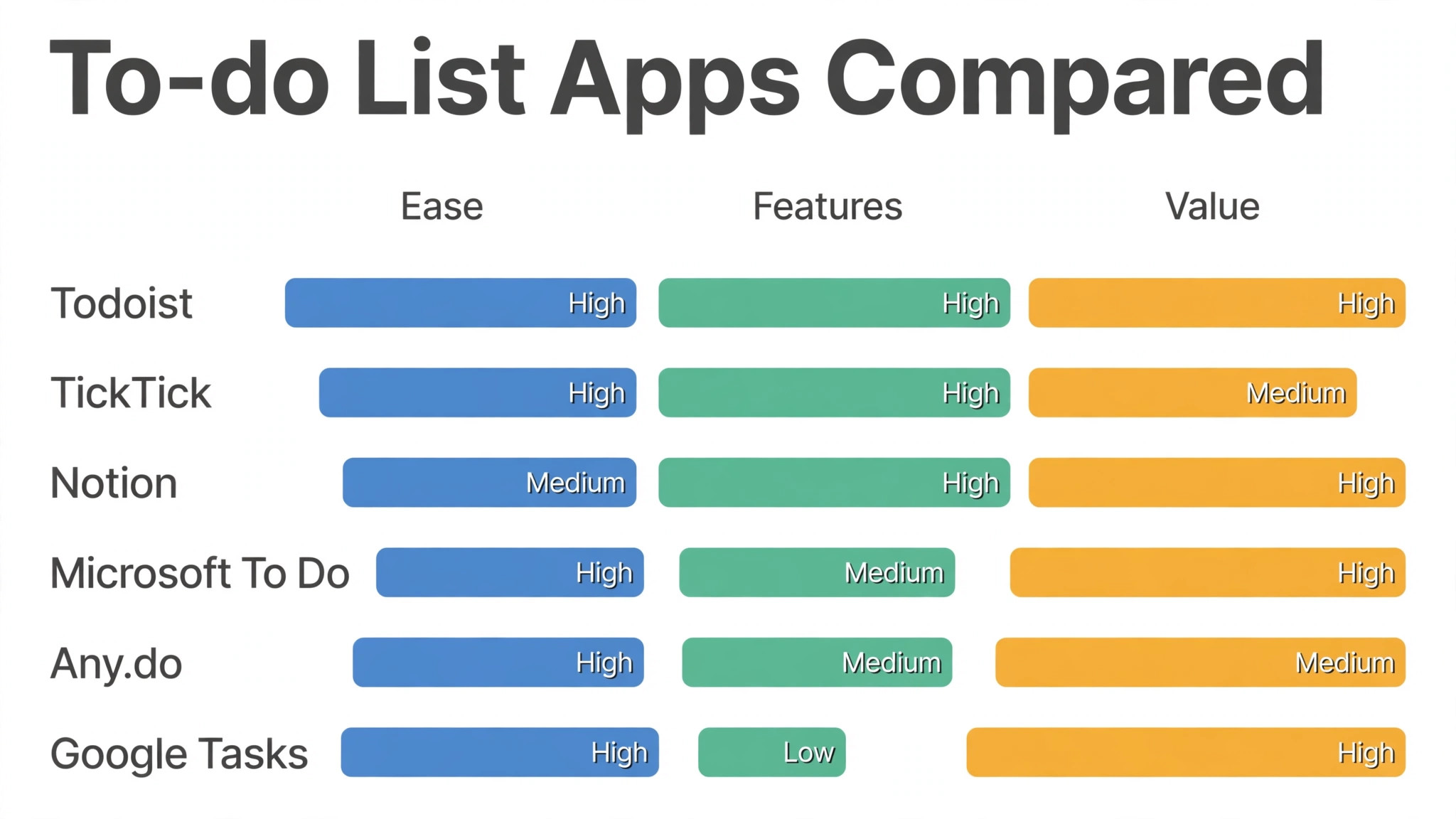
The best to-do list apps for students split neatly by job, so match the row to the work rather than buying the winner by default. A heavy exam term, a group project and a student budget need different strengths, and the table below names the right app for each one.
| Job | Best pick | Why it wins |
|---|---|---|
| Daily task capture | Todoist | Fastest natural-language entry |
| All-in-one planning | TickTick | Calendar, habits and timer built in |
| Notes plus tasks | Notion | Tasks live beside lecture notes |
| Free Microsoft setup | Microsoft To Do | Free with a student account |
| Simple shared lists | Google Tasks | Free and inside Gmail and Calendar |
| Building a study habit | Habitica | Tasks become a game with rewards |
The 10 Tools in Detail
Each app below was tested on the same student week, the same assignment deadlines and the same phone, so the notes compare like with like. Read the ones that match the study style first, then check the verdict line for the short answer.
1. Todoist
Todoist is a task manager built around speed, letting a student type ‘essay Friday 6pm’ and have the date, time and reminder set in one move. Its projects, labels and filters organise a term into courses and assignments, and the Karma points reward finishing tasks on time. Boards, calendars and upcoming views show the week at a glance, and the app syncs instantly between phone, laptop and browser. Templates for common student routines, like weekly reviews and exam prep, save setup time at the start of a term. Integrations with Gmail, Google Calendar and Slack pull tasks from the places a student already works, so nothing gets lost in an inbox.
Todoist is free for basic lists, and Pro costs $4 a month on annual billing, with reminders, filters and bigger file uploads included. It fits students best when the day is full and tasks must be captured in seconds, not minutes. That capture speed is a big reason Todoist leads the best to-do list apps for students field for students who want a list that keeps up with a busy term.
Our verdict. Todoist is the right buy for students who want the fastest way to capture and clear tasks, and it is the quickest app we tested.
2. TickTick
TickTick combines tasks, calendar, habit tracking and a Pomodoro timer in one app, so a student can plan a study session without switching tools. Its calendar view drags tasks onto time slots, which turns a vague list into a real plan for the day. Habit tracking with streaks keeps daily routines visible, and the built-in timer runs focused study blocks with short breaks. Smart lists group tasks by date, priority and tag, and the Eisenhower matrix view sorts urgent work from merely loud work. The app works offline and syncs when back online, which matters in lecture halls with weak signal.
TickTick is free for core lists and habits, and paid plans are listed on the vendor site. Confirm the current figure before you buy. It fits students best when one app should cover the calendar, the habits and the focus timer as well as the list. The trade-off is a busier interface than Todoist, so a student who wants pure simplicity may find it crowded.
Our verdict. TickTick is the right buy for students who want everything in one place, and its built-in extras are the best value in this list.
3. Notion
Notion is a workspace where lecture notes, reading lists and tasks live in the same pages, so a student can link an assignment to its notes directly. Its databases turn a task list into a filtered table by course, deadline or status, which suits students who like to see the whole term at once. Templates for class notes, revision plans and project trackers save hours of setup, and the free student plan covers the core features. Collaboration lets group members share pages and comment, which keeps a group project in one place instead of scattered chats. The mobile app captures quick tasks, though heavy planning still feels better on a laptop with a full keyboard.
Notion is free for students with a school email, and Plus costs $10 a month per user on annual billing for bigger uploads and longer history. It fits students best when notes and tasks belong together and the student enjoys building a personal system. The trade-off is setup time, because Notion starts as a blank page and needs an afternoon of building before it feels like a to-do app.
Our verdict. Notion is the right buy for students who want notes and tasks in one system, and its flexibility is unmatched in this list.
4. Microsoft To Do
Microsoft To Do is a free task app that syncs with Outlook and Microsoft 365, turning flagged emails into tasks with one click. Its My Day view picks the tasks for today each morning, which gives a student a short, honest list to work through. Shared lists make group assignments easy, and the app works on phone, desktop and web with the same lists everywhere. Steps break a big assignment into smaller pieces, and file attachments keep the reading list beside the task. Integration with OneNote and Teams means a task created in a lecture note or a class chat lands in the same list.
Microsoft To Do is free with a Microsoft account, and students with a school Microsoft 365 plan get it included at no extra cost. It fits students best when the school already runs on Microsoft apps and the email inbox is where tasks arrive. The trade-off is fewer power features than Todoist or TickTick, so heavy planners may miss advanced filters and views.
Our verdict. Microsoft To Do is the right buy for students who want a free, simple list inside the Microsoft world, and its My Day view is genuinely useful.
5. Any.do
Any.do is a task app built around a daily planning moment, asking each morning what the day should hold and then guiding through it. Its calendar integration shows tasks beside appointments, which stops a student booking a study session over a lecture. Location reminders fire when arriving at the library or the lab, which suits tasks tied to a place rather than a time. Shared lists and assigned tasks cover group work, and the clean design keeps the focus on today rather than the whole term. The voice entry adds tasks hands-free, which helps when walking between lectures with no time to type.
Any.do is free for core lists, and paid plans are listed on the vendor site. Confirm the current figure before you buy. It fits students best when a short daily planning habit matters more than deep project structure. The trade-off is a smaller template library than Notion or Todoist, so complex terms need more manual setup.
Our verdict. Any.do is the right buy for students who want a calm daily planner, and its morning routine is the most habit-forming here.
6. Google Tasks
Google Tasks is a free list built into Gmail and Google Calendar, so a task can be made from an email without opening another app. Its lists stay simple, with due dates, subtasks and reminders, and everything syncs to the phone automatically. The Calendar view shows tasks beside lectures and deadlines, which makes the week visible in one place. Tasks can be added from a phone widget in seconds, which suits students who live on their phones between classes. Because it needs no new account, a student can start using it in a minute and stop just as easily.
Google Tasks is free with any Google account, with no paid tier and no limits on lists or tasks. It fits students best when Gmail and Calendar already run the term and the list should live inside them. The trade-off is the lack of power features like filters, labels and recurring-task rules, so heavy users will feel the ceiling.
Our verdict. Google Tasks is the right buy for students who want a free list with zero setup, and it is the simplest option in this list.
7. Things 3
Things 3 is a beautifully designed task app for Apple devices, with a clean inbox, projects and a Today view that feels calm rather than crowded. Its quick entry with autofill turns a typed date or tag into a structured task, and the app is fast enough to trust during a lecture. Areas group projects by course or by life, and the evening review shows what is due tomorrow before the day ends. The design rewards daily use, with smooth animations and a layout that keeps the next task visible at all times. Sync between Apple devices is quick and reliable, though it needs a separate purchase for each device type.
Things 3 is a one-time purchase, with the Mac app at $49.99 and separate prices for iPhone and iPad, and no subscription. It fits students best when the student uses Apple devices, values design, and wants a list that feels good to open. The trade-off is the price and the lack of a Windows or Android version, so mixed-device students should look elsewhere.
Our verdict. Things 3 is the right buy for Apple students who want the prettiest list, and its design is the best in this list.
8. Habitica
Habitica turns tasks, habits and daily goals into a role-playing game, where finishing work earns gold and levelling up a character. Its party system lets friends join the same quest, so a study group can hold each other accountable with shared rewards. Daily goals, habits and to-dos live in separate lists, which keeps routine work apart from one-off assignments. Custom rewards let a student set their own prizes, like an episode of a favourite show after finishing a chapter. The app works on phone and web, and the game layer makes starting a dull task feel less like a chore.
Habitica is free for the core game, and subscriptions start at $4.99 a month for extra gems, drops and customisation. It fits students best when starting is the hard part and a game layer makes the first task of the day easier. The trade-off is a playful interface that can distract, so students who want a plain professional list should pick Todoist instead.
Our verdict. Habitica is the right buy for students who need a nudge to start, and its game layer is the most motivating in this list.
9. Remember The Milk
Remember The Milk is a long-running task app with smart lists, tags and powerful search, built for people who live by their lists. Its smart lists filter tasks by tag, location or date, so a student can see only the library tasks or only the work due this week. Reminders work by email, text and app notification, which suits students who need a nudge in more than one place. The app syncs across phone, tablet and web, and the interface stays fast even with thousands of old tasks. Location-based lists show tasks when arriving somewhere, like a shopping list that appears at the supermarket.
Remember The Milk is free for basic lists, and Pro costs $25 a year with unlimited syncing, subtasks and file attachments. It fits students best when the term is organised by tags and smart lists rather than by projects and boards. The trade-off is a dated design next to newer rivals, so students who care about looks may prefer Todoist or Things.
Our verdict. Remember The Milk is the right buy for students who want smart lists and strong reminders, and its search is the best in this list.
10. Structured
Structured is a day planner that lays tasks on a visual timeline, so a student can see the shape of the day rather than a flat list. Its timeline shows gaps and overlaps clearly, which helps a student spot a free hour for revision between lectures. Subtasks and notes sit inside each block, and the app gently moves unfinished tasks to the next day. The inbox collects tasks without a time, so ideas can be captured fast and scheduled later. Widgets show the timeline on the home screen, which keeps the plan visible without opening the app.
Structured is free for core planning, and paid plans are listed on the vendor site. Confirm the current figure before you buy. It fits students best when the day is planned by the hour and the shape of the schedule matters more than the list. The trade-off is weaker long-term project views than Todoist or Notion, so term planning needs another tool.
Our verdict. Structured is the right buy for students who think in hours, and its timeline view is the clearest in this list.
Todoist vs TickTick: The Head-to-Head That Decides It
Todoist wins on capture speed. Typing a task in plain language and having the date set itself is the single most useful feature in a student app, and Todoist does it better than any rival here. For a student adding tasks between lectures, that speed decides whether the list gets used at all, and a list that is not used is worth nothing.
TickTick wins on breadth. The calendar, habit tracker and Pomodoro timer mean a student can plan a study session, track the habit and time the focus block without leaving the app. That breadth suits students who want one home for the whole routine, though the interface asks more of a newcomer than Todoist does.
The deciding question is how the student plans. If tasks arrive all day and need instant capture, Todoist wins. If the day is planned in blocks and the student wants the timer and the calendar beside the list, TickTick wins. Most students capture more than they plan, which is why Todoist takes the top spot.
One more difference shows up in exam season. Todoist’s filters and labels make it easy to pull a list of everything due this week across all courses, while TickTick’s calendar view shows the same work as blocks on a timeline. A student who studies in short bursts will prefer the list, and a student who studies in long blocks will prefer the calendar.
Choosing a To-do App That Survives Exam Season
A to-do app must survive the hardest week of term, not just the first, so choose for exam season rather than freshers week. These five checks separate an app that holds up from one that falls apart.
- Add ten tasks with dates on a phone and time it, because capture speed decides whether the list gets used at all.
- Check the free tier on a real week before paying, because reminder and sync limits only show up in daily use.
- Look at the week view, not the list view, because a term is planned by days and deadlines rather than by tasks alone.
- Test the reminder at the time it matters, because a reminder that arrives late is worse than no reminder at all.
- Confirm the export and backup story, because a whole term of tasks should never live in one app with no way out.
Running Your First Study Week Plan in Five Steps
The best to-do list apps for students all support the same five-step weekly plan, so run this pass on Sunday evening and see where the current app slows down. Each step has one job, and skipping one always shows up by Wednesday.
- Capture everything. Empty the head into the inbox, including assignments, chores and social plans, without sorting anything yet.
- Sort by course. Move each task into its course project, add a date, and break big assignments into smaller steps.
- Plan the week. Drag the dated tasks onto the calendar, protect study blocks, and leave one buffer slot each day.
- Work the day. Open the today view each morning, work the list in order, and tick tasks off as they finish.
- Review and reset. On Sunday, clear completed tasks, move unfinished ones forward, and plan the next week from a clean list.
Frequently Asked Questions
The best to-do list apps for students raise the same six questions in every inbox we read, so here are the short answers before the detail sections. Each one assumes a working student rather than a productivity expert.
What is the best free to-do app for students?
Todoist, Microsoft To Do and Google Tasks all offer strong free tiers, and the best choice depends on the rest of the setup. Todoist has the fastest capture, Microsoft To Do suits schools on Microsoft 365, and Google Tasks is the simplest option for students who live in Gmail. Start with one free tier for a full week before paying for anything.
Is Todoist worth paying for as a student?
The free tier covers lists, projects and basic reminders, which is enough for many students. Pro adds reminders, filters and labels, and it earns its $4 a month when the term gets busy and the free tier starts to feel tight. Students should test the free tier through a deadline week first.
Can a to-do app help with exam revision?
Yes, when revision is broken into small dated tasks rather than one large block called revision. An app with reminders and a calendar view keeps daily revision visible, and TickTick’s habit tracker and timer add structure. The app helps most when the plan is written down the night before.
How do I share tasks for a group project?
Most apps in this guide support shared lists and assigned tasks, including Todoist, Microsoft To Do and Notion. Create one shared project, assign each task to a person with a date, and check the shared view before each meeting. A shared list beats a group chat for tracking who owes what.
Should I use one app or several?
One app usually wins, because tasks spread across apps get forgotten. Pick the app that covers the most needs, whether that is Todoist for capture, TickTick for planning or Notion for notes, and keep everything else out. A second app only earns its place when it does something the first cannot.
Do to-do apps work offline?
Most of them do, including Todoist, TickTick and Microsoft To Do, which store tasks on the phone and sync when back online. Offline support matters in lecture halls and libraries with weak signal, so check it before relying on an app for exams. Browser-only tools are the ones to avoid here.
Our Pick, Stated Plainly — Todoist Is the Student Default
The best to-do list apps for students split into two honest answers. Todoist is the default for students who want the fastest capture and the cleanest list, while TickTick is the default for students who want the calendar, habits and timer in the same app. Our pick is Todoist, because a student list lives or dies on how fast a task gets in.
Buy Todoist when tasks arrive all day and speed matters most. Buy TickTick when the day is planned in blocks and the extras earn their place. Either way, capture everything, review the list each morning, and let the app carry the term so memory does not have to.