

Which website builder should a nonprofit pick in 2026, and how much will it cost once donations start flowing? This guide compares the best website builders for nonprofits on price, fit and the limits that only show up after launch, and it names the pick outright.
Wix wins the general case because its free plan, 70 percent nonprofit discount and built-in donation tools cover a small charity end to end, while Squarespace wins when the story and the design carry the fundraising.
This guide compares fifteen builders on price, nonprofit discounts, donation fees and ease of use, then works out the monthly bill at three fundraising volumes, so a charity can pick the builder that keeps the most of every donation.
In this article
- How the Best Website Builders for Nonprofits Handle Donations and Discounts
- The 15 Tools at a Glance
- Best Pick by Job
- The 15 Tools in Detail
- Rebuilding a Nonprofit Website in Three Weekends
- Nonprofit Website Costs at One, Five and Twenty Donation Campaigns
- How Donors Actually Give on a Nonprofit Website
- Nonprofit Website Mistakes That Lose Donors
- Eight Steps to Launch a Nonprofit Site Before Your Next Appeal
- Frequently Asked Questions
- The Nonprofit Website Bill at Three Fundraising Volumes
How the Best Website Builders for Nonprofits Handle Donations and Discounts
Two numbers decide this choice, which are the nonprofit discount and the fee taken from each donation, since a builder that looks cheap can quietly keep two percent of everything a charity raises. That is the first filter this guide applies to the best website builders for nonprofits.
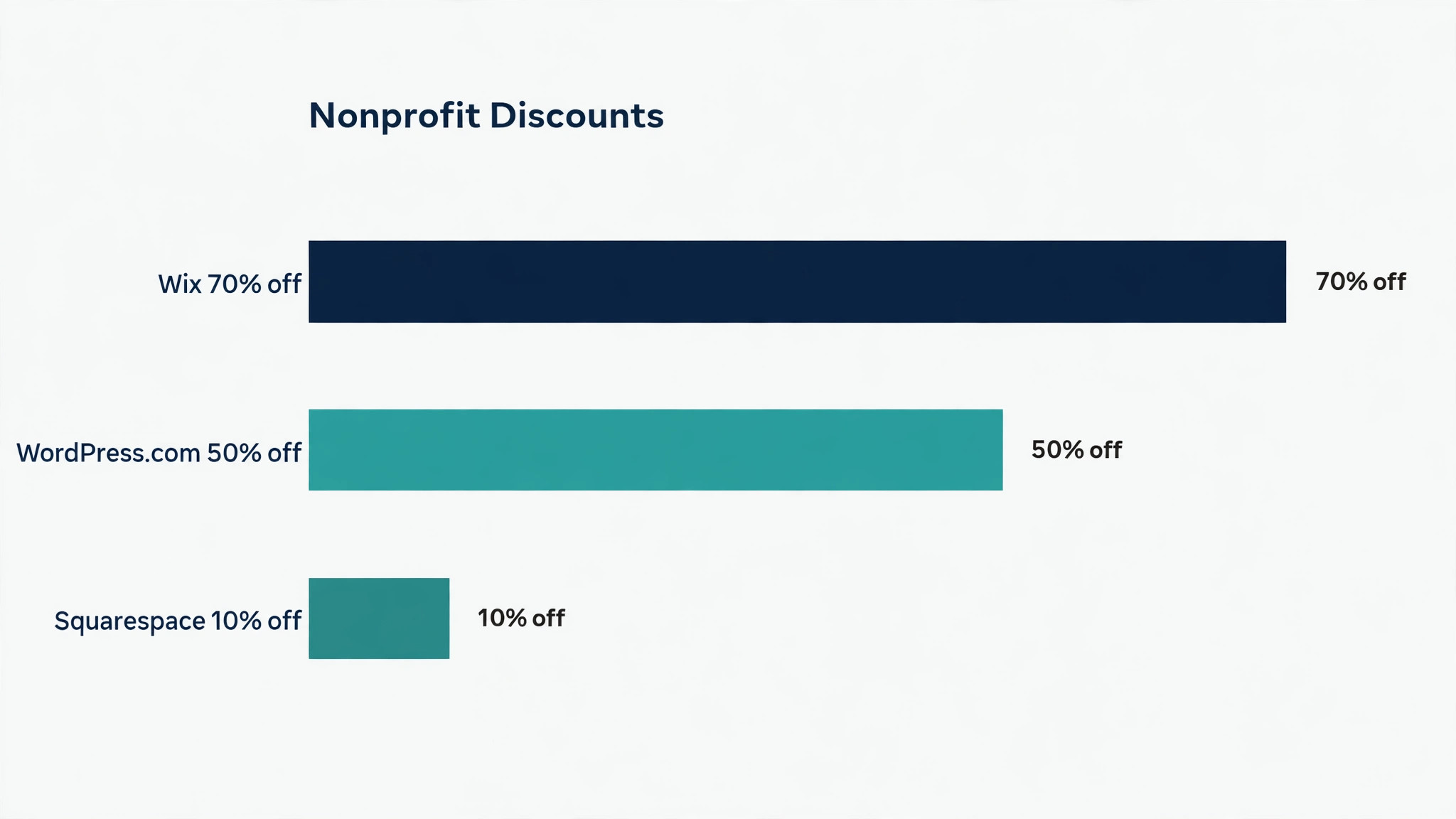
A 70 percent discount through TechSoup can turn a 29 dollar plan into under nine dollars, and a two percent donation fee on 10,000 dollars of gifts costs 200 dollars, so both numbers deserve a line in the budget.
– Nonprofit discount, and how to claim it through TechSoup or direct application. – Donation fees, including platform cuts and payment processing on top. – Ease of use for a two-person team or a volunteer who edits the site. – Accessibility and mobile design, since donors give from phones.
The 15 Tools at a Glance
Fifteen builders span free drag-and-drop tools, design-led platforms and nonprofit-only systems, and the table below shows the starting price for each. The table below compares the best website builders for nonprofits side by side.
| Tool | Starting price | Best for | Free option |
|---|---|---|---|
| Wix | About $17 a month | small nonprofits that want everything in one place | Free plan |
| Squarespace | About $16 a month | charities whose story and imagery carry the fundraising | 14-day trial |
| WordPress.com | From about $4 a month | content-heavy charities with technical help | Free plan |
| Weebly | About $10 a month | very small charities that want the simplest free site | Free plan |
| Webflow | From about $14 a month | charities that want full design control | Free plan |
| Duda | From about $19 a month | charities that need a fast site with client management | 14-day trial |
| GoDaddy | From about $9.99 a month | charities that want a quick site with a domain in one place | Free trial |
| Strikingly | From about $8 a month | one-page charity sites and simple appeals | Free plan |
| Jimdo | From about $9 a month | tiny charities that want a site with almost no setup | Free plan |
| SITE123 | From about $12.80 a month | charities that need a multilingual site quickly | Free plan |
| Morweb | From about $99 a month | charities that want a platform built only for nonprofits | No free plan |
| Hostinger Website Builder | From about $2.99 a month | charities that want the lowest possible monthly price | Free trial |
| IONOS | From about $6 a month | charities that want a guided setup with support | Free trial |
| Mailchimp | From about $13 a month | charities that already run email on Mailchimp | Free plan |
| Canva | Free | charities that need a simple one-page site fast | Free plan |
Best Pick by Job
A tiny charity and a membership organisation need different builders, so the table below matches each charity shape to its pick, with the monthly cost beside it.
| Job | Pick | Why it wins | Monthly cost |
|---|---|---|---|
| Small charity, tiny budget | Wix | Free plan plus 70% nonprofit discount | Under $9 a month via TechSoup |
| Design-led fundraising story | Squarespace | Best templates for donor trust | About $16 a month, Core $23 removes fees |
| Content-heavy site, technical team | WordPress.com | Plugins for every donation need | From about $4 a month |
| Membership organisation | Wild Apricot | Membership and website in one bill | From about $66 a month |
| All-in-one nonprofit platform | Morweb | Built only for nonprofits | From about $99 a month |
The 15 Tools in Detail
Each builder below suits a different kind of charity, so read the ones that match your team size and fundraising style before comparing prices. Start with the tools that match your job, then check the price, because the best website builders for nonprofits differ more on fit than on features.
1. Wix
Wix gives a nonprofit a drag-and-drop editor, donation tools, events and email in one dashboard, with hundreds of nonprofit templates. Its strength is the discount, since eligible charities get 70 percent off two-year Premium plans through TechSoup plus a free domain for a year.
Light lists at about 17 dollars a month on annual billing, with Core at about 29 dollars adding more storage and no Wix ads. Skip it when the charity needs deep custom design, because its templates bend less far than Webflow or WordPress.
2. Squarespace
Squarespace produces the most polished nonprofit sites on this list, with templates built around photography, storytelling and clean donation pages. Its strength is design, since a Squarespace site looks professionally made without a designer, which builds donor trust fast.
Basic lists at about 16 dollars a month on annual billing, with Core at about 23 dollars removing the two percent donation fee. Skip it when the budget is tight and design is secondary, because the discount is only 10 percent off the first payment.
3. WordPress.com
WordPress.com hosts the world’s most flexible publishing platform, with donation plugins, membership tools and full control over the content. Its strength is flexibility, since GiveWP, Charitable and WPForms cover almost any donation or event need a charity can describe.
Plans start at about 4 dollars a month, and registered nonprofits get 50 percent off through TechSoup, dropping the entry price to about two dollars. Skip it for a team with no technical help, because plugins, updates and security become the charity’s own job.
4. Weebly
Weebly is a straightforward drag-and-drop builder with a free plan, simple pages and basic donation buttons for the smallest organisations. Its strength is simplicity, since a volunteer can build and publish a credible site in an afternoon without training.
Paid plans start at about 10 dollars a month on annual billing, adding a custom domain and removing Weebly ads. Skip it when the charity needs modern donation tools, because its fundraising features are basic next to Wix or Squarespace.
5. Webflow
Webflow gives a charity professional-grade design control, with a visual editor that produces clean, fast and accessible pages. Its strength is design freedom, since a designer can build exactly the site the charity imagines without template limits.
General plans range from about 14 to 39 dollars a month, and eligible nonprofits report a discount on one site for the first year. Skip it for a volunteer-run site, because the editor has a real learning curve and needs someone comfortable with design tools.
6. Duda
Duda builds fast, responsive sites with built-in client management, aimed at teams that run several sites or work with an agency. Its strength is speed, since its sites load quickly and its editor handles multilingual content cleanly.
Plans start at about 19 dollars a month, with higher tiers adding team seats, white labelling and more sites. Skip it for a single small charity site, because its agency features add cost a one-site charity does not need.
7. GoDaddy
GoDaddy Website Builder pairs a simple editor with domain registration, email and marketing tools in a single account. Its strength is convenience, since the domain, site and email all live under one login and one support number.
Plans start at about 9.99 dollars a month, with higher tiers adding ecommerce and marketing features. Skip it when design quality matters most, because its templates look plainer than Squarespace or Webflow.
8. Strikingly
Strikingly builds single-page sites fast, which suits a charity that needs one strong page for an appeal rather than a full website. Its strength is speed, since a one-page appeal can go live in an hour with a donation button and a story.
Paid plans start at about 8 dollars a month, adding a custom domain, more pages and no Strikingly branding. Skip it for a charity that needs many pages, because the one-page format strains once programmes, reports and news pile up.
9. Jimdo
Jimdo offers a simple builder with AI-assisted setup, producing a small business or charity site with very little input. Its strength is the low effort, since the setup wizard asks a few questions and produces a finished-looking site.
Plans start at about 9 dollars a month, with higher tiers adding ecommerce and search optimisation tools. Skip it when the charity needs serious donation features, because its fundraising tools are lighter than the leaders here.
10. SITE123
SITE123 builds small sites fast with multilingual support, which suits charities that serve communities in more than one language. Its strength is language support, since a site can publish in several languages without a plugin or a developer.
Paid plans start at about 12.80 dollars a month, adding a custom domain, more storage and no SITE123 ads. Skip it for a design-led site, because its templates are plain and its customisation options are limited.
11. Morweb
Morweb is built exclusively for nonprofits, bundling the website, donations, events and accessibility compliance into one platform. Its strength is the nonprofit focus, since every feature assumes a charity workflow rather than adapting a business tool.
Pricing starts at about 99 dollars a month, with some sources listing 149 dollars for plans that include fundraising modules. Skip it for a small charity with a simple site, because the price assumes a mid-size organisation using the full platform.
12. Hostinger Website Builder
Hostinger Website Builder pairs very low prices with an AI-assisted editor, hosting and a free domain on higher plans. Its strength is price, since the entry plan undercuts almost every builder on this list.
Plans start at about 2.99 dollars a month, with the business tier adding ecommerce and more AI features. Skip it when donation features matter most, because its fundraising tools are basic and need a third-party form.
13. IONOS
IONOS MyWebsite offers a guided builder with templates, email and support, aimed at beginners who want help at every step. Its strength is support, since a real person answers the phone when a volunteer gets stuck.
Plans start at about 6 dollars a month, with higher tiers adding ecommerce and marketing tools. Skip it for a design-led site, because its templates are functional rather than beautiful.
14. Mailchimp
Mailchimp Website Builder lets a charity build a simple site inside the email platform it already uses, sharing the same audience list. Its strength is the shared list, since the website, email and donation forms all draw on one contact database.
Paid plans start at about 13 dollars a month, with the website builder included in the standard marketing plans. Skip it as a standalone website, because its builder is simpler than Wix or Squarespace and suits a companion site best.
15. Canva
Canva Websites turns a design into a simple one-page site in minutes, which suits an appeal page or an event landing page. Its strength is speed, since a charity that already designs in Canva can publish a page without learning a new tool.
Canva Websites is free with a Canva account, and Canva Pro at 10 dollars a month on annual billing adds a custom domain and more features. Skip it for a full charity website, because one-page sites cannot carry programmes, reports and news together.
Website builders split into free drag-and-drop tools, design-led platforms and nonprofit-only systems, and the split decides the real cost, since the monthly price is only one of three numbers. The other two are the nonprofit discount and the fee taken from each donation, and a builder that looks cheap on the subscription can be the most expensive once donations flow.
Rebuilding a Nonprofit Website in Three Weekends
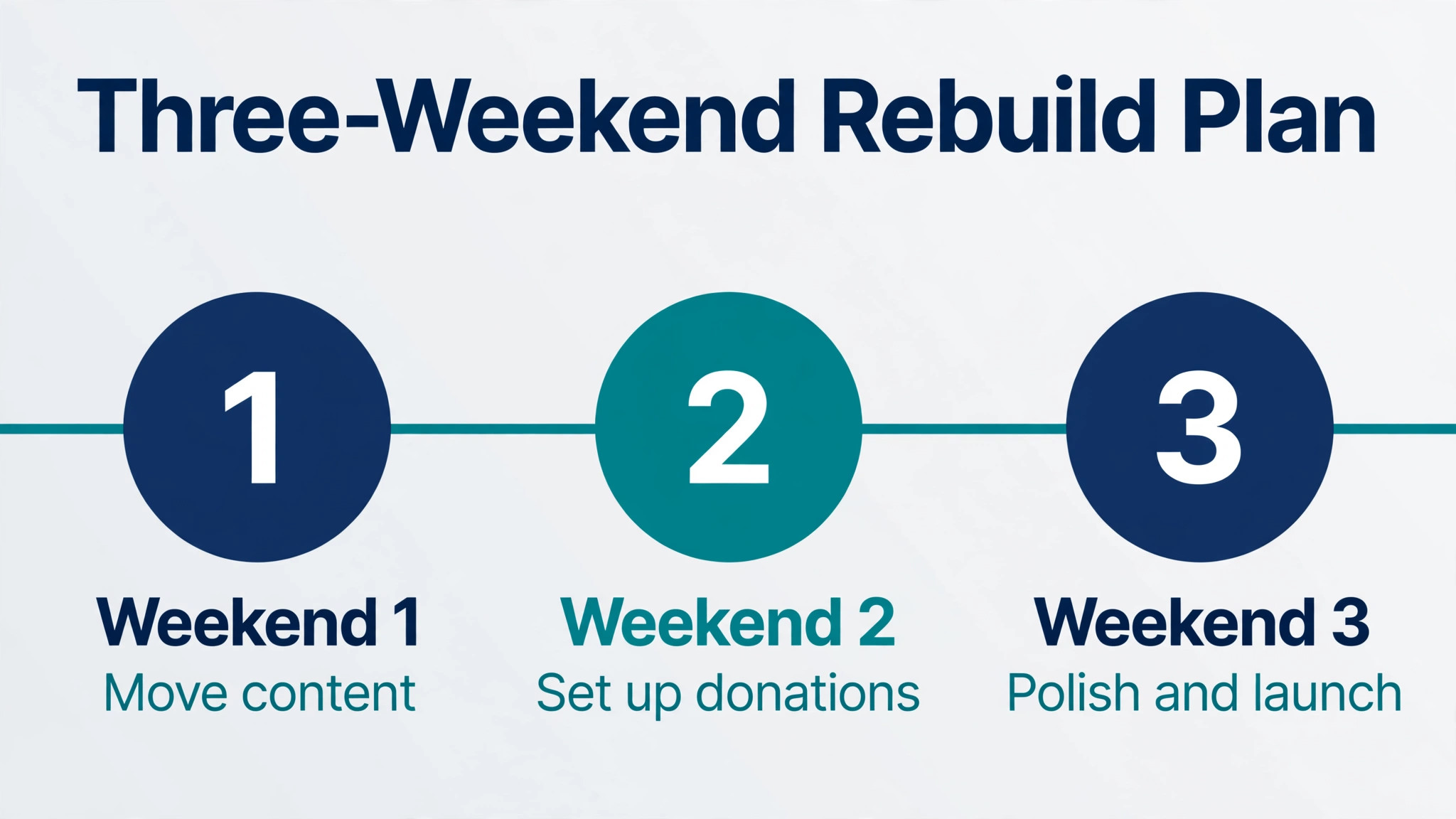
A nonprofit site rebuild fits into three weekends when the work is split by job, and the donation flow comes before the design polish.
Weekend one, move the content. Copy the mission, programmes and impact stories into the new builder, and cut anything nobody has read in a year.
Weekend two, set up donations. Connect the payment processor, test a one-time gift and a monthly gift, and check the receipt email arrives.
Weekend three, polish and launch. Add photos, check the site on a phone, claim the nonprofit discount, and announce the new site to the mailing list.
Test the donation flow on a phone. Open the site on a phone, give a test donation, and count the steps, because a flow that feels fine on a laptop can lose half its donors on mobile.
Nonprofit Website Costs at One, Five and Twenty Donation Campaigns
The monthly bill depends on campaigns, not just the plan, so the table below shows what each entry plan costs at three fundraising volumes. The table below prices the best website builders for nonprofits at the volume a working buyer actually reaches.
| Tool | Entry plan | Cost at volume | What changes |
|---|---|---|---|
| Wix | Light, about $17 a month | 70% off via TechSoup | Under $9 a month on a 2-year plan |
| Squarespace | Basic, about $16 a month | 10% off first payment | Core at $23 removes the 2% fee |
| WordPress.com | From about $4 a month | 50% off via TechSoup | From about $2 a month after discount |
| Morweb | From about $99 a month | No published discount | Purpose-built, donations included |
| Wild Apricot | From about $66 a month | 10% nonprofit discount | Membership plus website in one bill |
| Webflow | From about $14 a month | Nonprofit discount reported | Design freedom, steeper learning curve |
At 10,000 dollars of annual donations, a Squarespace Basic plan keeps about 200 dollars in platform fees on top of the subscription, while Wix keeps nothing beyond card processing, which is why the fee column matters more than the monthly price once fundraising grows.
How Donors Actually Give on a Nonprofit Website
Most donors arrive on a phone, and the share grows every year, so a donation page that works beautifully on a laptop and poorly on a phone loses the majority of its gifts. The mobile form should ask for as little as possible, show the amount buttons first, and accept the payment wallets the donor already uses, since every extra field costs completed gifts. A charity that tests its own donation flow on a phone once a month will catch the friction that a desktop test never shows, and the fix is usually a shorter form rather than a new platform.
Recurring gifts are worth far more than one-time gifts, since a donor giving 10 dollars a month gives 120 dollars a year and usually stays for years, while a one-time donor of 25 dollars may never return. The donation page should offer monthly giving as the default choice, with the one-time option beside it rather than hidden, and the thank-you message should explain what the monthly gift makes possible. A charity that converts one in ten one-time donors to monthly giving can double its annual income without finding a single new donor.
Trust signals decide whether a first-time visitor gives at all, since a stranger will not hand a card to a website that looks abandoned or vague. Impact stories with real names and photos, a current annual report, a visible charity registration number and a secure checkout badge all tell the donor the money will be used well. The most persuasive signal is specificity, such as 25 dollars buys a week of meals, because a donor who can picture the result gives more readily than one asked for a general donation.
Friction kills gifts quietly, and the common causes are a form that asks for a full address before the amount, a payment page that rejects common cards, and a donation button that leads to a slow or confusing page. Each extra step in the flow loses a share of donors, so the best donation pages ask for the amount first, then the payment, then the details, and nothing else. A charity should count the steps in its own flow and remove any field that is not needed to take the money and thank the donor.
The thank-you matters as much as the ask, since a donor who receives a warm, specific thank-you within minutes is far more likely to give again than one who gets a silent receipt. The message should say what the gift will do, when the donor will hear about the result, and how to change a monthly gift, because those three answers turn a transaction into a relationship. A charity that treats the thank-you as the start of the next gift, rather than the end of this one, builds a donor base that grows every year.
Nonprofit Website Mistakes That Lose Donors
Nonprofit website mistakes lose donors quietly, and the five below are the ones that cost a charity real money. Each one below wastes money on the best website builders for nonprofits in a different way.
Paying full price without claiming the discount. Most builders cut 25 to 70 percent for registered charities, so a team that skips the TechSoup application pays hundreds extra every year.
Accepting a platform fee on donations. A two percent platform fee on 50,000 dollars of gifts costs 1,000 dollars a year, so move to a plan that removes it before the big appeal.
Burying the donate button. Donors give in the moment, so the donate button belongs in the header on every page, not at the bottom of the about page.
Launching a site nobody can use on a phone. Most donors arrive on a phone, so a desktop-only design loses gifts before the visitor reads a word.
Forgetting the thank-you page. A donor who lands on a blank page after giving wonders whether the payment worked, so confirm the gift and say what happens next.
Eight Steps to Launch a Nonprofit Site Before Your Next Appeal
Run these eight steps before the next appeal, because a site that is ready a week early raises more than one finished the night before. Every check below applies to the best website builders for nonprofits the same way.
- Claim the nonprofit discount before paying anything.
- Connect the donation processor and test a real gift.
- Put the donate button in the header on every page.
- Check the whole site on a phone, not just a laptop.
- Add the impact stories and the annual report.
- Set up the thank-you page and the receipt email.
- Connect analytics and the email list signup.
- Ask three supporters to donate and report any friction.
Frequently Asked Questions
Which website builder is cheapest for a nonprofit?
Wix is the cheapest credible option for most small charities, because its free plan publishes a real site today and eligible nonprofits get a 70 percent discount on two-year Premium plans through TechSoup, dropping the Core plan from about 29 dollars a month to under nine dollars. WordPress.com is cheaper still after its 50 percent TechSoup discount, from about two dollars a month, though it needs more setup and a donation plugin. Squarespace starts at about 16 dollars a month with only a 10 percent first-payment discount, so it costs more, and its value is design rather than price. That is the short answer for the best website builders for nonprofits.
Does Wix really offer a 70 percent nonprofit discount?
Yes, Wix partners with TechSoup to offer eligible 501(c)(3) organisations a 70 percent discount on two-year Premium plans, plus a free domain for the first year, and the application needs the charity’s determination letter. The discount applies to the plan price, not to payment processing, so card fees of about 2.9 percent plus 30 cents per donation still apply. A small charity should register with TechSoup first, since the same verification unlocks discounts on WordPress.com and other software at the same time.
Is Squarespace worth it for a nonprofit that needs donations?
Squarespace is worth it when the charity’s story and imagery carry the fundraising, because its templates produce the most polished storytelling pages on this list, and its donation tools handle one-time and recurring gifts. The catch is the fee, since the Basic plan at about 16 dollars a month adds a two percent platform fee on donations, so a charity raising 50,000 dollars a year pays about 1,000 dollars in fees. The Core plan at about 23 dollars a month removes that fee, so most fundraising charities should start on Core rather than Basic.
Should a nonprofit use WordPress or a drag-and-drop builder?
A drag-and-drop builder suits a charity with a small team and no technical help, because Wix or Squarespace handles hosting, security and updates, and a volunteer can edit pages without training. WordPress suits a charity with technical help or complex needs, because plugins like GiveWP and Charitable add deep donation features and the site can grow without platform limits. The honest split is staff time, since WordPress saves money on the subscription and costs it back in maintenance, while a builder costs more per month and needs almost no upkeep.
What is Morweb, and is it worth 99 dollars a month?
Morweb is a website platform built only for nonprofits, bundling the website, donations, events and accessibility compliance into one system, with prices reported from about 99 dollars a month and some sources listing 149 dollars for plans with fundraising modules. It earns its price for a charity that wants one vendor for the whole digital presence and needs accessibility compliance included rather than bolted on. A small charity with a simple site should start with Wix or Squarespace, while a mid-size charity that runs events, memberships and donations together should price Morweb against the separate tools it would replace.
How much of each donation does the builder keep?
Wix keeps no platform fee on donations, so only the card processor takes about 2.9 percent plus 30 cents per gift. Squarespace Basic adds a two percent platform fee on top of processing, while Core removes it. WordPress.com depends on the donation plugin, with GiveWP and Charitable charging no platform fee beyond processing. A charity raising 10,000 dollars a year loses about 200 dollars to a two percent fee, and one raising 100,000 dollars loses about 2,000 dollars, so the fee column deserves as much attention as the monthly price.
The Nonprofit Website Bill at Three Fundraising Volumes
At one donation campaign a year raising about 5,000 dollars, Wix on the TechSoup discount costs under nine dollars a month with no platform fee, Squarespace Basic costs about 16 dollars plus about 100 dollars in fees, and WordPress.com costs about two dollars plus a plugin, so the cheapest real bill is WordPress.com for a technical team and Wix for everyone else. That is the bill the best website builders for nonprofits produce at this volume.
At five campaigns raising about 25,000 dollars, Squarespace Core at about 23 dollars a month with no platform fee costs about 276 dollars a year, Wix Core at under nine dollars costs about 108 dollars a year, and Morweb at about 99 dollars a month costs about 1,188 dollars a year, so the runner-up costs more than double the pick.
At twenty campaigns raising about 100,000 dollars, the two percent fee on a Basic plan would cost 2,000 dollars a year, which dwarfs every subscription on this list, so any charity at that volume must sit on a no-fee plan, and the cheapest no-fee bill is Wix Core under nine dollars a month.
At one campaign a year raising about 5,000 dollars, the platform fee matters more than the subscription, since Squarespace Basic keeps about 100 dollars in fees while Wix keeps nothing, and the gap grows with every campaign. A charity that raises 100,000 dollars a year loses 2,000 dollars to a two percent fee, which is more than any subscription on this list costs in a year.
| Scenario | Our pick | Runner-up cost | What the gap means |
|---|---|---|---|
| 1 campaign, $5,000 raised | Wix, under $9 a month | Squarespace Basic, about $16 plus fees | Wix wins on discount and zero fee |
| 5 campaigns, $25,000 raised | Wix Core, under $9 a month | Squarespace Core, about $23 a month | Wix stays less than half the price |
| 20 campaigns, $100,000 raised | Wix Core, under $9 a month | Squarespace Basic, about $16 plus $2,000 fees | The platform fee dwarfs the subscription |