

A church runs on people, and people are easy to lose track of. A visitor who came twice and never heard back, a volunteer who signed up and never got a rota, a family that stopped giving and nobody noticed, and each one is a person the church cares about slipping quietly away. The top 10 church management software in this guide exists to keep those people connected, so the admin serves the ministry instead of swallowing it.
We tested each tool on real church work, not on a feature list. That meant running the same month through every system, which was a hundred-member directory, a Sunday service plan, a volunteer rota, a giving report, and a follow-up list of new visitors. The ranking weighs how easily the team keeps track of people, how simply the Sunday work gets planned, and how little the volunteers need to learn.
Planning Center leads the ranking on the combined score, with Breeze close behind for churches that want simple membership and giving. ChurchTrac wins for small churches that need a lot for a little, while Tithe.ly suits churches that want giving, a website, and management in one place. Planning Center earns its place on service planning, Breeze on simple people tracking, and the rest on strengths of their own.
Planning Center leads the combined score, while a church whose Sunday runs one way should let the best pick by job table near the end outweigh the overall order. A tool that ranks fifth overall can still be the right answer for a church of eighty people with one part-time administrator, just as the overall winner can be wrong for a church that needs deep multi-campus reporting. Match the tool to the congregation, not to the rank.
In this article
- The 10 Tools at a Glance
- Why the Top 10 Church Management Software Matters for a Congregation
- How We Put Each Church System Through Its Paces
- The 10 Tools in Detail
- What a Church Actually Pays for Management Software
- Mistakes That Leave Visitors Unfollowed
- Best Pick by Job
- Frequently Asked Questions
- Choosing the Church System Your Team Runs Sunday With
The 10 Tools at a Glance
The table below lines up the top 10 church management software on the facts that decide a purchase, which are the price shape, the natural fit, and the strength that earned each rank. Planning Center leads on service planning and depth, while Breeze wins for churches that want the essentials done simply.
| Tool | Starting price | Best for | Standout strength |
|---|---|---|---|
| Planning Center | Free plan; paid plans on the vendor site | Churches that plan services carefully | Service planning with deep people tools |
| Breeze | Pricing on the vendor site | Churches that want simple essentials | Easy directory, giving, and events |
| ChurchTrac | Pricing on the vendor site | Small churches on a tight budget | Low cost with generous member limits |
| Tithe.ly | Free plan; paid plans on the vendor site | Churches that want giving plus management | Giving, website, and management together |
| Pushpay | Pricing on the vendor site | Churches that prioritise digital giving | Strong giving with an engaging app |
| FellowshipOne | Pricing on the vendor site | Larger churches that need depth | Deep reporting for big congregations |
| Elvanto | Pricing on the vendor site | Churches that run many small groups | Small groups and volunteer tools |
| Realm | Pricing on the vendor site | Churches that want community features | Member community with giving built in |
| ShelbyNext | Pricing on the vendor site | Churches that need finance depth | Strong accounting beside membership |
| Church Community Builder | Pricing on the vendor site | Churches that track engagement | Engagement tracking across ministries |
Planning Center and Breeze are the two rows to compare first, so read their reviews and see which Sunday routine fits your church team. A tool that scores High on reporting only helps if the leadership actually reads the report, and a tool that scores High on giving only helps if the congregation finds it easy to give.
Why the Top 10 Church Management Software Matters for a Congregation
People are the first reason a system matters, and a church that cannot see its people cannot care for them properly. A directory that shows who is new, who has not attended in a month, and who volunteered last year lets the pastoral team reach out before someone drifts away. Without that picture, the church notices the absence far too late.
Volunteers are the second reason. A church runs on volunteers, and volunteers stay when the rota is clear, the reminder arrives on time, and nobody gets double-booked. A tool that plans the rota, sends the reminders, and lets a volunteer swap a slot without a phone chain keeps the team willing, which is worth more than any feature.
Giving is the third reason, and it is the one most churches feel directly. A giving tool that works on a phone, remembers the donor, and sends a receipt without fuss makes regular giving easy, and easy giving is steady giving. The tools in this ranking handle donations, pledges, and reports in a way that respects both the giver and the treasurer.
The final gain is the Sunday itself. A service plan that lists the songs, the readers, the volunteers, and the timings in one place means the service runs smoothly, and a smooth service lets the congregation focus on worship rather than logistics. The planning tools in this ranking exist to make Sunday feel prepared rather than improvised.
How We Put Each Church System Through Its Paces
We ran the top 10 church management software through the same five measures, using a simulated church with a hundred members, a Sunday service plan, a volunteer rota, a giving report, and a follow-up list of new visitors. Each tool handled the same month, so the scores compare like with like.
- People tracking, judged by how easily the team could see who was new, who had drifted, and who volunteered, with a directory that stayed accurate.
- Service planning, measured by how simply a Sunday could be planned, with songs, readers, volunteers, and timings in one place.
- Giving tools, scored on whether donations were easy to make and easy to report, with receipts and pledge tracking handled cleanly.
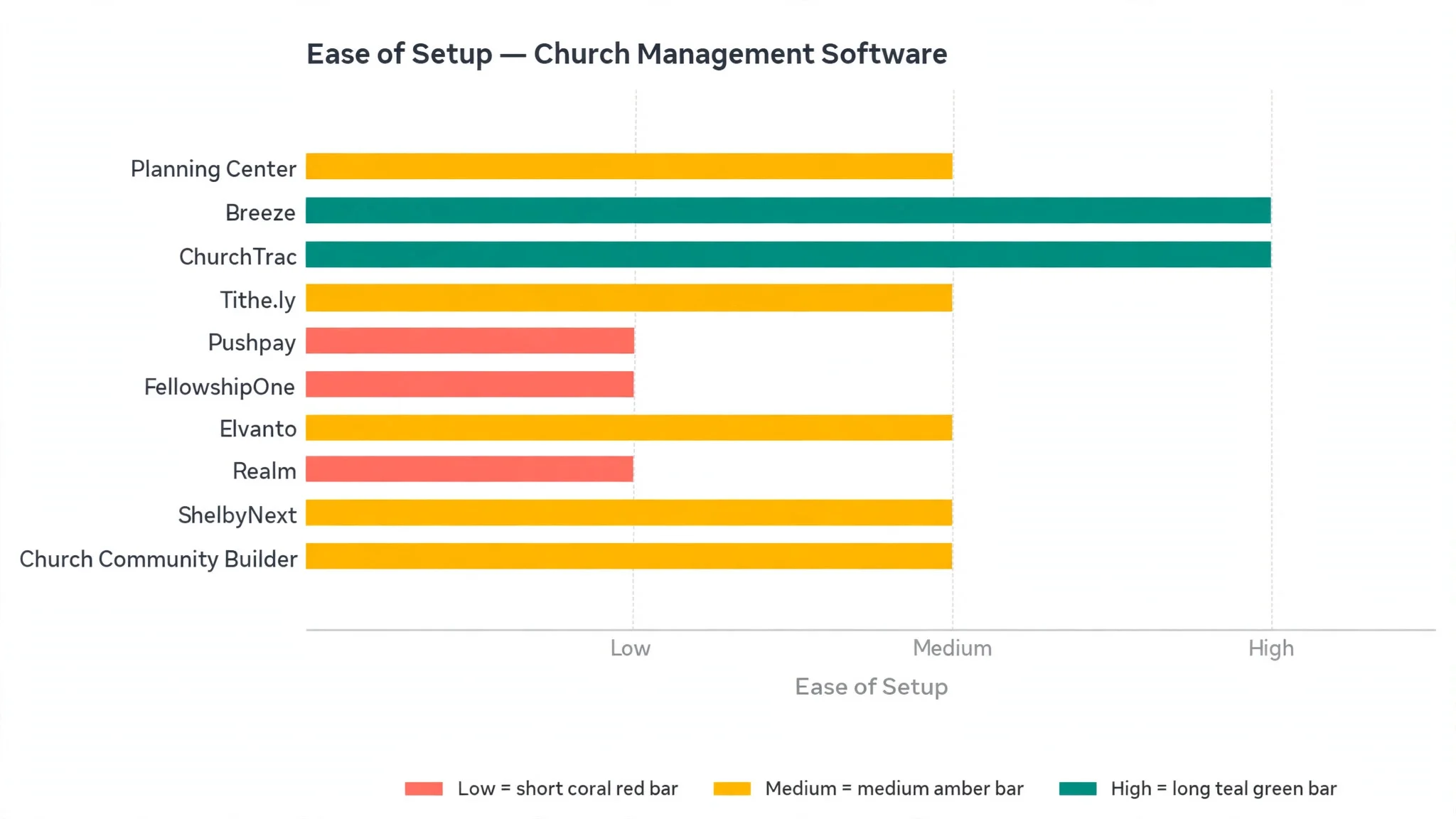
- Setup speed, timed from account creation to a working system with members imported, a service planned, and the first donation recorded.
- Daily usability, judged by how easily a volunteer administrator could do the weekly tasks without asking for help or opening a manual.
Each measure carried equal weight except people tracking, which counted double, because a church system that cannot keep track of its people is not doing its job. Scores run out of 100, and the order below follows the combined total, led by Planning Center on planning and depth.
The 10 Tools in Detail
Each review below judges the top 10 church management software on the same ground. We note what each tool does best, where it falls short, and the church it suits best, with people tracking carrying the most weight.
1. Planning Center
Planning Center tops the top 10 church management software on the combined score, and it earns the lead with service planning that no other tool in this ranking matches. Services, songs, volunteers, and timings all sit in one plan, and the team can rehearse, schedule, and communicate from the same place. For a church that plans its Sundays carefully, that single plan is the whole point.
The strengths run beyond the planning. The people tools track members, visitors, and groups, the giving tools handle donations and pledges, and the check-in system manages children’s ministry safely. Each part works as a separate app, so a church can start with one and add the rest as it grows.
The limits are price and complexity. Planning Center charges per app, so the full suite costs more than the simpler tools, and the depth rewards a team that invests time in setup. A small church that only needs a directory and giving will find much of it unused, while a church that plans every Sunday will feel the difference immediately.
In the trial, plan one full Sunday with songs, readers, and volunteers, then send the plan to the team. Check whether the volunteers understood their roles, whether the check-in worked, and whether the plan was easy to change. If the Sunday ran smoothly, the planning is real.
Our verdict. The best service planning here, and the safest first pick for most churches.
2. Breeze
Breeze is the simplicity pick, and it earns second place by covering the essentials without fuss. The directory, giving, events, and follow-up tools all work in a plain interface that a volunteer administrator can learn in an afternoon. For a church that wants the basics done well, Breeze is the calm choice.
The strengths are the ease and the price shape. The system is genuinely simple, the giving tools work well on a phone, and the events and volunteer features cover the weekly work. The support is known for answering quickly, which matters when the administrator is a volunteer with limited time.
The limits are depth. Breeze does not offer the service planning depth of Planning Center or the finance depth of ShelbyNext, and larger churches may feel the ceiling as they grow. The reporting is solid but lighter than the enterprise tools, and the customisation is modest.
In the trial, import the member list, record a week of giving, and send a follow-up to the new visitors. Check whether each task felt easy, and whether the reports answered the questions the leadership asks. If the week ran smoothly, the simplicity is real.
Our verdict. The simplest essentials here, ideal for churches that want the basics done well.
3. ChurchTrac
ChurchTrac is the value pick, and it suits small churches that need a lot for a little. The system covers membership, giving, events, accounting, and attendance at a price that stays low even as the congregation grows, with generous member limits on every tier. For a small church on a tight budget, that value is hard to beat.
The strengths are the breadth and the price. The accounting tools are unusually strong for the cost, the attendance tracking works well, and the interface is straightforward. The free trial lets a church test the whole system properly before committing.
The limits are polish and scale. The interface feels plainer than Breeze or Planning Center, and the service planning is lighter than the leaders. Larger churches with complex needs may find the depth limiting, though for a congregation under a few hundred, the value is excellent.
In the trial, run a full month on the system, including giving, attendance, and one event. Check whether the accounting matched the bank, and whether the reports were clear enough for the treasurer. If the month closed cleanly, the value is real.
Our verdict. The best value here, ideal for small churches on a tight budget.
4. Tithe.ly
Tithe.ly is the giving-plus pick, and it earns its place by combining giving, a website, and management in one place. A church can take donations, run its website, and manage its members from a single account, which suits a church that wants fewer logins and one bill. For a church starting fresh, that single system is attractive.
The strengths are the giving tools and the breadth. The donation flow works well on a phone, the text-to-give option suits a congregation that gives during the service, and the website builder keeps the church’s online home tidy. The management tools cover the directory, events, and groups.
The limits are depth in each area. Tithe.ly does many things well but does not lead any single one, so a church that wants the deepest service planning will still prefer Planning Center, and a church that wants the deepest finance will prefer ShelbyNext. The pricing is fair, but the add-ons add up.
Our verdict. The best giving plus management here, ideal for churches that want one system.
5. Pushpay
Pushpay is the digital giving pick, and it suits churches that prioritise giving through an app. The giving flow is fast, the app keeps the congregation engaged with sermons and events, and the reporting shows giving trends clearly. For a church that wants giving to be as easy as possible, Pushpay is the focused choice.
The strengths are the giving experience and the engagement. The app is polished, the donation process takes seconds, and the recurring giving tools help the church plan its budget. The analytics show which campaigns work and which do not, which helps the leadership plan.
The limits are scope and price. Pushpay is a giving platform first, so the management tools are lighter than a full church system, and the price suits larger churches better than small ones. A church that needs deep membership and planning tools will need a second system.
Our verdict. The strongest digital giving here, ideal for churches that prioritise giving.
6. FellowshipOne
FellowshipOne is the depth pick, and it earns its place with reporting and management tools built for larger churches. The system tracks members, groups, giving, and engagement across a big congregation, and the reports answer the questions a large leadership team actually asks. For a church with several hundred members, that depth matters.
The strengths are the reporting and the scale. The member tracking is thorough, the group tools handle many small groups, and the giving reports cover pledges, campaigns, and trends. The system is built to grow, and the support is geared to larger churches.
The limits are price and complexity. FellowshipOne costs more than the simpler tools, and the setup needs real time and often vendor help. A small church will find much of the power unused, and the interface rewards a trained administrator rather than a casual volunteer.
Our verdict. The deepest reporting here, ideal for larger churches with complex needs.
7. Elvanto
Elvanto is the small groups pick, and it suits churches that run many groups and volunteers. The system plans services, manages volunteers, tracks small groups, and handles check-in, all in one place. For a church where the small groups are the heart of the ministry, that focus is the point.
The strengths are the group tools and the volunteer planning. The rota is clear, the reminders work reliably, and the small group tracking shows who is connected and who is drifting. The service planning is solid, and the interface is clean.
The limits are scale and reach. Elvanto is a focused tool, so the finance depth is lighter than ShelbyNext and the giving tools are lighter than Pushpay. The price suits mid-sized churches, and smaller churches may find the group features more than they need.
Our verdict. The best small group tools here, ideal for churches built around groups.
8. Realm
Realm is the community pick, and it earns its place with member community features that keep a congregation connected during the week. Members can message each other, join groups, and see church news, while the giving and directory tools run underneath. For a church that wants the community to stay close, that connection matters.
The strengths are the community and the giving. The member app is easy to use, the giving flow works well, and the directory stays accurate because members update their own details. The events and group tools cover the weekly work, and the reporting is solid.
The limits are planning depth. Realm does not offer the service planning depth of Planning Center, and the finance tools are lighter than ShelbyNext. A church that plans complex Sundays will feel the gap, while a church that prizes connection will find Realm a natural fit.
Our verdict. The best member community here, ideal for churches that want connection.
9. ShelbyNext
ShelbyNext is the finance pick, and it suits churches that need strong accounting beside membership. The system covers the general ledger, payroll, and fund accounting alongside the directory, giving, and attendance, so the treasurer and the administrator work from the same numbers. For a church with a real budget to manage, that depth is essential.
The strengths are the accounting and the integration. The finance tools are the deepest in this ranking, the membership data feeds the reports cleanly, and the giving records match the ledger without manual fixes. The system is built for churches that take their finances seriously.
The limits are complexity and price. ShelbyNext needs a trained administrator, and the setup takes time, while the interface feels more like accounting software than a friendly church tool. Smaller churches will find it more than they need, and the price reflects the depth.
Our verdict. The strongest church finance here, ideal for churches with serious budgets.
10. Church Community Builder
Church Community Builder is the engagement pick, and it rounds out the ranking with tools that track how people engage across ministries. The system shows who attends, who serves, who gives, and who has drifted, so the leadership can see the health of the congregation in one place. For a church that wants to measure connection, that picture is valuable.
The strengths are the engagement tracking and the process tools. The workflows help the team follow up with visitors and new members, the group tools cover the small group ministry, and the giving reports are clear. The system is built for churches that take assimilation seriously.
The limits are price and learning curve. Church Community Builder costs more than the simpler tools, and the depth rewards a team that invests time in setup. Smaller churches may find the engagement tracking more than they need, while larger churches will use it daily.
Our verdict. The best engagement tracking here, ideal for churches that measure connection.
What a Church Actually Pays for Management Software
The top 10 church management software differs most on how the price scales with the congregation, and the cheapest plan for a church of eighty can be the most expensive for a church of eight hundred. Some tools charge per member, some per app, and some a flat monthly fee, which changes the maths as the church grows. Before choosing, work out the cost at the current size and at double the size, then compare both totals across two or three finalists.
Free plans deserve a hard look. Planning Center and Tithe.ly both offer a free start, but each one limits something different, which is members here, features there, and giving volume elsewhere. A free plan that covers the real congregation is a gift. A free plan that runs out at a hundred members is just a trial, so test it against the actual member count, not the hopeful one.
Watch the giving fees too. Most tools charge a processing fee on each donation, and that fee is separate from the monthly subscription. A church that takes a large share of its giving online should add up the annual processing fees, because a small difference in the rate can cost more than the subscription itself. Ask the vendor for the full annual total on real giving numbers before signing.

Mistakes That Leave Visitors Unfollowed
The first mistake is collecting visitor details and then doing nothing with them. A visitor who fills in a card and never hears back is a visitor who will not return, and the church will never know why. Set a simple follow-up flow, which is a thank-you message within two days and a personal invitation the following week, and make sure the system reminds the right person to send it.
The second mistake is letting the directory go stale. A directory with old phone numbers, wrong addresses, and members who left two years ago is worse than no directory, because the team trusts it and then fails to reach the people it needs. Assign one person to update the directory monthly, and let members update their own details through the app where the tool allows it.
The third mistake is planning the rota in a group chat. A rota that lives in messages gets lost, double-books volunteers, and leaves gaps that nobody notices until Sunday morning. Put the rota in the system, send the reminders from the system, and let volunteers swap slots in the system, so the plan is always visible to everyone who needs it.
Best Pick by Job
No single winner fits every church, so the tools below are matched to the job instead of the rank. Read the row that sounds like your church, then start the trial with that tool.
| Job | Best pick | Why it wins |
|---|---|---|
| Plans services carefully | Planning Center | Service planning with deep people tools |
| Wants simple essentials | Breeze | Easy directory, giving, and events |
| Small church, tight budget | ChurchTrac | Low cost with generous member limits |
| Wants giving plus management | Tithe.ly | Giving, website, and management together |
| Prioritises digital giving | Pushpay | Strong giving with an engaging app |
| Large church, needs depth | FellowshipOne | Deep reporting for big congregations |
| Runs many small groups | Elvanto | Small groups and volunteer tools |
| Wants member community | Realm | Member community with giving built in |
| Needs finance depth | ShelbyNext | Strong accounting beside membership |
| Tracks engagement | Church Community Builder | Engagement tracking across ministries |
If your situation does not match a row exactly, take the closest one and read that review first, starting with Planning Center when it fits. The gap between neighbouring tools is smaller than the gap between a church that follows up with visitors and one that never does, so the follow-up habit matters more than a few points on a scorecard.
Frequently Asked Questions
Church leaders ask the same questions before choosing from the top 10 church management software, so the plain answers are here, based on how these tools actually work in a real congregation.
How long does it take to move a church to new software?
A focused church is running on the new system within a month, and comfortable within two. The setup itself takes a few days, which is importing the member list, setting up giving, and planning the first service. The slower part is the people, which is training the volunteers and the administrator, and that takes a few Sundays of patient use to stick.
Can one tool handle membership, giving, and service planning together?
Yes, and that is the main reason to buy one. Planning Center, Breeze, ChurchTrac, and Tithe.ly all cover the directory, the giving, and the planning in a single system, so the team checks one place instead of three. The depth differs, so a church that leans on service planning should weigh Planning Center, while a church that leans on finance should weigh ShelbyNext.
What happens to our data if we switch tools later?
Every tool in this ranking exports members and giving records to common formats, so a switch is possible but never painless. Service plans, volunteer rotas, and custom workflows do not transfer, and the team must rebuild them in the new tool. Service plans, volunteer rotas and custom workflows never carry across, which is why a church should trial Planning Center properly now instead of staying with a tool that no longer fits Sunday.
Do these tools work for a church with several locations?
Some do, and the depth differs. FellowshipOne, ShelbyNext, and Planning Center all support multi-campus work, with reporting by location and shared member records. Smaller tools like Breeze and ChurchTrac suit a single location better, so a church planning a second campus should check the multi-location features before choosing.
How do we keep volunteers using the system?
Keep it simple, and keep the reminders coming from the system rather than from a group chat. A volunteer who gets a clear rota, a timely reminder, and an easy way to swap a slot will use the tool, while a volunteer who gets a confusing login and no help will ignore it. Train the team in person, keep the first tasks easy, and celebrate the first smooth Sunday.
Choosing the Church System Your Team Runs Sunday With
The top 10 church management software proves its worth in the first month, and the proof is simple to measure. Count the visitors who got a follow-up, count the volunteers who knew their rota without asking, and check whether the giving report matched the bank. If the follow-ups went out, the rota was clear, and the numbers agreed, the system is working.
Planning Center wins our ranking on the combined score, but the right tool for your church is the one the administrator and the volunteers actually use every week without being asked. Run the trial on a real Sunday with real people, judge it on the service plan rather than the demo, and pick the system that keeps the congregation connected. A connected church and a smooth Sunday will pay for the subscription many times over.