

Most visitors leave a small business website without buying anything, and most of them never come back. A good capture tool changes that math by offering something worth an email address just as a visitor is about to leave. The best lead capture tools for small businesses turn passing traffic into a list the owner can email again and again. OptinMonster leads this ranking on the combined score, with HubSpot close behind for businesses that want capture tied to a full CRM.
We judged each tool on real small business work rather than a feature list. That meant building an exit-intent popup for a product page, a signup form for a blog, a notification bar for a seasonal offer, and a spin-to-win campaign for a store. We tracked speed to launch, how the targeting behaved, and how a busy owner coped when the first leads arrived.
OptinMonster earns the top spot on targeting depth, HubSpot on CRM connection, and every tool after them on a strength of its own. Some are full conversion suites built for high-traffic stores. Others are lighter tools that suit a small site running its first capture campaign. The right pick depends on your traffic volume, your visitors’ source, and how much follow-up the tool should handle.
OptinMonster tops the combined score, yet a business that captures leads in one main way should let the best pick by job table near the end carry equal weight. A tool that ranks sixth overall can still be the right answer for a blog with modest traffic, while the overall winner can be more than a new shop needs.
In this article
- The 10 Tools at a Glance
- Why the Best Lead Capture Tools for Small Businesses Pay for Themselves
- How We Put Each Lead Capture Tool Through Its Paces
- The 10 Tools in Detail
- Popups, Forms and Bars: The Capture Formats That Decide the Shortlist
- Seven Capture Mistakes That Drive Visitors Away
- A Four Week Lead Capture Plan for a Small Business Site
- What to Check in the Free Plan Before You Pay
- Best Pick by Job
- Frequently Asked Questions
- Why OptinMonster Leads Our Lead Capture Ranking
The 10 Tools at a Glance
The table below puts one row per tool, with the price shape, the natural fit, and the strength that put OptinMonster first. The best lead capture tools for small businesses are not always the most powerful, and the table shows why. OptinMonster leads on targeting depth, while Hello Bar wins for businesses that want the simplest possible start.
| Tool | Starting price | Best for | Standout strength |
|---|---|---|---|
| OptinMonster | Pricing on the vendor site | Businesses that want deep targeting | Exit-intent with behaviour rules |
| HubSpot | Free plan; paid plans on the vendor site | Businesses that want capture plus CRM | Forms that feed a free CRM |
| Leadpages | Pricing on the vendor site | Landing pages that capture leads | Fast landing pages with forms |
| Poptin | Free plan; paid plans on the vendor site | Small teams on a budget | Affordable popups with exit-intent |
| Justuno | Pricing on the vendor site | High-traffic stores | AI targeting with deep rules |
| Hello Bar | Free plan; paid plans on the vendor site | Simple bars and announcements | Lightweight bars in minutes |
| Sleeknote | Pricing on the vendor site | Stores that want on-site guidance | Guided popups that feel helpful |
| Privy | Free plan; paid plans on the vendor site | New Shopify stores | Capture and email in one place |
| OptiMonk | Free plan; paid plans on the vendor site | Stores that personalise on site | Personalised popups and surveys |
| Mailchimp | Free plan; paid plans on the vendor site | Businesses already emailing | Signup forms inside the email tool |
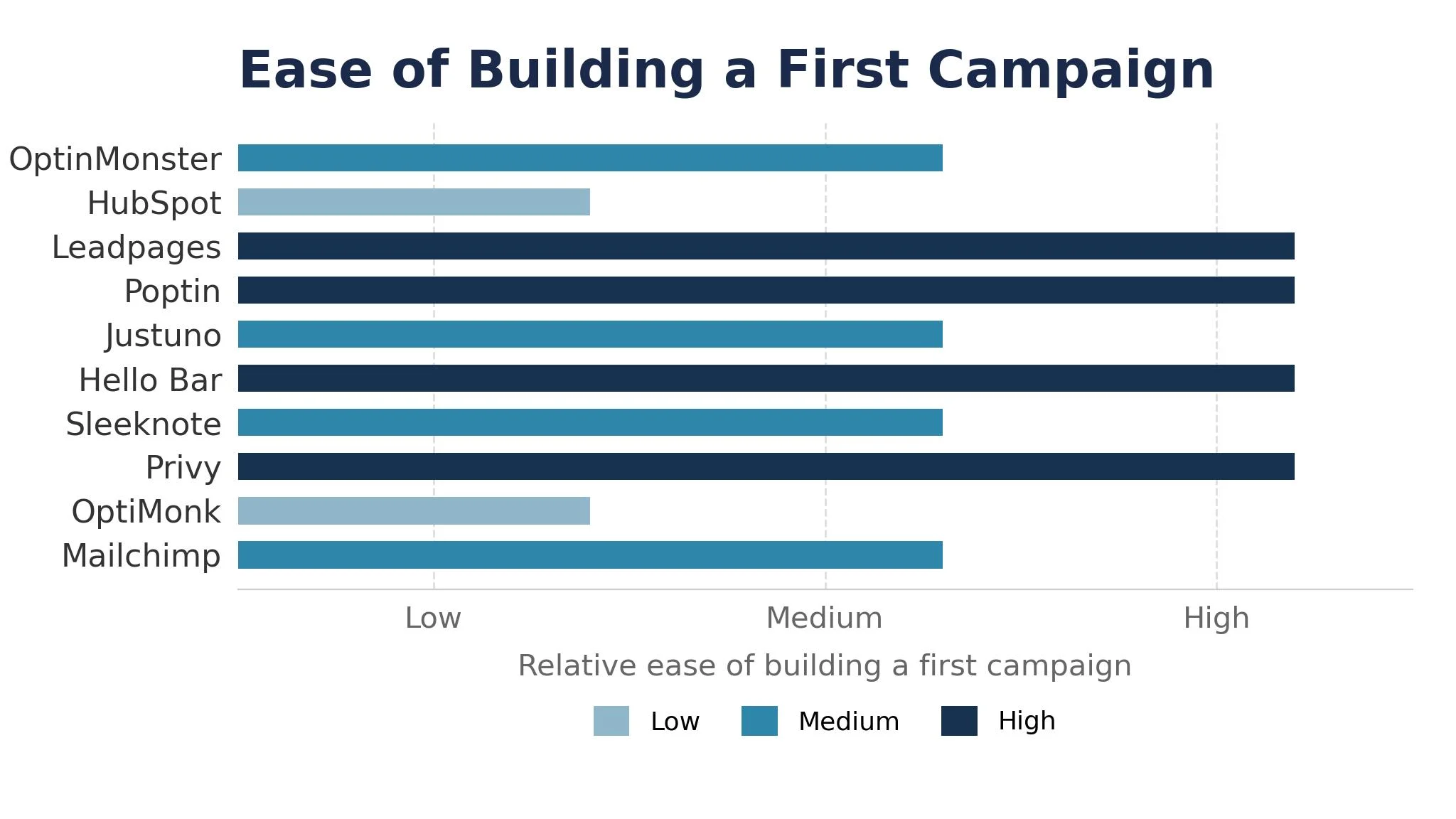
Narrow the table to OptinMonster and HubSpot, then read those two reviews to see which capture routine fits your business. A tool that scores High on targeting only helps if your traffic is large enough to segment, and a tool that scores High on CRM only helps if someone works the list. Fit to your traffic and your follow-up matters more than a long feature list.
Why the Best Lead Capture Tools for Small Businesses Pay for Themselves
The best lead capture tools for small businesses pay for themselves in the same place, which is the visitor who would otherwise have vanished. A shop that captures five percent of its visitors builds a list of hundreds within months, and that list becomes the cheapest marketing channel the business owns. Across a year of sends, those captured leads are worth far more than the tool costs.
The second reason is a second chance at the sale. Most first-time visitors are not ready to buy, and a capture form with a small incentive keeps the business in touch until they are. A ten percent discount code for an email turns a maybe into a yes more often than a silent exit does.
The third reason is learning what visitors want. A popup asking one question, or an exit survey, tells the owner which products interest people and which pages lose them. That feedback shapes the next product, offer and page, and the learning compounds with every campaign.
The fourth reason is less money spent on ads. A business that owns its list emails past visitors for free, while one that owns nothing must pay to reach the same people again.
The final reason is calmer marketing. An owner with a growing list stops guessing what to post and sends what the list asks for, and the replies guide the next campaign.
How We Put Each Lead Capture Tool Through Its Paces
We tested the best lead capture tools for small businesses against the same five measures, using an exit-intent popup on a product page, a signup form on a blog post, a notification bar for a seasonal offer, and a spin-to-win campaign for a store. Each tool ran the same workload for two weeks, so OptinMonster and the rest compare like with like.
- Campaign build speed, judged by how quickly a working popup went live.
- Targeting precision, measured by how finely a campaign could pick its audience by page, behaviour and source.
- Form conversion rate, scored on the share of shown visitors who actually signed up.
- Email integration depth, timed by how fast a new lead landed with the right tags.
- Analytics clarity, judged by how fast an owner could read which campaign earned its keep.
Each measure carried equal weight except targeting precision, which counted double, because a capture tool that shows the wrong offer to the wrong visitor is not doing its job. Scores run out of 100, and the order below follows the combined total, led by OptinMonster on targeting precision. Where two tools tied, we broke the tie on form conversion rate, since a campaign that converts is the one that pays.
We also checked the template range. The best tools offer templates built around discounts, guides and giveaways, while the weakest force a business to design every campaign from a blank page.
The 10 Tools in Detail
Each review below follows the same pattern, and every tool is judged on the same ground as the best lead capture tools for small businesses. We note what each tool does best, where it falls short, and the business it suits best, with targeting precision carrying the most weight.
1. OptinMonster
OptinMonster is the targeting leader in this ranking, and it leads because the rules engine goes deeper than any other tool here. Exit-intent, scroll depth, time on page, referrer and page-level targeting combine so the right offer reaches the right visitor at the right moment. The campaign templates convert well out of the box, and the analytics show which campaign earned its keep.
The trade off is price shape. OptinMonster gates its signature exit-intent feature to higher tiers, and the impression caps per plan mean a high-traffic site must watch its usage. A business that invests in the plan it actually needs gets the most powerful targeting here, but one running its first popup should start on the lower tier and grow.
In the trial, build one exit-intent campaign for a product page and one signup form for the blog. Time how long both take to go live, and check whether the targeting rules behaved as planned. Fast launch and cleanly tagged leads suit real site traffic.
Our verdict. The deepest targeting here, and the best all rounder for growing businesses.
2. HubSpot
HubSpot is the CRM pick, and it earns second place by feeding every captured lead straight into a free CRM. The forms, popups and live chat share one contact record, so a lead captured on Tuesday can be emailed on Wednesday with its source and page history attached. For a business that wants capture and follow-up in one system, it is the natural standard.
The trade off is weight. HubSpot is a full marketing platform, so a business that only needs a popup will find the setup heavier than a dedicated capture tool. The free CRM covers a useful trial, but the sharper capture features sit on paid plans. For a business building a real sales process, that weight is worth carrying.
In the trial, build one popup and one form, then check the contact record it created. See whether the source and tags carried across, and whether the follow-up email went out cleanly. Source and tags carried across, follow-up email clean, the record connects.
Our verdict. The best capture plus CRM here, ideal for businesses building a sales process.
3. Leadpages
Leadpages is the landing page pick, and it suits businesses that capture leads on dedicated pages rather than popups. Build the page, add the form, and publish it in minutes, with templates built around lead magnets, webinars and free trials. The conversion focus shows in every template, and the page speed is strong.
The trade off is scope. Leadpages captures leads brilliantly on landing pages but does not run exit-intent popups across a whole site the way OptinMonster does. For a business whose leads come from ads and campaigns, that focus is exactly right, because the landing page is where the traffic lands.
In the trial, build one landing page for a lead magnet and drive a small amount of traffic to it. Watch whether the page loaded fast, and whether the form converted. A fast-loading page that actually converts earns the lead magnet slot.
Our verdict. The fastest landing page capture here, ideal for ad-driven businesses.
4. Poptin
Poptin is the budget pick, and it earns its place with a genuinely useful free plan and exit-intent on affordable tiers. The editor is friendly, the templates cover popups, forms, slide-ins and countdowns, and a small team can launch a campaign in an afternoon without a developer. For a business watching every dollar, it is the most honest value here.
The trade off is depth at scale. Poptin is lighter on advanced targeting and integrations than the leaders, so a high-traffic store will outgrow it. For a small business running its first capture campaigns, that lightness is a strength, because the team learns capture without a heavy platform.
In the trial, launch one exit-intent popup and one slide-in form on the free plan. Test whether the editor stayed simple, and whether the leads landed in your email tool. A simple editor and leads landing straight in the email tool decide it.
Our verdict. The best budget capture here, ideal for small teams starting out.
5. Justuno
Justuno is the high-traffic pick, and it suits stores with volume to optimise. The AI-led targeting reads visitor behaviour in real time, the rules engine slices audiences finely, and the product recommendations turn a popup into a shopping assistant. The conversion data is the deepest in this ranking for ecommerce.
The trade off is cost and complexity. Justuno prices by visitor volume and reserves its sharpest tools for upper tiers, and the interface is heavier going than most. For a store with serious traffic and someone to run it day to day, the depth pays, but a small blog should look at the lighter tools first.
In the trial, run one AI-targeted campaign on your highest-traffic page for a week. Notice whether the targeting improved the conversion rate, and whether the team could manage the rules without help. Targeting lifting conversion, rules managed unaided, the campaign delivers.
Our verdict. The sharpest high-traffic targeting here, ideal for stores with volume.
6. Hello Bar
Hello Bar is the simplicity pick, and it earns its place by doing one job with almost no fuss. A notification bar at the top of the page, a simple popup, or a slide-in takes minutes to set up, and the free plan covers a small site well. For a business that wants a gentle nudge rather than a full campaign, it is the least intrusive option here.
The trade off is depth. Hello Bar is lighter on targeting, testing and analytics than the leaders, so a business that wants to optimise hard will hit its limits. For a small site that mainly needs an announcement bar and a simple email capture, that lightness is exactly right.
In the trial, set up one notification bar for a seasonal offer and one simple popup. Confirm whether the setup took minutes, and whether the bar read well on a phone. Set up in minutes, clean on a phone, the bar suits.
Our verdict. The simplest capture here, ideal for small sites that want a gentle nudge.
7. Sleeknote
Sleeknote is the guidance pick, and it suits stores that want capture to feel helpful rather than pushy. The guided popups walk a visitor toward the right product or offer, the on-site messages feel like a shop assistant rather than an interruption, and the design quality is high. For a store that cares about the shopping experience, it is the most tasteful choice here.
The trade off is price shape. Sleeknote is built for stores with real traffic, so a small blog will find it dear. The setup also rewards a team that will write thoughtful guided flows. For an online store that wants capture without annoying visitors, the polish is worth the price.
In the trial, build one guided popup that helps a visitor choose a product. Judge whether the flow felt helpful, and whether the conversion rate held up. A helpful flow and a conversion rate holding up prove the guidance.
Our verdict. The most tasteful capture here, ideal for stores that guide visitors.
8. Privy
Privy is the Shopify pick, and it rounds out the ranking for new Shopify stores that want capture and email in one place. The popups, spin-to-win campaigns and abandoned cart emails share one dashboard, so a new merchant can capture a visitor and follow up without a second subscription. The free tier covers a useful start.
The trade off is scope outside Shopify. Privy is built for Shopify first, so a business on another platform gets less from it. For a new Shopify store, the connection is the reason to choose it, because the capture and the email finally live together.
In the trial, launch one spin-to-win popup and one cart recovery email. Find out whether the popup converted, and whether the recovery email went out cleanly. Popup converting, recovery email clean, the bundle pulls its weight.
Our verdict. The best Shopify capture here, ideal for new Shopify merchants.
9. OptiMonk
OptiMonk is the personalisation pick, and it earns its place with on-site personalisation alongside popups. Exit-intent surveys, personalised messages and smart product recommendations share one platform, so a returning visitor sees a different offer from a first-time one. The free plan gives every feature on a modest traffic allowance, which is generous for a small store.
The trade off is learning time. OptiMonk covers so much ground that a new team takes time to learn where each feature lives. For a store that wants personalisation as well as capture, that depth is worth learning, because the returning visitor experience improves fast.
In the trial, run one personalised popup for returning visitors and one exit survey. Check whether the personalisation worked, and whether the survey answers were useful. Personalisation that worked and survey answers worth reading carry the store.
Our verdict. The best capture plus personalisation here, ideal for stores that personalise.
10. Mailchimp
Mailchimp is the email pick, and it closes the ranking for businesses already sending email through it. The signup forms, landing pages and popup forms live inside the email tool, so a captured lead lands in the list with no integration to build. For a business that already pays for Mailchimp, the capture costs nothing extra.
The trade off is targeting depth. Mailchimp captures leads well but its popups are simpler than the specialists, with less behaviour targeting and testing. For a small business whose email list is the main channel, that simplicity is fine, because the list is where the value sits.
In the trial, add one popup form to your site and check the list it feeds. Look at whether the lead arrived tagged, and whether the welcome email went out. A tagged lead arriving with its welcome email sent closes the chain.
Our verdict. The simplest capture inside email here, ideal for existing Mailchimp users.
Popups, Forms and Bars: The Capture Formats That Decide the Shortlist
A capture tool earns its keep on three formats, and the shortlist should be judged on those formats first. Popups need targeting that shows the right offer to the right visitor, with exit-intent that catches the leaver without annoying the reader. Forms need a design that fits the page, with fields a visitor will actually complete. Bars need a quiet presence at the top of the page that announces an offer without blocking the content.
The mistake is judging a tool on its template count alone. A tool with a hundred templates and clumsy targeting will show the wrong offer to most visitors, while a tool with twenty templates and sharp rules will convert better every week. Ask each tool how it decides who sees a campaign, and test the answer on your own traffic.
Forms deserve the same scrutiny. Check whether the form can sit inside a blog post, whether it works on a phone without zooming, and whether it asks for only the fields you truly need.
Bars are the third test. A notification bar that announces a seasonal offer should be visible without being loud, and it should disappear cleanly when the offer ends.
Seven Capture Mistakes That Drive Visitors Away
The first mistake is showing a popup the second a visitor arrives. A person who has read nothing yet has no reason to give an email, and the interruption teaches them to close popups on sight. Wait for a scroll, a time delay or an exit signal, and the same offer converts far better.
The second mistake is asking for too much. A form that wants a name, a phone number, a company and a budget will lose nine out of ten visitors. Ask for the email first, and collect the rest later.
The third mistake is the same offer everywhere. A visitor reading a pricing page wants a different offer from a visitor reading a blog post, and a tool that shows one popup to everyone wastes most of its impressions. Segment the offer by page, and the conversion rate climbs without extra traffic.
The fourth mistake is no mobile check. Most visitors arrive on a phone, yet many teams judge popups on a desktop screen. Open every campaign on a phone, tap through the form, and drop any tool whose popup covers the whole screen with no way to close it.
The fifth mistake is never testing. A campaign that runs unchanged for a year is a guess that never got checked, and the headline that worked in January may fail in June.
The sixth mistake is ignoring the thank-you page. A visitor who just gave an email deserves a clear next step, not a dead end. Send the promised guide and tell them what happens next, because the first email sets the tone for the whole relationship.
The seventh mistake is buying the list instead of building it. A purchased list looks cheap until the spam complaints and the dead addresses arrive, and the damage to the sender reputation lasts far longer than the list. Capture your own visitors slowly, and the list will answer when you email it.
A Four Week Lead Capture Plan for a Small Business Site
Week one is the audit, and it should be honest. Find the pages with the most traffic, the highest exit rate and the clearest offer, then write one capture idea for the top page. A campaign chosen from data beats a campaign chosen from taste every time.
Week two is the first campaign. Build an exit-intent popup for the top page, write the offer in one clear sentence, and let it run without interference. Check the setup daily, but do not change the offer mid-week, because a clean first test builds the habit that carries the whole programme.
Week three is the result and the next campaign. Read the conversion rate with a colleague, write down the lesson, and launch the follow-up campaign the same week.
Week four is the routine. Set a weekly capture slot, a shared results sheet, and a monthly email to the list that uses what the campaigns taught you. A capture habit that runs every week compounds, and the list becomes the cheapest marketing the business owns.

What to Check in the Free Plan Before You Pay
A capture free plan hides its real limits in the details, and three checks catch most of it. The first is the impression cap. Several tools limit the number of popup views on the free plan, and a site with real traffic will hit the cap within days. Count your real monthly visitors before comparing free plans.
The second check is the feature gate. The signature feature, often exit-intent, frequently sits on a paid tier, so the free plan tests a weaker version of the tool. Confirm which features the free plan actually includes, and price the tier that holds the feature you need.
The third check is the branding. A free plan that stamps the vendor logo across your popup tells visitors you would not pay for your own marketing, and that signal costs conversions. Check whether the branding can be removed, and what the removal costs, before you build campaigns on a free tier.
Best Pick by Job
No single tool fits every small business, so each common business situation below is matched to the tool that scored highest for that job. The best lead capture tools for small businesses for a blog look different from the right pick for a high-traffic store, and the table below makes that split clear.
| Job | Best pick | Why it wins |
|---|---|---|
| Wants the deepest targeting | OptinMonster | Exit-intent with behaviour rules |
| Needs capture feeding a CRM | HubSpot | Forms that feed a free CRM |
| Captures leads from ads | Leadpages | Fast landing pages with forms |
| Runs capture on a tight budget | Poptin | Affordable popups with exit-intent |
| Optimises a high-traffic store | Justuno | AI targeting with deep rules |
| Wants the simplest possible start | Hello Bar | Lightweight bars in minutes |
| Wants capture to feel helpful | Sleeknote | Guided popups that feel helpful |
| Runs a new Shopify store | Privy | Capture and email in one place |
| Personalises for returning visitors | OptiMonk | Personalised popups and surveys |
| Already sends email with Mailchimp | Mailchimp | Signup forms inside the email tool |
If your situation does not match a row exactly, take the closest one and read that review first, starting with OptinMonster when it fits. The gap between neighbouring tools is smaller than the gap between a list your business grows weekly and one it never builds, so habit matters more than a few points on a scorecard.
Frequently Asked Questions
Small business owners ask the same questions before every capture tool change, so we answered the most common ones here.
How much does a lead capture tool cost for a small business?
Most tools in this ranking charge per month, so a business pays one plan plus any overage for high traffic. Free plans cover small sites well, but exit-intent and advanced targeting usually sit on paid tiers. Check the vendor site for current pricing and confirm the total before you pay, because impression caps can change the bill.
Can one tool handle popups, forms and landing pages together?
It can handle all three, and most businesses prefer one system for the whole job. A popup needs targeting and timing, a form needs a clean design, and a landing page needs speed and a clear offer, and the leaders cover all three well. Some teams still pair a popup specialist with a separate landing page tool, which works fine when the lead lands in one list.
How long does it take to get a first campaign live?
A focused team gets a first campaign live in a day if the offer is ready. The delay usually comes from writing the offer and designing the lead magnet, not from the tool. Decide the offer first, build the campaign, and launch with one strong popup rather than five half-finished ones.
Do these tools work for low-traffic business sites?
They work, but the campaigns take longer to produce meaningful numbers, and some tests will never get there. A low-traffic site should capture with a simple form and a clear offer, rather than complex targeting that needs thousands of visitors to prove itself. Capture on the pages with the most traffic first, because those are the campaigns that pay.
What happens to our leads if we switch tools later?
Every tool in this ranking exports leads and campaign results to common formats, so a switch is possible but never painless. Campaign designs and targeting rules do not transfer, and the team must rebuild them in the new tool. A switch is never painless, which is why a business should trial OptinMonster properly now instead of staying with a tool that no longer fits the way the site works.
Why OptinMonster Leads Our Lead Capture Ranking
A small business can settle this in a trial by timing days to a live campaign, counting the leads captured in the first month, and measuring the conversion rate on the top page. The best lead capture tools for small businesses prove themselves on the days to a live campaign, the share of visitors who sign up, and the leads that turn into customers, and a four week trial with your real traffic will show all three. OptinMonster wins our ranking on the combined score, but the right tool for your business is the one your team runs every week without being asked.
Run the trial on one real page with your real offer and your real visitors, and judge the tool on the first leads rather than the demo. If the campaign launches in a day and the leads arrive tagged, the system is working. If the setup stalls and the targeting confuses the team, the tool is fighting you rather than helping you. Pick the tool that makes capture feel easy, protect the weekly habit, and let the growing list pay for the subscription many times over.