


A meeting that drops, lags, or locks guests out wastes more than the hour on the calendar, because it breaks the trust that remote work runs on. The best video conferencing tools keep video steady, let guests join in one click, and record the decisions so nobody has to ask twice. Zoom leads this ranking on the combined score, with Microsoft Teams close behind for organisations already on Microsoft 365.
We judged each tool on real meeting work rather than a feature list. That meant a weekly team meeting, a client call with screen sharing, and a large all-hands with breakout groups. We tracked how fast guests joined, how steady the video stayed, and how much help a first-time user needed along the way.
Zoom earns the top spot on reliability, Teams on workspace fit, and every tool after them on a strength of its own. Some are full meeting platforms built for daily use. Others are lighter tools that suit a team that meets twice a week. The right pick depends on your team size, your existing software, and how much of the meeting job you want the tool to run.
Zoom tops the combined score, yet a team that runs webinars every week should let the best pick by job table near the end carry equal weight. A tool that ranks twelfth overall can still be the right answer for a marketing team, while the overall winner can be too much for a team that only needs simple calls.
In this article
- The 15 Tools at a Glance
- Why the Best Video Conferencing Tools Pay for Themselves
- How We Put Each Video Conferencing Tool Through Its Paces
- The 15 Tools in Detail
- Meeting Reliability Compared Across the Fifteen Tools
- Five Meeting Mistakes That Waste Team Time
- How to Pick Between Meetings and Webinars
- A Four-Week Meeting Routine for a Remote Team
- Best Pick by Job
- Frequently Asked Questions
- Zoom Leads, and Your Next Meeting Is the Real Test
The 15 Tools at a Glance
The table below puts one row per tool, with the price shape, the natural fit, and the strength that put Zoom first. The best video conferencing tools are not always the most expensive, and the table shows why. Zoom leads on reliability, while Jitsi Meet wins for teams that want free open-source meetings.
| Tool | Starting price | Best for | Standout strength |
|---|---|---|---|
| Zoom | Free plan; paid plans on the vendor site | Teams wanting reliable large meetings | Reliable video with breakout rooms and recording |
| Microsoft Teams | Pricing on the vendor site | Organisations already on Microsoft 365 | Meetings inside the Microsoft workspace |
| Google Meet | Free plan; paid plans on the vendor site | Teams already on Google Workspace | Simple browser meetings with live captions |
| Cisco Webex | Pricing on the vendor site | Enterprises needing secure meetings | Enterprise security with strong admin controls |
| GoTo Meeting | Pricing on the vendor site | Teams wanting simple reliable calls | Straightforward meetings with good audio |
| RingCentral Video | Pricing on the vendor site | Teams wanting calls plus phone | Video meetings inside a phone system |
| Zoho Meeting | Free plan; paid plans on the vendor site | Small teams on a budget | Affordable meetings with webinar options |
| Whereby | Free plan; paid plans on the vendor site | Teams wanting browser rooms | Instant browser meeting rooms with no downloads |
| Jitsi Meet | Free plan; paid plans on the vendor site | Teams wanting free open-source meetings | Free self-hosted video with no account needed |
| Lifesize | Pricing on the vendor site | Teams with dedicated meeting rooms | Room systems with cloud meetings |
| ClickMeeting | Pricing on the vendor site | Teams running webinars and classes | Webinars with polls and automation |
| Livestorm | Pricing on the vendor site | Teams running engaging webinars | Browser webinars with engagement analytics |
| Demio | Pricing on the vendor site | Marketers automating webinars | Automated webinars with simple funnels |
| Dialpad Meetings | Free plan; paid plans on the vendor site | Teams wanting AI meeting notes | AI notes and transcripts after every call |
| FreeConferenceCall | Free plan; paid plans on the vendor site | Teams needing free conference lines | Free conference calls with screen sharing |
Narrow the table to Zoom and Microsoft Teams, then read those two reviews to see which meeting routine fits your team. A tool that scores High on reliability only helps if your guests join without help, and a tool that scores High on features only helps if the team uses them. Fit to your meeting routine matters more than a long feature list.
Why the Best Video Conferencing Tools Pay for Themselves
The best video conferencing tools pay for themselves in the same place, which is the meetings that actually happen on time. A call that starts ten minutes late because guests cannot join wastes the first quarter of every meeting, and across a year of calls that gap is worth far more than the tool costs. A tool that lets guests join in one click hands that time back, and the saving repeats with every call.
The second reason is fewer wasted trips. Most meeting losses are not dramatic. A team flies across the country for a meeting that a good video call could have handled, and the travel budget pays for it. A tool with steady video and clear screen sharing catches these gaps, because each trip is weighed against a call that works.
Speed of response is the third reason. When a client asks for a call this afternoon, a team with a permanent meeting link answers in minutes. A team working from a tool that needs installs and accounts has to schedule the call for tomorrow, and the client has already called someone else.
The fourth reason is evidence for the record. A tool that records every meeting, every decision, and every action gives a team real notes for the next week. Guessing what was agreed is very different from reading the transcript, and that record is what keeps the work moving.
How We Put Each Video Conferencing Tool Through Its Paces
We tested the best video conferencing tools against the same five measures, using a team meeting, a client call, and a large all-hands. Each tool ran the same workload for two weeks, so Zoom and the rest compare like with like.
- Joining ease, judged by how fast a guest could join without an account or a download.
- Video stability, measured by how steady the picture stayed on a weak connection.
- Audio clarity, scored on how clear voices sounded with several people speaking.
- Screen sharing, timed from click to a shared screen that every guest could read.
- Daily usability, judged by how long the weekly meeting setup took and how often the team needed to ask for help.
Each measure carried equal weight except video stability, which counted double, because a video tool with frozen pictures is not doing its job. Scores run out of 100, and the order below follows the combined total, led by Zoom on reliability. Where two tools tied, we broke the tie on joining ease, since a tool that lets guests in fast protects the team from late starts.
We also checked the free tiers, because small teams run on tight budgets. The best tools in this ranking let a team test real meetings before paying, while the weakest hide the useful features behind a sales call.
The 15 Tools in Detail
Each review below follows the same pattern, and every tool is judged on the same ground as the best video conferencing tools. We note what each tool does best, where it falls short, and the team it suits best, with video stability carrying the most weight.
1. Zoom
Zoom sets the standard for reliable video meetings, with breakout rooms, recording, and polls built in. Most guests already know how to join, which cuts setup friction.
The trade-off is the forty-minute limit on free group meetings. A team meeting weekly for an hour will need a paid plan.
In the trial, run a real team meeting with breakout rooms and record it.
The reliable video with breakout rooms and recording shows up most clearly after a month of real use, when the first-week novelty fades and the routine settles. A team lead who sticks with Zoom for a full cycle will know by then whether the fit is real.
Our verdict. The most reliable meetings here, and the best all-rounder for most teams.
2. Microsoft Teams
Microsoft Teams puts meetings beside chat, files, and calendars in one workspace. A team on Microsoft 365 joins from the calendar without a second login.
The trade-off is the weight of the full suite. A small team wanting only video calls may find Teams heavier than a lighter tool.
In the trial, schedule a meeting from Outlook and share a file in the call.
The meetings inside the microsoft workspace shows up most clearly after a month of real use, when the first-week novelty fades and the routine settles. A team lead who sticks with Microsoft Teams for a full cycle will know by then whether the fit is real.
Our verdict. The best Microsoft-linked meetings here, ideal for 365 workplaces.
3. Google Meet
Google Meet runs in the browser with no install, and live captions help every participant follow along. Calendar invites carry the meeting link automatically.
The trade-off is fewer advanced features than the biggest platforms. A team needing webinars or large breakout groups may need an add-on.
In the trial, start a meeting from a calendar invite and turn on captions.
The simple browser meetings with live captions shows up most clearly after a month of real use, when the first-week novelty fades and the routine settles. A team lead who sticks with Google Meet for a full cycle will know by then whether the fit is real.
Our verdict. The simplest Workspace meetings here, ideal for Google-based teams.
4. Cisco Webex
Cisco Webex pairs solid video with enterprise-grade security and admin controls. Large organisations trust its encryption and compliance options.
The trade-off is the enterprise feel, which can slow small teams. A startup wanting a quick call may find the setup heavier than a lighter rival.
In the trial, run a meeting with screen sharing and check the admin settings.
The enterprise security with strong admin controls shows up most clearly after a month of real use, when the first-week novelty fades and the routine settles. A team lead who sticks with Cisco Webex for a full cycle will know by then whether the fit is real.
Our verdict. The most secure enterprise meetings here, ideal for regulated organisations.
5. GoTo Meeting
GoTo Meeting keeps video calls simple, with reliable audio and one-click joining. The drawing tools help when a call needs a quick sketch.
The trade-off is a smaller feature set than the leaders. A team wanting webinars or deep integrations may need a second product.
In the trial, host a client call and share your screen for ten minutes.
The straightforward meetings with good audio shows up most clearly after a month of real use, when the first-week novelty fades and the routine settles. A team lead who sticks with GoTo Meeting for a full cycle will know by then whether the fit is real.
Our verdict. The most straightforward calls here, ideal for teams that value simplicity.
6. RingCentral Video
RingCentral Video sits inside a full phone system, so a team can move from a video call to a phone call without switching apps. The integration suits customer-facing teams.
The trade-off is the bundle price, since the value shows when you use the phone features too. A video-only team may pay for more than it uses.
In the trial, start a video call, then switch to a phone call with the same contact.
The video meetings inside a phone system shows up most clearly after a month of real use, when the first-week novelty fades and the routine settles. A team lead who sticks with RingCentral Video for a full cycle will know by then whether the fit is real.
Our verdict. The best calls-plus-phone mix here, ideal for teams that talk to customers daily.
7. Zoho Meeting
Zoho Meeting offers affordable video calls with webinar features on higher plans. Small teams get a solid meeting tool without enterprise pricing.
The trade-off is a smaller user base, which means guests may need a minute to orient themselves. The interface is clear once they join.
In the trial, host a team meeting and a short webinar.
The affordable meetings with webinar options shows up most clearly after a month of real use, when the first-week novelty fades and the routine settles. A team lead who sticks with Zoho Meeting for a full cycle will know by then whether the fit is real.
Our verdict. The best budget meetings here, ideal for small teams watching costs.
8. Whereby
Whereby gives each team a permanent browser room with a simple link. Guests join without downloads or accounts, which suits client calls.
The trade-off is the smaller meeting size on lower plans. A large all-hands will need a bigger platform.
In the trial, send your room link to a client and time how fast they join.
The instant browser meeting rooms with no downloads shows up most clearly after a month of real use, when the first-week novelty fades and the routine settles. A team lead who sticks with Whereby for a full cycle will know by then whether the fit is real.
Our verdict. The easiest guest joining here, ideal for client-facing calls.
9. Jitsi Meet
Jitsi Meet is free and open source, with meetings that need no account. A team can self-host for full control or use the public service for quick calls.
The trade-off is the lack of built-in support and polish. A team without IT help may miss the hand-holding the paid tools provide.
In the trial, start a meeting and invite five colleagues.
The free self-hosted video with no account needed shows up most clearly after a month of real use, when the first-week novelty fades and the routine settles. A team lead who sticks with Jitsi Meet for a full cycle will know by then whether the fit is real.
Our verdict. The best free open meetings here, ideal for privacy-minded teams.
10. Lifesize
Lifesize pairs cloud meetings with room hardware, so a conference room joins with one touch. The video quality holds up well in dedicated spaces.
The trade-off is the hardware focus, which suits room-based teams best. A fully remote team gains less from the room systems.
In the trial, join a meeting from a room system and from a laptop.
The room systems with cloud meetings shows up most clearly after a month of real use, when the first-week novelty fades and the routine settles. A team lead who sticks with Lifesize for a full cycle will know by then whether the fit is real.
Our verdict. The best room-based meetings here, ideal for offices with meeting rooms.
11. ClickMeeting
ClickMeeting focuses on webinars and online classes, with polls, Q and A, and automated follow-ups. A trainer can run a session and a replay from one place.
The trade-off is the webinar focus, which means everyday team meetings feel secondary. A team needing daily calls may prefer a meeting-first tool.
In the trial, run a thirty-minute webinar with a poll and a follow-up email.
The webinars with polls and automation shows up most clearly after a month of real use, when the first-week novelty fades and the routine settles. A team lead who sticks with ClickMeeting for a full cycle will know by then whether the fit is real.
Our verdict. The best webinar-first tool here, ideal for trainers and marketers.
12. Livestorm
Livestorm runs webinars in the browser with polls, chat, and engagement analytics. The interface looks modern, which helps when the audience is external.
The trade-off is the price for larger audiences. A team running big monthly webinars should check the attendee limits first.
In the trial, host a webinar for twenty people and watch the engagement scores.
The browser webinars with engagement analytics shows up most clearly after a month of real use, when the first-week novelty fades and the routine settles. A team lead who sticks with Livestorm for a full cycle will know by then whether the fit is real.
Our verdict. The most engaging webinars here, ideal for marketing-led sessions.
13. Demio
Demio makes automated and live webinars simple, with registration pages and replay funnels built in. Marketers can run an evergreen session without a technician.
The trade-off is the marketing focus, which leaves team meetings thin. A company needing both may run Demio beside a meeting tool.
In the trial, set up an automated webinar and watch the replay funnel.
The automated webinars with simple funnels shows up most clearly after a month of real use, when the first-week novelty fades and the routine settles. A team lead who sticks with Demio for a full cycle will know by then whether the fit is real.
Our verdict. The simplest automated webinars here, ideal for marketing teams.
14. Dialpad Meetings
Dialpad Meetings records calls and returns AI notes with action items. A busy team can skip manual minutes and still know what was agreed.
The trade-off is the smaller ecosystem compared with the giants. A team deep in Microsoft or Google may miss the native integrations.
In the trial, run a meeting, then read the AI notes.
The ai notes and transcripts after every call shows up most clearly after a month of real use, when the first-week novelty fades and the routine settles. A team lead who sticks with Dialpad Meetings for a full cycle will know by then whether the fit is real.
Our verdict. The smartest meeting notes here, ideal for teams drowning in follow-ups.
15. FreeConferenceCall
FreeConferenceCall offers free conference calls with screen sharing and recording. A small team can run regular calls without a subscription.
The trade-off is the basic interface and limited advanced features. A team wanting breakout rooms or polls will need a richer tool.
In the trial, host a call with screen sharing and record it.
The free conference calls with screen sharing shows up most clearly after a month of real use, when the first-week novelty fades and the routine settles. A team lead who sticks with FreeConferenceCall for a full cycle will know by then whether the fit is real.
Our verdict. The best free conference calls here, ideal for small teams on zero budget.
Meeting Reliability Compared Across the Fifteen Tools
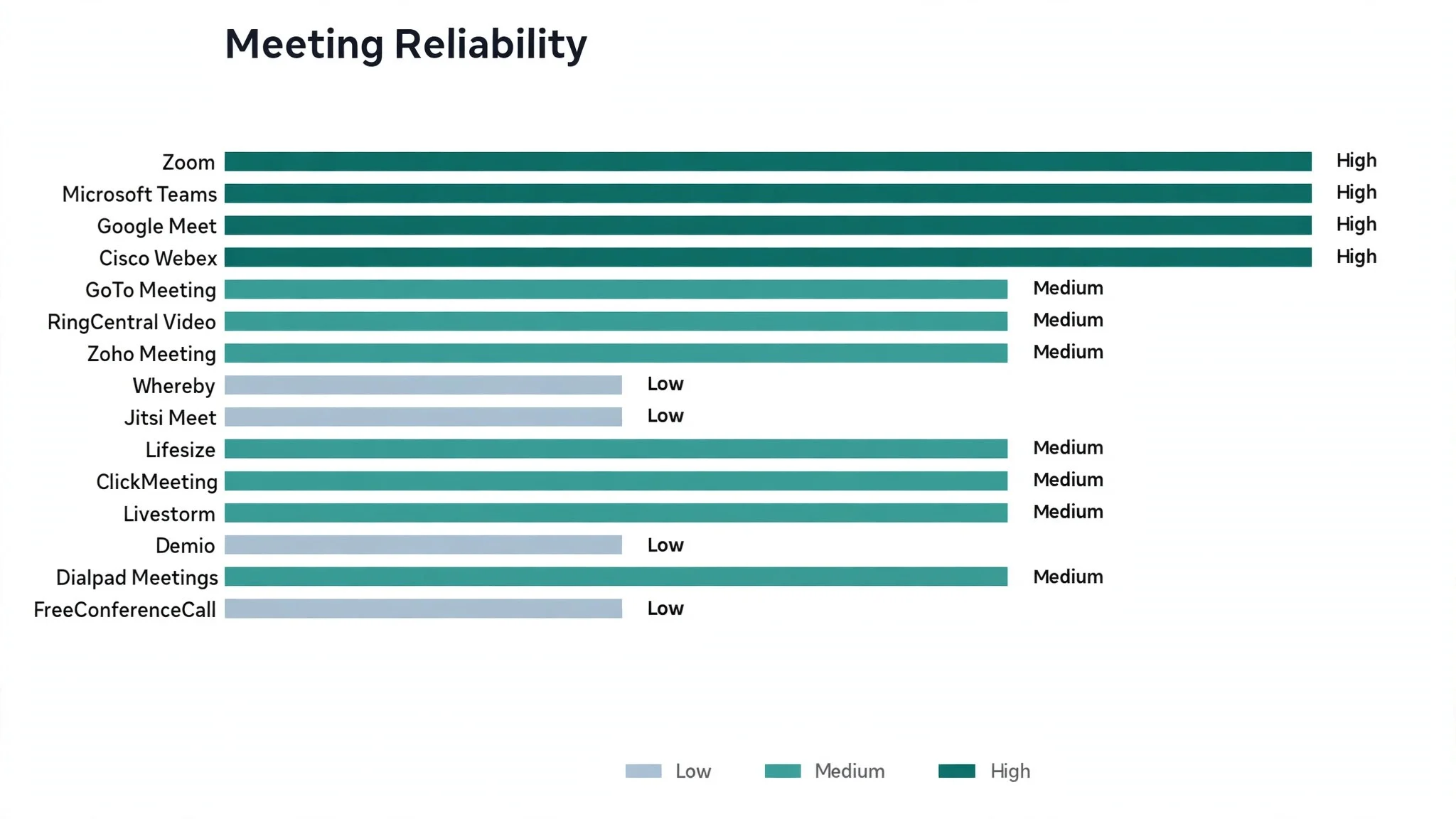
Reliability is the first gap in this ranking, and it decides whether a team trusts the tool enough to schedule important calls on it. Zoom and Google Meet hold steady on weak connections, while the smaller tools can freeze when the network dips. Test each tool on a poor connection before trusting it with a client call.
Audio matters more than video when the connection drops, because a call with frozen pictures and clear voices still works. Check whether the tool keeps the audio going when the video fails, and whether it offers a dial-in number as a backup. A tool with a phone fallback saves the meeting when the internet fails.
Guest joining is the third factor, and it decides whether meetings start on time. A tool that needs downloads and accounts adds ten minutes of setup to every first call, while a browser link gets guests in within a minute. Send the link early, test it with a colleague, and keep the dial-in number in the invite.
Five Meeting Mistakes That Waste Team Time
The first mistake is a meeting with no agenda. A team that joins without knowing the purpose talks in circles for an hour, while a team with three bullet points finishes in twenty minutes. Write the agenda in the invite, and let it set the length.
The second mistake is inviting everyone by default. A meeting with twelve people and two speakers wastes ten hours of attention, and the quiet attendees learn nothing. Invite only the people who must decide, and send the recording to the rest.
The third mistake is skipping the notes. A meeting that ends without written actions repeats itself next week, because nobody remembers what was agreed. Assign one person to take notes, and send the actions within the hour.
How to Pick Between Meetings and Webinars
A meeting suits a small group that must talk together, while a webinar suits a large audience that mostly listens. A team that runs a webinar like a meeting ends up with a hundred muted faces and no questions, and a team that runs a meeting like a webinar leaves the quiet voices unheard.
The tool choice follows the format, because webinar tools add registration, polls, and replay funnels that meeting tools lack. Pick the format first, then the tool, and never buy a webinar platform for a team that only needs daily calls.
A Four-Week Meeting Routine for a Remote Team
Week one is the setup, and it should be honest about the time involved. Pick the tool, set the recurring links, and agree the meeting rules with the team. A routine chosen together survives longer than a routine imposed from above.
Week two is the first real test. Run the weekly meeting, record it, and ask the team what slowed them down. Fix the joining problems first, because a meeting that starts late every week trains the team to arrive late.

Best Pick by Job
No single video tool fits every team, so each common meeting situation below is matched to the tool that scored highest for that job. The best video conferencing tools for a remote team look different from the right pick for a marketing team running webinars, and the table below makes that split clear.
| Job | Best pick | Why it wins |
|---|---|---|
| Teams wanting reliable large meetings | Zoom | Reliable video with breakout rooms and recording |
| Organisations already on Microsoft 365 | Microsoft Teams | Meetings inside the Microsoft workspace |
| Teams already on Google Workspace | Google Meet | Simple browser meetings with live captions |
| Enterprises needing secure meetings | Cisco Webex | Enterprise security with strong admin controls |
| Teams wanting simple reliable calls | GoTo Meeting | Straightforward meetings with good audio |
| Teams wanting calls plus phone | RingCentral Video | Video meetings inside a phone system |
| Small teams on a budget | Zoho Meeting | Affordable meetings with webinar options |
| Teams wanting browser rooms | Whereby | Instant browser meeting rooms with no downloads |
| Teams wanting free open-source meetings | Jitsi Meet | Free self-hosted video with no account needed |
| Teams with dedicated meeting rooms | Lifesize | Room systems with cloud meetings |
| Teams running webinars and classes | ClickMeeting | Webinars with polls and automation |
| Teams running engaging webinars | Livestorm | Browser webinars with engagement analytics |
| Marketers automating webinars | Demio | Automated webinars with simple funnels |
| Teams wanting AI meeting notes | Dialpad Meetings | AI notes and transcripts after every call |
| Teams needing free conference lines | FreeConferenceCall | Free conference calls with screen sharing |
If your situation does not match a row exactly, take the closest one and read that review first, starting with Zoom when it fits. The gap between neighbouring tools is smaller than the gap between a team that meets well weekly and one that never gets started, so habit matters more than a few points on a scorecard.
Frequently Asked Questions
Teams ask the same questions before every video tool change, so we answered the most common ones here.
Do I need a paid plan for team meetings?
You do not need a paid plan for short team meetings, because Zoom, Google Meet, and Jitsi cover free calls well. A paid plan earns its fee once meetings run past the free limit or need recording and breakout rooms. Start free, then pay when a specific limit slows the team down.
Which tool is best for large webinars?
ClickMeeting, Livestorm, and Demio suit large webinars best, because they add registration, polls, and replay funnels that meeting tools lack. A team running webinars monthly should pick a webinar-first tool rather than stretching a meeting tool. Check the vendor site for current pricing and confirm the attendee limits before you pay.
Can guests join without downloading anything?
Guests can join without downloading anything on Google Meet, Whereby, Jitsi Meet, and Livestorm, because all four run in the browser. A browser link keeps the first call fast, which matters most with clients. Send the link with a one-line instruction and a dial-in backup.
How do I improve video quality on a weak connection?
Improve video quality by turning off your own video when you are not speaking, closing other apps, and moving closer to the router. A wired connection beats wireless when the meeting matters, and a good microphone matters more than a good camera. Fix the audio first, because a call with clear voices and frozen pictures still works.
What happens to our recordings if we switch tools later?
Every tool in this ranking exports recordings to common formats, so a switch is possible but never painless. Meeting links and scheduled series do not transfer, and the team must rebuild them in the new tool. Trial Zoom properly now instead of staying with a meeting tool that no longer fits the way the team works.
Zoom Leads, and Your Next Meeting Is the Real Test
A team can settle this in a trial by timing days to a first meeting, counting the meetings held in the first month, and measuring how many started on time. The best video conferencing tools prove themselves on the days to a first call, the share of guests who join without help, and the meetings that start on time, and a two week trial with your real team will show all three. Zoom wins our ranking on the combined score, but the right tool for your team is the one your team meets on every week without being asked.
Run the trial on real meetings with your real team and your real clients, and judge the tool on the calls that run smoothly rather than the demo. If guests join in a minute and the video holds steady, the system is working. If the setup stalls and the audio drops, the tool is fighting you rather than helping you. Pick the tool that makes meetings feel easy, protect the weekly habit, and let the saved hours pay for the subscription many times over.