

A book is finished twice, once when the writing ends and once when the formatting is right. The second finish is the one most authors underestimate, because a manuscript that reads well in Word can look broken on a Kindle, with chapters in the wrong place, a cover that crops badly, and a table of contents that leads nowhere. The best ebook makers are the ones that make the second finish easy, with clean EPUB files, proper typesetting and a cover that survives every store.
Twelve tools made the list, and they split into three kinds. Formatters turn a manuscript into EPUB and print files. Writing apps draft and compile in one place. Repurposing tools turn existing content into a short ebook fast. The prices below were checked against vendor pages and November 2026 roundups, and where sources disagreed the draft says so rather than picking the friendlier number.
In this article
- How the Best eBook Makers Were Compared
- The Format Decides the Tool
- The 12 Tools at a Glance
- The 12 Tools in Detail
- Formatting Errors That Break a Book
- Best Pick by Job
- One-Time Beats Monthly Over Many Books
- A Simple First Ebook
- Free Formatting That Looks Professional
- Frequently Asked Questions
- The Bottom Line
How the Best eBook Makers Were Compared
Each of the best ebook makers was judged on five things that decide whether a book reaches readers looking like a book. Formats are first, because an EPUB that Kindle rejects is a failed export. Typesetting is second, because chapter styling and typography decide whether the book feels professional. Price is third, measured as the cost of one book and as the cost of a career, because one-time purchases beat subscriptions over many books. Ease is fourth, because a formatter that needs a manual will not be used. Writing is fifth, because a tool that drafts and formats together saves a handoff.
The tools in this guide all produce real ebooks, and every tool here has a free plan or a free trial except the ones that say otherwise. The comparison below names the limit of each tool plainly, because a tool bought for the wrong job wastes more than its subscription. It wastes the book it was bought to publish.
The prices in this guide were checked in November 2026, and the one-time tools hold their price better than the subscriptions, because Atticus, Vellum and Scrivener charge once while Designrr and InDesign bill monthly. Check the vendor page at checkout, because the monthly tools reprice often.
The Format Decides the Tool
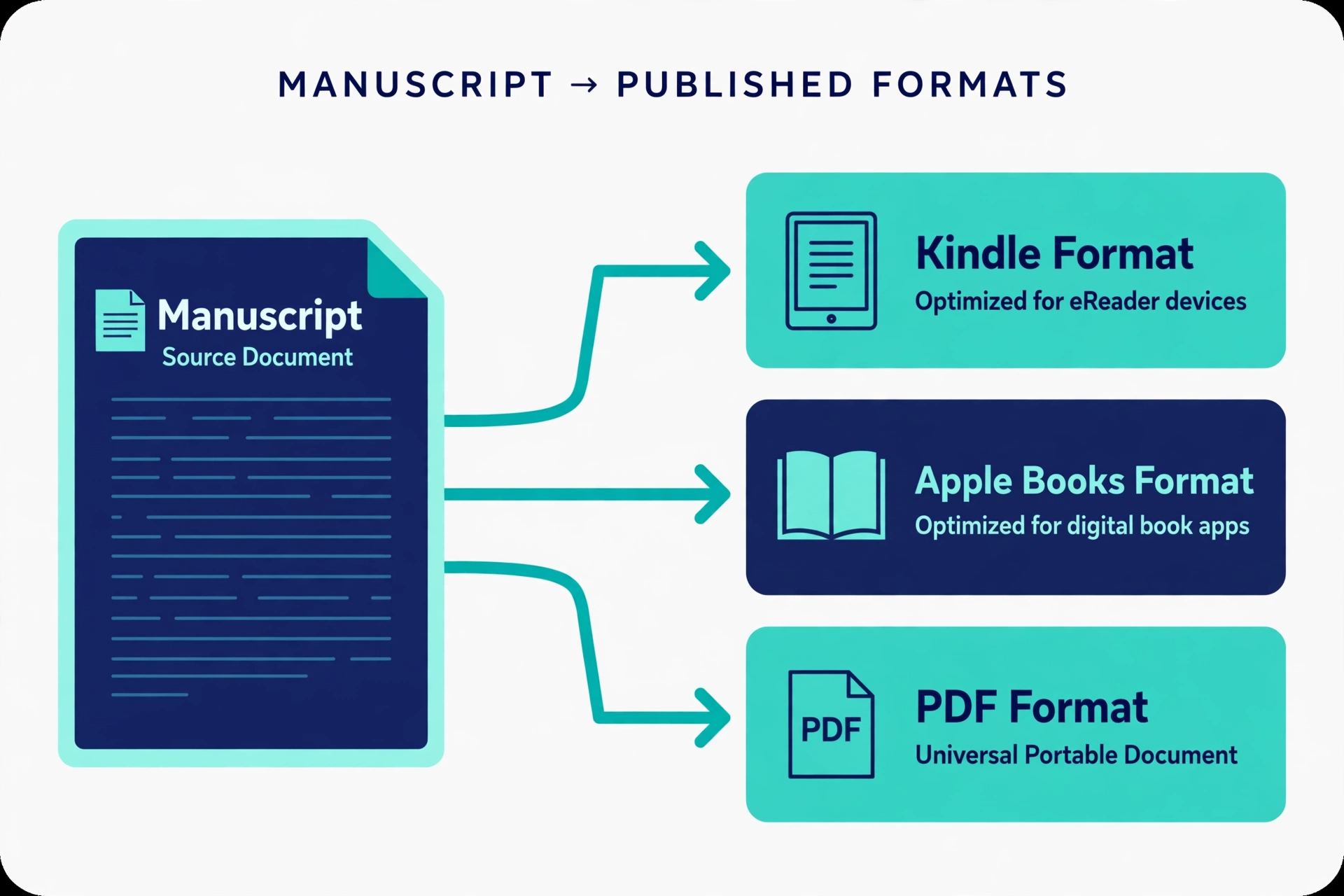
An ebook is not one format, it is several, and the store decides which one matters. Kindle wants its own format, Apple Books wants EPUB, and a lead magnet wants PDF. A tool that exports only one of them will leave the book stranded on one store, and the author will discover the gap after the launch, not before.
The best ebook makers export to the stores that matter. Atticus covers EPUB, PDF and print in one purchase. Vellum covers the same on a Mac. Kindle Create covers Kindle for free. A book that must reach every store needs a formatter that exports everywhere, and a book that lives on one store can use the free tool for that store.
The distribution decision deserves an answer before the formatting starts, because a book formatted for Kindle only cannot reach Apple Books, and a book formatted for print cannot become an EPUB without rework. Decide the stores first, and the formatter follows.
The 12 Tools at a Glance
The table below lines up the twelve tools by entry price and free access, so the shortlist takes a minute to build.
| Tool | Price | Free plan | Best for |
|---|---|---|---|
| Canva | Pro $120 to $144 a year | Free plan | Lead-magnet ebooks from templates |
| Adobe InDesign | $22.99 a month on annual billing | 7-day free trial, no free plan | Fixed-layout and illustrated ebooks |
| Atticus | $147 one-time | No free plan, money-back only | Writing and formatting in one purchase |
| Scrivener | $59.99 one-time | 30-day free trial, days of actual use | Long manuscripts, compiled to EPUB |
| Vellum | $199.99 one-time | Free to try until export | Most polished ebooks, Mac only |
| Designrr | Standard $29 a month | 7-day free trial | Blog posts and PDFs into ebooks |
| Kindle Create | Free | Free with every KDP account | Free Amazon-only formatting |
| Calibre | Free | Free, open source | Free conversion and library management |
| Reedsy Book Editor | Free | Free, no paid tier | Free writing and formatting |
| Kotobee Author | $150 one-time | Free plan with limits | Interactive ebooks with quizzes |
| Jutoh | $45 one-time | Free trial, no free plan | Affordable EPUB and Kindle formatting |
| BookBolt | $9.99 a month | Free trial, no free plan | Low-content books for Amazon KDP |
Read the price column against the book count, because a one-time purchase beats a subscription over many books.
The 12 Tools in Detail
1. Canva
Best for Lead-magnet ebooks from templates. Price Pro $120 to $144 a year. Free plan Free plan.
Canva is the fastest route to a lead-magnet ebook, with templates for guides, workbooks and reports that already place the cover, the chapters and the call to action. A marketer can turn a blog post into a designed PDF in an afternoon, with the brand kit keeping the ebook consistent with the website. Magic Write drafts the short-form copy, though a human should rewrite it.
Pro is $120 to $144 a year on annual billing, depending on the region, and the free plan covers a large template set with watermark-free exports. Pro adds premium templates and the brand kit. The trade-off is format, because Canva exports PDF and PNG, not EPUB, so a Kindle-ready ebook needs a second tool.
Buy it when the ebook is a marketing PDF, because the templates are the fastest route. Skip it when the book must reach Kindle, because Canva does not export EPUB.
Watch out. A Canva PDF is a fixed layout, so it reads badly on a small phone screen.
2. Adobe InDesign
Best for Fixed-layout and illustrated ebooks. Price $22.99 a month on annual billing. Free plan 7-day free trial, no free plan.
InDesign is the professional layout tool, and an illustrated ebook, a fixed-layout book or a highly designed guide belongs here. The precision over typography, images and pages is unmatched, and a print shop or a publisher will accept its files without a conversion step. A book that must look like a book, not a document, is an InDesign job.
It costs $22.99 a month on annual billing, or $34.49 month-to-month, with a seven-day trial and no free plan. The trade-off is the learning curve, because InDesign is a professional tool, and a first ebook will take longer than in a template tool. The precision is the reason to pay it.
Buy it when the ebook is illustrated or fixed-layout, because the control is the product. Skip it when the book is plain text, because a formatter does that faster and cheaper.
Watch out. Fixed-layout ebooks do not reflow, so test the file on a phone and a tablet before publishing.
3. Atticus
Best for Writing and formatting in one purchase. Price $147 one-time. Free plan No free plan, money-back only.
Atticus combines a writing editor and a formatter, and it runs on Windows, Mac, Linux and Chromebook, in the browser. A self-publisher gets ebook and print formatting, a custom theme builder, and EPUB, PDF and DOCX export in one tool, for one payment. For most self-publishers who are not on a Mac, it is the default paid pick.
It costs $147 one-time, which covers both ebook and print with future updates included. There is no free plan, though a money-back guarantee covers the purchase. The trade-off is that Atticus does not write the book, so the drafting still needs a writing app or a blank page.
Buy it when the book needs ebook and print formatting in one purchase, because the one-time price beats a subscription over a few books. Skip it when the budget is zero, because Reedsy and Kindle Create format for free.
Watch out. Atticus runs in the browser, so a slow connection will slow the formatting.
4. Scrivener
Best for Long manuscripts, compiled to EPUB. Price $59.99 one-time. Free plan 30-day free trial, days of actual use.
Scrivener is built for long, messy projects. Each chapter or scene lives in its own section that you can drag around, with research, notes and outlines kept alongside the draft. When the book is finished, its Compile feature turns the same project into EPUB, Kindle-ready files, Word and print PDFs, so many authors never use a separate formatter.
It costs $59.99 one-time for Mac or Windows, or $95.98 for both, with a 30-day trial counted in days of actual use, and the iOS app is $23.99 extra. The trade-off is the learning curve, because Compile is powerful and confusing in equal measure, and the first export will take an evening to get right.
Buy it when the book is long and complex, because the project organisation is the product. Skip it when the book is short, because a simple formatter is faster.
Watch out. Compile exports to many formats, but the formatting needs the Format Designer to look polished.
5. Vellum
Best for Most polished ebooks, Mac only. Price $199.99 one-time. Free plan Free to try until export.
Vellum produces the prettiest ebooks in the business, with balanced ornaments, proper chapter styling and clean typography on every device. Books formatted in Vellum look like they came from a traditional publisher, and the app is so simple that a first book takes an afternoon. It is Mac only, and there are no plans for a Windows version.
Vellum Ebooks is $199.99 one-time, and Vellum Press, which adds paperback and hardcover interiors, is $249.99. You can download the app free and format the entire book before paying a cent, which makes the trial honest. The trade-off is the platform, because Windows authors need Atticus instead.
Buy it when the author is on a Mac and the ebook must look traditional, because the output is the best here. Skip it on Windows, because there is no version for it.
Watch out. Vellum is Mac only and needs macOS 13 or later, so check the version before buying.
6. Designrr
Best for Blog posts and PDFs into ebooks. Price Standard $29 a month. Free plan 7-day free trial.
Designrr serves a different buyer from the rest of this list. It is built for coaches, marketers and bloggers who turn existing content into ebooks, usually lead magnets and short nonfiction. Import a blog post, a document, a podcast or a PDF, pick a template, and you have a designed PDF or EPUB in under an hour.
Standard is $29 a month, and Pro is $39 a month for Kindle files and flipbooks, with Business at $99. A lifetime deal for Standard is frequently available at $27 one-time. The trade-off is depth, because Designrr formats existing content rather than helping to write a book.
Buy it when the content already exists and the ebook is the repackaging, because the import is the feature. Skip it when the book is being written from scratch, because a writing app serves that better.
Watch out. The lifetime deal appears often, so check for it before paying monthly.
7. Kindle Create
Best for Free Amazon-only formatting. Price Free. Free plan Free with every KDP account.
Kindle Create is Amazon free formatting tool for authors publishing only on KDP. Import a Word document, style the chapters, add a table of contents, and export a Kindle-ready file without paying anything. It is simple by design, and it is the right tool for a first book that will only ever sell on Amazon.
It costs nothing, and it comes with every KDP account. The trade-off is scope, because Kindle Create formats for Kindle only, with no EPUB for Apple Books and no print files, so a book that must reach other stores needs a second formatter.
Buy it when the book sells only on Amazon, because the price is zero and the output is correct. Skip it when the book must reach Apple Books or print, because Kindle Create cannot do either.
Watch out. A Kindle-only file cannot be sold elsewhere, so decide the distribution before formatting.
8. Calibre
Best for Free conversion and library management. Price Free. Free plan Free, open source.
Calibre is the free Swiss army knife for ebooks, converting between EPUB, MOBI, PDF and a dozen other formats, fixing metadata, and managing a whole library. An author who needs to convert a file, check it on a reader, or fix a broken EPUB will find Calibre does the job without a subscription, and the community plugins cover almost every edge case.
It costs nothing, and it is open source. The trade-off is that Calibre converts and manages rather than designing, so a book formatted in Calibre will look plain next to a Vellum book. The conversion quality is the feature, because it rarely breaks a file.
Buy it when the job is conversion, checking or library management, because the tool is free and reliable. Skip it when the book needs beautiful formatting, because Calibre does not design.
Watch out. Conversion can change the layout, so check the file on a real e-reader before publishing.
9. Reedsy Book Editor
Best for Free writing and formatting. Price Free. Free plan Free, no paid tier.
Reedsy Book Editor is a free online tool for writing and formatting a book, with a clean editor, chapter management and professional typesetting built in. An author can write the whole book in the browser and export a print-ready PDF and a clean EPUB without paying anything, which makes it the best free formatter in this list.
It costs nothing, and there is no paid tier. The trade-off is that Reedsy is a writing and formatting tool, not a design tool, so a book that needs custom layouts will feel constrained. The typesetting is the feature, because it looks professional without any effort.
Buy it when the budget is zero and the book needs proper typesetting, because the free output is genuinely good. Skip it when the book needs custom design, because the layouts are fixed.
Watch out. The book lives in the browser, so export a backup copy regularly.
10. Kotobee Author
Best for Interactive ebooks with quizzes. Price $150 one-time. Free plan Free plan with limits.
Kotobee Author builds interactive ebooks, with quizzes, videos, pop-ups and widgets embedded in the pages, which suits textbooks, training manuals and children’s books. A book that needs the reader to do something, not just read, belongs here, because the interactivity is built into the format rather than bolted on.
It costs $150 one-time for the Author desktop app, with higher tiers for cloud features. The free plan covers the basics with limits. The trade-off is that the interactivity needs a reader that supports it, so the EPUB must be opened in a compatible app.
Buy it when the ebook must be interactive, because the widgets are the product. Skip it when the book is plain text, because a simpler formatter is faster.
Watch out. Interactive features need a compatible reader, so test the file on the target device before publishing.
11. Jutoh
Best for Affordable EPUB and Kindle formatting. Price $45 one-time. Free plan Free trial, no free plan.
Jutoh is the affordable formatter, turning a Word document or an OpenDocument file into EPUB, Kindle and other ebook formats for a one-time $45. It covers the formats a self-publisher needs, with control over styles, covers and metadata, without a subscription. A first-time author on a budget gets a proper ebook file for less than a dinner.
It costs $45 one-time, with a free trial and no free plan. The trade-off is polish, because the interface is plain and the output needs checking, so a book that must look premium will need extra work.
Buy it when the budget is tight and the formats matter, because $45 one-time is the cheapest paid formatter here. Skip it when the book needs premium typesetting, because Vellum or Reedsy does that better.
Watch out. The interface is dated, so allow an evening to learn it before formatting the real book.
12. BookBolt
Best for Low-content books for Amazon KDP. Price $9.99 a month. Free plan Free trial, no free plan.
BookBolt serves the low-content niche, journals, planners, colouring books and activity books for Amazon KDP, with a cover designer, an interior designer and research tools that show which niches are selling. A publisher who makes many small books gets the research and the design in one subscription, which is the whole business model.
It costs $9.99 a month, with higher tiers for more features. The trade-off is scope, because BookBolt is built for low-content books, and a novel or a nonfiction book will not fit its workflow.
Buy it when the business is low-content books on KDP, because the research tools are the feature. Skip it for a standard book, because the workflow does not fit.
Watch out. Low-content niches saturate fast, so check the research before building a whole catalogue on one niche.
Formatting Errors That Break a Book
The best ebook makers all export an EPUB, and the EPUB is only as good as the manuscript behind it. A Word document full of manual line breaks, double spaces and tabbed indents will produce an ebook full of gaps and jumps, because the formatter copies the mess faithfully. Clean the manuscript first, with proper styles for headings, body and quotes, and the export will behave.
The second error is the cover. A cover designed at the wrong size will crop badly on Kindle, and a cover with small text will vanish on a phone screen. Build the cover at the size the store asks for, test it as a thumbnail, and check that the title reads at a glance.
The third error is the table of contents. A book without a working table of contents strands the reader, because an ebook has no page numbers to flip through. Generate the contents from the heading styles, test every link, and the reader will find the way around.
The fourth error is the fixed layout. A fixed-layout ebook looks perfect on a tablet and unreadable on a phone, because the pages do not reflow. Choose reflowable for text books and fixed only for illustrated books, and test on both sizes before publishing.
Best Pick by Job
The right pick depends on the book, so match the job to the tool rather than buying the biggest name.
| Job | Pick | Why |
|---|---|---|
| Lead-magnet PDFs | Canva | Templates, brand kit, fast |
| Illustrated ebooks | Adobe InDesign | Fixed-layout control, $22.99 a month |
| Ebook plus print | Atticus | $147 once, all platforms |
| Long manuscripts | Scrivener | Compile to EPUB, $59.99 once |
| Polished Mac ebooks | Vellum | $199.99 once, best output |
| Repurposed content | Designrr | Posts to ebook, $29 a month |
| Amazon-only books | Kindle Create | Free, Kindle-ready |
| Free conversion | Calibre | Free, open source |
| Free typesetting | Reedsy Book Editor | Free, professional output |
| Interactive ebooks | Kotobee Author | $150 once, quizzes built in |
| Budget formatting | Jutoh | $45 once, EPUB and Kindle |
| Low-content KDP books | BookBolt | Research plus design, $9.99 a month |
When two tools tie, pick the one that exports to the stores you will actually publish on, because a format you never use is a feature you never needed.
One-Time Beats Monthly Over Many Books
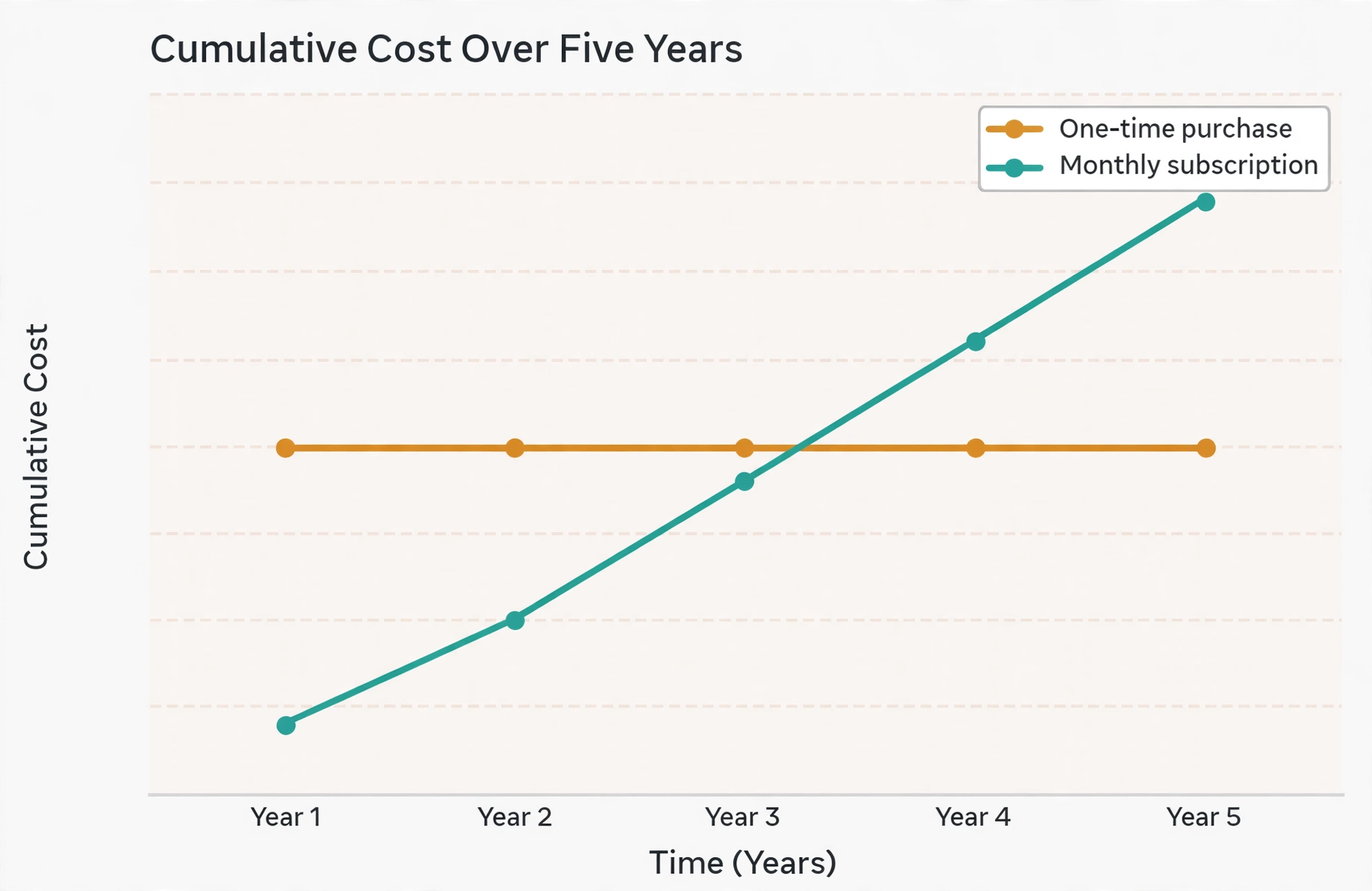
An author who publishes one book a year should do the maths over five years, not one month. Atticus at $147 once, Vellum at $199.99 once, and Scrivener at $59.99 once cost the same in year five as in year one, because one-time tools do not bill again. A subscription at $29 a month costs $348 a year and $1,740 over five years, which is more than all three one-time tools combined.
The practical rule is simple. Buy one-time when the author plans many books. Buy monthly when the book is a one-off lead magnet, because a single month of Designrr at $29 is cheaper than a $147 purchase. A marketer building lead magnets buys monthly, and an author building a backlist buys once.
The backlist maths deserves a line, because an author who publishes one book a year will spend $1,740 on a $29 monthly tool over five years, and $147 once on Atticus. The subscription is cheaper for one book and dearer for a career, so count the books before the billing model.
The best ebook makers make the second finish easy, and the pick that fits your book is the right one. Atticus leads for every store, Vellum for Mac polish, and Reedsy for free typesetting.
A Simple First Ebook
The best ebook makers repay a simple first book, and the simplicity starts with the manuscript. Finish the writing first, clean the styles, and only then open the formatter, because a book formatted before it is finished will be formatted twice. The writing and the formatting are separate jobs, and the order matters.
Step two is the formatter, pick the tool that matches the distribution, Atticus for every store, Kindle Create for Amazon only, Reedsy for free typesetting. Step three is the test, open the EPUB on a real e-reader and on a phone, because the emulator hides the problems a device reveals.
Step four is the cover, build it at the store size and test it as a thumbnail, because the thumbnail is what sells the book. Step five is the launch, publish to one store first, check the file, and then expand to the others, because a broken file on five stores is five problems.
Keep a backup of the manuscript and the formatted files, because a store can reject a file and the fix is easier when the source is safe. The backup is the cheapest insurance in publishing.
Free Formatting That Looks Professional
The best ebook makers include free tools that format a real book without a subscription. Reedsy Book Editor is free with professional typesetting, Kindle Create is free for Amazon, and Calibre is free and open source for conversion. An author who never pays can still publish a book that looks like a book, and the paid tools add speed rather than quality.
A free book follows a simple pattern. Write the manuscript in a clean editor, clean the styles so headings and body text are consistent, and format in Reedsy for every store or Kindle Create for Amazon only. Test the EPUB on a real e-reader and on a phone, because the device reveals what the emulator hides.
Frequently Asked Questions
How much does it cost to make an ebook?
From nothing to $249.99. Reedsy Book Editor, Kindle Create and Calibre are free, Jutoh is $45 once, Atticus is $147 once, and Vellum is $199.99 once for ebooks or $249.99 with print. A monthly tool like Designrr costs $29 a month, which is cheaper for one book and dearer over many.
What is the difference between EPUB and PDF?
EPUB reflows, so the text adapts to the screen, the font size and the device, which is what e-readers need. PDF is fixed, so the layout stays exactly as designed, which suits lead magnets and print. A book for Kindle or Apple Books needs EPUB, and a lead magnet needs PDF.
Can I publish an ebook on Amazon for free?
Yes. Kindle Create formats the book for free, and KDP publishes it for free, taking a royalty share on sales instead of an upfront fee. The author pays nothing until the book sells, which is why Amazon is the starting point for most self-publishers.
Do I need a Mac to make a good ebook?
No, not anymore. Vellum is Mac only and produces the prettiest ebooks, but Atticus does the same job on Windows, Mac, Linux and Chromebook for $147 once. A Windows author loses nothing by choosing Atticus.
What is the cheapest way to format a first book?
Reedsy Book Editor, because it is free and the typesetting looks professional, or Kindle Create when the book sells only on Amazon. Both export a proper ebook file without a purchase, and the author can upgrade to a paid formatter when the second book arrives.
How long does it take to format an ebook?
A first book takes an evening in a simple formatter like Reedsy or Kindle Create, and a day in a professional tool like InDesign, because the learning curve is the cost. A book formatted twice, once before the writing is finished and once after, takes twice as long, so finish the writing first.
How do I price my first ebook?
Lower than you think, because a first book earns readers rather than revenue. Price between $2.99 and $4.99, so the royalty rate is highest and the barrier is low, and raise the price when the reviews arrive. A cheap first book that earns readers is worth more than a dear one that earns nothing.
The Bottom Line
The best ebook makers make the second finish easy, and the author who finishes the writing before opening the formatter will publish faster. Start free, test on a real device, and let the second book decide the purchase.