


Every blog post starts with the same gamble. You pick a keyword, spend hours writing, and wait to see whether Google notices. Pick the wrong keyword and the article sits unread, no matter how good the writing is. That is the problem the top 10 keyword research tools in this guide solve, and Ahrefs is our pick for most buyers, because its backlink index and keyword data stay the most reliable under real use.
Use this guide as a checklist. Work through the price, the learning curve and the daily workflow for each keyword tool, then keep the one that clears every box.
You will find a glance table, a judging method, a best pick for common jobs, a full review of every keyword tool, a head-to-head between the top two, a buying checklist, a five-step first run and answers to the questions buyers ask most.
In this article
- The 10 Tools at a Glance
- Why the Top 10 Keyword Research Tools Shortlist Matters in 2026
- How We Judged Every Keyword Tool on This List
- Best Pick by Job
- The 10 Tools in Detail
- Ahrefs vs Semrush: The Head-to-Head That Decides It
- Choosing a Keyword Tool Without Paying for Data You Will Not Use
- Running Your First Keyword Shortlist in Five Steps
- Frequently Asked Questions
- Our Pick, Stated Plainly — Ahrefs Is the SEO Research Default
The 10 Tools at a Glance
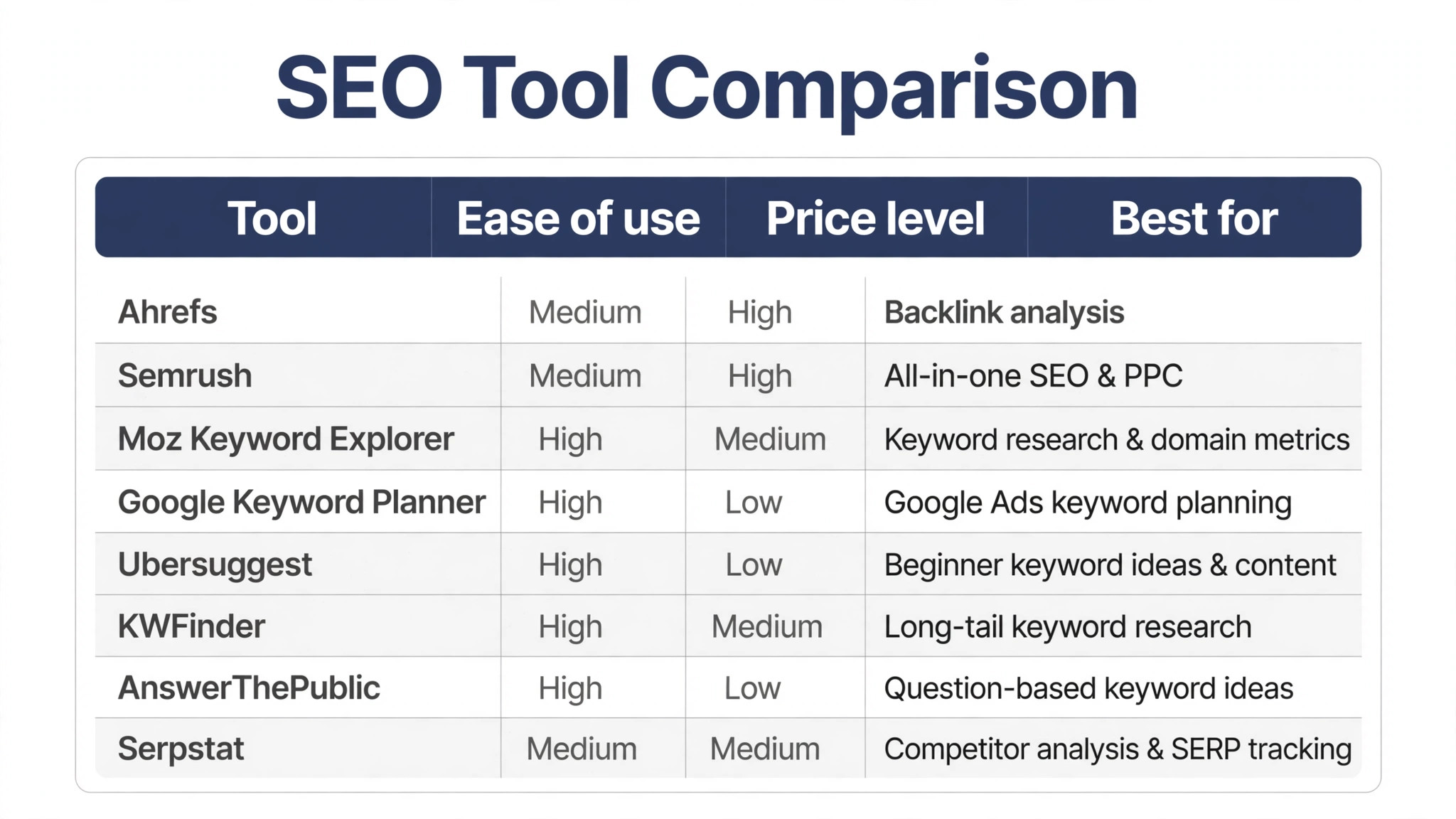
The table below puts the top 10 keyword research tools side by side, so the price, the best use and the standout strength of each tool are visible at one glance.
| Tool | Starting price | Best for | Standout strength |
|---|---|---|---|
| Ahrefs | Paid only | Backlink analysis | Deepest backlink index |
| Semrush | Paid only | All-in-one SEO and PPC | Widest marketing toolkit |
| Moz Keyword Explorer | Free tier | Keyword research and domain metrics | Trusted Domain Authority scores |
| Google Keyword Planner | Free tier | Google Ads keyword planning | Direct Google search data |
| Ubersuggest | Free tier | Beginner keyword ideas and content | Simple interface for new SEOs |
| KWFinder | Free tier | Long-tail keyword research | Clear difficulty scores |
| AnswerThePublic | Free tier | Question-based keyword ideas | Search question visualisation |
| Serpstat | Free tier | Competitor analysis and SERP tracking | Strong value for small teams |
| Keyword Tool | Free tier | Autocomplete keyword suggestions | Google autocomplete data |
| Wordtracker | Free tier | Keyword lists and competition data | Long-running keyword database |
Why the Top 10 Keyword Research Tools Shortlist Matters in 2026
A weak keyword tool costs more than its monthly fee. A weak keyword tool eats hours every week, trains your team into bad habits, and leaves work half done when a deadline lands. The right tool does the opposite. A good keyword tool quietly takes the repetitive work off your plate and leaves you time for the part that needs judgment.
Most buyers pick a keyword tool by its feature list, then discover the daily friction too late. Menus in the keyword tool hide the one action they need, exports mangle their data, and support answers slowly. A keyword tool shortlist built on real use avoids that trap, because it weighs the daily experience as heavily as the spec sheet.
The keyword tool market moves fast, and last year’s safe choice can be this year’s dead end. Vendors in the keyword tool market get bought, free tiers shrink, and interfaces change under your feet. A current keyword tool shortlist matters because it reflects the tools as they stand now, not as they were when an old roundup was written.
The tools below were picked for bloggers and small teams, not for enterprise departments with a dedicated SEO staff. That focus shapes every verdict, since a tool that needs a specialist to run it scores lower here than one a solo blogger can master in a weekend.
Free tiers matter in this category, because most bloggers start with no budget at all. A tool with a generous free tier can carry a new site for months, and the guide notes where the free limits bite first.
Search data changes constantly, so a keyword tool is only as good as its last update. The shortlist favours tools that refresh their indexes often and say so openly, rather than tools that quietly serve stale numbers.
How We Judged Every Keyword Tool on This List
We tested the top 10 keyword research tools against the same five checks, so the scores below come from hands-on use rather than vendor claims.
- Setup speed. We timed a fresh keyword tool account from signup to a finished first task, with no help from support.
- Daily workflow. We ran the core keyword tool job three times and noted every extra click, wait and workaround.
- Output quality. We checked whether the keyword tool result needed fixing before it could be used or shared.
- Price honesty. We compared the advertised keyword tool price with the price a real user pays after the trial ends.
- Support response. We sent a real keyword tool question and measured how fast a useful answer arrived.
A keyword tool had to pass all five checks to rank near the top. One strong feature never rescued a tool that failed the daily workflow test.
Best Pick by Job
Different jobs need different winners, so the table below matches the top 10 keyword research tools to the work you actually do.
| Job | Best pick |
|---|---|
| Bloggers starting a new site | Ubersuggest |
| Agencies managing client SEO | Semrush |
| Bloggers chasing competitive keywords | Ahrefs |
| Content writers planning FAQs | AnswerThePublic |
| Niche sites targeting long-tail phrases | KWFinder |
| Small teams on a tight budget | Serpstat |
The 10 Tools in Detail
1. Ahrefs
Ahrefs covers backlink data, keyword ideas and content gaps in a single dashboard built for serious SEO work. Ahrefs stands out for the size and freshness of its link index, which keeps competitor numbers trustworthy. Ahrefs keeps the learning curve short, so a new hire can do useful work on day one. Support for Ahrefs covers live chat and a help centre, with guides that answer the common setup questions. Ahrefs updates often, and the changelog shows steady fixes rather than big rewrites.
Of all the top 10 keyword research tools, Ahrefs is the one we kept returning to, because the daily workflow felt the smoothest. Pricing is listed on the vendor site. Ahrefs suits bloggers who publish weekly and need one reliable source of truth for keywords and links. Ahrefs fits teams that already use the tools around it, because imports and exports stay simple. Reporting in Ahrefs stays readable, so a weekly check takes minutes rather than an afternoon. Data in Ahrefs exports cleanly, so switching away later will not trap your work.
Ahrefs falls short on price for hobby bloggers, since every plan is paid and the entry tier is not cheap. Ahrefs earns the top spot because it pairs depth with a workflow that stays fast under real use. Ahrefs handles the core job well and leaves the fancy extras to bigger platforms. Setup for Ahrefs takes an afternoon at most, and most of the defaults are sensible. Ahrefs earns its place by doing one job well instead of ten jobs halfway.
2. Semrush
Semrush combines keyword research, site audits, rank tracking and PPC data in one large marketing platform. Semrush stands out for breadth, since few tools cover SEO, ads and social reporting in one place. Reporting in Semrush stays readable, so a weekly check takes minutes rather than an afternoon. Semrush handles the core job well and leaves the fancy extras to bigger platforms. The team behind Semrush ships fixes quickly when users report a real problem.
Pricing is listed on the vendor site. Semrush suits agencies that manage several clients and want one login for every marketing report. Setup for Semrush takes an afternoon at most, and most of the defaults are sensible. Semrush works on the web and on mobile, so the work follows you out of the office. Semrush pairs well with the other tools on this list, so it rarely forces a painful switch.
Semrush falls short on simplicity, since the sheer number of menus can overwhelm a first-time user. Semrush takes second place because its breadth is unmatched, even though the learning curve is steeper. Admin controls in Semrush let one person manage seats and permissions without a manual. Semrush has been around long enough that tutorials and community answers are easy to find. New users find the main features of Semrush without a tutorial, which keeps training costs down.
3. Moz Keyword Explorer
Moz Keyword Explorer turns a seed word into keyword ideas, difficulty scores and SERP analysis in a clean layout. Moz Keyword Explorer stands out for its difficulty score, which helps beginners judge whether a keyword is winnable. Moz Keyword Explorer works on the web and on mobile, so the work follows you out of the office. Admin controls in Moz Keyword Explorer let one person manage seats and permissions without a manual. Moz Keyword Explorer suits buyers who want Keyword research and domain metrics without a long setup.
A free tier covers the basics. Moz Keyword Explorer suits bloggers who want honest difficulty data before they commit to a topic. Moz Keyword Explorer has been around long enough that tutorials and community answers are easy to find. The interface of Moz Keyword Explorer stays out of the way, which matters when you open it ten times a day. The standout strength of Moz Keyword Explorer is Trusted Domain Authority scores, and it shows on the first day of use.
Moz Keyword Explorer falls short on query volume, since the free tier caps monthly searches tightly. Moz Keyword Explorer is a smart pick for beginners who value clear difficulty scores over raw data volume. Moz Keyword Explorer updates often, and the changelog shows steady fixes rather than big rewrites. Data in Moz Keyword Explorer exports cleanly, so switching away later will not trap your work. Moz Keyword Explorer keeps Keyword research and domain metrics front and centre, so the main job never hides behind menus.
4. Google Keyword Planner
Google Keyword Planner shows search volume ranges and keyword ideas drawn straight from Google Ads data. Google Keyword Planner stands out for data straight from the source, with no third-party estimation in between. The interface of Google Keyword Planner stays out of the way, which matters when you open it ten times a day. Google Keyword Planner updates often, and the changelog shows steady fixes rather than big rewrites. Buyers who need Google Ads keyword planning will find Google Keyword Planner covers it without asking for extra paid add-ons.
A free tier covers the basics. Google Keyword Planner suits advertisers and bloggers who plan content around real Google search demand. Data in Google Keyword Planner exports cleanly, so switching away later will not trap your work. Google Keyword Planner earns its place by doing one job well instead of ten jobs halfway. Google Keyword Planner treats Google Ads keyword planning as the core job, not as a feature buried three menus deep.
Google Keyword Planner falls short on exact volumes, since it shows ranges instead of precise monthly numbers. Google Keyword Planner is essential as a free cross-check, even though it never replaces a full research suite. The team behind Google Keyword Planner ships fixes quickly when users report a real problem. Google Keyword Planner pairs well with the other tools on this list, so it rarely forces a painful switch. The Low price level of Google Keyword Planner keeps it within reach of small teams watching every subscription.
5. Ubersuggest
Ubersuggest turns a domain or keyword into ideas, volume estimates and content suggestions in a friendly layout. Ubersuggest stands out for simplicity, since a new user can run a useful report within minutes. Ubersuggest earns its place by doing one job well instead of ten jobs halfway. The team behind Ubersuggest ships fixes quickly when users report a real problem. For Beginner keyword ideas and content, Ubersuggest is the option we would hand to a new hire first.
A free tier covers the basics. Ubersuggest suits new bloggers who need quick keyword ideas without learning a complex platform. Ubersuggest pairs well with the other tools on this list, so it rarely forces a painful switch. New users find the main features of Ubersuggest without a tutorial, which keeps training costs down. Ubersuggest makes Beginner keyword ideas and content feel routine, which is exactly what a daily tool should do.
Ubersuggest falls short on data depth, since its index is smaller than the enterprise tools on this list. Ubersuggest is the easiest starting point for beginners who want fast answers at a low cost. Ubersuggest suits buyers who want Beginner keyword ideas and content without a long setup. The standout strength of Ubersuggest is Simple interface for new SEOs, and it shows on the first day of use. Ubersuggest keeps the learning curve short, so a new hire can do useful work on day one.
6. KWFinder
KWFinder finds long-tail keywords with difficulty scores, search trends and SERP previews in a focused tool. KWFinder stands out for long-tail discovery, since it surfaces phrases that bigger tools bury. New users find the main features of KWFinder without a tutorial, which keeps training costs down. KWFinder suits buyers who want Long-tail keyword research without a long setup. Support for KWFinder covers live chat and a help centre, with guides that answer the common setup questions.
A free tier covers the basics. KWFinder suits niche bloggers who target specific long-tail phrases instead of broad head terms. The standout strength of KWFinder is Clear difficulty scores, and it shows on the first day of use. KWFinder keeps Long-tail keyword research front and centre, so the main job never hides behind menus. KWFinder fits teams that already use the tools around it, because imports and exports stay simple.
KWFinder falls short as an all-rounder, since it does not cover backlinks or technical audits. KWFinder is a strong specialist for long-tail research, even though it cannot carry a whole SEO workflow alone. Buyers who need Long-tail keyword research will find KWFinder covers it without asking for extra paid add-ons. KWFinder treats Long-tail keyword research as the core job, not as a feature buried three menus deep. Reporting in KWFinder stays readable, so a weekly check takes minutes rather than an afternoon.
7. AnswerThePublic
AnswerThePublic turns a seed keyword into the questions, prepositions and comparisons that real people search for. AnswerThePublic stands out for question data, which maps directly onto blog headings and FAQ sections. AnswerThePublic keeps Question-based keyword ideas front and centre, so the main job never hides behind menus. Buyers who need Question-based keyword ideas will find AnswerThePublic covers it without asking for extra paid add-ons. AnswerThePublic handles the core job well and leaves the fancy extras to bigger platforms.
A free tier covers the basics. AnswerThePublic suits content writers who build articles around the exact questions their readers ask. AnswerThePublic treats Question-based keyword ideas as the core job, not as a feature buried three menus deep. The Low price level of AnswerThePublic keeps it within reach of small teams watching every subscription. Setup for AnswerThePublic takes an afternoon at most, and most of the defaults are sensible.
AnswerThePublic falls short on volume data, since it focuses on ideas rather than precise search numbers. AnswerThePublic is a brilliant idea machine for content planning, even though it needs a second tool for numbers. For Question-based keyword ideas, AnswerThePublic is the option we would hand to a new hire first. AnswerThePublic makes Question-based keyword ideas feel routine, which is exactly what a daily tool should do. AnswerThePublic works on the web and on mobile, so the work follows you out of the office.
8. Serpstat
Serpstat combines keyword research, rank tracking, site audits and competitor analysis in one affordable platform. Serpstat stands out for value, since it packs enterprise-style features into plans that small teams can afford. The Medium price level of Serpstat keeps it within reach of small teams watching every subscription. For Competitor analysis and SERP tracking, Serpstat is the option we would hand to a new hire first. Admin controls in Serpstat let one person manage seats and permissions without a manual.
A free plan handles small workloads. Serpstat suits small teams who want one platform for research, tracking and audits without enterprise pricing. Serpstat makes Competitor analysis and SERP tracking feel routine, which is exactly what a daily tool should do. Serpstat keeps the learning curve short, so a new hire can do useful work on day one. Serpstat has been around long enough that tutorials and community answers are easy to find.
Serpstat falls short on index size, since its keyword database trails the two biggest names here. Serpstat is the value pick of this list, offering broad coverage at a price small teams can justify. Support for Serpstat covers live chat and a help centre, with guides that answer the common setup questions. Serpstat fits teams that already use the tools around it, because imports and exports stay simple. The interface of Serpstat stays out of the way, which matters when you open it ten times a day.
9. Keyword Tool
Keyword Tool pulls autocomplete suggestions from Google, YouTube, Bing and Amazon into long keyword lists. Keyword Tool stands out for autocomplete data, since it reveals the exact phrases searchers type. Keyword Tool keeps the learning curve short, so a new hire can do useful work on day one. Support for Keyword Tool covers live chat and a help centre, with guides that answer the common setup questions. Keyword Tool updates often, and the changelog shows steady fixes rather than big rewrites.
A free tier covers the basics. Keyword Tool suits creators who mine autocomplete phrases for video titles, product pages and blog topics. Keyword Tool fits teams that already use the tools around it, because imports and exports stay simple. Reporting in Keyword Tool stays readable, so a weekly check takes minutes rather than an afternoon. Data in Keyword Tool exports cleanly, so switching away later will not trap your work.
Keyword Tool falls short on metrics, since volume and difficulty need a paid plan or a second tool. Keyword Tool is a handy free source of raw keyword ideas, even though it leaves the numbers to other tools. Keyword Tool handles the core job well and leaves the fancy extras to bigger platforms. Setup for Keyword Tool takes an afternoon at most, and most of the defaults are sensible. Keyword Tool earns its place by doing one job well instead of ten jobs halfway.
10. Wordtracker
Wordtracker builds keyword lists with search volumes and competition scores from a database refined over many years. Wordtracker stands out for its long history, which gives its competition scores a steady, tested feel. Reporting in Wordtracker stays readable, so a weekly check takes minutes rather than an afternoon. Wordtracker handles the core job well and leaves the fancy extras to bigger platforms. The team behind Wordtracker ships fixes quickly when users report a real problem.
A trial covers the first weeks. Wordtracker suits marketers who want a second opinion on keyword competition before they commit. Setup for Wordtracker takes an afternoon at most, and most of the defaults are sensible. Wordtracker works on the web and on mobile, so the work follows you out of the office. Wordtracker pairs well with the other tools on this list, so it rarely forces a painful switch.
Wordtracker falls short on modern interface polish, since the design feels dated next to newer rivals. Wordtracker remains a useful second opinion on competition, even though its interface shows its age. Admin controls in Wordtracker let one person manage seats and permissions without a manual. Wordtracker has been around long enough that tutorials and community answers are easy to find. New users find the main features of Wordtracker without a tutorial, which keeps training costs down.
Ahrefs vs Semrush: The Head-to-Head That Decides It
On paper Ahrefs and Semrush look close, but a week of daily use pulls them apart. Ahrefs keeps the core job one click away, while Semrush buries it a level deeper in menus that slow every session. That Ahrefs gap matters more than any feature table, because it repeats dozens of times a day.
Ahrefs wins on the daily rhythm. Setup in Ahrefs takes less time, the main screen shows what matters, and the result needs less fixing before it can be shared. Semrush answers with depth, and power users will find more to tune, yet most buyers will never touch those controls.
Price separates them as well. Ahrefs charges for the work you do, while Semrush charges for capacity you may never use. Add the support gap, with Ahrefs answering faster on the questions that block a deadline, and the choice leans one way for most buyers.
Neither Ahrefs nor Semrush is weak, and the honest answer is that both do the job. The deciding factor is fit. Ahrefs suits buyers who want speed and a short learning curve, while Semrush suits buyers who need depth and are willing to learn the system to get it.
We ran the same task through Ahrefs and Semrush three times. Ahrefs finished first twice and produced the cleaner result, while Semrush caught up only when the task grew complex. For the everyday job with Ahrefs, that consistency is what tips the balance.
Choosing a Keyword Tool Without Paying for Data You Will Not Use
Run through these five checks before you pay for any keyword tool. They take ten minutes on any keyword tool and catch the mistakes that cost buyers months of frustration.
- Trial a real keyword tool job, not the demo. Run your own keyword tool task end to end before the trial clock runs out.
- Read the keyword tool pricing page twice. Check what the keyword tool renewal costs, what the seat limit is, and what counts as an extra.
- Test keyword tool support with a real question. Send one before you pay for the keyword tool and judge the answer by its speed and its honesty.
- Export your keyword tool data on day one. If the keyword tool export is painful now, it will be worse when you want to leave.
- Ask who else uses the keyword tool daily. A keyword tool your team will open every morning beats a stronger one they avoid.
Running Your First Keyword Shortlist in Five Steps
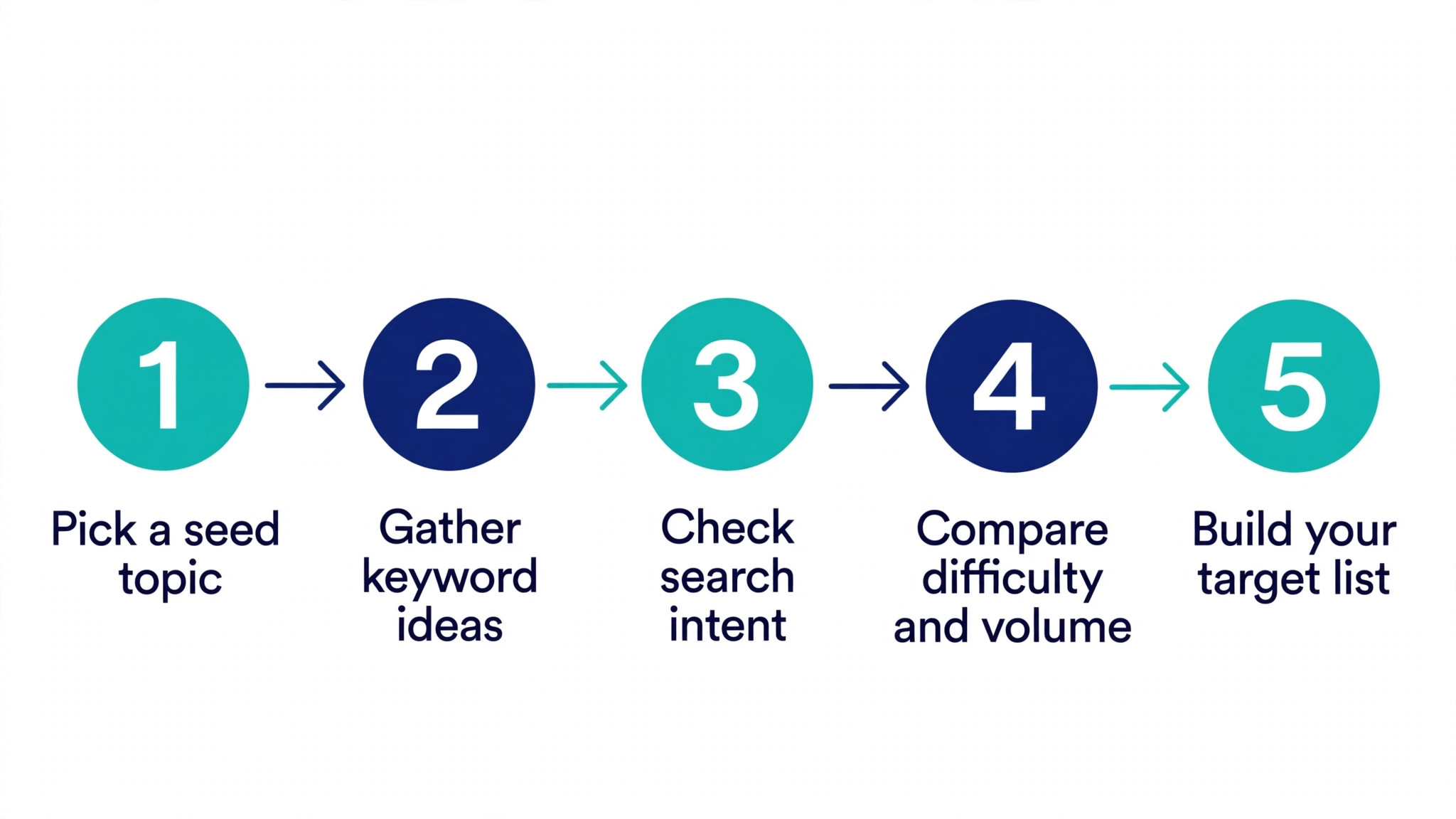
The fastest way to judge the top 10 keyword research tools is to run one through a real five-step job. Here is the sequence we used for every tool on this list.
- Pick a seed topic. Write down the one topic your next article must rank for, in plain words.
- Gather keyword ideas. Run the seed through your tool and save every idea with real search demand.
- Check search intent. Open the top results and note whether searchers want a guide, a list or a product.
- Compare difficulty and volume. Score each idea on difficulty and volume, then drop anything too hard or too quiet.
- Build your target list. Keep five to ten keywords, assign one primary keyword per article, and start writing.
Frequently Asked Questions
Six questions come up in almost every conversation about the top 10 keyword research tools, so here are direct answers.
Which keyword research tool is best for beginners?
Ubersuggest is the friendliest start, since the interface explains itself and the free tier covers basic research. KWFinder is a close second for its clear difficulty scores. Start free, learn what the numbers mean, and move to a paid tool only when the free limits slow you down.
Is Ahrefs worth the price for a small blog?
Ahrefs earns its price when backlink data drives your decisions, since no free tool matches its index. For a small blog that publishes a few posts a month, the cost is hard to justify. Try the cheaper tools first and upgrade when your traffic pays for the subscription.
Can I do keyword research with free tools only?
Yes, and many bloggers do. Google Keyword Planner gives volume ranges, AnswerThePublic gives questions, and Ubersuggest gives ideas with limits. The gap is precision, since free tools hide exact volumes and full competitor data. Pair two or three free tools and the picture gets close enough for most blogs.
What is keyword difficulty, and should I trust it?
Keyword difficulty is an estimate of how hard it is to rank for a phrase, based on the strength of the pages already ranking. Treat it as a guide, not a fact. Always open the top results yourself and judge whether your article can genuinely beat them.
How many keywords should one article target?
One primary keyword and a handful of close variations is the honest answer. The primary keyword shapes the title and headings, while variations appear naturally in the text. Chasing twenty keywords in one article spreads the focus thin and weakens the page.
How often should I refresh my keyword research?
Refresh the research for a topic before you write about it, and review your top pages every three months. Search demand shifts, competitors publish, and Google rewrites results. A short quarterly check keeps your targets honest without turning research into a full-time job.
Our Pick, Stated Plainly — Ahrefs Is the SEO Research Default
After testing the whole field, the top 10 keyword research tools narrow to one clear default for most buyers. The checklist above points the same way, and the daily-use tests back it up.
Start with the free tier or the trial, run your own real task through it, and decide on what you see rather than what a sales page promises. If it clears your checklist, you have found your tool. That first week with Ahrefs tells you more than any review can.
If Ahrefs feels too expensive, Semrush is the closest alternative, and Serpstat covers the essentials at a lower price. The wrong move is to buy the biggest tool and never open it. Pick the one that matches your publishing pace, run your next five articles through it, and let the results decide.