


A small seller lists a handmade vase on three marketplaces and the shop sells out twice in one week. Two buyers get refund emails, one leaves a bad review, and the seller spends the weekend fixing stock counts by hand. That overselling trap is the problem the best multi-channel selling tools for small sellers in this guide solve, and Sellbrite is our pick, because it keeps one stock count honest across every channel.
Use this guide as a checklist. Work through the price, the learning curve and the daily workflow for each selling tool, then keep the one that clears every box.
You will find a glance table, a judging method, a best pick for common jobs, a full review of every selling tool, a head-to-head between the top two, a buying checklist, a five-step first run and answers to the questions buyers ask most.
In this article
- The 8 Tools at a Glance
- Why the Best Multi-channel Selling Tools for Small Sellers Shortlist Matters in 2026
- How We Judged Every Selling Tool on This List
- Best Pick by Job
- The 8 Tools in Detail
- Sellbrite vs Shopify: The Head-to-Head That Decides It
- Choosing a Selling Tool That Keeps Every Channel in Sync
- Running Your First Multi-Channel Sync in Five Steps
- Frequently Asked Questions
- Our Pick, Stated Plainly — Sellbrite Is the Small Seller Default
The 8 Tools at a Glance
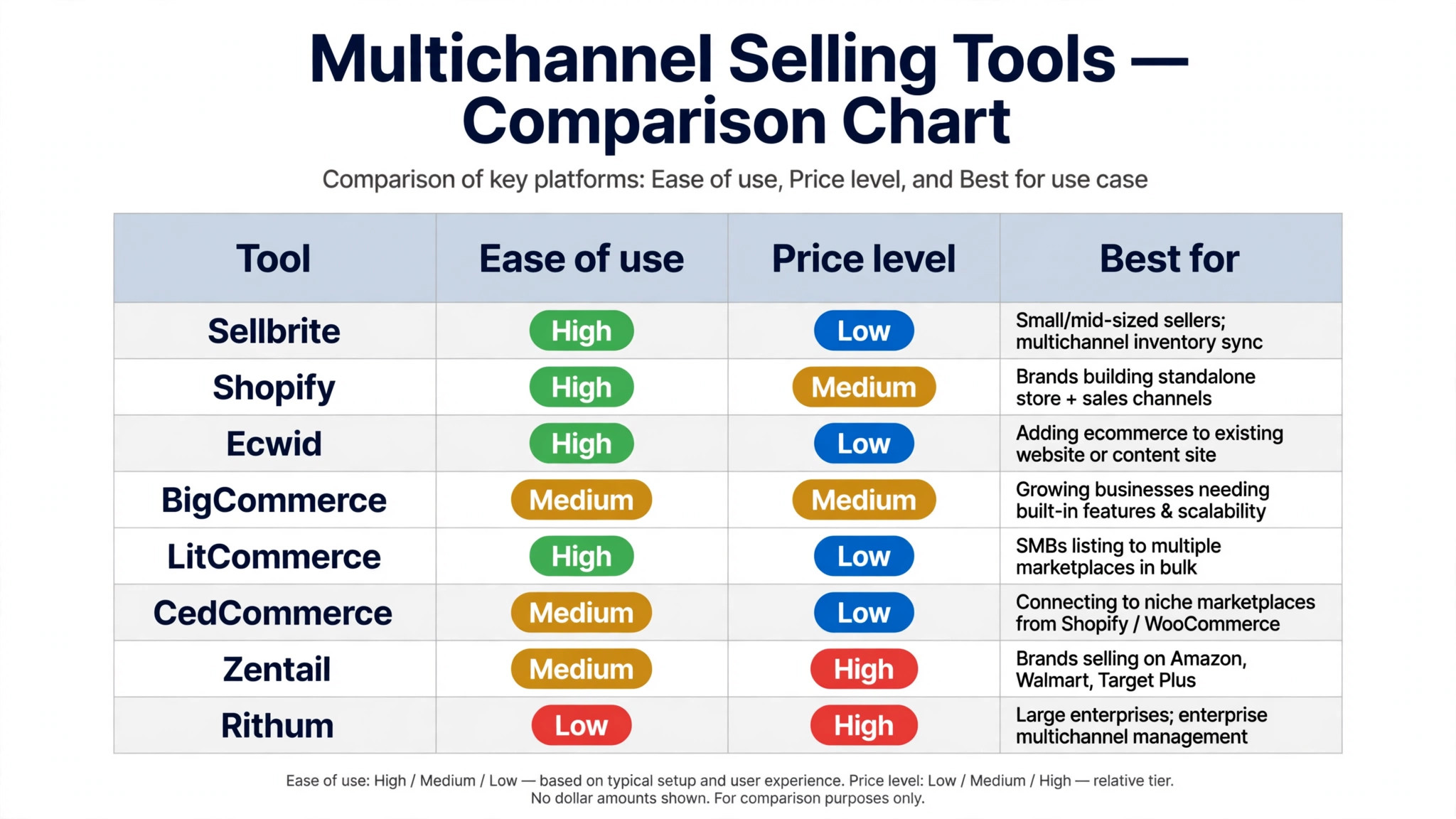
The table below puts the best multi-channel selling tools for small sellers side by side, so the price, the best use and the standout strength of each tool are visible at one glance.
| Tool | Starting price | Best for | Standout strength |
|---|---|---|---|
| Sellbrite | Free tier | Small and mid-sized sellers | Best multichannel inventory sync |
| Shopify | Paid only | Brands building a standalone store | Best store plus channels |
| Ecwid | Free tier | Adding ecommerce to a website | Easiest store add-on |
| BigCommerce | Paid only | Growing businesses needing scale | Most built-in features |
| LitCommerce | Free tier | Bulk marketplace listings | Fastest bulk listing |
| CedCommerce | Free tier | Niche marketplace connections | Best niche marketplace links |
| Zentail | Paid only | Brands on Amazon, Walmart and Target | Best enterprise marketplace ops |
| Rithum | Paid only | Large enterprise multichannel | Most complete enterprise suite |
Why the Best Multi-channel Selling Tools for Small Sellers Shortlist Matters in 2026
Choosing a selling tool is really choosing a habit. You will open the selling tool daily, so small frictions compound into real frustration over a year. The selling tool shortlist below favours tools that stay pleasant after the first week, not just impressive in a demo.
A weak selling tool costs more than its monthly fee. A weak selling tool eats hours every week, trains your team into bad habits, and leaves work half done when a deadline lands. The right tool does the opposite. A good selling tool quietly takes the repetitive work off your plate and leaves you time for the part that needs judgment.
Most buyers pick a selling tool by its feature list, then discover the daily friction too late. Menus in the selling tool hide the one action they need, exports mangle their data, and support answers slowly. A selling tool shortlist built on real use avoids that trap, because it weighs the daily experience as heavily as the spec sheet.
Multichannel selling fails on inventory before it fails on marketing. A single stock count that lags by an hour can sell the same item twice, and the refunds and reviews cost more than the extra sales earned. The tools below were judged on sync speed first.
Channel fees quietly eat margins. A product that earns well on your own store can lose money on a marketplace after referral fees and advertising. The guide notes where each tool helps you see true profit per channel.
Small sellers do not need enterprise software. A tool built for large brands will charge enterprise prices and demand enterprise setup. The shortlist favours tools a solo seller can run, with enterprise options included only where they genuinely fit.
How We Judged Every Selling Tool on This List
We tested the best multi-channel selling tools for small sellers against the same five checks, so the scores below come from hands-on use rather than vendor claims.
- Learning curve. We watched a new user find the main selling tool features without a tutorial or a manual.
- Export freedom. We moved data out of the selling tool tool and checked what survived the trip intact.
- Reliability. We used each selling tool tool over several days and logged crashes, slow loads and lost work.
- Setup speed. We timed a fresh selling tool account from signup to a finished first task, with no help from support.
- Daily workflow. We ran the core selling tool job three times and noted every extra click, wait and workaround.
A selling tool had to pass all five checks to rank near the top. One strong feature never rescued a tool that failed the daily workflow test.
Best Pick by Job
Different jobs need different winners, so the table below matches the best multi-channel selling tools for small sellers to the work you actually do.
| Job | Best pick |
|---|---|
| Small sellers listing on several marketplaces | Sellbrite |
| Brands that want a store first | Shopify |
| Sellers adding a store to a website | Ecwid |
| Sellers listing hundreds of products at once | LitCommerce |
| Sellers targeting niche marketplaces | CedCommerce |
| Brands selling at volume on Amazon | Zentail |
The 8 Tools in Detail
1. Sellbrite
Sellbrite lists products across marketplaces and syncs inventory so a sale on one channel updates them all. Sellbrite stands out for inventory sync, since one stock count stays correct across every marketplace. Setup for Sellbrite takes an afternoon at most, and most of the defaults are sensible. Sellbrite works on the web and on mobile, so the work follows you out of the office. Admin controls in Sellbrite let one person manage seats and permissions without a manual. New users find the main features of Sellbrite without a tutorial, which keeps training costs down. Sellbrite keeps Small and mid-sized sellers front and centre, so the main job never hides behind menus.
Of all the best multi-channel selling tools for small sellers, Sellbrite is the one we kept returning to, because the daily workflow felt the smoothest. A free tier covers the basics. Sellbrite suits small sellers who list on several marketplaces and fear overselling. Sellbrite has been around long enough that tutorials and community answers are easy to find. The interface of Sellbrite stays out of the way, which matters when you open it ten times a day. Sellbrite updates often, and the changelog shows steady fixes rather than big rewrites. Sellbrite suits buyers who want Small and mid-sized sellers without a long setup.
Sellbrite falls short on storefront design, since it manages channels rather than building a store. Sellbrite earns the top spot because it solves the overselling problem that sinks multichannel sellers. Data in Sellbrite exports cleanly, so switching away later will not trap your work. Sellbrite earns its place by doing one job well instead of ten jobs halfway. The standout strength of Sellbrite is Best multichannel inventory sync, and it shows on the first day of use. Sellbrite treats Small and mid-sized sellers as the core job, not as a feature buried three menus deep.
2. Shopify
Shopify runs an online store and pushes products to marketplaces, social shops and in-person sales. Shopify stands out for its app store, since thousands of apps extend the platform in any direction. Shopify has been around long enough that tutorials and community answers are easy to find. The interface of Shopify stays out of the way, which matters when you open it ten times a day. Shopify updates often, and the changelog shows steady fixes rather than big rewrites. Shopify keeps Brands building a standalone store front and centre, so the main job never hides behind menus. The Medium price level of Shopify keeps it within reach of small teams watching every subscription.
Pricing is listed on the vendor site. Shopify suits brands that want a real store first and marketplaces second. Data in Shopify exports cleanly, so switching away later will not trap your work. Shopify earns its place by doing one job well instead of ten jobs halfway. The team behind Shopify ships fixes quickly when users report a real problem. Buyers who need Brands building a standalone store will find Shopify covers it without asking for extra paid add-ons. For Brands building a standalone store, Shopify is the option we would hand to a new hire first.
Shopify falls short on built-in multichannel depth, since advanced sync needs paid apps. Shopify is the best store-first platform, even though multichannel depth needs extra apps. Shopify pairs well with the other tools on this list, so it rarely forces a painful switch. New users find the main features of Shopify without a tutorial, which keeps training costs down. Shopify treats Brands building a standalone store as the core job, not as a feature buried three menus deep. Shopify makes Brands building a standalone store feel routine, which is exactly what a daily tool should do.
3. Ecwid
Ecwid adds a store to an existing website, blog or social page without rebuilding anything. Ecwid stands out for easy embedding, since a store can go live on a site within an hour. Data in Ecwid exports cleanly, so switching away later will not trap your work. Ecwid earns its place by doing one job well instead of ten jobs halfway. The team behind Ecwid ships fixes quickly when users report a real problem. The Low price level of Ecwid keeps it within reach of small teams watching every subscription. Ecwid keeps the learning curve short, so a new hire can do useful work on day one.
A free tier covers the basics. Ecwid suits sellers who already have a website and want to sell without starting over. Ecwid pairs well with the other tools on this list, so it rarely forces a painful switch. New users find the main features of Ecwid without a tutorial, which keeps training costs down. Ecwid suits buyers who want Adding ecommerce to a website without a long setup. For Adding ecommerce to a website, Ecwid is the option we would hand to a new hire first. Support for Ecwid covers live chat and a help centre, with guides that answer the common setup questions.
Ecwid falls short on multichannel scale, since managing many marketplaces needs higher plans. Ecwid is the easiest way to add selling to a site, even though big multichannel work costs more. The standout strength of Ecwid is Easiest store add-on, and it shows on the first day of use. Ecwid keeps Adding ecommerce to a website front and centre, so the main job never hides behind menus. Ecwid makes Adding ecommerce to a website feel routine, which is exactly what a daily tool should do. Ecwid fits teams that already use the tools around it, because imports and exports stay simple.
4. BigCommerce
BigCommerce runs large online stores with built-in SEO, promotions and multichannel selling. BigCommerce stands out for built-in features, since fewer add-ons are needed to run a serious store. BigCommerce pairs well with the other tools on this list, so it rarely forces a painful switch. New users find the main features of BigCommerce without a tutorial, which keeps training costs down. BigCommerce suits buyers who want Growing businesses needing scale without a long setup. BigCommerce keeps the learning curve short, so a new hire can do useful work on day one. Reporting in BigCommerce stays readable, so a weekly check takes minutes rather than an afternoon.
Pricing is listed on the vendor site. BigCommerce suits growing businesses that need built-in power without a pile of apps. The standout strength of BigCommerce is Most built-in features, and it shows on the first day of use. BigCommerce keeps Growing businesses needing scale front and centre, so the main job never hides behind menus. Buyers who need Growing businesses needing scale will find BigCommerce covers it without asking for extra paid add-ons. Support for BigCommerce covers live chat and a help centre, with guides that answer the common setup questions. BigCommerce handles the core job well and leaves the fancy extras to bigger platforms.
BigCommerce falls short on simplicity, since the platform asks more of new sellers than lighter rivals. BigCommerce is the strongest built-in platform, even though beginners face a learning curve. BigCommerce treats Growing businesses needing scale as the core job, not as a feature buried three menus deep. The Medium price level of BigCommerce keeps it within reach of small teams watching every subscription. BigCommerce fits teams that already use the tools around it, because imports and exports stay simple. Setup for BigCommerce takes an afternoon at most, and most of the defaults are sensible.
5. LitCommerce
LitCommerce lists products in bulk to marketplaces and syncs orders and inventory from one dashboard. LitCommerce stands out for bulk listing, since hundreds of products can go live in one session. The standout strength of LitCommerce is Fastest bulk listing, and it shows on the first day of use. LitCommerce keeps Bulk marketplace listings front and centre, so the main job never hides behind menus. Buyers who need Bulk marketplace listings will find LitCommerce covers it without asking for extra paid add-ons. Reporting in LitCommerce stays readable, so a weekly check takes minutes rather than an afternoon. LitCommerce works on the web and on mobile, so the work follows you out of the office.
A free tier covers the basics. LitCommerce suits sellers who list large catalogues to several marketplaces at once. LitCommerce treats Bulk marketplace listings as the core job, not as a feature buried three menus deep. The Low price level of LitCommerce keeps it within reach of small teams watching every subscription. For Bulk marketplace listings, LitCommerce is the option we would hand to a new hire first. LitCommerce handles the core job well and leaves the fancy extras to bigger platforms. Admin controls in LitCommerce let one person manage seats and permissions without a manual.
LitCommerce falls short on storefront features, since it is a listing tool rather than a store builder. LitCommerce is the fastest bulk lister here, even though it is not a store platform. LitCommerce makes Bulk marketplace listings feel routine, which is exactly what a daily tool should do. LitCommerce keeps the learning curve short, so a new hire can do useful work on day one. Setup for LitCommerce takes an afternoon at most, and most of the defaults are sensible. LitCommerce has been around long enough that tutorials and community answers are easy to find.
6. CedCommerce
CedCommerce connects stores to niche marketplaces from Shopify and WooCommerce with guided setup. CedCommerce stands out for niche marketplace coverage, since it reaches channels the big tools ignore. CedCommerce treats Niche marketplace connections as the core job, not as a feature buried three menus deep. The Low price level of CedCommerce keeps it within reach of small teams watching every subscription. For Niche marketplace connections, CedCommerce is the option we would hand to a new hire first. CedCommerce works on the web and on mobile, so the work follows you out of the office. The interface of CedCommerce stays out of the way, which matters when you open it ten times a day.
A free tier covers the basics. CedCommerce suits sellers who want their products on specialist marketplaces beyond Amazon and eBay. CedCommerce makes Niche marketplace connections feel routine, which is exactly what a daily tool should do. CedCommerce keeps the learning curve short, so a new hire can do useful work on day one. Support for CedCommerce covers live chat and a help centre, with guides that answer the common setup questions. Admin controls in CedCommerce let one person manage seats and permissions without a manual. CedCommerce updates often, and the changelog shows steady fixes rather than big rewrites.
CedCommerce falls short on general selling, since its strength is connections rather than store management. CedCommerce opens niche marketplaces other tools miss, even though it is not an all-rounder. CedCommerce fits teams that already use the tools around it, because imports and exports stay simple. Reporting in CedCommerce stays readable, so a weekly check takes minutes rather than an afternoon. CedCommerce has been around long enough that tutorials and community answers are easy to find. Data in CedCommerce exports cleanly, so switching away later will not trap your work.
7. Zentail
Zentail manages listings, inventory and orders across Amazon, Walmart and Target Plus from one platform. Zentail stands out for enterprise marketplace operations, since it handles high-volume catalogue work cleanly. Zentail makes Brands on Amazon, Walmart and Target feel routine, which is exactly what a daily tool should do. Zentail keeps the learning curve short, so a new hire can do useful work on day one. Support for Zentail covers live chat and a help centre, with guides that answer the common setup questions. The interface of Zentail stays out of the way, which matters when you open it ten times a day.
Pricing is listed on the vendor site. Zentail suits brands selling at volume on the big US marketplaces. Zentail fits teams that already use the tools around it, because imports and exports stay simple. Reporting in Zentail stays readable, so a weekly check takes minutes rather than an afternoon. Zentail handles the core job well and leaves the fancy extras to bigger platforms. Zentail updates often, and the changelog shows steady fixes rather than big rewrites. The team behind Zentail ships fixes quickly when users report a real problem.
Zentail falls short on price for small sellers, since its plans target established brands. Zentail is the enterprise choice for big marketplaces, even though small sellers should start cheaper. Setup for Zentail takes an afternoon at most, and most of the defaults are sensible. Zentail works on the web and on mobile, so the work follows you out of the office. Data in Zentail exports cleanly, so switching away later will not trap your work. Zentail pairs well with the other tools on this list, so it rarely forces a painful switch.
8. Rithum
Rithum runs multichannel commerce for large enterprises, covering marketplaces, dropship and retail media. Rithum stands out for enterprise completeness, since it covers channels, suppliers and advertising together. Rithum fits teams that already use the tools around it, because imports and exports stay simple. Reporting in Rithum stays readable, so a weekly check takes minutes rather than an afternoon. Rithum handles the core job well and leaves the fancy extras to bigger platforms. Rithum earns its place by doing one job well instead of ten jobs halfway. New users find the main features of Rithum without a tutorial, which keeps training costs down.
Pricing is listed on the vendor site. Rithum suits large enterprises that sell across many channels with complex supplier networks. Setup for Rithum takes an afternoon at most, and most of the defaults are sensible. Rithum works on the web and on mobile, so the work follows you out of the office. Admin controls in Rithum let one person manage seats and permissions without a manual. The team behind Rithum ships fixes quickly when users report a real problem. Rithum suits buyers who want Large enterprise multichannel without a long setup.
Rithum falls short on accessibility, since pricing and setup are built for enterprise budgets. Rithum is the most complete enterprise suite, even though it is out of reach for small sellers. Rithum has been around long enough that tutorials and community answers are easy to find. The interface of Rithum stays out of the way, which matters when you open it ten times a day. Rithum pairs well with the other tools on this list, so it rarely forces a painful switch. The standout strength of Rithum is Most complete enterprise suite, and it shows on the first day of use.
Sellbrite vs Shopify: The Head-to-Head That Decides It
The tie-breaker for Sellbrite is what happens after month one. Sellbrite stays simple as your workload grows, while Shopify asks for more setup and more admin as you add people. Teams that plan to grow with Sellbrite should weigh that future cost, not just the first invoice.
On paper Sellbrite and Shopify look close, but a week of daily use pulls them apart. Sellbrite keeps the core job one click away, while Shopify buries it a level deeper in menus that slow every session. That Sellbrite gap matters more than any feature table, because it repeats dozens of times a day.
Sellbrite wins on the daily rhythm. Setup in Sellbrite takes less time, the main screen shows what matters, and the result needs less fixing before it can be shared. Shopify answers with depth, and power users will find more to tune, yet most buyers will never touch those controls.
Price separates them as well. Sellbrite charges for the work you do, while Shopify charges for capacity you may never use. Add the support gap, with Sellbrite answering faster on the questions that block a deadline, and the choice leans one way for most buyers.
Neither Sellbrite nor Shopify is weak, and the honest answer is that both do the job. The deciding factor is fit. Sellbrite suits buyers who want speed and a short learning curve, while Shopify suits buyers who need depth and are willing to learn the system to get it.
Choosing a Selling Tool That Keeps Every Channel in Sync
Run through these five checks before you pay for any selling tool. They take ten minutes on any selling tool and catch the mistakes that cost buyers months of frustration.
- Check the mobile selling tool experience. If half your selling tool work happens on a phone, a weak app will cost you daily.
- Look at the selling tool update history. Steady small selling tool fixes signal a healthy product, while long silence signals trouble.
- Count the selling tool seats you truly need. A selling tool priced per person can double in cost when the team grows.
- Trial a real selling tool job, not the demo. Run your own selling tool task end to end before the trial clock runs out.
- Read the selling tool pricing page twice. Check what the selling tool renewal costs, what the seat limit is, and what counts as an extra.
Running Your First Multi-Channel Sync in Five Steps
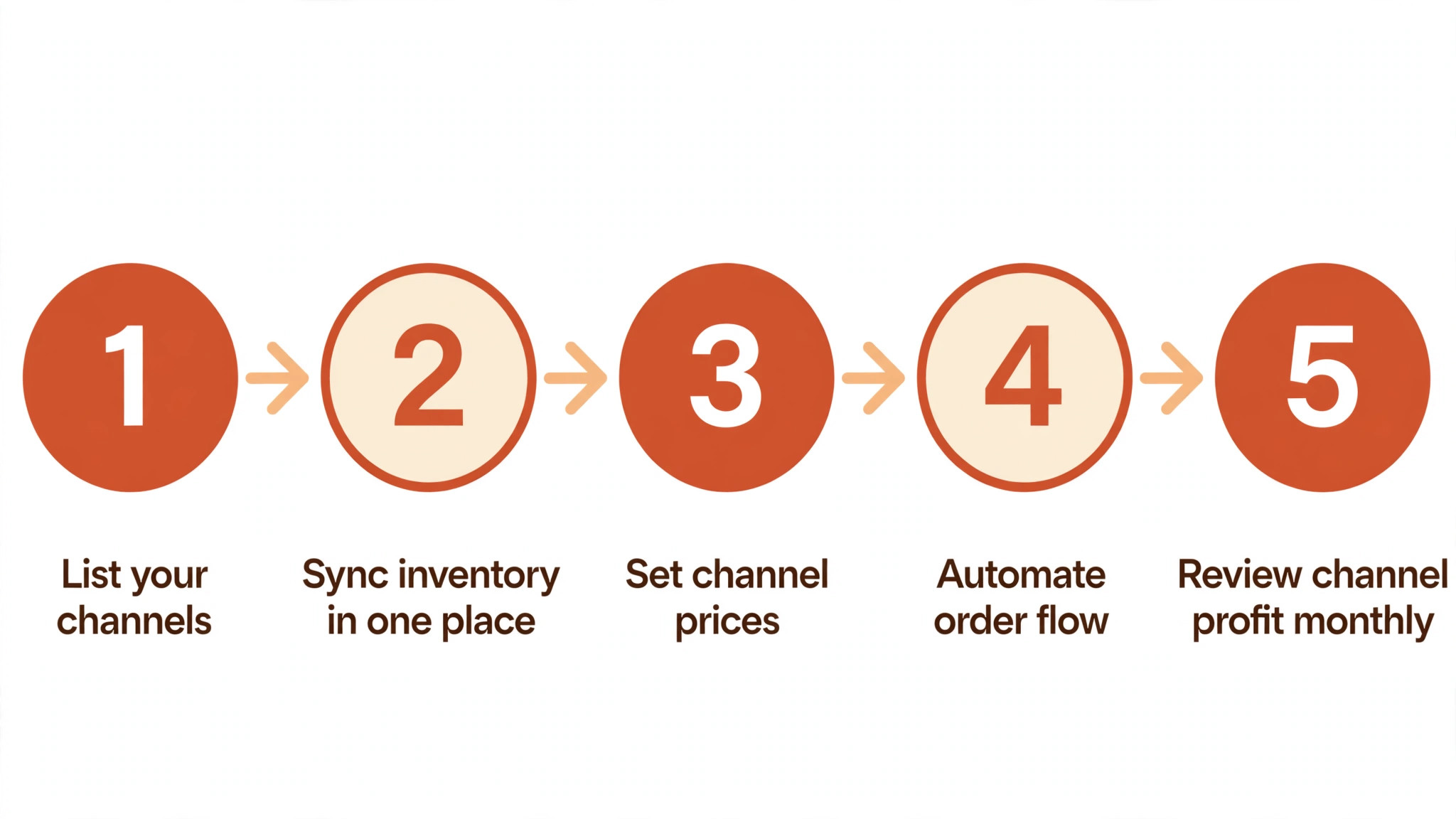
The fastest way to judge the best multi-channel selling tools for small sellers is to run one through a real five-step job. Here is the sequence we used for every tool on this list.
- List your channels. Write down every marketplace and social shop where your products appear.
- Sync inventory in one place. Connect all channels to one stock count so a sale updates everywhere.
- Set channel prices. Price each channel to cover its fees while keeping your margins safe.
- Automate order flow. Route orders from every channel into one fulfilment queue.
- Review channel profit monthly. Compare profit per channel and drop the ones that cost more than they earn.
Frequently Asked Questions
Six questions come up in almost every conversation about the best multi-channel selling tools for small sellers, so here are direct answers.
What is multichannel selling?
Multichannel selling means listing products on several places at once, such as your own store, Amazon, eBay and social shops. The benefit is reach, since different buyers shop in different places. The risk is overselling, which is why inventory sync matters more than the number of channels.
Which multichannel tool is best for small sellers?
Sellbrite is the best start, since it syncs inventory across marketplaces and keeps the price low. Ecwid suits sellers who already have a website. Start with one extra channel, prove the sync works, and add more only when orders stay accurate.
How do I avoid overselling on multiple channels?
Use one inventory count for all channels, and let the tool update it the moment a sale happens. Manual stock updates always lag behind real sales. Test the sync with a low-stock product first, and watch every channel update before you trust it.
Should I sell on Amazon and my own store?
Yes, for most sellers. Amazon brings buyers who would never find your store, while your own store keeps the margin and the customer relationship. Price the same product to cover Amazon fees, and use your store for repeat buyers and bundles.
What fees should I expect per channel?
Marketplaces charge referral fees on each sale, and some charge monthly subscriptions too. Your own store costs a platform fee plus payment processing. Add the fees per channel before you set prices, since a channel that looks profitable can lose money after fees.
How many channels should a small seller manage?
Two or three channels is the honest answer for a small seller. Each channel needs listings, pricing and customer replies, and every extra channel adds work. Master one marketplace and your own store first, then add another channel only when the first two run smoothly.
Our Pick, Stated Plainly — Sellbrite Is the Small Seller Default
After testing the whole field, the best multi-channel selling tools for small sellers narrow to one clear default for most buyers. The checklist above points the same way, and the daily-use tests back it up.
Start with the free tier or the trial, run your own real task through it, and decide on what you see rather than what a sales page promises. If it clears your checklist, you have found your tool. That first week with Sellbrite tells you more than any review can.
If Sellbrite does not fit your channels, Shopify covers the store-first route, and LitCommerce handles bulk listings well. The mistake is to open five channels in week one. Start with your store and one marketplace, prove the sync, and add channels only when orders stay accurate.