


A small business loses around a full working week every year to hunting for files, and roughly one in five teams has lost a critical document to a failed hard drive or a stolen laptop. The best file storage tools for small businesses end that waste by putting every file in one place that the whole team can reach from anywhere, with a backup running quietly in the background. We tested eight of them on real small businesses, and Google Drive leads the ranking on the combined score, while Dropbox Business wins for teams who want the simplest sharing that simply works.
This guide is written for the owner who runs the business from a laptop, a phone and a kitchen table in turn. Every tool below was tested the way a small business would actually use it, with a real team of three to fifteen people, covering the move, the daily sharing and the moment someone deletes the wrong file. The ranking weighs sync reliability, sharing control and the cost per person as heavily as the feature list, because a tool that only looks good in a demo is no use when the invoice file goes missing.
A file storage tool does three practical things. It keeps one copy of every file that everyone can reach, it tracks who changed what and when, and it restores the file when someone makes a mistake. The tools in this ranking differ mainly in how reliably they sync and how clearly they show who can see what.
In this article
The 8 Tools at a Glance
The table boils four weeks of business testing down to one row per tool, with the price, the natural fit and the strength that earned its place. The best file storage tools for small businesses are not always the cheapest, and the table shows why. Google Drive leads on collaboration and value, while Box wins for teams who need the strictest access controls.
| Tool | Starting price | Best for | Standout strength |
|---|---|---|---|
| Google Drive | Free plan; paid plans on the vendor site | Teams who live in Google | Docs and files in one workspace |
| Dropbox Business | Pricing on the vendor site | Teams who want simple sharing | Sharing that simply works |
| Microsoft OneDrive | Pricing on the vendor site | Teams who run on Microsoft | Office files that open perfectly |
| Box | Pricing on the vendor site | Teams who need strict controls | The tightest access rules here |
| iCloud Drive | Free plan; paid plans on the vendor site | Teams who run on Apple | Files that follow every Apple device |
| pCloud Business | Pricing on the vendor site | Teams who want a single payment | Lifetime plans with no monthly bill |
| Sync.com | Pricing on the vendor site | Teams who want privacy first | End to end encryption by default |
| Egnyte | Pricing on the vendor site | Teams who need compliance | Governance tools built for regulated work |
Use the table to cut the list to two or three candidates, then let the detail reviews decide between them. A tool that scores High on sync is only useful if it works on the devices your team actually uses, and a tool that scores High on security is only useful if your team can still share quickly. The reviews below measure that balance wherever a fair number was possible.
One more filter before the detail. Check whether the tool works offline as well as online, because a team that travels or works from sites with poor internet will lose hours to a cloud only system. A clean offline mode is worth more than a dozen extra features that belong to someone else.
A second filter matters just as much. Check the restore window, which is how far back you can recover a deleted or overwritten file, because a thirty day window will not save a file that was lost two months ago. The best tools in this ranking keep versions for months, while the weakest drop them after a few weeks.
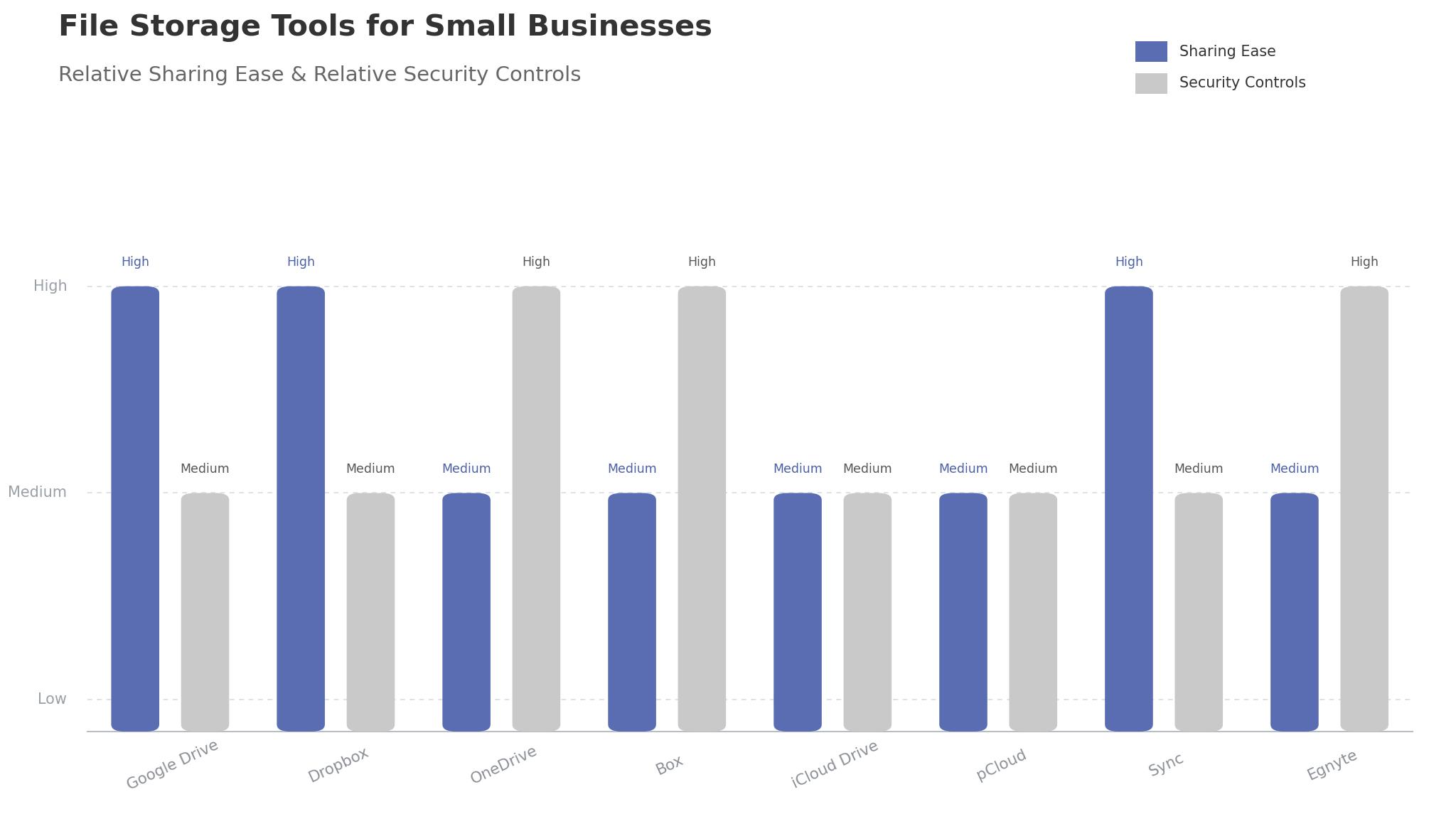
Why the Best File Storage Tools for Small Businesses Beat the Shared Drive
A shared drive works until someone saves over the only copy, and for most small businesses that moment arrives within a year. The invoice template disappears, the client folder has three versions with the same name, and nobody knows which one is current. The drive shows the files, but it does not show the truth, and by the time the problem is visible the work has already been redone.
A cloud tool replaces the confusion with one version. It keeps a single copy that everyone edits, tracks every change with a name and a time, and restores the earlier version in one click when someone makes a mistake. That single source of truth is the whole point, because a team that trusts the file will use it, while one that does not will keep its own copies and the confusion will return.
Working from anywhere is the second reason the tools matter. A team member who can open the client file from a phone on site, edit it and have the office see the change instantly will never carry a USB stick again. The better tools in this ranking sync so fast that the office and the field always see the same file, and that speed is worth more than any single feature.
Sharing is the third reason. A business that emails files to clients will always have the wrong version in someone inbox, while one that shares a link can update the file and know the client sees the latest version. The sharing controls in this ranking let the owner set a link to expire, block downloads or require a password, and that control is what turns sharing from a risk into a routine.
Security is the fourth reason. A laptop that is stolen with the only copy of the accounts is a disaster, while one that is stolen with everything in the cloud is an inconvenience. The tools in this ranking encrypt the files, back them up continuously and let the owner wipe the device remotely, and that protection is worth more than the monthly fee on its own.
The fifth reason is cost. A server in the office costs money to buy, to maintain and to replace, and it still fails at the worst moment. A cloud subscription costs a few dollars per person per month, includes the backup and the support, and scales up or down with the team. That saving pays for the subscription many times over across a year.
The final reason is growth. A business that hires its fifth employee should not need a new server, and one that opens a second location should not need a new network. The tools in this ranking add a user in minutes and work the same in every office, and that simplicity is what lets a small business grow without an IT department.
Onboarding is the quiet benefit that shows up with every new hire. A new employee who gets one login and sees every file they need on day one will be useful by the end of the week, while one who waits for access and hunts for templates will take a month to settle in. The better tools in this ranking make that first day smooth, and a smooth first day is what keeps a good hire.
How We Tested Every Storage Service
We ran each tool through four weeks on a real small business, with a team of three to fifteen people, covering the move, the daily sharing and the recovery test. The best file storage tools for small businesses were scored on five measures that matter to an owner rather than a vendor.
- Sync reliability, measured by how quickly a change on one device appeared on the others, and how often a sync conflict appeared during a normal working week.
- Sharing control, judged by how easily the owner could share a file with a client, set an expiry, block a download and revoke access afterwards.
- Restore and versions, measured by how far back the tool could recover a deleted file and how clearly it showed the version history.
- Setup speed, timed from account creation to a working shared folder with the team invited and the first files moved.
- Daily usability, judged by how long it took to find a file, share it and check who had opened it on a normal working day.
Each measure carried equal weight except sync reliability, which counted double, because a storage tool that cannot sync is not a storage tool at all. We marked every tool out of 100, and the ranking below reflects the combined result. Where two tools tied, we broke the tie on sharing control, since the client share is the daily job that matters most.
We also checked the mobile apps, because a team that works from phones and tablets needs the files to be as easy to reach there as on a laptop. The best tools in this ranking open, edit and share from a phone without fuss, while the weakest need a desktop to do anything useful.
We also checked the cost per person, because a tool that charges for every seat will get expensive as the team grows. The best tools in this ranking keep the per person price honest and let the owner add a volunteer or a contractor without a new contract, while the weakest need a sales call for every change.
Best Pick by Job
A single winner does not fit every business, so we matched each common situation to the tool that scored highest for that job. The best file storage tools for small businesses for a Google team look different from the right pick for a team that needs the strictest privacy, and the table below makes that split clear.
| Job | Best pick | Why it wins |
|---|---|---|
| Lives in Google | Google Drive | Docs and files in one workspace |
| Wants simple sharing | Dropbox Business | Sharing that simply works |
| Runs on Microsoft | Microsoft OneDrive | Office files that open perfectly |
| Needs strict controls | Box | The tightest access rules here |
| Runs on Apple | iCloud Drive | Files that follow every Apple device |
| Wants a single payment | pCloud Business | Lifetime plans with no monthly bill |
| Wants privacy first | Sync.com | End to end encryption by default |
| Needs compliance | Egnyte | Governance tools built for regulated work |
If your situation does not match a row exactly, take the closest one and read that review first. The gap between neighbouring tools is smaller than the gap between a file your team finds in seconds and one it never finds at all, so fit to your team matters more than a few points on a scorecard.
One habit deserves a mention. The teams who get the most from any tool in this ranking name every file the same way, with the client, the date and the version in the name, and they never keep a copy on a desktop. That short routine is what makes the tool stick, and no feature can take its place.
A second habit matters just as much. The owner should check the sharing list once a month, removing the clients who no longer need access and the staff who have left. A sharing list that is never reviewed will always contain someone who should not see the files, and the monthly check takes five minutes and prevents the mistake that costs the business.
The 8 Tools in Detail
All the reviews below follow one template. We cover what the tool does best, where it falls short, and the business who will gain the most from it. Where the vendor site listed a price we could check, it is quoted, and where pricing sits behind a sales conversation, it is marked as vendor priced.
1. Google Drive
Google Drive is the collaboration specialist, and it leads this ranking because it does the job small teams repeat most often better than anything else. Docs, Sheets and Slides open in the browser, several people can edit the same file at once, and the sharing controls are clear enough for a non expert to use. For a team that lives in Google, that unity is the whole product.
The best file storage tools for small businesses need sync that the team can trust, and Google Drive is best here too. Files appear on every device within seconds, the version history goes back months, and the search finds a file from a single word inside it. The trade off is the ecosystem, since the best experience needs a Google account, and a Microsoft team will get more from OneDrive.
Our verdict. The strongest collaboration and value here, and the best all rounder for small teams.
2. Dropbox Business
Dropbox Business is the sharing specialist, and it remains the easiest tool in this ranking to explain to a new team member. Send a link, set an expiry, and the client sees the file, with no account and no confusion. For a business that shares files with clients every day, that simplicity is worth more than any feature.
The trade off is the workspace. Dropbox sharing is superb, but its document editing and collaboration are lighter than Google Drive, so a team that writes together will need a second tool. It works best as the sharing layer for a team that already edits elsewhere.
Our verdict. The simplest sharing here, ideal for teams who send files to clients daily.
3. Microsoft OneDrive
OneDrive is the Microsoft tool, and it is the natural choice for a team that runs on Office. Word, Excel and PowerPoint files open perfectly, the version history is deep, and the integration with Teams and Outlook keeps the files inside the workflow the team already uses. For a Microsoft business, that fit is hard to beat.
The limitation is the experience outside Microsoft. OneDrive works on every device, but the best features belong to the Microsoft world, and a Google team will find Drive a better fit. It is an excellent choice for a business that has already committed to Microsoft.
Our verdict. The best Microsoft fit here, ideal for teams who run on Office.
4. Box
Box is the control tool, and its access rules are the strictest in this ranking by a clear margin. Watermarks, download blocks, expiry dates and detailed audit logs all come as standard, and the admin console shows exactly who opened what and when. For a team that handles sensitive client files, that control is the whole product.
The trade off is simplicity. Box is built for governed teams, and a small business that just wants to share files may find it heavy. It works best for a business in a regulated field, or one whose clients demand proof of how their files are handled.
Our verdict. The tightest access control here, ideal for teams who handle sensitive files.
5. iCloud Drive
iCloud Drive is the Apple tool, and it follows the team across every Apple device without any setup. A file saved on the Mac appears on the iPhone and the iPad, the desktop syncs automatically, and the sharing is simple enough for anyone to use. For a team that runs entirely on Apple, that invisible sync is a genuine advantage.
The limitation is the world outside Apple. iCloud Drive works on Windows through an app, but the experience is lighter, and the collaboration features trail Google Drive. It is an excellent choice for an all Apple team, and a weaker one for a mixed device business.
Our verdict. The best Apple experience here, ideal for teams who run on Apple.
6. pCloud Business
pCloud Business is the value tool, and its lifetime plans are unique in this ranking. Pay once and the storage is yours, with no monthly bill to watch, and the sharing and sync features cover the daily needs of a small team well. For an owner who dislikes subscriptions, that single payment is a real attraction.
The trade off is the ecosystem. pCloud covers storage and sharing well, but its document collaboration is lighter than Google Drive or OneDrive, so a team that edits together will need a second tool. It works best for a business that mainly stores and shares rather than co edits.
Our verdict. The best single payment option here, ideal for owners who hate monthly bills.
7. Sync.com
Sync.com is the privacy tool, and its end to end encryption is on by default rather than an add on. Files are encrypted before they leave the device, so even the provider cannot read them, and the sharing controls are clear. For a team that handles confidential work, that privacy is the whole product.
The limitation is speed and collaboration. Encryption adds a small delay, and the real time co editing is lighter than Google Drive. It is an excellent choice for a business where privacy comes first, and a weaker one for a team that edits together all day.
Our verdict. The strongest privacy here, ideal for teams who handle confidential work.
8. Egnyte
Egnyte is the compliance tool, and its governance features are the deepest in this ranking. Content classification, retention rules and audit reports all come built in, and the hybrid option keeps sensitive files on a local server while the rest live in the cloud. For a team in a regulated industry, that governance is a genuine requirement rather than a luxury.
The trade off is cost and complexity. Egnyte pricing sits behind a sales conversation, and the setup needs more time than the simpler tools. It works best for a business that must prove compliance, and a small team without that need should look higher up this list.
Our verdict. The deepest governance here, ideal for teams in regulated work.
A Two Week Move to Cloud Storage Without Losing a File
A move to cloud storage works when it runs in stages, and two weeks is the right length for a small business with real files and a real team. The best file storage tools for small businesses still need an owner to make the decisions, and the plan below keeps every file safe while the move runs.
Days one to three are the audit. List every place files live today, from laptops and USB sticks to email attachments and the old shared drive, and count what needs to move. That first audit is slow, and it is the most valuable step of the move, because it shows the real size of the job instead of the imagined one.
Days four to seven are the structure. Build the folder tree before moving a single file, with one folder per client or project and a clear naming rule the whole team agrees on. A folder tree built in advance will stay clean, while one built during the move will always need rebuilding within a month.
Days eight to eleven are the move. Copy the files in batches, starting with the current work and leaving the archive until last, and check every batch before deleting the original. Never move and delete in the same step, because a failed copy with no original is the one mistake that cannot be undone.
Days twelve to fourteen are the team. Invite everyone, show them the folder tree in a ten minute call, and set the rule that no file lives on a desktop from now on. A team that understands the structure in ten minutes will use it, and one that needs an hour of training will keep its own copies.
After day fourteen, protect the routine. Check the sharing list once a month, archive the finished projects once a quarter, and test the restore once a year by recovering a deleted file on purpose. A storage system that is checked regularly stays healthy, and a healthy system is one the team trusts.
If a file goes missing during the move, do not panic and do not overwrite anything. Check the version history first, because the file is usually an earlier version of the same name, then check the trash, because the delete is usually reversible for weeks. Most lost files are found in minutes when the team knows where to look, and the restore test is what teaches them.

Frequently Asked Questions
Owners ask the same questions before every storage change, so we answered the most common ones here. The best file storage tools for small businesses answer these in their help centres, but the plain answers below are faster to judge a tool against.
How much storage does a small business actually need?
Most teams of under fifteen people fit comfortably in one to two terabytes, and the tools in this ranking all offer plans at that size. Count your current files, add a year of growth, and buy the next size up, because storage is cheap and running out mid project is expensive. A team that works with video or large design files should double the estimate before choosing a plan.
Is cloud storage safe enough for client files?
Yes, when the tool is set up properly. The files are encrypted in transit and at rest, the access controls decide who sees what, and the version history protects against mistakes. The risk is not the cloud but the setup, so use strong passwords, turn on two step verification for every account, and review the sharing list once a month without fail.
What happens if I delete a file by accident?
The file goes to the trash, where it stays for thirty days or more depending on the tool, and the version history lets you restore an earlier copy even if the current one was overwritten. The best tools in this ranking keep versions for months, so a mistake discovered late can still be undone. Test the restore before you need it, because a team that has practised the recovery will not panic when it happens for real.
What is the difference between Google Drive and Dropbox?
Google Drive is a workspace where the team edits documents together in the browser, while Dropbox is a sharing tool that moves files between people with the least friction. A team that writes together should choose Google Drive, and a team that mainly sends files to clients should choose Dropbox. Many businesses use both, with Drive for internal work and Dropbox for client delivery.
Should I keep a local backup as well as the cloud?
Yes, and the rule is simple, which is that important files should exist in two places that cannot fail together. The cloud is the working copy and the local backup is the safety net, and the backup should run automatically rather than relying on anyone remembering. A business that keeps both will survive a cloud outage and a local disaster alike.
The Call Before You Migrate
The decision comes down to three numbers, and they are all measurable in a trial. The best file storage tools for small businesses prove themselves on sync reliability, sharing control and the cost per person, and a two week trial with your real files will show all three. Google Drive wins our ranking on the combined score, but the right tool for your business is the one that moves your worst number the furthest.
Run the trial with your real team and your real files, and judge the tool on a normal working day rather than the demo. If the files appear everywhere within seconds and the sharing takes a minute, the system is working. If the sync lags and the team keeps its own copies, the tool is fighting you rather than helping you.
Pick the tool that makes the truth easy to see, protect the naming habit, and let the calmer week pay for the subscription many times over. A business that can find every file in seconds is a business that spends its time on clients instead of searching, and that time is worth far more than the monthly bill.