


What does a link cost an agency in 2026? The answer runs from a free shortener to a monthly platform fee that pays for itself the first time a client report shows exactly which campaign drove the sale, and the gap between a link that gets clicked and one that gets ignored is usually the domain it carries. The best link management tools for agencies in this guide cover that whole range, and Bitly leads the list because its analytics are the ones clients already trust and its branded domains work at any scale. This guide prices every platform before it weighs the features.
An agency lives on links. Every ad, email, social post and QR code points somewhere, and each of those links is a chance to learn what works or to lose the thread entirely. A generic short link tells you nothing, while a managed link tells you who clicked, when, from where, and which campaign sent them. The ten tools below were judged on how much of that story they capture.
The price question is really a client question. An agency with three clients needs a clean dashboard and a branded domain, while an agency with three hundred needs workspaces, permissions and reporting that scales. The glance table below shows where each platform sits on that scale, so you can skip straight to the ones built for your book of business.
In this article
- The 10 Tools at a Glance
- Why the Best Link Management Tools for Agencies Shortlist Matters in 2026
- How We Judged Every Link Tool on This List
- Best Pick by Job
- The 10 Tools in Detail
- Bitly vs Rebrandly: The Head-to-Head That Decides It
- Choosing a Link Platform Your Clients Will Trust
- Running Your First Branded Link in Five Steps
- Frequently Asked Questions
- Our Pick, Stated Plainly — Bitly Is the Agency Default
The 10 Tools at a Glance
Look at the cost first. The best link management tools for agencies split into free tiers for small shops and paid platforms for client work at scale, and the table below shows where each of the ten sits before you read a single review.
| Tool | Starting price | Best for | Standout strength |
|---|---|---|---|
| Bitly | Free tier | Client reporting at scale | Trusted analytics |
| Rebrandly | Free tier | Branded domains | Domain management |
| Short.io | Free tier | Budget agencies | Generous free plan |
| BL.INK | Pricing on the vendor site | Enterprise teams | Deep integrations |
| T2M | Pricing on the vendor site | Simple shortening | Clean dashboard |
| ClickMeter | Pricing on the vendor site | Affiliate tracking | Conversion tracking |
| Linktree | Free tier | Link-in-bio pages | Social landing pages |
| Lnk.Bio | Free tier | Small creators | Simple bio links |
| RocketLink | Pricing on the vendor site | Retargeting | Audience pixels |
| Sniply | Pricing on the vendor site | Content curation | Call-to-action overlays |

Why the Best Link Management Tools for Agencies Shortlist Matters in 2026
Clients now ask where every click came from, and an agency that cannot answer loses the renewal. The days of reporting impressions and hoping the client is satisfied are over, since the client can see their own sales data and will compare it with your report. A link platform turns that conversation from a guess into a number, and the number is what keeps the account.
The cost of unmanaged links shows up quietly. A campaign link breaks after a landing page moves, a QR code on a printed flyer points at a dead page, or a client asks which ad drove the sales and nobody can say. Each of those failures costs trust, and trust is the product an agency actually sells. The platforms on this list exist to stop those failures before a client ever sees them.
This shortlist exists so the gaps between the tools are easy to see. Every tool below was tested on the same five measures, with real agency work in mind rather than demo data. If you manage links for clients, the gaps on this page will decide how your next report reads.
A final shift matters too. Privacy rules keep tightening, and the third-party cookies that once powered retargeting are fading. Link platforms that collect first-party click data are becoming the reliable record of what a campaign did, while the old tracking methods fall away. The tools below were judged on how well they work in that new world.
How We Judged Every Link Tool on This List
We scored every platform on five tests, and the best link management tools for agencies had to pass all five before earning a place on this list.
- Analytics depth. We ran the same campaign through each tool and scored how much it reports, from clicks and locations to devices and referrers.
- Branding control. We tested custom domains, branded slugs and the way each link looks when a client shares it.
- Client separation. We checked workspaces, permissions and reporting, since an agency must keep each client blind to the others.
- Reliability. We tested uptime history, redirect speed and what happens to links if a subscription lapses.
- Price against scale. We compared the monthly cost with the number of links, domains and team seats a growing agency needs.
Best Pick by Job
No single platform wins every agency job, so match the work in front of you to the tool that handles it best. The best link management tools for agencies differ most in how they handle many clients, not in their shortening.
| Job | Best pick |
|---|---|
| Client reporting at scale | Bitly |
| Branded domains for many clients | Rebrandly |
| Budget-conscious agency | Short.io |
| Link-in-bio campaigns | Linktree |
| Retargeting from links | RocketLink |
| Affiliate click tracking | ClickMeter |
The 10 Tools in Detail
1. Bitly
Bitly is the link platform clients already know, and that familiarity is its biggest asset. It shortens links, brands them under your own domain, and reports clicks by location, device and referrer in a dashboard a client can understand at a glance. QR codes, link-in-bio pages and campaign tagging sit in the same account, so an agency can run a whole campaign from one place. Teams that report to clients every month will feel the benefit immediately.
Pricing is where the best link management tools for agencies separate most clearly. Bitly offers a free tier for basic shortening, with paid plans from $10 a month adding branded domains and deeper analytics. Confirm the current figure before you buy, since the tiers and their prices change, and the vendor site lists the current figures. An agency with a dozen clients will find the mid-tier plans fair for what they replace.
The free tier is deliberately limited, and a busy agency will outgrow it in weeks. Custom domains, bulk shortening and team seats all sit behind the paywall, which is fair yet worth knowing before you build a workflow on the free plan. Once paid, the platform scales smoothly. Our verdict. Buy it when client reports must look professional from day one.
2. Rebrandly
Rebrandly is the domain-first platform, built for agencies that treat the link itself as a brand asset. It manages many custom domains in one account, lets each client have their own branded short domain, and reports clicks per domain, per link and per campaign. The interface is clean, and the domain setup is guided, so an agency can move a client onto a branded domain in minutes. Teams that sell branding will appreciate the polish.
Pricing on the vendor site is the accurate line for Rebrandly, since plans depend on link volume and domains. A free tier covers the basics, while paid plans add the domains and team features an agency needs. Confirm the current figure before you buy, and check how many custom domains each tier allows.
Rebrandly does less on the analytics side than Bitly, with fewer breakdowns and no built-in QR analytics at the lower tiers. Agencies that live in the reporting will notice the gap. For branding-led work, it remains the strongest choice. Our verdict. Choose it when every link must carry the client’s brand.
The domain setup is the detail that wins agencies over. Rebrandly walks a team through DNS records with clear steps, and a branded domain is usually live within the hour. An agency onboarding ten clients in a week will feel that speed, since every other platform makes the same job take longer.
3. Short.io
Short.io is the generous free plan of this list, and small agencies love it for that reason. It offers custom domains, branded links, click tracking and team seats at a price that stays low as the agency grows. The dashboard is simple, the setup is quick, and the API lets a technical team automate link creation from their own tools. A small shop can run its whole link operation here without a big subscription.
Pricing on the vendor site is the fair answer, since Short.io plans depend on link volume and features. The free tier covers more than most rivals, and the paid tiers stay affordable. Confirm the current figure before you buy, and compare the click limits across tiers.
The reporting is solid yet plainer than the leaders, with fewer visual breakdowns for client presentations. An agency that builds its own reports from the API will not care. Our verdict. Start here when the budget is tight and the link volume is high.
Short.io also deserves credit for its API, which is the part technical agencies use most. A team can generate branded links from a CRM, a spreadsheet or a campaign tool without opening the dashboard, and the links stay tracked in the same place. That automation saves hours on a large campaign, and it is the reason many small agencies stay after outgrowing the free tier.
4. BL.INK
BL.INK is the enterprise platform for teams that need links inside a larger system. It offers branded domains, deep analytics and integrations with the marketing tools a big company already runs, plus permissions that keep departments separate. The platform handles high volumes without slowing down, and its support team works with large accounts directly. Enterprise marketing teams will find the depth they expect.
Pricing on the vendor site is the right line, since BL.INK quotes plans by volume and features. The cost is higher than the small-agency tools, which matches the audience. Confirm the current figure before you buy, and ask for a demo on your own campaign data.
A small agency will find BL.INK more platform than it needs, and the setup takes longer than the simpler tools. Large teams will use all of it. Our verdict. Pick it when links must plug into an enterprise stack.
5. T2M
T2M is the straightforward shortener for teams that want links without a learning curve. It shortens, brands, tracks clicks and generates QR codes in a clean dashboard, with no extra modules to configure. The interface is plain and fast, and the pricing stays low. A team that needs reliable links and honest analytics will find everything here.
Pricing on the vendor site is the accurate answer, since T2M plans depend on link volume. The cost is modest for what it covers. Confirm the current figure before you buy, and check the click limits on the plan you need.
T2M will not run a complex multi-client agency, since workspaces and permissions are lighter than the leaders. For a small team with one brand, that limit never appears. Our verdict. Use it when the job is simple shortening done well.
The QR code generator is the feature small teams use most after shortening itself. A restaurant menu, a flyer or a shop window can carry a code that points at a tracked link, and the scans show up in the same dashboard as the clicks. That single view of print and digital traffic is worth more than the subscription costs.
6. ClickMeter
ClickMeter is the conversion tracker of this list, built for affiliates and performance marketers. It tracks clicks, conversions and revenue per link, with fraud detection that flags suspicious traffic before it pollutes the data. Agencies running affiliate campaigns will value the way it ties a click to a sale, which is the number the client actually cares about. The reporting is detailed, with breakdowns by campaign, source and device.
Pricing on the vendor site is the fair line, since ClickMeter plans depend on events tracked. The cost reflects the depth of the analytics. Confirm the current figure before you buy, and estimate your monthly events before you choose a tier.
ClickMeter is a specialist, and a general agency may find its interface focused on a job they rarely do. For performance work, few tools match it. Our verdict. Buy it when the click must be tied to a conversion.
The fraud detection is the part performance marketers should test first. ClickMeter flags bot traffic and suspicious patterns before they reach the report, which keeps a client from paying for clicks that never came from a person. An agency running paid traffic will save more than the subscription in the first month of clean data.
7. Linktree
Linktree is the link-in-bio platform that turned a social profile into a landing page. It gives each client a single page with all their important links, plus analytics on which link gets tapped. Agencies managing creators and small brands use it to turn Instagram traffic into measurable clicks, and the templates make a good-looking page in minutes. The social audience is the point, not the shortening.
Pricing on the vendor site is the right answer, since Linktree offers a free tier with paid plans adding analytics, branding and scheduling. The cost is low. Confirm the current figure before you buy, and check which analytics the paid tier unlocks.
Linktree is not a full link management platform, and an agency that needs workspaces and client separation will need a second tool. For social campaigns, it is the standard. Our verdict. Pick it when the traffic starts on social media.
The analytics are the part agencies should test first, since the free tier shows little and the paid tier shows much more. A client report built on free-tier data will look thin, so budget for the paid plan if reporting matters. Teams that treat Linktree as a landing page rather than a tracker will be happy with either tier.
8. Lnk.Bio
Lnk.Bio is the simple bio link tool for small creators and local businesses. It builds a clean page of links in minutes, with no account needed for visitors and a straightforward dashboard for the owner. Agencies handling a small creator or a local shop will find it quick to set up and easy to explain. The price is low, and the page looks good on a phone.
Pricing on the vendor site is the accurate line, since Lnk.Bio plans depend on features. A free tier covers the basics. Confirm the current figure before you buy, and check whether the plan includes the analytics you need.
Lnk.Bio will not serve a large agency, since it lacks workspaces, team seats and deep reporting. For a single creator, those limits do not matter. Our verdict. Use it when the client is one person with a phone audience.
9. RocketLink
RocketLink adds a retargeting pixel to every link you share, so anyone who clicks joins an audience you can advertise to later. Agencies use it to build retargeting lists from content they do not own, which is a trick no other tool on this list does as well. The platform also shortens, brands and tracks links, so the retargeting sits on top of a solid shortener. Performance marketers will see the value immediately.
Pricing on the vendor site is the fair answer, since RocketLink plans depend on link volume and pixel events. The cost is mid-range. Confirm the current figure before you buy, and check how the pixel works with your ad platforms.
The retargeting angle needs a privacy check, since pixel rules keep changing and some browsers block them. An agency should confirm the current rules before promising a client an audience built this way. Our verdict. Choose it when every shared link should build an audience.
10. Sniply
Sniply puts a call-to-action on links to other people’s content. Share an article, and a small branded message follows the reader to the page, turning curated content into a lead channel. Agencies that share industry news for clients use it to keep their brand visible on every share, and the analytics show which curated links drive clicks back. The idea is clever, and for the right client it works well.
Pricing on the vendor site is the right line, since Sniply plans depend on link volume and features. The cost is modest. Confirm the current figure before you buy, and test the overlay on a real article first.
Sniply suits curation-heavy work and little else. An agency that rarely shares third-party content will not use it. Our verdict. Pick it when the agency shares other people’s articles every day.
The overlay itself deserves a test, because some readers find it distracting and some publishers block it. A quick trial on a few articles will show whether the audience tolerates the message or bounces. Agencies that test first and roll out second will avoid an awkward conversation with a client.
Bitly vs Rebrandly: The Head-to-Head That Decides It
Bitly and Rebrandly both brand links and report clicks, yet they start from opposite ends. Bitly starts from analytics and adds branding, which suits agencies that report to clients every month. Rebrandly starts from domains and adds analytics, which suits agencies that sell branding as a service. The choice is between a reporting platform and a branding platform.
Price is close at the entry level, since both offer a free tier and paid plans that scale with volume. The difference appears as the agency grows, since Rebrandly charges more for many custom domains while Bitly charges more for deep analytics seats. Count the domains first, then count the seats, and the cheaper option will show itself.
The dashboards tell the same story. Bitly presents clicks, locations and referrers in a layout a client understands without training, while Rebrandly presents domains and link groups in a layout a brand manager loves. An agency that sends screenshots to clients will lean Bitly, and an agency that manages fifty domains will lean Rebrandly.
What finally separates them is the client conversation. Bitly answers the question of what the campaign did, and Rebrandly answers the question of how the brand looked while it did it. Most agencies need both answers, and many end up using Bitly for reporting and Rebrandly for domain-heavy clients. The two tools share the work well.
Choosing a Link Platform Your Clients Will Trust
The client sees the link before they see the report, so judge the shortlist by what the link itself communicates.
- Test the link on a phone first. If the branded domain looks odd or the redirect is slow, the client will notice before you do.
- Count the domains you actually need. An agency with twenty clients needs twenty domains, and the plan must cover them.
- Check what happens when a link breaks. A platform that lets you edit the destination without changing the short link saves printed material.
- Ask about workspaces and permissions. A client must never see another client’s data, and the platform should enforce that by design.
- Read the analytics as a client would. If the report needs explaining, the client will not trust it.
Running Your First Branded Link in Five Steps
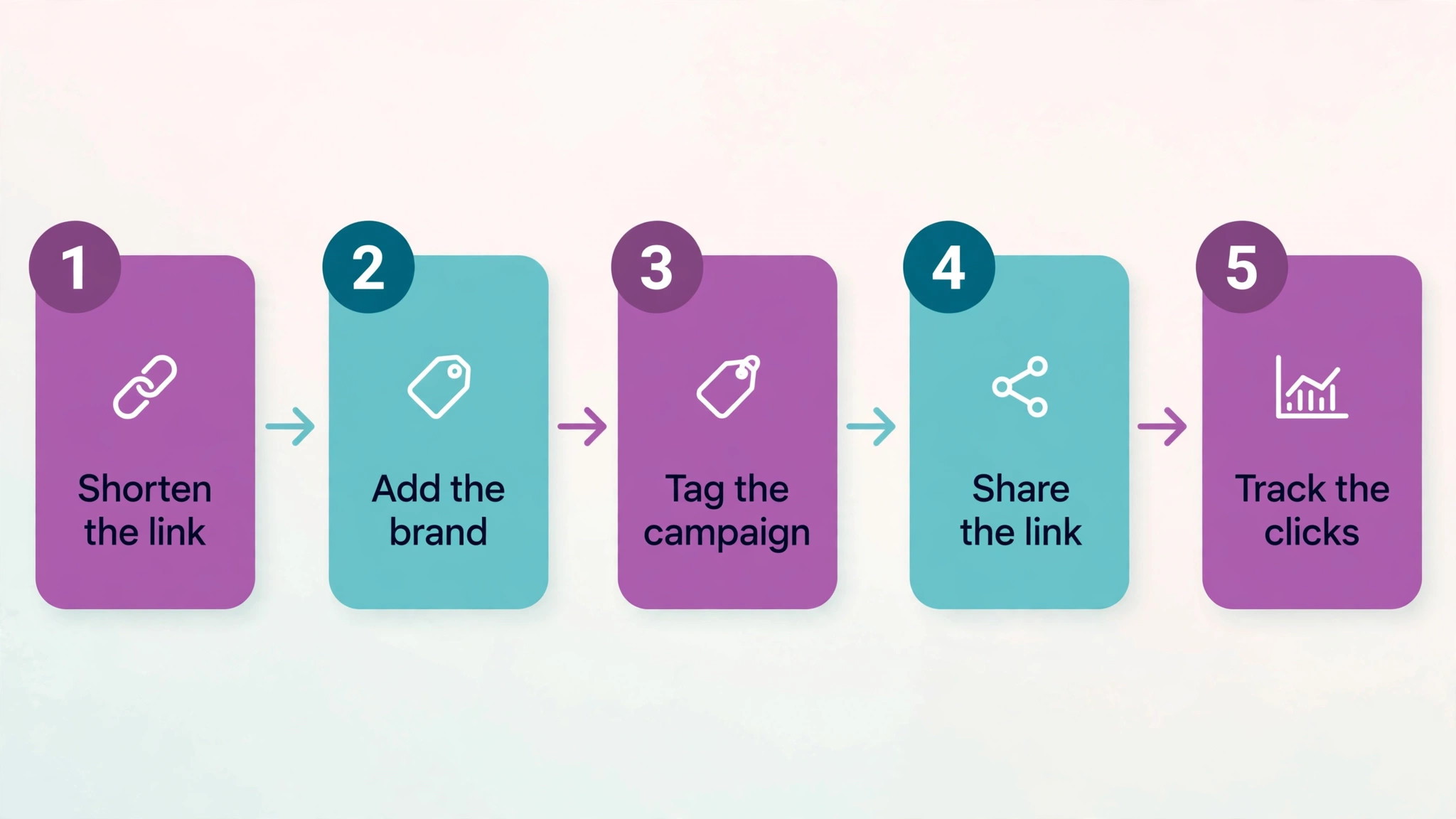
The best link management tools for agencies only help when the link workflow around them is clear, so here is the five-step run we recommend for a first branded link.
- Shorten the link. Take the long destination URL and create a short link under your own branded domain.
- Add the brand. Set the custom slug so the link reads like your client, not like a random string.
- Tag the campaign. Add UTM tags so the clicks land in the right campaign report automatically.
- Share the link. Publish it in the ad, email or post, and check it on a phone before the campaign goes live.
- Track the clicks. Watch the first day of data, then send the client a report that names the winning channel.
Frequently Asked Questions
These are the questions agencies ask us most about the best link management tools for agencies, answered in plain terms.
Do branded short links really get more clicks?
Yes, and the difference is measurable. A link on a domain people recognise earns more trust than a generic short link, and the click rate rises accordingly. The effect is strongest in email and print, where the reader cannot hover to check the destination. A branded domain will not rescue a weak offer, yet it removes a reason not to click.
How many custom domains does an agency need?
One per client is the usual answer, since each client should have links on their own domain. An agency with twenty clients needs twenty domains, plus one house domain for its own marketing. Some platforms charge per domain, so count the clients first and check the plan limits before you sign. A domain costs little to buy, yet the platform fee per domain is what adds up.
What happens to short links if I cancel the subscription?
It depends on the platform, and the answer should be in writing before you build a campaign on it. Some platforms keep existing links working on a free tier, while others stop redirects when the paid plan ends. Printed material and old social posts carry those links for years, so a platform that kills them on cancellation is a risk. Ask the vendor directly and keep the answer. A written confirmation is worth more than a sales call promise, since the person who answers the phone may not be there when the contract ends.
Can clients see their own link data without seeing other clients?
Yes, when the platform supports workspaces and permissions properly. Each client gets a workspace with its own links and reports, and the agency controls who sees what. A platform without workspaces forces the agency to share exports by hand, which is slow and error-prone. Check the permission model during the trial, not after the first client asks.
Should every campaign link be shortened?
No, and the exceptions matter. Links on your own website should stay full, since shortening adds a redirect that search engines and users do not need. Shorten the links you share in ads, emails, social posts and print, where the short form earns clicks and the tracking matters. A link that lives on your own site gains nothing from shortening. The one grey area is email, where a short branded link also protects the message from spam filters that distrust long URLs.
How do link retargeting pixels work?
A retargeting pixel is a small piece of code attached to a short link, and anyone who clicks the link joins an audience the advertiser can reach later. The agency shares a link to a useful article, the reader clicks, and the pixel adds them to a list for future ads. Privacy rules limit what can be done with that list, so an agency should confirm the current rules before promising a client an audience built this way.
Our Pick, Stated Plainly — Bitly Is the Agency Default
If your agency buys one link platform this quarter, buy Bitly. The best link management tools for agencies all have a place, but Bitly pairs the most trusted analytics with the smoothest client reporting, and that combination is why it leads this guide. A client can read the report without training, the branded domains work at any scale, and the platform rarely gets in the way.
The remaining tools earn their keep on narrower work. Rebrandly suits domain-heavy branding, Short.io suits a tight budget, and RocketLink suits retargeting. Use Bitly for the daily work, then add the specialist that matches the gap in your client list. That is the whole strategy, and it works for three clients as well as three hundred.
Set the system up once and let it run. A branded domain, a tagging habit and a monthly report template will carry an agency further than any single feature, since the value of link management compounds with every campaign that uses it.
One last pricing note matters. Track what each client actually costs in link platform fees, from the subscription share to the domains, and keep the numbers in a simple sheet. After a quarter you will know your true cost per client on the platform you chose, and the renewal decision will take minutes instead of a meeting. The platforms do not change much. Your data about them is what improves.