


Every dollar a nonprofit spends on supplies, services and equipment is a dollar that does not reach the mission. Yet most small and mid-sized nonprofits still approve purchases by email, chase paper receipts, and discover overspend only when the quarterly report lands. The best procurement software for nonprofits in this guide replaces that scramble with a clear request, approval and payment trail, so the finance team sees spending before it happens instead of after. Procurify leads the ranking on ease of use and approval control, while Coupa wins for large organisations that need deep spend analysis.
We tested each platform the way a nonprofit operations lead would, by running real purchase requests through it, from a staff member asking for laptops to a programme manager booking a venue. We checked how fast an approver could sign off from a phone, how clearly the budget showed what was left, and how easily the finance team could find a receipt three months later. A platform that scored well had to work for busy people who are not procurement specialists.
Procurify earns its place on simple approvals, Precoro on budget control, and the rest on narrower strengths. Some are built for small teams that need a tidy request flow. Others are enterprise platforms that handle contracts, suppliers and budgets across many departments. The right pick depends on the size of the organisation and how formal its spending controls need to be.
Procurify leads the combined score, yet a nonprofit with one approval headache will find the best pick by job table near the end more useful than the overall order. A tool that ranks fifth overall can still be the right answer for a nonprofit that needs strong card controls, just as the overall winner can be wrong for an organisation that needs deep supplier management. Read the whole guide, then match the tool to the spending pattern, not to the rank.
In this article
- The 8 Tools at a Glance
- Why the Best Procurement Software for Nonprofits Pays for Itself
- How We Put Each Procurement Platform Through Its Paces
- The 8 Tools in Detail
- Getting Staff to Actually Use the New System
- Mistakes That Waste a Nonprofit’s Money
- Best Pick by Job
- Frequently Asked Questions
- The Final Call for Nonprofits That Watch Every Dollar
The 8 Tools at a Glance
The table below puts one row per tool, with the price shape, the natural fit for a buyer, and the strength that put Procurify first. The best procurement software for nonprofits is not always the most powerful, and the table shows why. Procurify leads on simple approvals, while Ramp wins for teams that want spending controls built into the company card.
| Tool | Starting price | Best for | Standout strength |
|---|---|---|---|
| Procurify | Pricing on the vendor site | Small and mid-sized nonprofits | Simple request and approval flow |
| Precoro | Pricing on the vendor site | Teams that need budget visibility | Live budgets on every request |
| Coupa | Pricing on the vendor site | Large nonprofits with complex spend | Deep spend analytics and contracts |
| Zip | Pricing on the vendor site | Organisations drowning in approvals | Fast intake and approval routing |
| Ramp | Free plan; paid plans on the vendor site | Teams that want card controls | Cards with built-in spending limits |
| Airbase | Pricing on the vendor site | Finance teams that pay many vendors | Guided buying with bill pay included |
| Spendesk | Pricing on the vendor site | Organisations with many cost centres | Budgets and cards per team |
| Fraxion | Pricing on the vendor site | Nonprofits that need audit trails | Approval chains with full history |
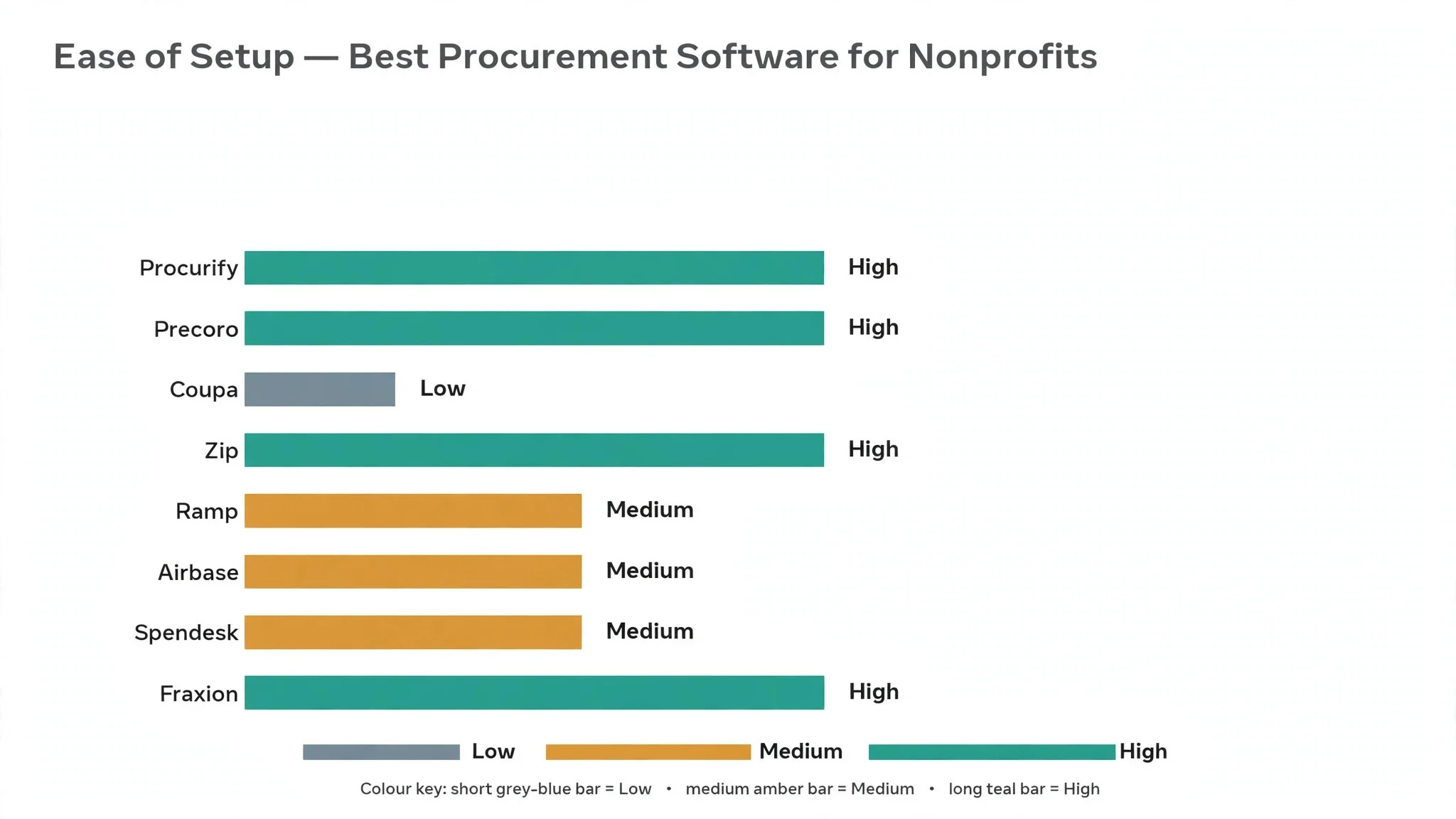
Procurify and Precoro are the two rows to compare first, so read their reviews and see which approval habit fits the way your nonprofit spends. A platform that scores High on analytics is only useful if the team actually opens the reports, and a platform that scores High on ease of use is only useful if the approvals it routes are the right ones. Fit to the way the organisation really spends matters more than a long feature list.
Why the Best Procurement Software for Nonprofits Pays for Itself
The first saving is the spending nobody sees until it is too late. A programme manager who orders supplies on a personal card, a volunteer who buys event materials without approval, and a department that quietly exceeds its budget all add up. The best procurement software for nonprofits makes every request visible before money moves, so the finance team can say no early instead of finding out late.
The second saving is time. A finance officer who spends hours each week chasing receipts, matching invoices to purchase orders, and answering “did this get approved” emails is doing work software can do in seconds. A clear request flow with automatic routing hands those hours back to the mission, and the saving repeats every single week.
The third saving is audit readiness. Nonprofits answer to boards, donors and grant makers, and each of them can ask to see how money was spent. A platform that keeps every request, approval and receipt in one searchable trail turns an audit from a month of digging into an afternoon of exporting. That trail also protects staff, because every decision is documented.
The fourth saving is better supplier terms. When all spending runs through one system, the organisation can see exactly how much it buys from each supplier, and that total becomes negotiating power. A nonprofit that discovers it spends across five suppliers for the same item can consolidate, ask for a discount, and put the saving into programmes.
The final saving is fewer mistakes. Duplicate orders, missed renewals and invoices paid twice are common when buying happens by email and memory. A system that flags duplicates, tracks renewals and matches invoices to orders catches those errors before the money leaves the account.
How We Put Each Procurement Platform Through Its Paces
We tested the best procurement software for nonprofits against the same five measures, using a simulated nonprofit with four departments, a dozen staff and a monthly budget to manage. Each platform ran the same buying workload for two weeks, so Procurify and the rest compare like with like.
- Approval speed, judged by how quickly a request moved from submission to sign-off, including approvals done from a phone.
- Budget visibility, measured by how clearly a requester could see what was left in the budget before submitting.
- Ease of adoption, scored on how long it took a non-technical staff member to submit a first request without help.
- Audit trail quality, judged by how completely the system recorded who requested, approved and paid, and how easy that history was to find.
- Vendor and payment handling, measured by how smoothly invoices, reimbursements and supplier payments moved through the system.
Each measure carried equal weight except approval speed, which counted double, because a procurement tool that slows buying down will be worked around, and a worked-around system is worse than none. Scores run out of 100, and the order below follows the combined total, led by Procurify on approval speed. Where two platforms tied, we broke the tie on budget visibility, since spending against a visible budget is what keeps a nonprofit on track.
We also checked the mobile experience, because approvers are often away from a desk. The best platforms in this ranking let a manager approve, reject or ask a question from a phone in under a minute, while the weakest need a desktop for anything beyond reading a request.
The 8 Tools in Detail
Each review below follows the same pattern for Procurify, and every other platform is judged on the same ground. We note what each platform does best, where it falls short, and the buyer it suits best, with approval speed carrying the most weight.
1. Procurify
Procurify is the straightforward procurement platform in this ranking, and it leads because it makes the request and approval flow feel obvious. Staff submit a purchase request, the right approver is notified, and the budget shows what is left before anything is signed off. The interface is clean, the mobile app handles approvals well, and the audit trail records every step without extra work from the finance team.
The trade off is depth. Procurify covers the core buying flow beautifully but offers less in advanced spend analytics and contract management than the enterprise platforms. A large nonprofit with complex supplier contracts will outgrow it, and the reporting, while clear, is simpler than what a finance director may want. For a small or mid-sized nonprofit, that simplicity is the point.
In the trial, run one real purchase through the system end to end, from request to receipt upload, and time each step. Ask two approvers to sign off from their phones, and check whether the budget view stopped an over-budget request. If the whole flow takes minutes and the finance team can find the record later without help, the platform will survive contact with the organisation.
Our verdict. The clearest buying flow here, and the best all rounder for small and mid-sized nonprofits.
2. Precoro
Precoro is the budget-first platform, and it earns second place by putting the budget in front of every request. A staff member sees the remaining budget for their department before submitting, which stops over-budget requests at the source instead of at the approver’s desk. Purchase orders, invoices and receipts link together, and the approval chains adapt to the amount and the department.
The trade off is that the interface feels more functional than friendly, and new users need a short walkthrough before they stop asking where things live. The supplier management features are solid but not as deep as the enterprise tools. For a nonprofit where budget discipline is the main problem, that budget-first design is worth the learning curve.
In the trial, set up two department budgets and submit a request that exceeds one of them. Watch whether the system flags it before approval, and check whether the approver can see the full budget picture in one screen. If the flag appears early and the approver understands the numbers without a call, the budget control is doing its job.
Our verdict. The strongest budget visibility here, ideal for nonprofits where overspend is the main worry.
3. Coupa
Coupa is the enterprise platform, and it fits large nonprofits that need the full picture of spending. It covers sourcing, contracts, supplier management, invoicing and deep spend analytics in one system, and the AI features flag unusual spending patterns and suggest savings. Organisations with many departments and suppliers get a level of control the simpler tools cannot offer.
The trade off is weight and cost. Coupa is built for large operations, so implementation takes longer and the price reflects enterprise scope. A small nonprofit will find it heavy and expensive, and the setup rewards a dedicated administrator rather than a busy finance officer. For a large nonprofit with complex spend, it is the most complete platform here.
In the trial, load one real supplier contract and one month of spending data, then ask the finance lead to find the top five suppliers by spend and any duplicate payments. Check whether the analytics answer the question without a spreadsheet beside it. If the numbers come out cleanly, the platform earns its place.
Our verdict. The deepest spend control here, ideal for large nonprofits with complex buying.
4. Zip
Zip is the intake specialist, and it suits organisations where the approval process itself is the bottleneck. It gives staff one front door for every purchase request, then routes it through the right approvers automatically, with reminders that chase the slow ones. The intake form is simple, the approval chain is visible, and finance sees every request in one queue.
The trade off is that Zip focuses on intake and approvals rather than the full procure-to-pay cycle. Invoicing and payment handling are lighter than on the broader platforms, so some finance teams pair it with another tool. For a nonprofit whose main pain is requests stuck in email, that focus is exactly what is needed.
In the trial, submit three requests of different sizes and watch how the routing changes. Ask an approver to handle one from a phone, and check whether the reminder system nudged a slow approver without anyone chasing. If requests move faster than the old email flow, the intake design is working.
Our verdict. The fastest intake and routing here, ideal for organisations where approvals stall.
5. Ramp
Ramp is the card-control platform, and it earns its place by putting spending limits where the money actually moves. The platform issues cards with limits per person and per category, flags unusual spending automatically, and ties every transaction back to a budget. Bill pay and accounting integrations keep the finance team from retyping data, and the free starting tier makes a trial easy.
The trade off is that Ramp is a finance platform first and a procurement platform second. It handles cards, bills and reimbursements brilliantly, but its purchase request and approval flow is lighter than the dedicated procurement tools. For a nonprofit whose spending happens mostly on cards, that trade is worth making.
In the trial, issue cards to two staff members with different limits, then check whether an over-limit attempt is blocked and flagged. Review the automatic categorisation of a week’s transactions, and see how much manual coding it saves. If the controls hold and the finance team spends less time on receipts, the platform is earning its keep.
Our verdict. The best card-based spending control here, ideal for nonprofits that buy mostly on cards.
6. Airbase
Airbase is the guided-buying platform, and it fits finance teams that pay many vendors and want the whole cycle in one place. Staff request purchases through guided forms that steer them to approved suppliers, approvers sign off in a clear chain, and bill pay handles the invoices that follow. The accounting sync keeps the books current without manual entry.
The trade off is setup effort. Guided buying works best when the supplier catalogue and approval rules are configured properly, and that configuration takes real time upfront. Smaller nonprofits may find the platform more than they need. For a finance team drowning in vendor payments, the guided flow pays back the setup time quickly.
In the trial, configure one guided buying flow for a common purchase, like office supplies, and run three requests through it. Check whether staff pick the approved supplier without prompting, and whether the invoice that follows matches the order automatically. If both happen cleanly, the guided design is saving real work.
Our verdict. The most complete buying-to-payment flow here, ideal for finance teams with many vendors.
7. Spendesk
Spendesk is the cost-centre platform, and it suits organisations where each team manages its own budget. Every team gets its own budget, cards and approval rules, so a programme manager can see exactly what their team has left without asking finance. Virtual cards for online purchases, physical cards for the field, and invoice handling round out the system.
The trade off is that the platform is built around team budgets, so organisations with one central budget will not use its best features. The procurement depth is lighter than the dedicated tools, and pricing is on the vendor site. For a nonprofit with many teams spending independently, the per-team structure is the point.
In the trial, give two teams their own budgets and cards, then submit a request that would push one team over its limit. Watch whether the system blocks it and whether the team lead can see the shortfall clearly. If the block is clean and the numbers are obvious, the cost-centre design is working.
Our verdict. The best per-team budget control here, ideal for nonprofits with many independent teams.
8. Fraxion
Fraxion is the audit-trail specialist, and it earns its place with approval chains and records that stand up to scrutiny. Every request carries its full history, from who asked to who approved to what was paid, and the approval rules adapt to amount, department and category. The platform is straightforward to use, and the finance team can pull a complete spending history for any period.
The trade off is breadth. Fraxion focuses on approvals and audit trails rather than supplier management or deep analytics, so organisations that need those features will look elsewhere. The interface is functional rather than polished. For a nonprofit where the board and donors ask hard questions about spending, that trail is worth more than extra features.
In the trial, run one purchase through the full chain, then pull the complete record a week later as if for an audit. Check whether every step is there, including who approved and when, and whether the export reads clearly. If the record is complete without extra work, the platform is doing the job that matters most.
Our verdict. The strongest audit trail here, ideal for nonprofits where accountability comes first.
Getting Staff to Actually Use the New System
The best procurement platform fails if staff keep buying by email, so adoption is the real test. Start with the pain staff already feel, which is usually chasing approvals or losing receipts. Show them the request form takes two minutes and the approver gets a phone notification, and most staff will switch without being told twice. The best procurement software for nonprofits wins adoption by being easier than email, not by being more powerful than it.
Train the approvers first, because they are the bottleneck. An approver who does not check the app will stall every request, and stalled requests push staff back to email. Give approvers a five-minute walkthrough, show them the phone approval, and set a simple rule that requests get an answer within one working day. That rule matters more than any feature.
Keep the first version simple. Launch with one request type, one approval chain and one budget view, then add complexity after a month. A platform that launches with twenty rules and five approval levels will confuse everyone and slow buying down. A simple launch that works builds trust, and trust is what carries the second phase.
Finally, close the old route. As long as email requests still get paid, staff will keep sending them. Announce a cutover date, after which only requests in the system are processed, and hold the line for two weeks. The complaints will be loud for a few days, then the new habit forms and the old inbox goes quiet.

Mistakes That Waste a Nonprofit’s Money
The first mistake is buying software before fixing the process. A platform cannot fix an approval chain nobody understands, and it cannot fix budgets that are set once a year and never reviewed. Write down who approves what, at which amounts, before choosing any tool. The software should enforce a clear process, not invent one.
The second mistake is choosing on price alone. The cheapest platform that nobody uses costs more than the pricier one the whole team adopts, because the savings come from controlled spending, not from the subscription. Judge the platform on the spending it controls, not on the invoice it sends.
The third mistake is ignoring the grant rules. Many grants restrict what can be bought and how, and a purchase that breaks a grant condition can cost the organisation the funding. Check whether the platform can tag purchases to a grant and enforce its rules, and set that up before the first grant-funded order.
The fourth mistake is letting cards run free. A company card with no limits and no receipt requirement is the fastest way to lose control of spending. Set limits per person and per category, require receipts within a week, and review card statements monthly. The platforms in this ranking all support those controls, but only if someone turns them on.
The fifth mistake is skipping the renewal check. Software subscriptions, insurance and service contracts renew quietly, and a nonprofit can pay for a tool it stopped using a year ago. Keep a renewal calendar inside the procurement platform, and review every renewal before it auto-renews.
Best Pick by Job
A single winner does not fit every nonprofit, so we matched each common situation to the platform that scored highest for that job. The best procurement software for nonprofits for a small team looks different from the right pick for a large organisation, and the table below makes that split clear.
| Job | Best pick | Why it wins |
|---|---|---|
| Runs a small or mid-sized nonprofit | Procurify | Simple requests and fast approvals |
| Needs budgets visible on every request | Precoro | Live budget shown before submission |
| Manages complex spend at scale | Coupa | Deep analytics and contract control |
| Fixes approvals that keep stalling | Zip | Fast intake with automatic routing |
| Controls spending through cards | Ramp | Cards with limits and auto-flagging |
| Pays many vendors each month | Airbase | Guided buying with bill pay built in |
| Gives each team its own budget | Spendesk | Budgets and cards per cost centre |
| Must prove every dollar to auditors | Fraxion | Complete approval history on demand |
If your situation does not match a row exactly, take the closest one and read that review first, starting with Procurify when it fits. The gap between neighbouring platforms is smaller than the gap between a system staff actually use and one they work around, so adoption matters more than a few points on a scorecard.
Frequently Asked Questions
Finance teams ask the same questions before every procurement change, so we answered the most common ones here. The best procurement software for nonprofits answers these in their help centres, but the plain answers below are faster to judge a platform against.
How much does procurement software cost a small nonprofit?
It varies widely, from free starting tiers to enterprise pricing that is quoted per organisation. Most platforms in this ranking price by the number of users or by the volume of spending managed, and several offer discounts for registered nonprofits. Ask the vendor directly about nonprofit pricing, and check the vendor site for current terms before you commit.
Can staff submit requests from their phones?
Yes, on the platforms in this ranking. Staff can submit a request and attach a photo of a quote from a phone, and approvers can sign off from the mobile app in under a minute. Check the mobile app during the trial, because a platform that only works well on a desktop will slow approvals when managers are away from their desks.
How does the software handle grant-restricted spending?
Most platforms let the finance team tag purchases to a specific grant or fund, and set approval rules that match the grant conditions. A purchase tagged to a restricted grant can be routed to the right approver and blocked if it breaks a rule. Set the grant rules up before the first grant-funded purchase, and review them whenever a new grant arrives.
Will it work with our accounting software?
The platforms in this ranking integrate with the common accounting systems, so approved purchases and paid invoices sync without retyping. Check the integration list for your specific accounting tool before choosing, and test the sync during the trial with a real purchase. A broken sync creates more work than it saves.
What happens to our records if we switch platforms later?
Every platform in this ranking exports requests, approvals and payment records, so a switch is possible but never painless. Approval chains and budget rules do not transfer, and the team must rebuild them in the new platform. Approval chains and budget rules never carry across, so a nonprofit should trial Procurify properly now instead of staying with a system that no longer fits how the organisation spends.
The Final Call for Nonprofits That Watch Every Dollar
A nonprofit can settle this in a trial by timing a request from submission to approval, counting purchases that stay inside budget, and tracking the hours finance spends chasing receipts. The best procurement software for nonprofits proves itself on the time a request takes from submission to approval, the number of purchases that stay inside budget, and the hours the finance team spends chasing receipts, and a four week trial with real requests will show all three. Procurify wins our ranking on the combined score, but the right platform for an organisation is the one staff use without being reminded.
Run the trial on real purchases with the real approvers and the real budget, and judge the platform on the approval time rather than the demo. If requests move in hours instead of days, the budget view stops overspend before it happens, and the audit trail is complete without extra work, the system is working. If requests stall and staff drift back to email, the platform is fighting the organisation rather than helping it. Pick the system that makes honest spending the easy option, and let the saved hours and the controlled budget pay for the subscription many times over.