

The contest for the best youtube tools for course creators is really a contest between two different jobs. vidIQ wants to tell you what to film next, and it backs that advice with search data, outlier tracking and a coach that reads your channel. TubeBuddy wants to run the channel you already have, with bulk edits, A/B tests and a keyword explorer that costs less. The other eight tools fill the gaps around those two, from editing to clips to thumbnails.
This guide puts all ten side by side so you can see where the leader wins, where the runner-up catches it, and which tool fits the way you actually work. Course creators live or die on watch time, and watch time starts before you press record. A lesson that nobody searches for will not find students, however good the teaching is. A lesson with a weak title or a muddy thumbnail will not get the click, however strong the content is. That is why the research tools matter as much as the editing tools here.
The right pick depends on whether your bottleneck is ideas, production speed or packaging. This guide tests each tool against the work a course creator actually does. We looked at idea research, keyword data, bulk channel management, editing speed, clip creation and thumbnail design. Prices come from the vendors own pages, checked in November 2026. Where a vendor does not publish a price, we say so plainly instead of guessing a number.
In this article
- The 10 Tools at a Glance
- Why the Best Youtube Tools for Course Creators Still Decide Who Gets Watched
- How We Judged Each Tool for Course Creators
- Best Pick by Job
- The 10 Tools in Detail
- A Weekly Workflow That Uses the Leader and the Runner-Up Together
- Mistakes That Cost Course Creators Views
- Frequently Asked Questions
- Our Pick for Course Creators, Stated Plainly
The 10 Tools at a Glance
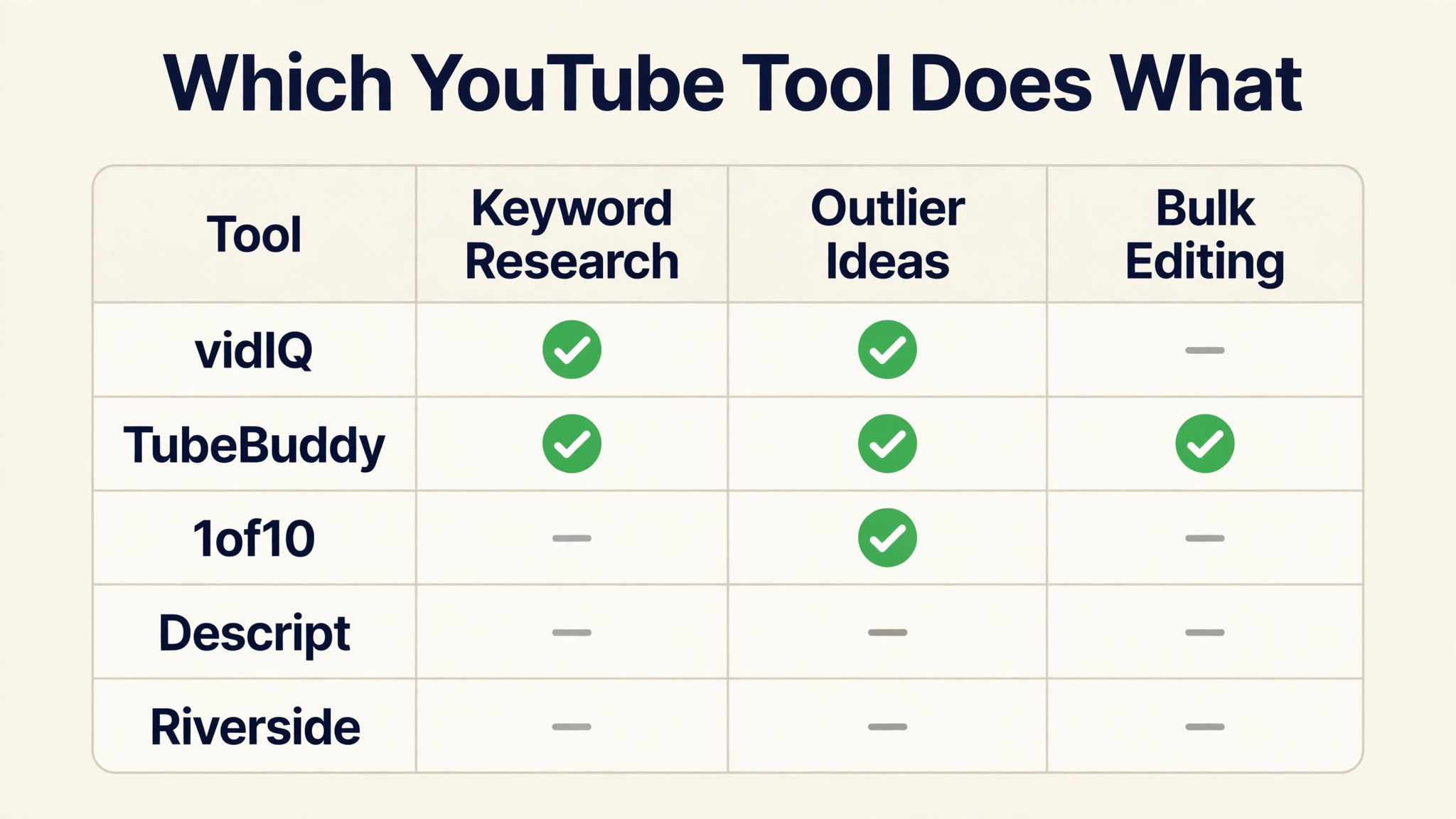
The table below gives the short version of the best youtube tools for course creators. vidIQ leads on research, TubeBuddy leads on running a back catalogue, and the rest specialise in one job each. Read the detail section before you pay, because the cheapest plan that fits your bottleneck usually beats the most powerful plan you will not use.
| Tool | Starting price | Best for | Standout strength |
|---|---|---|---|
| vidIQ | $16.58 per month, annual billing | Research-led creators | Keyword and outlier research |
| TubeBuddy | From $12 per month, annual billing | Bulk channel admin | Bulk editing and A/B tests |
| 1of10 | Pricing on the vendor site | Finding proven ideas | Outlier finder |
| Descript | $16 per month, annual billing | Transcript editing | Edit video by editing text |
| CapCut | Free, Pro $19.99 per month | Fast phone edits | Auto captions and templates |
| Riverside | $15 per month, annual billing | Remote guest lessons | Studio-quality remote recording |
| OpusClip | From $15 per month | Turning lessons into clips | AI clip cutting |
| Canva | Pro from $10 per month, annual billing | Thumbnails and slides | Quick design templates |
| ViewStats | Pricing on the vendor site | Thumbnail and title data | Channel analytics |
| Morningfame | Pricing on the vendor site | Budget keyword research | Simple keyword scores |
Why the Best Youtube Tools for Course Creators Still Decide Who Gets Watched
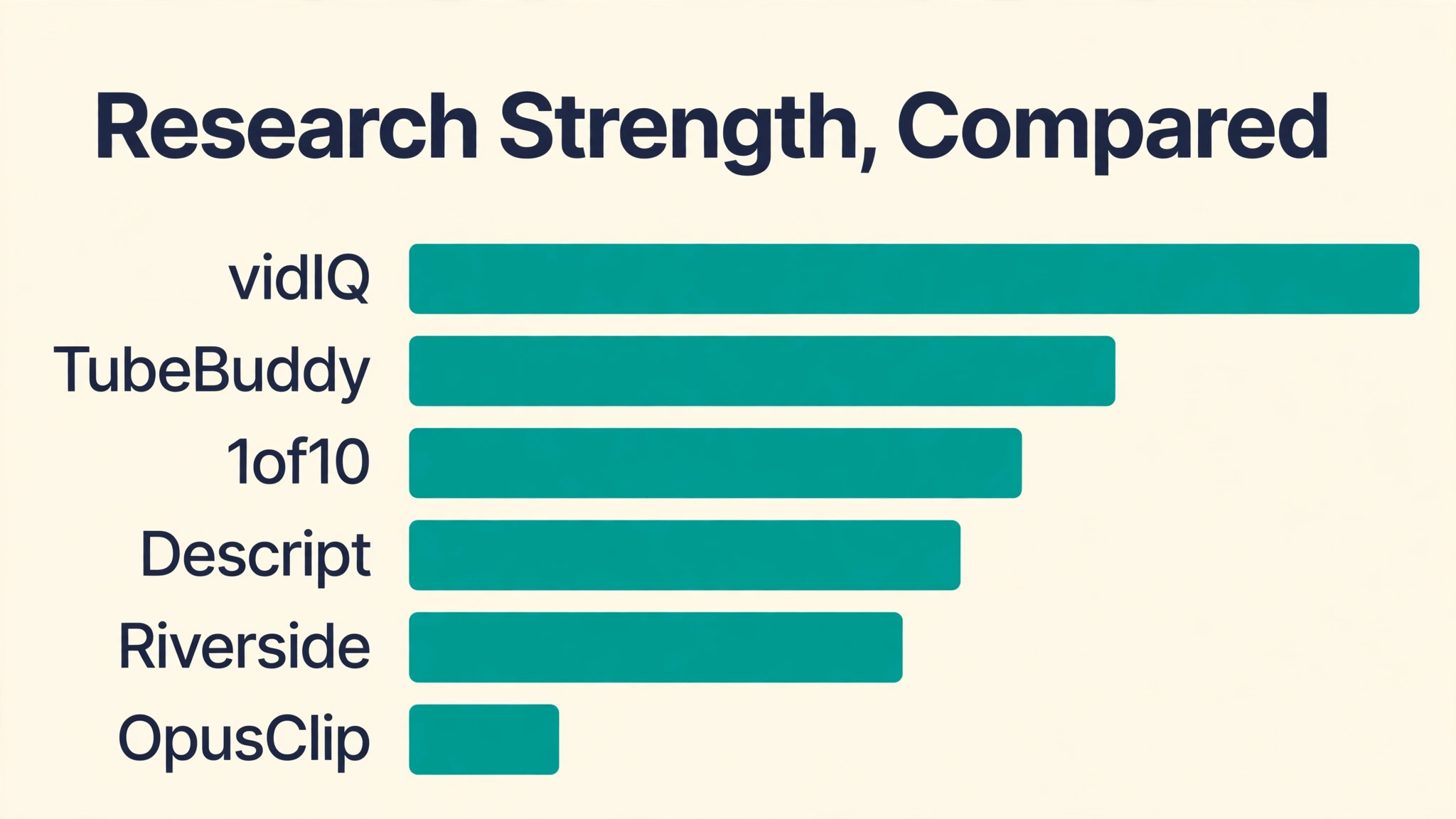
Search is the quiet engine of a course channel. Students type a problem into YouTube, and the videos that answer it clearly get the first click. A tool that shows real search volume, competition and related questions changes which lessons you film. Without that data, most creators film what they already know, and the channel grows slowly because the lessons answer questions nobody asked. The runner-up matters here because research and management are different skills. vidIQ is stronger at telling you what to make, and its daily ideas and competitor tracking suit a creator who publishes every week.
TubeBuddy is stronger at keeping a growing library tidy, and its bulk processing can update hundreds of old descriptions in one pass. A creator with fifty lessons already published may get more value from the runner-up than from the leader. Production speed is the third pressure. A course creator who spends six hours editing one lesson will publish less often than a rival who ships in two. Descript cuts that time by letting you edit the transcript instead of the timeline, and CapCut handles phone-shot lessons with captions in minutes.
The ranking below weighs all three pressures at once, and a tool that fails one of them cannot win on features alone. The last pressure is packaging, and it is the one most creators underrate. A strong lesson with a weak thumbnail loses the click to a weaker lesson with a clear one, and the data in these tools shows it plainly. Thumbnail testing, title scores and caption quality are not decoration. They decide whether the research and the editing ever get seen, which is why this guide weighs them alongside the deeper features.
How We Judged Each Tool for Course Creators
Every tool in this guide faced the same five tests, and the best youtube tools for course creators earned their places by passing most of them. We weighted research depth highest, because a wrong topic wastes the whole production. Editing speed and packaging came next, because they decide how often you publish. Price was judged on the plan a working creator actually needs, not the cheapest headline figure.
- Research depth, from keyword scores and search volume to outlier videos that already proved a topic works
- Bulk management, including bulk edits, A/B tests and the ability to update an old library without opening every video
- Editing speed, measured by how fast a finished lesson goes from raw recording to a published file
- Packaging help, from title ideas and thumbnail analysis to captions that keep viewers watching
- Price honesty, meaning the paid plan that unlocks the useful features, with free plans judged on what they really include
Best Pick by Job
No single tool wins every job, so the table below matches the best youtube tools for course creators to the work you do most. Start from your bottleneck, not from the ranking. A creator who films guest lessons needs Riverside more than vidIQ, and a creator with a huge back catalogue needs TubeBuddy more than either of them.
| If you need | Pick | Why it wins |
|---|---|---|
| Finding what to film next | vidIQ | Deepest keyword data and daily ideas grounded in your own channel |
| Managing a large back catalogue | TubeBuddy | Bulk edits and A/B tests nobody else in this list matches |
| Editing lessons fast | Descript | Transcript editing removes filler words and dead air in minutes |
| Filming lessons on a phone | CapCut | Free editor with captions and templates built for vertical video |
| Recording remote guests | Riverside | Separate high-quality tracks for every guest, recorded locally |
| Turning lessons into short clips | OpusClip | Finds the strongest moments and cuts them into shareable clips |
The 10 Tools in Detail
1. vidIQ
Paid plans start at $16.58 per month on annual billing for the Boost plan, and a free plan covers 150 AI credits a month. vidIQ grew from a keyword extension into a research product that studies your channel, suggests daily video ideas, tracks competitors and scores titles before you publish. Its keyword data is the deepest in this list, with search volume, competition scoring and related terms that hold up when you compare them against real channel results. It suits creators who treat YouTube as a search engine and publish tutorials, reviews and how-to lessons on a regular schedule.
Against TubeBuddy, vidIQ wins on research and loses on price and bulk work. TubeBuddy Pro costs less per year, and its bulk processing can rewrite a whole library while vidIQ can only advise you one video at a time. vidIQ also caps AI credits per plan, so heavy users hit the ceiling and start rationing ideas. The best youtube tools for course creators are judged on the job they do, and vidIQ is the best research instrument here even though it is not the cheapest or the most complete manager.
Start on the free plan and upgrade when you hit the AI credit ceiling. The free tier covers a new channel well, and Boost only earns its price once you publish often enough to need daily ideas and competitor tracking. Check the renewal price before you commit, because the first-year offer is not always the price you pay in year two.
2. TubeBuddy
Paid plans start from about $12 per month on annual billing for the Pro plan, and a free plan covers basic keyword and SEO tools. TubeBuddy is the older, less flashy rival, and its strength is workflow rather than research. The Legend plan adds A/B testing for titles, descriptions and thumbnails, plus bulk processing that updates end screens, cards and description links across your whole back catalogue at once. It suits established channels with hundreds of videos that need tidying, and creators who want one extension inside YouTube Studio.
Against vidIQ, TubeBuddy wins on price and on bulk operations, and it loses on research depth. Its keyword data is thinner, its AI features sit behind higher tiers, and it will not tell you which proven ideas to film next. What it does better than any rival here is housekeeping at scale. If your channel already has the lessons and your problem is keeping them current, the runner-up is the better buy.
Use the A/B test on your ten best-performing videos first, not on new uploads. A title change on a video that already ranks can lift its traffic for months, while a test on a new video tells you little. Bulk processing works the same way, so refresh descriptions and end screens on proven lessons before you touch the rest.
3. 1of10
Pricing is on the vendor site, and a free tier covers outlier search and competitor tracking with a limited number of AI credits. 1of10 answers one question better than anything else in this list, which proven video ideas already worked for channels like yours. Its outlier finder surfaces videos that outperformed their channel size, so you can study the angle and the packaging instead of guessing. It suits creators who have a topic in mind and want proof before they spend a week filming it.
Against vidIQ, 1of10 is narrower and cheaper in spirit. It does not edit, optimise or manage your channel, and it will not write your titles for you. Its value is focus. Pair it with a research tool for keywords and an editor for production, and it earns its place as the idea checker that stops you filming lessons nobody wants.
Run the outlier finder once a week and keep a short list of proven angles. The habit matters more than the tool, because a creator who checks what worked for others will never run out of topics. Skip the temptation to copy a rival video outright, and use the angle as a starting point for your own lesson.
4. Descript
Paid plans start at $16 per month on annual billing for the Hobbyist plan, and a free plan includes 60 media minutes. Descript lets you edit video by editing its transcript, so cutting a rambling sentence is as simple as deleting words on a page. It removes filler words, adds studio-quality voice cleanup and generates captions without a separate tool. It suits course creators who film talking-head lessons and want the edit done in an afternoon rather than a weekend.
Against CapCut, Descript wins on long-form lesson editing and loses on phone speed and templates. It is not the tool for vertical social cuts, and its learning curve is steeper than a phone editor. For lesson videos that run ten minutes or longer, though, transcript editing is the fastest honest way to a clean final cut.
Record with a script, even a rough one, because transcript editing works best when the words are already in order. A rambling recording takes twice as long to cut, whatever the editor. Keep lessons in ten-minute blocks where the topic allows it, and let Descript remove the pauses that make viewers click away.
5. CapCut
The editor is free, and the Pro plan costs $19.99 per month, or $179.99 billed yearly. CapCut is the fastest way to turn phone clips from a lesson into a finished short video, with auto captions, beat-matched cuts and vertical export built in. The free tier includes the full editor, 1080p export and captions, while premium templates, effects and most AI features sit behind Pro. It suits creators who film on a phone and publish Reels, TikToks and Shorts alongside their lessons.
Against Descript, CapCut wins on speed and price and loses on long-form control. It will not edit a forty-minute lesson by transcript, and its desktop workflow is thinner than a dedicated editor. For short-form cuts and quick lesson teasers, it is the default choice, and the free tier alone covers most of a new creator needs.
Film vertical lessons in good light and let CapCut handle the rest. The free tier covers captions, cuts and export, so spend money on a small tripod and a cheap microphone before you pay for Pro. Short lessons filmed on a phone can look professional when the audio is clean and the captions are accurate.
6. Riverside
Paid plans start at $15 per month on annual billing for the Standard plan, and a free plan covers short test recordings. Riverside records each guest on a separate high-quality track, locally on their own device, so a bad connection does not ruin the audio. It suits course creators who interview experts, record remote lessons with a co-host, or run live sessions that must sound professional. Transcripts, captions and basic editing are built in, so the recording arrives ready to shape.
Against Descript, Riverside wins on recording quality and loses on editing depth. You record here and polish elsewhere, which is the right split for guest lessons. If your lessons are solo and filmed in one room, you do not need it. If guests are part of your course, it is the most reliable way to capture them.
Book guests a week ahead and send them three questions in advance. A prepared guest gives tighter answers, and tight answers edit faster. Record a short test clip first to check audio levels, because a guest with a bad microphone will cost you more editing time than any tool can save.
7. OpusClip
Paid plans start from $15 per month, and a free plan covers a small number of clips. OpusClip watches a long lesson, finds the moments most likely to hold attention, and cuts them into vertical clips with captions and hooks. It suits creators who already have long lessons and want short-form reach without re-filming anything. The best clips keep the lesson context, so a viewer who finds a clip can follow it back to the full course.
Against CapCut, OpusClip wins on finding the moments and loses on control. You cannot shape every cut by hand, and the AI sometimes picks a lively moment that teaches nothing. Used as a first pass, with a human review before publishing, it turns one lesson into a week of short videos.
Review every clip before it goes out, and cut the ones that teach nothing. A clip that entertains without teaching will bring viewers who never watch the full lesson, and that traffic does not convert into course students. Two strong clips a week beat ten weak ones.
8. Canva
The Pro plan costs from $10 per month on annual billing, and a free plan covers the core design tools. Canva handles the visual side of a course channel, from thumbnails and lesson slides to end screens and channel art. Its templates are fast to adapt, its brand kit keeps colours and fonts consistent, and its background tools clean up a messy screenshot in seconds. It suits creators who want professional-looking packaging without learning a design program.
Against the specialist tools here, Canva wins on breadth and loses on depth. It will not research keywords, edit video or find outliers. Treat it as the packaging layer on top of a research tool and an editor, and it pays for itself in the first week of thumbnails.
Build three thumbnail templates and rotate them, so the channel looks varied without starting from scratch each time. A consistent font and colour set helps viewers recognise your videos, while a different layout keeps the feed from looking like one repeated image. Test the thumbnail at small size before you publish.
9. ViewStats
Pricing is on the vendor site, and a free tier covers basic channel analytics. ViewStats focuses on what already works, showing which thumbnails and titles earned their clicks and which videos held viewers to the end. It suits creators with more than ten thousand subscribers who want data on packaging rather than more ideas. The numbers are plain and specific, which makes it easy to repeat a winning thumbnail style.
Against vidIQ, ViewStats is a specialist where vidIQ is a generalist. It will not suggest topics, score keywords or edit anything. Its value appears once you have enough videos to learn from your own results, and before that point the free tier of a broader tool covers the same ground.
Compare your own thumbnails first, before you study rivals. A tool that shows which of your titles earned clicks is more useful than a tool that shows what a bigger channel did, because your audience is not their audience. Use the rival data to spot trends, not to copy a style that does not fit your lessons.
10. Morningfame
Pricing is on the vendor site, and the service is aimed squarely at small channels. Morningfame gives simple keyword scores, video topic research and a clear read on whether a title can rank for a channel of your size. It suits new course creators who find vidIQ expensive and TubeBuddy busy, and who want one calm answer to the question of what to film next. The interface is plain, the advice is direct, and the learning curve is close to zero.
Against vidIQ, Morningfame wins on simplicity and loses on depth. Its data is thinner, its competitor tools are basic, and it has no bulk management at all. For a first channel with a small budget, that trade is fair. Move to a deeper research tool once the channel earns enough to justify it.
Use the keyword scores to reject topics, not just to pick them. A score that says your channel cannot rank for a term yet is worth as much as a score that says it can, because it stops you wasting a week on a lesson that will not be found. Revisit rejected topics once the channel grows.
A Weekly Workflow That Uses the Leader and the Runner-Up Together
Start the week with vidIQ, not with a camera. Spend an hour on keyword research and outlier videos, then pick one lesson that has proven demand and a clear angle. Write the title and the thumbnail idea before you film, because a lesson filmed around a weak title is hard to rescue in the edit. This single habit separates channels that grow from channels that film on hope. Film the lesson, then hand the edit to Descript or CapCut depending on length. A talking-head lesson goes through Descript, where transcript editing removes the filler in minutes.
A short teaser goes through CapCut, where captions and templates finish the job. Once a month, open TubeBuddy and run bulk updates across older lessons, refreshing descriptions, cards and end screens in one pass. Review the numbers every Friday with the same discipline you bring to filming. Look at click-through rate first, then average view duration, then subscriber conversion. A lesson with a good click rate and a bad retention curve needs a better opening, while a lesson with a bad click rate needs a better title or thumbnail.
Change one thing at a time, and let TubeBuddy A/B tests settle the argument instead of guessing.
- Monday, research one proven topic and draft the title and thumbnail idea
- Tuesday, film the lesson in one sitting while the plan is fresh
- Wednesday, edit by transcript or on the phone and add captions
- Thursday, publish, then cut two short clips with OpusClip for social reach
- Friday, check the numbers and queue the next topic from the same research
Mistakes That Cost Course Creators Views
- Filming a lesson before checking whether anyone searches for the topic, then wondering why a good video gets twenty views
- Buying the most expensive plan on day one, before the channel earns enough to justify a single subscription
- Publishing lessons with no captions, which loses viewers who watch with the sound off on a phone
- Treating thumbnails as an afterthought and reusing the same layout, so the channel looks the same in every search result
Frequently Asked Questions
The questions below come from course creators who are choosing between the best youtube tools for course creators for the first time. The short answers favour starting small, testing with a free plan, and paying only when a tool removes a bottleneck you can name.
Which YouTube tool should a new course creator buy first?
Start with vidIQ if your problem is ideas, and with TubeBuddy if your problem is managing videos you already have. Most new creators have an ideas problem, so vidIQ earns the first subscription. Use the free plans of both for a month first. The paid plan only makes sense once you publish at least twice a month and can point to a specific job the free tier cannot do. The trial month also shows whether you enjoy the workflow, which matters more than any feature list.
Is the free plan of vidIQ enough for a small channel?
Yes, for the first few months. The free plan gives 150 AI credits a month, three daily ideas and a small number of keyword results per search, which is enough to plan two or three lessons a week. Move to Boost when you publish more often, run out of credits mid-month, or need competitor tracking that the free tier does not include.
Can TubeBuddy replace vidIQ completely?
No, and the reverse is also true. TubeBuddy is the better manager and the cheaper tool, but its keyword research is thinner and it will not find proven outlier ideas for you. vidIQ is the better researcher but cannot bulk-edit a library. Many working creators keep both, using vidIQ to choose topics and TubeBuddy to maintain the channel.
Do I need Descript if I already use CapCut?
It depends on lesson length. CapCut handles short videos and phone edits better than anything in this list. Descript earns its place when lessons run past ten minutes, because editing a long transcript is far faster than cutting a timeline by hand. If your lessons are short, CapCut alone is enough.
How much should a course creator budget for YouTube tools?
A realistic starting stack costs between $30 and $50 a month. That covers a research tool on annual billing and an editor, with free tiers filling the rest. Add a clip tool once short-form traffic matters, and add a bulk manager once the library passes fifty videos. Paying for five tools before the channel earns anything is a mistake.
What is the biggest mistake course creators make with these tools?
Filming before researching. A beautiful lesson on a topic nobody searches for will not find students, and no editing tool can fix that. The second mistake is buying the most expensive plan on day one. Start with free tiers, prove the workflow, and let the channel revenue decide when an upgrade is due.
Our Pick for Course Creators, Stated Plainly
vidIQ is the pick for most course creators, because the hardest part of a course channel is choosing the right lesson, and it answers that question with the best data in this list. TubeBuddy is the runner-up that many working creators actually need more, because a large library rewards bulk management more than fresh research. Buy the leader if your channel is young and your ideas are thin. Buy the runner-up if your library is large and your metadata is stale. Whichever you choose, keep the stack small.
One research tool, one editor and one clip tool cover the whole workflow, and the money you save can go into better audio or a second camera. The best youtube tools for course creators are the ones you open every week, not the ones with the longest feature list.