


An agency that ships client websites without proper consent banners is shipping a liability. Regulators fine real businesses, Google blocks analytics data without Consent Mode v2, and the client blames the agency that built the site. The best cookie consent tools for agencies solve that problem across dozens of client sites from one dashboard, and the wrong pick turns every new client into a new billing headache.
The trap is choosing a tool priced per site and then discovering the agency has forty sites. Per-site billing multiplies fast, and a banner that takes an hour to configure per client eats the margin on the whole project. Agencies need multi-site dashboards, white labelling, and a pricing model that gets cheaper per client as the portfolio grows.
This guide compares ten consent platforms on agency criteria. Multi-site management, Consent Mode v2 support, TCF 2.2 certification, banner customisation, and the real cost of running ten, twenty, or fifty client sites. The prices in this guide come from vendor pages and 2026 comparisons, checked before writing.
In this article
- The 10 Tools at a Glance
- Best Pick by Job
- How the Best Cookie Consent Tools for Agencies Handle Fifty Client Sites
- How We Tested These Tools for Agencies
- The 10 Tools in Detail
- What Fifty Client Sites Cost on Each Platform
- Five Mistakes Agencies Make With Consent Banners
- Onboarding a New Client Site in One Afternoon
- Frequently Asked Questions
- Rolling Consent Out Across the Client Portfolio
The 10 Tools at a Glance
The table gives the agency view at a glance. Each row shows the starting price, the billing model that matters most to an agency, and the client type the tool fits best.
| Tool | Best for | Starting price |
|---|---|---|
| CookieYes | Most small and mid-size client sites | From about $10 a month |
| Cookiebot | EU-focused clients with complex data | From about $8 a month |
| OneTrust | Enterprise clients with a full privacy program | Custom quote, about $10,000 a year minimum |
| Osano | Mid-market teams growing a privacy program | From about $199 a month |
| Termly | US small businesses needing policy generators | From about $14 a month |
| iubenda | Agencies managing many small sites | From about $29 a year per site |
| Didomi | Publishers and mid-market teams with ad revenue | Custom quote |
| Enzuzo | Small and mid-market sites, including Shopify | From about $9 a month |
| ConsentBit | Webflow and Framer sites and agencies | From about $9 a month |
| CookieScript | Small sites that want a simple banner | Pricing on the vendor site |

Best Pick by Job
Agencies do not buy one tool for every client. A local bakery site, a publisher with ad revenue, and an enterprise client with a legal team each need a different consent platform.
| Job | Pick | Why it fits |
|---|---|---|
| The fastest first win | CookieYes | It installs in minutes and covers the most common apps, so the first result arrives on day one. |
| The best value at scale | Cookiebot | Its pricing model stays cheap as volume grows, which matters more than the entry price. |
| The technical pick | OneTrust | It offers the deepest control for teams that can use it, with features the simpler tools lack. |
| The budget pick | CookieScript | It covers the essentials at the lowest cost, which suits a small team or a solo buyer. |
| The pick for a specific workflow | Osano | It handles the specialised job better than the general tools, so it earns its place on that one task. |
How the Best Cookie Consent Tools for Agencies Handle Fifty Client Sites
The best cookie consent tools for agencies treat the portfolio as the product, not the single site. That means one login, one view of every client’s consent status, and the ability to push a banner change to ten sites without opening each one. A tool that forces a separate login per client wastes the exact hours the agency is trying to save.
White labelling decides whether consent work looks like an agency service or a vendor referral. Clients see the agency’s name on the banner and the policy pages, and the agency can charge a monthly managed compliance fee on top of the tool cost. Tools with strong white labelling turn a cost into a revenue line, and tools without it leave money on the table.
Regulatory coverage is the third test. GDPR, CCPA and CPRA, and the IAB TCF 2.2 framework each need different banner behaviour, and a client with visitors in Europe and California needs both. The strongest agency tools switch rules by visitor location automatically, so one banner configuration serves every market a client reaches.
How We Tested These Tools for Agencies
Every tool on this list was judged against the same agencies test, and the best cookie consent tools for agencies were scored on what they do in real work rather than what their marketing pages promise. We checked the published pricing page for each tool, read the free tier limits, and compared the features that decide whether a agencie keeps using it after the first month. If the price is not published, the guide says so plainly instead of inventing a number, and the buyer can ask the vendor directly.
We scored each tool on four questions, in this order. Can it do the main job without a workaround. Is the price honest at the volume a real user reaches. Can a beginner get a result in an afternoon. And does it fail gracefully, with a clear error and a way to recover, rather than failing silently. For agencies, realistic cost matters most, because a price that looks small for one site multiplies across fifty client sites.
The list below is ordered by overall fit, and overall fit is not the same as best for one reader. Check the Best Pick by Job table first if the situation is clear, then read the detail section for any tool that looks close, because the trade-off written there is what decides whether the tool survives the first month. An agency owner who counts the client sites already knows which billing model to check first.
The 10 Tools in Detail
Each platform below was judged as an agency purchase. The questions were about the portfolio, not the single site. How many clients fit on one account, how the bill grows with each new site, and how much of the work can be branded as the agency’s own service.
1. CookieYes
CookieYes serves more than 1.5 million websites with a free tier, Google Consent Mode v2 support, and TCF 2.2 certification. Its Ultimate plan covers multiple domains under one account, which is the feature agencies actually need.
The free tier caps pageviews, and geo-targeting needs a paid plan. For an agency with standard business clients, CookieYes is the default pick, and its low entry price makes the first client site nearly free to start.
Our verdict on CookieYes: CookieYes earns its place here because it does the per pageviews, multi-site plan job well, and CookieYes is fairly priced for what it delivers. The trial is the real test for CookieYes, so use the free plan or the free trial on a genuine task with CookieYes, check the result the next morning, and only then decide whether the CookieYes subscription stays.
2. Cookiebot
Cookiebot, now part of Usercentrics, is the most widely deployed consent platform in Europe, with monthly automatic scans and a database of millions of cookies. Its geo-targeting and TCF support are strong, and its scanner is thorough.
Billing runs per domain and subpages, so a portfolio of fifty sites costs real money. Cookiebot suits agencies whose clients are mainly European and need deep GDPR coverage, not agencies counting every dollar per site.
Buy Cookiebot when the per domain and subpages job is the one that matters most, and skip Cookiebot when that job is rare in the reader’s week. Judge the cost of Cookiebot against the hours Cookiebot saves on that single job, not against the whole feature list, because a tool that saves five hours a week on one task pays for itself even if Cookiebot does nothing else well.
3. OneTrust
OneTrust is the enterprise governance platform, with a cookie database of more than 45 million entries, custom consent experiences, and deployment across web, mobile, and connected TV. Large clients with legal teams expect it by name.
The minimum annual commitment around $10,000 puts it out of reach for small agencies, and there is no self-serve option. Choose OneTrust only when a client requires it, and pass the cost through to that client.
Trial check for OneTrust: run one real job through OneTrust before paying, using the exact data the team handles every day. If OneTrust handles that job and OneTrust still looks fairly priced at twice the volume, OneTrust earns its place. If the trial exposes a missing integration in OneTrust or a surprise fee from OneTrust, that is the answer, and the next tool on the list deserves the same test.
4. Osano
Osano pairs consent management with a broader privacy program, including vendor risk and subject rights handling. Its no-fines guarantee in limited form gives clients confidence, and its dashboard suits teams that manage privacy as a program.
At $199 a month it is one of the pricier options for what a small agency needs, and its European coverage is thinner than Cookiebot. Osano fits agencies whose clients are US-focused and want privacy handled as a whole, not just a banner.
Our verdict on Osano: Osano earns its place here because it does the per program size job well, and Osano is fairly priced for what it delivers. The trial is the real test for Osano, so use the free plan or the free trial on a genuine task with Osano, check the result the next morning, and only then decide whether the Osano subscription stays.
5. Termly
Termly combines a consent banner with full policy generators, which suits agencies that deliver a complete compliance package to US clients. Its weekly automatic scans and agency pricing make it practical for portfolios.
Its European coverage and TCF features are weaker than Cookiebot or CookieYes, and geo-targeting sits on higher plans. For agencies with mainly US clients, Termly is a strong pick, and its policy generators save real drafting time.
Buy Termly when the per site job is the one that matters most, and skip Termly when that job is rare in the reader’s week. Judge the cost of Termly against the hours Termly saves on that single job, not against the whole feature list, because a tool that saves five hours a week on one task pays for itself even if Termly does nothing else well.
6. iubenda
iubenda bills per site on yearly plans, which keeps the cost low when an agency manages dozens of small client sites. Its multi-site dashboard centralises management, and it supports Google Consent Mode v2 natively.
Its banner customisation is simpler than Cookiebot, and its TCF support is limited for ad-heavy clients. For agencies with many small sites and few publishers, iubenda is one of the cheapest honest options.
Trial check for iubenda: run one real job through iubenda before paying, using the exact data the team handles every day. If iubenda handles that job and iubenda still looks fairly priced at twice the volume, iubenda earns its place. If the trial exposes a missing integration in iubenda or a surprise fee from iubenda, that is the answer, and the next tool on the list deserves the same test.
7. Didomi
Didomi is built for publishers and media companies, with strong TCF 2.2 support, consent rate optimisation, and A/B testing for banners. It helps publishers recover consent rates that a plain banner loses.
Pricing needs a sales conversation, which slows down a small agency. Didomi fits agencies whose clients earn from ads and need every point of consent rate, not agencies with local business clients.
Our verdict on Didomi: Didomi earns its place here because it does the custom quote job well, and Didomi is fairly priced for what it delivers. The trial is the real test for Didomi, so use the free plan or the free trial on a genuine task with Didomi, check the result the next morning, and only then decide whether the Didomi subscription stays.
8. Enzuzo
Enzuzo offers a free plan, Google certification, and a native Shopify app, with paid plans from about $9 a month. Its agency-friendly pricing and CIPA coverage make it a practical pick for agencies with ecommerce clients.
Its brand recognition is lower than CookieYes or Cookiebot, which matters when a client asks what tool runs their banner. For agencies that value price and Shopify support over brand name, Enzuzo delivers.
Buy Enzuzo when the per site job is the one that matters most, and skip Enzuzo when that job is rare in the reader’s week. Judge the cost of Enzuzo against the hours Enzuzo saves on that single job, not against the whole feature list, because a tool that saves five hours a week on one task pays for itself even if Enzuzo does nothing else well.
9. ConsentBit
ConsentBit builds native apps inside Webflow Designer and Framer, plus agency volume pricing with discounts of 30 to 50 percent. It suits agencies that build on those platforms and want consent inside the design tool.
Its general website coverage is narrower than the big platforms, and its cheapest plan with full geo-targeting and TCF costs about $20 a month. Agencies on Webflow or Framer should trial it first, because the in-designer workflow saves real time.
Trial check for ConsentBit: run one real job through ConsentBit before paying, using the exact data the team handles every day. If ConsentBit handles that job and ConsentBit still looks fairly priced at twice the volume, ConsentBit earns its place. If the trial exposes a missing integration in ConsentBit or a surprise fee from ConsentBit, that is the answer, and the next tool on the list deserves the same test.
10. CookieScript
CookieScript offers a straightforward consent banner with scanning, geo-targeting, and Consent Mode support at a modest price. It suits agencies that need a working banner without the complexity of a full privacy suite.
Its feature depth and reporting are thinner than the leaders, and its agency tools are limited. For a small client site with simple needs, CookieScript does the job, and the agency can move on to the next client.
Our verdict on CookieScript: CookieScript earns its place here because it does the per domain job well, and CookieScript is fairly priced for what it delivers. The trial is the real test for CookieScript, so use the free plan or the free trial on a genuine task with CookieScript, check the result the next morning, and only then decide whether the CookieScript subscription stays.
What Fifty Client Sites Cost on Each Platform
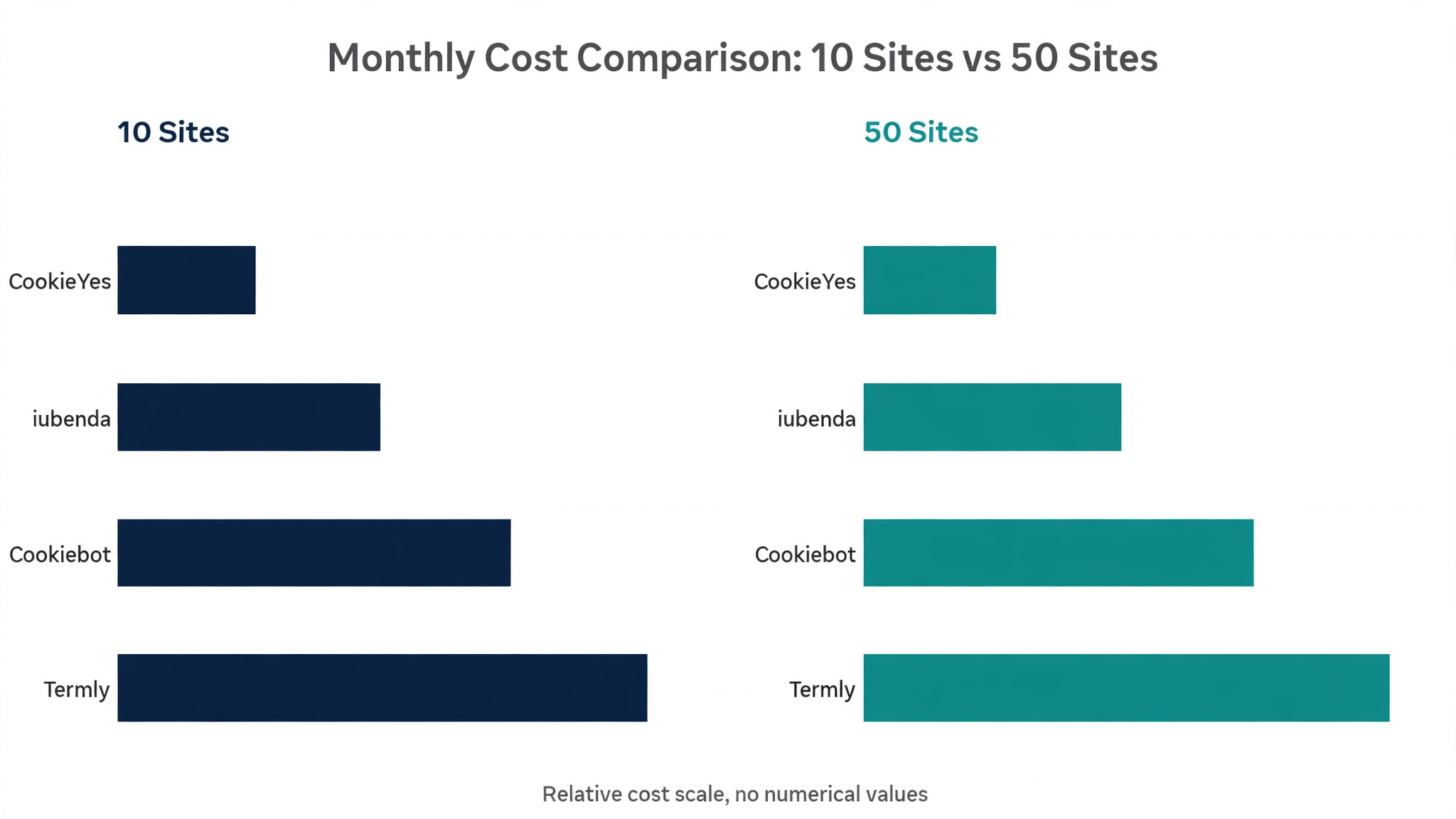
Per-site pricing is the number that decides agency profit. The table below models the monthly cost of running consent banners on 10, 25, and 50 client sites, because the best cookie consent tools for agencies get cheaper per client as the portfolio grows, and the ones that do not will show it here.
| Tool | Billing model | Cost for 10 sites a month | Cost for 50 sites a month |
|---|---|---|---|
| CookieYes | Per pageviews, multi-site plan | About $25 to $55 a month | About $55 to $150 a month |
| Cookiebot | Per domain and subpages | About $80 to $130 a month | About $400 to $650 a month |
| OneTrust | Custom enterprise quote | Pricing on the vendor site | Pricing on the vendor site |
| Osano | Per program size | About $199 a month and up | Pricing on the vendor site |
| Termly | Per site | About $100 to $150 a month | About $500 to $750 a month |
| iubenda | Per site, yearly billing | About $30 to $60 a month | About $150 to $300 a month |
| Didomi | Custom quote | Pricing on the vendor site | Pricing on the vendor site |
| Enzuzo | Per site | About $90 a month | About $450 a month |
| ConsentBit | Per site with agency discount | About $60 to $90 a month | About $200 to $350 a month |
| CookieScript | Per domain | About $50 to $100 a month | About $250 to $500 a month |
The spread is wide. A tool that costs $10 a month for one site can cost $500 a month for fifty, and the agency that does not model this before signing ends up absorbing the difference. Multi-site plans and agency discounts change the maths completely, so ask every vendor for agency pricing before comparing headline rates.
Managed compliance is the other side of the cost question. Agencies commonly charge clients $50 to $200 a month for managed privacy compliance as a recurring service. A tool that costs $100 a month across fifty sites and brings in $2,500 a month in managed fees is not a cost at all, it is a profit centre.
Volume is the test that separates the best cookie consent tools for agencies. A flat or per-user price scales gently, while a per-step or per-site price climbs with every workflow, ticket, or client added. Before committing, multiply the metered units by ten and compare the result across the shortlist, since that number, not the headline monthly price, is the cost that matters.
Five Mistakes Agencies Make With Consent Banners
Consent mistakes cost clients money and cost agencies trust. The best cookie consent tools for agencies cannot fix a banner that was set up wrong, so these five errors are worth naming before the first client site goes live.
Using one banner for every regulation. A GDPR banner and a CCPA banner behave differently, and a single generic banner fails both. Use geo-targeting so each visitor sees the rules for their location.
Forgetting Consent Mode v2. Google now requires Consent Mode v2 for sites using Ads and Analytics in Europe. A banner without it silently loses analytics data, and the client notices months later.
Skipping the cookie scan. Sites add new trackers every time a plugin or embed changes. Run a scan monthly and update the banner, or the banner slowly stops matching reality.
Hiding the agency behind the vendor brand. When the banner carries the vendor’s name, the client sees a third party, not the agency’s service. White label the banner and charge for the managed service.
Never testing the banner on mobile. Most visitors arrive on phones, and a banner that covers the whole screen or hides the reject button creates complaints and lost consent. Test every banner on a real phone before launch.
Onboarding a New Client Site in One Afternoon
A repeatable onboarding process is what makes consent work profitable. The best cookie consent tools for agencies turn a new client site into a thirty-minute job, not a half-day project.
- Scan the client site for cookies and trackers. Run the tool’s scanner and save the report as the baseline for the account.
- Choose the regulations that apply. GDPR for European visitors, CCPA and CPRA for California, and TCF 2.2 if the site runs programmatic ads.
- Configure geo-targeting so each visitor sees the right banner. Test with a VPN or the tool’s preview for at least two regions.
- Brand the banner with the client’s colours and logo. Keep the reject option as visible as the accept option, because regulators check that.
- Connect Google Consent Mode v2 and test that Analytics respects a refusal. A banner that does not actually block tracking is worse than no banner.
- Generate the cookie policy and privacy policy pages. Review the generated text against the scan results before publishing.
- Set a monthly rescan and a named owner. The owner checks the scan, updates the banner, and reports to the client each month.
- Add the managed compliance fee to the client’s invoice. Record the tool cost and the fee side by side so the margin stays visible.
Frequently Asked Questions
Agency owners ask the same questions when they switch consent tools. The answers below focus on multi-site billing, white labelling, and the regulations that actually get enforced.
Which cookie consent tool is cheapest for an agency with 50 client sites?
CookieYes and iubenda are usually cheapest at fifty sites, because CookieYes offers a multi-site Ultimate plan and iubenda bills yearly per site at a low rate. Cookiebot and Termly cost more at that scale because they bill per domain. Always ask for agency pricing, because published rates often drop 30 to 50 percent for agencies with a real portfolio.
Do agencies need TCF 2.2 certification on their consent tool?
Yes, if any client runs programmatic advertising or works with ad partners. TCF 2.2 is the framework most ad partners require, and a tool without it cannot pass consent signals to those partners. CookieYes, Cookiebot, and Didomi all support TCF 2.2. Check the certification before promising a publisher client that ads will keep working.
Can an agency white label the consent banner and charge clients for it?
Most agency-focused tools support white labelling, including CookieYes, iubenda, Enzuzo, and ConsentBit. The banner carries the agency or client brand instead of the vendor name, and agencies commonly charge $50 to $200 a month per client for managed compliance. Confirm white labelling is included in the plan you buy, because some vendors gate it behind higher tiers.
What is Google Consent Mode v2 and why does it matter for agencies?
Consent Mode v2 lets Google tags adjust their behaviour based on the visitor’s consent choice, so Analytics and Ads keep working in a privacy-safe way when a visitor refuses cookies. Google requires it for sites using Ads and Analytics in Europe. Every tool on this list supports it, but the agency must connect it and test that a refusal actually blocks tracking.
How often should an agency rescan client sites for new cookies?
Monthly, at minimum. Sites add trackers whenever a plugin, embed, or marketing script changes, and a banner that no longer matches the site’s real cookies creates a compliance gap. Most tools offer automatic monthly scans. Set the rescan, assign an owner, and review the results as part of the monthly client report.
Is OneTrust worth it for a small agency?
Usually not. OneTrust is built for enterprise privacy programs, with a reported minimum annual commitment around $10,000. A small agency gets the same banner compliance from CookieYes, Cookiebot, or Enzuzo at a fraction of the cost. Choose OneTrust only when a client specifically requires it or when the agency serves enterprise clients with a full privacy program.
Rolling Consent Out Across the Client Portfolio
First, count your client sites and model the cost of each shortlisted tool at that number, not at one site. Second, trial two tools on three real client sites each and test geo-targeting, Consent Mode v2, and white labelling. Third, set the managed compliance fee, write the onboarding checklist into your process, and roll the winner out portfolio-wide.
The best cookie consent tools for agencies are the ones that make fifty sites feel like five, keep the bill predictable as the portfolio grows, and let the agency’s name sit on the work. Pick the platform that does that, and consent stops being a chore and starts being a service clients pay for every month.
Agencies should also negotiate before they buy. Published rates are the starting point, not the final price, and a vendor that sees a portfolio of twenty or fifty sites will usually offer a discount, a multi-site plan, or a longer trial.
Ask for the agency rate in writing, compare it with the standard rate, and record the saving, because the difference funds the managed service the agency sells on top.
Packaging matters as much as pricing. A client who pays $50 a month for managed compliance does not want to hear about pageviews and subpages. They want to know the banner works, the policy is current, and someone checks it every month. The agency that reports those three facts in plain language keeps the client, and the tool that makes the report easy to write earns its subscription. Monthly reporting is the part agencies most often skip, and it is the part clients value most. A short monthly note that lists the scan results, any new trackers found, and the consent rate for the month takes ten minutes to write and proves the service is being delivered.
Send that note with the invoice, every month, without being asked. A client who sees the work each month renews the managed compliance fee without a sales conversation, and a client who never hears about it wonders what they are paying for.