
What does a missed appointment cost in 2026? The answer runs from an empty chair in a salon to a lost client for a consultant, and the booking tool that stops the no-show pays for itself in the first month. The best scheduling software in this guide covers the whole range, and Calendly leads the list because its booking page is the one clients already know how to use. This guide prices every tool before it weighs the features.
A booking is a promise between two people, and the software exists to keep that promise from breaking. The client picks a time, the business confirms it, and a reminder arrives before the day. When any of those steps fails, the appointment fails with it. The fifteen tools below were judged on how reliably they carry that chain.
The price question is really a business question. A solo consultant needs a free booking link and a calendar sync, while a salon with six chairs needs staff schedules, payments and reminders. The glance table below shows where each tool sits on that scale, so you can skip straight to the ones built for your kind of work.
The 15 Tools at a Glance
Start with the money. The best scheduling software splits into free tiers for solo workers and paid plans for teams that book all day, and the table below shows where each of the fifteen sits before you read a single review.
| Tool | Starting price | Best for | Standout strength |
|---|---|---|---|
| Calendly | Free tier | Solo consultants | Simplest booking link |
| Acuity Scheduling | From $16 a month | Service businesses | Deep customisation |
| Doodle | Free tier | Group scheduling | Meeting polls |
| Setmore | Free tier | Small teams | Free core plan |
| SimplyBook.me | Pricing on the vendor site | Class bookings | Feature depth |
| Appointy | Pricing on the vendor site | Local services | Staff management |
| Booksy | Pricing on the vendor site | Salons and barbers | Beauty marketplace |
| Square Appointments | Free tier | Square users | Built-in payments |
| Fresha | Pricing on the vendor site | Beauty businesses | Commission model |
| Timely | Pricing on the vendor site | Salons | Smart calendar |
| Schedulicity | Pricing on the vendor site | Solo professionals | Low monthly cost |
| Vagaro | Pricing on the vendor site | Wellness studios | Marketing tools |
| HoneyBook | Pricing on the vendor site | Creative businesses | Client management |
| Jobber | Pricing on the vendor site | Home services | Quoting and invoicing |
| Housecall Pro | Pricing on the vendor site | Field service teams | Dispatch and routing |
Why the Best Scheduling Software Shortlist Matters in 2026
Clients now expect to book the way they order food, which is online, instantly and without a phone call. A business that still takes bookings by voicemail loses the client who searched at midnight and booked with the competitor who answered online. The booking page has become the front door, and a business without one looks closed even when it is open.
No-shows are the quiet cost that owners underestimate. A single missed appointment wastes the slot, the preparation and the next booking that could have filled it, and the losses add up to real money by the end of the month. Reminders, deposits and easy rescheduling cut that loss sharply, yet each tool handles them differently. The differences on this page are the differences in how much revenue a business keeps.
This shortlist exists to make those differences visible. Every tool below was tested on the same five measures, with real booking work in mind rather than demo data. If you take appointments for a living, the gaps on this page will decide how full your calendar stays.
How We Judged Every Scheduling App on This List
We scored every tool on five tests, and the best scheduling software had to pass all five before earning a place on this list.
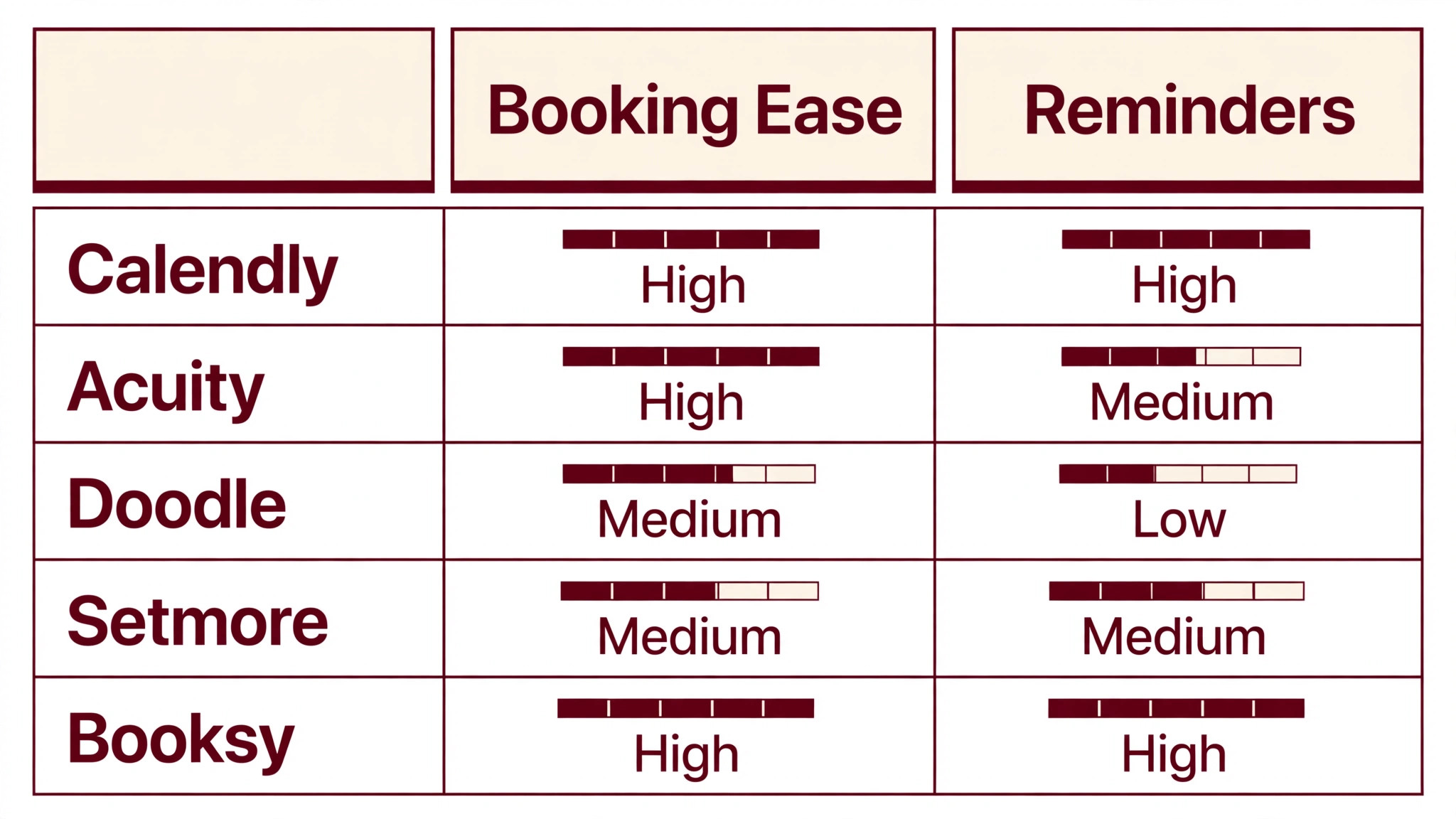
- Booking ease. We booked an appointment as a first-time client in each tool and scored how many steps it took and how clear each one was.
- No-show controls. We tested reminders, deposits and cancellation rules, since a booking that never happens is worse than no booking at all.
- Calendar reliability. We checked two-way sync, double-booking protection and how the tool handles time zones.
- Payments. We tested deposits, full payment and invoicing, since a booking tool that cannot take money leaves revenue on the table.
- Price against use. We compared the monthly cost with the number of bookings a business can realistically take, and scored value rather than sticker price.
Best Pick by Job
No single tool wins every booking job, so match the work in front of you to the tool that handles it best. The best scheduling software differs most in the kind of business it serves, not in its feature list.
| Job | Best pick |
|---|---|
| Solo consultant | Calendly |
| Salon or spa | Booksy |
| Fitness studio classes | SimplyBook.me |
| Home services crew | Jobber |
| Medical practice | Setmore |
| Beauty business | Fresha |
The 15 Tools in Detail
1. Calendly
Calendly is the booking link the world already knows. Share a link, and the client picks a time from your real availability, with time zones handled automatically and a calendar invite sent to both sides. The setup takes minutes, the free tier covers a solo worker, and the paid tiers add team scheduling, routing and integrations. Consultants, coaches and sales teams use it because clients never need instructions to book.
Pricing is where the best scheduling software separates most clearly. Calendly offers a free tier for basic booking, with paid plans from $10 a month per user adding team features and integrations. Confirm the current figure before you buy, since the per-user price and plan limits move, so verify the current numbers on the pricing page first. A solo consultant can run on the free tier for a long time.
Calendly is a meeting scheduler first, and a salon or clinic that needs staff rosters and payments will find it thin. For meetings and consultations, nothing beats its simplicity. Our verdict. Start here when the booking is a meeting, not a service with a price.
2. Acuity Scheduling
Acuity Scheduling, now Squarespace Scheduling, is the customisable option for service businesses. It handles intake forms, deposits, packages, gift certificates and client self-scheduling, with a booking page that can match a brand. The tool suits businesses that sell services with options, since a client can pick the service, the add-ons and the staff member in one flow. Coaches, therapists and consultants will find the depth useful.
Pricing on the vendor site is the accurate line for Acuity, since plans start from $16 a month and rise with features. The cost is mid-range for this list. Confirm the current figure before you buy, and check whether the plan includes payment processing.
Acuity takes longer to set up than Calendly, since the options and forms need configuring before the first booking. A business that invests that time gets a booking flow that fits exactly. Our verdict. Choose it when the service has options the client must pick.
3. Doodle
Doodle is the group scheduling tool, built for finding a time that suits several people. It sends a poll of time options, collects votes, and books the slot that works for everyone, with calendar sync and reminders attached. Teams that schedule meetings across companies use it to end the email chain about availability. The interface is simple, and the free tier covers the core polling.
Pricing on the vendor site is the fair answer, since Doodle offers a free tier with paid plans adding branding and integrations. The cost is low. Confirm the current figure before you buy, and check how many polls each tier allows.
Doodle is a meeting finder rather than a full booking system, so a business that takes client appointments all day will need more. For group scheduling, it remains the standard. Our verdict. Use it when the hard part is finding a time everyone shares.
4. Setmore
Setmore is the free core plan that small teams love. It offers online booking, staff schedules, reminders and a booking page at no cost, with paid tiers adding payments and integrations. The tool suits clinics, salons and small practices that need a real system without a monthly bill. The interface is clean, and the setup takes under an hour.
Pricing on the vendor site is the right line, since Setmore plans depend on features and staff count. The free tier covers more than most rivals. Confirm the current figure before you buy, and compare the free and paid feature lists.
Setmore is lighter on marketing and reporting than the specialist salon tools, so a business that lives on promotions may want more. For straightforward booking, it is excellent value. Our verdict. Start here when the budget is zero and the bookings are real.
5. SimplyBook.me
SimplyBook.me is the feature-deep booking system for classes and services. It handles group classes, memberships, packages, coupons and staff schedules, with a booking page that can sell as well as schedule. Fitness studios, tutors and clinics use it because the feature list covers the whole business, not just the calendar. The customisation runs deep, with add-ons for almost every need.
Pricing on the vendor site is the accurate answer, since SimplyBook.me plans depend on bookings and features. The cost is mid-range. Confirm the current figure before you buy, and count your monthly bookings before you choose a tier.
The depth comes with complexity, and a new user can feel lost in the settings for a day. A business that works through the setup gets a system that fits precisely. Our verdict. Pick it when the booking flow has many moving parts.
6. Appointy
Appointy is the local services scheduler, built for businesses that book by staff and by service. It covers online booking, staff management, reminders and payments, with a booking page that works well on a phone. Salons, clinics and repair shops use it because the staff view shows who is free at a glance. The tool also handles Google integration, so clients can book straight from a search result.
Pricing on the vendor site is the fair line, since Appointy plans depend on staff count and features. The cost is competitive. Confirm the current figure before you buy, and check whether the Google booking feature is included.
Appointy is less known than the leaders, and its template library is smaller. The core booking works well, and the price is fair. Our verdict. Try it when the business books by staff member as well as by service.
7. Booksy
Booksy is the beauty marketplace with booking built in. Clients find salons and barbers through the Booksy app, book a chair, and pay, while the business gets a booking system, a marketplace listing and marketing tools in one account. The platform suits salons that want new clients from the app as well as bookings from their own page. The interface is polished, and the mobile experience is the best in its category.
Pricing on the vendor site is the right answer, since Booksy plans depend on staff count and features. The cost is mid-range for a salon tool. Confirm the current figure before you buy, and ask how the marketplace commission works.
Booksy takes a cut of marketplace bookings, which is the price of the new clients it brings. A salon that books mostly through its own page will pay less. Our verdict. Choose it when new clients should find you through the app.
8. Square Appointments
Square Appointments is the booking tool for businesses already on Square. It covers online booking, staff schedules, reminders and payments, with the money landing in the same Square account as the till. The free tier handles a solo worker, and the paid tier adds team features. Shops, salons and clinics that take card payments through Square will find the connection smooth in the practical sense, with no extra accounts to reconcile.
Pricing on the vendor site is the accurate line, since Square Appointments offers a free tier with a paid plan for teams. Confirm the current figure before you buy, and check the processing fees on payments.
The tool is tied to Square, so a business that does not use Square gains little from it. For Square users, the fit is natural. Our verdict. Pick it when the till is already Square.
9. Fresha
Fresha is the beauty platform that charges by commission rather than subscription. Salons list their services, clients book online, and Fresha takes a percentage of bookings made through its marketplace, while bookings from the salon’s own page cost nothing extra. The model suits a new salon that wants bookings without a monthly bill, and the booking system itself is polished. The marketplace brings new clients, which is the point.
Pricing on the vendor site is the fair answer, since Fresha plans depend on the marketplace commission and paid add-ons. Confirm the current figure before you buy, and read the commission terms carefully.
A salon that books mostly through its own page will find Fresha cheap, while one that relies on the marketplace will pay more over time. The maths depends on where the clients come from. Our verdict. Use it when the salon is new and the budget is tight.
10. Timely
Timely is the smart calendar for salons, with a booking system that learns the business. It handles online booking, staff rosters, reminders and payments, with a clean interface that a salon team learns quickly. The tool also includes marketing features, so a salon can message clients about gaps and quiet days. The smart calendar suggests the best slot for each booking, which cuts the admin time per appointment.
Pricing on the vendor site is the right line, since Timely plans depend on staff count. The cost is mid-range for a salon tool. Confirm the current figure before you buy, and test the smart calendar on a real week of bookings.
Timely is salon-focused, so a business outside beauty will find features it never uses. For salons, the fit is exact. Our verdict. Choose it when the salon wants a calendar that thinks ahead.
11. Schedulicity
Schedulicity is the low-cost scheduler for solo professionals. It covers online booking, reminders, payments and a booking page at a monthly price that stays low, with a marketplace that brings new clients to the business. Hair stylists, massage therapists and tutors use it because the cost is small and the setup is quick. The interface is simple, and the mobile app works well.
Pricing on the vendor site is the accurate answer, since Schedulicity plans depend on features. The cost is among the lowest on this list. Confirm the current figure before you buy, and check whether the marketplace listing is included.
Schedulicity is lighter on reporting than the leaders, so a business that needs deep analytics may want more. For a solo professional, the value is clear. Our verdict. Start here when the business is one person and the budget is small.
12. Vagaro
Vagaro is the wellness platform with marketing built in. It covers booking, staff schedules, payments and client records, plus email campaigns, deals and a marketplace that brings new clients. Spas, studios and salons use it because the marketing tools fill quiet slots without extra software. The interface is busy, yet the features are all there.
Pricing on the vendor site is the fair line, since Vagaro plans depend on staff count and features. The cost is mid-range. Confirm the current figure before you buy, and check which marketing tools each tier includes.
Vagaro can feel crowded for a business that only needs booking, since the marketing panels fill the screen. A business that uses the marketing will get its money’s worth. Our verdict. Pick it when empty slots need filling, not just booking.
13. HoneyBook
HoneyBook is the client management platform for creative businesses. It covers booking, contracts, invoices and payments in one flow, so a photographer or designer can take a booking, send a contract and collect a deposit without leaving the tool. The templates make the paperwork look professional, and the client portal keeps everything in one place. Creative professionals who juggle clients will feel the relief immediately.
Pricing on the vendor site is the right answer, since HoneyBook plans depend on features. The cost is mid-range for a business tool. Confirm the current figure before you buy, and test the contract templates on your own work.
HoneyBook is built for project-based work, so a business that books the same appointment every day may find it heavy. For creative bookings, it is the standard. Our verdict. Use it when the booking comes with a contract and an invoice.
14. Jobber
Jobber is the home services platform, built for businesses that quote, schedule and invoice in the field. It covers booking, dispatch, quoting, invoicing and payments, with a mobile app that a crew uses on the job. Plumbers, cleaners and landscapers use it because the whole job, from quote to payment, lives in one system. The scheduling view shows the crew’s day at a glance.
Pricing on the vendor site is the accurate line, since Jobber plans depend on users and features. The cost is mid-range for a field service tool. Confirm the current figure before you buy, and check whether the plan includes the quoting tools you need.
Jobber is a field service system first, so a business that only needs a booking page will find it heavy. For home services, the fit is exact. Our verdict. Choose it when the work happens at the client’s address.
15. Housecall Pro
Housecall Pro is the dispatch and routing platform for field service teams. It covers online booking, dispatch, GPS tracking, estimates, invoicing and payments, with automation that keeps the crew moving. The tool suits larger home service businesses that run several vans, since the routing and dispatch features save hours a day. The mobile app is the centre of the system, and the office sees the whole fleet live.
Pricing on the vendor site is the fair answer, since Housecall Pro plans depend on users and features. The cost reflects the depth. Confirm the current figure before you buy, and ask for a demo on a real dispatch day.
Housecall Pro is too much system for a solo operator, and the setup takes time. A team running several vans will use all of it. Our verdict. Buy it when the fleet needs dispatch, not just a booking page.
Calendly vs Acuity Scheduling: The Head-to-Head That Decides It
Calendly and Acuity both take bookings online, yet they serve different businesses. Calendly wins on simplicity, since a client books in three clicks and the host never configures anything. Acuity wins on depth, since a business can shape the booking flow around its services, forms and payments. The choice is between a tool that gets out of the way and a tool that does exactly what the business asks.
Price is close at the entry level, since Calendly starts free and Acuity starts from $16 a month. The difference appears as the business grows, since Acuity charges for the features a complex service needs while Calendly charges per user. Count the team first, then count the services, and the cheaper option will show itself.
The client experience tells the same story. Calendly feels instant, with a booking page that needs no explanation. Acuity feels thorough, with a flow that asks the right questions before the booking is confirmed. A client booking a consultation will prefer Calendly, while a client booking a treatment with options will prefer Acuity.
What finally separates them is the business behind the booking. Calendly suits a business that sells time, while Acuity suits a business that sells a service with choices. A consultant should pick Calendly, and a clinic should pick Acuity. Match the tool to what the client is actually buying.
Choosing a Booking Tool That Cuts No-Shows Instead of Adding Admin
The booking tool should save more time than it takes to run, so judge the shortlist by the admin it removes rather than the features it adds.
- Test the booking as a client first. If the flow confuses you, it will confuse the people paying you.
- Turn on reminders before launch. A booking without a reminder is a no-show waiting to happen.
- Check the cancellation rules. A clear policy with easy rescheduling keeps clients instead of losing them.
- Ask about double-booking protection. A tool that lets two clients take one slot will cost more than any subscription saves.
- Count the clicks to a confirmed booking. Three clicks is the target, and every extra click loses clients.
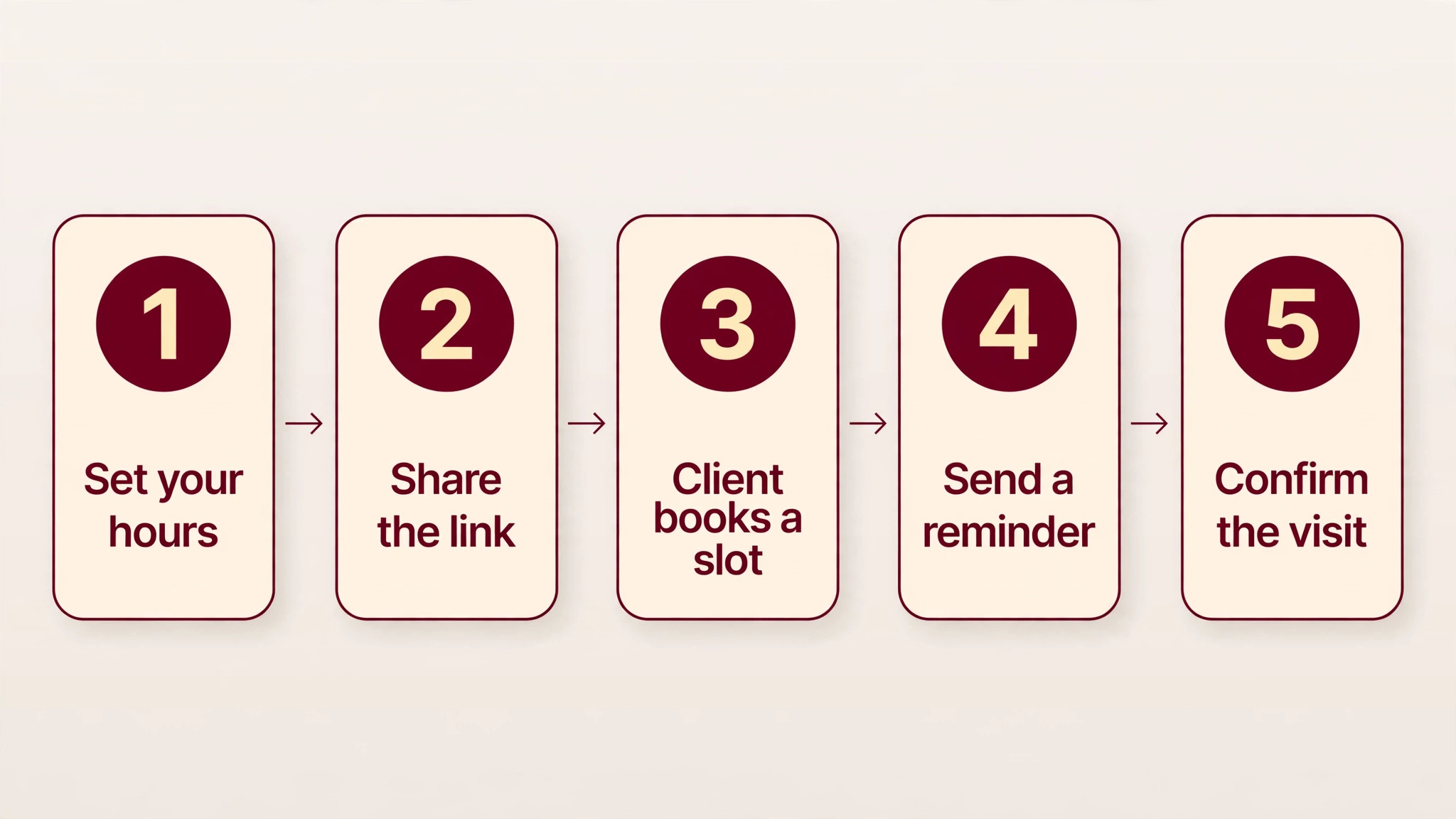
Running Your First Online Booking in Five Steps
The best scheduling software only helps when the booking steps around it are sound, so here is the five-step run we recommend for a first online booking.
- Set your hours. Define the working hours, breaks and buffer time, since the booking page can only offer what the calendar allows.
- Share the link. Put the booking link on the website, the email signature and the social profiles, so clients find it everywhere.
- Client books a slot. The client picks a time, answers the intake questions, and gets a confirmation instantly.
- Send a reminder. A message the day before and an hour before cuts no-shows sharply, so automate both.
- Confirm the visit. A quick confirmation on arrival closes the loop, and the client leaves ready to book again.
Frequently Asked Questions
These are the questions owners ask us most about the best scheduling software, answered in plain terms.
How much does scheduling software reduce no-shows?
Most businesses see no-shows fall by a third or more once reminders are automated, and deposits cut them further. The exact saving depends on the business, since a salon and a consultant lose different amounts to a missed slot. The pattern is consistent, which is that a client who gets a reminder the day before and an hour before shows up far more often than one who gets nothing.
Can clients book without creating an account?
Yes, and the best tools on this list allow it. A client should be able to pick a time, enter a name and a phone number, and confirm without a password. Forcing an account creation loses bookings, since many clients will abandon the flow rather than register. Check the guest booking option during the trial, since it matters more than any other feature for conversion.
Do I need a separate payment tool for deposits?
No, when the booking tool includes payments. Most tools on this list take deposits and full payments at booking, with the money landing in the same account as the business. A separate payment tool adds reconciliation work, so choose a booking tool with payments built in when deposits matter. Check the processing fee, since it varies between tools.
How do buffer times and breaks work in a booking tool?
Buffer time is the gap the tool adds between appointments, and breaks are the times it blocks off entirely. A salon sets fifteen minutes to clean the chair, a consultant sets ten minutes to write notes, and the booking page never offers those gaps to clients. The settings live in the calendar rules, and a business should set them before the first booking goes live.
What happens when two clients book the same slot?
A good tool prevents it, since the slot disappears from the booking page the moment the first client confirms. The risk appears when the calendar sync lags or when two staff members share one calendar, so two-way sync matters. Test the protection during the trial by booking the same slot twice, and choose the tool that blocks the second booking cleanly.
Can a booking page match my website branding?
Yes, and the better tools on this list allow colours, logos and custom domains on the booking page. A page that looks like the business builds trust, while a generic page looks like a third party. The depth of customisation differs, so a brand-conscious business should test the branding options before committing.
Our Pick, Stated Plainly — Calendly Is the Scheduling Default
If your business takes bookings online, start with Calendly. The best scheduling software all has a place, but Calendly pairs the simplest booking flow with the widest recognition, and that combination is why it leads this guide. Clients book without instructions, the calendar stays honest, and the free tier covers a solo worker for a long time.
The rest of the list earns its keep for specific businesses. Acuity suits a service with options, Booksy suits a salon, and Jobber suits a home services crew. Use Calendly for the daily work of booking, then add the specialist that matches the gap in your diary. That is the whole strategy, and it works for one person as well as a full team.
One last pricing note matters. Track what each booking actually costs, from the subscription share to the no-shows prevented, and keep the numbers in a simple sheet. After a month you will know your true cost per booking on the tool you chose, and the renewal decision will take minutes instead of a meeting. The tools do not change much. Your data about them is what improves.