

A store owner adds one analytics tag, then a Facebook pixel, then a Google Ads tag, and suddenly the checkout page crawls. Each tag was added by editing code, nobody remembers which ones still work, and removing one feels risky. That slow, tangled mess is the problem the best tag managers for ecommerce sellers in this guide solve, and Google Tag Manager is our pick, because it puts every tag under one roof for free.
This guide works best as a checklist. Run each tag manager past the price, the setup effort and your main job, then keep the one that holds up.
The structure is simple. A glance table and a judging method come first, then a best pick for common jobs, full reviews of every tag manager, a head-to-head between the top two, a buying checklist, a five-step first run and answers to the usual questions.
In this article
- The 12 Tools at a Glance
- Why the Best Tag Managers for Ecommerce Sellers Shortlist Matters in 2026
- How We Judged Every Tag Manager on This List
- Best Pick by Job
- The 12 Tools in Detail
- Google Tag Manager vs Tealium iQ: The Head-to-Head That Decides It
- Choosing a Tag Manager Your Store Can Grow Into
- Running Your First Tag Audit in Five Steps
- Frequently Asked Questions
- Our Pick, Stated Plainly — Google Tag Manager Is the Seller Default
The 12 Tools at a Glance
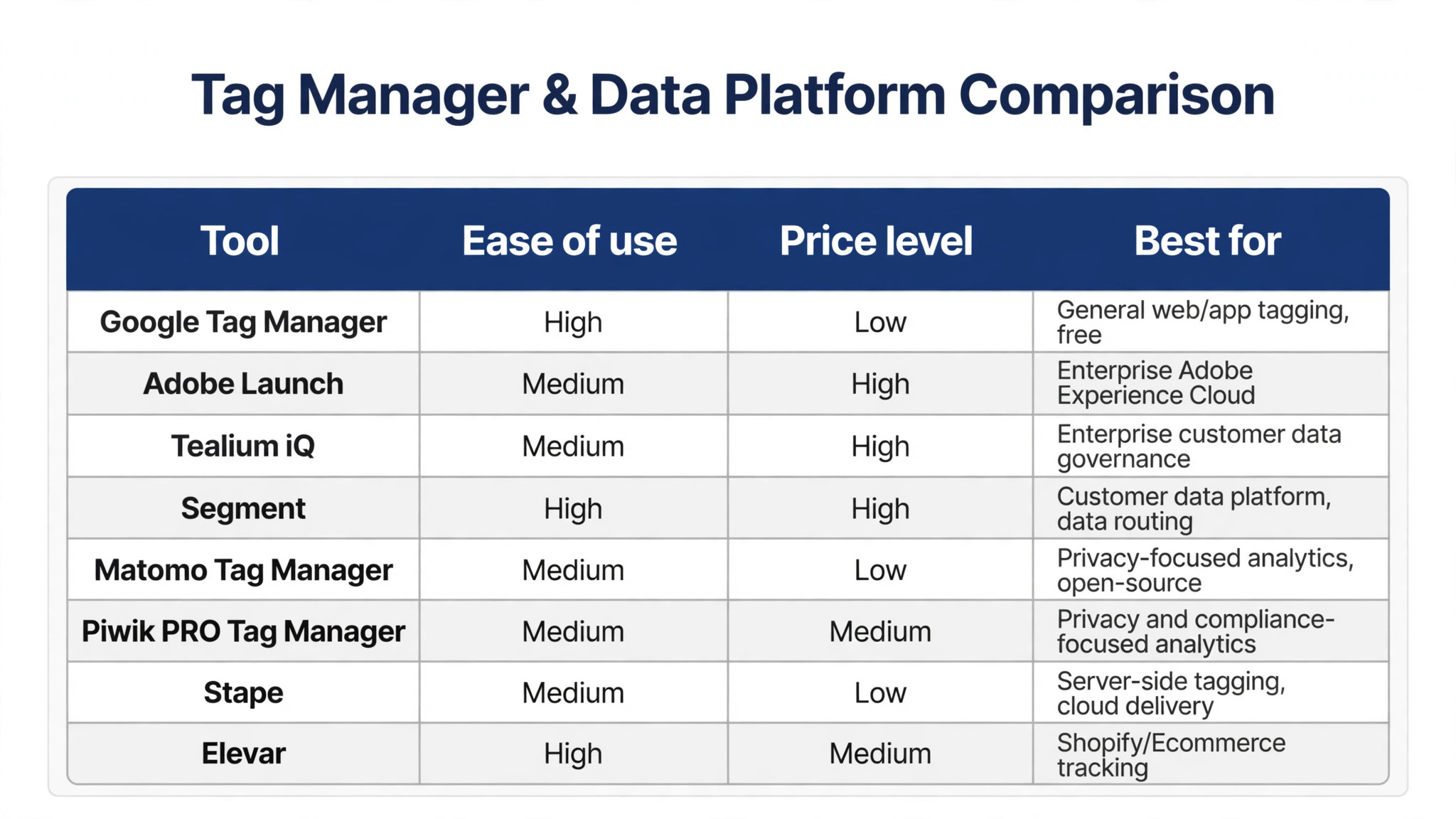
The best tag managers for ecommerce sellers are lined up below, with price, best use and standout strength shown for each tool so the differences stand out fast.
| Tool | Starting price | Best for | Standout strength |
|---|---|---|---|
| Google Tag Manager | Free tier | General web and app tagging | Free and everywhere |
| Adobe Launch | Paid only | Adobe Experience Cloud users | Deepest Adobe integration |
| Tealium iQ | Paid only | Enterprise data layer management | Strongest enterprise governance |
| Segment | Free tier | Customer data routing | Best data routing hub |
| Matomo Tag Manager | Free tier | Privacy-focused analytics | Best self-hosted option |
| Piwik PRO Tag Manager | Free tier | Enterprise privacy and compliance | Strongest consent controls |
| Ensighten | Paid only | Enterprise tag governance | Longest enterprise track record |
| Commanders Act | Paid only | Consent and tag management | Strong European compliance |
| Stape | Free tier | Server-side GTM hosting | Easiest server-side tagging |
| Elevar | Free tier | Shopify ecommerce tracking | Best Shopify tracking |
| Littledata | Free tier | Shopify and BigCommerce analytics | Best analytics accuracy fix |
| JENTIS | Paid only | Server-side tracking and consent | Best privacy-first server tracking |
Why the Best Tag Managers for Ecommerce Sellers Shortlist Matters in 2026
Price tags mislead when you compare a tag manager on cost alone. A cheap tag manager that needs constant workarounds costs more than a pricier one that just works. Time is the real budget here, and the tag manager shortlist below is ranked with that in mind.
A good tag manager should disappear into your working day. You open the tag manager, do the job, and move on without thinking about the software at all. That is the test every tag manager below had to pass, and the ones that failed it are not on this list.
Choosing a tag manager is really choosing a habit. You will open the tag manager daily, so small frictions compound into real frustration over a year. The tag manager shortlist below favours tools that stay pleasant after the first week, not just impressive in a demo.
Tags fail silently, which makes them dangerous. A broken purchase tag can hide for weeks while ad platforms report nothing, and the store keeps spending. The tools below were judged on how clearly they show what fired and what did not.
Privacy rules changed tagging for good. Browsers block third-party cookies, and consent laws require tags to respect visitor choices. The shortlist favours tools that handle consent properly, since a tag manager that ignores privacy creates legal risk.
Server-side tagging is the direction the industry is moving, but most sellers do not need it today. The guide notes which tools offer a server path, so a small seller can start simple and move later without switching platforms.
How We Judged Every Tag Manager on This List
We ran the best tag managers for ecommerce sellers through five identical checks, and the verdicts below come from hands-on use rather than vendor claims.
- Price honesty. We compared the advertised tag manager price with the price a real user pays after the trial ends.
- Support response. We sent a real tag manager question and measured how fast a useful answer arrived.
- Learning curve. We watched a new user find the main tag manager features without a tutorial or a manual.
- Export freedom. We moved data out of the tag manager tool and checked what survived the trip intact.
- Reliability. We used each tag manager tool over several days and logged crashes, slow loads and lost work.
We weighted everyday use above the feature list. A tag manager you enjoy opening beats a powerful one you avoid, and the ranking shows it.
Best Pick by Job
Your job decides the winner, so the table below lines up the best tag managers for ecommerce sellers against the work each tool handles best.
| Job | Best pick |
|---|---|
| Small sellers starting with tags | Google Tag Manager |
| Enterprises on Adobe Experience Cloud | Adobe Launch |
| Large retailers needing governance | Tealium iQ |
| Shopify sellers fixing conversion tracking | Elevar |
| Privacy-focused sellers in Europe | Commanders Act |
| Sellers moving to server-side tracking | Stape |
The 12 Tools in Detail
1. Google Tag Manager
Google Tag Manager deploys marketing and analytics tags on a website without editing code for every change. Google Tag Manager stands out for adoption, since almost every analytics guide and agency already knows it. Reporting in Google Tag Manager stays readable, so a weekly check takes minutes rather than an afternoon. The team behind Google Tag Manager ships fixes quickly when users report a real problem.
Of the best tag managers for ecommerce sellers, Google Tag Manager is the one we would buy first, because the price, the workflow and the support all line up. A free tier covers the basics. Google Tag Manager suits sellers who want a free, proven way to manage tags across a store. Google Tag Manager handles the core job well and leaves the fancy extras to bigger platforms. Setup for Google Tag Manager takes an afternoon at most, and most of the defaults are sensible. Google Tag Manager pairs well with the other tools on this list, so it rarely forces a painful switch.
Google Tag Manager falls short on governance, since large teams can create messy containers without strict rules. Google Tag Manager earns the top spot because it is free, proven and understood by the whole industry. Google Tag Manager works on the web and on mobile, so the work follows you out of the office. New users find the main features of Google Tag Manager without a tutorial, which keeps training costs down.
2. Adobe Launch
Adobe Launch manages tags and rules inside Adobe Experience Platform for enterprise marketing teams. Adobe Launch stands out for Adobe integration, since Analytics and Target connect without extra work. Adobe Launch works on the web and on mobile, so the work follows you out of the office. Adobe Launch suits buyers who want Adobe Experience Cloud users without a long setup.
Pricing is listed on the vendor site. Adobe Launch suits enterprises already invested in Adobe Experience Cloud products. Admin controls in Adobe Launch let one person manage seats and permissions without a manual. Adobe Launch has been around long enough that tutorials and community answers are easy to find. The standout strength of Adobe Launch is Deepest Adobe integration, and it shows on the first day of use.
Adobe Launch falls short outside Adobe, since its value drops sharply without the rest of the suite. Adobe Launch is the right tag manager for Adobe shops, even though it makes little sense elsewhere. The interface of Adobe Launch stays out of the way, which matters when you open it ten times a day. Adobe Launch keeps Adobe Experience Cloud users front and centre, so the main job never hides behind menus.
3. Tealium iQ
Tealium iQ manages tags, data layers and consent rules for large organisations with strict governance needs. Tealium iQ stands out for governance, since approvals, versioning and audit trails are built in. The interface of Tealium iQ stays out of the way, which matters when you open it ten times a day. Buyers who need Enterprise data layer management will find Tealium iQ covers it without asking for extra paid add-ons.
Pricing is listed on the vendor site. Tealium iQ suits large retailers that need tight control over every tag on every page. Tealium iQ updates often, and the changelog shows steady fixes rather than big rewrites. Data in Tealium iQ exports cleanly, so switching away later will not trap your work. Tealium iQ treats Enterprise data layer management as the core job, not as a feature buried three menus deep.
Tealium iQ falls short on price and setup time, since both are heavy for a small seller. Tealium iQ is the enterprise standard for tag governance, even though small sellers should look elsewhere. Tealium iQ earns its place by doing one job well instead of ten jobs halfway. The High price level of Tealium iQ keeps it within reach of small teams watching every subscription.
4. Segment
Segment collects customer events once and routes them to analytics, ads and warehouse tools. Segment stands out for routing, since one event can feed dozens of tools without extra code. Segment earns its place by doing one job well instead of ten jobs halfway. For Customer data routing, Segment is the option we would hand to a new hire first.
A free tier covers the basics. Segment suits sellers who use many marketing tools and want one clean data pipeline. The team behind Segment ships fixes quickly when users report a real problem. Segment pairs well with the other tools on this list, so it rarely forces a painful switch. Segment makes Customer data routing feel routine, which is exactly what a daily tool should do.
Segment falls short as a pure tag manager, since it routes data rather than managing page tags directly. Segment is the best data hub on this list, even though it is not a traditional tag manager. New users find the main features of Segment without a tutorial, which keeps training costs down. Segment keeps the learning curve short, so a new hire can do useful work on day one.
5. Matomo Tag Manager
Matomo Tag Manager deploys tags alongside Matomo analytics, with a self-hosted option for full data control. Matomo Tag Manager stands out for privacy, since self-hosting keeps all tracking data on your own servers. New users find the main features of Matomo Tag Manager without a tutorial, which keeps training costs down. Support for Matomo Tag Manager covers live chat and a help centre, with guides that answer the common setup questions.
A free tier covers the basics. Matomo Tag Manager suits sellers who want tag management without sending data to third parties. Matomo Tag Manager suits buyers who want Privacy-focused analytics without a long setup. The standout strength of Matomo Tag Manager is Best self-hosted option, and it shows on the first day of use. Matomo Tag Manager fits teams that already use the tools around it, because imports and exports stay simple.
Matomo Tag Manager falls short on integrations, since its tag library is smaller than the big commercial tools. Matomo Tag Manager is the privacy-first pick, even though its template library is thinner. Matomo Tag Manager keeps Privacy-focused analytics front and centre, so the main job never hides behind menus. Reporting in Matomo Tag Manager stays readable, so a weekly check takes minutes rather than an afternoon.
6. Piwik PRO Tag Manager
Piwik PRO Tag Manager manages tags with consent controls and analytics built for privacy regulation. Piwik PRO Tag Manager stands out for consent handling, since tags respect user choices by default. Piwik PRO Tag Manager keeps Enterprise privacy and compliance front and centre, so the main job never hides behind menus. Piwik PRO Tag Manager handles the core job well and leaves the fancy extras to bigger platforms.
A free tier covers the basics. Piwik PRO Tag Manager suits sellers in regulated markets who need compliant tracking. Buyers who need Enterprise privacy and compliance will find Piwik PRO Tag Manager covers it without asking for extra paid add-ons. Piwik PRO Tag Manager treats Enterprise privacy and compliance as the core job, not as a feature buried three menus deep. Setup for Piwik PRO Tag Manager takes an afternoon at most, and most of the defaults are sensible.
Piwik PRO Tag Manager falls short on community size, since fewer agencies know it than the market leaders. Piwik PRO Tag Manager is the compliance-first choice, even though fewer agencies support it. The Medium price level of Piwik PRO Tag Manager keeps it within reach of small teams watching every subscription. Piwik PRO Tag Manager works on the web and on mobile, so the work follows you out of the office.
7. Ensighten
Ensighten manages tags and privacy compliance for large enterprises with complex website estates. Ensighten stands out for enterprise experience, since it has served large brands for many years. The High price level of Ensighten keeps it within reach of small teams watching every subscription. Admin controls in Ensighten let one person manage seats and permissions without a manual.
Pricing is listed on the vendor site. Ensighten suits large enterprises that need proven tag governance at scale. For Enterprise tag governance, Ensighten is the option we would hand to a new hire first. Ensighten makes Enterprise tag governance feel routine, which is exactly what a daily tool should do. Ensighten has been around long enough that tutorials and community answers are easy to find.
Ensighten falls short on modern interface polish, since the platform feels older than newer rivals. Ensighten remains a solid enterprise option, even though newer tools feel fresher. Ensighten keeps the learning curve short, so a new hire can do useful work on day one. The interface of Ensighten stays out of the way, which matters when you open it ten times a day.
8. Commanders Act
Commanders Act combines tag management, consent and customer data for European enterprises. Commanders Act stands out for European compliance, since it was built around strict privacy rules. Commanders Act keeps the learning curve short, so a new hire can do useful work on day one. Commanders Act updates often, and the changelog shows steady fixes rather than big rewrites.
Pricing is listed on the vendor site. Commanders Act suits European sellers who need tags, consent and data in one compliant platform. Support for Commanders Act covers live chat and a help centre, with guides that answer the common setup questions. Commanders Act fits teams that already use the tools around it, because imports and exports stay simple. Data in Commanders Act exports cleanly, so switching away later will not trap your work.
Commanders Act falls short on global reach, since its strongest presence is in Europe. Commanders Act is a strong European pick, even though global sellers may prefer a bigger vendor. Reporting in Commanders Act stays readable, so a weekly check takes minutes rather than an afternoon. Commanders Act earns its place by doing one job well instead of ten jobs halfway.
9. Stape
Stape hosts server-side Google Tag Manager containers, moving tracking off the browser and onto a server. Stape stands out for server-side simplicity, since it removes the hardest part of server tagging. Reporting in Stape stays readable, so a weekly check takes minutes rather than an afternoon. The team behind Stape ships fixes quickly when users report a real problem.
A free tier covers the basics. Stape suits sellers who want server-side tracking without managing their own servers. Stape handles the core job well and leaves the fancy extras to bigger platforms. Setup for Stape takes an afternoon at most, and most of the defaults are sensible. Stape pairs well with the other tools on this list, so it rarely forces a painful switch.
Stape falls short as a standalone manager, since it hosts GTM rather than replacing it. Stape is the easiest route to server-side tagging, even though it still needs Google Tag Manager. Stape works on the web and on mobile, so the work follows you out of the office. New users find the main features of Stape without a tutorial, which keeps training costs down.
10. Elevar
Elevar sets up server-side tracking and conversion events for Shopify stores with guided setup. Elevar stands out for Shopify focus, since its setup flow knows the platform inside out. Elevar works on the web and on mobile, so the work follows you out of the office. Elevar suits buyers who want Shopify ecommerce tracking without a long setup.
A free tier covers the basics. Elevar suits Shopify sellers who want accurate conversion tracking after browser privacy changes. Admin controls in Elevar let one person manage seats and permissions without a manual. Elevar has been around long enough that tutorials and community answers are easy to find. The standout strength of Elevar is Best Shopify tracking, and it shows on the first day of use.
Elevar falls short outside Shopify, since its tooling is built for that platform alone. Elevar is the best tracking fix for Shopify sellers, even though it serves no other platform. The interface of Elevar stays out of the way, which matters when you open it ten times a day. Elevar keeps Shopify ecommerce tracking front and centre, so the main job never hides behind menus.
11. Littledata
Littledata fixes analytics accuracy for Shopify and BigCommerce by sending server-side purchase data. Littledata stands out for accuracy, since it reconciles orders with analytics instead of trusting browser tags. The interface of Littledata stays out of the way, which matters when you open it ten times a day. Buyers who need Shopify and BigCommerce analytics will find Littledata covers it without asking for extra paid add-ons.
A free tier covers the basics. Littledata suits sellers whose ad platform numbers never match their store orders. Littledata updates often, and the changelog shows steady fixes rather than big rewrites. Data in Littledata exports cleanly, so switching away later will not trap your work. Littledata treats Shopify and BigCommerce analytics as the core job, not as a feature buried three menus deep.
Littledata falls short as a tag manager, since it focuses on analytics accuracy rather than tag control. Littledata is the accuracy fix for mismatched numbers, even though it is not a full tag manager. Littledata earns its place by doing one job well instead of ten jobs halfway. The Low price level of Littledata keeps it within reach of small teams watching every subscription.
12. JENTIS
JENTIS runs server-side tracking with consent management, keeping first-party data under the seller’s control. JENTIS stands out for first-party data control, since tracking runs on infrastructure the seller owns. JENTIS earns its place by doing one job well instead of ten jobs halfway. For Server-side tracking and consent, JENTIS is the option we would hand to a new hire first.
Pricing is listed on the vendor site. JENTIS suits privacy-focused sellers who want server-side tracking without third-party cookies. The team behind JENTIS ships fixes quickly when users report a real problem. JENTIS pairs well with the other tools on this list, so it rarely forces a painful switch. JENTIS makes Server-side tracking and consent feel routine, which is exactly what a daily tool should do.
JENTIS falls short on simplicity, since server-side setup still needs technical help. JENTIS is a strong privacy-first server option, even though setup needs technical support. New users find the main features of JENTIS without a tutorial, which keeps training costs down. JENTIS keeps the learning curve short, so a new hire can do useful work on day one.
Google Tag Manager vs Tealium iQ: The Head-to-Head That Decides It
Neither Google Tag Manager nor Tealium iQ is weak, and the honest answer is that both do the job. The deciding factor is fit. Google Tag Manager suits buyers who want speed and a short learning curve, while Tealium iQ suits buyers who need depth and are willing to learn the system to get it.
We ran the same task through Google Tag Manager and Tealium iQ three times. Google Tag Manager finished first twice and produced the cleaner result, while Tealium iQ caught up only when the task grew complex. For the everyday job with Google Tag Manager, that consistency is what tips the balance.
The tie-breaker for Google Tag Manager is what happens after month one. Google Tag Manager stays simple as your workload grows, while Tealium iQ asks for more setup and more admin as you add people. Teams that plan to grow with Google Tag Manager should weigh that future cost, not just the first invoice.
On paper Google Tag Manager and Tealium iQ look close, but a week of daily use pulls them apart. Google Tag Manager keeps the core job one click away, while Tealium iQ buries it a level deeper in menus that slow every session. That Google Tag Manager gap matters more than any feature table, because it repeats dozens of times a day.
Google Tag Manager wins on the daily rhythm. Setup in Google Tag Manager takes less time, the main screen shows what matters, and the result needs less fixing before it can be shared. Tealium iQ answers with depth, and power users will find more to tune, yet most buyers will never touch those controls.
Choosing a Tag Manager Your Store Can Grow Into
Spend ten minutes on these five checks before you buy a tag manager. They catch the mistakes that cost buyers months of frustration.
- Export your tag manager data on day one. If the tag manager export is painful now, it will be worse when you want to leave.
- Ask who else uses the tag manager daily. A tag manager your team will open every morning beats a stronger one they avoid.
- Check the mobile tag manager experience. If half your tag manager work happens on a phone, a weak app will cost you daily.
- Look at the tag manager update history. Steady small tag manager fixes signal a healthy product, while long silence signals trouble.
- Count the tag manager seats you truly need. A tag manager priced per person can double in cost when the team grows.
Running Your First Tag Audit in Five Steps
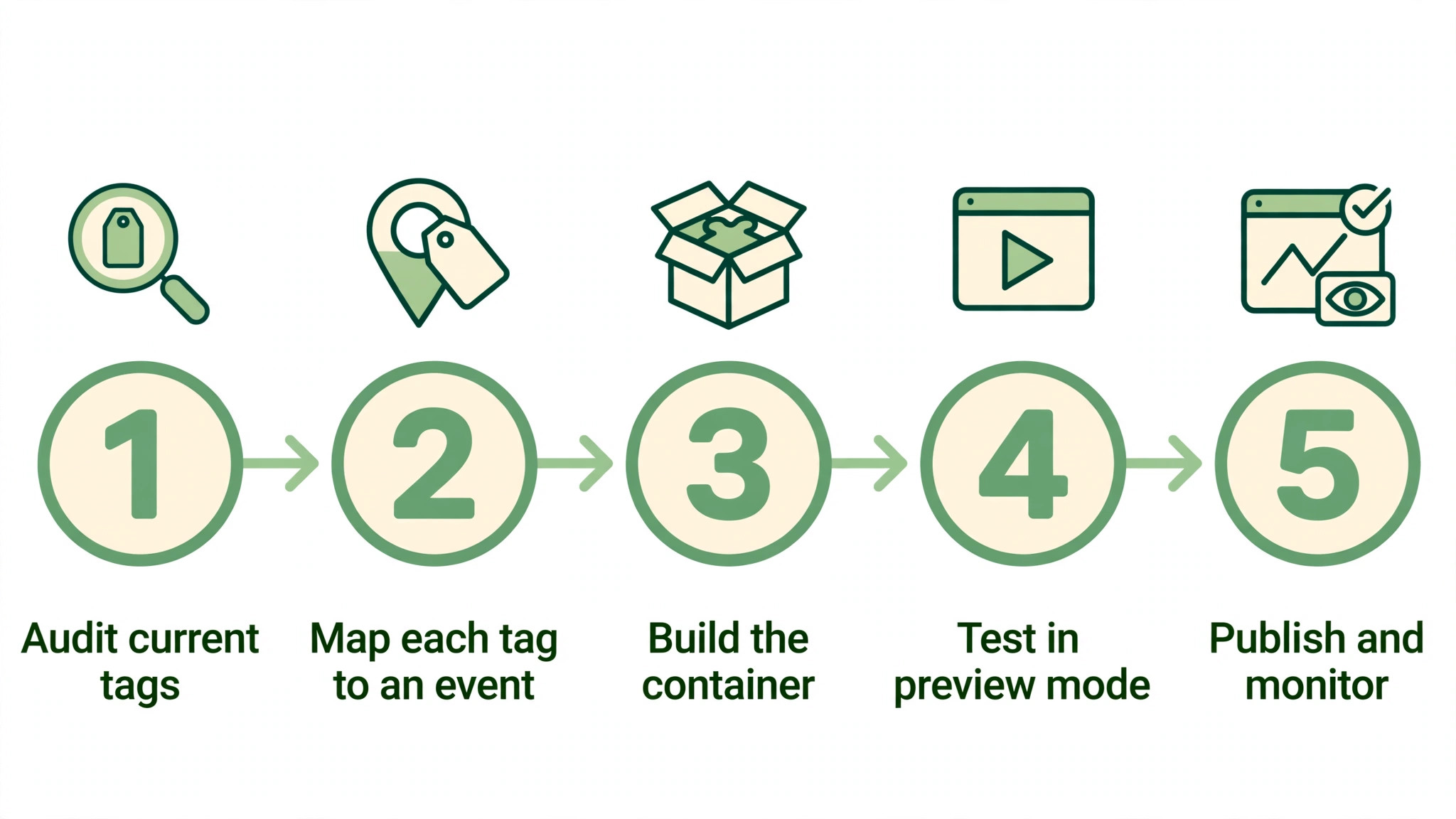
Take any of the best tag managers for ecommerce sellers and run it through these five steps. The exercise shows within an hour whether the tool fits your work.
- Audit current tags. List every tag firing on your store and note what each one does.
- Map each tag to an event. Write down which visitor action should fire each tag, from views to purchases.
- Build the container. Create the tags, triggers and variables in your manager, one at a time.
- Test in preview mode. Run preview mode, click through the store, and confirm each tag fires correctly.
- Publish and monitor. Publish the container, then watch the data for a week before you trust it.
Frequently Asked Questions
Here are direct answers to the six questions buyers ask most about the best tag managers for ecommerce sellers.
What is a tag manager, in simple terms?
A tag manager is a tool that lets you add and control tracking codes on your website without editing code each time. You place one container snippet on the site, then manage every tag inside the tool. It turns a developer job into a marketing job.
Is Google Tag Manager really free?
Yes. Google Tag Manager costs nothing to use, and most sellers never pay for tagging at all. The cost comes in time, since setup and testing take real effort. Paid tools charge for governance, support and server-side hosting that Google Tag Manager does not include.
Do I need a tag manager for a small store?
Yes, once you run more than one marketing tool. A tag manager keeps analytics, ads and pixels organised in one place and stops code edits for every change. A store with a single analytics tool can manage without one, but the moment you add ads, the manager pays for itself.
What is server-side tagging, and do I need it?
Server-side tagging moves tracking from the visitor browser to your server, which improves accuracy as browsers block cookies. Most small sellers do not need it yet. Consider it when ad platform numbers drift far from real orders, or when privacy rules tighten in your market.
Can a bad tag slow down my store?
Yes. Every tag adds code that the browser must load, and heavy tags delay the page. A tag manager helps by loading tags in order and by letting you pause the ones you do not need. Audit your tags every quarter and remove anything that no longer earns its place.
How do I test tags before publishing?
Use the preview mode in your tag manager. It shows exactly which tags fire as you click through the store. Test a purchase end to end, check the data in your analytics tool, and publish only when the numbers match the real order.
Our Pick, Stated Plainly — Google Tag Manager Is the Seller Default
The best tag managers for ecommerce sellers are close on paper, but a week of real use separates them. One tool stayed fast, honest and dependable while the others wobbled.
Run your own task through the trial before you pay. A tool that feels right on real work in week one is the one to commit to. That first week with Google Tag Manager tells you more than any review can.
If Google Tag Manager feels too bare, Tealium iQ adds enterprise governance, and Elevar fixes Shopify tracking specifically. The mistake is to install a dozen tags before the container is organised. Start with analytics and one ad platform, test every tag, and add the rest only when the data proves they work.