

The contest for the top 10 email automation tools is really a contest between depth and price. ActiveCampaign wants to be the automation engine a business grows into, with flows that follow a customer from first click to repeat purchase without anyone touching them. Klaviyo wants to be the ecommerce answer, with revenue data built into every send and flows that trigger from what a shopper actually did.
The other eight tools sit between those two poles, from simple newsletter senders to full marketing hubs, and this guide puts all ten side by side so you can see where the leader wins, where the runner-up catches it, and which tool fits the list you actually have. Email still earns more per dollar than any other channel, and the gap is widest for businesses that automate. A welcome flow that runs itself will earn more in a month than a newsletter written by hand every week, because the flow reaches every new subscriber at the right moment.
The problem is not the idea, it is the setup, and the right tool is the one you will finish setting up. We tested each tool against the work a business actually does, from welcome flows and abandoned carts to newsletters and re-engagement campaigns. We looked at automation depth, ecommerce integration, deliverability and the real cost of the plan a working business needs. Prices come from vendor pages and recent pricing guides checked in November 2026, and where a vendor charges by contacts or by sends we say so instead of hiding the maths.
In this article
- The 10 Tools at a Glance
- Why the Top 10 Email Automation Tools Decide Whether Your List Earns
- How We Judged Each Email Tool for a Working Business
- Best Pick by Job
- The 10 Tools in Detail
- A First-Month Email Setup That Pays for Itself
- What Email Automation Actually Costs at Real List Sizes
- Email Mistakes That Hurt Deliverability
- Frequently Asked Questions
- Our Pick for Your List, Stated Plainly
The 10 Tools at a Glance
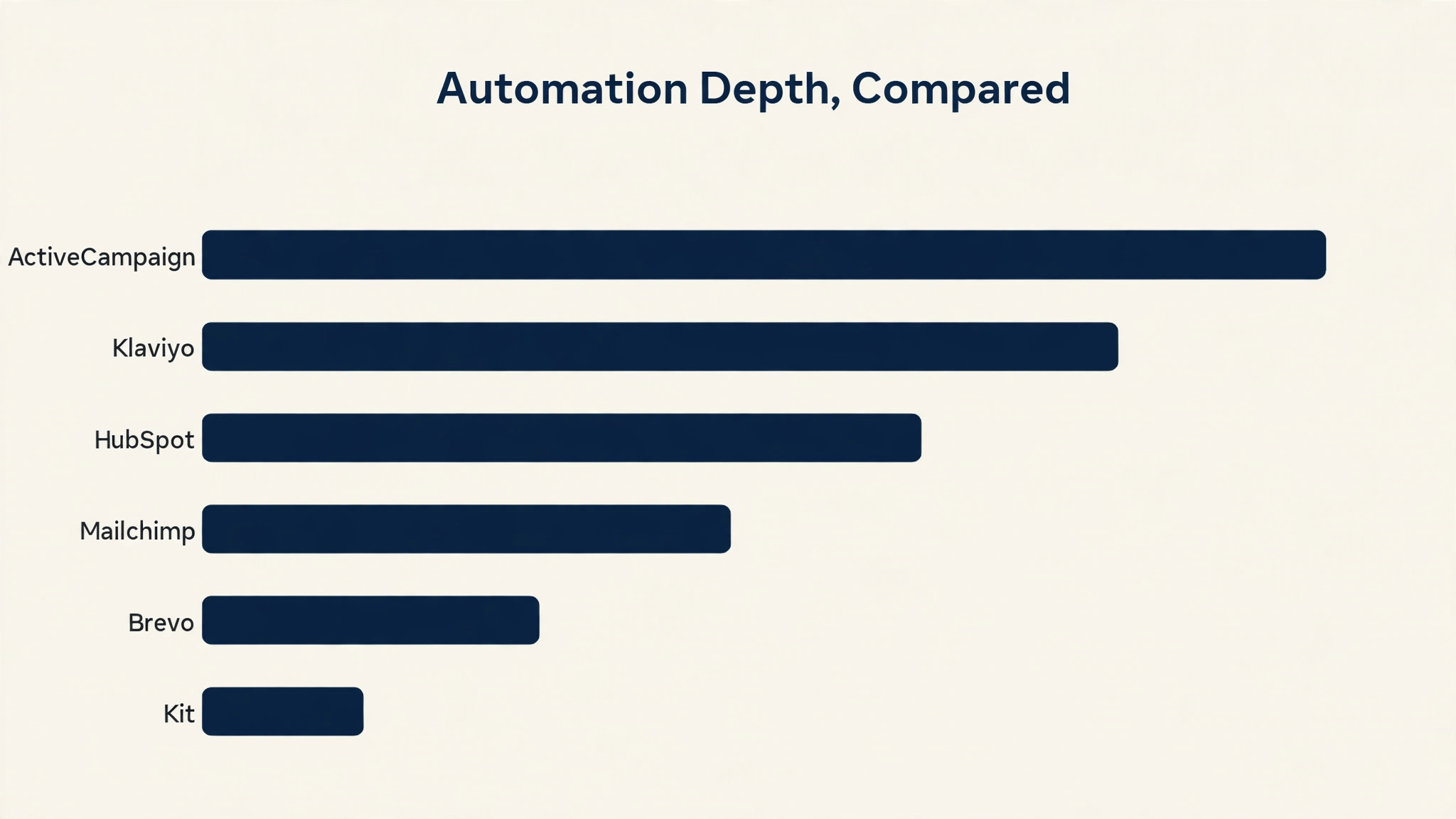
The table below gives the short version of the top 10 email automation tools. ActiveCampaign leads on automation depth, Klaviyo leads on ecommerce revenue, and the rest specialise by price or simplicity. Read the detail section before you pay, because the cheapest tool in this list is the wrong choice for a store that lives on repeat orders.
| Tool | Starting price | Best for | Standout strength |
|---|---|---|---|
| ActiveCampaign | $15 per month, annual billing | Deep automation flows | Best flow builder here |
| Klaviyo | From $20 per month | Ecommerce revenue | Revenue per email built in |
| HubSpot | From $20 per seat per month | Marketing hubs | CRM built into every send |
| Mailchimp | $13 per month | Simple newsletters | Easiest to start with |
| Brevo | $9 per month | Cheap sends at scale | Bills by sends, not contacts |
| MailerLite | $10 per month | Clean simple campaigns | Best free tier for beginners |
| Kit | $29 per month | Creators and newsletters | Best for paid newsletters |
| GetResponse | $19 per month | Webinars and funnels | Webinars built in |
| Moosend | $9 per month | Budget automation | Automation at the lowest price |
| Drip | $39 per month | Ecommerce workflows | Strong ecommerce flows |
Why the Top 10 Email Automation Tools Decide Whether Your List Earns
An email list is the only audience a business truly owns, and automation is what makes that audience earn. A welcome flow, an abandoned cart flow and a post-purchase flow will run every day without anyone writing a new email, and the revenue they produce is the closest thing to free money in marketing. A business without flows is leaving its best sales on the table. The runner-up matters here because most online stores should start with it.
Klaviyo costs from $20 a month and ties every send to revenue, while ActiveCampaign costs $15 a month and earns its price only when the flows get complex. A store that lives on repeat orders will earn more from Klaviyo revenue data than from ActiveCampaign flow depth, and the choice comes down to what you sell. Deliverability is the third pressure, and it decides whether any of this matters. An email that lands in spam earns nothing, however good the flow behind it. Brevo and MailerLite keep deliverability strong at low prices, while HubSpot adds CRM data that makes every send smarter.
We ranked the tools below on all three pressures at once, so a strong feature list cannot rescue a tool that fails one of them. The last pressure is pricing by contacts, because a list grows and the bill grows with it. A tool that charges $15 a month for 1,000 contacts can cost $100 a month at 10,000 contacts, and the jump catches businesses by surprise. Brevo bills by sends instead, which suits a business with a large list that mails rarely. Check the price at your list size, not at the headline size.
How We Judged Each Email Tool for a Working Business
Every tool in this guide faced the same five tests, and the top 10 email automation tools earned their places by passing most of them. We weighted automation depth highest, because a flow that runs itself is worth more than a newsletter that needs writing every week. Ecommerce integration and deliverability came next, because they decide whether the flows earn and whether the emails arrive. Price was judged on the plan a working business needs at a realistic list size.
- Automation depth, from welcome flows and abandoned carts to multi-step journeys with branching logic
- Ecommerce integration, including revenue tracking, product recommendations and order-triggered flows
- Deliverability, meaning the share of emails that reach the inbox rather than the spam folder
- Ease of use, because a flow builder a busy owner will not open is worthless however powerful it is
- Price honesty, meaning the cost at a realistic list size, with per-contact and per-send maths shown where they apply
Best Pick by Job
No single tool wins every job, so the table below matches the top 10 email automation tools to the work you do most. Start from what you sell, not from the ranking. A store needs Klaviyo, a creator needs Kit, and a business with a large list that mails rarely needs Brevo.
| If you need | Pick | Why it wins |
|---|---|---|
| Deep automation for a growing business | ActiveCampaign | Flow builder with branching, scoring and CRM in one place |
| Ecommerce revenue from every send | Klaviyo | Revenue data built into every flow and campaign |
| Marketing hub with a CRM | HubSpot | Contacts, deals and emails in one system |
| Simple newsletters on a budget | Mailchimp | Easiest start, strong templates, fair price |
| A large list that mails rarely | Brevo | Bills by sends, so a big list stays cheap |
| Creators and paid newsletters | Kit | Built for creators who sell subscriptions |
The 10 Tools in Detail
1. ActiveCampaign
The Starter plan costs $15 per month on annual billing for 1,000 contacts. ActiveCampaign is the deepest automation tool in this list, with a visual flow builder that handles branching, lead scoring, site tracking and CRM in one place. It suits a business that wants flows to do the selling, from welcome journeys that adapt to what a subscriber clicks to post-purchase flows that ask for a review at the right moment. The builder is visual and honest, and it shows exactly what each subscriber will receive.
Against Klaviyo, ActiveCampaign wins on flow depth and loses on ecommerce revenue data. Klaviyo ties every send to a purchase, while ActiveCampaign ties every send to a journey. For a business that sells services or subscriptions, the journey matters more. For a store, the revenue data matters more, and Klaviyo is the better buy.
Build the welcome flow first, before you build anything else. A welcome flow that introduces the business, offers a reason to buy and asks one question will earn more than any campaign, because it reaches every new subscriber at the moment they care most. Test it with a small discount, and let the numbers decide whether the discount stays.
Use lead scoring to find the subscribers who are ready to buy, because a scored list tells sales exactly who to call. A subscriber who opened three emails and visited the pricing page is worth more than a subscriber who opened one email six months ago. Set the score once, and let the flows do the sorting.
2. Klaviyo
The Email plan costs from $20 per month for 500 profiles, and a free plan covers 250 profiles. Klaviyo is the ecommerce email tool in this list, with revenue data built into every send, flow and campaign. It suits online stores that live on repeat orders, because it triggers flows from what a shopper actually did, from viewing a product to abandoning a cart to buying for the third time. The reporting shows revenue per email, so the value of each flow is visible.
Against ActiveCampaign, Klaviyo wins on ecommerce revenue and loses on flow depth. ActiveCampaign builds more complex journeys, while Klaviyo builds journeys that earn. For a store, the revenue view is the feature that matters, and Klaviyo is the right leader for ecommerce. For a service business, ActiveCampaign is the better buy.
Set up the abandoned cart flow before you send a single campaign. A cart flow that reminds a shopper, offers help and then offers a small incentive will recover sales every day without anyone writing a new email. Check the revenue per email each week, and the flows that earn will tell you where to spend your time.
Check the revenue per email each week, and let the numbers decide where to spend your time. A flow that earns $500 a month deserves more attention than a campaign that earns $50, and the reporting makes the difference visible. Test one change at a time, and keep the change that earns.
3. HubSpot
The Marketing Hub Starter plan costs from $20 per seat per month. HubSpot is a full marketing hub with a CRM built into every send, so contacts, deals and emails live in one system. It suits a business that wants sales and marketing in the same place, because a contact who opens an email and visits the pricing page can be passed to sales automatically. The free CRM is generous, and the paid plans add the automation that makes it useful.
Against ActiveCampaign, HubSpot wins on CRM depth and loses on price. HubSpot charges per seat, so a team of five pays far more than the headline price, while ActiveCampaign charges per contact. For a business with a sales team, the CRM is worth it. For a business that only needs email, it is not.
Start with the free CRM and add the marketing plan only when the contacts justify it. A business that moves its contacts into HubSpot first will find the email tools far more useful, because every send can use the deal data already in the system. Do not buy the marketing plan before the CRM holds real contacts.
4. Mailchimp
The Essentials plan costs $13 per month for 500 contacts. Mailchimp is the easiest email tool in this list to start with, and it handles newsletters, simple automation and basic ecommerce flows with a friendly interface. It suits a small business that wants to send a good newsletter without learning a flow builder, and its templates are among the cleanest here. The free plan covers a small list, so a new business can test it properly before paying.
Against Brevo, Mailchimp wins on ease and templates and loses on price at scale. Brevo bills by sends, so a large list stays cheap, while Mailchimp charges by contacts and the bill grows with the list. For a business with a small list and simple needs, Mailchimp is the right first buy.
Use the templates and change as little as possible. A Mailchimp template that looks good out of the box will look better than a custom design built by someone who is not a designer, and the time saved goes into writing a better email. Send on the same day each week, and the habit will build the list.
5. Brevo
The Starter plan costs $9 per month for 5,000 emails. Brevo is the cheapest email tool in this list for a large list, because it bills by sends rather than by contacts. It suits a business with a big list that mails rarely, from a seasonal shop to a newsletter that goes out monthly. The automation is solid, the deliverability is strong, and the price stays low even as the list grows.
Against Mailchimp, Brevo wins on price at scale and loses on templates. Mailchimp templates look better out of the box, while Brevo needs more work to look polished. For a business that mails a large list a few times a month, Brevo is the cheapest honest option in this list.
Count your sends before you count your contacts, because the maths flips at scale. A list of 20,000 contacts that receives four emails a month costs far less on Brevo than on a per-contact tool, while a list of 2,000 contacts that receives daily emails costs more. Work out your monthly sends first, then choose the pricing model.
Work out your monthly sends before you choose the pricing model, because the maths flips at scale. A list that receives four emails a month costs far less on a per-send plan, while a list that receives daily emails costs more. Count the sends first, then choose the tool that fits.
6. MailerLite
Paid plans start at $10 per month. MailerLite is the cleanest simple email tool in this list, with a friendly editor, solid automation and a free tier that covers a small list properly. It suits a beginner who wants to send good campaigns without a learning curve, and its landing pages and forms make it easy to grow the list from scratch. The interface is the least cluttered here, and the support is fast.
Against Kit, MailerLite wins on price and loses on creator features. Kit handles paid newsletters and creator commerce better, while MailerLite handles simple campaigns better. For a small business that sends a newsletter and a welcome flow, MailerLite is enough, and the price is fair.
Use the landing pages to grow the list, because a form on your own site will convert better than a link in a social bio. A simple landing page with one clear offer, such as a guide or a discount, will add subscribers every week without any advertising. Check the form conversion monthly, and test one change at a time.
7. Kit
The Creator plan costs $29 per month. Kit is built for creators and newsletters, with paid subscriptions, commerce and automation designed around an audience rather than a store. It suits a creator who sells a newsletter, a course or a membership, because it handles the payment and the delivery in one place. The automation is simple and honest, and the focus on creators means the features match the job.
Against MailerLite, Kit wins on creator commerce and loses on price. MailerLite is cheaper and simpler for a basic newsletter, while Kit earns its price when the newsletter itself is the product. For a creator who charges for content, Kit is the right buy. For a business that sends a free newsletter, it is not.
Price the paid newsletter before you build the flows, because the subscription is the product and the flows exist to sell it. A free newsletter that grows to a thousand readers is worth more than a paid newsletter with ten subscribers, so grow the free list first and add the paid tier when the audience asks for it.
8. GetResponse
Paid plans start at $19 per month. GetResponse is the only tool in this list with webinars built in, and it pairs them with email automation, funnels and landing pages in one system. It suits a business that sells through webinars or live events, because the registration, the reminders and the follow-up all run from the same place. The funnel builder is solid, and the automation covers the common journeys well.
Against ActiveCampaign, GetResponse wins on webinars and loses on flow depth. ActiveCampaign builds deeper journeys, while GetResponse builds a complete funnel around a webinar. For a business that runs webinars every month, the built-in webinar tool is worth the price alone.
Run one webinar a month and let the follow-up do the selling. A webinar that teaches something useful, followed by a short email flow that answers questions and offers a next step, will convert better than a dozen campaigns. Record the webinar, and the replay becomes a lead magnet for the next month.
9. Moosend
Paid plans start at $9 per month. Moosend is the cheapest automation tool in this list, and it handles the common flows, from welcome journeys to abandoned carts, at a price that suits a small business. It suits a business that wants real automation without paying for a premium tool, and its editor is simple enough to learn in an afternoon. The price is the headline, but the automation is genuinely useful.
Against ActiveCampaign, Moosend wins on price and loses on depth. ActiveCampaign builds journeys that Moosend cannot, while Moosend builds the common journeys for a tenth of the price. For a small business that needs welcome, cart and win-back flows, Moosend is enough, and the money saved goes into the product.
Build the three flows that matter, and stop there. A welcome flow, an abandoned cart flow and a win-back flow will earn most of the revenue that automation can earn, and the rest is refinement. Check the flow revenue monthly, and add a fourth flow only when the first three are earning.
10. Drip
Paid plans start at $39 per month. Drip is built for ecommerce workflows, with strong flows for post-purchase, win-back and product recommendations that trigger from order data. It suits a store that wants ecommerce automation without the price of Klaviyo, and its visual builder is among the clearest here. The flows are designed around buying behaviour, not around generic journeys.
Against Klaviyo, Drip wins on price and loses on revenue reporting. Klaviyo shows revenue per email more clearly, while Drip builds similar flows for less money. For a store that wants ecommerce flows on a budget, Drip is a strong second choice, and the $39 price is fair for what it does.
Use the post-purchase flow to earn the second order, because the second order is where a store makes its money. A flow that thanks the buyer, suggests a matching product and asks for a review at the right moment will turn one-time buyers into repeat customers. Track the repeat purchase rate, and let it judge the flow.
A First-Month Email Setup That Pays for Itself
Start with the top 10 email automation tools on a Monday, not on a Friday. Import the list, clean the bounces and unsubscribes, and build the welcome flow before you send a single campaign. A clean list and a working welcome flow are the foundation, and everything else is refinement. Send the first campaign to your most engaged subscribers only, and let the opens tell you whether the list is healthy. Add one flow a week after that, and the system grows without a big project.
Week two is the abandoned cart flow, week three is the post-purchase flow, and week four is the win-back flow for subscribers who stopped opening. By the end of the month, the flows will earn more than the campaigns, and the list will start to pay for the tool. Keep the list clean every month, because a dirty list costs money twice. Unengaged subscribers drag the sender reputation down, and a large list on a per-contact plan costs more than it earns. Remove subscribers who have not opened in six months, and watch the open rate rise the next time you send.
- Import and clean the list, removing bounces and unsubscribes first
- Build the welcome flow and test it with a small discount
- Send the first campaign to engaged subscribers only
- Add the abandoned cart flow in week two
- Add post-purchase and win-back flows by the end of the month

What Email Automation Actually Costs at Real List Sizes
A business with 1,000 contacts can run email automation for $9 to $15 a month, and most should start there. Brevo costs $9 a month, Mailchimp costs $13, and ActiveCampaign costs $15, and all three cover the flows a small business needs. The price that matters is not the headline, it is the price at your list size in a year, because the list will grow and the bill will grow with it.
The expensive surprise is per-contact pricing at scale. A list of 10,000 contacts can cost $100 a month or more on a per-contact tool, while the same list costs far less on Brevo, which bills by sends. Work out the cost at 5,000 and 10,000 contacts before you commit, and choose the pricing model that fits how often you mail.
| Tool | Monthly cost for one user | What you get for that money |
|---|---|---|
| Brevo | $9 a month | 5,000 emails, bills by sends |
| Mailchimp | $13 a month | 500 contacts, simple newsletters |
| ActiveCampaign | $15 a month | 1,000 contacts, deep automation |
| Klaviyo | From $20 a month | 500 profiles, ecommerce revenue |
| MailerLite | $10 a month | Simple campaigns and landing pages |
| Kit | $29 a month | Creator newsletters and subscriptions |
Email Mistakes That Hurt Deliverability
- Importing a bought list, which destroys deliverability and gets the account flagged in a week
- Mailing the whole list every time, so unengaged subscribers drag the sender reputation down
- Building ten flows before the welcome flow works, and never finishing any of them properly
- Choosing a tool on the headline price, then discovering the cost at 10,000 contacts
Frequently Asked Questions
The questions below come from business owners who are choosing between the top 10 email automation tools for the first time. The short answers favour starting with a clean list, building the welcome flow first and choosing the pricing model that fits how often you mail.
What is the best email automation tool for a small business?
ActiveCampaign at $15 a month is the best for deep automation, while Mailchimp at $13 a month is the best for simple newsletters. A business that wants flows to do the selling should buy ActiveCampaign, and a business that wants to send a good newsletter should buy Mailchimp. Start with the job, not the ranking.
Is Klaviyo worth it for a small online store?
Yes, if the store lives on repeat orders. Klaviyo costs from $20 a month for 500 profiles, and the revenue data it shows for every send makes the value visible. A store that sends campaigns without knowing which ones earn is guessing, and Klaviyo removes the guess. Start on the free plan and upgrade when the list grows.
How much does email automation cost as my list grows?
It depends on the pricing model. Per-contact tools charge more as the list grows, so a list of 10,000 contacts can cost $100 a month or more. Brevo bills by sends, so a large list that mails rarely stays cheap. Work out the cost at 5,000 and 10,000 contacts before you commit.
Do I need a CRM with my email tool?
Only if you have a sales team or a long sales cycle. HubSpot pairs a CRM with email, and the combination is powerful when a contact moves from email to a sales call. A business that only sends newsletters does not need a CRM, and the per-seat price is money wasted.
What is the first automation flow I should build?
The welcome flow, because it reaches every new subscriber at the moment they care most. A welcome flow that introduces the business, offers a reason to buy and asks one question will earn more than any campaign. Build it first, test it with a small discount, and let the numbers decide whether the discount stays.
Can I switch email tools later without losing my list?
Yes, and switching is easier than most businesses fear. Export the list, the segments and the flow logic, then rebuild the flows in the new tool one at a time. Start with the welcome flow, then the cart flow, and keep the old tool running until the new flows are tested. A switch takes a week, not a month.
Our Pick for Your List, Stated Plainly
ActiveCampaign is the pick for a business that wants flows to do the selling, because its flow builder is the deepest in this list and its price is fair. Klaviyo is the runner-up that most online stores should buy first, because its revenue data ties every send to a purchase and its free plan covers the first 250 profiles. Buy the leader when automation depth is the job. Buy the runner-up when ecommerce revenue is the job. Whichever you choose, build the welcome flow first and keep the list clean.
The top 10 email automation tools will not earn money by themselves, but a business that builds the right flows and mails the right people will find the list becomes its most reliable source of sales.