
The contest for the best content writing tools for small businesses is really a contest between speed and voice. Jasper wants to write a blog post, a product description and an email campaign in the time it takes to drink a coffee, with a brand voice setting that keeps every page sounding like the same company. Copy.ai wants to do the same job for a third of the price, with a chat interface that feels closer to talking to a colleague.
The other six tools sit between those two poles, from grammar checkers to SEO scorers, and this guide puts all eight side by side so you can see where the leader wins, where the runner-up catches it, and which tool fits a business that writes every day. A small business does not need more content, it needs content that sounds like the business. A plumbing firm that publishes generic advice will not win a customer, while the same firm publishing clear, local, practical guides will.
The writing tool matters less than the voice it protects, which is why this guide weighs brand voice control as heavily as speed. We tested each tool against the work a small business actually does, from blog posts and product pages to social captions and email subject lines. We looked at brand voice control, SEO scoring, ease of use and the real cost of the plan a working business needs. Prices come from vendor pages and recent pricing guides checked in November 2026, and where a vendor charges per word or per seat we say so instead of hiding the maths.
The 8 Tools at a Glance
The table below gives the short version of the best content writing tools for small businesses. Jasper leads on brand voice, Copy.ai leads on value, and the rest specialise by job. Read the detail section before you pay, because the cheapest tool in this list is the wrong choice for a business that publishes long guides.
| Tool | Starting price | Best for | Standout strength |
|---|---|---|---|
| Jasper | $59 per seat per month, annual billing | Long-form brand content | Brand voice controls |
| Copy.ai | $24 per month, annual billing | Budget AI writing | Best value chat interface |
| Writesonic | $79 per month, annual billing | SEO-led blog posts | Strong article writer |
| Rytr | $7.50 per month, annual billing | Short copy on a budget | Cheapest paid plan here |
| Frase | $39 per month, annual billing | SEO briefs and research | Best content briefs |
| Grammarly | $12 per month, annual billing | Editing and polishing | Best grammar and tone checks |
| Scalenut | From $59 per month | AI SEO workflows | Keyword planning built in |
| Surfer SEO | $99 per month | Content optimisation | Strongest SEO scoring |
Why the Best Content Writing Tools for Small Businesses Decide Whether Anyone Reads You
Content is how a small business gets found, and the first paragraph decides whether a visitor stays. A business that publishes clear, specific, useful pages will outrank a competitor with a bigger budget but thinner content, because search engines reward pages that answer the question properly. A writing tool does not create that quality by itself, but the right one removes the friction that stops a busy owner from publishing at all. The runner-up matters here because most small businesses should start with it.
Copy.ai costs $24 a month and covers the daily jobs, from social captions to product descriptions, while Jasper costs $59 per seat and earns that price only when long-form brand content is a weekly job. A business that buys Jasper before it publishes regularly is paying for power it will not use. Voice is the third pressure, and it is the one that separates a business from its competitors. A tool that learns how you write will keep every page sounding like the same company, while a tool with no voice controls will produce pages that read like everyone else.
Jasper has the strongest voice controls in this list, Frase has the best research, and Surfer SEO has the strongest scoring. We weighed all three pressures at once when we ranked the tools below. The last pressure is cost per seat, because a small business rarely buys one login. A tool that charges $59 per seat becomes expensive fast when three people write, while a tool that charges a flat $24 a month stays cheap. Check the seat maths before you commit, because the headline price is rarely the price you pay.
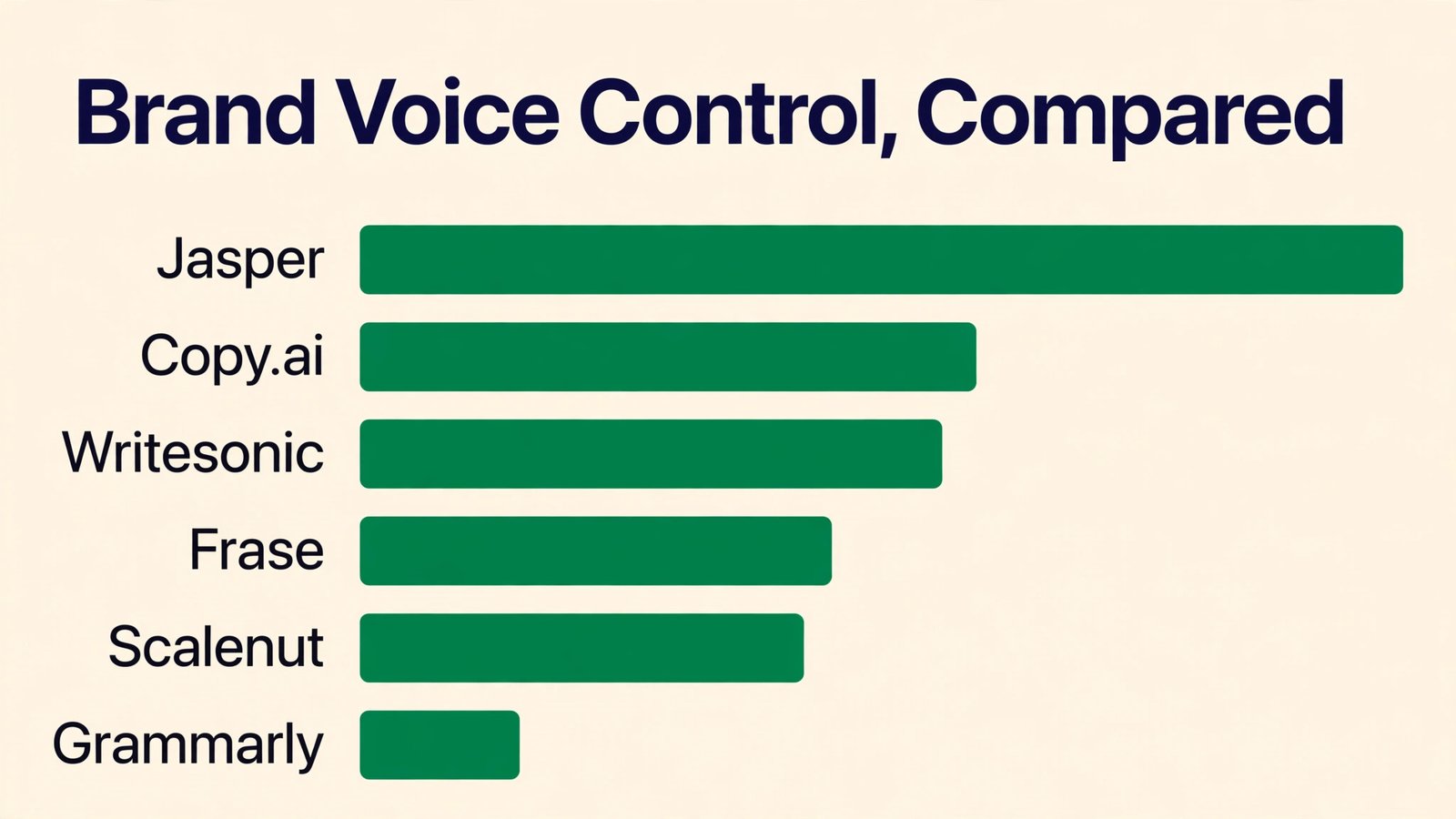
How We Judged Each Writing Tool for a Small Business
Every tool in this guide faced the same five tests, and the best content writing tools for small businesses earned their places by passing most of them. We weighted brand voice control highest, because a business that sounds like everyone else will not be remembered. Speed and SEO scoring came next, because they decide whether content gets published and whether it ranks. Price was judged on the plan a working business needs, with per-seat maths shown where it matters.
- Brand voice control, including how well the tool learns your tone and keeps it consistent across pages
- Writing speed, from a blank page to a publishable first draft on a typical business topic
- SEO scoring, including keyword guidance, readability checks and how the tool handles optimisation
- Ease of use, because a tool a busy owner will not open is worthless however powerful it is
- Price honesty, meaning the plan that unlocks the useful features, with per-seat costs shown where they apply
Best Pick by Job
No single tool wins every job, so the table below matches the best content writing tools for small businesses to the work you do most. Start from what you publish, not from the ranking. A business that writes long guides needs Jasper, a business that writes social posts needs Copy.ai, and a business that writes for search needs Surfer SEO or Frase.
| If you need | Pick | Why it wins |
|---|---|---|
| Long-form blog posts in your voice | Jasper | Brand voice controls keep every page sounding like your business |
| Daily social posts and short copy on a budget | Copy.ai | Chat interface writes fast at a low monthly price |
| SEO-led articles that need to rank | Writesonic | Article writer with keyword guidance built in |
| Short copy for a tiny budget | Rytr | Cheapest paid plan in this list, good for captions and ads |
| Research and briefs before you write | Frase | Best content briefs, built from the pages already ranking |
| Polishing and tone checks | Grammarly | Grammar, clarity and tone checks on everything you publish |
The 8 Tools in Detail
1. Jasper
The Pro plan costs $59 per seat per month on annual billing, or $69 per seat billed monthly. Jasper is the strongest long-form writing tool in this list, with brand voice controls that learn how your business writes and keep every page consistent. It handles blog posts, product descriptions, email campaigns and social captions from one workspace, and its templates cover the jobs a small business does every week. It suits a business that publishes long-form content regularly and needs every page to sound like the same company.
Against Copy.ai, Jasper wins on brand voice and long-form depth and loses on price. Copy.ai costs $24 a month and covers the daily jobs, while Jasper costs more than twice as much and earns that price only when voice and volume both matter. For a business that publishes a long guide every week, Jasper is worth it. For a business that writes mostly short copy, it is not.
Set the brand voice up properly before you write anything. Feed Jasper your best pages, your tone notes and a few examples of what good looks like, then test it on a real blog post and edit the result honestly. A voice setting built from your own words will produce pages that sound like you, while a voice setting built from defaults will produce pages that sound like everyone else.
Start with one seat and add more only when the publishing habit proves itself. A single Jasper seat shared by two writers is a false economy, because the tool tracks voice per seat, but two seats bought before anyone publishes weekly is money wasted. Let the habit come first, then buy the seats.
2. Copy.ai
The Chat plan costs $24 per month on annual billing, or $29 billed monthly. Copy.ai is the best value writing tool in this list, with a chat interface that writes social captions, product descriptions, emails and short blog posts quickly. It suits a small business that needs daily copy without a big budget, and its workflow tools let you automate repeat jobs such as writing product descriptions for a whole catalogue. The interface feels closer to talking to a colleague than to filling in a form.
Against Jasper, Copy.ai wins on price and ease and loses on brand voice depth. Jasper controls voice more precisely and handles long-form better, while Copy.ai is faster for short copy and far cheaper. For most small businesses, Copy.ai is the right first buy, and Jasper becomes the right second buy only when long-form content is a weekly job.
Use the workflows for repeat jobs and the chat for one-off jobs. A product description workflow that writes fifty descriptions from a spreadsheet will save a day of work, while a chat prompt that drafts one email will save ten minutes. Keep a short list of prompts that work for your business, and reuse them instead of starting from scratch each time.
Keep the chat prompts short and specific, and let Copy.ai ask for the details it needs. A prompt that says who the reader is, what the product does and what the page should do will produce a better draft than a prompt that just names the topic. Save the prompts that work, and reuse them every week.
3. Writesonic
The Starter plan costs $79 per month on annual billing. Writesonic is an SEO-led article writer that drafts long-form posts with keyword guidance, outlines and research built in, and it handles product descriptions, ads and landing pages alongside blog content. It suits a business that wants ranking content without hiring a writer, and its article writer is among the strongest in this list for turning a keyword into a structured draft. The price is higher than Copy.ai, but the long-form depth is greater.
Against Jasper, Writesonic wins on SEO guidance and loses on brand voice. Jasper keeps your voice consistent, while Writesonic keeps your keywords in place. Against Frase, it wins on drafting and loses on research depth. For a business that publishes for search, Writesonic is a strong single purchase.
Start every article with the keyword research, not the draft. Writesonic works best when you give it a clear keyword, a target audience and the pages you want to beat, because the outline it builds from that brief is far better than the outline it builds from a bare topic. Edit the draft honestly, and the result will read like your business rather than a template.
Use the keyword research before you draft, and let the outline follow the research. An article that starts from a keyword plan will rank better than an article that starts from a blank page, because the research shows what readers actually ask. Spend twenty minutes on research, and the draft takes half the time.
4. Rytr
The Unlimited plan costs $7.50 per month on annual billing, or $9 billed monthly, and a free plan covers a small monthly word count. Rytr is the cheapest paid writing tool in this list, and it handles short copy well, from social captions and ad headlines to product descriptions and email subject lines. It suits a business with a tiny budget that needs help with short copy, and its tone settings cover the common business voices without much setup. The free plan is generous enough to test it properly.
Against Copy.ai, Rytr wins on price and loses on depth. Copy.ai handles longer content and workflows better, while Rytr is a short-copy tool at a short-copy price. For a business that writes mostly captions and ads, Rytr is enough. For a business that writes long guides, it is not.
Use Rytr for the jobs it does well and do not ask it to write a long guide. Ten product descriptions, twenty social captions and a dozen ad headlines are a good day for Rytr, and the $7.50 price makes that work almost free. Keep long-form content in a stronger tool, and let Rytr handle the volume jobs.
Pair Rytr with a free grammar checker, because short copy still needs a second pair of eyes. A product description with a typo will cost more sales than the $7.50 subscription saves, so read every output before it goes live. The tool writes fast, and your job is to make it accurate.
5. Frase
The Solo plan costs $39 per month on annual billing. Frase is the best research and briefing tool in this list, and it builds content briefs from the pages already ranking for your keyword, showing the questions, headings and topics your article must cover. It suits a business that writes for search and wants every article to start from evidence rather than guesswork. The briefs are detailed enough to hand to a freelancer, and the writing tools are strong enough to draft from the brief yourself.
Against Surfer SEO, Frase wins on briefs and loses on scoring depth. Surfer scores your draft more precisely, while Frase tells you what to write before you start. Against Writesonic, it wins on research and loses on drafting speed. For a business that plans content carefully, Frase is the right first buy.
Build the brief before you write a word, and treat the brief as the plan. A Frase brief shows the questions your article must answer, the headings it should carry and the topics the ranking pages cover, and an article built from that brief will outrank an article written from memory. Share the brief with anyone who writes for you, and the quality of outside work improves at once.
Share the brief with anyone who writes for you, including freelancers and junior staff. A Frase brief is detailed enough to hand to a stranger, and the quality of outside work improves at once when the writer knows what the page must cover. Keep the briefs in a shared folder, and reuse them for related topics.
6. Grammarly
The Pro plan costs $12 per month on annual billing. Grammarly is the best editing and polishing tool in this list, and it checks grammar, clarity, tone and plagiarism across every page you publish. It suits every business in this list as a second tool, because it catches the errors that AI drafts and hurried human writing both produce. The browser extension checks your writing wherever you write, from email to documents to social posts.
Against the AI writers, Grammarly wins on editing and loses on drafting. It will not write a blog post for you, but it will make the blog post you wrote read better. Buy it alongside a drafting tool, not instead of one, and treat it as the final check before anything goes live.
Turn on the tone checks and read the suggestions before you accept them. Grammarly flags tone as well as grammar, and a suggestion that makes a sentence clearer is worth taking while a suggestion that makes it sound like everyone else is worth ignoring. The goal is a page that reads well in your voice, not a page that passes every check.
Run Grammarly on everything, including emails and social posts, not just blog articles. A business that writes clearly in every channel earns more trust than a business that writes well only on its blog. The browser extension makes the check automatic, so there is no reason to skip it.
7. Scalenut
Paid plans start from $59 per month. Scalenut is an AI SEO platform that combines keyword planning, content briefs and AI drafting in one workflow, so a small business can plan a month of content and draft it without leaving the tool. It suits a business that wants a single SEO workflow rather than three separate tools, and its keyword clustering helps you cover a topic properly instead of publishing isolated pages. The price is higher than Frase, but the scope is wider.
Against Frase, Scalenut wins on breadth and loses on brief depth. Frase builds a better single brief, while Scalenut covers the whole month. Against Surfer SEO, it wins on planning and loses on scoring precision. For a business that wants one SEO tool, Scalenut is a strong choice.
Plan the month before you draft anything. Scalenut works best when you cluster keywords around a topic, build briefs for the cluster, and draft the pages in order, because the tool is built for topic coverage rather than one-off articles. A month planned this way will outrank a month of random posts.
Cluster keywords around a topic before you draft, and cover the cluster in order. A set of pages that covers a topic properly will outrank isolated pages, because search engines reward depth. Scalenut is built for this habit, and a month planned this way will outperform a month of random posts.
8. Surfer SEO
The Essential plan costs $99 per month. Surfer SEO is the strongest content optimisation tool in this list, with a scoring system that shows exactly how your draft compares to the pages already ranking. It suits a business that publishes for search and wants every page to have the best possible chance of ranking, and its content editor gives live feedback on word count, keywords, headings and structure as you write. The price is the highest here, but the scoring is the most precise.
Against Frase, Surfer wins on scoring and loses on briefs. Frase tells you what to write, while Surfer tells you how well you wrote it. Against Writesonic, it wins on optimisation and loses on drafting. Buy Surfer when ranking is the job, and pair it with a drafting tool rather than using it alone.
Write the draft first, then optimise it in Surfer, and do not chase a perfect score. A page that reads well and scores in the green will outrank a page that scores perfectly and reads like a keyword list. Use the score as a guide, not a target, and keep your voice in the final draft.
Score the draft after you write it, and fix the gaps the score finds. A page that reads well and scores in the green will outrank a page that scores perfectly and reads like a keyword list. Use the score as a guide, not a target, and keep your voice in the final draft.
A Weekly Writing Workflow That Keeps a Small Business Publishing
Start with the best content writing tools for small businesses on a Monday morning, not on a Friday afternoon. Pick one topic for the week, build a brief in Frase or Scalenut, and draft the article in Jasper or Copy.ai before lunch. The brief stops you writing from memory, and the draft stops you staring at a blank page. Edit the draft in the afternoon with Grammarly, check the score in Surfer SEO, and publish before the week ends. Repeat the habit every week, and the catalogue grows into a real asset.
A business that publishes one useful page a week will have fifty pages in a year, and fifty pages that answer real questions will outrank a competitor with a bigger budget but thinner content. The tools make the habit easier, but the habit is what ranks. Keep a short list of prompts that work for your business, and reuse them every week. A prompt that produced a good blog post once will produce a good blog post again, while a new prompt each week means starting from scratch.
Save the best prompts in a shared document, and let anyone who writes for the business use them.
- Pick one topic a week and build a brief before you write
- Draft in Jasper or Copy.ai, using the brief as the plan
- Edit with Grammarly and check tone before you publish
- Score the draft in Surfer SEO and fix the gaps it finds
- Publish weekly, and track which pages earn inquiries

What Writing Tools Actually Cost a Small Business Each Month
A small business can start writing with AI for $24 a month, and most should. Copy.ai covers the daily jobs at that price, Grammarly adds $12 a month for editing, and the two together cost less than a single lunch out. The free plans from Rytr and Canva cover the first tests, so there is no reason to pay before you know the workflow works.
The expensive mistake is buying seats before you need them. Jasper costs $59 per seat, so a team of three pays $177 a month before anyone writes a word, while a single seat plus Copy.ai covers the same work for far less. Buy seats for the people who write every week, and add more only when the publishing habit proves itself.
| Tool | Monthly cost for one user | What you get for that money |
|---|---|---|
| Copy.ai | $24 a month | Daily short copy and chat writing |
| Grammarly | $12 a month | Editing, tone and plagiarism checks |
| Rytr | $7.50 a month | Short copy on the smallest budget |
| Frase | $39 a month | Research briefs for SEO articles |
| Jasper | $59 per seat a month | Long-form content in your brand voice |
| Surfer SEO | $99 a month | Content scoring for ranking pages |
Writing Mistakes That Make a Small Business Sound Generic
- Publishing AI drafts without editing them, so every page reads like every other business in the industry
- Buying the most expensive plan before you publish regularly, and paying for power you never use
- Writing for search engines instead of customers, so the page ranks but nobody calls
- Skipping the brand voice setup, so each page sounds like a different company wrote it
Frequently Asked Questions
The questions below come from small business owners who are choosing between the best content writing tools for small businesses for the first time. The short answers favour starting cheap, setting the brand voice early and editing every draft before it goes live.
What is the best content writing tool for a small business on a budget?
Copy.ai at $24 a month is the best budget choice, because it covers social posts, product descriptions and emails at a low price. Rytr at $7.50 a month is cheaper still, but it handles short copy only. Start with Copy.ai, and move to Jasper when long-form content becomes a weekly job.
Is Jasper worth $59 a month for a small business?
Yes, if you publish long-form content every week and your brand voice matters. Jasper costs $59 per seat, so a business with three writers pays far more than the headline price. If you publish a long guide weekly and want every page to sound like the same company, the price is fair. If you write mostly short copy, Copy.ai does the job for less.
Which tool is best for SEO content?
Surfer SEO has the strongest scoring, Frase has the best briefs, and Writesonic has the best SEO-led drafting. Use Frase to plan, Writesonic or Jasper to draft, and Surfer SEO to optimise, and the combination will outrank any single tool. If you must buy one, Frase at $39 a month is the best single purchase for planning.
Can AI writing tools replace a human writer?
No, and the best results come from pairing the two. AI drafts quickly and a human edits for voice, accuracy and local knowledge, and the combination produces better pages than either alone. A business that publishes AI drafts without editing will sound generic, while a business that edits every draft will sound like itself.
Do I need Grammarly if I already use an AI writer?
Yes, because Grammarly catches the errors that AI drafts and hurried writing both produce. It checks grammar, clarity and tone across everything you publish, and the browser extension works wherever you write. At $12 a month, it is the cheapest quality improvement in this list.
How many seats should a small business buy?
Buy seats for the people who write every week, and share a single login only if the vendor allows it. Jasper charges per seat, so three writers cost three times the headline price, while Copy.ai charges a flat monthly rate. Check the seat maths before you commit, because the headline price is rarely the price you pay.
Our Pick for Small Businesses, Stated Plainly
Jasper is the pick for a business that publishes long-form content every week, because brand voice is the feature that matters most and Jasper controls it best. Copy.ai is the runner-up that most businesses should buy first, because it covers the daily jobs at a third of the price and leaves money for the editing that makes the difference. Buy the leader when long-form content is a weekly job. Buy the runner-up when you need daily copy on a budget. Whichever you choose, edit every draft before it goes live.
The best content writing tools for small businesses will not write a good page by themselves, but they will help a business that edits honestly to publish pages that sound like itself and rank for the questions its customers actually ask.